phone Acura MDX 2014 Owner's Guide
[x] Cancel search | Manufacturer: ACURA, Model Year: 2014, Model line: MDX, Model: Acura MDX 2014Pages: 500, PDF Size: 11.72 MB
Page 263 of 500
262
uuCustomized Featuresu
Features
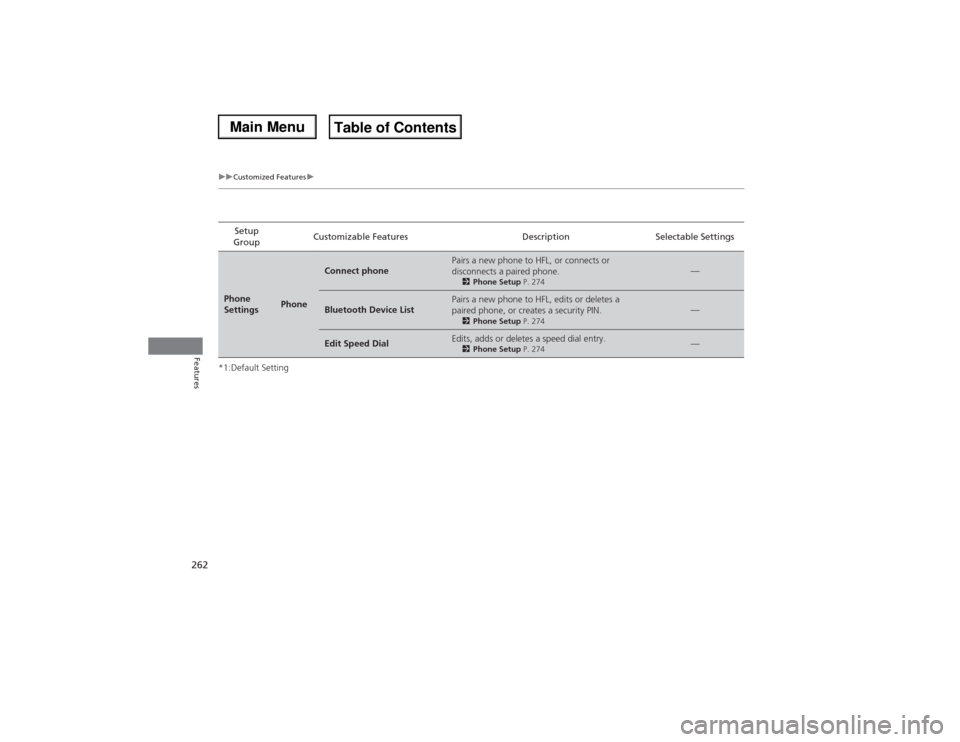
*1:Default SettingSetup
GroupCustomizable Features Description Selectable SettingsPhone
Settings
Phone
Connect phone
Pairs a new phone to HFL, or connects or
disconnects a paired phone.2Phone Setup P. 274
—
Bluetooth Device List
Pairs a new phone to HFL, edits or deletes a
paired phone, or creates a security PIN.2Phone Setup P. 274
—
Edit Speed Dial
Edits, adds or deletes a speed dial entry.2Phone Setup P. 274
—
Page 264 of 500
263
uuCustomized Featuresu
Continued
Features
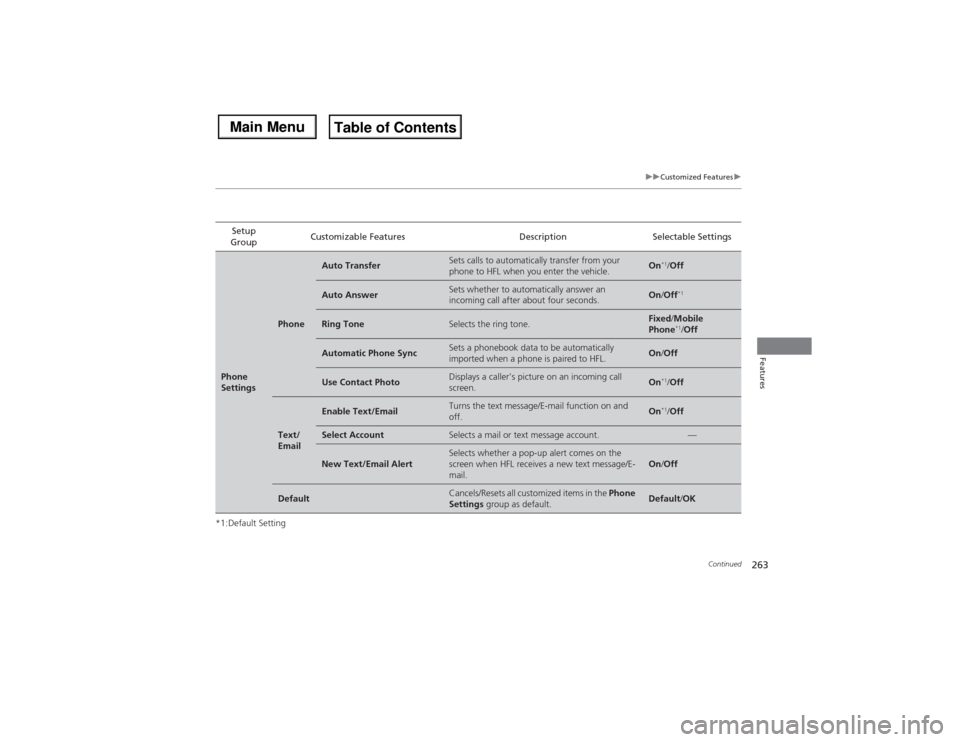
*1:Default SettingSetup
GroupCustomizable Features Description Selectable SettingsPhone
Settings
Phone
Auto Transfer
Sets calls to automatically transfer from your
phone to HFL when you enter the vehicle.
On
*1/Off
Auto Answer
Sets whether to automatically answer an
incoming call after about four seconds.
On/Off
*1
Ring Tone
Selects the ring tone.
Fixed/Mobile
Phone
*1/Off
Automatic Phone Sync
Sets a phonebook data to be automatically
imported when a phone is paired to HFL.
On/Off
Use Contact Photo
Displays a caller’s picture on an incoming call
screen.
On
*1/Off
Text/
Email
Enable Text/Email
Turns the text message/E-mail function on and
off.
On
*1/Off
Select Account
Selects a mail or text message account.
—
New Text/Email Alert
Selects whether a pop-up alert comes on the
screen when HFL receives a new text message/E-
mail.
On/Off
Default
Cancels/Resets all customized items in the Phone
Settings group as default.
Default/OK
Page 269 of 500
268Features
Bluetooth® HandsFreeLink®See Navigation System Manual for how to operate Bluetooth® HandsFreeLink®.
Bluetooth® HandsFreeLink® (HFL) allows you to place and receive phone calls using
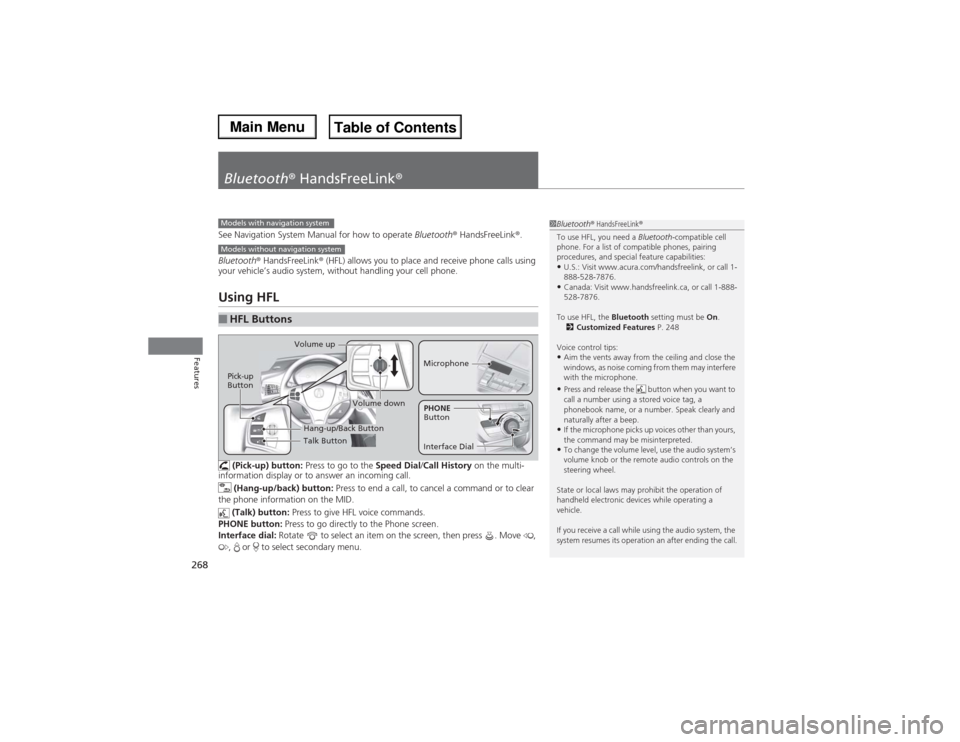
your vehicle’s audio system, without handling your cell phone.Using HFL (Pick-up) button: Press to go to the Speed Dial/Call History on the multi-
information display or to answer an incoming call.
(Hang-up/back) button: Press to end a call, to cancel a command or to clear
the phone information on the MID.
(Talk) button: Press to give HFL voice commands.
PHONE button: Press to go directly to the Phone screen.
Interface dial: Rotate to select an item on the screen, then press . Move ,
, or to select secondary menu.■HFL Buttons
1Bluetooth® HandsFreeLink®
To use HFL, you need a Bluetooth-compatible cell
phone. For a list of compatible phones, pairing
procedures, and special feature capabilities:•U.S.: Visit www.acura.com/handsfreelink, or call 1-
888-528-7876.•Canada: Visit www.handsfreelink.ca, or call 1-888-
528-7876.
To use HFL, the Bluetooth setting must be On.
2Customized Features P. 248
Voice control tips:•Aim the vents away from the ceiling and close the
windows, as noise coming from them may interfere
with the microphone.•Press and release the button when you want to
call a number using a stored voice tag, a
phonebook name, or a number. Speak clearly and
naturally after a beep.•If the microphone picks up voices other than yours,
the command may be misinterpreted.•To change the volume level, use the audio system’s
volume knob or the remote audio controls on the
steering wheel.
State or local laws may prohibit the operation of
handheld electronic devices while operating a
vehicle.
If you receive a call while using the audio system, the
system resumes its operation an after ending the call.
Models with navigation systemModels without navigation system
Talk Button Volume up
MicrophoneHang-up/Back Button
Pick-up
Button
Volume down
Interface DialPHONE
Button
Page 270 of 500
269
uuBluetooth® HandsFreeLink®uUsing HFL
Features
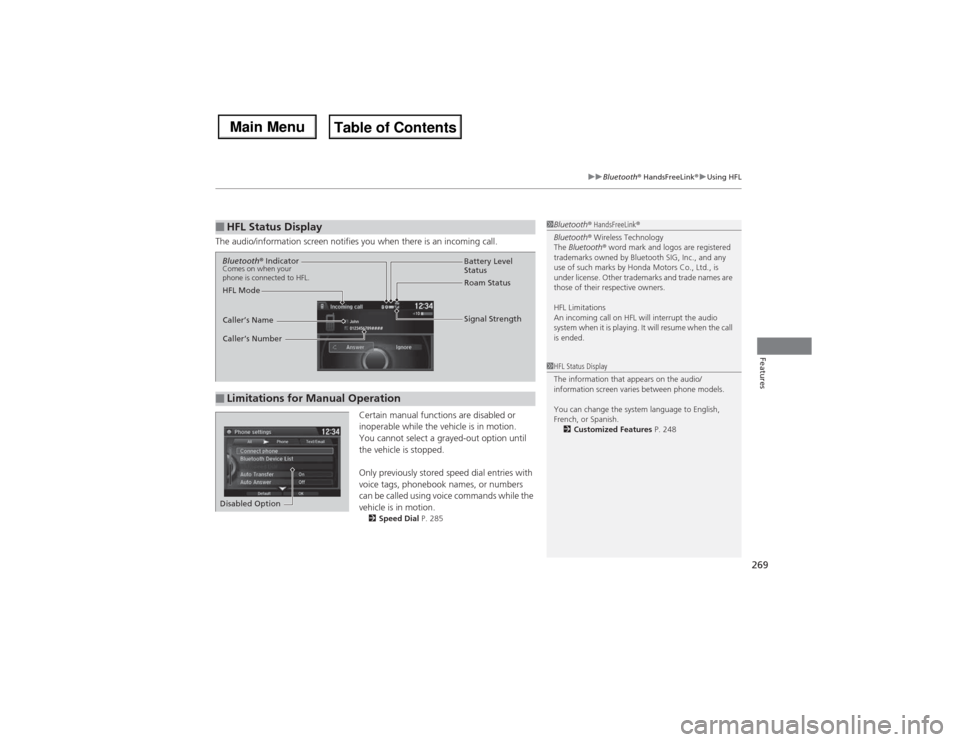
The audio/information screen notifies you when there is an incoming call.
Certain manual functions are disabled or
inoperable while the vehicle is in motion.
You cannot select a grayed-out option until
the vehicle is stopped.
Only previously stored speed dial entries with
voice tags, phonebook names, or numbers
can be called using voice commands while the
vehicle is in motion.
2Speed Dial P. 285
■HFL Status Display
1Bluetooth® HandsFreeLink®
Bluetooth® Wireless Technology
The Bluetooth® word mark and logos are registered
trademarks owned by Bluetooth SIG, Inc., and any
use of such marks by Honda Motors Co., Ltd., is
under license. Other trademarks and trade names are
those of their respective owners.
HFL Limitations
An incoming call on HFL will interrupt the audio
system when it is playing. It will resume when the call
is ended.1HFL Status Display
The information that appears on the audio/
information screen varies between phone models.
You can change the system language to English,
French, or Spanish.
2Customized Features P. 248
■Limitations for Manual OperationBluetooth® IndicatorComes on when your
phone is connected to HFL.
Signal Strength HFL ModeBattery Level
Status
Roam Status
Caller’s Name
Caller’s Number
Disabled Option
Page 271 of 500
270
uuBluetooth® HandsFreeLink®uHFL Menus
Features
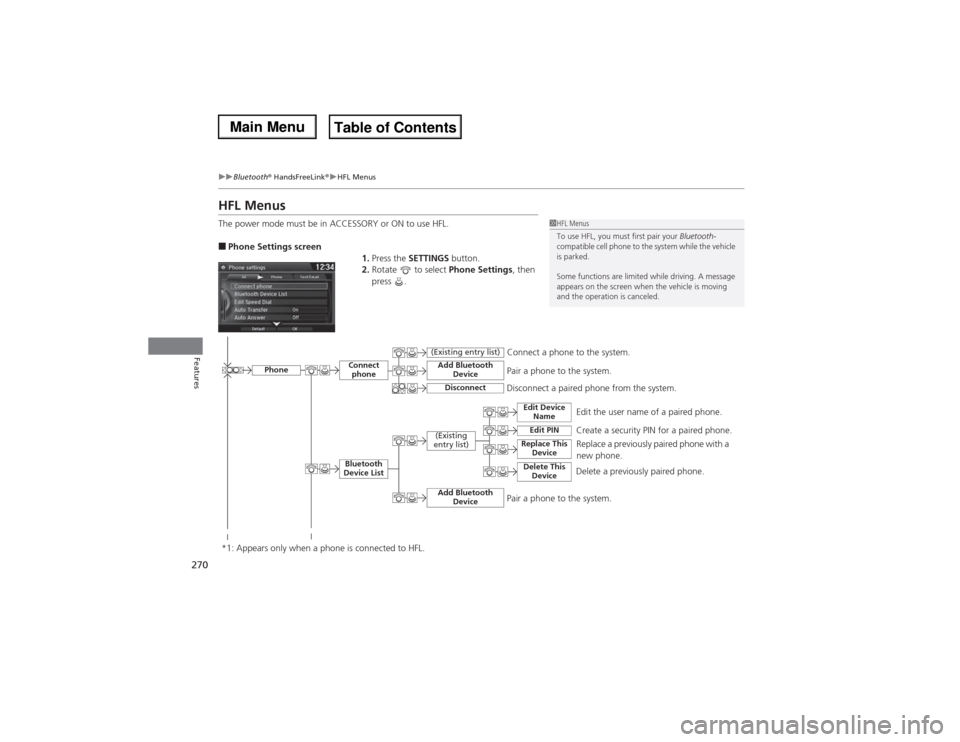
HFL MenusThe power mode must be in ACCESSORY or ON to use HFL.■Phone Settings screen
1.Press the SETTINGS button.
2.Rotate to select Phone Settings, then
press .
1HFL Menus
To use HFL, you must first pair your Bluetooth-
compatible cell phone to the system while the vehicle
is parked.
Some functions are limited while driving. A message
appears on the screen when the vehicle is moving
and the operation is canceled.
Edit the user name of a paired phone.
Phone
Edit Device
Name
Connect
phoneBluetooth
Device List
(Existing
entry list)
Replace This
Device
Add Bluetooth
Device
Disconnect a paired phone from the system.Connect a phone to the system.
*1: Appears only when a phone is connected to HFL.
Disconnect
(Existing entry list)
Pair a phone to the system.
Edit PIN
Create a security PIN for a paired phone.
Replace a previously paired phone with a
new phone.
Delete This
Device
Delete a previously paired phone.
Add Bluetooth
Device
Pair a phone to the system.
Page 272 of 500
271
uuBluetooth® HandsFreeLink®uHFL Menus
Continued
Features
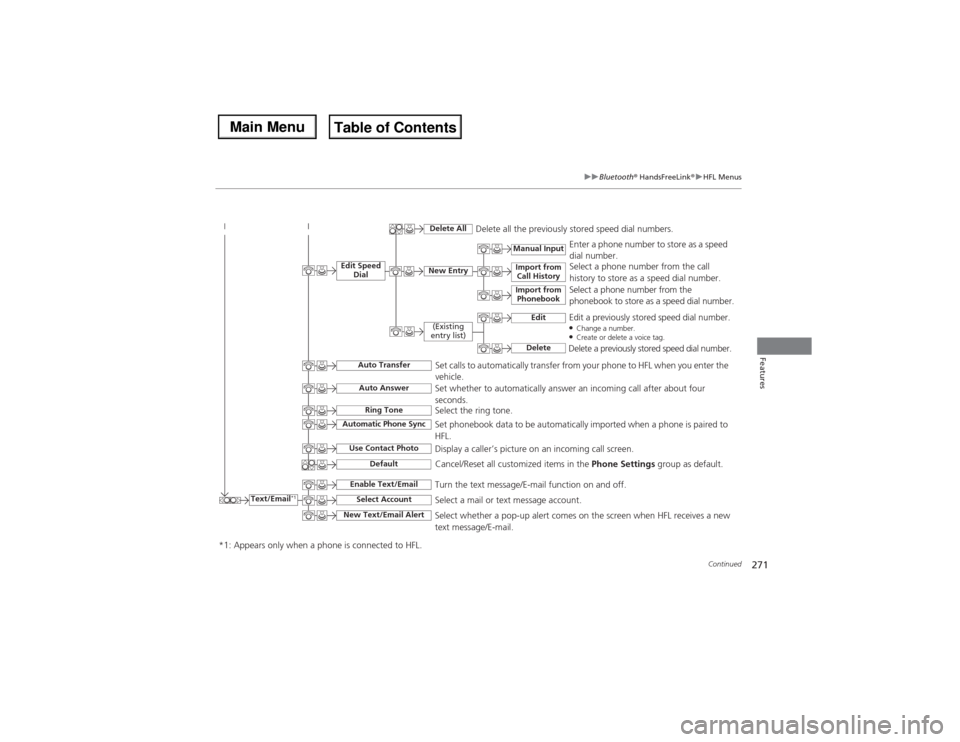
Text/Email
*1
Manual Input
Edit Speed
Dial
New Entry
Import from
Call History
*1: Appears only when a phone is connected to HFL.
Import from
Phonebook
Delete All
Delete all the previously stored speed dial numbers.
Select a phone number from the call
history to store as a speed dial number.
Select a phone number from the
phonebook to store as a speed dial number.Enter a phone number to store as a speed
dial number.
Edit
Delete
(Existing
entry list)
Edit a previously stored speed dial number.●Change a number.●Create or delete a voice tag.Delete a previously stored speed dial number.
Set calls to automatically transfer from your phone to HFL when you enter the
vehicle.
Auto TransferAuto AnswerRing Tone
Set whether to automatically answer an incoming call after about four
seconds.
Select the ring tone.
Use Contact Photo
Set phonebook data to be automatically imported when a phone is paired to
HFL.
Display a caller’s picture on an incoming call screen.
Automatic Phone Sync
Select Account
Select a mail or text message account.
Enable Text/Email
Turn the text message/E-mail function on and off.
New Text/Email Alert
Select whether a pop-up alert comes on the screen when HFL receives a new
text message/E-mail.
Cancel/Reset all customized items in the Phone Settings group as default.
Default
Page 273 of 500
272
uuBluetooth® HandsFreeLink®uHFL Menus
Features
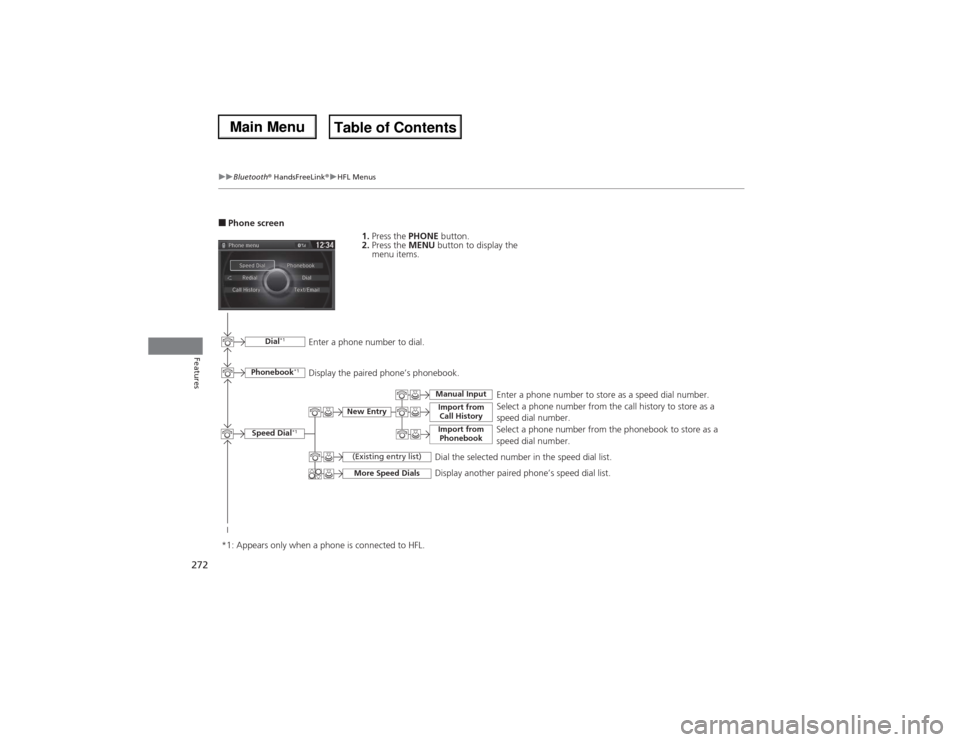
■Phone screen
1.Press the PHONE button.
2.Press the MENU button to display the
menu items.
Select a phone number from the call history to store as a
speed dial number.
Speed Dial
*1
Manual Input
New Entry
Import from
Call HistoryImport from
Phonebook
Select a phone number from the phonebook to store as a
speed dial number.Enter a phone number to store as a speed dial number.
More Speed Dials
Display another paired phone’s speed dial list.
*1: Appears only when a phone is connected to HFL.
(Existing entry list)
Dial the selected number in the speed dial list.
Phonebook
*1
Dial
*1
Display the paired phone’s phonebook. Enter a phone number to dial.
Page 274 of 500
273
uuBluetooth® HandsFreeLink®uHFL Menus
Continued
Features
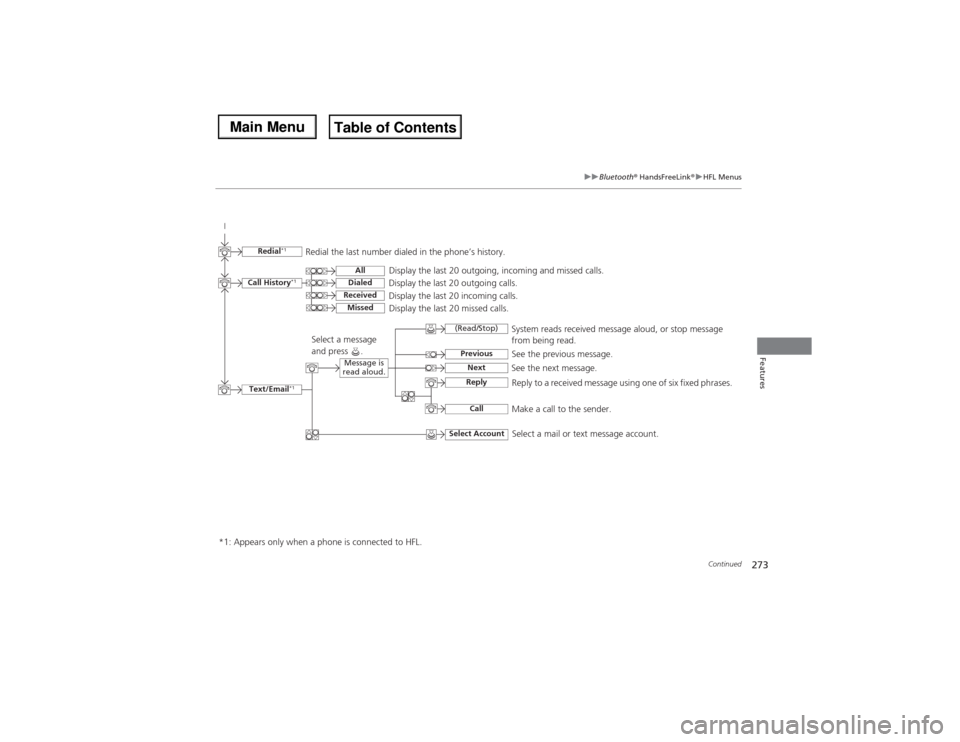
Text/Email
*1
Message is
read aloud.
See the previous message.
(Read/Stop)PreviousNext
See the next message.System reads received message aloud, or stop message
from being read.
ReplyCall
Reply to a received message using one of six fixed phrases.
Make a call to the sender.
Select Account
Select a message
and press .
Select a mail or text message account.
Redial
*1
Redial the last number dialed in the phone’s history.
Display the last 20 outgoing, incoming and missed calls.
Call History
*1
AllDialedReceived
Display the last 20 outgoing calls.
Display the last 20 incoming calls.
Missed
Display the last 20 missed calls.
*1: Appears only when a phone is connected to HFL.
Page 275 of 500
uuBluetooth® HandsFreeLink®uHFL Menus
274Features
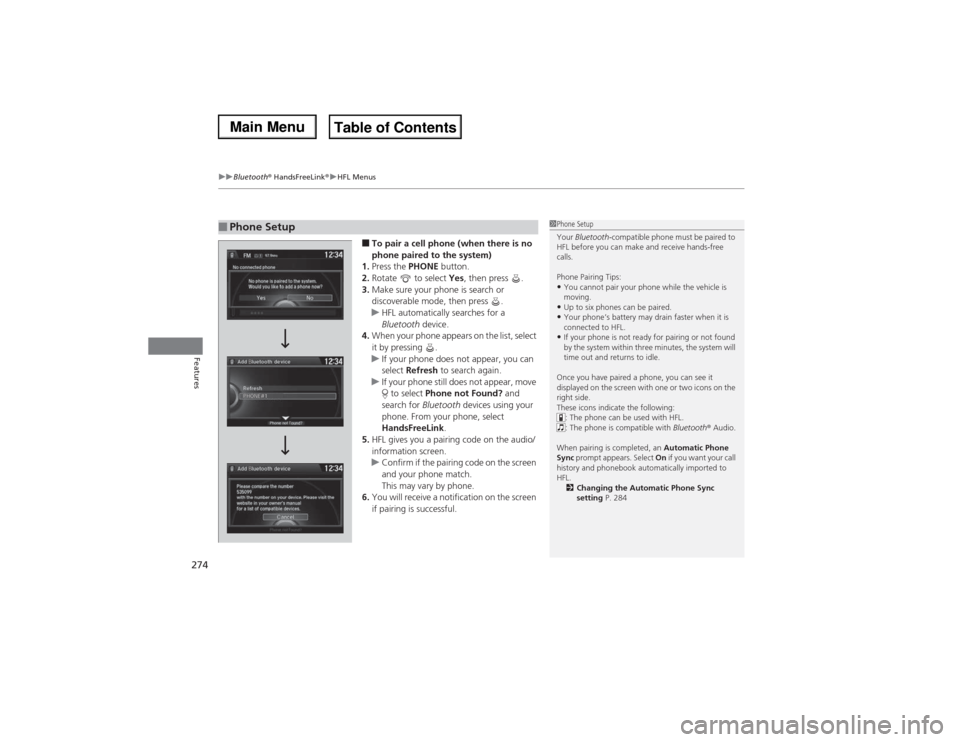
■To pair a cell phone (when there is no
phone paired to the system)
1.Press the PHONE button.
2.Rotate to select Yes, then press .
3.Make sure your phone is search or
discoverable mode, then press .
uHFL automatically searches for a
Bluetooth device.
4.When your phone appears on the list, select
it by pressing .
uIf your phone does not appear, you can
select Refresh to search again.
uIf your phone still does not appear, move
to select Phone not Found? and
search for Bluetooth devices using your
phone. From your phone, select
HandsFreeLink.
5.HFL gives you a pairing code on the audio/
information screen.
uConfirm if the pairing code on the screen
and your phone match.
This may vary by phone.
6.You will receive a notification on the screen
if pairing is successful.
■Phone Setup
1Phone Setup
Your Bluetooth-compatible phone must be paired to
HFL before you can make and receive hands-free
calls.
Phone Pairing Tips:•You cannot pair your phone while the vehicle is
moving.•Up to six phones can be paired.•Your phone’s battery may drain faster when it is
connected to HFL.•If your phone is not ready for pairing or not found
by the system within three minutes, the system will
time out and returns to idle.
Once you have paired a phone, you can see it
displayed on the screen with one or two icons on the
right side.
These icons indicate the following:
: The phone can be used with HFL.
: The phone is compatible with Bluetooth® Audio.
When pairing is completed, an Automatic Phone
Sync prompt appears. Select On if you want your call
history and phonebook automatically imported to
HFL.
2Changing the Automatic Phone Sync
setting P. 284
Page 276 of 500
275
uuBluetooth® HandsFreeLink®uHFL Menus
Continued
Features
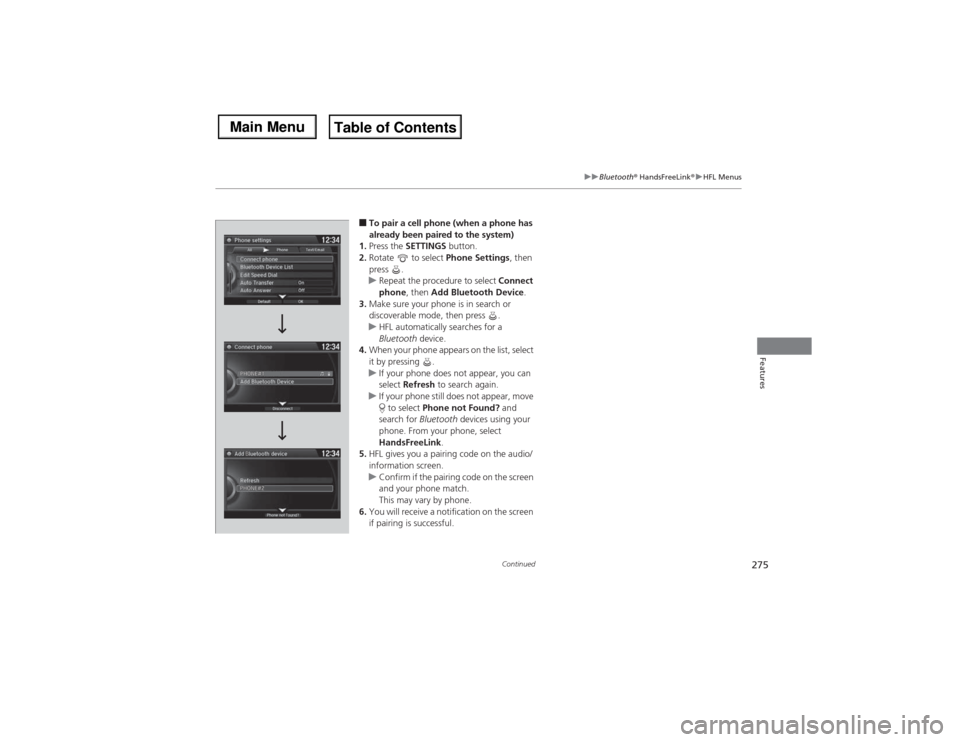
■To pair a cell phone (when a phone has
already been paired to the system)
1.Press the SETTINGS button.
2.Rotate to select Phone Settings, then
press .
uRepeat the procedure to select Connect
phone, then Add Bluetooth Device.
3.Make sure your phone is in search or
discoverable mode, then press .
uHFL automatically searches for a
Bluetooth device.
4.When your phone appears on the list, select
it by pressing .
uIf your phone does not appear, you can
select Refresh to search again.
uIf your phone still does not appear, move
to select Phone not Found? and
search for Bluetooth devices using your
phone. From your phone, select
HandsFreeLink.
5.HFL gives you a pairing code on the audio/
information screen.
uConfirm if the pairing code on the screen
and your phone match.
This may vary by phone.
6.You will receive a notification on the screen
if pairing is successful.