steering Acura MDX 2014 Manual PDF
[x] Cancel search | Manufacturer: ACURA, Model Year: 2014, Model line: MDX, Model: Acura MDX 2014Pages: 500, PDF Size: 11.72 MB
Page 372 of 500
371
uuBrakinguCollision Mitigation Braking System
TM (CMBS
TM)*
Continued
Driving
Collision Mitigation Braking System
TM (CMBS
TM)*
Can assist you when there is a possibility of your vehicle colliding with a vehicle
detected in front of yours. The CMBS
TM is designed to alert you when a potential
collision is determined, as well as to reduce your vehicle speed when a collision is
deemed unavoidable to help minimize collision severity.
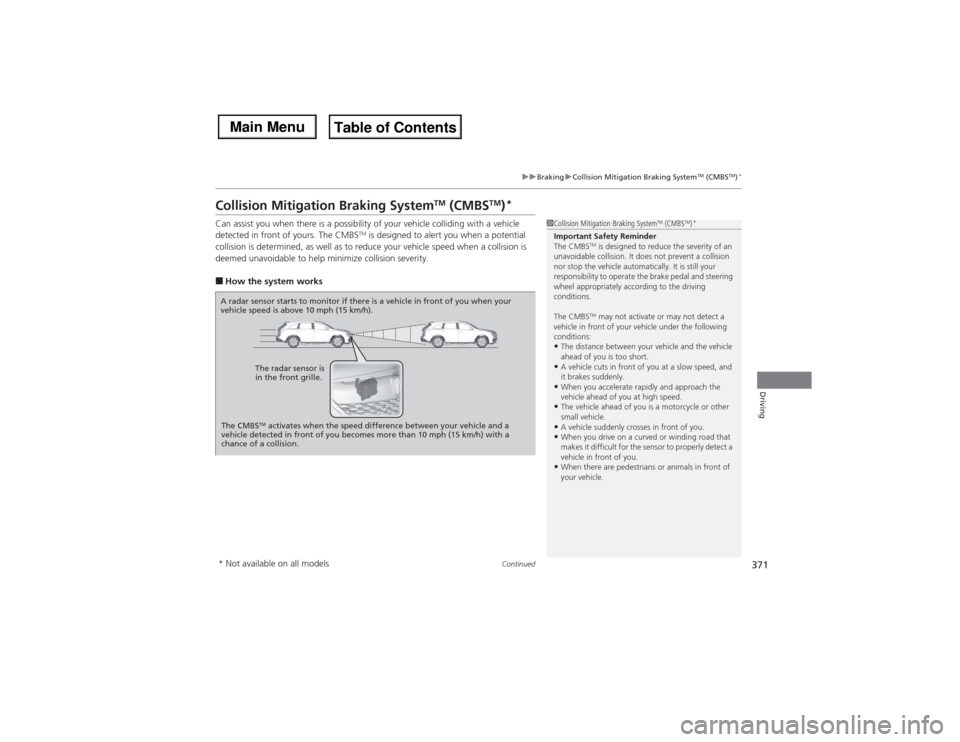
■How the system works
1Collision Mitigation Braking System
TM (CMBS
TM)*
Important Safety Reminder
The CMBS
TM is designed to reduce the severity of an
unavoidable collision. It does not prevent a collision
nor stop the vehicle automatically. It is still your
responsibility to operate the brake pedal and steering
wheel appropriately according to the driving
conditions.
The CMBSTM may not activate or may not detect a
vehicle in front of your vehicle under the following
conditions:
•The distance between your vehicle and the vehicle
ahead of you is too short.•A vehicle cuts in front of you at a slow speed, and
it brakes suddenly.•When you accelerate rapidly and approach the
vehicle ahead of you at high speed.•The vehicle ahead of you is a motorcycle or other
small vehicle.•A vehicle suddenly crosses in front of you.•When you drive on a curved or winding road that
makes it difficult for the sensor to properly detect a
vehicle in front of you.•When there are pedestrians or animals in front of
your vehicle.
A radar sensor starts to monitor if there is a vehicle in front of you when your
vehicle speed is above 10 mph (15 km/h).
The radar sensor is
in the front grille.
The CMBS
TM activates when the speed difference between your vehicle and a
vehicle detected in front of you becomes more than 10 mph (15 km/h) with a
chance of a collision.
* Not available on all models
Page 392 of 500

391
Continued
Maintenance
Maintenance Minder
TM
Maintenance items, which should be serviced at the same time that you replace the
engine oil, appear on the MID.
You can view them on the engine oil life screen at any time.To Use Maintenance Minder
TM
1.Set the power mode to ON.
2.Roll the multi-function steering-wheel controls until the engine oil life appears on
the MID.■Displaying the Engine Oil Life and Maintenance Items
1Displaying the Engine Oil Life and Maintenance Items
Based on the engine operating conditions, the
remaining engine oil life is calculated and displayed
as a percentage.
There is a list of maintenance main and sub items you
can view on the MID.
2Maintenance Service Items P. 393
Displayed Engine Oil
Life (%)
Calculated Engine Oil
Life (%)
100 100 to 91
90
90 to 81
80 80 to 71
70
70 to 61
60 60 to 51
50
50 to 41
40 40 to 31
30
30 to 21
20 20 to 16
15
15 to 11
10 10 to 6
5
5 to 1
00
Remaining Engine Oil Life
Maintenance Service Items
Multi-function
Steering-wheel
Controls
Page 393 of 500

392
uuMaintenance Minder
TMuTo Use Maintenance Minder
TM
Maintenance
The system message indicator ( ) comes on along with the Maintenance Minder message.■Maintenance Minder Messages on the Multi-Information
Display (MID)Maintenance Message
Oil Life Display
Explanation
Information
Maintenance Due Soon
15%
The remaining engine oil life is 15 to
6 percent. Once you switch the
display by rolling the multi-function
steering-wheel controls, this
message will go off.
The engine oil is approaching the end
of its service life, and the maintenance
items should be inspected and serviced
soon.
Maintenance Due Now
5%
The remaining engine oil life is 5 to 1
percent. Roll the multi-function
steering-wheel controls to switch to
another display.
The engine oil has almost reached the
end of its service life, and the
maintenance items should be inspected
and serviced as soon as possible.
Maintenance Past Due
Negative Distance
The remaining engine oil life has
passed its service life, and a negative
distance appears after driving over
10 miles (U.S. models) or 10 km
(Canadian models). Roll the multi-
function steering wheel control to
switch to another display.
The engine oil life has passed.
The maintenance items must be
inspected and serviced immediately.
U.S.
Canada
Page 394 of 500
393
uuMaintenance Minder
TMuTo Use Maintenance Minder
TM
Continued
Maintenance
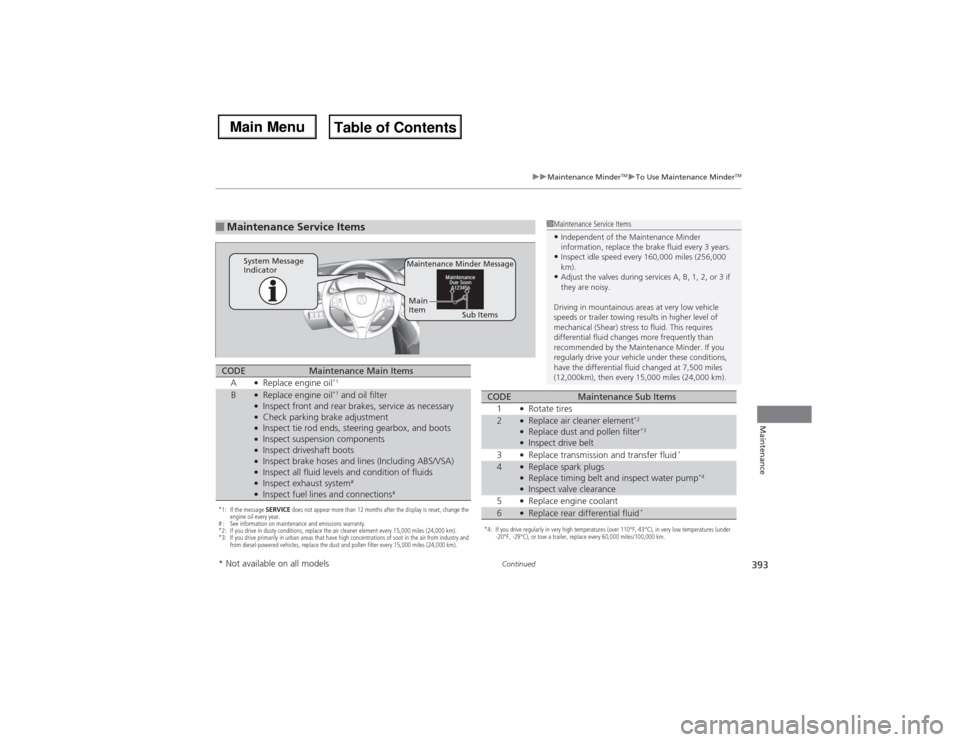
■Maintenance Service Items
1Maintenance Service Items•Independent of the Maintenance Minder
information, replace the brake fluid every 3 years.•Inspect idle speed every 160,000 miles (256,000
km).•Adjust the valves during services A, B, 1, 2, or 3 if
they are noisy.
Driving in mountainous areas at very low vehicle
speeds or trailer towing results in higher level of
mechanical (Shear) stress to fluid. This requires
differential fluid changes more frequently than
recommended by the Maintenance Minder. If you
regularly drive your vehicle under these conditions,
have the differential fluid changed at 7,500 miles
(12,000km), then every 15,000 miles (24,000 km).
Maintenance Minder Message
System Message
Indicator
Sub Items Main
Item
*1: If the message SERVICE does not appear more than 12 months after the display is reset, change the
engine oil every year.
# : See information on maintenance and emissions warranty.
*2: If you drive in dusty conditions, replace the air cleaner element every 15,000 miles (24,000 km).
*3: If you drive primarily in urban areas that have high concentrations of soot in the air from industry and
from diesel-powered vehicles, replace the dust and pollen filter every 15,000 miles (24,000 km).CODE
Maintenance Main Items
A
●Replace engine oil
*1
B
●Replace engine oil
*1 and oil filter
●Inspect front and rear brakes, service as necessary●Check parking brake adjustment●Inspect tie rod ends, steering gearbox, and boots●Inspect suspension components●Inspect driveshaft boots●Inspect brake hoses and lines (Including ABS/VSA)●Inspect all fluid levels and condition of fluids●Inspect exhaust system
#
●Inspect fuel lines and connections
#
*4: If you drive regularly in very high temperatures (over 110°F, 43°C), in very low temperatures (under
-20°F, -29°C), or tow a trailer, replace every 60,000 miles/100,000 km.CODE
Maintenance Sub Items
1
●Rotate tires
2
●Replace air cleaner element
*2
●Replace dust and pollen filter
*3
●Inspect drive belt
3●Replace transmission and transfer fluid
*
4
●Replace spark plugs●Replace timing belt and inspect water pump
*4
●Inspect valve clearance
5●Replace engine coolant
6
●Replace rear differential fluid
*
* Not available on all models
Page 395 of 500
uuMaintenance Minder
TMuTo Use Maintenance Minder
TM
394Maintenance
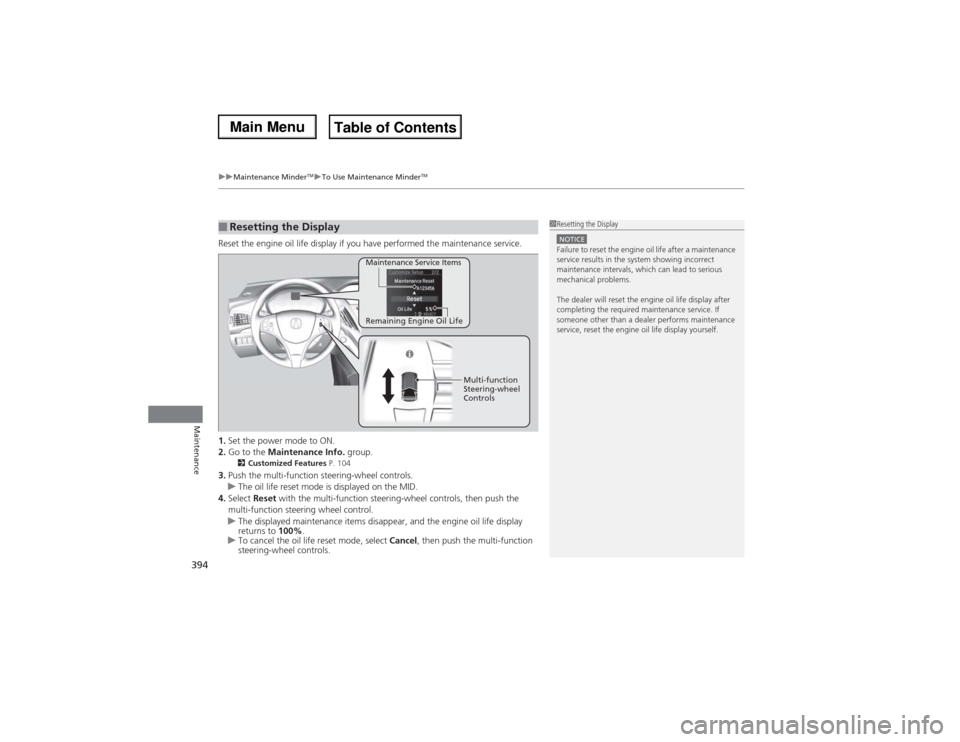
Reset the engine oil life display if you have performed the maintenance service.
1.Set the power mode to ON.
2.Go to the Maintenance Info. group.
2Customized Features P. 104
3.Push the multi-function steering-wheel controls.
uThe oil life reset mode is displayed on the MID.
4.Select Reset with the multi-function steering-wheel controls, then push the
multi-function steering wheel control.
uThe displayed maintenance items disappear, and the engine oil life display
returns to 100%.
uTo cancel the oil life reset mode, select Cancel, then push the multi-function
steering-wheel controls.■Resetting the Display
1Resetting the DisplayNOTICEFailure to reset the engine oil life after a maintenance
service results in the system showing incorrect
maintenance intervals, which can lead to serious
mechanical problems.
The dealer will reset the engine oil life display after
completing the required maintenance service. If
someone other than a dealer performs maintenance
service, reset the engine oil life display yourself.
Remaining Engine Oil Life Maintenance Service Items
Multi-function
Steering-wheel
Controls
Page 426 of 500
425
uuChecking and Maintaining TiresuWinter Tires
Maintenance
Winter TiresIf driving on snowy or frozen roads, mount all season marked “M+S” tires, snow
tires, or tire chains; reduce speed; and maintain sufficient distance between vehicles
when driving.
Be particularly careful when operating the steering wheel or brakes to prevent
skidding.
Use tire chains, snow tires, or all season tires when necessary or according to the law.
When mounting, refer to the following points.
For winter tires:
•Select the size and load ranges that are the same as the original tires.
•Mount the tires to all four wheels.
For tire chains:
•Install them on the front tires only.
•Because your vehicle has limited tire clearance, we strongly recommend using the
chains listed below:
•Follow the chain manufacturer’s instruction when installing. Mount them as
tightly as you can.
•Check that the chains do not touch the brake lines or suspension.
•Drive slowly.
Cable-type: SCC Cable Chain ZT735
1Winter TiresNOTICETraction devices that are the wrong size or improperly
installed can damage your vehicle’s brake lines,
suspension, body, and wheels. Stop driving if they are
hitting any part of the vehicle.
When tire chains are mounted, follow the chain
manufacturer’s instructions regarding vehicle
operational limits.
If your vehicle is equipped with summer tires, be
aware that these tires are not designed for winter
driving conditions. For more information, contact a
dealer.
3
WARNING
Using the wrong chains, or not properly
installing chains, can damage the brake
lines and cause a crash in which you can be
seriously injured or killed.
Follow all instructions in this owner’s
manual regarding the selection and use of
tire chains.
Page 438 of 500
437
Handling the Unexpected
This chapter explains how to handle unexpected troubles.
Tools
Types of Tools .................................. 438
If a Tire Goes Flat
Changing a Flat Tire
*....................... 439
Temporarily Repairing a Flat Tire
*..... 446
Engine Does Not Start
Checking the Engine ........................ 457
If the Keyless Access Remote Battery is
Weak ............................................. 458
Emergency Engine Stop ................... 459
Jump Starting.................................... 460
Shift Lever Does Not Move.............. 462Overheating
How to Handle Overheating............. 463
Indicator, Coming On/Blinking
If the Low Oil Pressure Indicator Comes
On ............................................. 465If the Charging System Indicator Comes
On ................................................. 465
If the Malfunction Indicator Lamp Comes
On or Blinks ................................... 466If the Brake System Indicator (Red) Comes
On .................................................... 467
If the Speed-Sensitive Electric Power Steering
(EPS) System Indicator Comes On ........... 467If the Low Tire Pressure/TPMS Indicator
Comes On or Blinks ....................... 468
Fuses
Fuse Locations ................................. 469
Inspecting and Changing Fuses ........ 474
Emergency Towing........................... 475
When You Cannot Unlock the Fuel Fill
Door................................................. 476When You Cannot Open the Tailgate
.. 477
* Not available on all models
Page 440 of 500

439
Continued
Handling the Unexpected
If a Tire Goes FlatChanging a Flat Tire
*
If a tire goes flat while driving, grasp the steering wheel firmly, and brake gradually
to reduce speed. Then, stop in a safe place. Replace the flat tire with a compact
spare tire. Go to a dealer as soon as possible to have the full-size tire repaired or
replaced.
1.Park the vehicle on firm, level, non-slippery surface and apply the parking brake.
2.Move the shift lever to
(P.
3.Turn on the hazard warning lights and set the power mode to VEHICLE OFF
(LOCK).
1Changing a Flat Tire
*
Periodically check the tire pressure of the compact
spare. It should be set to the specified pressure.
Specified Pressure: 60 psi (420 kPa, 4.2 kgf/cm
2)
When driving with the compact spare tire, keep the
vehicle speed under 50 mph (80 km/h). Replace with
a full-size tire as soon as possible.
The compact spare tire and wheel in your vehicle are
specifically for this model.
Do not use them with another vehicle.
Do not use another type of compact spare tire or
wheel with your vehicle.
Do not mount tire chains on a compact spare tire.
If a chain-mounted front tire goes flat, remove one of
the full-size rear tires and replace it with the compact
spare tire. Remove the flat front tire and replace it
with the full-size tire that was removed from the rear.
Mount the tire chains on the front tire.
Do not use a puncture-repairing agent on a flat tire,
as it can damage the tire pressure sensor.
* Not available on all models
Page 447 of 500

446
uuIf a Tire Goes FlatuTemporarily Repairing a Flat Tire
*
Handling the Unexpected
Temporarily Repairing a Flat Tire
*
If the tire has a large cut or is otherwise severely damaged, you will need to have the
vehicle towed. If the tire only has a small puncture, from a nail for instance, you can
use the temporary tire repair kit so that you can drive to the nearest service station
for a more permanent repair.
If a tire goes flat while driving, grasp the steering wheel firmly, and brake gradually
to reduce speed. Then stop in a safe place.
1.Park the vehicle on a firm, level, and non-slippery surface and apply the parking
brake.
2.Move the shift lever to
(P.
3.Turn on the hazard warning lights and set the power mode to VEHICLE OFF
(LOCK).
■Getting Ready to Temporarily Repair the Flat Tire
1Temporarily Repairing a Flat Tire
*
The kit should not be used in the following situations.
Instead, contact a dealer or a roadside assistant to
have the vehicle towed.•The tire sealant has expired.•More than two tires are punctured.•The puncture or cut is larger than 3/16 inch (4mm).•The tire side wall is damaged or the puncture is
outside the contact area.•Damage has been caused by driving with the tire
extremely under inflated.•The tire bead is no longer seated.•The rim is damaged.
Do not remove a nail or screw that punctured the
tire. If you remove it from the tire, you may not be
able to repair the puncture using the kit.NOTICEDo not use a puncture-repairing agent other than the
one provided in the kit that came with your vehicle. If
a different agent is used, you may permanently
damage the tire pressure sensor.
When the puncture is:
Kit Use
Smaller than 3/16 inch
(4 mm)
Yes
Larger than 3/16 inch
(4 mm)
No
Contact
Area
Instruction
Manual
Air Only Hose (Black)Speed Restriction Label Repair Notification Label Pressure Relief
ButtonInflator Switch
Selector Switch
SEALANT/AIR side Sealant/Air Hose (Clear)AIR ONLY side
Power Plug Pressure Gauge
Tire Sealant
Expiration Date* Not available on all models
Page 460 of 500

459
uuEngine Does Not StartuEmergency Engine Stop
Handling the Unexpected
Emergency Engine StopThe ENGINE START/STOP button may be used to stop the engine due to an
emergency situation even while driving. If you must stop the engine, do either of the
following operations:
•Press and hold the ENGINE START/STOP button for about two seconds.
•Firmly press the ENGINE START/STOP button two times.
•The steering wheel will not lock. The power mode changes to VEHICLE OFF with
the shift lever in
(P, and to ACCESSORY with the shift lever in any position other
than
(P.
•Because turning off the engine also disables the power assist the engine provides
to the steering and braking systems, it will require significantly more physical
effort and time to steer and slow the vehicle. Downshift gears and use both feet
on the brake pedal, if necessary, to slow the vehicle and stop immediately in a
safe place.
1Emergency Engine StopNOTICEDo not press the button while driving unless it is
absolutely necessary for the engine to be switched
off.