lock Acura MDX 2015 Owner's Manual
[x] Cancel search | Manufacturer: ACURA, Model Year: 2015, Model line: MDX, Model: Acura MDX 2015Pages: 505, PDF Size: 18.62 MB
Page 442 of 505

441
Handling the Unexpected
This chapter explains how to handle unexpected troubles.
Tools
Types of Tools .................................. 442
If a Tire Goes Flat Changing a Flat Tire
*....................... 443
Temporarily Repairing a Flat Tire
*..... 450
Engine Does Not Start Checking the Engine ........................ 462
If the Keyless Access Remote Battery is Weak ............................................. 463
Emergency Engine Stop ................... 464
Jump Starting .................................... 465
Shift Lever Does Not Move .............. 467Overheating
How to Handle Overheating............. 468
Indicator, Coming On/Blinking
If the Low Oil Pressure Indicator Comes On ............................................. 470If the Charging System Indicator Comes
On ................................................. 470
If the Malfunction Indicator Lamp Comes On or Blinks ................................... 471If the Brake System Indicator (Red) Comes On .................................................... 472
If the Speed-Sensitive Electric Power Steering
(EPS) System Indicator Comes On ........... 472If the Low Tire Pressure/TPMS Indicator Comes On or Blinks ....................... 473
Fuses Fuse Locations ................................. 474
Inspecting and Changing Fuses ........ 479
Emergency Towing ........................... 480
When You Cannot Unlock the Fuel Fill Door ................................................. 481When You Cannot Open the Tailgate
.. 482
* Not available on all models
Page 444 of 505
443
Continued
Handling the Unexpected
If a Tire Goes FlatChanging a Flat Tire
*
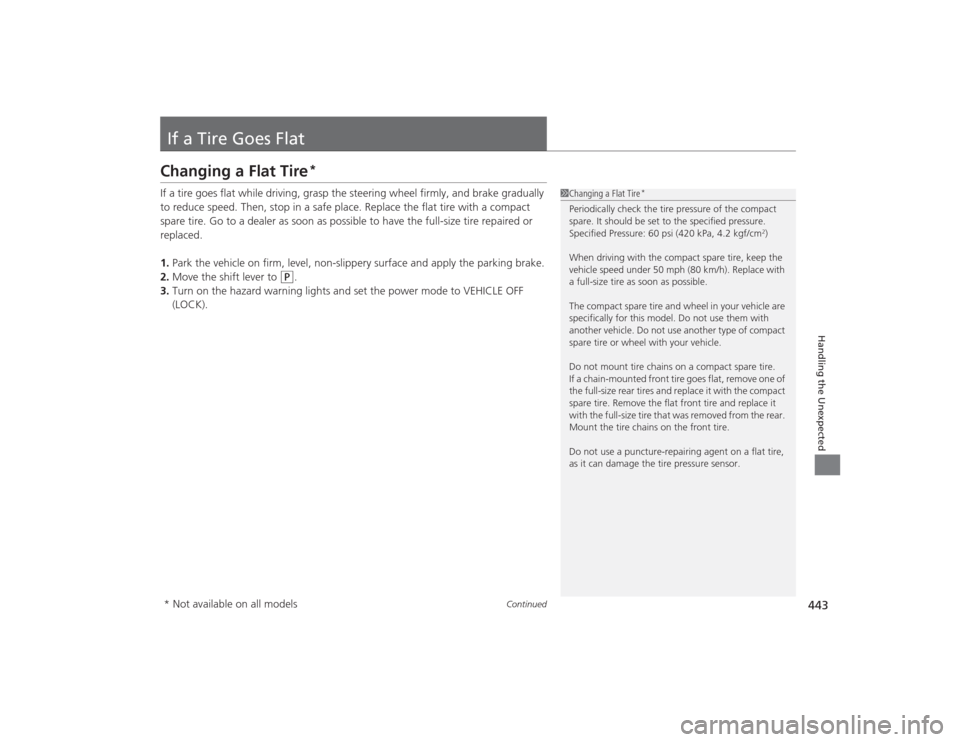
If a tire goes flat while driving, grasp the steering wheel firmly, and brake gradually
to reduce speed. Then, stop in a safe place. Replace the flat tire with a compact
spare tire. Go to a dealer as soon as possible to have the full-size tire repaired or
replaced.
1.Park the vehicle on firm, level, non-slippery surface and apply the parking brake.
2. Move the shift lever to
(P
.
3. Turn on the hazard warning lights and set the power mode to VEHICLE OFF
(LOCK).
1Changing a Flat Tire
*
Periodically check the tire pressure of the compact
spare. It should be set to the specified pressure.
Specified Pressure: 60 psi (420 kPa, 4.2 kgf/cm
2)
When driving with the compact spare tire, keep the
vehicle speed under 50 mph (80 km/h). Replace with
a full-size tire as soon as possible.
The compact spare tire and wheel in your vehicle are
specifically for this model. Do not use them with
another vehicle. Do not use another type of compact
spare tire or wheel with your vehicle.
Do not mount tire chains on a compact spare tire.
If a chain-mounted front tire goes flat, remove one of
the full-size rear tires and replace it with the compact
spare tire. Remove the flat front tire and replace it
with the full-size tire that was removed from the rear.
Mount the tire chains on the front tire.
Do not use a puncture-repairing agent on a flat tire,
as it can damage the tire pressure sensor.
* Not available on all models
Page 447 of 505
446
uuIf a Tire Goes Flat uChanging a Flat Tire
*
Handling the Unexpected
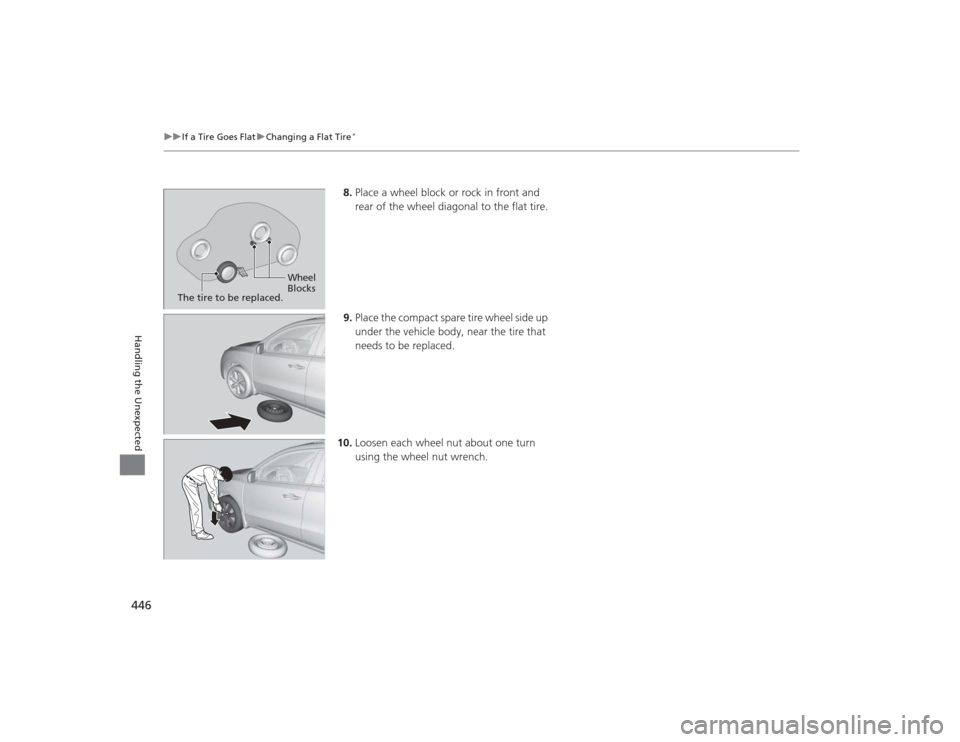
8. Place a wheel block or rock in front and
rear of the wheel diagonal to the flat tire.
9. Place the compact spare tire wheel side up
under the vehicle body, near the tire that
needs to be replaced.
10. Loosen each wheel nut about one turn
using the wheel nut wrench.
Wheel
Blocks
The tire to be replaced.
Page 448 of 505
Continued
447
uuIf a Tire Goes Flat uChanging a Flat Tire
*
Handling the Unexpected
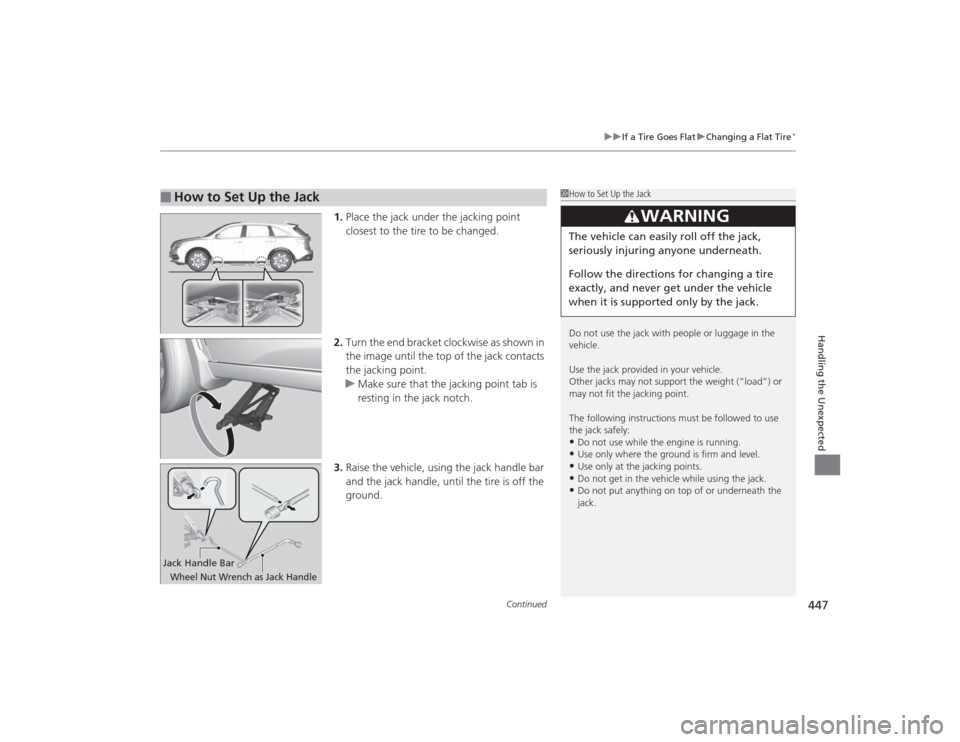
1. Place the jack under the jacking point
closest to the tire to be changed.
2. Turn the end bracket clockwise as shown in
the image until the top of the jack contacts
the jacking point.
u Make sure that the jacking point tab is
resting in the jack notch.
3. Raise the vehicle, using the jack handle bar
and the jack handle, until the tire is off the
ground.
■
How to Set Up the Jack
1How to Set Up the Jack
Do not use the jack with people or luggage in the
vehicle.
Use the jack provided in your vehicle.
Other jacks may not support the weight (“load”) or
may not fit the jacking point.
The following instructions must be followed to use
the jack safely:•Do not use while the engine is running.•Use only where the ground is firm and level.•Use only at the jacking points.•Do not get in the vehicle while using the jack.•Do not put anything on top of or underneath the
jack.
3
WARNING
The vehicle can easily roll off the jack,
seriously injuring anyone underneath.
Follow the directions for changing a tire
exactly, and never get under the vehicle
when it is suppor ted only by the jack.
Jack Handle BarWheel Nut Wrench as Jack Handle
Page 450 of 505
449
uuIf a Tire Goes Flat uChanging a Flat Tire
*
Handling the Unexpected
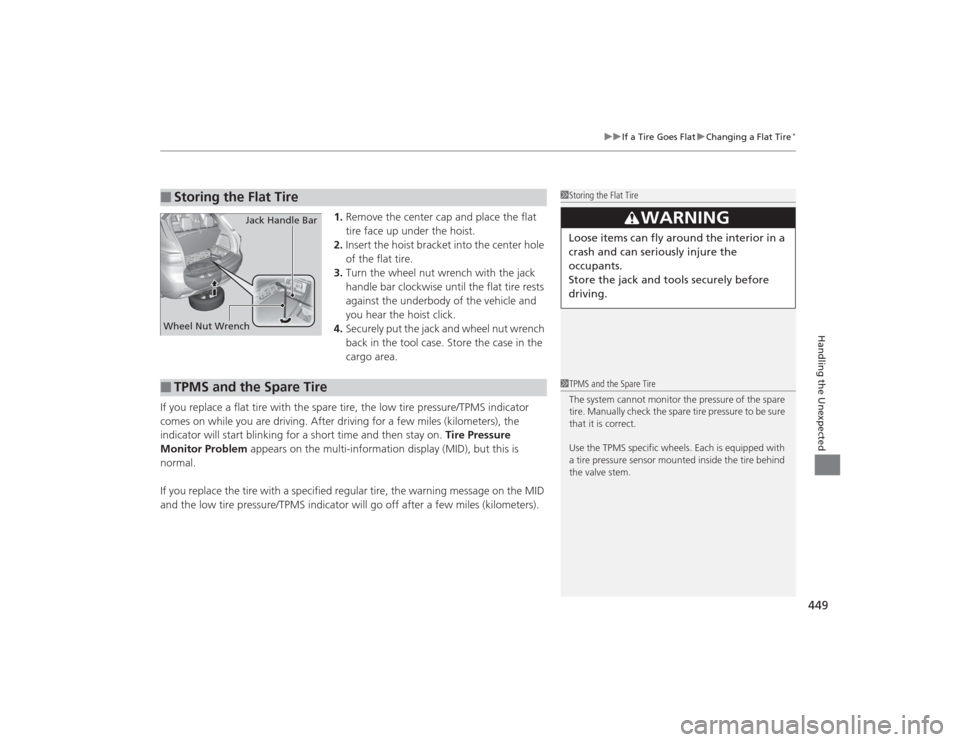
1. Remove the center cap and place the flat
tire face up under the hoist.
2. Insert the hoist bracket into the center hole
of the flat tire.
3. Turn the wheel nut wrench with the jack
handle bar clockwise until the flat tire rests
against the underbody of the vehicle and
you hear the hoist click.
4. Securely put the jack and wheel nut wrench
back in the tool case. Store the case in the
cargo area.
If you replace a flat tire with the spare tire, the low tire pressure/TPMS indicator
comes on while you are driving. After driving for a few miles (kilometers), the
indicator will start blinking for a short time and then stay on. Tire Pressure
Monitor Problem appears on the multi-information display (MID), but this is
normal.
If you replace the tire with a specified regular tire, the warning message on the MID
and the low tire pressure/TPMS indicator will go off after a few miles (kilometers).
■
Storing the Flat Tire
1 Storing the Flat Tire
3
WARNING
Loose items can fly around the interior in a
crash and can seriously injure the
occupants.
Store the jack and tools securely before
driving.
Wheel Nut Wrench Jack Handle Bar■
TPMS and the Spare Tire
1
TPMS and the Spare Tire
The system cannot monitor the pressure of the spare
tire. Manually check the spare tire pressure to be sure
that it is correct.
Use the TPMS specific wheels. Each is equipped with
a tire pressure sensor mounted inside the tire behind
the valve stem.
Page 451 of 505

450
uuIf a Tire Goes Flat uTemporarily Repairing a Flat Tire
*
Handling the Unexpected
Temporarily Repairing a Flat Tire
*
If the tire has a large cut or is otherwise severely damaged, you will need to have the
vehicle towed. If the tire only has a small puncture, from a nail for instance, you can
use the temporary tire repair kit so that you can drive to the nearest service station
for a more permanent repair.
If a tire goes flat while driving, grasp the steering wheel firmly, and brake gradually
to reduce speed. Then stop in a safe place.
1. Park the vehicle on a firm, level, and non-slippery surface and apply the parking
brake.
2. Move the shift lever to
(P
.
3. Turn on the hazard warning lights and set the power mode to VEHICLE OFF
(LOCK).
1Temporarily Repairing a Flat Tire
*
The kit should not be used in the following situations.
Instead, contact a dealer or a roadside assistant to
have the vehicle towed.•The tire sealant has expired.•More than one tire is punctured.•The puncture or cut is larger than 3/16 inch (4mm).•The tire side wall is damaged or the puncture is
outside the contact area.•Damage has been caused by driving with the tire
extremely under inflated.•The tire bead is no longer seated.•The rim is damaged.
Do not remove a nail or screw that punctured the
tire. If you remove it from the tire, you may not be
able to repair the puncture using the kit.NOTICEDo not use a puncture-repairing agent other than the
one provided in the ki t that came with your vehicle. If
a different agent is us ed, you may permanently
damage the tire pressure sensor.
When the puncture is:
Kit Use
Smaller than 3/16 inch (4 mm)
Yes
Larger than 3/16 inch (4 mm)
No
Contact
Area
* Not available on all models
Page 465 of 505

464
uuEngine Does Not Start uEmergency Engine Stop
Handling the Unexpected
Emergency Engine StopThe ENGINE START/STOP button may be used to stop the engine due to an
emergency situation even while driving. If you mus t stop the engine, do either of the
following operations:
• Press and hold the ENGINE START/STOP button for about two seconds.
• Firmly press the ENGINE START/STOP button two times.
The steering wheel will not lock. However, because turning off the engine disables
the power assist the engine provides to the steering and braking systems, it will
require significantly more physical effort and time to steer and slow the vehicle. Use
both feet on the brake pedal to slow down the vehicle and stop immediately in a
safe place.
The power mode is in ACCESSORY when the engine is stopped.
To change the mode to VEHICLE OFF, change the gear position to
(P
after the
vehicle comes to a complete stop. Then press the ENGINE START/STOP button
twice without depressing the brake pedal.
1 Emergency Engine StopNOTICEDo not press the button while driving unless it is
absolutely necessary for the engine to be switched
off.
Page 468 of 505

467Handling the Unexpected
Shift Lever Does Not MoveFollow the procedure below if you cannot move the shift lever out of the
(P
position.
1.Set the parking brake.
2. Remove the built-in key from the keyless
access remote.
3. Wrap a cloth around the tip of a small flat-
tip screwdriver. Place it at the back of the
release lock cover, and remove the cover.
4. Insert the key into the shift lock release slot.
5. While pushing the key down, press the shift
lever release button and place the shift lever
into
(N
.
u The lock is now released. Have the shift
lever checked by a dealer as soon as
possible.
■
Releasing the Lock
Cover
SlotRelease ButtonShift Lock Release Slot
Page 475 of 505
474Handling the Unexpected
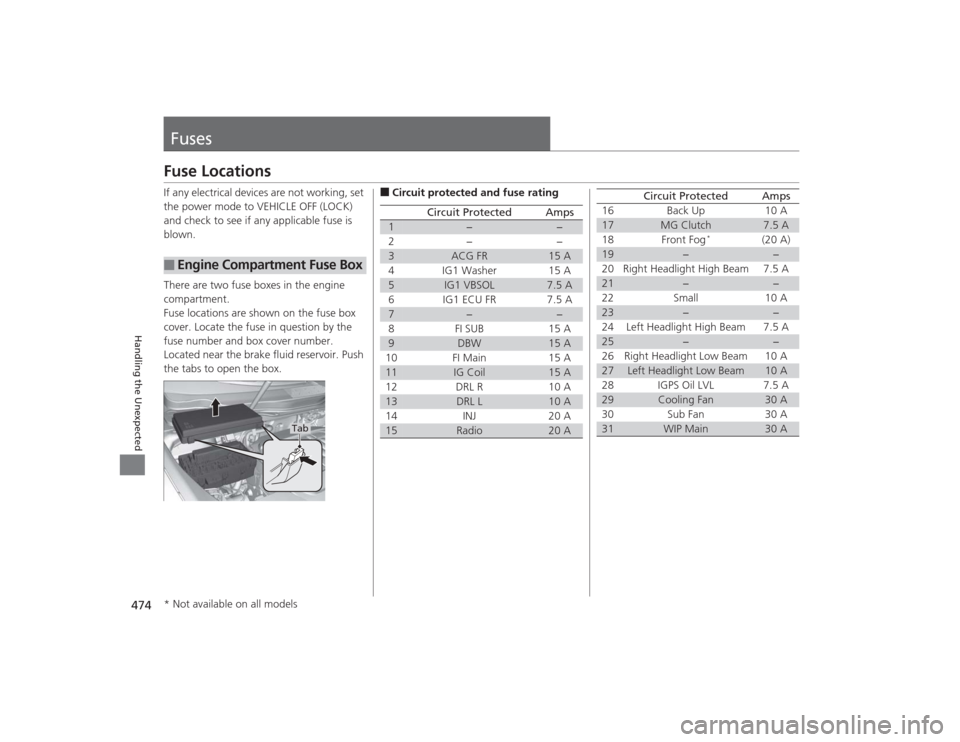
FusesFuse LocationsIf any electrical devices are not working, set
the power mode to VEHICLE OFF (LOCK)
and check to see if any applicable fuse is
blown.
There are two fuse boxes in the engine
compartment.
Fuse locations are shown on the fuse box
cover. Locate the fuse in question by the
fuse number and box cover number.
Located near the brake fluid reservoir. Push
the tabs to open the box.■
Engine Compartment Fuse Box
Tab
■Circuit protected and fuse rating
Circuit Protected
Amps
1
−
−
2
−
−
3
ACG FR
15 A
4 IG1 Washer 15 A
5
IG1 VBSOL
7.5 A
6IG1 ECU FR 7.5A
7
−
−
8FI SUB 15A
9
DBW
15 A
10 FI Main 15 A
11
IG Coil
15 A
12 DRL R 10 A
13
DRL L
10 A
14 INJ 20 A
15
Radio
20 A
16 Back Up 10 A17
MG Clutch
7.5 A
18 Front Fog
*
(20 A)
19
−
−
20 Right Headlight High Beam 7.5 A
21
−
−
22 Small 10 A
23
−
−
24 Left Headlight High Beam 7.5 A
25
−
−
26 Right Headlight Low Beam 10 A
27
Left Headlight Low Beam
10 A
28 IGPS Oil LVL 7.5 A
29
Cooling Fan
30 A
30 Sub Fan 30 A
31
WIP Main
30 A
Circuit Protected
Amps
* Not available on all models
Page 477 of 505
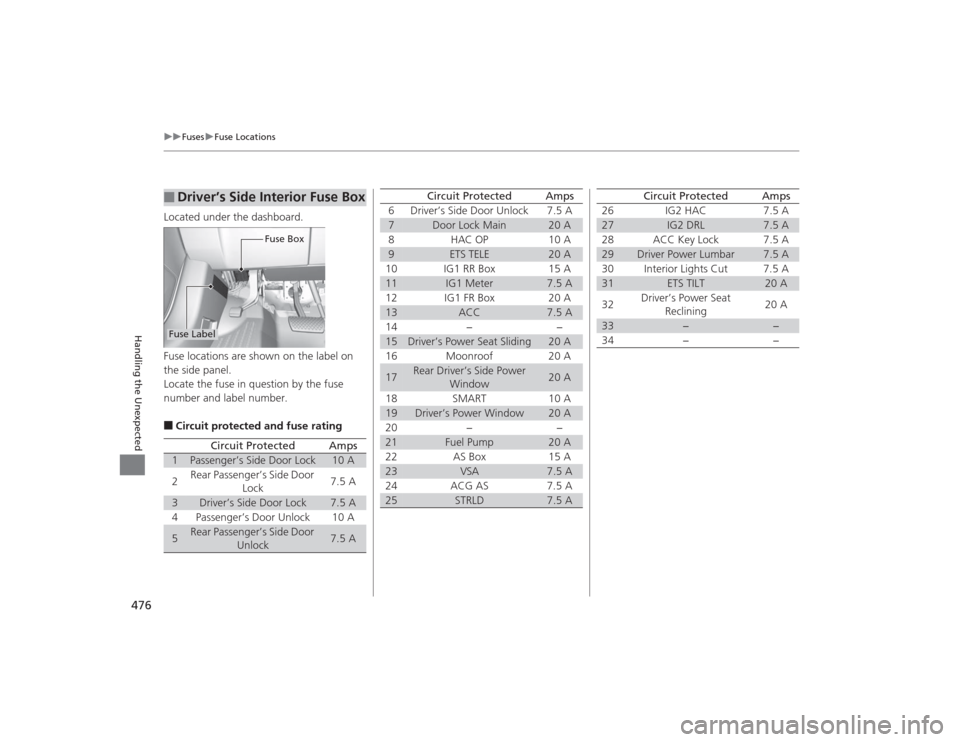
476
uuFuses uFuse Locations
Handling the Unexpected
Located under the dashboard.
Fuse locations are shown on the label on
the side panel.
Locate the fuse in question by the fuse
number and label number.■Circuit protected and fuse rating■
Driver’s Side Interior Fuse Box
Fuse Box
Fuse Label
Circuit Protected
Amps
1
Passenger’s Side Door Lock
10 A
2
Rear Passenger’s Side Door
Lock
7.5 A
3
Driver’s Side Door Lock
7.5 A
4
Passenger’s Door Unlock
10 A
5
Rear Passenger’s Side Door Unlock
7.5 A
6
Driver’s Side Door Unlock
7.5 A
7
Door Lock Main
20 A
8
HAC OP
10 A
9
ETS TELE
20 A
10 IG1 RR Box 15 A
11
IG1 Meter
7.5 A
12 IG1 FR Box 20 A
13
ACC
7.5 A
14 − −
15
Driver’s Power Seat Sliding
20 A
16 Moonroof 20 A
17
Rear Driver’s Side Power Window
20 A
18 SMART 10 A
19
Driver’s Power Window
20 A
20 − −
21
Fuel Pump
20 A
22 AS Box 15 A
23
VSA
7.5 A
24 ACG AS 7.5 A
25
STRLD
7.5 A
Circuit Protected
Amps
26 IG2 HAC 7.5 A27
IG2 DRL
7.5 A
28 ACC Key Lock 7.5 A
29
Driver Power Lumbar
7.5 A
30 Interior Lights Cut 7.5 A
31
ETS TILT
20 A
32 Driver’s Power Seat
Reclining 20 A
33
−
−
34
−
−
Circuit Protected
Amps