lights Acura MDX 2015 User Guide
[x] Cancel search | Manufacturer: ACURA, Model Year: 2015, Model line: MDX, Model: Acura MDX 2015Pages: 505, PDF Size: 18.62 MB
Page 90 of 505
89
uuIndicators uMulti-Information Display (MID) Warning and Information Messages
Continued
Instrument Panel
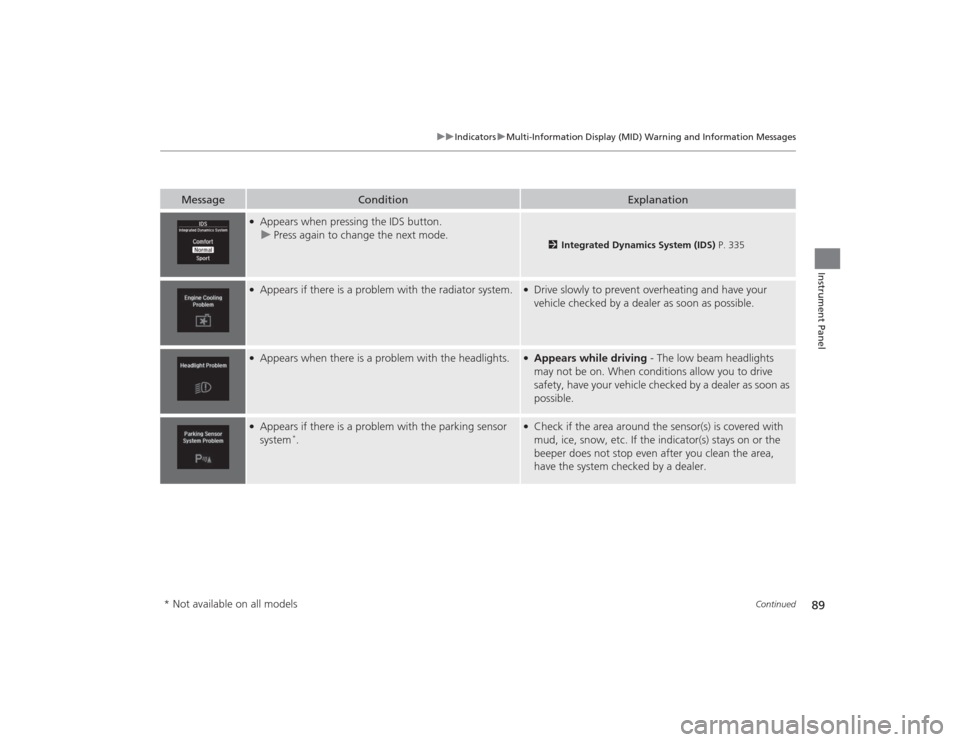
Message
Condition
Explanation
●Appears when pressing the IDS button.
u Press again to change the next mode.
2 Integrated Dynamics System (IDS) P. 335
●Appears if there is a problem with the radiator system.
●Drive slowly to prevent overheating and have your
vehicle checked by a dealer as soon as possible.
●Appears when there is a problem with the headlights.
●Appears while driving - The low beam headlights
may not be on. When conditions allow you to drive
safety, have your vehicle checked by a dealer as soon as
possible.
●Appears if there is a problem with the parking sensor
system
*.
●Check if the area around the sensor(s) is covered with
mud, ice, snow, etc. If the indicator(s) stays on or the
beeper does not stop even after you clean the area,
have the system checked by a dealer.
* Not available on all models
Page 109 of 505
108
uuGauges and Multi-Informa tion Display (MID)uMID
Instrument Panel
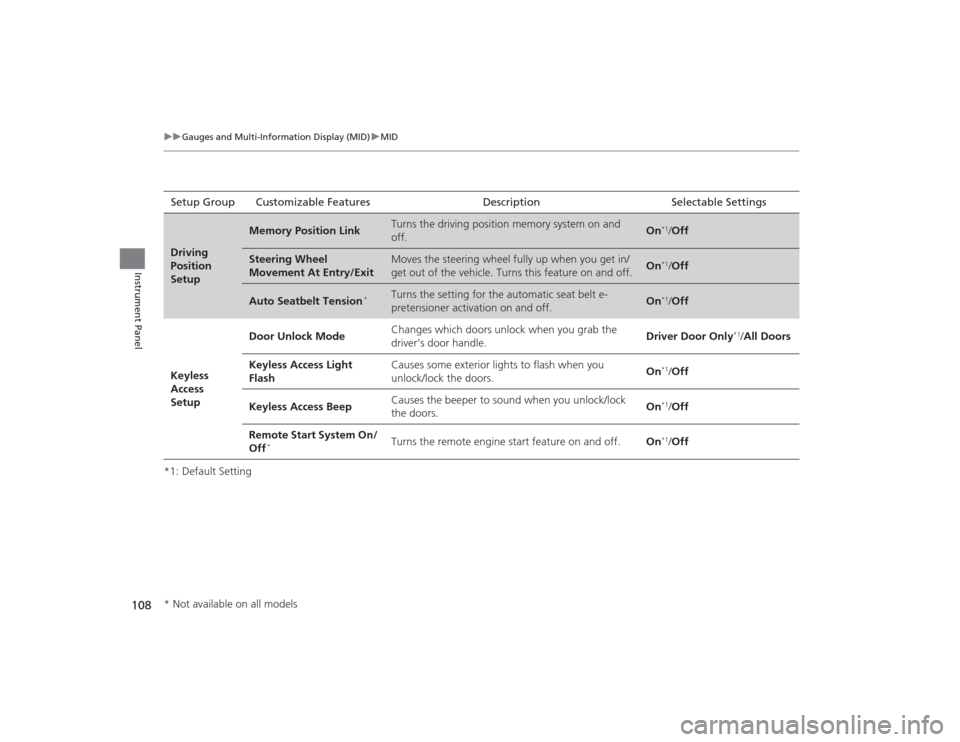
*1: Default SettingSetup Group Customizable Features Description Selectable SettingsDriving
Position
Setup
Memory Position Link
Turns the driving position memory system on and
off.
On
*1/
Off
Steering Wheel
Movement At Entry/Exit
Moves the steering wheel fully up when you get in/
get out of the vehicle. Turns this feature on and off.
On
*1/Off
Auto Seatbelt Tension
*
Turns the setting for the automatic seat belt e-
pretensioner activation on and off.
On
*1/Off
Keyless
Access
Setup Door Unlock Mode
Changes which doors unlock when you grab the
driver’s door handle. Driver Door Only
*1/
All Doors
Keyless Access Light
Flash Causes some exterior lights to flash when you
unlock/lock the doors.
On
*1/
Off
Keyless Access Beep Causes the beeper to sound when you unlock/lock
the doors.
On*1/
Off
Remote Start System On/
Off
*
Turns the remote engine start feature on and off. On
*1/Off
* Not available on all models
Page 110 of 505
109
uuGauges and Multi-Information Display (MID) uMID
Continued
Instrument Panel
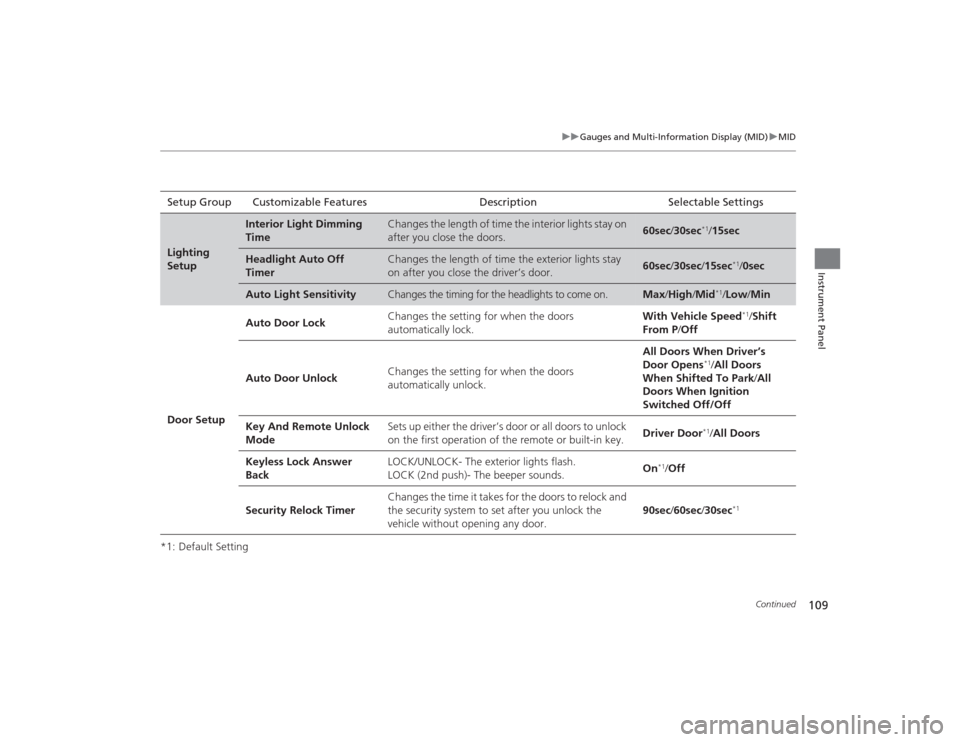
*1: Default SettingSetup Group Customizable Features Description Selectable SettingsLighting
Setup
Interior Light Dimming
Time
Changes the length of time the interior lights stay on
after you close the doors.
60sec
/30sec
*1/15sec
Headlight Auto Off
Timer
Changes the length of time the exterior lights stay
on after you close the driver’s door.
60sec /30sec /15sec
*1/ 0sec
Auto Light Sensitivity
Changes the timing for the headlights to come on.
Max /High /Mid
*1/Low /Min
Door Setup Auto Door Lock
Changes the setting for when the doors
automatically lock. With Vehicle Speed
*1/
Shift
From P /Off
Auto Door Unlock Changes the setting for when the doors
automatically unlock. All Doors When Driver’s
Door Opens
*1/
All Doors
When Shifted To Park /All
Doors When Ignition
Switched Off/Off
Key And Remote Unlock
Mode Sets up either the driver’s door or all doors to unlock
on the first operation of the remote or built-in key.
Driver Door*1/
All Doors
Keyless Lock Answer
Back LOCK/UNLOCK- The exterior lights flash.
LOCK (2nd push)- The beeper sounds.
On
*1/
Off
Security Relock Timer Changes the time it takes for the doors to relock and
the security system to set after you unlock the
vehicle without opening any door.
90sec
/60sec /30sec
*1
Page 114 of 505
113
Controls
This chapter explains how to operate the various controls necessary for driving.
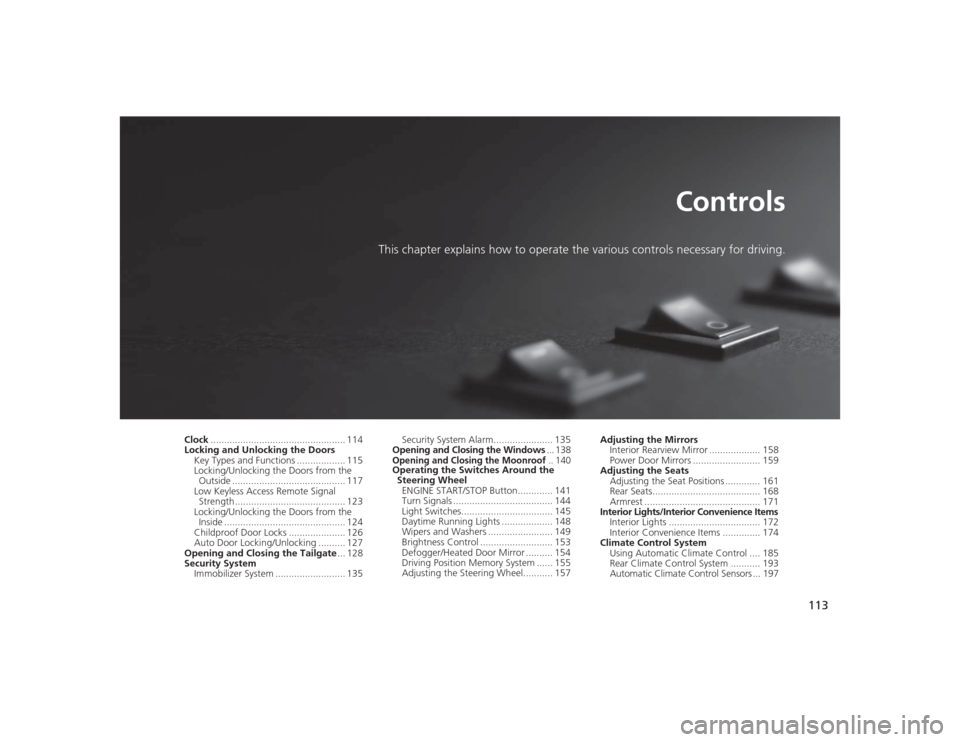
Clock.................................................. 114
Locking and Unlocking the Doors
Key Types and Functions .................. 115
Locking/Unlocking the Doors from the Outside .......................................... 117
Low Keyless Access Remote Signal Strength ......................................... 123
Locking/Unlocking the Doors from the
Inside ............................................. 124
Childproof Door Locks ..................... 126
Auto Door Locking/Unlocking .......... 127
Opening and Closing the Tailgate ... 128
Security System Immobilizer System .......................... 135 Security System Alarm...................... 135
Opening and Closing the Windows ... 138
Opening and Closing the Moonroof
.. 140
Operating the Switches Around the
Steering Wheel ENGINE START/STOP Button............. 141
Turn Signals ..................................... 144
Light Switches.................................. 145
Daytime Running Lights ................... 148
Wipers and Washers ........................ 149
Brightness Control ........................... 153
Defogger/Heated Door Mirror .......... 154
Driving Position Memory System ...... 155
Adjusting the Steering Wheel........... 157 Adjusting the Mirrors
Interior Rearview Mirror ................... 158
Power Door Mirrors ......................... 159
Adjusting the Seats Adjusting the Seat Positions ............. 161
Rear Seats........................................ 168
Armrest ........................................... 171
Interior Lights/Interior Convenience Items
Interior Lights .................................. 172
Interior Convenience Items .............. 174
Climate Control System
Using Automatic Climate Control .... 185
Rear Climate Control System ........... 193
Automatic Climate Control Sensors ... 197
Page 118 of 505

117
uuLocking and Unlocking the Doors uLocking/Unlocking the Doors from the Outside
Continued
Controls
Locking/Unlocking the Doors from the Outside
■Locking the doors
Press the lock button.
Once: u Some exterior lights flash, all the doors
and tailgate lock, and the security system
sets.
Twice (within five seconds after the first
push): u The beeper sounds and verifies the
security system is set.■Unlocking the doors
Press the unlock button.
Once: u Some exterior lights flash twice, and the
driver’s door unlocks.
Twice: u The remaining doors and tailgate unlock.
*1:
Checking Door Lock Status
* P. 122
■
Using the Remote Transmitter
1 Locking/Unlocking the Doors from the Outside
You can lock or unlock doors using the remote
transmitter or keyless access system only when the
power mode is in VEHICLE OFF.1Using the Remote Transmitter
If you do not open a door within 30 seconds of
unlocking the vehicle with the remote transmitter,
the doors will automatically relock.
You can change the relock timer setting.
2 Customized Features P. 104, 249
If the interior light switch is in the door activated
position, the interior lights come on when you press
the unlock button.
No doors opened: The lights fade out after 30
seconds.
Doors relocked with the remote: The lights go off
immediately. 2 Interior Lights P. 172
The remote transmitter uses low-power signals, so
the operating range may vary depending on the
surroundings.
The remote will not lock the vehicle when a door or
the tailgate is open.
LED
Unlock
Button Lock
Button
LED
*1
Unlock
Button Lock
Button* Not available on all models
Page 120 of 505

Continued
119
uuLocking and Unlocking the Doors uLocking/Unlocking the Doors from the Outside
Controls
■Locking the doors and tailgate
Press the door lock button on a front door,
rear doors
* or the tailgate.
u Some exterior lights flash; the beeper
sounds; all the doors and tailgate lock;
and the security system sets.
1Using the Keyless Access System•Do not leave the keyless access remote in the
vehicle when you get out. Carry it with you.•Even if you are not carrying the keyless access
remote, you can lock/unlock the doors and unlock
the tailgate while someone else with the remote is
within range.•The door may be unlocked if the door handle is
covered with water in heavy rain or in a car wash if
the keyless access remote is within range.•If you grip a door handle wearing gloves, the door
sensor may be slow to respond or may not respond
by unlocking the doors.•The door may not open if you pull it immediately
after gripping the door handle. Grip the handle
again and confirm that the door is unlocked before
pulling the handle.•Even within the 32 inches (80 cm) radius, you may
not be able to lock/unlock the doors with the
keyless access remote if it is above or below the
outside handle.•The keyless access remote may not operate if it is
too close to the door and door glass.
Door Lock Button
Lock Button
* Not available on all models
Page 121 of 505
uuLocking and Unlocking the Doors uLocking/Unlocking the Doors from the Outside
120Controls
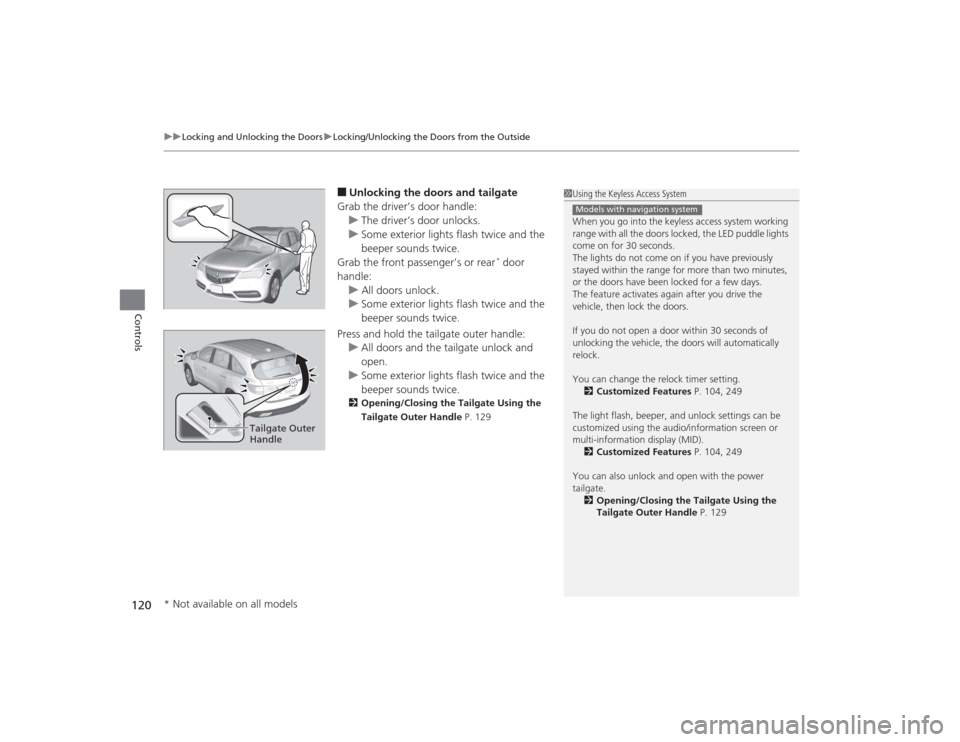
■Unlocking the doors and tailgate
Grab the driver’s door handle: u The driver’s door unlocks.
u Some exterior lights flash twice and the
beeper sounds twice.
Grab the front passenger’s or rear
* door
handle: u All doors unlock.
u Some exterior lights flash twice and the
beeper sounds twice.
Press and hold the tailgate outer handle: u All doors and the tailgate unlock and
open.
u Some exterior lights flash twice and the
beeper sounds twice.
2 Opening/Closing the Tailgate Using the
Tailgate Outer Handle P. 129
1Using the Keyless Access System
When you go into the keyless access system working
range with all the doors locked, the LED puddle lights
come on for 30 seconds.
The lights do not come on if you have previously
stayed within the range for more than two minutes,
or the doors have been locked for a few days.
The feature activates again after you drive the
vehicle, then lock the doors.
If you do not open a door within 30 seconds of
unlocking the vehicle, the doors will automatically
relock.
You can change the relock timer setting.
2 Customized Features P. 104, 249
The light flash, beeper, and unlock settings can be
customized using the audio/information screen or
multi-information display (MID). 2 Customized Features P. 104, 249
You can also unlock and open with the power
tailgate. 2 Opening/Closing the Tailgate Using the
Tailgate Outer Handle P. 129Models with navigation system
Tailgate Outer
Handle
* Not available on all models
Page 133 of 505
132
uuOpening and Closing the Tailgate uOpening/Closing the Power Tailgate
Controls
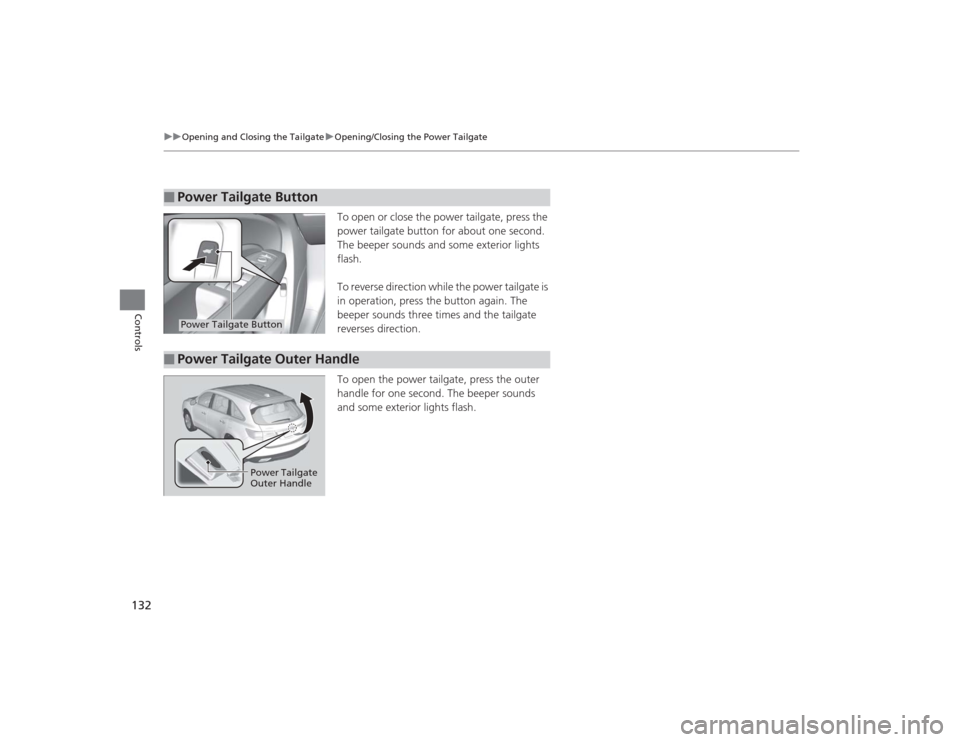
To open or close the power tailgate, press the
power tailgate button for about one second.
The beeper sounds and some exterior lights
flash.
To reverse direction while the power tailgate is
in operation, press the button again. The
beeper sounds three times and the tailgate
reverses direction.
To open the power tailgate, press the outer
handle for one second. The beeper sounds
and some exterior lights flash.
■
Power Tailgate ButtonPower Tailgate Button
■
Power Tailgate Outer Handle
Power Tailgate
Outer Handle
Page 136 of 505
135
Continued
Controls
Security SystemImmobilizer SystemThe immobilizer system prevents a key that has not been pre-registered from
starting the engine. Each key contains electronic transmitters that use electronic
signals to verify the key.
Pay attention to the following when pressing the ENGINE START/STOP button:
• Do not allow objects that emit strong radio waves near the ENGINE START/
STOP button.
• Make sure the key is not covered by or touching a metal object.
• Do not bring a key from another vehicle’s immobilizer system with the keyless
access remote.Security System AlarmThe security system alarm activates when the tailgate, hood, or doors are opened
without the key, remote transmitter or keyless access system.■When the security system alarm activates
The horn sounds intermittently, and all of the exterior lights flash.■To deactivate the security system alarm
Unlock the vehicle using the key, remote transmitter, or keyless access system. The
system, along with the horn and flashing lights, is deactivated.
1 Immobilizer SystemNOTICELeaving the keyless access remote in the vehicle can
result in theft or accidental movement of the vehicle.
Always take the key with you whenever you leave the
vehicle unattended.
Do not alter the system or add other devices to it.
Doing so may damage the system and make your
vehicle inoperable.1Security System Alarm
The security alarm continues for a maximum of two
minutes until the security system alarm deactivates.
Page 138 of 505

137
uuSecurity System uSecurity System Alarm
Controls
■The panic button on the remote
transmitter
If you press the panic button for
approximately one second, the following will
occur for about 30 seconds:
• The horn sounds.
• Some exterior lights flash.
■Canceling panic mode
Press any button on the remote transmitter, or set the power mode to ON.■
Panic Mode
Panic
Button