lights Acura MDX 2015 Service Manual
[x] Cancel search | Manufacturer: ACURA, Model Year: 2015, Model line: MDX, Model: Acura MDX 2015Pages: 505, PDF Size: 18.62 MB
Page 259 of 505
258
uuCustomized Features u
Features
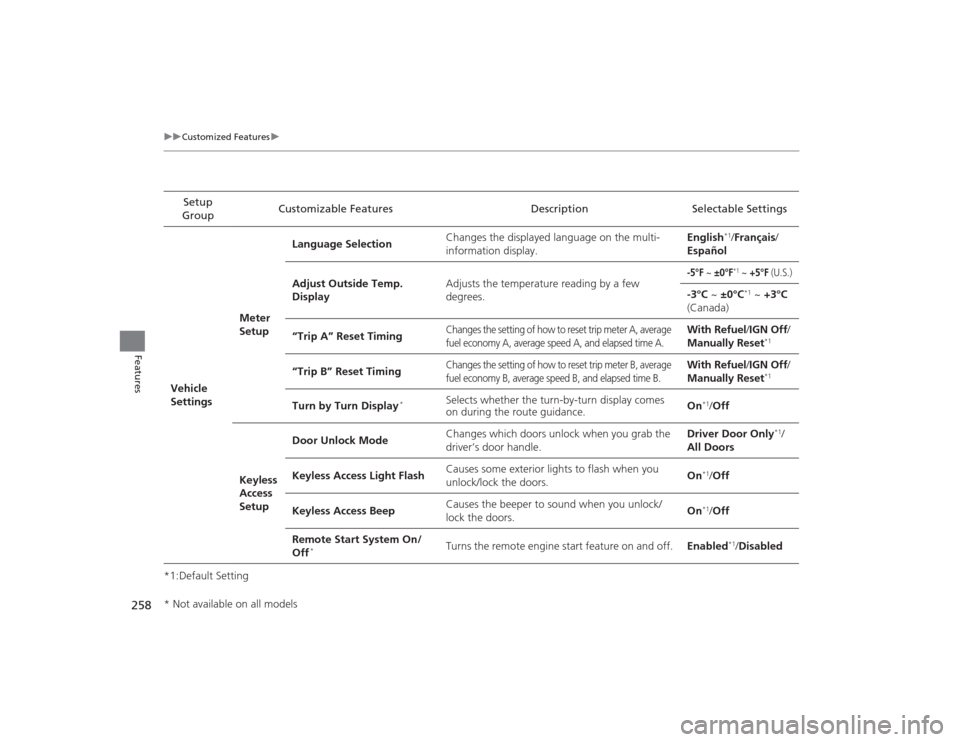
*1:Default SettingSetup
Group Customizable Features Description Selectable SettingsVehicle
SettingsMeter
SetupLanguage Selection
Changes the displayed language on the multi-
information display. English
*1/
Français /
Español
Adjust Outside Temp.
Display Adjusts the temperature reading by a few
degrees.
-5°F
~ ±0°F
*1 ~ +5°F
(U.S.)
-3°C
~ ±0°C
*1 ~ +3°C
(Canada)
“Trip A” Reset Timing
Changes the setting of how to reset trip meter A, average
fuel economy A, average speed A, and elapsed time A.
With Refuel/ IGN Off/
Manually Reset
*1
“Trip B” Reset Timing
Changes the setting of how to reset trip meter B, average
fuel economy B, average speed B, and elapsed time B.
With Refuel/ IGN Off/
Manually Reset
*1
Turn by Turn Display
*
Selects whether the turn-by-turn display comes
on during the route guidance. On
*1/
Off
Keyless
Access
Setup Door Unlock Mode
Changes which doors unlock when you grab the
driver’s door handle. Driver Door Only
*1/
All Doors
Keyless Access Light Flash Causes some exterior lights to flash when you
unlock/lock the doors.
On
*1/
Off
Keyless Access Beep Causes the beeper to sound when you unlock/
lock the doors. On*1/
Off
Remote Start System On/
Off
*
Turns the remote engine start feature on and off. Enabled
*1/Disabled
* Not available on all models
Page 260 of 505

259
uuCustomized Features u
Continued
Features
*1:Default SettingSetup
Group Customizable Features Description Selectable Settings
Vehicle
Settings Lighting
Setup
Interior Light Dimming
Time
Changes the length of time the interior lights stay
on after you close the doors. 60seconds
/
30seconds
*1/
15seconds
Headlight Auto Off Timer Changes the length of time the exterior lights
stay on after you close the driver’s door. 60seconds
/
30seconds /
15seconds*1/
0seconds
Auto Light Sensitivity Changes the timing for the headlights to come
on. Max
/High /Mid
*1/
Low /Min
Driving
Position
Setup Memory Position Link
Turns the driving position memory system using a
remote transmitter on and off. On
*1/
Off
Steering Wheel Movement
At Entry/Exit Moves the steering wheel fully up when you get
in/get out of the vehicle.
On*1/
Off
Auto Seatbelt Tension
*
Turns the setting for the automatic seat belt e-
pretensioner activation on and off. On
*1/
Off
* Not available on all models
Page 261 of 505
260
uuCustomized Features u
Features
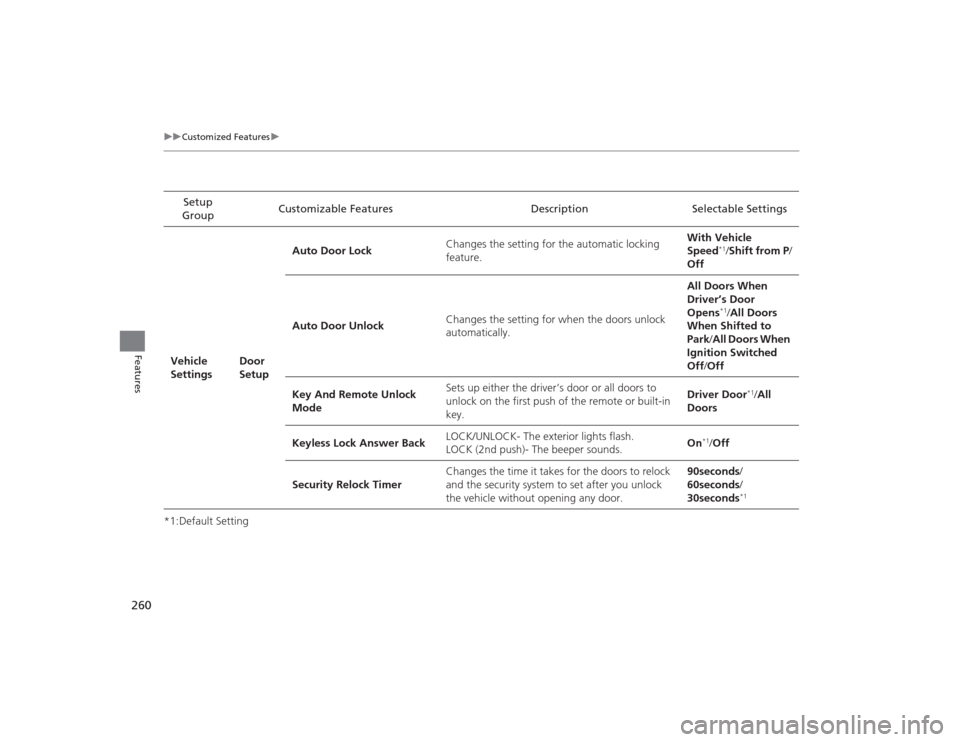
*1:Default SettingSetup
Group Customizable Features Description Selectable Settings
Vehicle
Settings Door
SetupAuto Door Lock
Changes the setting for the automatic locking
feature. With Vehicle
Speed
*1/
Shift from P/
Off
Auto Door Unlock Changes the setting for when the doors unlock
automatically. All Doors When
Driver’s Door
Opens*1/
All Doors
When Shifted to
Park /All Doors When
Ignition Switched
Off /Off
Key And Remote Unlock
Mode Sets up either the driver’s door or all doors to
unlock on the first push of the remote or built-in
key. Driver Door
*1/
All
Doors
Keyless Lock Answer Back LOCK/UNLOCK- The exterior lights flash.
LOCK (2nd push)- The beeper sounds.
On
*1/
Off
Security Relock Timer Changes the time it takes for the doors to relock
and the security system to set after you unlock
the vehicle without opening any door. 90seconds/
60seconds/
30seconds
*1
Page 307 of 505

306Driving
Before DrivingDriving PreparationCheck the following items before you start driving.
•Make sure there are no obstructions on the windows, door mirrors, exterior
lights, or other parts of the vehicle.
u Remove any frost, snow, or ice.
u Remove any snow on the roof, as this can slip down and obstruct your field of
vision while driving. If frozen solid, remove ice once it has softened.
u When removing ice from around the wheels, be sure not to damage the wheel
or wheel components.
• Make sure the hood is securely closed.
u If the hood opens while driving, your front view will be blocked.
• Make sure the tires are in good condition.
u Check air pressure, check for damage and excessive wear.
2 Checking and Maintaining Tires P. 421
•Make sure there are no people or objects behind or around the vehicle.
u There are blind spots from the inside.■
Exterior Checks
1Exterior ChecksNOTICEWhen doors are frozen shut, use warm water around
the door edges to melt any ice. Do not try to force
them open, as this can damage the rubber trim
around the doors. When done, wipe dry to avoid
further freezing.
Do not pour warm water into the key cylinder.
You will be unable to insert the key if the water
freezes in the hole.
Heat from the engine and exhaust can ignite
flammable materials left under the hood, causing a
fire. If you’ve parked your vehicle for an extended
period, inspect and remove any debris that may have
collected, such as dried grass and leaves that have
fallen or have been carried in for use as a nest by a
small animal.
Also check under the hood for leftover flammable
materials after you or someone else has performed
maintenance on your vehicle.
Page 318 of 505
Continued
317
uuTowing a Trailer uTowing Preparation
Driving
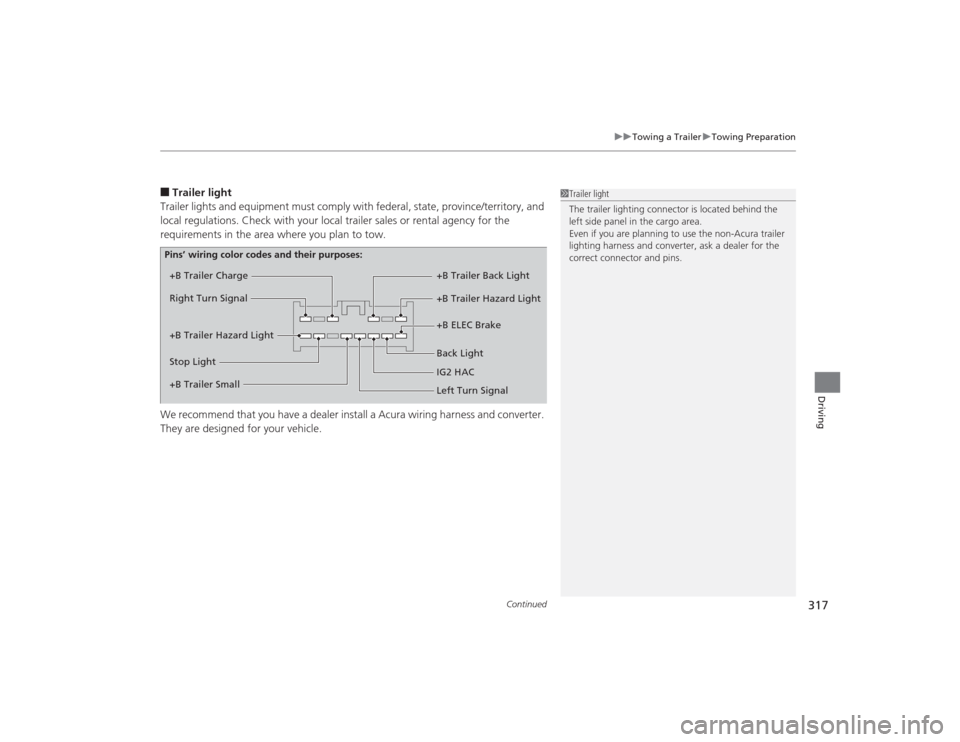
■Trailer light
Trailer lights and equipment must comply with federal, state, province/territory, and
local regulations. Check with your local traile r sales or rental agency for the
requirements in the area where you plan to tow.
We recommend that you have a dealer install a Acura wiring harness and converter.
They are designed for your vehicle.
1 Trailer light
The trailer lighting connector is located behind the
left side panel in the cargo area.
Even if you are planning to use the non-Acura trailer
lighting harness and converter, ask a dealer for the
correct connector and pins.
+B Trailer Charge
+B Trailer Hazard Light +B Trailer Hazard Light +B Trailer Back Light
Back Light +B ELEC Brake
Right Turn Signal
Stop Light
Pins’ wiring color codes and their purposes:
+B Trailer Small IG2 HAC
Left Turn Signal
Page 320 of 505

319
uuTowing a Trailer uTrailer Stability Assist
*
Driving
Trailer Stability Assist
*
Helps to stabilize the vehicle and trailer when the trailer severely sways.■How trailer stability assist works
When the vehicle and trailer become unstable while driving, trailer stability assist
determines the cause. If the trailer oscillation is detected as the cause, and the
swaying increases, the system applies the brakes or controls engine output to reduce
vehicle speed.
Both the vehicle and trailer brake lights come on automatically if you brake to
reduce vehicle speed.
1 Trailer Stability Assist
*
Trailer stability assist is not a function that prevents
the vehicle and trai ler from swaying. Avoid high
speeds, abrupt steering, improper trailer load, and
sudden braking to keep the trailer from swaying.
When swayed too severely, the system becomes
ineffective, and you may loose control of your
vehicle, causing the trailer to roll over or get
damaged. 2 Driving Safely with a Trailer P. 320
Trailer towing sway is caused by:•Crosswinds•Improper towbar down load•Excessive Speed
The VSA ® system indicator blinks during the trailer
stability assist operation.
2 VSA ® Operation P. 362
* Not available on all models
Page 321 of 505
320
uuTowing a Trailer uDriving Safely with a Trailer
Driving
Driving Safely with a Trailer• Have the trailer properly serviced an d keep it in good condition.
• Make sure that all the weights and load in the vehicle and trailer are within limits.
2 Towing Load Limits P. 311
•When towing more than 3,500 lbs (1,590 kg), use of gasoline with a pump
octane number of 91 or higher is recommended.
u Towing performance can be affected by high altitude, high temperature, or
steep uphill.
• Securely attach the hitch, safety chains, and other necessary parts to the trailer.
• Securely store all the items in and on the trailer so that they do not shift while
driving.
• Check if the lights and brakes on the trailer are working properly.
• Check the pressures of the trailer tires, including the spare.
• Drive slower than normal.
• Obey posted speed limits for vehicles with trailers.
• Use the
(D
position when towing a trailer on level roads.
• Turn more slowly and with a wider turning arc than normal.
• Allow more time and distance for braking.
• Do not brake or turn suddenly.
■
Things You Need To Know Before Towing a Trailer
■
Towing Speeds and Gears
■
Turning and Braking
1Driving Safely with a Trailer
Parking
In addition to the normal precautions, place wheel
chocks at each of the trailer’s tires.1Towing Speeds and Gears
When towing a fixed-sided trailer (e.g., camper), do
not exceed 55 mph (88 km/h).
At higher speeds, the trailer ma y sway or affect
vehicle handling.
Page 325 of 505
324Driving
When DrivingStarting the Engine
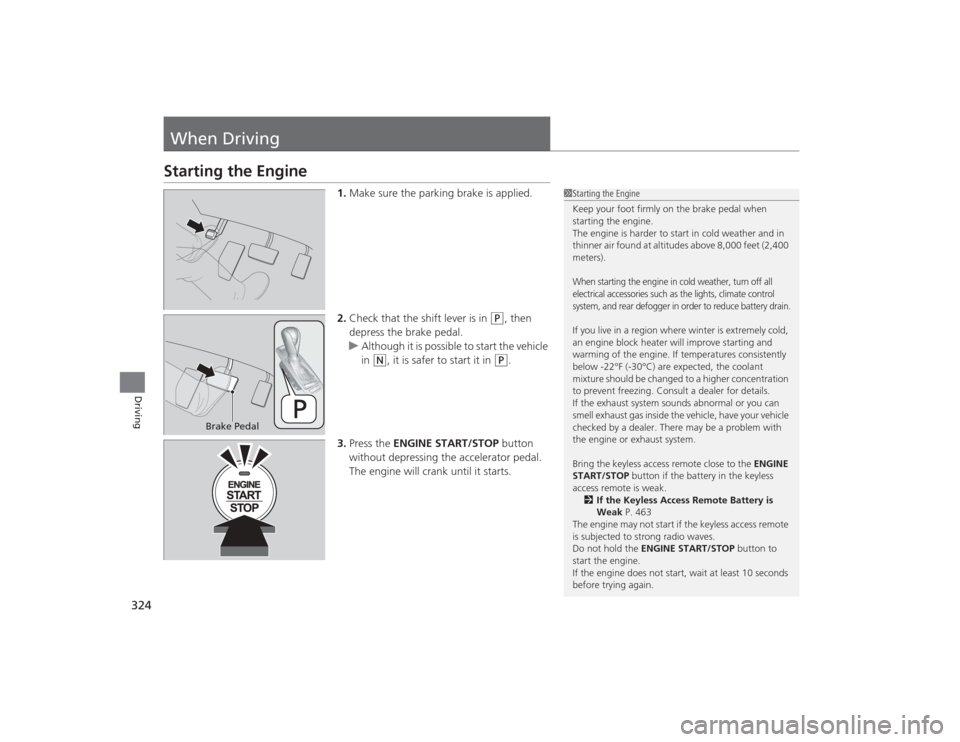
1.Make sure the parking brake is applied.
2. Check that the shift lever is in
(P
, then
depress the brake pedal.
u Although it is possible to start the vehicle
in
(N
, it is safer to start it in
(P
.
3. Press the ENGINE START/STOP button
without depressing the accelerator pedal.
The engine will crank until it starts.
1 Starting the Engine
Keep your foot firmly on the brake pedal when
starting the engine.
The engine is harder to start in cold weather and in
thinner air found at altitudes above 8,000 feet (2,400
meters).When starting the engine in cold weather, turn off all
electrical accessories such as the lights, climate control
system, and rear defogger in order to reduce battery drain.If you live in a region where winter is extremely cold,
an engine block heater will improve starting and
warming of the engine. If temperatures consistently
below -22°F (-30°C) are expected, the coolant
mixture should be changed to a higher concentration
to prevent freezing. Consult a dealer for details.
If the exhaust system sounds abnormal or you can
smell exhaust gas inside the vehicle, have your vehicle
checked by a dealer. There may be a problem with
the engine or exhaust system.
Bring the keyless access remote close to the ENGINE
START/STOP button if the battery in the keyless
access remote is weak. 2 If the Keyless Access Remote Battery is
Weak P. 463
The engine may not start if the keyless access remote
is subjected to strong radio waves.
Do not hold the ENGINE START/STOP button to
start the engine.
If the engine does not start, wait at least 10 seconds
before trying again.
Brake Pedal
Page 354 of 505
353
uuWhen Driving uForward Collision Warning (FCW)
*
Driving
FCW may not activate or may not detect a vehicle in front of your vehicle, and may
activate even when you are aware of a vehicle ahead of you, or when there is no
vehicle ahead, under the following conditions.■
FCW Limitations
Condition
●The distance between your vehicle and the vehicle ahead of you is too short.●A vehicle cuts in front of you at a slow speed, and it brakes suddenly.●A vehicle suddenly crosses in front of you.●When either your vehicle or the vehicle ahead of you accelerates rapidly.●The vehicle ahead of you is a motorcycle, a small vehicle, or a unique vehicle such as a tractor.●When you drive off-road or on a mountain road, or curved and winding road for an extended period that makes it difficult for th e sensor/camera to
properly detect a vehicle in front of you.●When there are pe destrians or animals in front of your vehicle.●When you drive in bad weather (rain, fog, etc.).●A heavy load in the rear or modifications to the suspension tilts your vehicle.●An abnormal tire condition is detected (wrong tire size, flat tire, etc.).●When the windshield is blocked by dirt, mud, leaves, wet snow, etc.●When the temperature inside the system is high.●A sudden change between light and dark such as an entrance or exit of a tunnel.●You drive into the sunlight (e.g. at dawn or dusk).●When the windshield is dirty or cloudy.●When streetlights are perceived as the taillight of a vehicle in front of yours.●When driving at night, the vehicle ahead of you is running with either taillight bulb burned out.●When you drive in the shadows of trees, buildings, etc.●When your vehicle is towing a trailer.
Page 362 of 505
361
uuWhen Driving uLane Keeping Assist System (LKAS)
*
Driving
The system may not detect lane markings and the position of your vehicle properly
under the following conditions.■
LKAS Limitations
Condition
●The vehicle interior is reflected onto the front windshield.●Headlight lenses are dirty or the headlights are not properly adjusted.●The windshield is fogged.●Driving on snowy or wet roads.●The ambient brightness suddenly changes (e.g., at the entrance or exit of a tunnel).●You drive into the low sun (e.g., at dawn or dusk).●A strong light is reflected onto the roadway.●Roadway lane markers are difficult to see due to weather (rain, snow, fog, etc.) or road conditions.●Driving on a road with temporary lane markings.●Multiple or varied lane markings are visible on the roadway due to road repairs or old lane markings.●Roadway objects or structures are misinterpreted as lane markers.●There is little contrast between lane lines and the roadway surface.●The vehicle in front of you is driving near the lane lines.●Driving over bumps.●Where marked lanes merge or split.●Where the lane is extremely narrow, wide or changing.●Where the road is hilly or the vehicle is approaching the crest of a hill.