brake Acura MDX 2015 Owner's Guide
[x] Cancel search | Manufacturer: ACURA, Model Year: 2015, Model line: MDX, Model: Acura MDX 2015Pages: 505, PDF Size: 18.62 MB
Page 146 of 505
145
uuOperating the Switches Around the Steering Wheel uLight Switches
Continued
Controls
Light Switches
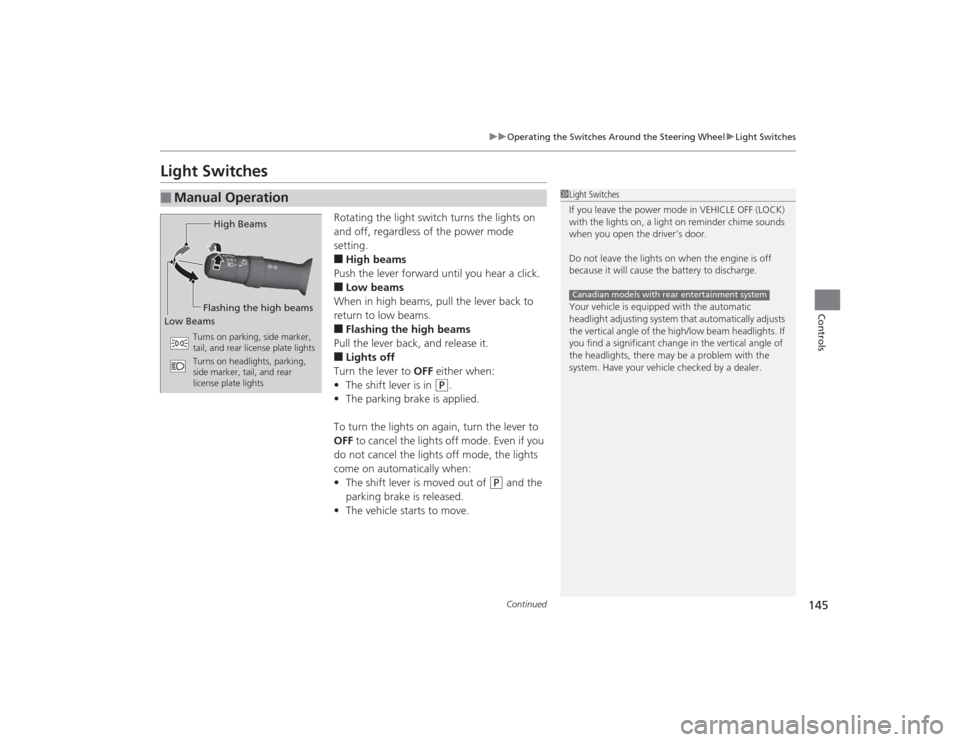
Rotating the light switch turns the lights on
and off, regardless of the power mode
setting.■High beams
Push the lever forward until you hear a click.■Low beams
When in high beams, pull the lever back to
return to low beams.■Flashing the high beams
Pull the lever back, and release it.■Lights off
Turn the lever to OFF either when:
• The shift lever is in
(P
.
• The parking brake is applied.
To turn the lights on again, turn the lever to
OFF to cancel the lights off mode. Even if you
do not cancel the lights off mode, the lights
come on automatically when:
• The shift lever is moved out of
(P
and the
parking brake is released.
• The vehicle starts to move.
■
Manual Operation
1Light Switches
If you leave the power mode in VEHICLE OFF (LOCK)
with the lights on, a light on reminder chime sounds
when you open the driver’s door.
Do not leave the lights on when the engine is off
because it will cause the battery to discharge.
Your vehicle is equipped with the automatic
headlight adjusting system that automatically adjusts
the vertical angle of the high/low beam headlights. If
you find a significant change in the vertical angle of
the headlights, there may be a problem with the
system. Have your vehicle checked by a dealer.Canadian models with rear entertainment system
High Beams
Flashing the high beams
Low Beams
Turns on parking, side marker,
tail, and rear license plate lights
Turns on headlights, parking,
side marker, tail, and rear
license plate lights
Page 149 of 505
148
uuOperating the Switches Around the Steering Wheel uDaytime Running Lights
Controls
Daytime Running LightsThe daytime running lights come on when the following conditions have been met:
• The power mode is in ON.
• The headlight switch is AUTO, or in .
• The parking brake is released.
The daytime running lights are off once the headlight switch is turned on, or when
the head light switch is in AUTO and it is getting darker outside.
Page 157 of 505

uuOperating the Switches Around the Steering Wheel uDriving Position Memory System
156Controls
1. Set the power mode to ON. Adjust the
driver’s seat, the steering wheel and the
door mirrors to the desired position.
2. Press the SET button.
u You will hear a beep, and the memory
button indicator light will blink.
3. Press memory button
(1
or
(2
within five
seconds of pressing the SET button.
u Once the seat, the steering wheel and
the outside mirror positions have been
memorized, the indicator light on the
button you pressed stays on.
1. Move the shift lever to
(P
.
2. Apply the parking brake.
3. Press a memory button ((1
or
(2
).
u You will hear a beep, and the indicator
light will blink.
The seat, the steering wheel and the door
mirrors will automatically move to the
memorized positions. When it has finished
moving, you will hear the beep, and the
indicator light stays on.
■
Storing a Position in Memory
1 Storing a Position in Memory
After you press the SET button, the storing operation
will be canceled when: •You do not press the memory button within five
seconds.•You readjust the seat, the steering wheel or the
outside mirror position before the double-beep.•You set the power mode to any position except
ON.
Memory Button 1
Memory Button 2
SET Button■
Recalling the Stored Position
1Recalling the Stored Position
The seat will stop moving if you:•Press the SET button, or a memory button (
(1 or
(2).
•Adjust the seat, the steering wheel or the door
mirror position.•Shift into any position except
( P.
Memory Buttons
Page 171 of 505
uuAdjusting the Seats uRear Seats
170Controls
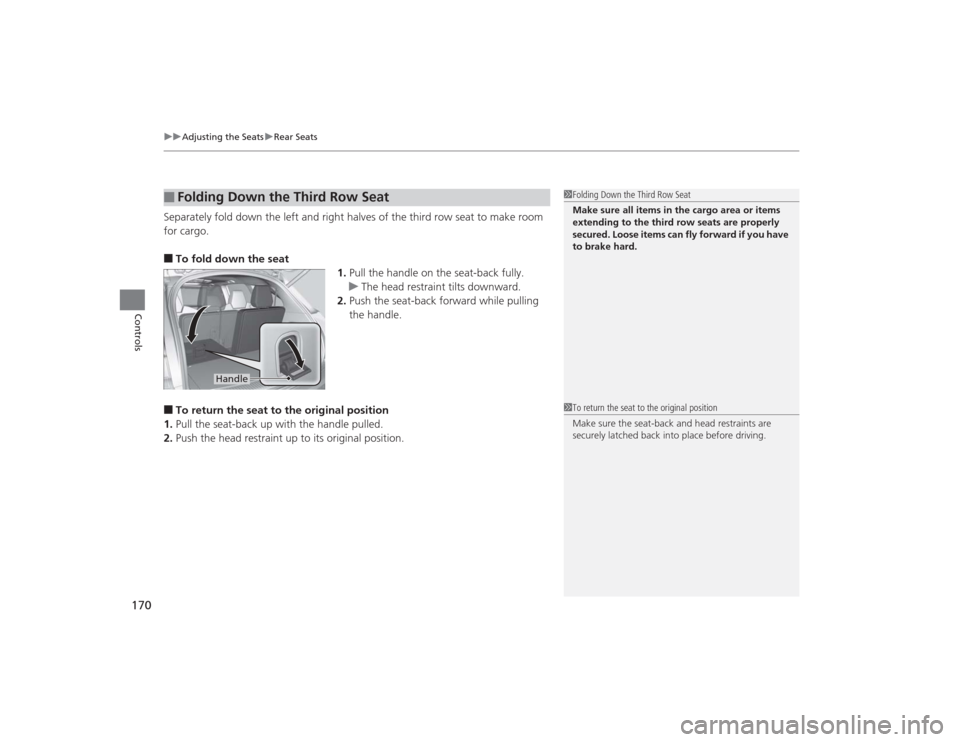
Separately fold down the left and right halves of the third row seat to make room
for cargo.■To fold down the seat
1.Pull the handle on the seat-back fully.
u The head restraint tilts downward.
2. Push the seat-back forward while pulling
the handle.■To return the seat to the original position
1. Pull the seat-back up with the handle pulled.
2. Push the head restraint up to its original position.■
Folding Down the Third Row Seat
1Folding Down the Third Row Seat
Make sure all items in the cargo area or items
extending to the third row seats are properly
secured. Loose items can fly forward if you have
to brake hard.
Handle
1To return the seat to the original position
Make sure the seat-back and head restraints are
securely latched back into place before driving.
Page 306 of 505
305
Driving
This chapter discusses driving, refueling, and information on items such as accessories.
Before DrivingDriving Preparation .......................... 306
Maximum Load Limit........................ 309
Towing a Trailer ................................ 311
Off-Highway Driving Guidelines ..... 322
When Driving Starting the Engine .......................... 324
Precautions While Driving................. 329
Automatic Transmission ................... 330
Shifting ............................................ 331
Integrated Dynamics System (IDS)..... 335
Cruise Control ................................. 336
Adaptive Cruise Control (ACC) with Low Speed Follow (LSF)
*......................... 339 Forward Collision Warning (FCW)
*.. 350
Lane Departure Warning (LDW)
*..... 354
Lane Keeping Assist System (LKAS)*.. 357
Vehicle Stability Assist (VSA ®), aka Electronic
Stability Control (ESC), System ............. 362Agile Handling Assist System............ 364
Blind Spot Information (BSI) System
*... 365
Super Handling-All Wheel Drive
TM (SH-
AWD® )
*......................................... 367
Tire Pressure Monitoring System (TPMS) ... 367Tire Pressure Monitoring System (TPMS) -
Required Federal Explanation ......... 369
Braking Brake System ................................... 371 Anti-lock Brake System (ABS) ........... 373
Brake Assist System ......................... 374
Collision Mitigation Braking System
TM
(CMBS
TM)*..................................... 375
Parking Your Vehicle
When Stopped ................................ 381
Parking Sensor System
*................... 382
Multi-View Rear Camera*................ 386
Refueling Fuel Information .............................. 387
How to Refuel ................................. 388
Fuel Economy .................................... 389
Accessories and Modifications ........ 390
* Not available on all models
Page 308 of 505

Continued
307
uuBefore Driving uDriving Preparation
Driving
• Store or secure all items on board properly.
u Carrying too much cargo, or improperly storing it, can affect your vehicle’s
handling, stability, stopping distance, and tires, and make it unsafe.
2 Maximum Load Limit P. 309
•Do not pile items higher than the seat height.
u They can block your view and may be thrown forward in the event of sudden
braking.
• Do not place anything in the front seat footwells. Make sure to secure the floor
mat.
u An object or unsecured floor mat can interfere with your brake and accelerator
pedal operation while driving.
• If you have any animals on board, do not let them move around in the vehicle.
u They may interfere with driving and a crash could occur.
• Securely close and lock all doors and the tailgate.
2 Locking/Unlocking the Doors from the Inside P. 124
•Adjust your seating position properly.
u Adjust the head restraint, too.
2 Adjusting the Seats P. 161
2 Adjusting the Head Restraints P. 164
•Adjust the mirrors and steering wheel properly for your driving.
u Adjust them while sitting in the proper driving position.
2 Adjusting the Steering Wheel P. 157
2 Adjusting the Mirrors P. 158
■
Interior Checks
1Interior Checks
The headlight aim is set by the factory, and does not
need to be adjusted. However, if you regularly carry
heavy items in the cargo area or tow a trailer, have
the aiming readjusted at a dealer or by a qualified
technician.
Page 316 of 505
Continued
315
uuTowing a Trailer uTowing Preparation
Driving
Towing generally requires a variety of supplemental equipment.
To ensure the best quality, we recommend that you purchase Acura equipment
whenever possible.■
Towing Equipment and Accessories
1Towing Equipment and Accessories
Make sure that all equipment is properly installed and
maintained, and that it meets federal, state, province/
territory, and local regulations.
Consult your trailer make r for proper installation and
setup of the equipment.
Improper installation and setup can affect the
handling, stability, and braking performance of your
vehicle.
Consult your trailer sales or rental agency if any other
items are recommended or required for your towing
situation.
The lighting and wiring of trailers can vary by type
and brand. If a connector is required, it should only
be installed by a qualified technician.
Trailer packages and products:•Ball mount, hitch plug, hitch pin etc.•Wiring harness kit•Trailer hitch kit (jumper harness included) 2Trailer brakes P. 316•Automatic transmission cooler kit
2Automatic transmission cooler P. 318
Are available at a dealer.
Page 317 of 505
uuTowing a Trailer uTowing Preparation
316Driving
■Trailer brakes
Recommended for any trailer with a total weight of 1,000 lbs (450 kg) or more:
There are two common types of trailer brakes: surge and electric. Surge brakes are
common for boat trailers, since the brakes will get wet.
If you choose electric brakes, be sure they are electronically actuated. Do not
attempt to attach trailer brakes to your vehicle’s hydraulic system, as it will lower
braking effectiveness and create a potential hazard.
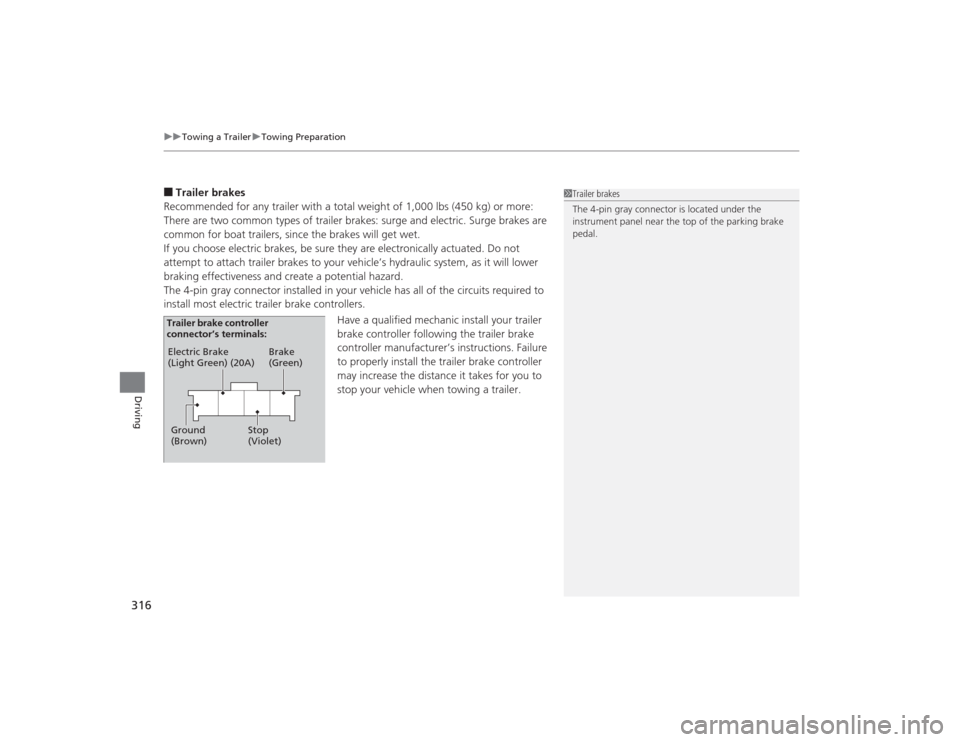
The 4-pin gray connector installed in your vehicle has all of the circuits required to
install most electric trailer brake controllers.
Have a qualified mechanic install your trailer
brake controller following the trailer brake
controller manufacturer’s instructions. Failure
to properly install the trailer brake controller
may increase the distance it takes for you to
stop your vehicle when towing a trailer.
1Trailer brakes
The 4-pin gray connector is located under the
instrument panel near the top of the parking brake
pedal.
Electric Brake
(Light Green) (20A)
Ground
(Brown) Brake
(Green)
Stop
(Violet)
Trailer brake controller
connector’s terminals:
Page 318 of 505
Continued
317
uuTowing a Trailer uTowing Preparation
Driving
■Trailer light
Trailer lights and equipment must comply with federal, state, province/territory, and
local regulations. Check with your local traile r sales or rental agency for the
requirements in the area where you plan to tow.
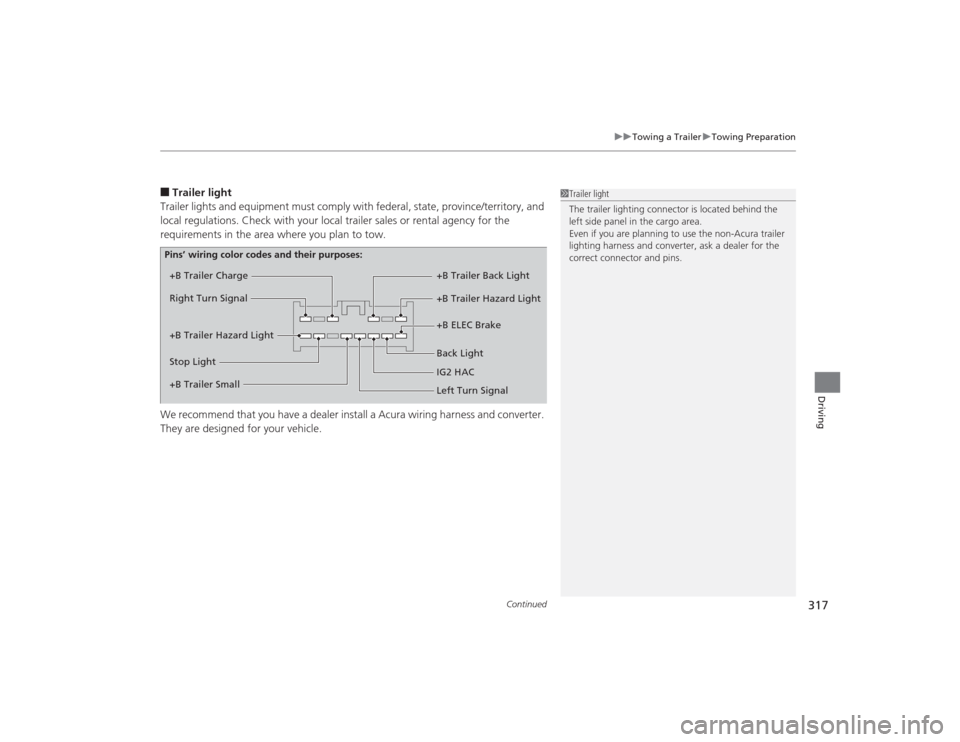
We recommend that you have a dealer install a Acura wiring harness and converter.
They are designed for your vehicle.
1 Trailer light
The trailer lighting connector is located behind the
left side panel in the cargo area.
Even if you are planning to use the non-Acura trailer
lighting harness and converter, ask a dealer for the
correct connector and pins.
+B Trailer Charge
+B Trailer Hazard Light +B Trailer Hazard Light +B Trailer Back Light
Back Light +B ELEC Brake
Right Turn Signal
Stop Light
Pins’ wiring color codes and their purposes:
+B Trailer Small IG2 HAC
Left Turn Signal
Page 320 of 505

319
uuTowing a Trailer uTrailer Stability Assist
*
Driving
Trailer Stability Assist
*
Helps to stabilize the vehicle and trailer when the trailer severely sways.■How trailer stability assist works
When the vehicle and trailer become unstable while driving, trailer stability assist
determines the cause. If the trailer oscillation is detected as the cause, and the
swaying increases, the system applies the brakes or controls engine output to reduce
vehicle speed.
Both the vehicle and trailer brake lights come on automatically if you brake to
reduce vehicle speed.
1 Trailer Stability Assist
*
Trailer stability assist is not a function that prevents
the vehicle and trai ler from swaying. Avoid high
speeds, abrupt steering, improper trailer load, and
sudden braking to keep the trailer from swaying.
When swayed too severely, the system becomes
ineffective, and you may loose control of your
vehicle, causing the trailer to roll over or get
damaged. 2 Driving Safely with a Trailer P. 320
Trailer towing sway is caused by:•Crosswinds•Improper towbar down load•Excessive Speed
The VSA ® system indicator blinks during the trailer
stability assist operation.
2 VSA ® Operation P. 362
* Not available on all models