door lock Acura MDX 2015 Service Manual
[x] Cancel search | Manufacturer: ACURA, Model Year: 2015, Model line: MDX, Model: Acura MDX 2015Pages: 505, PDF Size: 18.62 MB
Page 142 of 505
141
Continued
Controls
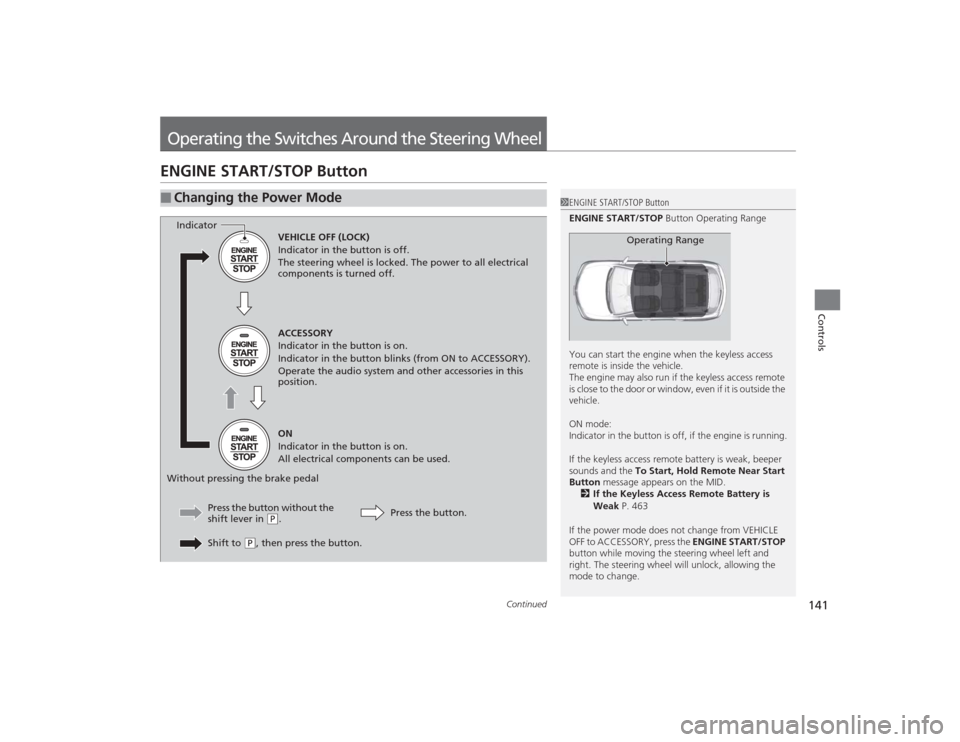
Operating the Switches Around the Steering WheelENGINE START/STOP Button■
Changing the Power Mode
1ENGINE START/STOP Button
ENGINE START/STOP Button Operating Range
You can start the engine when the keyless access
remote is inside the vehicle.
The engine may also run if the keyless access remote
is close to the door or window, even if it is outside the
vehicle.
ON mode:
Indicator in the button is off, if the engine is running.
If the keyless access remote battery is weak, beeper
sounds and the To Start, Hold Remote Near Start
Button message appears on the MID.
2 If the Keyless Access Remote Battery is
Weak P. 463
If the power mode does not change from VEHICLE
OFF to ACCESSORY, press the ENGINE START/STOP
button while moving the steering wheel left and
right. The steering wheel will unlock, allowing the
mode to change.
Operating Range
VEHICLE OFF (LOCK)
Indicator in the button is off.
The steering wheel is locked. The power to all electrical
components is turned off.
ACCESSORY
Indicator in the button is on.
Indicator in the button blinks (from ON to ACCESSORY).
Operate the audio system and other accessories in this
position.
ON
Indicator in the button is on.
All electrical components can be used.
Press the button.
Press the button without the
shift lever in (
P.
Shift to
( P, then press the button.
Indicator
Without pressing the brake pedal
Page 143 of 505
142
uuOperating the Switches Around the Steering Wheel uENGINE START/STOP Button
Controls
If you leave the vehicle for 30 to 60 minutes with the shift lever in
(P
and the power
mode in ACCESSORY, the vehicle automatically goes into the mode similar to
VEHICLE OFF (LOCK) to avoid the battery drain.
When in this mode:
The steering wheel does not lock.
You cannot lock or unlock doors with the remote transmitter or the keyless access
system.
Press the ENGINE START/STOP button to switch the mode to VEHICLE OFF (LOCK).
If you open the driver’s door when the power mode is set to ACCESSORY, a warning
buzzer sounds.
■
Automatic Power Off
■
Power Mode Reminder
Page 146 of 505
145
uuOperating the Switches Around the Steering Wheel uLight Switches
Continued
Controls
Light Switches
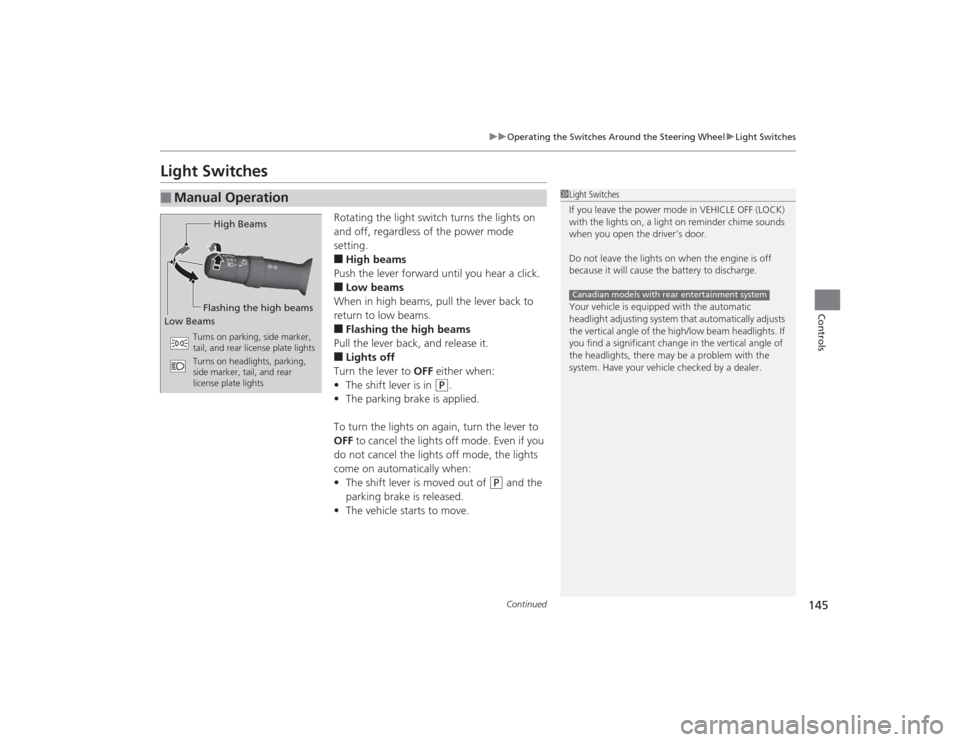
Rotating the light switch turns the lights on
and off, regardless of the power mode
setting.■High beams
Push the lever forward until you hear a click.■Low beams
When in high beams, pull the lever back to
return to low beams.■Flashing the high beams
Pull the lever back, and release it.■Lights off
Turn the lever to OFF either when:
• The shift lever is in
(P
.
• The parking brake is applied.
To turn the lights on again, turn the lever to
OFF to cancel the lights off mode. Even if you
do not cancel the lights off mode, the lights
come on automatically when:
• The shift lever is moved out of
(P
and the
parking brake is released.
• The vehicle starts to move.
■
Manual Operation
1Light Switches
If you leave the power mode in VEHICLE OFF (LOCK)
with the lights on, a light on reminder chime sounds
when you open the driver’s door.
Do not leave the lights on when the engine is off
because it will cause the battery to discharge.
Your vehicle is equipped with the automatic
headlight adjusting system that automatically adjusts
the vertical angle of the high/low beam headlights. If
you find a significant change in the vertical angle of
the headlights, there may be a problem with the
system. Have your vehicle checked by a dealer.Canadian models with rear entertainment system
High Beams
Flashing the high beams
Low Beams
Turns on parking, side marker,
tail, and rear license plate lights
Turns on headlights, parking,
side marker, tail, and rear
license plate lights
Page 148 of 505

147
uuOperating the Switches Around the Steering Wheel uLight Switches
Controls
The headlights automatically come on when the wipers are used several ti\
mes within
a certain number of intervals with the headlight switch in AUTO.
The headlights automatically go off a few minutes later if the wipers are stopped.
The headlights, all other exterior lights, and the instrument panel lights turn off 15
seconds after you set the power mode to VEHICLE OFF (LOCK), take the remote with
you, and close the driver’s door.
If you set the power mode to VEHICLE OFF (LOCK) with the headlight switch on, but
do not open the door, the lights turn off after 10 minutes (three minutes, if the
switch is in the AUTO position).
The lights turn on again when you unlock or open the driver’s door. If you unlock
the door, but do not open it within 15 seconds, the lights go off. If you open the
driver’s door, you will hear a lights on reminder chime.■
Headlight Integration with Wiper
■
Automatic Lighting Off Feature
1 Automatic Lighting Control
Adjust the auto light sensitivity as follows:
Setting
The exterior lights come on
when the ambient light is at
MaxHighMidLowMin
Bright
Dark
1 Headlight Integration with Wiper
This feature activates during the headlights are off in
AUTO .
The instrument panel brightness does not change
when the headlights come on.
When the ambient light is dark, the automatic
lighting control feature overrides, and the headlights
come on with or without the wipers sweeping more
than several times.1 Automatic Lighting Off Feature
You can change the headlight auto off timer setting.
2 Customized Features P. 104, 249
Page 156 of 505

155
uuOperating the Switches Around the Steering Wheel uDriving Position Memory System
Continued
Controls
Driving Position Memory SystemYou can store two driver’s seat (except for power lumbar), steering wheel and door
mirror positions with the driving position memory system.
When you unlock and open the driver’s door with a remote transmitter, or keyless
access system, the seat and door mirrors adjust automatically to one of the two
preset positions.
The steering wheel will move to the stored position when you set the power mode
to ACCESSORY.
The MID shows you which remote transmitter you used to unlock the vehicle when
you enter.
• DRIVER 1 transmitter is linked to memory button 1.
• DRIVER 2 transmitter is linked to memory button 2.
1Driving Position Memory System
Using the audio/information screen or MID, you can
disable the automatic seat, steering wheel and door
mirrors adjustment function.
2 Customized Features P. 104, 249
DRIVER 1 DRIVER 2
Page 173 of 505

172Controls
Interior Lights/Interior Convenience ItemsInterior Lights
■ON
The interior lights come on regardless of
whether the doors are open or closed.■Door activated
The interior lights come on in the following
situations:
• When any doors are opened.
• You unlock the driver’s door.
• When the power mode is set to VEHICLE
OFF (LOCK).■OFF
The interior lights remain off regardless of
whether the tailgate or the doors are open or
closed.
■
Interior Light Switches
1 Interior Light Switches
In the door activated position, the interior lights fade
out and go off about 30 seconds after the doors are
closed.
The lights go off after 30 seconds in the following
situations:•When you unlock the driver’s door but do not open
it.•When you set the power mode to VEHICLE OFF
(LOCK) but do not open a door.
You can change the interior lights dimming time. 2 Customized Features P. 104, 249
The interior lights go off immediately in the following
situations:•When you lock the driver’s door.•When you close the driver’s door in ACCESSORY
mode.•When you set the power mode to ON.
If you leave any doors open in VEHICLE OFF (LOCK)
mode, the interior lights go off after about 15
minutes.
When the interior light switch is in ON, if you close
the tailgate and all doors in VEHICLE OFF (LOCK)
mode, the interior lights go off after about 30
minutes.
However, when the batter y is weaken, the interior
lights go off after about 30 minutes if any door is
open.
Door Activated Position
Off
On
Page 186 of 505
185
Continued
Controls
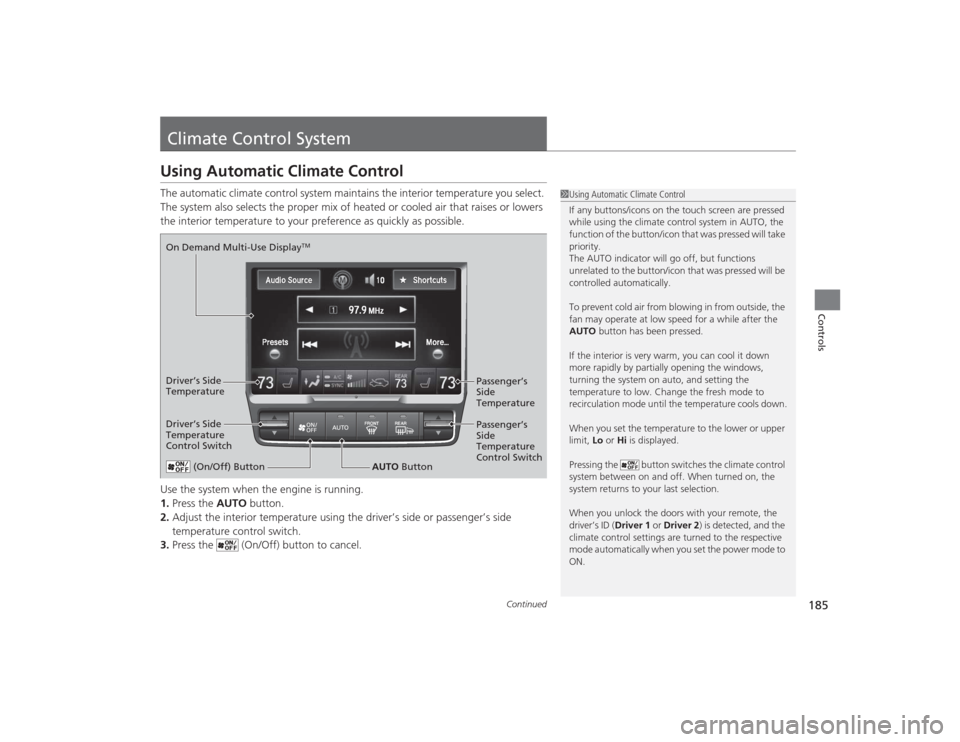
Climate Control SystemUsing Automatic Climate ControlThe automatic climate control system maintains the interior temperature you select.
The system also selects the proper mix of heated or cooled air that raises or lowers
the interior temperature to your preference as quickly as possible.
Use the system when the engine is running.
1.Press the AUTO button.
2. Adjust the interior temperature using the driver’s side or passenger’s side
temperature control switch.
3. Press the (On/Off) button to cancel.
1Using Automatic Climate Control
If any buttons/icons on the touch screen are pressed
while using the climate control system in AUTO, the
function of the button/icon that was pressed will take
priority.
The AUTO indicator will go off, but functions
unrelated to the button/icon that was pressed will be
controlled automatically.
To prevent cold air from blowing in from outside, the
fan may operate at low speed for a while after the
AUTO button has been pressed.
If the interior is very warm, you can cool it down
more rapidly by partially opening the windows,
turning the system on auto, and setting the
temperature to low. Change the fresh mode to
recirculation mode until the temperature cools down.
When you set the temperature to the lower or upper
limit, Lo or Hi is displayed.
Pressing the button switches the climate control
system between on and off. When turned on, the
system returns to your last selection.
When you unlock the doors with your remote, the
driver’s ID ( Driver 1 or Driver 2) is detected, and the
climate control settings are turned to the respective
mode automatically when you set the power mode to
ON.
(On/Off) Button
AUTO Button
On Demand Multi-Use Display
TM
Driver’s Side
Temperature
Control Switch
Passenger’s
Side
Temperature
Control Switch Passenger’s
Side
Temperature
Driver’s Side
Temperature
Page 206 of 505
205Features
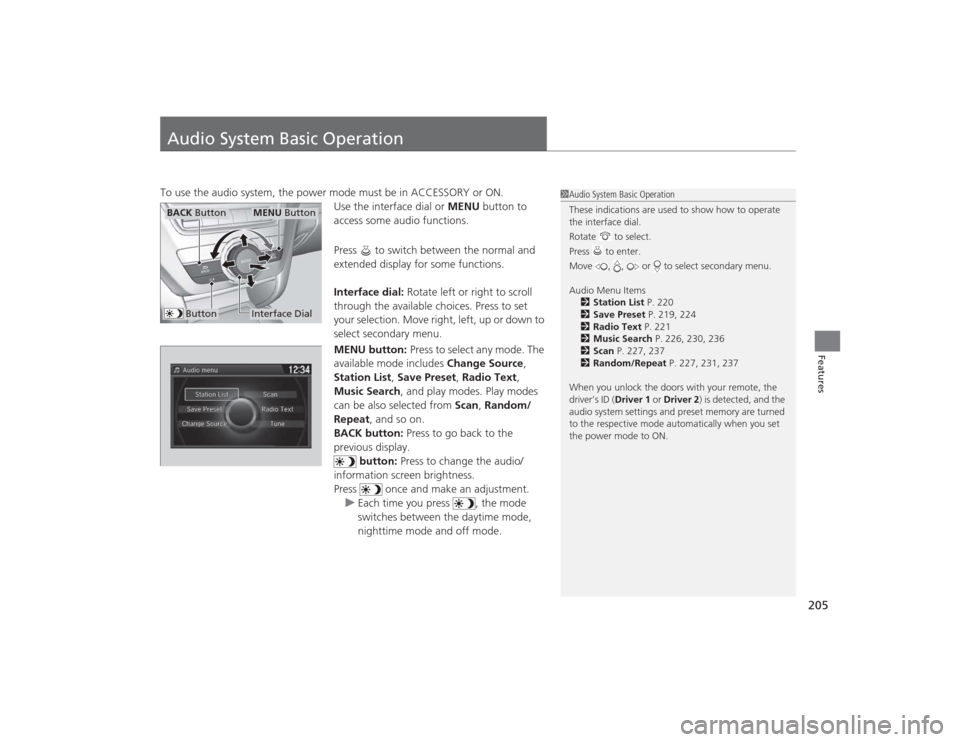
Audio System Basic OperationTo use the audio system, the power mode must be in ACCESSORY or ON.Use the interface dial or MENU button to
access some audio functions.
Press to switch between the normal and
extended display for some functions.
Interface dial: Rotate left or right to scroll
through the available choices. Press to set
your selection. Move right, left, up or down to
select secondary menu.
MENU button: Press to select any mode. The
available mode includes Change Source,
Station List , Save Preset , Radio Text,
Music Search , and play modes. Play modes
can be also selected from Scan, Random/
Repeat , and so on.
BACK button: Press to go back to the
previous display.
button: Press to change the audio/
information screen brightness.
Press once and make an adjustment. u Each time you press , the mode
switches between the daytime mode,
nighttime mode and off mode.
1Audio System Basic Operation
These indications are used to show how to operate
the interface dial.
Rotate to select.
Press to enter.
Move , , or to select secondary menu.
Audio Menu Items
2 Station List P. 220
2 Save Preset P. 219, 224
2 Radio Text P. 221
2 Music Search P. 226, 230, 236
2 Scan P. 227, 237
2 Random/Repeat P. 227, 231, 237
When you unlock the doors with your remote, the
driver’s ID ( Driver 1 or Driver 2) is detected, and the
audio system settings and preset memory are turned
to the respective mode au tomatically when you set
the power mode to ON.
Interface DialMENU Button
BACK Button
Button
Page 252 of 505
251
uuCustomized Features u
Continued
Features
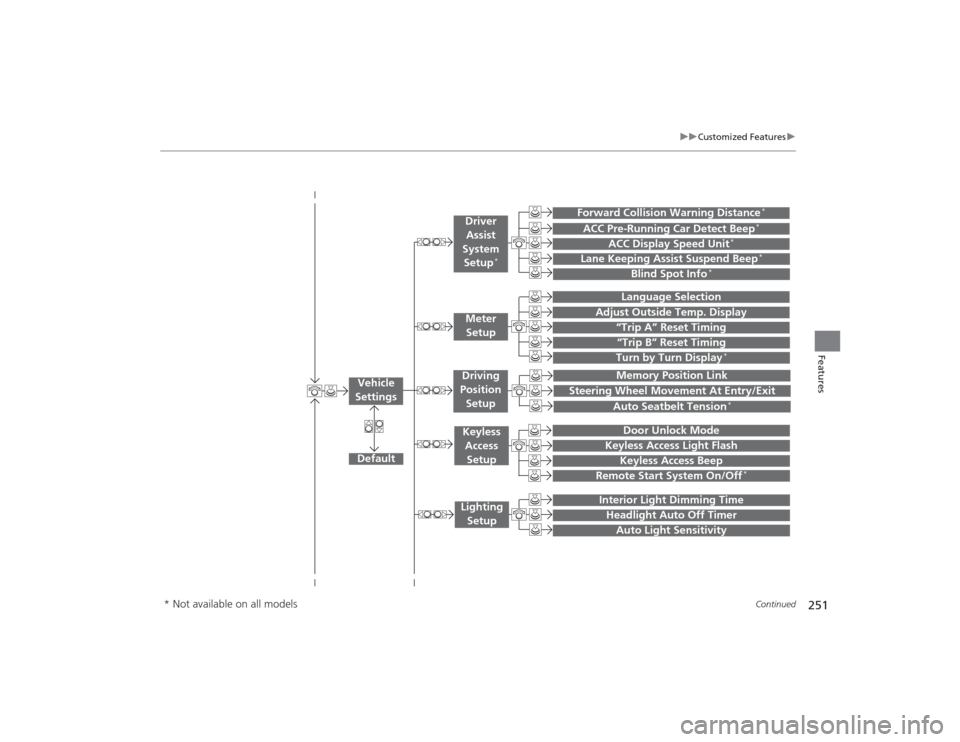
“Trip B” Reset TimingTurn by Turn Display
*
Adjust Outside Temp. Display
“Trip A” Reset Timing
Default
Memory Position Link
Keyless Access Light Flash
Keyless Access Beep
Interior Light Dimming TimeHeadlight Auto Off TimerAuto Light Sensitivity
Vehicle
Settings
Meter SetupKeyless Access
SetupLighting Setup
Remote Start System On/Off
*
Steering Wheel Movement At Entry/Exit
Driving
Position Setup
Door Unlock Mode
Lane Keeping Assist Suspend Beep
*
Blind Spot Info
*
ACC Pre-Running Car Detect Beep
*
ACC Display Speed Unit
*
Driver Assist
System Setup
*
Forward Collision Warning Distance
*
Language SelectionAuto Seatbelt Tension
*
* Not available on all models
Page 253 of 505
252
uuCustomized Features u
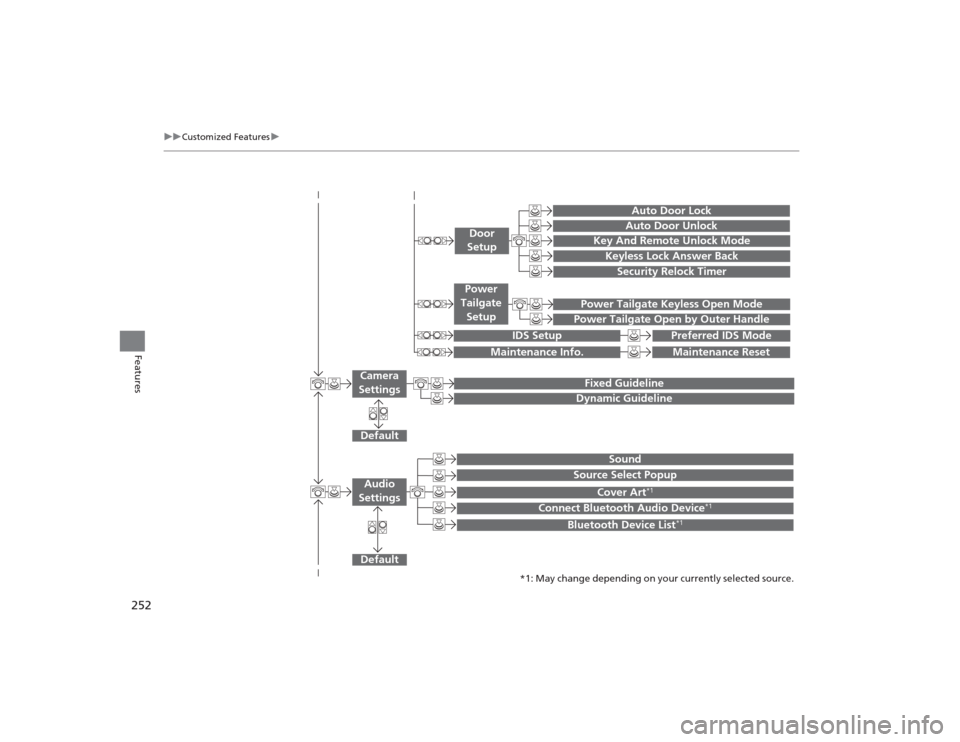
Features
Default
Fixed GuidelineDynamic Guideline
Default
Sound
Source Select Popup
Cover Art
*1
Connect Bluetooth Audio Device
*1
Bluetooth Device List
*1
Audio
Settings
Maintenance Reset
Maintenance Info.
Power Tailgate Keyless Open ModePower Tailgate Open by Outer Handle
Power
Tailgate Setup
Camera
Settings
Preferred IDS Mode
IDS Setup
Key And Remote Unlock ModeKeyless Lock Answer BackSecurity Relock Timer
Auto Door LockAuto Door Unlock
Door
Setup
*1: May change depending on your currently selected source.