steering Acura MDX 2015 Repair Manual
[x] Cancel search | Manufacturer: ACURA, Model Year: 2015, Model line: MDX, Model: Acura MDX 2015Pages: 505, PDF Size: 18.62 MB
Page 341 of 505

uuWhen Driving uAdaptive Cruise Control (ACC) with Low Speed Follow (LSF)
*
340Driving
1Adaptive Cruise Control (ACC) with Low Speed Follow (LSF)
*
Important Reminder
As with any system, there are limits to ACC with LSF.
Use the brake pedal whenever necessary, and always
keep a safe distance between your vehicle and other
vehicles.
The radar sensor for ACC with LSF is shared with the
collision mitigation braking system
TM (CMBS
TM).
2 Collision Mitigation Braking SystemTM
(CMBS
TM)* P. 375
■Vehicle speed for ACC with LSF: A vehicle is
detected ahead within ACC with LSF range –
ACC with LSF operates at any vehicle speed.
No vehicle is detected within ACC with LSF
range – ACC with LSF operates at the speed of
about 25 mph (40km/h) or above.■Shift positions for ACC with LSF: In
( D or
( S. The radar sensor is in the front grille.
■Press the
MAIN button on
the steering wheel. ACC (green) is on in the
instrument panel.
ACC with LSF is ready to
use.
When to use
How to use
* Not available on all models
Page 344 of 505

Continued
343
uuWhen Driving uAdaptive Cruise Control (ACC) with Low Speed Follow (LSF)
*
Driving
■There is no vehicle ahead
When driving at about 22 mph (35 km/h) or
above: Your vehicle maintains the set speed
without having to keep your foot on the brake
or accelerator pedal.
If there previously was a vehicle detected
ahead that kept your vehicle from travelling at
the set speed, ACC with LSF accelerates your
vehicle to the set speed, and then maintains it.
When driving under about 22 mph (35 km/h)
and no vehicle is detected ahead: ACC with LSF
automatically cancels. The beeper sounds once.
■When you depress the accelerator pedal
You can temporarily increase the vehicle speed. In this case, there is no audible or
visual alert even if a vehicle is in the ACC with LSF range.
ACC with LSF stays on unless you cancel it. Once you release the accelerator pedal,
the system resumes the set speed.■A vehicle detected ahead is within ACC with LSF range and slows to a stop
Your vehicle also stops, automatically. The
Stopped message appears on the multi-
information display.
When the vehicle ahead of you starts again,
the vehicle icon on the MID blinks. If you press
the RES/+/ SET/– switch up or down, or
depress the accelerator pedal, ACC with LSF
operates again within the prior set speed.A vehicle icon with dotted-line
contour appears on the MID
1 When in Operation
Limitations
You may need to use the brake to maintain a safe
distance when using ACC with LSF. Additionally,
ACC with LSF may not work properly when:•A vehicle ahead of you is parked when your vehicle
is moving.•Motorcycles or other small vehicles are ahead of
you.•A vehicle cuts in front of you at a short distance.
ACC with LSF may momentarily apply brakes or
sound a beep if there is a vehicle, or even a building,
next to you if:•You make a sudden turn or drive on a narrow road.•You abruptly move the steering wheel.•You are in an unusual position within your lane.
When your vehicle stops automatically because a
vehicle detected ahead of you has stopped, the
distance between the two vehicles will vary based on
the ACC with LSF distance setting, as follows:
Short: 11.5 ft (3.5 m)
Middle: 14.1 ft (4.3 m)
Long, Extra Long: 16.4 ft (5.0 m) 2 To Set or Change Following Distance P. 345
Page 345 of 505

uuWhen Driving uAdaptive Cruise Control (ACC) with Low Speed Follow (LSF)
*
344Driving
Increase or decrease the vehicle speed using the RES/+/SET/– switch on the steering
wheel.
• Each time you press the switch up or down, the vehicle speed is increased or
decreased by about 1 mph or 1 km/h accordingly.
• If you keep the switch pressed up or down, the vehicle speed increases or
decreases by about 5 mp h or 5 km/h accordingly.■
To Adjust the Vehicle Speed
1To Adjust the Vehicle Speed
If a vehicle ahead is going at a speed slower than your
increased set speed, ACC with LSF may not
accelerate your vehicle. This is to maintain the set
following distance between your vehicle and the
vehicle ahead.
To increase speedTo decrease speed
Page 349 of 505

uuWhen Driving uAdaptive Cruise Control (ACC) with Low Speed Follow (LSF)
*
348Driving
■Automatic cancellation
The beeper sounds and a message appears on the MID when ACC with LSF is
automatically canceled. Any of these conditions may cause the ACC with LSF to
automatically cancel:
• Your vehicle speed slows to about 22 mph (35 km/h) or below when a detected
vehicle goes out of the ACC with LSF range.
• Bad weather (rain, fog, snow, etc.)
• When the radar sensor in the front grille gets dirty.
• The vehicle ahead of you cannot be detected.
• An abnormal tire condition is detected, or the tires are skidding.
• Driving on a mountainous road, or driving off road for extended periods.
• Abrupt steering wheel movement.
• When the ABS, VSA ® or CMBS
TM is activated.
• When the VSA ® indicator comes on.
• When the vehicle is stopped on a very steep slope.
• When you manually apply the parking brake.
• When the detected vehicle within the ACC with LSF range is too close to your
vehicle.
• The driver’s seat belt is unfastened when the vehicle is stationary.
• The vehicle stops for more than 10 minutes.
• The engine is turned off.
• When trailer stability assist is activated.
2 Trailer Stability Assist
* P. 319
The ACC with LSF automatic cancellation can be also triggered by the following
causes.
1Automatic cancellation
Even though ACC with LSF has been automatically
canceled, you can still resume the prior set speed.
Wait until the condition that caused ACC with LSF to
cancel improves, then press the RES/+/SET/– switch
down.
* Not available on all models
Page 358 of 505
357
uuWhen Driving uLane Keeping Assist System (LKAS)
*
Continued
Driving
Lane Keeping Assist System (LKAS)
*
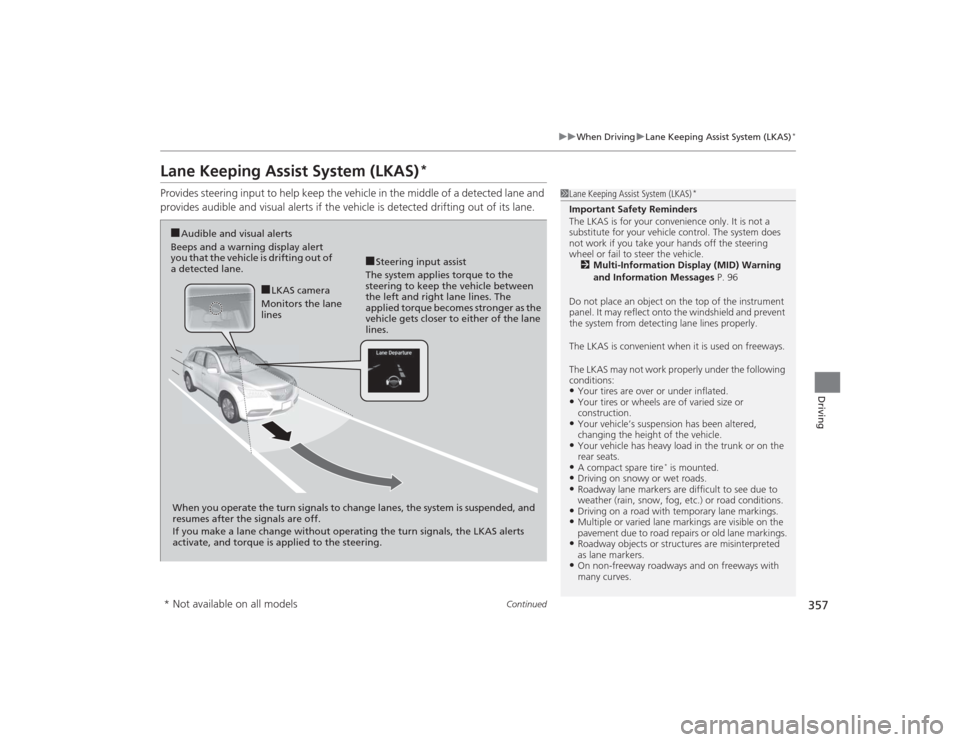
Provides steering input to help keep the vehicle in the middle of a detected lane and
provides audible and visual alerts if the vehicle is detected drifting out of its lane.
1Lane Keeping Assist System (LKAS)
*
Important Safety Reminders
The LKAS is for your convenience only. It is not a
substitute for your vehicle control. The system does
not work if you take your hands off the steering
wheel or fail to steer the vehicle.
2 Multi-Information Display (MID) Warning
and Information Messages P. 96
Do not place an object on the top of the instrument
panel. It may reflect onto the windshield and prevent
the system from detecting lane lines properly.
The LKAS is convenient when it is used on freeways.
The LKAS may not work properly under the following
conditions:•Your tires are over or under inflated.•Your tires or wheels are of varied size or
construction.•Your vehicle’s suspension has been altered,
changing the height of the vehicle.•Your vehicle has heavy load in the trunk or on the
rear seats.•A compact spare tire
* is mounted.
•Driving on snowy or wet roads.•Roadway lane markers are difficult to see due to
weather (rain, snow, fog, etc.) or road conditions.•Driving on a road with temporary lane markings.•Multiple or varied lane markings are visible on the
pavement due to road repairs or old lane markings.•Roadway objects or structures are misinterpreted
as lane markers.•On non-freeway roadways and on freeways with
many curves.
■Steering input assist
The system applies torque to the
steering to keep the vehicle between
the left and right lane lines. The
applied torque becomes stronger as the
vehicle gets closer to either of the lane
lines.
■Audible and visual alerts
Beeps and a warning display alert
you that the vehicle is drifting out of
a detected lane.
When you operate the turn signals to change lanes, the system is suspended, and
resumes after the signals are off.
If you make a lane change without operating the turn signals, the LKAS alerts
activate, and torque is applied to the steering.
■LKAS camera
Monitors the lane
lines
* Not available on all models
Page 361 of 505

360
uuWhen Driving uLane Keeping Assist System (LKAS)
*
Driving
■The system operation is suspended if
you:
• Set the wipers to continuous operation.
u Turning the wipers off resumes the
LKAS.
• Decrease the vehicle speed to about 40
mph (64 km/h) or less.
u Increasing the vehicle speed to about 45
mph (72 km/h) or more resumes the
LKAS.
• Depress the brake pedal.
u The LKAS resumes and starts detecting
the lane lines again once you release the
brake pedal.
■The LKAS may automatically be suspended when:
• The system fails to detect lane lines.
• The steering wheel is quickly turned.
• You fail to steer the vehicle.
• The vehicle is driven on a curved road over the speed limit.
• The camera temperature gets extremely high or low.
Once these conditions no long er exist, the LKAS automatically resumes.When the LKAS is suspended,
the lane lines on the multi-
information display change to
contour lines.
Page 365 of 505

364
uuWhen Driving uAgile Handling Assist System
Driving
Agile Handling Assist SystemLightly brakes each of the front and rear wheels, as needed, when you turn the
steering wheel, and helps support the vehicle’s stability and performance during
cornering.
1Agile Handling Assist System
The agile handling assist system cannot enhance
stability in all driving situations. You still need to drive
and corner at speeds appropriate for the conditions
and always leave a suffi cient margin of safety.
When the VSA ® indicator comes on and stays on
while driving, the agile handling assist system does
not activate.
You may hear a sound coming from the engine
compartment while the system is activated. This is
normal.
Page 369 of 505
uuWhen Driving uTire Pressure Monitoring System (TPMS)
368Driving
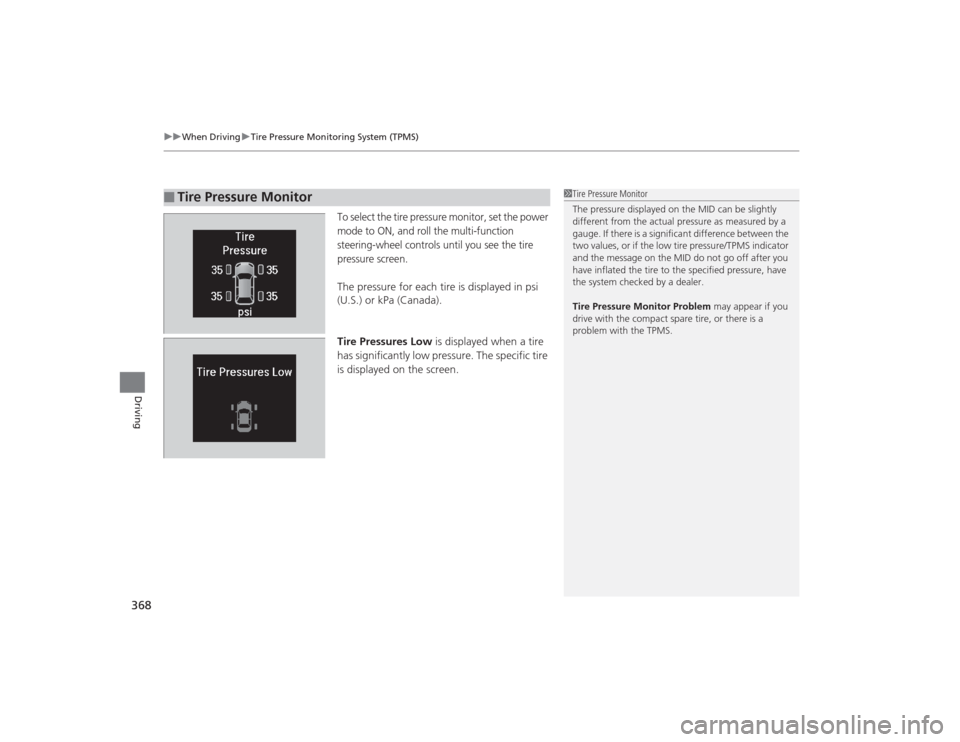
To select the tire pressure monitor, set the power
mode to ON, and roll the multi-function
steering-wheel controls until you see the tire
pressure screen.The pressure for each tire is displayed in psi
(U.S.) or kPa (Canada).
Tire Pressures Low is displayed when a tire
has significantly low pressure. The specific tire
is displayed on the screen.
■
Tire Pressure Monitor
1 Tire Pressure Monitor
The pressure displayed on the MID can be slightly
different from the actual pressure as measured by a
gauge. If there is a significant difference between the
two values, or if the low tire pressure/TPMS indicator
and the message on the MID do not go off after you
have inflated the tire to the specified pressure, have
the system checked by a dealer.
Tire Pressure Monitor Problem may appear if you
drive with the compact spare tire, or there is a
problem with the TPMS.
Page 373 of 505
uuBraking uBrake System
372Driving
Your vehicle is equipped with disc brakes at all four wheels. A vacuum power assist
helps reduce the effort needed on the brake pedal. The brake assist system increases
the stopping force when you depress the brake pedal hard in an emergency
situation. The anti-lock brake system (ABS) helps you retain steering control when
braking very hard.2 Brake Assist System P. 374
2 Anti-lock Brake System (ABS) P. 373■
Foot Brake
1Foot Brake
Check the brakes after driving through deep water,
or if there is a buildup of road surface water. If
necessary, dry the brakes by lightly depressing the
pedal several times.
If you hear a continuous metallic friction sound when
applying the brakes, the brake pads need to be
replaced. Have the vehicle checked by a dealer.
Constantly using the brake pedal while going down a
long hill builds up heat, which reduces the brake
effectiveness. Apply engine braking by taking your
foot off the accelerator pedal and downshifting to a
lower gear.
Do not rest your foot on the brake pedal while
driving, as it will lightly apply the brakes and cause
them to lose effectiveness over time and reduce pad
life. It will also confuse drivers behind you.
Page 374 of 505

373
uuBraking uAnti-lock Brake System (ABS)
Driving
Anti-lock Brake System (ABS)Helps prevent the wheels from locking up, and helps you retain steering control by
pumping the brakes rapidly, much faster than you.
The electronic brake distribution (EBD) system, which is part of the ABS, also
balances the front-to-rear braking distribution according to vehicle loading.
You should never pump the brake pedal. Let the ABS work for you by always
keeping firm, steady pressure on the brake pedal. This is sometimes referred to as
“stomp and steer.”■ABS operation
The brake pedal may pulsate slightly when the ABS is working. Keep holding the
pedal firmly down. On dry pavement, you will need to press on the brake pedal very
hard before the ABS activates. However, you may feel the ABS activate immediately
if you are trying to stop on snow or ice.
When the vehicle speed goes under 6 mph (10 km/h), the ABS stops.■
ABS
1 Anti-lock Brake System (ABS)NOTICEThe ABS may not function correctly if you use an
incorrect tire type and size.
When the ABS indicator comes on while driving,
there may be a problem with the system.
While normal braking is not affected, there is a
possibility of the ABS not operating. Have the vehicle
checked by a dealer immediately.
The ABS does not reduce the time or distance it takes
to stop the vehicle. It only helps with steering control
during hard braking.
In the following cases, your vehicle may need more
stopping distance than a vehicle without the ABS:•When driving on rough road surfaces, including
when driving on uneven surfaces, such as gravel or
snow.•When tire chains are installed.
You may hear a motor sound coming from the
engine compartment while system checks are being
performed immediatel y after starting the engine or
while driving. This is normal.