engine oil Acura MDX 2015 Owner's Manual
[x] Cancel search | Manufacturer: ACURA, Model Year: 2015, Model line: MDX, Model: Acura MDX 2015Pages: 505, PDF Size: 18.62 MB
Page 20 of 505
19Quick Reference Guide
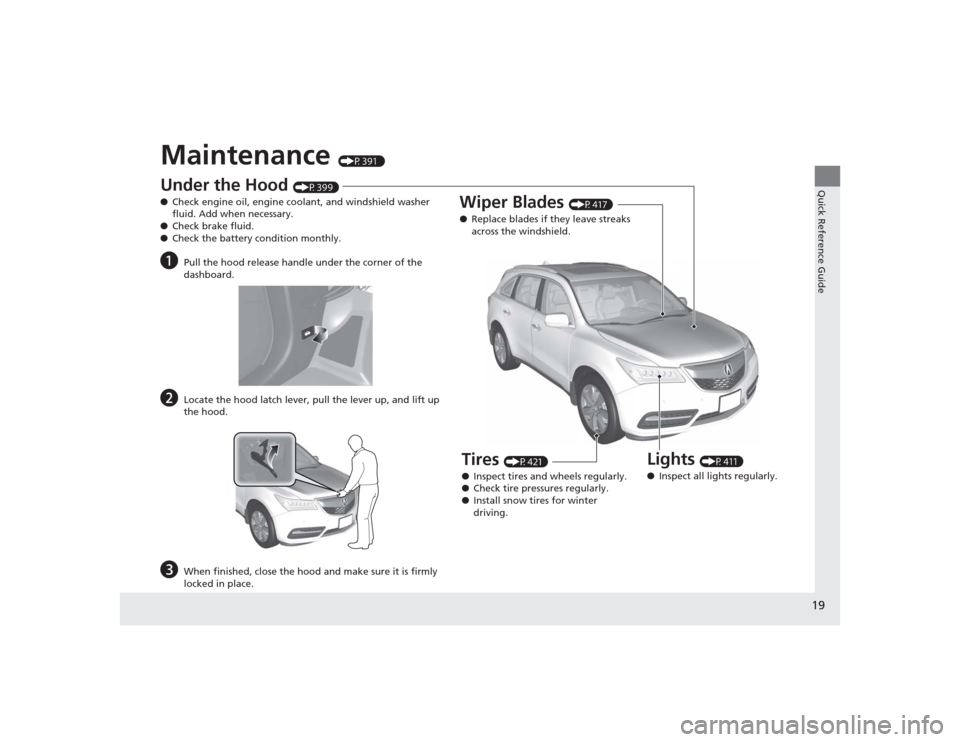
Maintenance
(P391 )
Under the Hood
(P399)
● Check engine oil, engine coolant, and windshield washer
fluid. Add when necessary.
● Check brake fluid.
● Check the battery condition monthly.
a
Pull the hood release handle under the corner of the
dashboard.
b
Locate the hood latch lever, pull the lever up, and lift up
the hood.
c
When finished, close the hood and make sure it is firmly
locked in place.
Lights
(P411)
● Inspect all lights regularly.
Wiper Blades
(P417)
● Replace blades if they leave streaks
across the windshield.
Tires
(P421)
● Inspect tires and wheels regularly.
● Check tire pressures regularly.
● Install snow tires for winter
driving.
Page 67 of 505
66Safe Driving
Exhaust Gas HazardCarbon Monoxide GasThe engine exhaust from this vehicle contains carbon monoxide, a colorless,
odorless, and highly toxic gas. As long as you properly maintain your vehicle, carbon
monoxide gas will not get into the interior.■Have the exhaust system inspected for leaks whenever
• The exhaust system is making an unusual noise.
• The exhaust system may have been damaged.
• The vehicle is raised for an oil change.
When you operate a vehicle with the tailgate open, airflow can pull exhaust gas into
the interior and create a hazardous condition. If you must drive with the tailgate
open, open all the windows and set the climate control system as shown below.
1. Select the fresh air mode.
2. Select the mode.
3. Set the fan speed to high.
4. Set the temperature control to a comfortable setting.
Adjust the climate control system in the same manner if you sit in your parked
vehicle with the engine running.
1Carbon Monoxide Gas
An enclosed area such as a garage can quickly fill up
with carbon monoxide gas.
Do not run the engine with the garage door closed.
Even when the garage door is open, drive out of the
garage immediately after starting the engine.
3
WARNING
Carbon monoxide gas is toxic.
Breathing it can cause unconsciousness and
even kill you.
Avoid any enclosed areas or activities that
expose you to carbon monoxide.
Page 72 of 505
71
uuIndicators u
Continued
Instrument Panel
Indicator
Name
On/Blinking
Explanation
Message
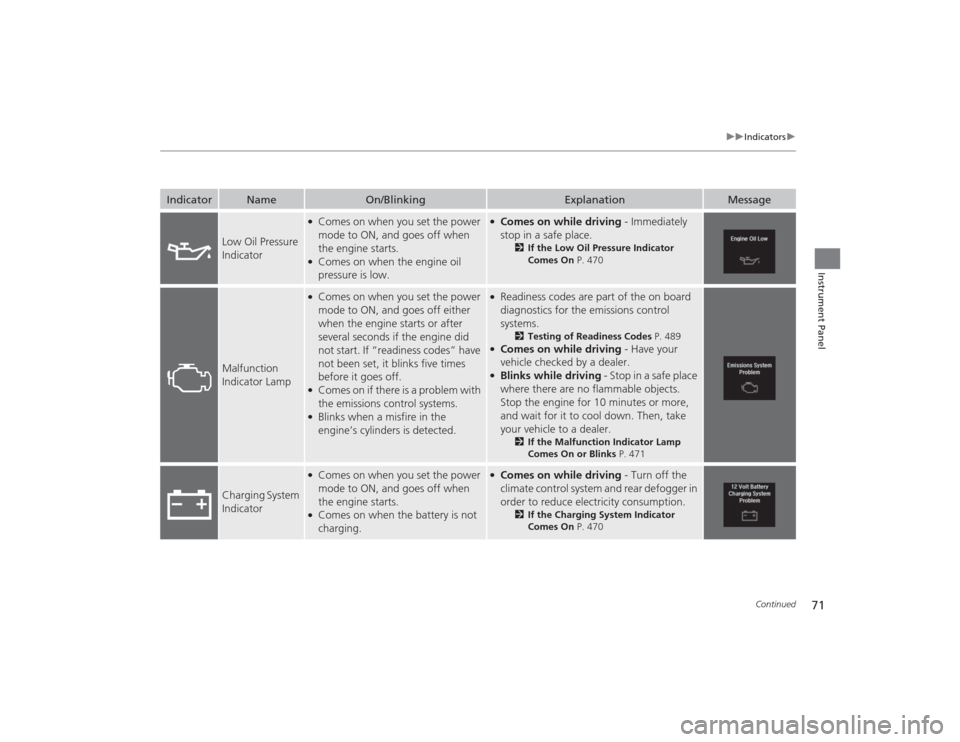
Low Oil Pressure
Indicator
●Comes on when you set the power
mode to ON, and goes off when
the engine starts.●Comes on when the engine oil
pressure is low.
●Comes on while driving - Immediately
stop in a safe place.
2 If the Low Oil Pressure Indicator
Comes On P. 470
Malfunction
Indicator Lamp
●Comes on when you set the power
mode to ON, and goes off either
when the engine starts or after
several seconds if the engine did
not start. If “readiness codes” have
not been set, it blinks five times
before it goes off.●Comes on if there is a problem with
the emissions control systems.●Blinks when a misfire in the
engine’s cylinders is detected.
●Readiness codes are part of the on board
diagnostics for the emissions control
systems.
2Testing of Readiness Codes P. 489
●Comes on while driving - Have your
vehicle checked by a dealer.●Blinks while driving - Stop in a safe place
where there are no flammable objects.
Stop the engine for 10 minutes or more,
and wait for it to cool down. Then, take
your vehicle to a dealer.
2 If the Malfunction Indicator Lamp
Comes On or Blinks P. 471
Charging System
Indicator
●Comes on when you set the power
mode to ON, and goes off when
the engine starts.●Comes on when the battery is not
charging.
●Comes on while driving - Turn off the
climate control system and rear defogger in
order to reduce electricity consumption.
2 If the Charging System Indicator
Comes On P. 470
Page 99 of 505
98
uuGauges and Multi-Informa tion Display (MID)uMID
Instrument Panel
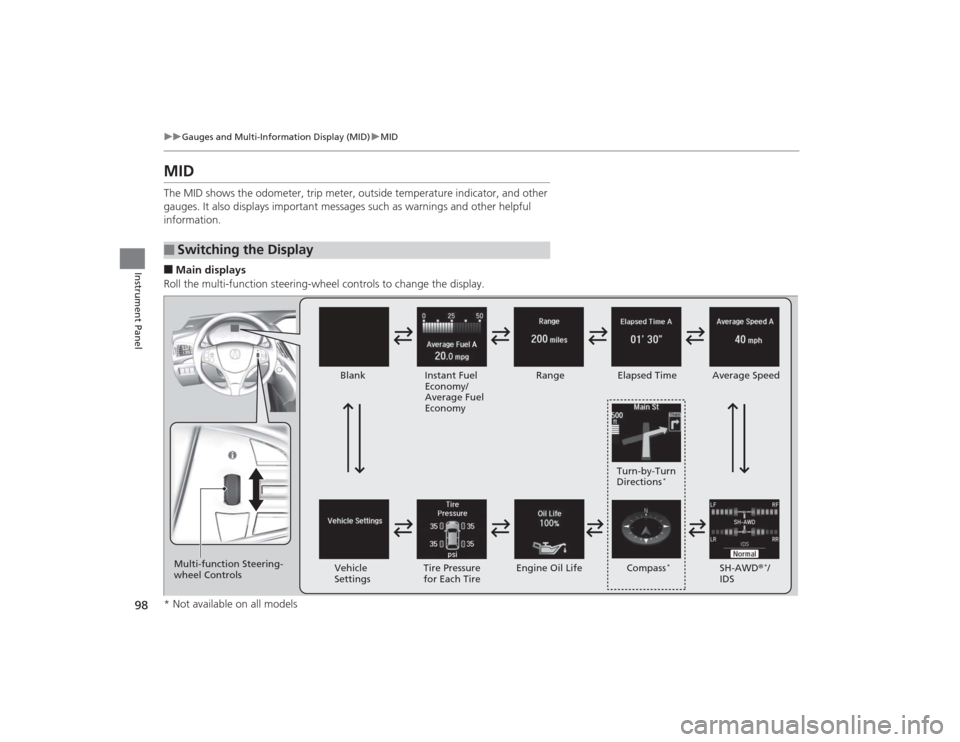
MIDThe MID shows the odometer, trip meter, outside temperature indicator, and other
gauges. It also displays important messages such as warnings and other helpful
information.■Main displays
Roll the multi-function steering-wheel controls to change the display.■
Switching the Display
Blank
Instant Fuel
Economy/
Average Fuel
Economy Range
Elapsed Time Average Speed
SH-AWD®
*/
IDS
Vehicle
Settings Tire Pressure
for Each Tire Engine Oil Life Turn-by-Turn
Directions
*
Multi-function Steering-
wheel Controls
Compass
*
* Not available on all models
Page 104 of 505
103
uuGauges and Multi-Information Display (MID) uMID
Continued
Instrument Panel
Shows the remaining oil life and Maintenance Minder
TM.
2 Maintenance Minder
TM P. 395
Shows each tire’s pressure.2Tire Pressure Monitoring System (TPMS) P. 367■
Engine Oil Life and Maintenance Items
■
Tire Pressure Monitor
Page 111 of 505

110
uuGauges and Multi-Informa tion Display (MID)uMID
Instrument Panel
*1: Default SettingSetup Group Customizable Features Description Selectable SettingsPower
Tailgate
Setup
Power Open By Outer
Handle
Changes the setting to open power tailgate by
tailgate outer handle.
On (Power/Manual)
*1/
Off
(Manual Only)
Keyless Open Mode
Changes the keyless setting for when the power
tailgate opens.
Anytime
*1/ When Unlocked
IDS Setup
Preferred IDS Mode
Changes the IDS mode setting for when you set the
power mode to ON.
Last Used
*1/ Comfort /Normal /
Sport
Maintenance
Info.
Maintenance Reset
Resets/Cancels the engine oil life display when you
have performed the maintenance service.
Cancel /Reset
Default All —Cancels/Resets all the customized settings as
default. Cancel
/Set
Page 262 of 505
261
uuCustomized Features u
Continued
Features
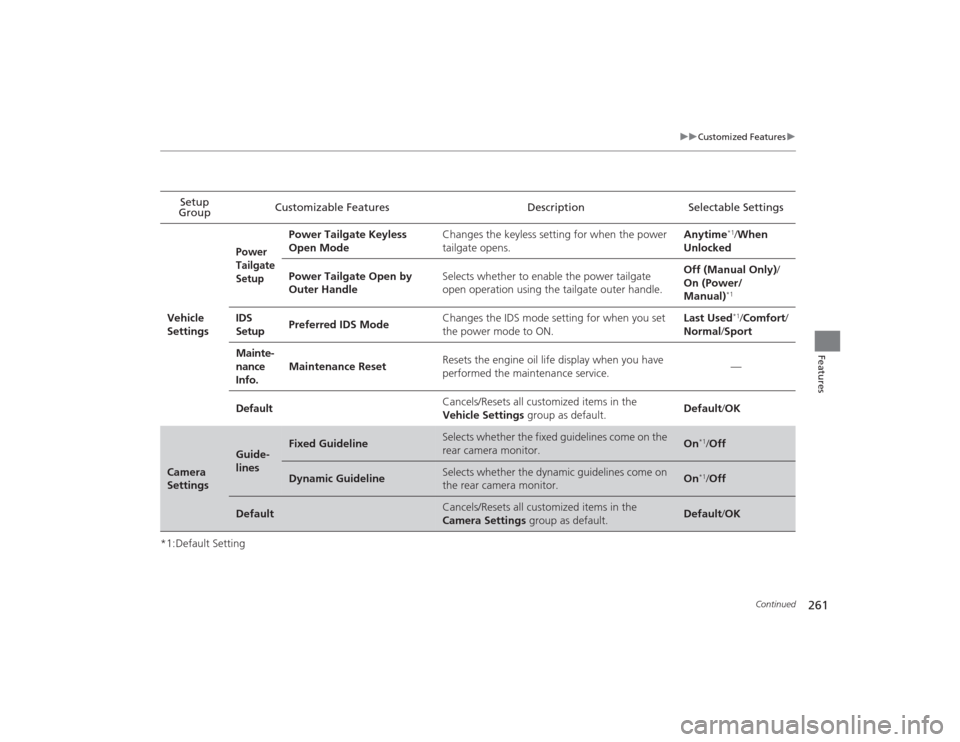
*1:Default SettingSetup
Group Customizable Features Description Selectable Settings
Vehicle
Settings
Power
Tailgate
Setup
Power Tailgate Keyless
Open Mode Changes the keyless setting for when the power
tailgate opens. Anytime
*1/
When
Unlocked
Power Tailgate Open by
Outer Handle Selects whether to enable the power tailgate
open operation using the tailgate outer handle. Off (Manual Only)
/
On (Power/
Manual)*1
IDS
Setup Preferred IDS Mode Changes the IDS mode setting for when you set
the power mode to ON. Last Used
*1/
Comfort/
Normal /Sport
Mainte-
nance
Info. Maintenance Reset
Resets the engine oil life display when you have
performed the maintenance service.
—
Default Cancels/Resets all customized items in the
Vehicle Settings
group as default. Default
/OK
Camera
Settings
Guide-
lines
Fixed Guideline
Selects whether the fixed guidelines come on the
rear camera monitor.
On
*1/Off
Dynamic Guideline
Selects whether the dynamic guidelines come on
the rear camera monitor.
On
*1/Off
Default
Cancels/Resets all customized items in the
Camera Settings group as default.
Default/OK
Page 328 of 505
Continued
327
uuWhen Driving uStarting the Engine
Driving
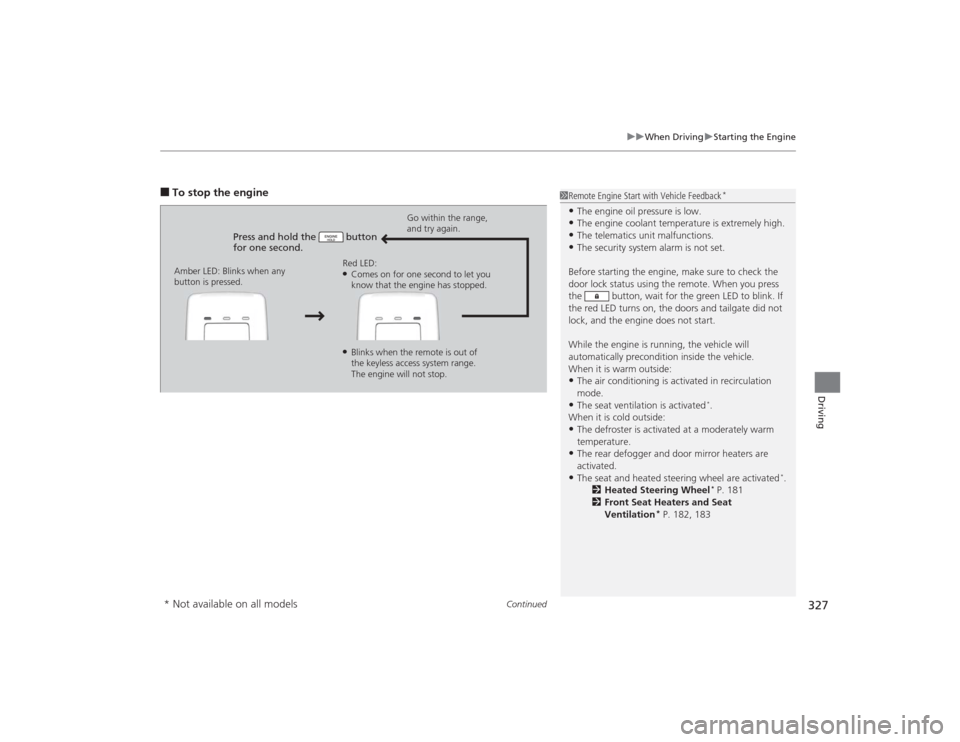
■To stop the engine
Press and hold the button
for one second.
Go within the range,
and try again.
Amber LED: Blinks when any
button is pressed. Red LED:
●Comes on for one second to let you
know that the engine has stopped.●Blinks when the remote is out of
the keyless access system range.
The engine will not stop.
1
Remote Engine Start with Vehicle Feedback
*
•The engine oil pressure is low.•The engine coolant temperature is extremely high.•The telematics unit malfunctions.•The security system alarm is not set.
Before starting the engine, make sure to check the
door lock status using the remote. When you press
the button, wait for the green LED to blink. If
the red LED turns on, the doors and tailgate did not
lock, and the engine does not start.
While the engine is running, the vehicle will
automatically precondition inside the vehicle.
When it is warm outside:•The air conditioning is activated in recirculation
mode.•The seat ventilation is activated
*.
When it is cold outside:
•The defroster is activated at a moderately warm
temperature.•The rear defogger and door mirror heaters are
activated.•The seat and heated steering wheel are activated
*.
2 Heated Steering Wheel
* P. 181
2 Front Seat Heaters and Seat
Ventilation
* P. 182, 183
* Not available on all models
Page 382 of 505

381Driving
Parking Your VehicleWhen Stopped1.Depress the brake pedal firmly with the shift lever in
(D
.
2. Firmly apply the parking brake.
3. Move the shift lever from
(D
to
(P
.
4. Turn off the engine.
Always set the parking brake firmly, in particular if you are parked on an incline.
1 Parking Your Vehicle
Do not park your vehicle near flammable objects,
such as dry grass, oil, or timber.
Heat from the exhaust can cause a fire.
Raise the wiper arms when snow is expected.1When StoppedNOTICEThe following can damage the transmission:•Depressing the accelerator and brake pedals
simultaneously.•Holding the vehicle in place when facing uphill by
depressing the accelerator pedal.•Moving the shift lever into
(P before the vehicle
stops completely.
Page 390 of 505
389Driving
Fuel EconomyImproving Fuel EconomyFuel economy depends on several conditions, including driving conditions, your
driving habits, the condition of your vehicle, and loading. Depending on these and
other conditions, you may or may not achieve the rated fuel economy of this vehicle.
You can optimize your fuel economy with proper maintenance of your vehicle.
Always maintain your vehicle in accordance with the messages displayed on the
MID.
•Use the recommended viscosity engine oil, displaying the API Certification Seal.
• Maintain the specified tire pressure.
• Do not load the vehicle with excess cargo.
• Keep your vehicle clean. A buildup of snow or mud on your vehicle’s underside
adds weight and increases wind resistance.■
Maintenance and Fuel Economy
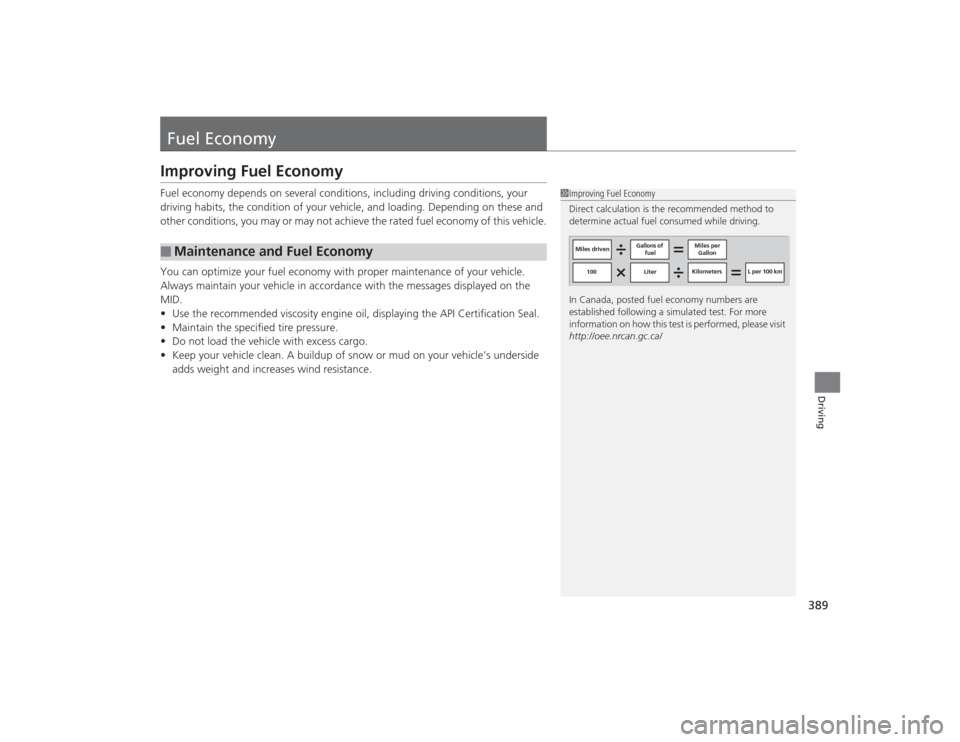
1Improving Fuel Economy
Direct calculation is the recommended method to
determine actual fuel consumed while driving.
In Canada, posted fuel economy numbers are
established following a simulated test. For more
information on how this test is performed, please visit
http://oee.nrcan.gc.ca/
Miles driven Gallons of
fuel Miles per
Gallon
100 LiterKilometers L per 100 km