Rear seat Acura MDX 2016 User Guide
[x] Cancel search | Manufacturer: ACURA, Model Year: 2016, Model line: MDX, Model: Acura MDX 2016Pages: 557, PDF Size: 31.09 MB
Page 59 of 557
58
uuChild Safety uSafety of Infants and Small Children
Safe Driving
Safety of Infants and Small Children
An infant must be properly restrained in a rear-facing, reclining child seat until the
infant reaches the seat manufacturer’s weig ht or height limit for the seat, and the
infant is at least one year old.
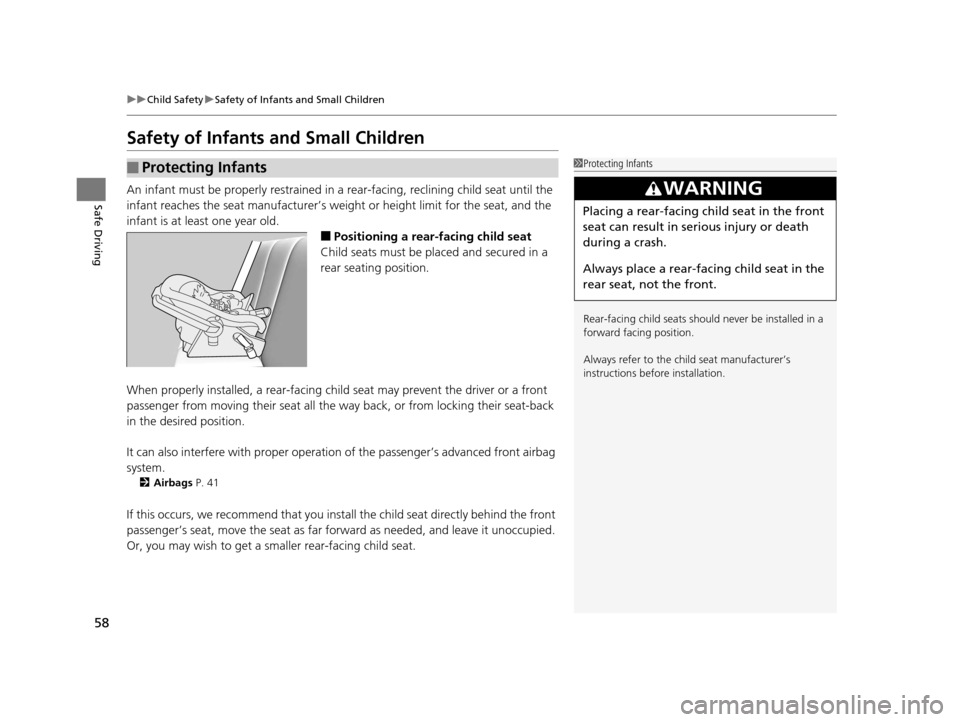
■Positioning a rear-facing child seat
Child seats must be placed and secured in a
rear seating position.
When properly installed, a rear-facing child seat may prevent the driver or a front
passenger from moving their seat all the way back, or from locking their seat-back
in the desired position.
It can also interfere with pr oper operation of the passenger’s advanced front airbag
system.
2 Airbags P. 41
If this occurs, we recommend that you install the child seat directly behind the front
passenger’s seat, move the seat as far fo rward as needed, and leave it unoccupied.
Or, you may wish to get a sm aller rear-facing child seat.
■Protecting Infants1Protecting Infants
Rear-facing child seats should never be installed in a
forward facing position.
Always refer to the child seat manufacturer’s
instructions before installation.
3WARNING
Placing a rear-facing child seat in the front
seat can result in serious injury or death
during a crash.
Always place a rear-fac ing child seat in the
rear seat, not the front.
16 ACURA MDX-31TZ56200.book 58 ページ 2015年3月4日 水曜日 午後2時59分
Page 60 of 557
Continued59
uuChild Safety uSafety of Infants and Small Children
Safe DrivingIf a child is at least one year old and with in the weight range indicated by the child
seat manufacturer, the child should be pr operly restrained in a firmly secured
forward-facing child seat.
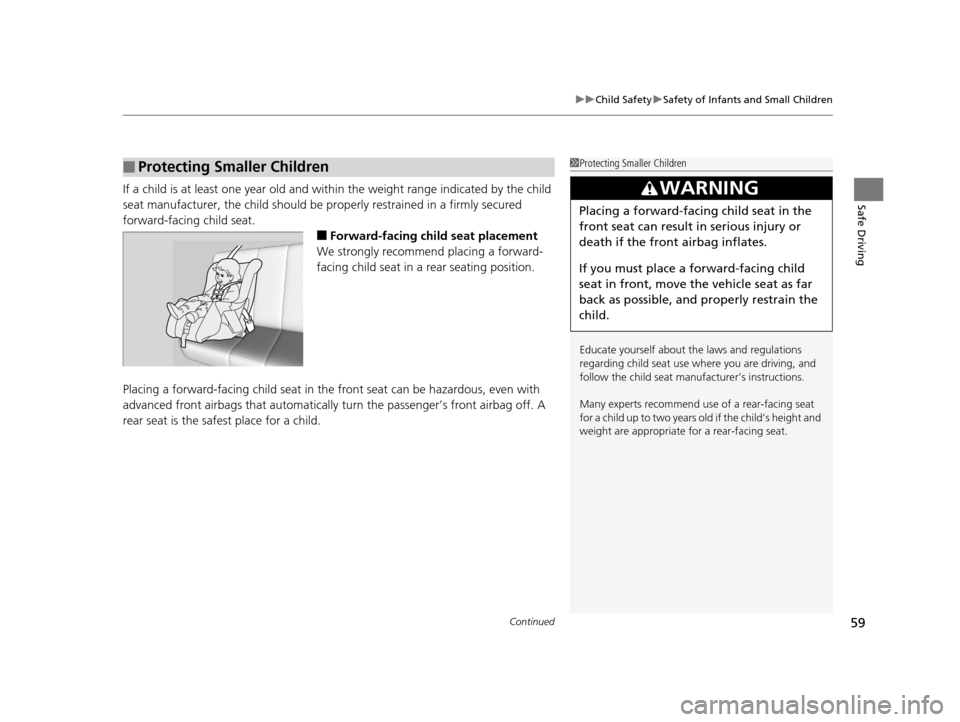
■Forward-facing child seat placement
We strongly recommend placing a forward-
facing child seat in a rear seating position.
Placing a forward-facing child seat in th e front seat can be hazardous, even with
advanced front airbags that automatically turn the passeng er’s front airbag off. A
rear seat is the safest place for a child.
■Protecting Smaller Children1 Protecting Smaller Children
Educate yourself about th e laws and regulations
regarding child seat use wh ere you are driving, and
follow the child seat manufacturer’s instructions.
Many experts recommend us e of a rear-facing seat
for a child up to two years old if the child’s height and
weight are appropriate for a rear-facing seat.
3WARNING
Placing a forward-facing child seat in the
front seat can result in serious injury or
death if the front airbag inflates.
If you must place a forward-facing child
seat in front, move the vehicle seat as far
back as possible, and properly restrain the
child.
16 ACURA MDX-31TZ56200.book 59 ページ 2015年3月4日 水曜日 午後2時59分
Page 66 of 557
65
uuChild Safety uSafety of Infants and Small Children
Safe Driving
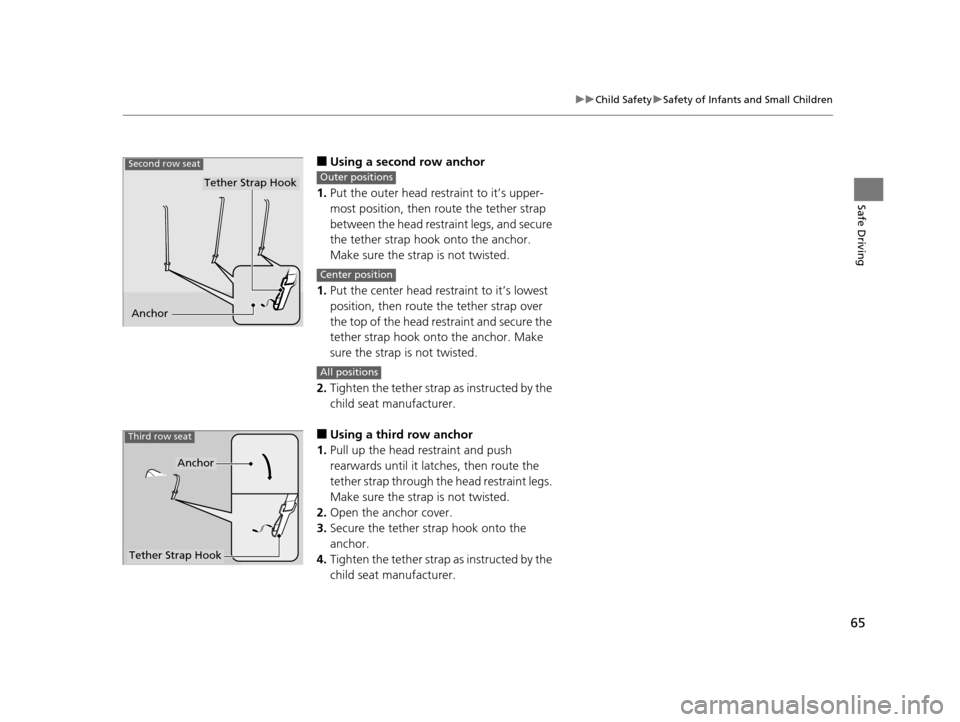
■Using a second row anchor
1. Put the outer head restraint to it’s upper-
most position, then route the tether strap
between the head restraint legs, and secure
the tether strap hook onto the anchor.
Make sure the strap is not twisted.
1. Put the center head restraint to it’s lowest
position, then route the tether strap over
the top of the head restraint and secure the
tether strap hook onto the anchor. Make
sure the strap is not twisted.
2. Tighten the tether strap as instructed by the
child seat manufacturer.
■Using a third row anchor
1. Pull up the head restraint and push
rearwards until it latches, then route the
tether strap through the head restraint legs.
Make sure the strap is not twisted.
2. Open the anchor cover.
3. Secure the tether strap hook onto the
anchor.
4. Tighten the tether strap as instructed by the
child seat manufacturer.
Anchor
Second row seat
Tether Strap HookOuter positions
Center position
All positions
Tether Strap Hook
Anchor
Third row seat
16 ACURA MDX-31TZ56200.book 65 ページ 2015年3月4日 水曜日 午後2時59分
Page 67 of 557

66
uuChild Safety uSafety of Larger Children
Safe Driving
Safety of Larger Children
The following pages give instructions on how to check proper seat belt fit, what kind
of booster seat to use if one is needed , and important precautions for a child who
must sit in front.
When a child is too big for a child seat, secure the child in a rear seat using the lap/
shoulder seat belt. Have the child sit upright and all the way back, then answer the
following questions.
■Checklist
• Do the child’s knees bend comfortably over
the edge of the seat?
• Does the shoulder belt cross between the
child’s neck and arm?
• Is the lap part of the seat belt as low as
possible, touching the child’s thighs?
• Will the child be able to stay seated like this
for the whole trip?
If you answer yes to all these questions, the child is ready to wear the lap/shoulder
seat belt correctly. If you answer no to any question, the child needs to ride on a
booster seat until the seat belt fits properly without a booster seat.
■Protecting Larger Children
■Checking Seat Belt Fit
1 Safety of Larger Children
3WARNING
Allowing a child age 12 or under to sit in
front can result in injury or death if the
passenger’s front airbag inflates.
If a larger child must ri de in front, move the
vehicle seat as far to the rear as possible,
have the child sit up properly and wear the
seat belt properly, us ing a booster seat if
needed.
16 ACURA MDX-31TZ56200.book 66 ページ 2015年3月4日 水曜日 午後2時59分
Page 68 of 557

67
uuChild Safety uSafety of Larger Children
Safe DrivingIf a lap/shoulder seat belt cannot be used
properly, position the child in a booster seat in
a rear seating position. For the child’s safety,
check that the child meets the booster seat
manufacturer’s recommendations.
Your vehicle has a rear seat where children can be properly restrained. If you ever
have to carry a group of children, and a child must ride in front:
• Make sure you read and fully understand the instructions and safety information
in this manual.
• Move the front passenger seat as far back as possible.
• Have the child sit upright and well back in the seat.
• Check that the seat belt is properly positi oned so that the child is secure in the
seat.
■Monitoring child passengers
We strongly recommend that you keep an ey e on child passengers. Even older, more
mature children sometimes need to be remind ed to fasten their seat belts and sit up
properly.
■Booster Seats1 Booster Seats
When installing a booster seat, make sure to read the
instructions that came with it, and install the seat
accordingly.
There are high- and low-type booster seats. Choose a
booster seat that allows the child to wear the seat
belt correctly.
Some U.S. states, and Canadian provinces and
territories require children to use a booster seat until
they reach a given age or we ight (e.g. six years or 60
lbs). Be sure to check current laws in the state or
province, or territory where you intend to drive.
■Protecting Larger Children-Final Checks
16 ACURA MDX-31TZ56200.book 67 ページ 2015年3月4日 水曜日 午後2時59分
Page 123 of 557
122
uuGauges and Multi-Information Display (MID) uMID
Instrument Panel
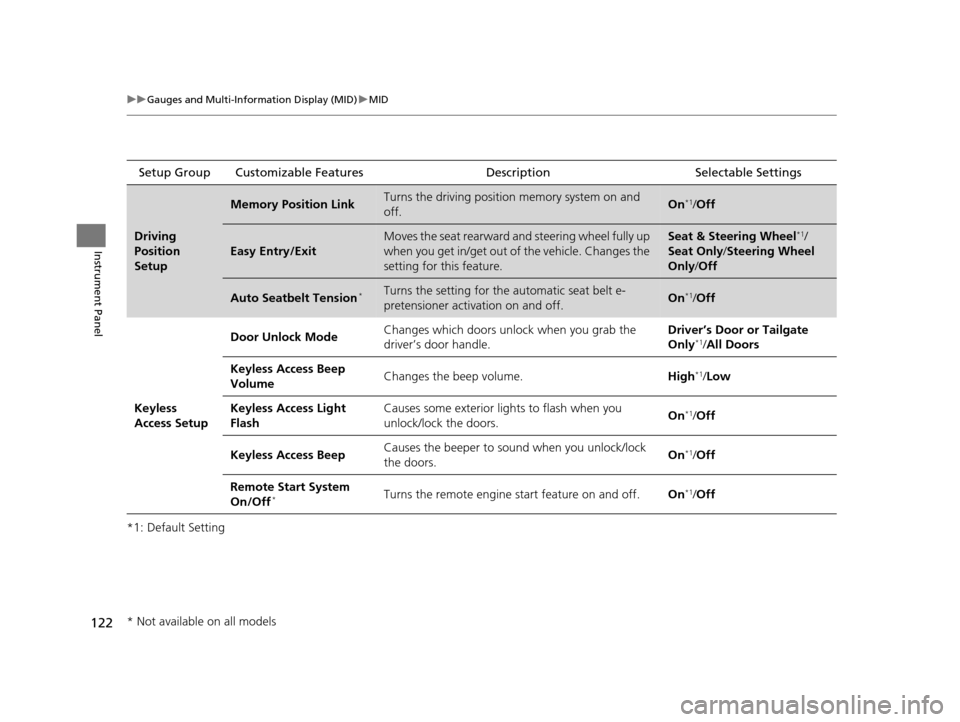
*1: Default SettingSetup Group Customizable Features
Description Selectable Settings
Driving
Position
Setup
Memory Position LinkTurns the driving position memory system on and
off.On*1/Off
Easy Entry/Exit
Moves the seat rearward and steering wheel fully up
when you get in/get out of the vehicle. Changes the
setting for this feature.Seat & Steering Wheel*1/
Seat Only/ Steering Wheel
Only /Off
Auto Seatbelt Tension*Turns the setting for the automatic seat belt e-
pretensioner activation on and off.On*1/ Off
Keyless
Access Setup Door Unlock Mode
Changes which doors unlock when you grab the
driver’s door handle. Driver’s Door or Tailgate
Only
*1/
All Doors
Keyless Access Beep
Volume Changes the beep volume.
High
*1/Low
Keyless Access Light
Flash Causes some exterior lig
hts to flash when you
unlock/lock the doors. On
*1/
Off
Keyless Access Beep Causes the beeper to sound when you unlock/lock
the doors. On
*1/
Off
Remote Start System
On/Off
*Turns the remote engine start feature on and off. On*1/Off
* Not available on all models
16 ACURA MDX-31TZ56200.book 122 ページ 2015年3月4日 水曜日 午後2時59分
Page 128 of 557
127
Controls
This chapter explains how to operate the various controls necessary for driving.
Clock.................................................. 128
Locking and Unlocking the Doors Key Types and Functions .................. 129
Locking/Unlocking the Doors from the Outside .......................................... 131
Low Keyless Access Remote Signal
Strength ......................................... 137
Locking/Unlocking the Doors from the Inside ............................................. 138
Childproof Door Locks ..................... 140
Auto Door Locking/Unlocking .......... 141
Opening and Closing the Tailgate ... 142
Security System Immobilizer System .......................... 149
Security System Alarm ...................... 149 Opening and Closing the Windows
... 152
Opening and Closing the Moonroof .. 154
Operating the Switches Around the
Steering Wheel ENGINE START/STOP Button............. 155
Turn Signals ..................................... 158
Light Switches.................................. 159
Fog Lights
*...................................... 162
Daytime Running Lights ................... 162
Wipers and Washers ........................ 163
Brightness Control ........................... 167
Defogger/Heated Door Mirror .......... 168
Driving Position Memory System ...... 169
Adjusting the Steering Wheel........... 171 Adjusting the Mirrors
Interior Rearview Mirror ................... 172
Power Door Mirrors ......................... 173
Adjusting the Seats Adjusting the Seat Positions ............. 175
Rear Seats........................................ 182
Armrest ........................................... 185
Interior Lights/Interior Convenience Items
Interior Lights .................................. 186
Interior Convenience Items .............. 188
Climate Control System
Using Automatic Climate Control .... 200
Rear Climate Control System ........... 208
Automatic Climate Control Sensors ... 212
* Not available on all models
16 ACURA MDX-31TZ56200.book 127 ページ 2015年3月4日 水曜日 午後2時59分
Page 140 of 557

Continued139
uuLocking and Unlocking the Doors uLocking/Unlocking the Doors from the Inside
Controls
Pull the front door inner handle.
u The door unlocks and opens in one
motion.
Unlocking and opening the driver’s door from the inner handle unlocks all the other
doors.
To avoid all the doors to be unlocked, use the lock tab on the driver’s door to unlock,
then lock again before opening the door. u This setting works for one time only. If you do not want all the doors to be
unlocked all the time, customize the Auto Door Unlock setting to Off using
the MID or audio/information screen.
■Unlocking Using the Front Door Inner Handle1 Unlocking Using the Front Door Inner Handle
The front door inne r handles are designed to allow
front seat occupants to open the door in one motion.
However this feature requires that front seat
occupants never pull a front door inner handle while
the vehicle is in motion.
Children should always ride in a rear seat where
childproof door locks are provided.
2 Childproof Door Locks P. 140
Inner Handle
16 ACURA MDX-31TZ56200.book 139 ページ 2015年3月4日 水曜日 午後2時59分
Page 153 of 557
152
Controls
Opening and Closing the Windows
Opening/Closing the Power Windows
The power windows can be opened and closed when the power mode is in ON,
using the switches on the doors. The driver’s side switches can be used to open and
close all of the windows.
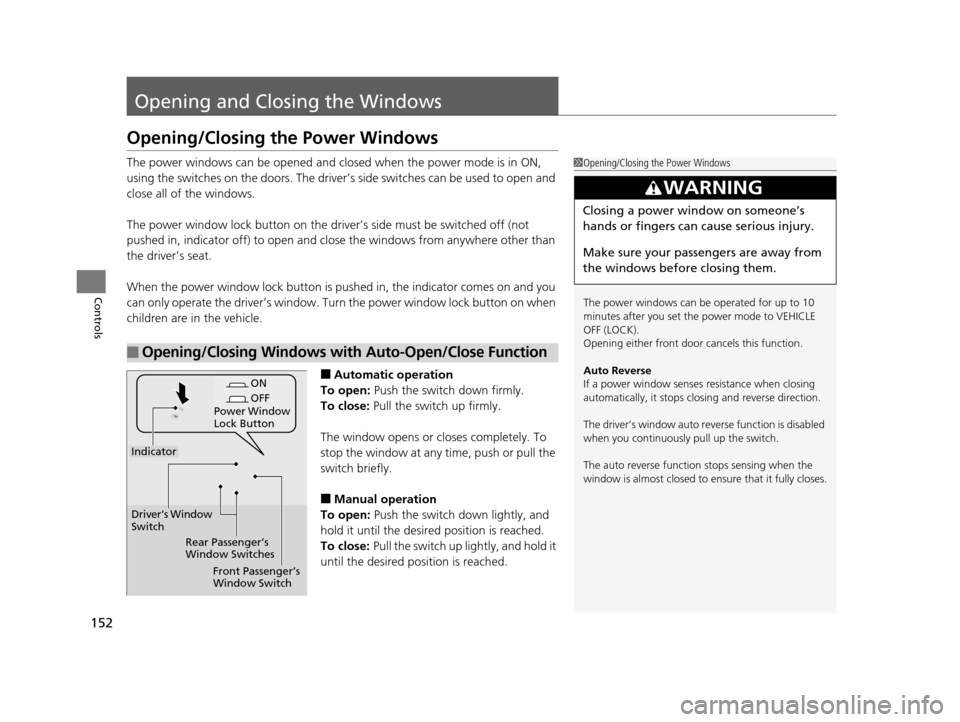
The power window lock button on the driver’s side must be switched off (not
pushed in, indicator off) to open and close the windows from anywhere other than
the driver’s seat.
When the power window lock button is pu shed in, the indicator comes on and you
can only operate the driver’s window. Turn the power window lock button on when
children are in the vehicle.
■Automatic operation
To open: Push the switch down firmly.
To close: Pull the switch up firmly.
The window opens or cl oses completely. To
stop the window at any time, push or pull the
switch briefly.
■Manual operation
To open: Push the switch down lightly, and
hold it until the desired position is reached.
To close: Pull the switch up lightly, and hold it
until the desired position is reached.
■Opening/Closing Windows with Auto-Open/Close Function
1 Opening/Closing the Power Windows
The power windows can be operated for up to 10
minutes after you set the power mode to VEHICLE
OFF (LOCK).
Opening either front door cancels this function.
Auto Reverse
If a power window senses resistance when closing
automatically, it stops clos ing and reverse direction.
The driver’s window auto re verse function is disabled
when you continuously pull up the switch.
The auto reverse function stops sensing when the
window is almost closed to en sure that it fully closes.
3WARNING
Closing a power window on someone’s
hands or fingers can cause serious injury.
Make sure your passengers are away from
the windows before closing them.
ON
OFF
Power Window
Lock Button
Rear Passenger’s
Window Switches
Front Passenger’s
Window Switch
Driver’s Window
Switch
Indicator
16 ACURA MDX-31TZ56200.book 152 ページ 2015年3月4日 水曜日 午後2時59分
Page 170 of 557
169
uuOperating the Switches Around the Steering Wheel uDriving Position Memory System
Continued
Controls
Driving Position Memory System
You can store two driver’s seat (except for power lumbar), steering wheel and door
mirror positions with the driv ing position memory system.
When you unlock and open the driver’s door with a remote transmitter, or keyless
access system, the seat and door mirrors adjust automatically to one of the two
preset positions.
The steering wheel will move to the stored position when you set the power mode
to ACCESSORY.
The MID shows you which remote transmitter you used to unlock the vehicle when
you enter.
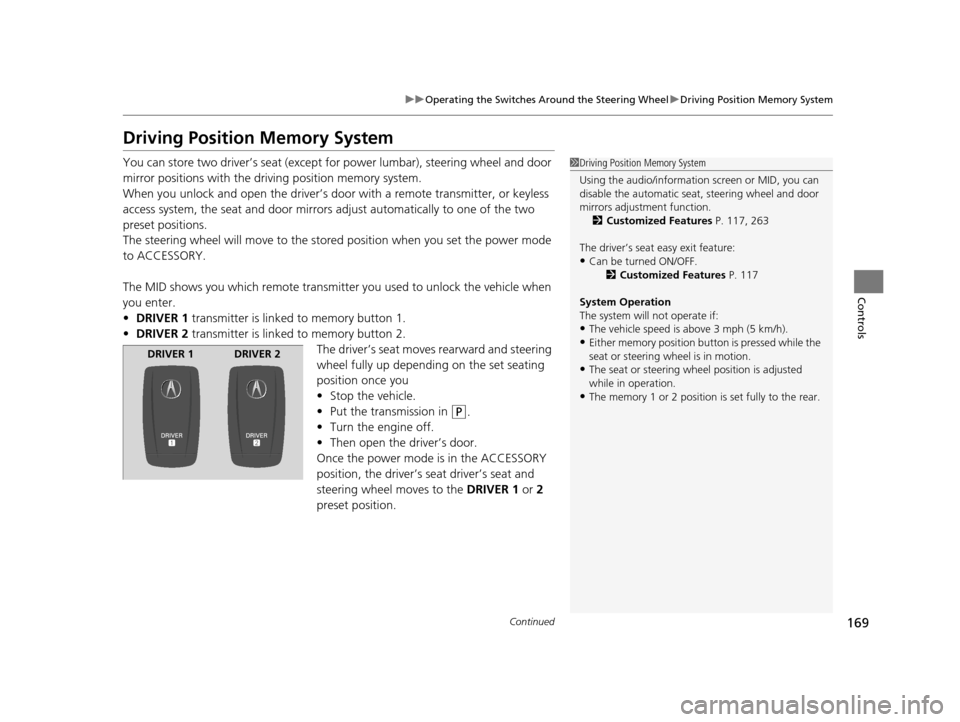
• DRIVER 1 transmitter is linked to memory button 1.
• DRIVER 2 transmitter is linked to memory button 2.
The driver’s seat moves rearward and steering
wheel fully up depending on the set seating
position once you
•Stop the vehicle.
• Put the transmission in
(P.
• Turn the engine off.
• Then open the driver’s door.
Once the power mode is in the ACCESSORY
position, the driver’s s eat driver’s seat and
steering wheel moves to the DRIVER 1 or 2
preset position.
1 Driving Position Memory System
Using the audio/information screen or MID, you can
disable the automatic seat, steering wheel and door
mirrors adjustment function. 2 Customized Features P. 117, 263
The driver’s seat easy exit feature:
•Can be turned ON/OFF. 2Customized Features P. 117
System Operation
The system will not operate if:
•The vehicle speed is above 3 mph (5 km/h).•Either memory position button is pressed while the
seat or steering wheel is in motion.
•The seat or steering wheel position is adjusted
while in operation.
•The memory 1 or 2 position is set fully to the rear.
DRIVER 1 DRIVER 2
16 ACURA MDX-31TZ56200.book 169 ページ 2015年3月4日 水曜日 午後2時59分