Replace Acura MDX 2016 User Guide
[x] Cancel search | Manufacturer: ACURA, Model Year: 2016, Model line: MDX, Model: Acura MDX 2016Pages: 557, PDF Size: 31.09 MB
Page 80 of 557
79
uuIndicators u
Continued
Instrument Panel
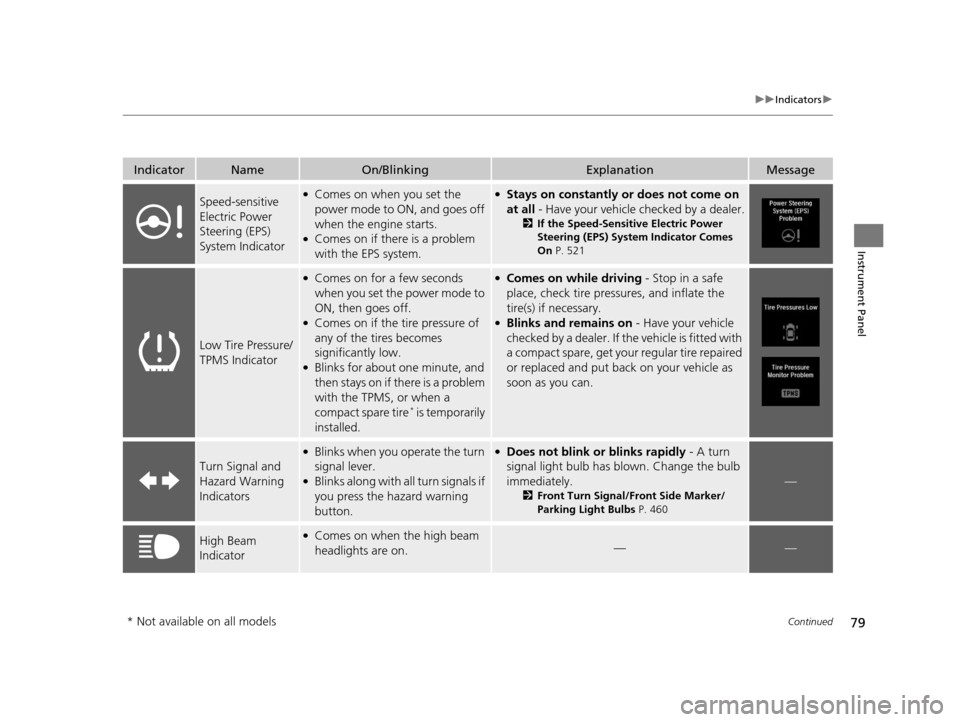
IndicatorNameOn/BlinkingExplanationMessage
Speed-sensitive
Electric Power
Steering (EPS)
System Indicator●Comes on when you set the
power mode to ON, and goes off
when the engine starts.
●Comes on if there is a problem
with the EPS system.
●Stays on constantly or does not come on
at all - Have your vehicle checked by a dealer.
2If the Speed-Sensitive Electric Power
Steering (EPS) System Indicator Comes
On P. 521
Low Tire Pressure/
TPMS Indicator
●Comes on for a few seconds
when you set the power mode to
ON, then goes off.
●Comes on if the tire pressure of
any of the tires becomes
significantly low.
●Blinks for about one minute, and
then stays on if there is a problem
with the TPMS, or when a
compact spare tire
* is temporarily
installed.
●Comes on while driving - Stop in a safe
place, check tire pressures, and inflate the
tire(s) if necessary.
●Blinks and remains on - Have your vehicle
checked by a dealer. If th e vehicle is fitted with
a compact spare, get your regular tire repaired
or replaced and put back on your vehicle as
soon as you can.
Turn Signal and
Hazard Warning
Indicators
●Blinks when you operate the turn
signal lever.
●Blinks along with all turn signals if
you press the hazard warning
button.
●Does not blink or blinks rapidly - A turn
signal light bulb has blown. Change the bulb
immediately.
2 Front Turn Signal/Front Side Marker/
Parking Light Bulbs P. 460
—
High Beam
Indicator●Comes on when the high beam
headlights are on.——
* Not available on all models
16 ACURA MDX-31TZ56200.book 79 ページ 2015年3月4日 水曜日 午後2時59分
Page 97 of 557
96
uuIndicators uMulti-Information Display (MID) Warning and Information Messages
Instrument Panel
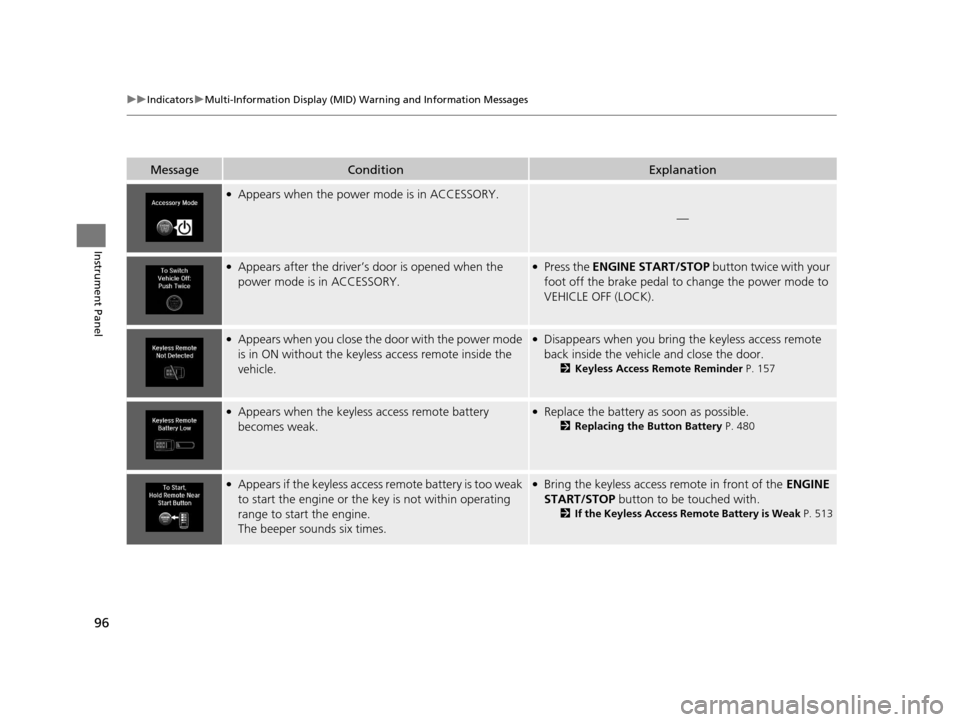
MessageConditionExplanation
●Appears when the power mode is in ACCESSORY.
—
●Appears after the driver’s door is opened when the
power mode is in ACCESSORY.●Press the ENGINE START/STOP button twice with your
foot off the brake pedal to change the power mode to
VEHICLE OFF (LOCK).
●Appears when you close the door with the power mode
is in ON without the keyless access remote inside the
vehicle.●Disappears when you bring the keyless access remote
back inside the vehicle and close the door.
2 Keyless Access Remote Reminder P. 157
●Appears when the keyless access remote battery
becomes weak.●Replace the battery as soon as possible.
2Replacing the Button Battery P. 480
●Appears if the keyless access remote battery is too weak
to start the engine or the key is not within operating
range to start the engine.
The beeper sounds six times.●Bring the keyless access remote in front of the ENGINE
START/STOP button to be touched with.
2 If the Keyless Access Remote Battery is Weak P. 513
16 ACURA MDX-31TZ56200.book 96 ページ 2015年3月4日 水曜日 午後2時59分
Page 131 of 557
uuLocking and Unlocking the Doors uKey Types and Functions
130
Controls
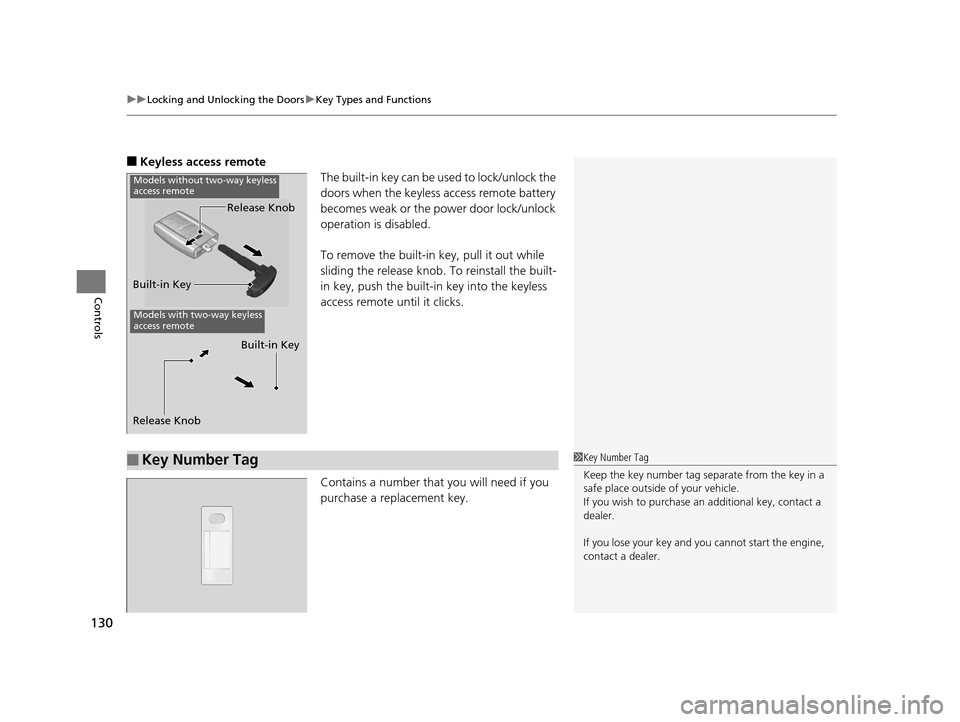
■Keyless access remote
The built-in key can be used to lock/unlock the
doors when the keyless access remote battery
becomes weak or the power door lock/unlock
operation is disabled.
To remove the built-in key, pull it out while
sliding the release knob. To reinstall the built-
in key, push the built-i n key into the keyless
access remote until it clicks.
Contains a number that you will need if you
purchase a replacement key.
Built-in Key Release Knob
Models with two-way keyless
access remote
Release Knob
Built-in Key
Models without two-way keyless
access remote
■Key Number Tag1
Key Number Tag
Keep the key number tag separate from the key in a
safe place outside of your vehicle.
If you wish to purchase an additional key, contact a
dealer.
If you lose your key and you cannot start the engine,
contact a dealer.
16 ACURA MDX-31TZ56200.book 130 ページ 2015年3月4日 水曜日 午後2時59分
Page 145 of 557
144
uuOpening and Closing the Tailgate uOpening/Closing the Power Tailgate
Controls
Opening/Closing the Power Tailgate
The power tailgate can be operated by pressing the power tailgate button on the
remote transmitter or driver's door, or pr essing the outer handle or button on the
tailgate.
■The power tailgate can be opened when:
• The tailgate is fully closed.
• The transmission is in
(P.
• Press and hold the tailgat e button on the remote transmitter for about one
second when the power mode is in VEHICLE OFF (LOCK).
u If you have changed the Keyless Open Mode setting to When Unlocked ,
you need to unlock the tailgate before you press the tailgate button to open it.
2Customized Features P. 117
■The power tailgate can be closed when:
• The tailgate is fully open.
• The transmission is in
(P.
• Press and hold the tailgat e button on the remote transmitter for about one
second when the power mode is in VEHICLE OFF (LOCK).
1Opening/Closing the Power Tailgate
NOTICE
Do not push or pull on the power tailgate when it is
being automatically opened or closed.
Forcibly opening or closing the power tailgate while
in operation can deform the tailgate frame.
The power tailgate may not open or close under the
following conditions:
•The vehicle is park ed on a steep hill.
•The vehicle is swayed in a strong wind.•The tailgate or the roof is covered with snow or ice.
If you close the power tail gate when all the doors are
locked, the power tailgate locks automatically.
If you replace the battery or the power tailgate fuse
while the tailgate is open, the power tailgate may be
disabled. The power tail gate resumes once you
manually close the tailgate.
Installing aftermarket com ponents other than Acura
genuine accessories on the power tailgate may
prevent it from fully opening or closing.
Make sure the power tailgate is fully open before you
get your luggage in and out.
Make sure the power tailgat e is fully closed before
you start the vehicle.
16 ACURA MDX-31TZ56200.book 144 ページ 2015年3月4日 水曜日 午後2時59分
Page 151 of 557
uuSecurity System uSecurity System Alarm
150
Controls
■Setting the security system alarm
The security system alarm automatically sets when the following conditions have
been met:
• The power mode is set to VEHICLE OFF (LOCK).
• The hood is closed.
• All doors and the tailgate are locked from outside with the key, remote
transmitter, or keyless access system.
■When the security system alarm sets
The security system alarm indicator in the instrument panel blinks. When the
blinking interval changes after about 15 seconds, the security system alarm is set.
■To cancel the security system alarm
The security system alarm is canceled when the vehicle is unlocked using the key,
remote transmitter, keyless access system, or the power mode is set to ON. The
security system alarm indicator goes off at the same time.
1 Security System Alarm
Do not set the security system alarm when someone
is in the vehicle or a window is open. The system can
accidentally activate when:
•Unlocking the door with the lock tab.•Opening the hood with the hood release.
If the battery goes dead after you have set the
security system alarm, the security alarm may go off
once the battery is re charged or replaced.
If this occurs, deactivate the security system alarm by
unlocking a door using the ke y, remote transmitter,
or keyless access system.
Do not attempt to alter th is system or add another
device to it.
16 ACURA MDX-31TZ56200.book 150 ページ 2015年3月4日 水曜日 午後2時59分
Page 180 of 557
Continued179
uuAdjusting the Seats uAdjusting the Seat Positions
Controls
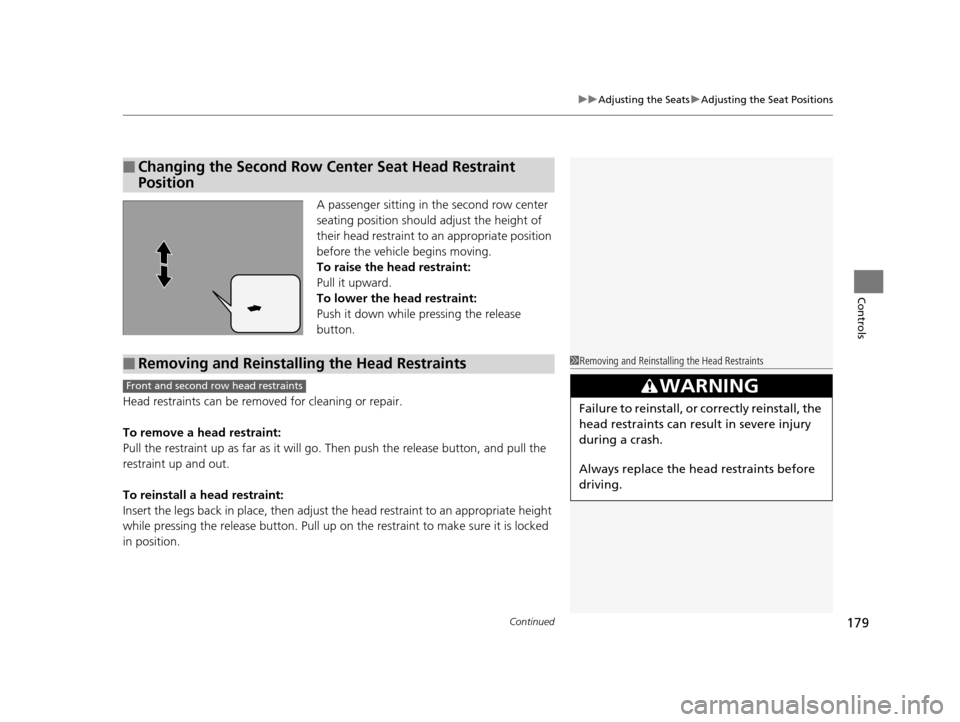
A passenger sitting in the second row center
seating position should adjust the height of
their head restraint to an appropriate position
before the vehicle begins moving.
To raise the head restraint:
Pull it upward.
To lower the head restraint:
Push it down while pressing the release
button.
Head restraints can be removed for cleaning or repair.
To remove a head restraint:
Pull the restraint up as far as it will go. Then push the release button, and pull the
restraint up and out.
To reinstall a head restraint:
Insert the legs back in place, then adjust the head restraint to an appropriate height
while pressing the release button. Pull up on the restraint to make sure it is locked
in position.
■Changing the Second Row Center Seat Head Restraint
Position
■Removing and Reinstalling the Head Restraints1 Removing and Reinstalling the Head Restraints
3WARNING
Failure to reinstall, or correctly reinstall, the
head restraints can result in severe injury
during a crash.
Always replace the he ad restraints before
driving.
Front and second row head restraints
16 ACURA MDX-31TZ56200.book 179 ページ 2015年3月4日 水曜日 午後2時59分
Page 284 of 557
283
uuHomeLink ® Universal Transceiver uTraining HomeLink
Features
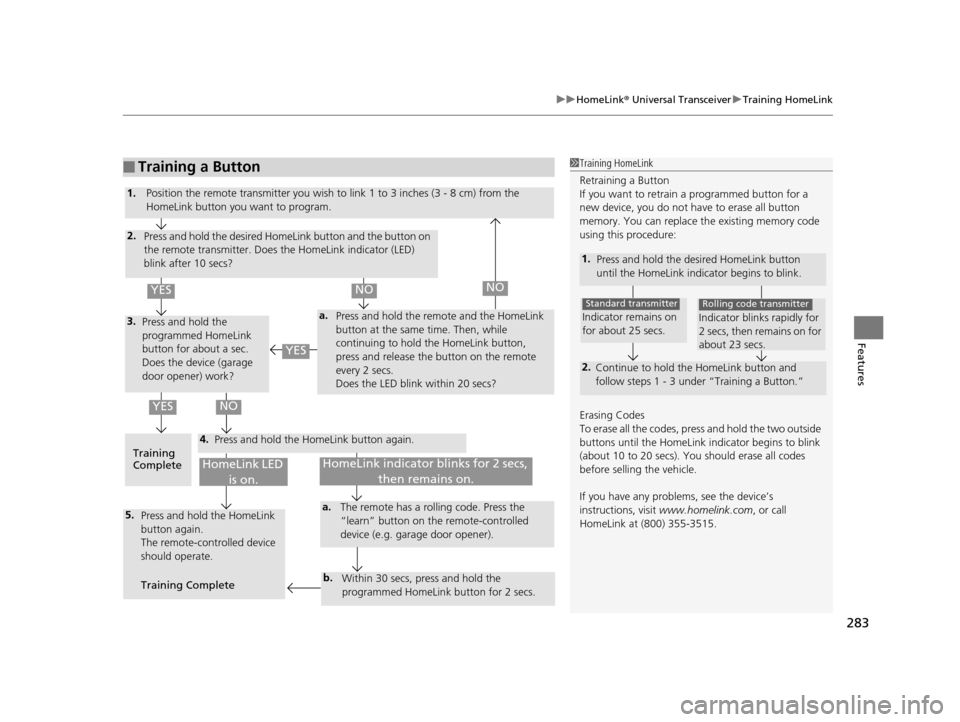
■Training a Button1Training HomeLink
Retraining a Button
If you want to retrain a programmed button for a
new device, you do not ha ve to erase all button
memory. You can replace the existing memory code
using this procedure:
1. Press and hold the desired HomeLink button
until the HomeLink indi cator begins to blink.
2.
Continue to hold the HomeLink button and
follow steps 1 - 3 unde r “Training a Button.”
Indicator remains on
for about 25 secs.
Standard transmitter
Indicator blinks rapidly for
2 secs, then remains on for
about 23 secs.
Rolling code transmitter
Erasing Codes
To erase all the codes, press and hold the two outside
buttons until the HomeLink i ndicator begins to blink
(about 10 to 20 secs). You should erase all codes
before selling the vehicle.
If you have any problems, see the device’s
instructions, visit www.homelink.com , or call
HomeLink at (800) 355-3515.
4.
a.3.
2.
5.a.
b.
1. Position the remote transmitter you wish to link 1 to 3 inches (3 - 8 cm) from the
HomeLink button you want to program.
Press and hold the desired HomeLink button and the button on
the remote transmitter. Does the HomeLink indicator (LED)
blink after 10 secs?
Press and hold the
programmed HomeLink
button for about a sec.
Does the device (garage
door opener) work? Press and hold the remote and the HomeLink
button at the same time. Then, while
continuing to hold the HomeLink button,
press and release the button on the remote
every 2 secs.
Does the LED blink within 20 secs?
Training
Complete Press and hold the HomeLink button again.
Press and hold the HomeLink
button again.
The remote-controlled device
should operate.
Training Complete The remote has a ro
lling code. Press the
“learn” button on the remote-controlled
device (e.g. garage door opener).
Within 30 secs, press and hold the
programmed HomeLink button for 2 secs.
HomeLink indicator blinks for 2 secs, then remains on.HomeLink LED is on.
YESNO
YES
YESNONO
16 ACURA MDX-31TZ56200.book 283 ページ 2015年3月4日 水曜日 午後2時59分
Page 287 of 557
286
uuBluetooth ® HandsFreeLink ®u HFL Menus
Features
HFL Menus
The power mode must be in ACCESSORY or ON to use HFL.
■Phone Settings screen
1.Press the SETTINGS button.
2. Rotate to select Phone Settings, then
press .
1 HFL Menus
To use HFL, you must first pair your Bluetooth-
compatible cell phone to th e system while the vehicle
is parked.
Some functions are limited while driving. A message
appears on the screen when the vehicle is moving
and the operation is canceled.
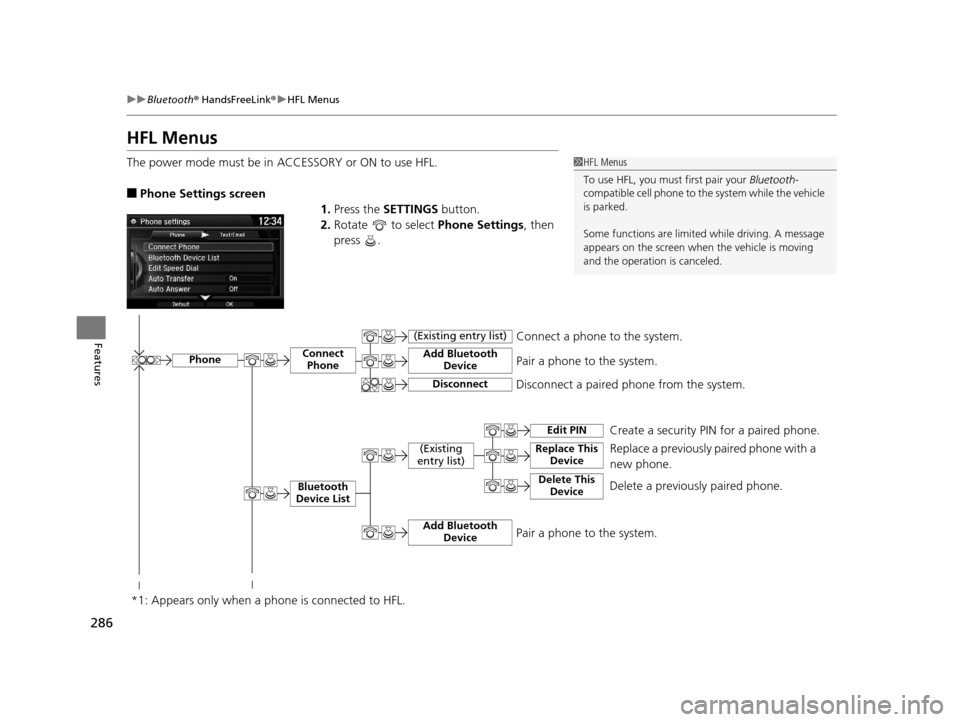
PhoneConnect Phone
Bluetooth
Device List
(Existing
entry list)
Add Bluetooth Device
Disconnect a paired phone from the system.Connect a phone to the system.
*1: Appears only when a pho ne is connected to HFL.Disconnect
(Existing entry list)
Pair a phone to the system.
Add Bluetooth
DevicePair a phone to the system.
Replace This Device
Edit PIN Create a security PIN for a paired phone.
Replace a previously paired phone with a
new phone.
Delete This DeviceDelete a previously paired phone.
16 ACURA MDX-31TZ56200.book 286 ページ 2015年3月4日 水曜日 午後2時59分
Page 295 of 557
uuBluetooth ® HandsFreeLink ®u HFL Menus
294
Features
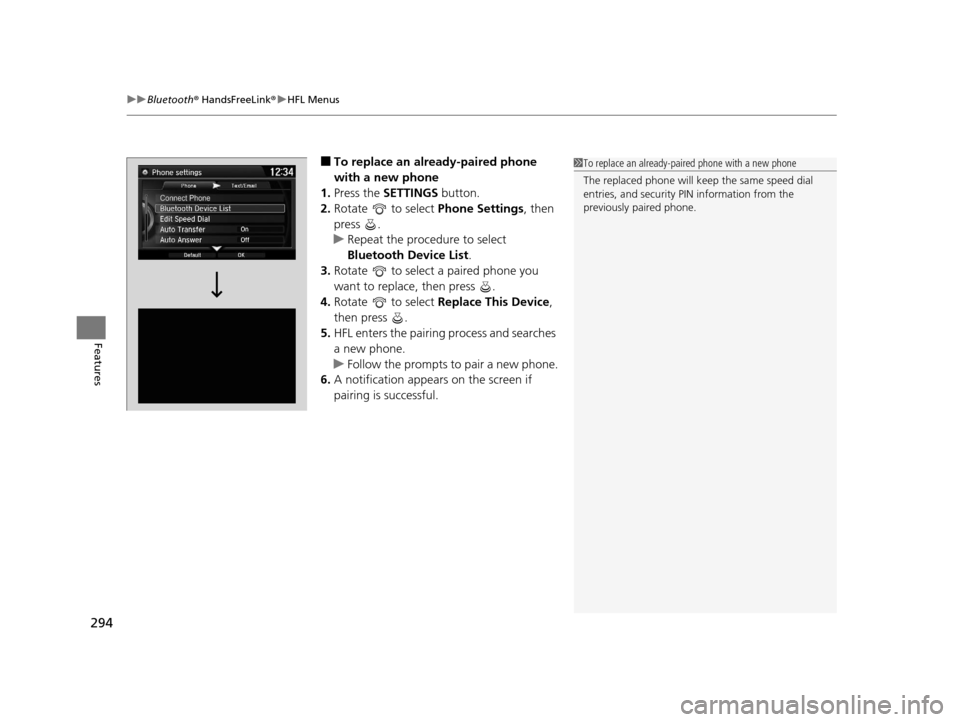
■To replace an already-paired phone
with a new phone
1. Press the SETTINGS button.
2. Rotate to select Phone Settings, then
press .
u Repeat the procedure to select
Bluetooth Device List.
3. Rotate to select a paired phone you
want to replace, then press .
4. Rotate to select Replace This Device,
then press .
5. HFL enters the pairing process and searches
a new phone.
u Follow the prompts to pair a new phone.
6. A notification appears on the screen if
pairing is successful.1To replace an already-pair ed phone with a new phone
The replaced phone will keep the same speed dial
entries, and security PIN information from the
previously paired phone.
16 ACURA MDX-31TZ56200.book 294 ページ 2015年3月4日 水曜日 午後2時59分
Page 345 of 557
uuWhen Driving uStarting the Engine
344
Driving
1. Depress the brake pedal and press the ENGINE START/STOP button
simultaneously.
2. Keeping your right foot on the brake peda l, release the parking brake. Check that
the parking brake indicator has gone off.
2 Parking Brake P. 412
3.Change the gear position to (D. Select (R when reversing.
4. Gradually release the brake pedal and gently depress the accelerator pedal to pull
away.
■Hill start assist system
Hill start assist keeps the brake engaged br iefly to help prevent the vehicle from
rolling on inclines as you move your fo ot from the brake pedal to the accelerator.
Change the gear position to
(D or (S when facing uphill, or (R when facing
downhill, then release the brake pedal.
The brakes remain engaged briefly as you release the brake pedal.
■Starting to Drive1 Starting to Drive
The engine stops when the gear position is changed
from
( P before the ENGINE START/STOP button is
pressed. Follow the step 1 when starting to drive.
When the engine was started using the two-way keyless
access remote*When the engine was started using the two-way keyless access remote*
When the engine was started in any case
1 Hill start assist system
Hill start assist may not prevent the vehicle from
rolling downhill on a very steep or slippe ry slope, and
will not operate on small inclines.
Hill start assist is not a replacement for the parking
brake.
* Not available on all models
16 ACURA MDX-31TZ56200.book 344 ページ 2015年3月4日 水曜日 午後2時59分