Replace Acura MDX 2016 Owner's Guide
[x] Cancel search | Manufacturer: ACURA, Model Year: 2016, Model line: MDX, Model: Acura MDX 2016Pages: 557, PDF Size: 31.09 MB
Page 346 of 557
345
uuWhen Driving uPrecautions While Driving
Driving
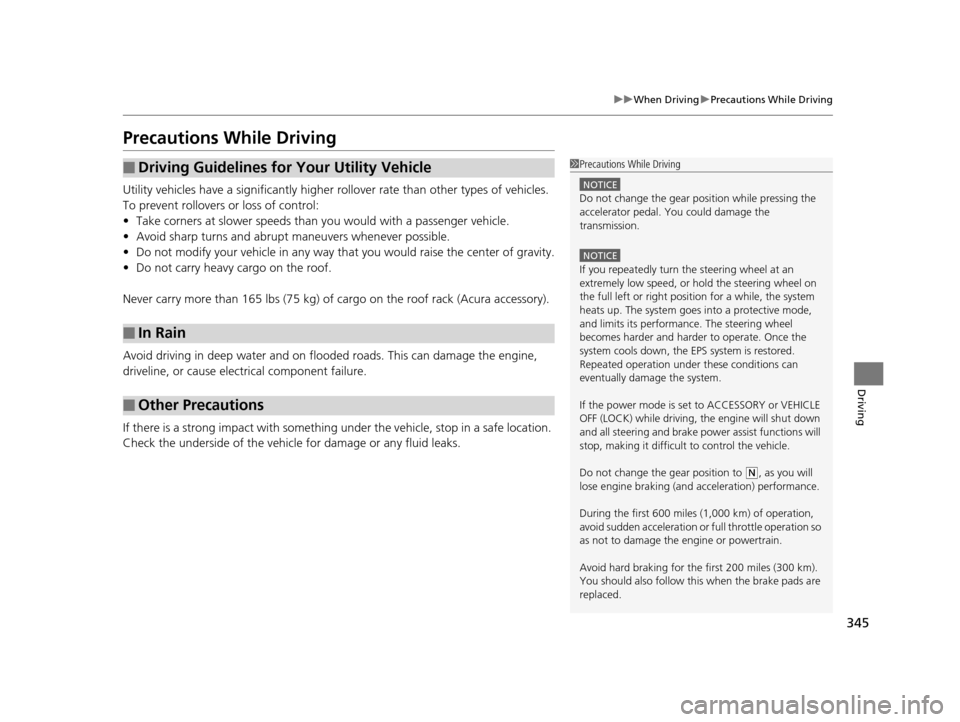
Precautions While Driving
Utility vehicles have a significantly higher rollover rate than other types of vehicles.
To prevent rollovers or loss of control:
• Take corners at slower speeds than yo u would with a passenger vehicle.
• Avoid sharp turns and abrupt maneuvers whenever possible.
• Do not modify your vehicle in any way th at you would raise the center of gravity.
• Do not carry heavy cargo on the roof.
Never carry more than 165 lbs (75 kg) of ca rgo on the roof rack (Acura accessory).
Avoid driving in deep water and on flooded roads. This can damage the engine,
driveline, or cause electrical component failure.
If there is a strong impact with something under the vehicle, stop in a safe location.
Check the underside of the vehicle for damage or any fluid leaks.
■Driving Guidelines for Your Utility Vehicle
■In Rain
■Other Precautions
1 Precautions While Driving
NOTICE
Do not change the gear position while pressing the
accelerator pedal. You could damage the
transmission.
NOTICE
If you repeatedly turn the steering wheel at an
extremely low speed, or hold the steering wheel on
the full left or right position for a while, the system
heats up. The system goes into a protective mode,
and limits its performa nce. The steering wheel
becomes harder and harder to operate. Once the
system cools down, the EPS system is restored.
Repeated operation under these conditions can
eventually damage the system.
If the power mode is set to ACCESSORY or VEHICLE
OFF (LOCK) while driving, the engine will shut down
and all steering and brake pow er assist functions will
stop, making it difficult to control the vehicle.
Do not change the gear position to
( N, as you will
lose engine braking (and acceleration) performance.
During the first 600 miles (1,000 km) of operation,
avoid sudden acceleration or full throttle operation so
as not to damage the engine or powertrain.
Avoid hard braking for the first 200 miles (300 km).
You should also follow this when the brake pads are
replaced.
16 ACURA MDX-31TZ56200.book 345 ページ 2015年3月4日 水曜日 午後2時59分
Page 356 of 557

355
uuWhen Driving uAuto Idle Stop*
Continued
Driving
Auto Idle Stop*
To help maximize fuel economy, the engi ne automatically stops when the vehicle
comes to a stop, depending on environmental and vehicle operating conditions. The
indicator comes on. The engine then restarts once the vehicle is
about to move again, and the indicator goes
off.
A message associated with Auto Idle Stop
appears on the MID.
2Indicators P. 83
2 Customized Features P. 121
If the driver’s door is opened while the
indicator is comes on, a buzzer sounds to
notify you that the Auto Idle Stop function is
in operation.
To turn the Auto Idle Stop system off, press
this button. The Auto Id le Stop system stops.
u The Auto Idle Stop system will stop and
the indicator (Amber) in meter will come
on.
1Auto Idle Stop*
The 12-volt battery insta lled in this vehicle is
specifically designed for a m odel with Auto Idle Stop.
Using a 12-volt battery other than this specified type
may shorten the battery life , and prevent Auto Idle
Stop from activati ng. If you need to replace the
battery, make sure to select the specified type. Ask a
dealer for more details.
The duration of the Au to Idle Stop operation:
•Increases in the ECON mode, compared to when
the ECON mode is off, with climate control in use.
Auto Idle Stop may activate less frequently in such
conditions as a traffic jam.
■Auto Idle Stop System ON/OFF1 Auto Idle Stop System ON/OFF
Press the Auto Idle Stop OFF button to restart the
engine from the idling stop.
* Not available on all models
16 ACURA MDX-31TZ56200.book 355 ページ 2015年3月4日 水曜日 午後2時59分
Page 364 of 557

363
uuWhen Driving uFront Sensor Camera*
Continued
Driving
Front Sensor Camera*
The camera, used in systems such as LDW, FCW with Pedestrian Detection, LKAS,
RDM, ACC with LSF, and CMBSTM, is designed to detect an object that triggers any
of the systems to operate its functions.
This camera is located behind the rearview
mirror.
To help reduce the likelihood that high interior
temperatures will cause the camera’s sensing
s y s t e m t o s h u t o f f , w h e n p a r k i n g , f i n d a s h a d y
area or face the front of the vehicle away from
the sun. If you use a reflective sun shade, do
not allow it to cover the camera housing.
Covering the camera can concentrate heat on
it.
■Camera Location and Handling Tips
1Front Sensor Camera*
Never apply a film or attach any objects to
windshield, the hood, or the front grill that could
obstruct the camera’s fiel d of vision and cause the
system to operate abnormally.
Scratches, nicks, and othe r damage to the windshield
within the camera’s fiel d of vision can cause the
system to operate abnormall y. If this occurs, we
recommend that you replac e the windshield with a
genuine Acura replacement windshield. Making even
minor repairs within the ca mera’s field of vision or
installing an aftermarke t replacement windshield
may also cause the system to operate abnormally.
After replacing the winds hield, have a dealer
recalibrate the camera. Pr oper calibration of the
camera is necessary for the system to operate
properly.
Do not place an object on the top of the instrument
panel. It may reflect onto the windshield and prevent
the system from detecting lane lines properly.
Front Sensor
Camera
* Not available on all models
16 ACURA MDX-31TZ56200.book 363 ページ 2015年3月4日 水曜日 午後2時59分
Page 408 of 557
407
uuWhen Driving uSuper Handling-All Wheel DriveTM (SH-AWD ®)*
Driving
Super Handling-Al l Wheel DriveTM (SH-AWD®)*
The system controls and trans fers varying amounts of engine torque to each wheel
in accordance with the driving conditions.
SH-AWD ® helps to enhance driving stability, and lets you handle situations like
slippery surfaces, such as snow, sand, mud, and steep hills, better than when driving
with two wheel drive. Howeve r, the system does not help to enhance braking. Be
precautious about the following:
• It is still your responsibility to drive sa fely when you steer, accelerate, and apply
brakes.
• Leave a sufficient margin when braking on slippery surfaces.1Super Handling-All Wheel DriveTM (SH-AWD ®)*
NOTICE
Avoid continuously driving in sand or mud where a
wheel is likely to spin out, and do not drive once the
SH-AWD ® indicator starts blinking. Driving
continuously under such conditions can damage the
system’s torque distribution unit.
Do not drive through deep water.
The SH-AWD ® system may not function properly if
tire type and size are mixed.
Make sure to use the same size and type of tire, and
the air pressures as specified. 2 Tire and Wheel Replacement P. 475
* Not available on all models
16 ACURA MDX-31TZ56200.book 407 ページ 2015年3月4日 水曜日 午後2時59分
Page 412 of 557

411
uuWhen Driving uTire Pressure Monitoring System (TPMS) - Required Federal Explanation
Driving
Please note that the TPMS is not a substitute for proper tire
maintenance, and it is the driver ’s responsibility to maintain
correct tire pressure, even if un der-inflation has not reached the
level to trigger illumination of th e TPMS low tire pressure telltale.
Your vehicle has also been equi pped with a TPMS malfunction
indicator to indicate when the system is not operating properly.
The TPMS malfunction indicator is combined with the low tire
pressure telltale. When the syst em detects a malfunction, the
telltale will flash fo r approximately one minute and then remain
continuously illumina ted. This sequence will continue upon
subsequent vehicle start-ups as long as the malfunction exists.
When the malfunction indicator is illuminated, the system may
not be able to detect or signal low tire pressure as intended.
TPMS malfunctions may occur for a variety of reasons, including
the installation of replacement or alternate tires or wheels on the
vehicle that prevent the TPMS from functioning properly.
Always check the TPMS malfunction telltale after replacing one or
more tires or wheels on your vehicle to ensure that the
replacement or alternate tires and wheels allow the TPMS to
continue to function properly.
16 ACURA MDX-31TZ56200.book 411 ページ 2015年3月4日 水曜日 午後2時59分
Page 414 of 557

413
uuBraking uBrake System
Driving
Your vehicle is equipped with disc brakes at all four wheels. A vacuum power assist
helps reduce the effort needed on the brake pedal. The brake assist system increases
the stopping force when you depress the brake pedal hard in an emergency
situation. The anti-lock brake system (ABS) helps you retain steering control when
braking very hard.
2 Brake Assist System P. 415
2 Anti-lock Brake System (ABS) P. 414
■Foot Brake1Foot Brake
Check the brakes after driving through deep water,
or if there is a buildup of road surface water. If
necessary, dry the brakes by lightly depressing the
pedal several times.
If you hear a continuous me tallic friction sound when
applying the brakes, the brake pads need to be
replaced. Have the vehicle checked by a dealer.
Constantly using the brak e pedal while going down a
long hill builds up heat, which reduces the brake
effectiveness. Apply engine braking by taking your
foot off the accelerator pe dal and downshifting to a
lower gear.
Do not rest your foot on the brake pedal while
driving, as it will lightly apply the brakes and cause
them to lose effectiveness over time and reduce pad
life. It will also conf use drivers behind you.
16 ACURA MDX-31TZ56200.book 413 ページ 2015年3月4日 水曜日 午後2時59分
Page 425 of 557

uuBraking uCollision Mitigation Braking SystemTM (CMBSTM)*
424
Driving
The CMBSTM may activate even when you are aw are of a vehicle ahead of you, or
when there is no vehicle ahead . Some examples of this are:
■When Passing
Your vehicle approaches another vehicle ah ead of you and you change lanes to pass.
■At an intersection
Your vehicle approaches or passes another vehicle that is making a left or right turn.
■On a curve
When driving through curves, your vehicle comes to a point where an oncoming
vehicle is right in front of you.
■Through a low bridge at high speed
You drive under a low or narrow bridge at high speed.
■Speed bumps, road work sites, tr ain tracks, roadside objects, etc.
You drive over speed bumps, steel road plates, etc., or yo ur vehicle approaches train
tracks or roadside objects [such as a traffi c sign and guard rail] on a curve or, when
parking, stationary vehicles and walls.
■With Little Chance of a Collision1 Collision Mitigation Braking SystemTM (CMBSTM)*
For the CMBSTM to work properly:
Always keep the radar sensor cover clean.
Never use chemical solvents or polishing powder for
cleaning the sensor cover. Clean it with water or a
mild detergent.
Do not put a sticker on the emblem or replace the
emblem.
If you need the radar sensor to be repaired, or
removed, or the radar se nsor cover is strongly
impacted, turn off the system by pressing the
CMBS
TM off button and take your vehicle to a dealer.
* Not available on all models
16 ACURA MDX-31TZ56200.book 424 ページ 2015年3月4日 水曜日 午後2時59分
Page 437 of 557
436
uuRefueling uHow to Refuel
Driving
How to Refuel
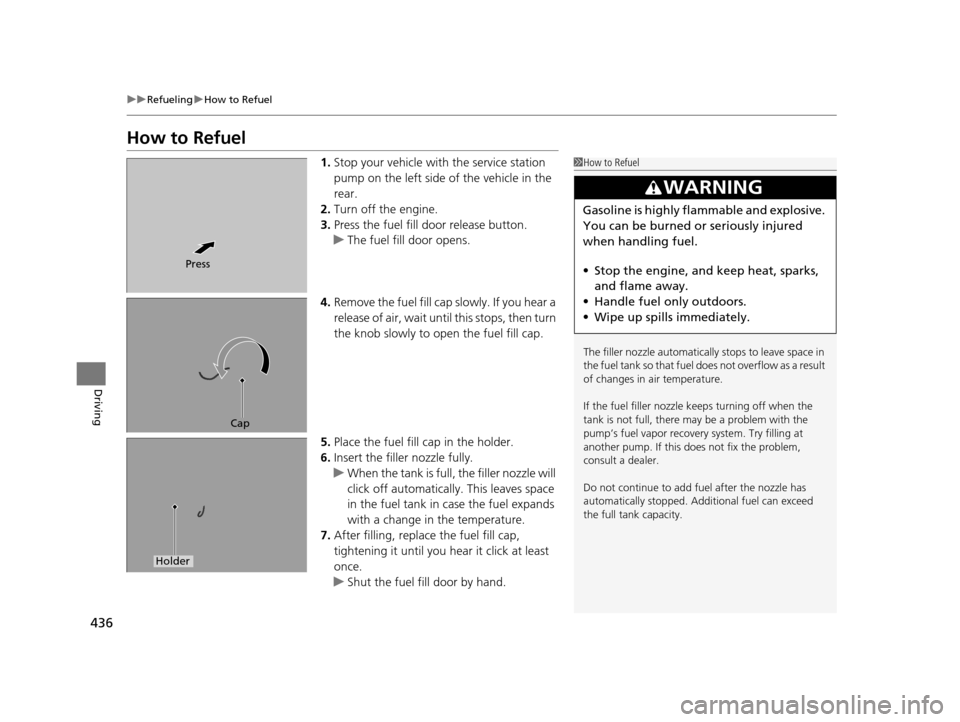
1. Stop your vehicle with the service station
pump on the left side of the vehicle in the
rear.
2. Turn off the engine.
3. Press the fuel fill door release button.
u The fuel fill door opens.
4. Remove the fuel fill cap slowly. If you hear a
release of air, wait unt il this stops, then turn
the knob slowly to open the fuel fill cap.
5. Place the fuel fill cap in the holder.
6. Insert the filler nozzle fully.
u When the tank is full, the filler nozzle will
click off automatically . This leaves space
in the fuel tank in case the fuel expands
with a change in the temperature.
7. After filling, replace the fuel fill cap,
tightening it until you hear it click at least
once.
u Shut the fuel fill door by hand.1How to Refuel
The filler nozzle automatically stops to leave space in
the fuel tank so that fuel does not overflow as a result
of changes in air temperature.
If the fuel filler nozzle keeps turning off when the
tank is not full, there ma y be a problem with the
pump’s fuel vapor recovery system. Try filling at
another pump. If this does not fix the problem,
consult a dealer.
Do not continue to add fuel after the nozzle has
automatically stopped. Addi tional fuel can exceed
the full tank capacity.
3WARNING
Gasoline is highly flammable and explosive.
You can be burned or seriously injured
when handling fuel.
• Stop the engine, and keep heat, sparks,
and flame away.
• Handle fuel only outdoors.
• Wipe up spills immediately.
Press
Cap
Holder
16 ACURA MDX-31TZ56200.book 436 ページ 2015年3月4日 水曜日 午後2時59分
Page 440 of 557
439
Maintenance
This chapter discusses basic maintenance.
Before Performing MaintenanceInspection and Maintenance ............ 440
Safety When Performing Maintenance ..441
Parts and Fluids Used in Maintenance Service ........................................... 442
Maintenance Minder
TM..................... 443
Maintenance Under the Hood Maintenance Items Under the Hood .. 447
Opening the Hood ........................... 448
Engine Compartment Cover ............. 449
Recommended Engine Oil ................ 450
Oil Check ......................................... 451
Adding Engine Oil ............................ 452 Changing the Engine Oi
l and Oil Filter... 453
Engine Coolant ................................ 455
Transmission Fluid ............................ 457
Brake Fluid ....................................... 458
Refilling Window Washer Fluid......... 458
Replacing Light Bulbs ....................... 459Checking and Maintaining Wiper Blades... 465Checking and Maintaining Tires
Checking Tires ................................. 469
Tire and Loading Information Label .. 470
Tire Labeling .................................... 470
DOT Tire Quality Grading (U.S. Vehicles).. 472Wear Indicators................................ 474 Tire Service Life ................................ 474
Tire and Wheel Replacement ........... 475
Tire Rotation .................................... 476
Winter Tires ..................................... 477
Battery ............................................... 478
Remote Transmitter Care
Replacing the Button Battery ........... 480
Remote Control and Wireless Headphone Care
*........................... 482Climate Control System Maintenance.. 484Cleaning Interior Care .................................... 485
Exterior Care.................................... 487
* Not available on all models
16 ACURA MDX-31TZ56200.book 439 ページ 2015年3月4日 水曜日 午後2時59分
Page 441 of 557
440
Maintenance
Before Performing Maintenance
Inspection and Maintenance
For your safety, perform all listed inspections and maintenance to keep your vehicle
in good condition. If you become aware of any abnormality (noise, smell, insufficient
brake fluid, oil residue on the ground, etc.), have your vehicle inspected by a dealer.
(Note, however, that service at a dealer is not mandatory to keep your warranties in
effect.) Refer to the separate maintena nce booklet for detailed maintenance and
inspection information.
■Daily inspections
Perform inspections before long distance trips, when washing the vehicle, or when
refueling.
■Periodic inspections
• Check the brake fluid level monthly.
2 Checking the Brake Fluid P. 458
•Check the tire pressure monthly. Examin e the tread for wear and foreign objects.
2Checking and Maintaining Tires P. 469
•Check the operation of the exterior lights monthly.
2 Replacing Light Bulbs P. 459
•Check the condition of the wiper bl ades at least every six months.
2Checking and Maintaining Wiper Blades P. 465
■Types of Inspection and Maintenance
1Inspection and Maintenance
Maintenance, replacement, or repair of
emissions control devices and systems may be
done by any automotive repair establishment or
individuals using parts that are “certified” to
EPA standards.
According to state and fede ral regulations, failure to
perform maintenance on the maintenance main
items marked with # will not void your emissions
warranties. However, all maintenance services should
be performed in accordan ce with the intervals
indicated by the multi-information display (MID).
2 Maintenance Service Items P. 445
If you want to perform complex maintenance tasks
that require more skills a nd tools, you can purchase a
subscription to the Service Express website at
www.techinfo.honda.com .
2 Authorized Manuals P. 545
If you want to perform ma intenance yourself, make
sure that you have the necessary tools and skills first.
After performing ma intenance, update the records in
the separate maintenance booklet.
U.S. models
16 ACURA MDX-31TZ56200.book 440 ページ 2015年3月4日 水曜日 午後2時59分