Brake Acura MDX 2016 Owner's Guide
[x] Cancel search | Manufacturer: ACURA, Model Year: 2016, Model line: MDX, Model: Acura MDX 2016Pages: 557, PDF Size: 31.09 MB
Page 105 of 557

104
uuIndicators uMulti-Information Display (MID) Warning and Information Messages
Instrument Panel
MessageConditionExplanation
●Appears when your vehicle is stopped by ACC with LSF
for more than five minu tes. The beeper sounds.
—
●Appears when your vehicle is stopped by ACC with LSF
for more than nine and a half minutes.
u The display starts the countdown when ACC with
LSF is cancelled within 30 seconds. The beeper
sounds.
—
●Appears if ACC with LSF is canceled while your vehicle
is automatically stopped by ACC with LSF. The beeper
sounds.●Immediately depress the brake pedal.
●Appears when pressing the RES/+/SET/– switch down
while the vehicle is moving and the brake pedal is
depressed.●ACC with LSF cannot be set.
2 Adaptive Cruise Control (ACC) with Low Speed
Follow (LSF)* P. 365
* Not available on all models
16 ACURA MDX-31TZ56200.book 104 ページ 2015年3月4日 水曜日 午後2時59分
Page 108 of 557

107
uuIndicators uMulti-Information Display (MID) Warning and Information Messages
Continued
Instrument Panel
MessageConditionExplanation
●Appears when the LKAS is in operation, or the LKAS
button is pressed, but there is a problem with a system
related to the LKAS. The LKAS cancels automatically.
The beeper sounds simultaneously if selected by
customization.●If any other system indicators come on, such as the
VSA ®, ABS and brake system, take appropriate action.
2Indicators P. 72
●Appears when the LKAS is in operation, or the LKAS
button is pressed, but there the temperature inside the
LKAS camera is too high. The LKAS cancels
automatically. The beeper sounds simultaneously if
selected by customization.●Use the climate control system to cool down the
camera.
●Goes off - The camera has been cooled down. Pressing
the LKAS button can resume the system.
2 Front Sensor Camera* P. 363
●Appears when the area around the camera is blocked
by dirt, mud, etc. Stop your vehicle in a safe place, and
wipe it off with a soft cloth.
●May appear when driving in bad weather (rain, snow,
fog, etc.)
●Have your vehicle checked by a dealer if the indicator
and message come back on after you cleaned the area
around the camera.
Models with LKAS
* Not available on all models
16 ACURA MDX-31TZ56200.book 107 ページ 2015年3月4日 水曜日 午後2時59分
Page 110 of 557

109
uuIndicators uMulti-Information Display (MID) Warning and Information Messages
Instrument Panel
MessageConditionExplanation
●Appears when Auto Idle Stop does not activate because
the pressure to the brake pedal is not enough.●Depress the brake pedal firmly.
●Appears when Auto Engine Idle Stop Guidance
Screens ON has been selected from the customization
menu.
●Appears when the system is under the following
conditions while Auto Idle Stop activates:
●The battery charge level is low.●The battery temperature is around 14°F (−10°C) or
lower.
●The climate control system is in use, and the difference
between the set temperature and actual interior
temperature becomes significant.
●The humidity in the interior is high.
●The engine restarts automatically in a few seconds.
2Starting the Engine P. 340
Models with Auto Idle Stop
16 ACURA MDX-31TZ56200.book 109 ページ 2015年3月4日 水曜日 午後2時59分
Page 156 of 557
155Continued
Controls
Operating the Switches Around the Steering Wheel
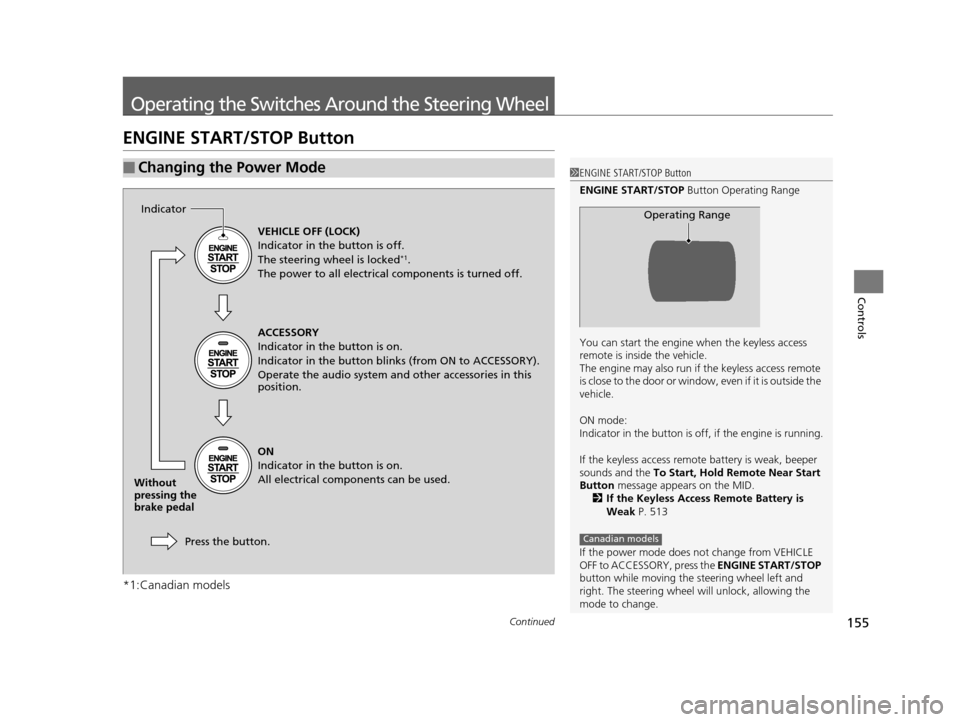
ENGINE START/STOP Button
*1:Canadian models
■Changing the Power Mode1ENGINE START/STOP Button
ENGINE START/STOP Button Operating Range
You can start the engine when the keyless access
remote is inside the vehicle.
The engine may also run if the keyless access remote
is close to the door or window, even if it is outside the
vehicle.
ON mode:
Indicator in the button is of f, if the engine is running.
If the keyless access remote battery is weak, beeper
sounds and the To Start, Hold Remote Near Start
Button message appears on the MID.
2 If the Keyless Access Remote Battery is
Weak P. 513
If the power mode does not change from VEHICLE
OFF to ACCESSORY, press the ENGINE START/STOP
button while moving the st eering wheel left and
right. The steering wheel will unlock, allowing the
mode to change.
Operating Range
Canadian models
VEHICLE OFF (LOCK)
Indicator in the button is off.
The steering wheel is locked
*1.
The power to all electrical components is turned off.
ACCESSORY
Indicator in the button is on.
Indicator in the button blinks (from ON to ACCESSORY).
Operate the audio system and other accessories in this
position.
ON
Indicator in the button is on.
All electrical components can be used.
Press the button.
Indicator
Without
pressing the
brake pedal
16 ACURA MDX-31TZ56200.book 155 ページ 2015年3月4日 水曜日 午後2時59分
Page 160 of 557
159
uuOperating the Switches Around the Steering Wheel uLight Switches
Continued
Controls
Light Switches
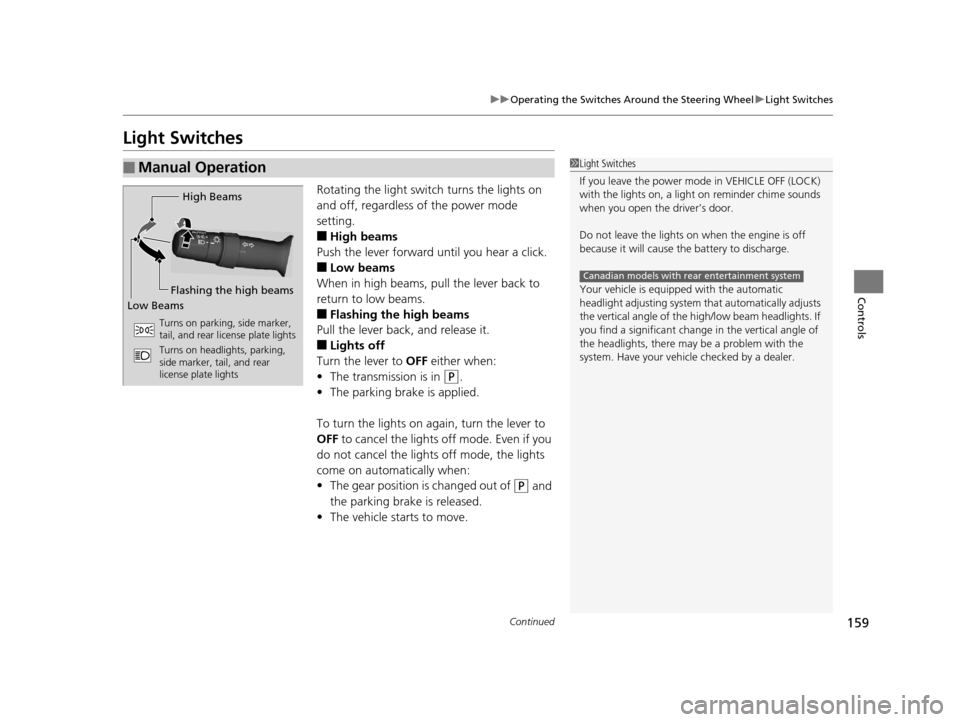
Rotating the light switch turns the lights on
and off, regardless of the power mode
setting.
■High beams
Push the lever forward until you hear a click.
■Low beams
When in high beams, pull the lever back to
return to low beams.
■Flashing the high beams
Pull the lever back, and release it.
■Lights off
Turn the lever to OFF either when:
• The transmission is in
(P.
• The parking brake is applied.
To turn the light s on again, turn the lever to
OFF to cancel the lights off mode. Even if you
do not cancel the lights off mode, the lights
come on automatically when:
• The gear position is changed out of
(P and
the parking brake is released.
• The vehicle starts to move.
■Manual Operation1Light Switches
If you leave the power mode in VEHICLE OFF (LOCK)
with the lights on, a light on reminder chime sounds
when you open the driver’s door.
Do not leave the lights on when the engine is off
because it will cause the battery to discharge.
Your vehicle is equipped with the automatic
headlight adjusting system that automatically adjusts
the vertical angle of the high/low beam headlights. If
you find a significant change in the vertical angle of
the headlights, there may be a problem with the
system. Have your vehicle checked by a dealer.
Canadian models with rear entertainment system
High Beams
Flashing the high beams
Low Beams
Turns on parking, side marker,
tail, and rear license plate lights
Turns on headlights, parking,
side marker, tail, and rear
license plate lights
16 ACURA MDX-31TZ56200.book 159 ページ 2015年3月4日 水曜日 午後2時59分
Page 163 of 557
162
uuOperating the Switches Around the Steering Wheel uFog Lights*
Controls
Fog Lights*
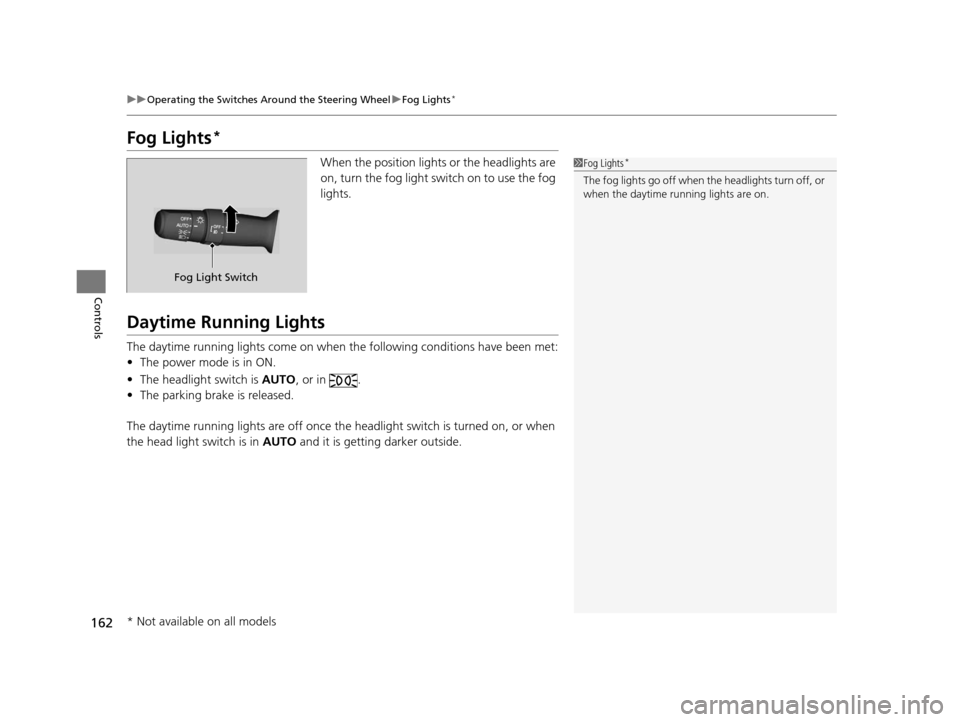
When the position lights or the headlights are
on, turn the fog light switch on to use the fog
lights.
Daytime Running Lights
The daytime running lights come on when the following conditions have been met:
• The power mode is in ON.
• The headlight switch is AUTO, or in .
• The parking brake is released.
The daytime running lights are off once the headlight switch is turned on, or when
the head light switch is in AUTO and it is getting darker outside.
1Fog Lights*
The fog lights go off when th e headlights turn off, or
when the daytime running lights are on.
Fog Light Switch
* Not available on all models
16 ACURA MDX-31TZ56200.book 162 ページ 2015年3月4日 水曜日 午後2時59分
Page 171 of 557

uuOperating the Switches Around the Steering Wheel uDriving Position Memory System
170
Controls
1. Set the power mode to ON. Adjust the
driver’s seat, the steering wheel and the
door mirrors to the desired position.
2. Press the SET button.
u You will hear a beep, and the memory
button indicator light will blink.
3. Press memory button
(1 or (2 within five
seconds of pressing the SET button.
u Once the seat, the steering wheel and
the outside mirror positions have been
memorized, the indicator light on the
button you pressed stays on.
1. Select
(P.
2. Apply the parking brake.
3. Press a memory button (
(1 or (2).
u You will hear a beep, and the indicator
light will blink.
The seat, the steering wheel and the door
mirrors will automatically move to the
memorized positions. When it has finished
moving, you will hear the beep, and the
indicator light stays on.
■Storing a Position in Memory1 Storing a Position in Memory
After you press the SET button, the storing operation
will be canceled when:
•You do not press the memory button within five
seconds.
•You readjust the seat, the steering wheel or the
outside mirror position before the double-beep.
•You set the power mode to any position except
ON.
Memory Button 1
Memory Button 2SET Button
■Recalling the Stored Position1Recalling the Stored Position
The seat will st op moving if you:
•Press the SET button, or a memory button ((1 or
(2).•Adjust the seat, the st eering wheel or the door
mirror position.
•Select into any position except ( P.
Memory Buttons
16 ACURA MDX-31TZ56200.book 170 ページ 2015年3月4日 水曜日 午後2時59分
Page 185 of 557

uuAdjusting the Seats uRear Seats
184
Controls
Separately fold down the left and right halv es of the third row seat to make room
for cargo.
■To fold down the seat 1.Pull the handle on the seat-back fully.
u The head restraint tilts downward.
2. Push the seat-back forward while pulling
the handle.
■To return the seat to the original position
1. Pull the seat-back up with the handle pulled.
2. Push the head restraint up to its original position.
■Folding Down the Third Row Seat1Folding Down the Third Row Seat
Make sure all items in the cargo area or items
extending to the third row seats are properly
secured. Loose items can fly forward if you have
to brake hard.
Handle
1To return the seat to the original position
Make sure the seat-back and head restraints are
securely latched back in to place before driving.
16 ACURA MDX-31TZ56200.book 184 ページ 2015年3月4日 水曜日 午後2時59分
Page 322 of 557
321
Driving
This chapter discusses driving, refueling, and information on items such as accessories.
Before Driving................................... 322
Towing a Trailer ................................ 327
Off-Highway Driving Guidelines ..... 338
When Driving Starting the Engine .......................... 340
Automatic Transmission ................... 346
Shifting ............................................ 347
Auto Idle Stop
*................................ 355
Integrated Dynamics System (IDS)..... 359
Cruise Control
*................................ 360
Front Sensor Camera*...................... 363Adaptive Cruise Control (ACC) with Low
Speed Follow (LSF)*............................ 365Forward Collision Warning (FCW) with Pedestrian Detection*.................... 379 Lane Departure Warning (LDW)
*..... 385Road Departure Mitigation (RDM)
System*..................................... 389Lane Keeping Assist System (LKAS)*.. 394Vehicle Stability Assist (VSA ®), aka Electronic
Stability Control (ESC), System ............. 402
Agile Handling Assist System............ 404
Blind Spot Information (BSI) System*... 405
Super Handling-All Wheel DriveTM (SH-
AWD® )*......................................... 407Tire Pressure Monitoring System (TPMS) ... 408Tire Pressure Monitoring System (TPMS) -
Required Federal Explanation ......... 410
Braking Brake System ................................... 412 Anti-lock Brake System (ABS) ........... 414
Brake Assist System ......................... 415
Collision Mitigation Braking System
TM
(CMBSTM)*..................................... 416
Parking Your Vehicle When Stopped ................................ 425
Parking Sensor System
*................... 426
Cross Traffic Monitor*..................... 430
Multi-View Rear Camera*................ 434
Refueling Fuel Information .............................. 435
How to Refuel ................................. 436
Fuel Economy .................................... 437
Accessories and Modifications ........ 438
* Not available on all models
16 ACURA MDX-31TZ56200.book 321 ページ 2015年3月4日 水曜日 午後2時59分
Page 324 of 557

Continued323
uuBefore Driving uDriving Preparation
Driving
• Store or secure all items on board properly.
u Carrying too much cargo, or improperly storing it, can affect your vehicle’s
handling, stability, sto pping distance, and tires, and make it unsafe.
2Maximum Load Limit P. 325
•Do not pile items higher than the seat height.
u They can block your view and may be thrown forward in the event of sudden
braking.
• Do not place anything in the front seat footwells. Make sure to secure the floor
mat.
u An object or unsecured floor mat can in terfere with your brake and accelerator
pedal operation while driving.
• If you have any animals on board, do not let them move around in the vehicle.
u They may interfere with driv ing and a crash could occur.
• Securely close and lock al l doors and the tailgate.
2Locking/Unlocking the Doors from the Inside P. 138
•Adjust your seating position properly.
u Adjust the head restraint, too.
2Adjusting the Seats P. 175
2 Adjusting the Head Restraints P. 178
•Adjust the mirrors and steering wh eel properly for your driving.
u Adjust them while sitting in the proper driving position.
2 Adjusting the Steering Wheel P. 171
2 Adjusting the Mirrors P. 172
■Interior Checks1Interior Checks
The headlight aim is set by the factory, and does not
need to be adjusted. Howeve r, if you regularly carry
heavy items in the cargo area or tow a trailer, have
the aiming readjusted at a dealer or by a qualified
technician.
16 ACURA MDX-31TZ56200.book 323 ページ 2015年3月4日 水曜日 午後2時59分