belt Acura MDX 2016 Workshop Manual
[x] Cancel search | Manufacturer: ACURA, Model Year: 2016, Model line: MDX, Model: Acura MDX 2016Pages: 557, PDF Size: 31.09 MB
Page 189 of 557
188
uuInterior Lights/Interior Convenience Items uInterior Convenience Items
Controls
Interior Convenience Items
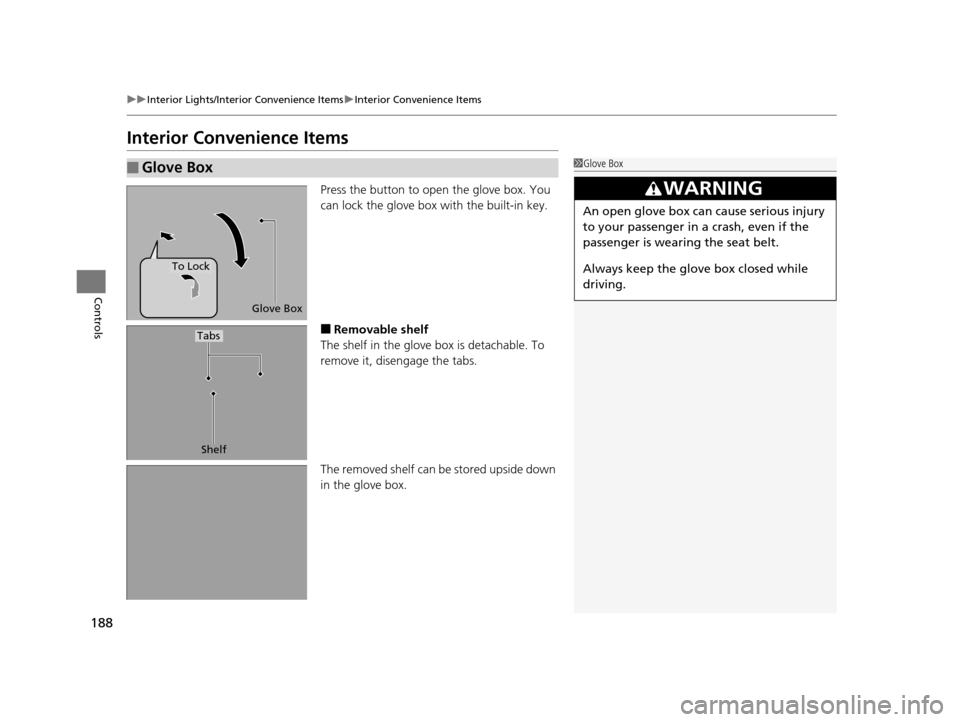
Press the button to open the glove box. You
can lock the glove box with the built-in key.
■Removable shelf
The shelf in the glove box is detachable. To
remove it, disengage the tabs.
The removed shelf can be stored upside down
in the glove box.
■Glove Box1 Glove Box
3WARNING
An open glove box can cause serious injury
to your passenger in a crash, even if the
passenger is wearing the seat belt.
Always keep the glove box closed while
driving.
Glove Box
To Lock
Shelf
Tabs
16 ACURA MDX-31TZ56200.book 188 ページ 2015年3月4日 水曜日 午後2時59分
Page 266 of 557
265
uuCustomized Features u
Continued
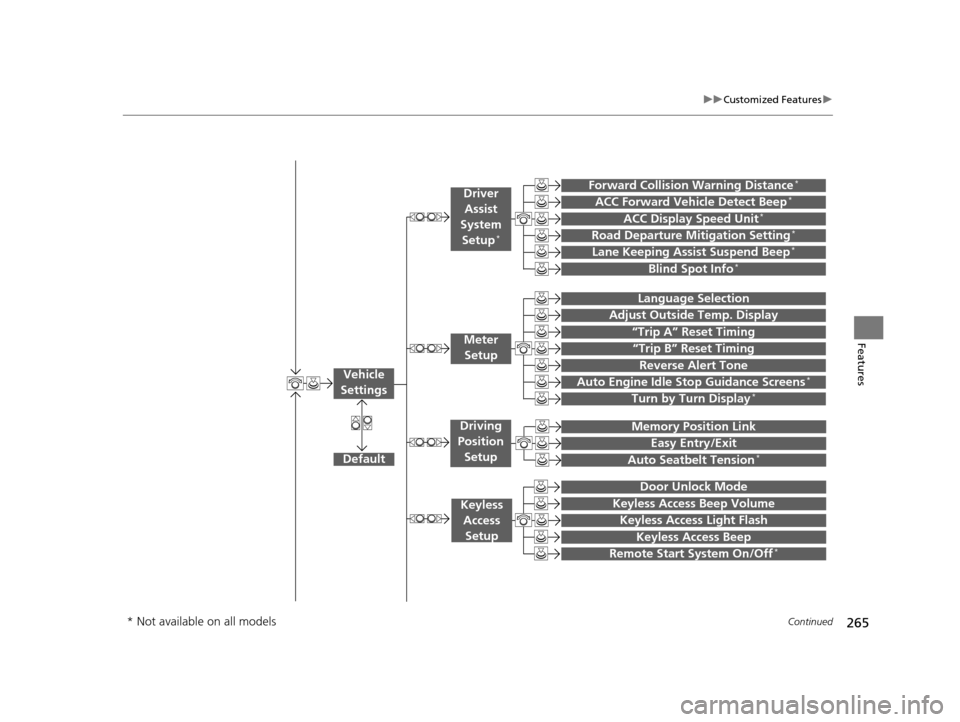
Features“Trip B” Reset Timing
Turn by Turn Display*
Adjust Outside Temp. Display
“Trip A” Reset Timing
Default
Memory Position Link
Keyless Access Light Flash
Keyless Access Beep
Meter
Setup
Keyless Access Setup
Remote Start System On/Off*
Easy Entry/Exit
Driving
Position Setup
Door Unlock Mode
Lane Keeping Assist Suspend Beep*
Blind Spot Info*
ACC Forward Vehicle Detect Beep*
ACC Display Speed Unit*
Driver
Assist
System Setup
*
Forward Collision Warning Distance*
Language Selection
Auto Seatbelt Tension*
Keyless Access Beep Volume
Reverse Alert Tone
Auto Engine Idle Stop Guidance Screens*
Road Departure Mitigation Setting*
Vehicle
Settings
* Not available on all models
16 ACURA MDX-31TZ56200.book 265 ページ 2015年3月4日 水曜日 午後2時59分
Page 275 of 557
274
uuCustomized Features u
Features
*1:Default SettingSetup
Group Customizable Features Descri
ption Selectable Settings
Vehicle
Settings Lighting
Setup
Interior Light Dimming
Time
Changes the length of time the interior lights stay
on after you close the doors. 60seconds/
30seconds
*1/
15seconds
Headlight Auto Off Timer Changes the length of time the exterior lights
stay on after you close the driver’s door. 60seconds/
30seconds/
15seconds
*1/
0seconds
Auto Light Sensitivity Changes the timing for the headlights to come
on. Max
/High /Mid
*1/
Low /Min
Driving
Position
Setup Memory Position Link
Turns the driving position
m e m o r y s y s t e m u s i n g a
remote transmitter on and off. On
*1/
Off
Easy Entry/Exit Moves the seat fully rearward and steering wheel
fully up when you get in/get out of the vehicle.
Changes the setting for this feature. Seat & Steering
Wheel
*1/
Seat Only /
Steering Wheel
Only /Off
Auto Seatbelt Tension
*Turns the setting for the automatic seat belt e-
pretensioner activation on and off. On*1/
Off
* Not available on all models
16 ACURA MDX-31TZ56200.book 274 ページ 2015年3月4日 水曜日 午後2時59分
Page 325 of 557

324
uuBefore Driving uDriving Preparation
Driving
• Be sure items placed on the floor behind the front seats cannot roll under the
seats.
u They can interfere with the driver’s ability to operate the pedals, the operation
of the seats, or the operation of the sensors under the seats.
• Everyone in the vehicle must fasten their seat belt.
2Fastening a Seat Belt P. 36
•Make sure that the indicators in the ins trument panel come on when you start the
vehicle, and go off soon after.
u Always have a dealer check the vehicle if a problem is indicated.
2 Indicators P. 72
16 ACURA MDX-31TZ56200.book 324 ページ 2015年3月4日 水曜日 午後2時59分
Page 339 of 557

338
Driving
Off-Highway Driving Guidelines
General Information
Your vehicle has been designed primarily for use on pavement, however, its higher
ground clearance allows you to occasionally travel on unpaved roads. It is not
designed for trail-blazing, or other challenging off-road activities.
If you decide to drive on unpaved roads, you will find that it requires somewhat
different driving skills and that your vehicle will handle somewhat differently than it
does on pavement. Pay attention to the precautions and tips in this section, and get
acquainted with your vehicle before leaving the pavement.
Important Safety Precautions
To avoid loss of control or rollover, be sure to follow all precautions and
recommendations:
• Be sure to store cargo properly and do not exceed your cargo load limits.
2 Maximum Load Limit P. 325
•Whenever you drive, make sure you and your passengers always wear seat belts.
• Keep your speed low, and never go faster than the conditions allow.
• It’s up to you to continually assess the situation and drive within the limits.
1Off-Highway Driving Guidelines
Failure to operate your vehi cle correctly might result
in a crash or a rollover. 2 Important Handling Information P. 30
2 Precautions While Driving P. 345
Spinning the tires can al so damage the SH-AWD ®
system.
3WARNING
Improperly operating this vehicle on or off
pavement can cause a crash or rollover in
which you and your passengers can be
seriously injured or killed.
• Follow all instructions and guidelines in
this owner’s manual.
• Keep your speed low, and don’t drive
faster than conditions permit.
16 ACURA MDX-31TZ56200.book 338 ページ 2015年3月4日 水曜日 午後2時59分
Page 351 of 557
uuWhen Driving uShifting
350
Driving
In freezing or sub-freezing conditions, the electronic gear selector response may be
slow.
Always depress the brake pedal before changing the gear position to
(P, and
confirm that
(P is shown on the gear position in dicator before releasing the brake.
■When opening the driver’s door
If you open the driver’s door under the following conditions, the gear position
automatically changes to
(P.
• The vehicle is stationary with the engine running, or moving at 1 mph (2 km/h) or
slower.
• The transmission is in other than
(P.
• You have unfastened the driver side seat belt.
u If you manually change the gear position from
(P with the brake pedal
depressed, the gear position will automatically return to
(P once you release
the brake pedal.
■When turning off the power mode
If you turn the engine off wh ile the vehicle is stationary, and the transmission is in
other than
(P, the gear position automatically changes to (P.
1 When opening the driver’s door
You should always select
(P before opening the
driver’s door.
Make sure to park the vehicle in a safe place. 2 When Stopped P. 425
If you want to drive the ve hicle after the gear position
has automatically changed to
( P under the described
conditions, close the door, fasten the seat belt,
depress the brake pedal, then change the gear
position.
If you leave the vehicle, tu rn off the engine and lock
the doors.
16 ACURA MDX-31TZ56200.book 350 ページ 2015年3月4日 水曜日 午後2時59分
Page 357 of 557
uuWhen Driving uAuto Idle Stop*
356
Driving
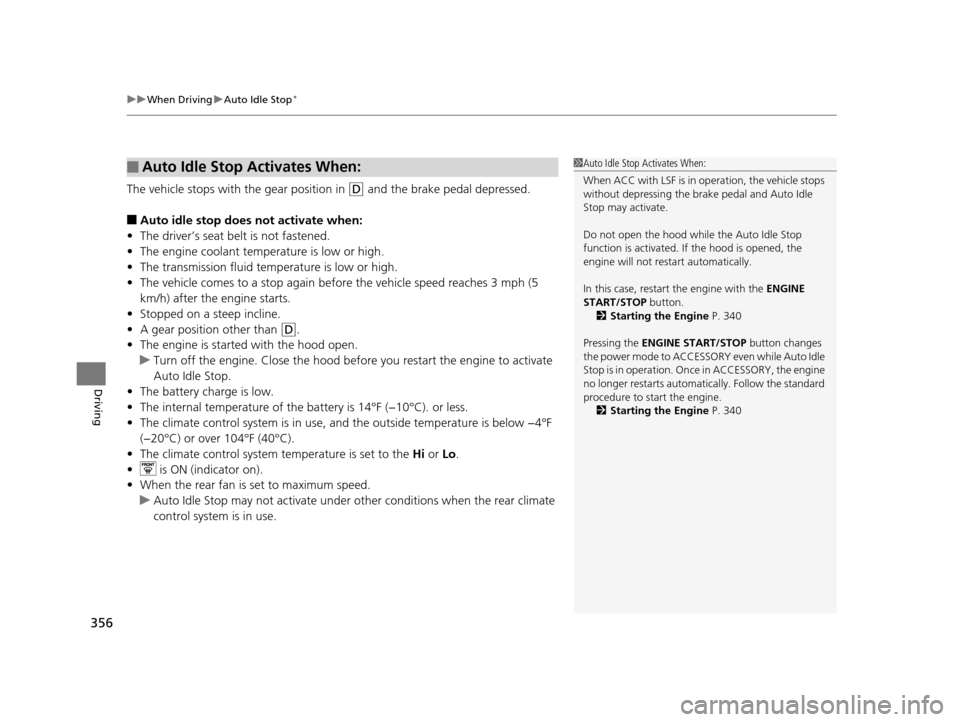
The vehicle stops with the gear position in (D and the brake pedal depressed.
■Auto idle stop does not activate when:
• The driver’s seat belt is not fastened.
• The engine coolant temperature is low or high.
• The transmission fluid temperature is low or high.
• The vehicle comes to a stop again befo re the vehicle speed reaches 3 mph (5
km/h) after the engine starts.
• Stopped on a steep incline.
• A gear position other than
(D.
• The engine is started with the hood open.
u Turn off the engine. Close the hood before you restart the engine to activate
Auto Idle Stop.
• The battery charge is low.
• The internal temperature of the ba ttery is 14°F (−10°C). or less.
• The climate control system is in use, an d the outside temperature is below −4°F
(−20°C) or over 104°F (40°C).
• The climate control system temperature is set to the Hi or Lo .
• is ON (indicator on).
• When the rear fan is set to maximum speed.
u Auto Idle Stop may not ac tivate under other conditions when the rear climate
control system is in use.
■Auto Idle Stop Activates When:1 Auto Idle Stop Activates When:
When ACC with LSF is in operation, the vehicle stops
without depressing the br ake pedal and Auto Idle
Stop may activate.
Do not open the hood while the Auto Idle Stop
function is activated. If the hood is opened, the
engine will not re start automatically.
In this case, restart the engine with the ENGINE
START/STOP button. 2 Starting the Engine P. 340
Pressing the ENGINE START/STOP button changes
the power mode to ACCESSORY even while Auto Idle
Stop is in operation. Once in ACCESSORY, the engine
no longer restarts automatica lly. Follow the standard
procedure to start the engine.
2 Starting the Engine P. 340
16 ACURA MDX-31TZ56200.book 356 ページ 2015年3月4日 水曜日 午後2時59分
Page 359 of 557
uuWhen Driving uAuto Idle Stop*
358
Driving
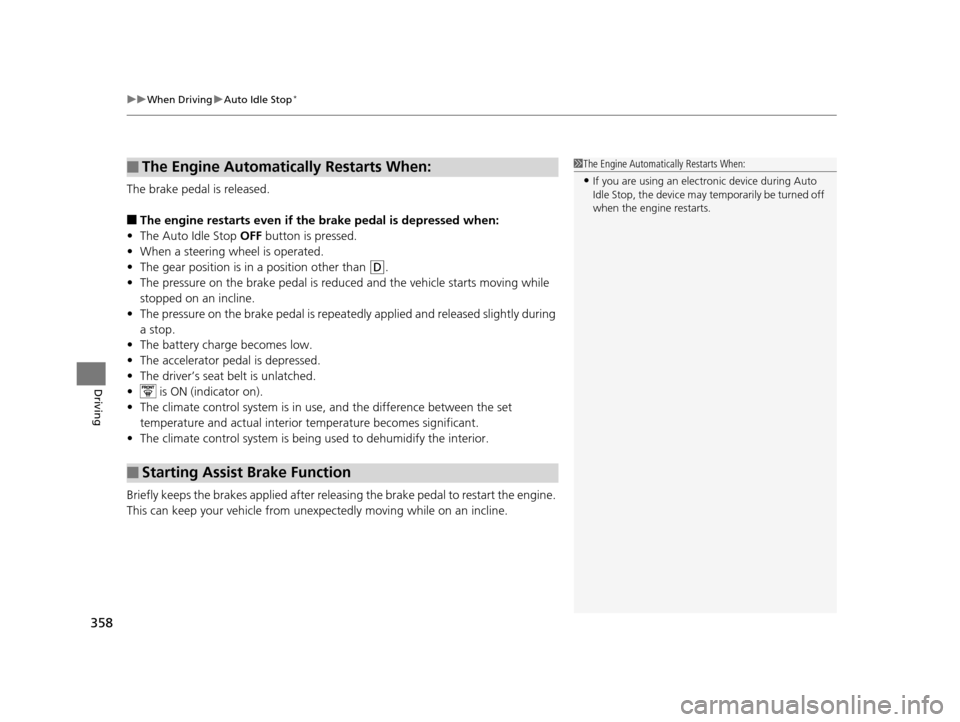
The brake pedal is released.
■The engine restarts even if the brake pedal is depressed when:
• The Auto Idle Stop OFF button is pressed.
• When a steering wheel is operated.
• The gear position is in a position other than
(D.
• The pressure on the brake pedal is redu ced and the vehicle starts moving while
stopped on an incline.
• The pressure on the brake pedal is repeated ly applied and released slightly during
a stop.
• The battery charge becomes low.
• The accelerator pedal is depressed.
• The driver’s seat belt is unlatched.
• is ON (indicator on).
• The climate control system is in us e, and the difference between the set
temperature and actual interior temperature becomes significant.
• The climate control system is bein g used to dehumidify the interior.
Briefly keeps the brakes applied after releas ing the brake pedal to restart the engine.
This can keep your vehicle from unexpectedly moving while on an incline.
■The Engine Automatically Restarts When:
■Starting Assist Brake Function
1 The Engine Automatically Restarts When:
•If you are using an elec tronic device during Auto
Idle Stop, the device may temporarily be turned off
when the engine restarts.
16 ACURA MDX-31TZ56200.book 358 ページ 2015年3月4日 水曜日 午後2時59分
Page 378 of 557

Continued377
uuWhen Driving uAdaptive Cruise Control (ACC) with Low Speed Follow (LSF)*
Driving
■Automatic ca ncellation
The beeper sounds and a message appear s on the MID when ACC with LSF is
automatically canceled. Any of these co nditions may cause the ACC with LSF to
automatically cancel:
• Bad weather (rain, fog, snow, etc.)
• When the radar sensor in the front grille gets dirty.
• The vehicle ahead of yo u cannot be detected.
• An abnormal tire condition is de tected, or the tires are skidding.
• Driving on a mountainous road, or driving off road for extended periods.
• Abrupt steering wheel movement.
• When the ABS, VSA ® or CMBS
TM is activated.
• When the ABS or VSA ® system indicator comes on.
• When the vehicle is stopped on a very steep slope.
• When you manually apply the parking brake.
• When the detected vehicle within the AC C with LSF range is too close to your
vehicle.
• When a detected vehicle goes out of the ACC with LSF range while your vehicle
is stationary.
• The camera behind the rearview mirror, or the area around the camera, including
the windshield, gets dirty.
The ACC with LSF automatic cancellation ca n be also triggered by the following
causes.
• The driver’s seat belt is unfastened when the vehicle is stationary.
• The vehicle stops for more than 10 minutes.
• The engine is turned off.
• When trailer stability assist
* is activated.
2 Trailer Stability Assist* P. 335
1Automatic cancellation
Even though ACC with LSF has been automatically
canceled, you can still resu me the prior set speed.
Wait until the condition that caused ACC with LSF to
cancel improves, then press the RES/+/SET/– switch
up.
* Not available on all models
16 ACURA MDX-31TZ56200.book 377 ページ 2015年3月4日 水曜日 午後2時59分
Page 419 of 557
418
uuBraking uCollision Mitigation Braking SystemTM (CMBSTM)*
Driving
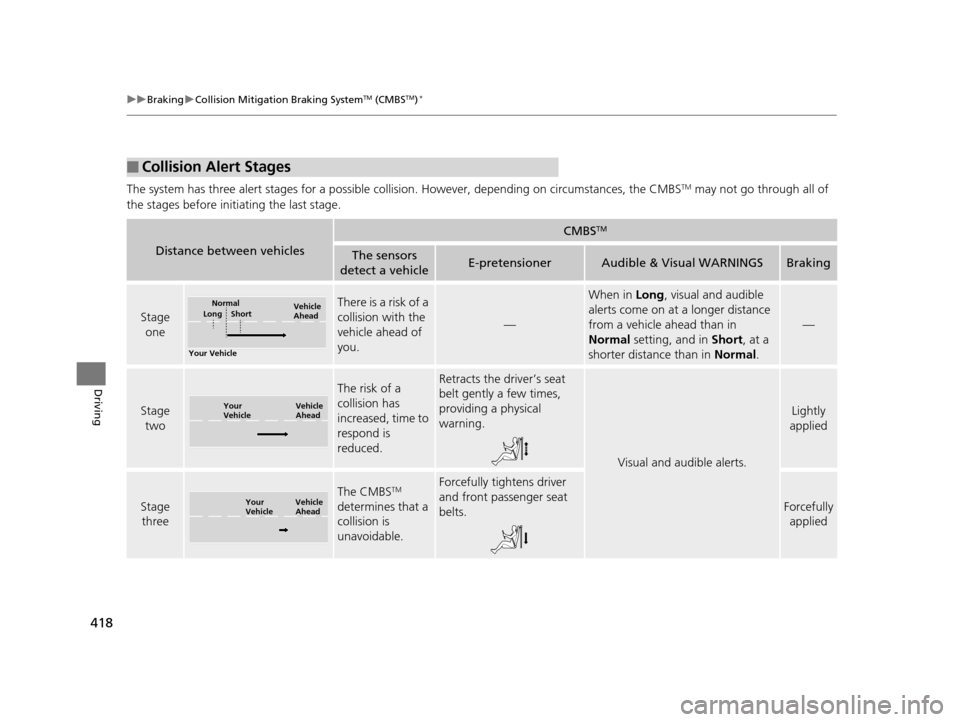
The system has three alert stages for a possible collision. However, depending on circumstances, the CMBSTM may not go through all of
the stages before initiating the last stage.
■Collision Alert Stages
Distance between vehicles
CMBSTM
The sensors
detect a vehicleE-pretensionerAudible & Visual WARNINGSBraking
Stage one
There is a risk of a
collision with the
vehicle ahead of
you.
—
When in Long, visual and audible
alerts come on at a longer distance
from a vehicle ahead than in
Normal setting, and in Short, at a
shorter distance than in Normal.
—
Stage
two
The risk of a
collision has
increased, time to
respond is
reduced.Retracts the driver’s seat
belt gently a few times,
providing a physical
warning.
Visual and audible alerts.
Lightly
applied
Stage three
The CMBSTM
determines that a
collision is
unavoidable.Forcefully tightens driver
and front passenger seat
belts.
Forcefully applied
Your Vehicle Vehicle
Ahead
Normal
Short
Long
Your
Vehicle Vehicle
Ahead
Your
Vehicle
Vehicle
Ahead
16 ACURA MDX-31TZ56200.book 418 ページ 2015年3月4日 水曜日 午後2時59分