ABS Acura MDX 2016 Owner's Manual
[x] Cancel search | Manufacturer: ACURA, Model Year: 2016, Model line: MDX, Model: Acura MDX 2016Pages: 557, PDF Size: 31.09 MB
Page 12 of 557
11
Quick Reference Guide
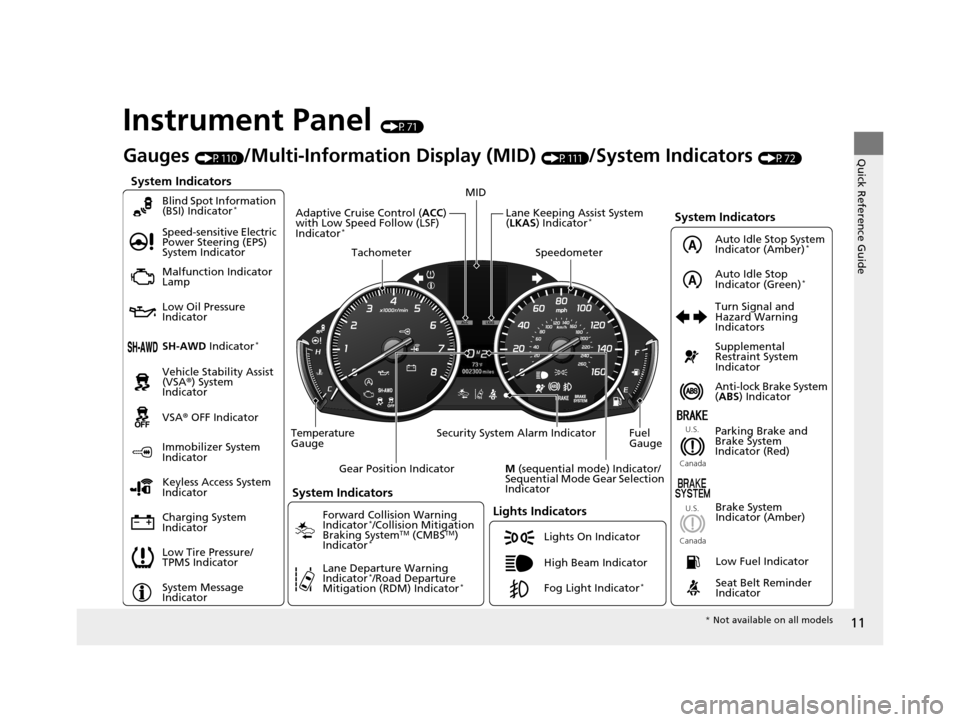
Instrument Panel (P71)
System Indicators
Malfunction Indicator
Lamp
Low Oil Pressure
Indicator
Charging System
IndicatorAnti-lock Brake System
(
ABS ) Indicator
Vehicle Stability Assist
(VSA®
) System
Indicator
VSA ® OFF Indicator
Speed-sensitive Electric
Power Steering (EPS)
System Indicator
Lights Indicators
Lights On Indicator
High Beam Indicator
Immobilizer System
Indicator
Seat Belt Reminder
Indicator
System Indicators
System Message
IndicatorParking Brake and
Brake System
Indicator (Red)
Supplemental
Restraint System
Indicator
Low Fuel Indicator
Gauges (P110)/Multi-Information Display (MID) (P111)/System Indicators (P72)
Low Tire Pressure/
TPMS Indicator Turn Signal and
Hazard Warning
Indicators
Keyless Access System
Indicator
Temperature
Gauge Security System Alarm Indicator Fuel
Gauge
Tachometer
MID
Speedometer
Gear Position Indicator
M (sequential mode) Indicator/
Sequential Mode Gear Selection
Indicator
Brake System
Indicator (Amber)
SH-AWD Indicator*
Blind Spot Information
(BSI) Indicator*
System Indicators
Forward Collision Warning
Indicator*/Collision Mitigation
Braking SystemTM (CMBSTM)
Indicator*
Lane Departure Warning
Indicator*/Road Departure
Mitigation (RDM) Indicator*
Lane Keeping Assist System
( LKAS ) Indicator*Adaptive Cruise Control ( ACC)
with Low Speed Follow (LSF)
Indicator
*
U.S.
Canada U.S.
Canada
Fog Light Indicator*
Auto Idle Stop System
Indicator (Amber)*
Auto Idle Stop
Indicator (Green)*
* Not available on all models
16 ACURA MDX-31TZ56200.book 11 ページ 2015年3月4日 水曜日 午後2時59分
Page 24 of 557
23
Quick Reference Guide
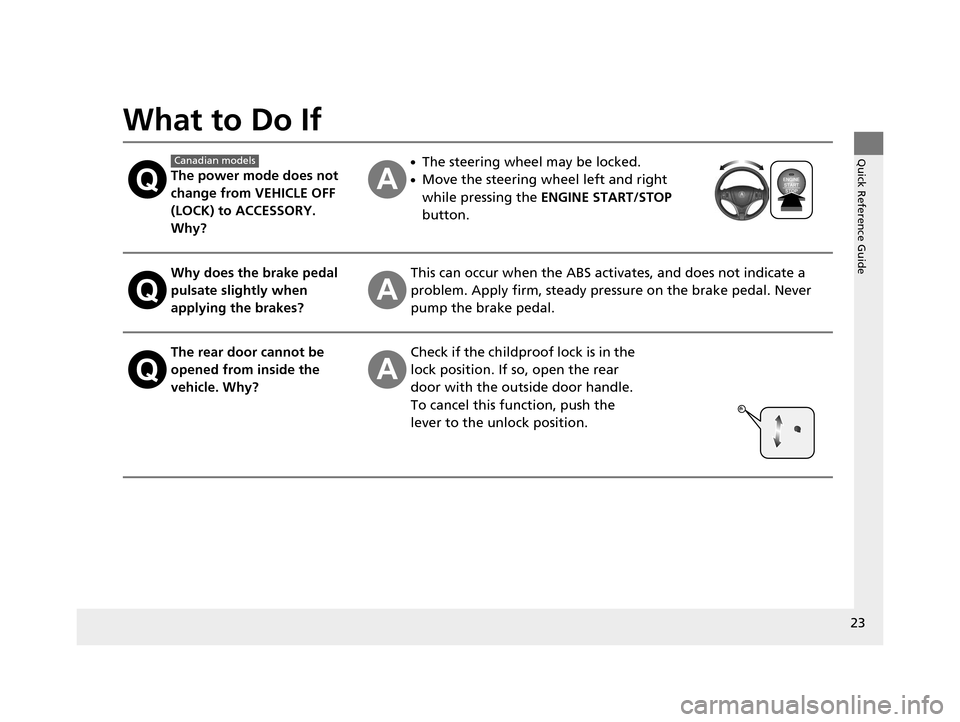
What to Do If
The power mode does not
change from VEHICLE OFF
(LOCK) to ACCESSORY.
Why?
●The steering wheel may be locked.
●Move the steering wheel left and right
while pressing the ENGINE START/STOP
button.
Why does the brake pedal
pulsate slightly when
applying the brakes?This can occur when the ABS activates, and does not indicate a
problem. Apply firm, steady pressure on the brake pedal. Never
pump the brake pedal.
The rear door cannot be
opened from inside the
vehicle. Why?Check if the childproof lock is in the
lock position. If so, open the rear
door with the outside door handle.
To cancel this function, push the
lever to the unlock position.
Canadian models
16 ACURA MDX-31TZ56200.book 23 ページ 2015年3月4日 水曜日 午後2時59分
Page 47 of 557
46
uuAirbags uFront Airbags (SRS)
Safe Driving
■When front airbags should not deploy
Minor frontal crashes: Front airbags were designed to supplement seat belts and
help save lives, not to prevent minor scrapes, or even broken bones that might occur
during a less than moderate-to-severe frontal crash.
Side impacts: Front airbags can provide protection when a sudden deceleration
causes a driver or front passenger to move toward the front of the vehicle. Side
airbags and side curtain airbag s have been specifically designed to help reduce the
severity of injuries that can occur durin g a moderate-to-severe side impact which
can cause the driver or passenger to move toward the side of the vehicle.
Rear impacts: Head restraints and seat belts are your best protection during a rear
impact. Front airbags cannot provide any si gnificant protection and are not designed
to deploy in such collisions.
Rollovers: Seat belts, and in vehicles equipped with a rollover sensor, side airbags,
and side curtain airbags offer the best prot ection in a rollover. Because front airbags
could provide little if any protection, they are not designed to deploy during a
rollover.
■When front airbags deploy with little or no visible damage
Because the airbag system senses sudden deceleration, a strong impact to the
vehicle framework or suspension might caus e one or more of the airbags to deploy.
Examples include running into a curb, the edge of a hole, or other low fixed object
that causes a sudden deceleration in th e vehicle chassis. Since the impact is
underneath the vehicle, damage may not be readily apparent.
■When front airbags may not deploy, even though exterior damage
appears severe
Since crushable body parts absorb crash energy during an impact, the amount of
visible damage does not always indicate proper airbag operation. In fact, some
collisions can result in severe damage but no airbag deployment because the airbags
would not have been needed or would not have provided protection even if they
had deployed.
16 ACURA MDX-31TZ56200.book 46 ページ 2015年3月4日 水曜日 午後2時59分
Page 50 of 557
49
uuAirbags uDriver’s Knee Airbag
Safe Driving
■When driver’s knee airbag deploy s with little or no visible damage
Because the airbag system senses sudden deceleration, a strong impact to the
vehicle framework or suspension might cause one or more of the airbags to deploy.
Examples include running into a curb, the edge of a hole, or other low fixed object
that causes a sudden deceleration in th e vehicle chassis. Since the impact is
underneath the vehicle, damage may not be readily apparent.
■When driver’s knee airbag may not de ploy, even though exterior damage
appears severe
Since crushable body parts absorb crash energy during an impact, the amount of
visible damage does not always indicate proper airbag operation. In fact, some
collisions can result in severe damage but no airbag deployment because the airbags
would not have been needed or would not have provided protection even if they
had deployed.
16 ACURA MDX-31TZ56200.book 49 ページ 2015年3月4日 水曜日 午後2時59分
Page 52 of 557
51
uuAirbags uSide Airbags
Safe Driving
■When a side airbag deploys with little or no visible damage
Because the airbag system senses sudden acceleration, a strong impact to the side
of the vehicle’s framework can cause a side airbag to deploy. In such cases, there
may be little or no damage, but the side impact sensors detected a severe enough
impact to deploy the airbag.
■When a side airbag may not deploy, even though visible damage appears
severe
It is possible for a side airbag to not deploy during an impact that results in
apparently severe damage. This can occur when the point of impact was toward the
far front or rear of the vehicle, or when the vehicle’s crushable body parts absorbed
most of the crash energy. In either case , the side airbag would not have been
needed nor provided protection even if it had deployed.
16 ACURA MDX-31TZ56200.book 51 ページ 2015年3月4日 水曜日 午後2時59分
Page 73 of 557

72
Instrument Panel
Indicators
IndicatorNameOn/BlinkingExplanationMessage
Parking Brake and
Brake System
Indicator (Red)
●Comes on for a few seconds
when you set the power mode to
ON, then goes off if the parking
brake has been released.
●Comes on when the parking
brake is applied, and goes off
when it is released.
●Comes on when the brake fluid
level is low.
●Comes on if there is a problem
with the brake system.
●The beeper sounds and the
indicator comes on if you drive
with the parking brake not fully
released.
●Comes on while driving - Make sure the
parking brake is released. Check the brake
fluid level.
2 What to do when th e indicator comes on
while driving P. 521
●Comes on along with the ABS indicator -
Have your vehicle checked by a dealer.
2 If the Brake System Indicator (Red)
Comes On P. 521
Brake System
Indicator (Amber)
●Comes on for a few seconds
when you set the power mode to
ON, then goes off.
●Comes on if there is a problem
with a system related to braking
other than the conventional
brake system.
●Comes on while driving - Have your vehicle
checked by a dealer.
●With this indicator on, your vehicle still has
normal braking ability.
U.S.
Canada
(Red)
U.S.
Canada
(Amber)
U.S.
Canada
16 ACURA MDX-31TZ56200.book 72 ページ 2015年3月4日 水曜日 午後2時59分
Page 78 of 557

77
uuIndicators u
Continued
Instrument Panel
IndicatorNameOn/BlinkingExplanationMessage
Anti-lock Brake
System (ABS)
Indicator
●Comes on for a few seconds
when you set the power mode to
ON, then goes off.
●If it comes on at any other time,
there is a problem with the ABS.
●Stays on constantly - Have your vehicle
checked by a dealer. Wi th this indicator on,
your vehicle still has normal braking ability but
no anti-lock function.
2 Anti-lock Brake System (ABS) P. 414
Supplemental
Restraint System
Indicator
●Comes on for a few seconds
when you set the power mode to
ON, then goes off.
●Comes on if a problem with any
of the following is detected:
-Supplemental restraint system
- Side airbag system
- Side curtain airbag system
- Seat belt tensioner
●Stays on constantly or does not come on
at all - Have your vehicle checked by a dealer.
16 ACURA MDX-31TZ56200.book 77 ページ 2015年3月4日 水曜日 午後2時59分
Page 108 of 557

107
uuIndicators uMulti-Information Display (MID) Warning and Information Messages
Continued
Instrument Panel
MessageConditionExplanation
●Appears when the LKAS is in operation, or the LKAS
button is pressed, but there is a problem with a system
related to the LKAS. The LKAS cancels automatically.
The beeper sounds simultaneously if selected by
customization.●If any other system indicators come on, such as the
VSA ®, ABS and brake system, take appropriate action.
2Indicators P. 72
●Appears when the LKAS is in operation, or the LKAS
button is pressed, but there the temperature inside the
LKAS camera is too high. The LKAS cancels
automatically. The beeper sounds simultaneously if
selected by customization.●Use the climate control system to cool down the
camera.
●Goes off - The camera has been cooled down. Pressing
the LKAS button can resume the system.
2 Front Sensor Camera* P. 363
●Appears when the area around the camera is blocked
by dirt, mud, etc. Stop your vehicle in a safe place, and
wipe it off with a soft cloth.
●May appear when driving in bad weather (rain, snow,
fog, etc.)
●Have your vehicle checked by a dealer if the indicator
and message come back on after you cleaned the area
around the camera.
Models with LKAS
* Not available on all models
16 ACURA MDX-31TZ56200.book 107 ページ 2015年3月4日 水曜日 午後2時59分
Page 189 of 557
188
uuInterior Lights/Interior Convenience Items uInterior Convenience Items
Controls
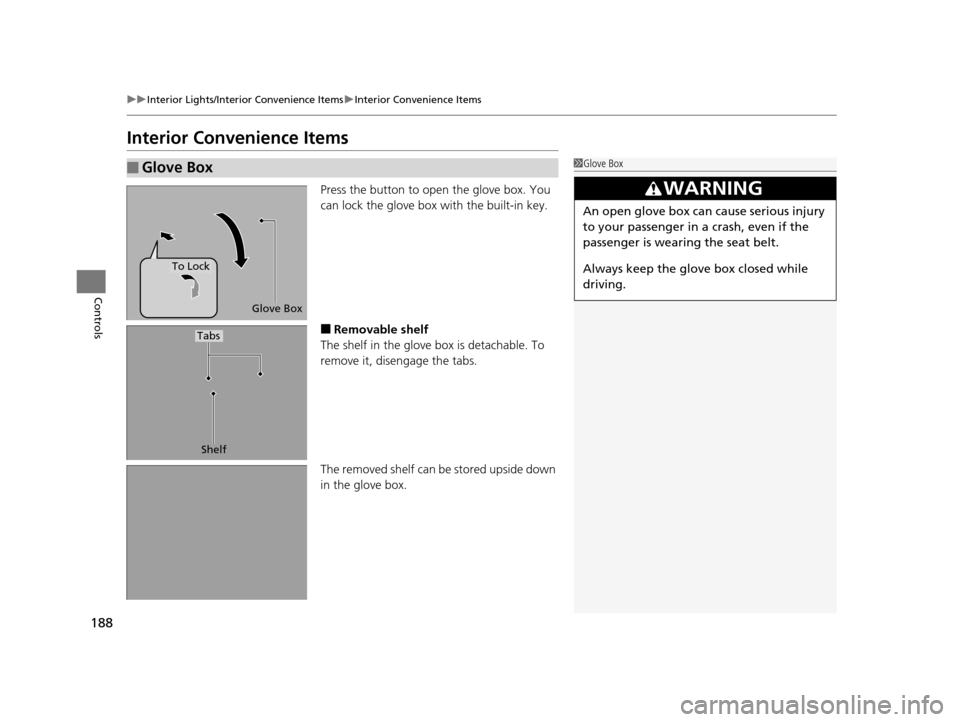
Interior Convenience Items
Press the button to open the glove box. You
can lock the glove box with the built-in key.
■Removable shelf
The shelf in the glove box is detachable. To
remove it, disengage the tabs.
The removed shelf can be stored upside down
in the glove box.
■Glove Box1 Glove Box
3WARNING
An open glove box can cause serious injury
to your passenger in a crash, even if the
passenger is wearing the seat belt.
Always keep the glove box closed while
driving.
Glove Box
To Lock
Shelf
Tabs
16 ACURA MDX-31TZ56200.book 188 ページ 2015年3月4日 水曜日 午後2時59分
Page 322 of 557
321
Driving
This chapter discusses driving, refueling, and information on items such as accessories.
Before Driving................................... 322
Towing a Trailer ................................ 327
Off-Highway Driving Guidelines ..... 338
When Driving Starting the Engine .......................... 340
Automatic Transmission ................... 346
Shifting ............................................ 347
Auto Idle Stop
*................................ 355
Integrated Dynamics System (IDS)..... 359
Cruise Control
*................................ 360
Front Sensor Camera*...................... 363Adaptive Cruise Control (ACC) with Low
Speed Follow (LSF)*............................ 365Forward Collision Warning (FCW) with Pedestrian Detection*.................... 379 Lane Departure Warning (LDW)
*..... 385Road Departure Mitigation (RDM)
System*..................................... 389Lane Keeping Assist System (LKAS)*.. 394Vehicle Stability Assist (VSA ®), aka Electronic
Stability Control (ESC), System ............. 402
Agile Handling Assist System............ 404
Blind Spot Information (BSI) System*... 405
Super Handling-All Wheel DriveTM (SH-
AWD® )*......................................... 407Tire Pressure Monitoring System (TPMS) ... 408Tire Pressure Monitoring System (TPMS) -
Required Federal Explanation ......... 410
Braking Brake System ................................... 412 Anti-lock Brake System (ABS) ........... 414
Brake Assist System ......................... 415
Collision Mitigation Braking System
TM
(CMBSTM)*..................................... 416
Parking Your Vehicle When Stopped ................................ 425
Parking Sensor System
*................... 426
Cross Traffic Monitor*..................... 430
Multi-View Rear Camera*................ 434
Refueling Fuel Information .............................. 435
How to Refuel ................................. 436
Fuel Economy .................................... 437
Accessories and Modifications ........ 438
* Not available on all models
16 ACURA MDX-31TZ56200.book 321 ページ 2015年3月4日 水曜日 午後2時59分