phone Acura MDX 2017 User Guide
[x] Cancel search | Manufacturer: ACURA, Model Year: 2017, Model line: MDX, Model: Acura MDX 2017Pages: 170, PDF Size: 12.43 MB
Page 81 of 170
74 |
Making a Call
You can make calls using several methods.
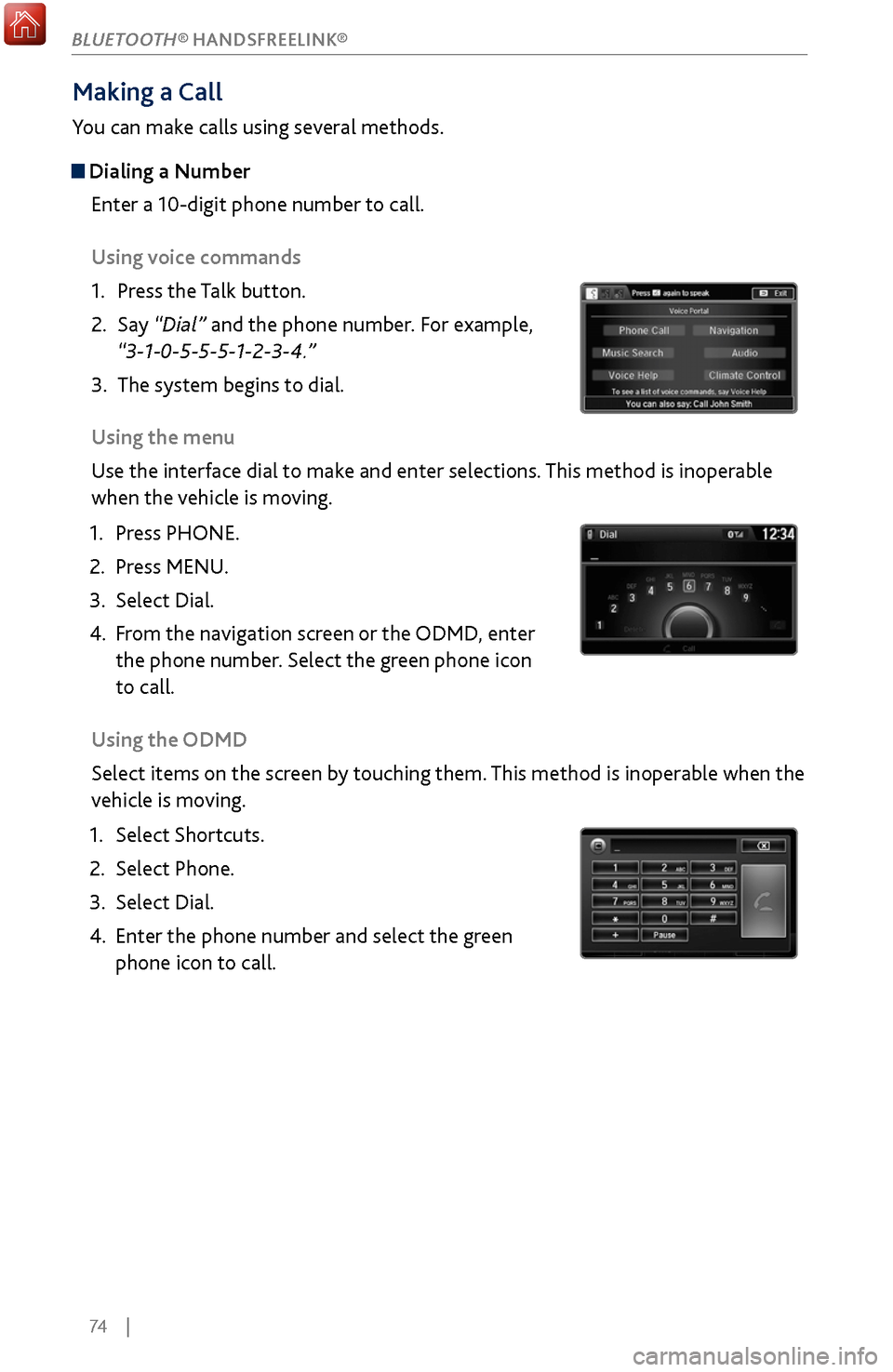
Dialing a NumberEnter a 10-digit phone number to call.
Using voice commands
1.
Press the T
alk button.
2.
Say “Dial” and
the phone number. For example,
“3-1-0-5-5-5-1-2-3-4.”
3.
The system begins to dial.
Using the
menu
Use the interface dial to make and enter selections. This method is inoperable
when the vehicle is moving.
1.
Press PHONE.
2.
Press MENU.
3.
Select Dial.
4.
From the
navigation screen or the ODMD, enter
the phone number. Select the green phone icon
to call.
Using the ODMD
Select items on the screen by touching them. This method is inoperable when the
vehicle is moving.
1.
Select Shortcuts.
2.
Select Phone.
3.
Select Dial.
4.
Enter the phone number and select the gr
een
phone icon to call.
BLUETOOTH® HANDSFREELINK®
Page 82 of 170
| 75
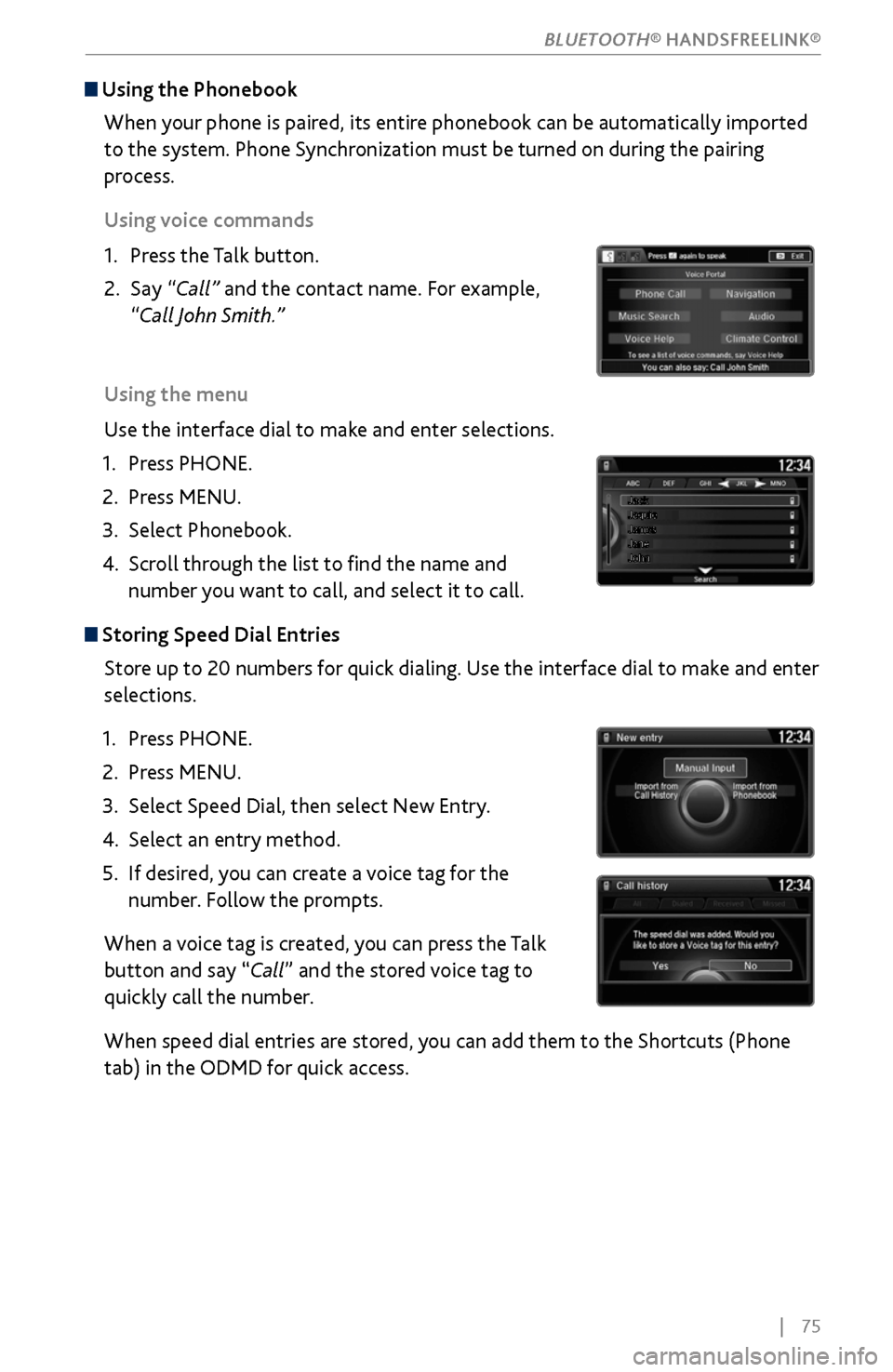
Using the Phonebook
When your phone is paired, its entire phonebook can be automatically imported
to the system. Phone Synchronization must be turned on during the pairing
process.
Using voice commands
1.
Press the T
alk button.
2.
Say “Call”
and the contact name. For example,
“Call John Smith.”
Using the menu
Use the interface dial to make and enter selections.
1.
Press PHONE.
2.
Press MENU.
3.
Select Phonebook.
4.
Scroll through the
list to find the name and
number you want to call, and select it to call.
Storing Speed Dial Entries
Store up to 20 numbers for quick dialing. Use the interface dial to make and enter
selections.
1.
Press PHONE.
2.
Press MENU.
3.
Select Speed Dial, then select New Entry
.
4.
Select an entry method.
5.
If desired, you
can create a voice tag for the
number. Follow the prompts.
When a voice tag is created, you can press the Talk
button and say “Call” and the stored voice tag to
quickly call the number.
When speed dial entries are stored, you can add them to the Shortcuts (Phone
tab) in the ODMD for quick access.
BLUETOOTH® HANDSFREELINK®
Page 83 of 170
76 |
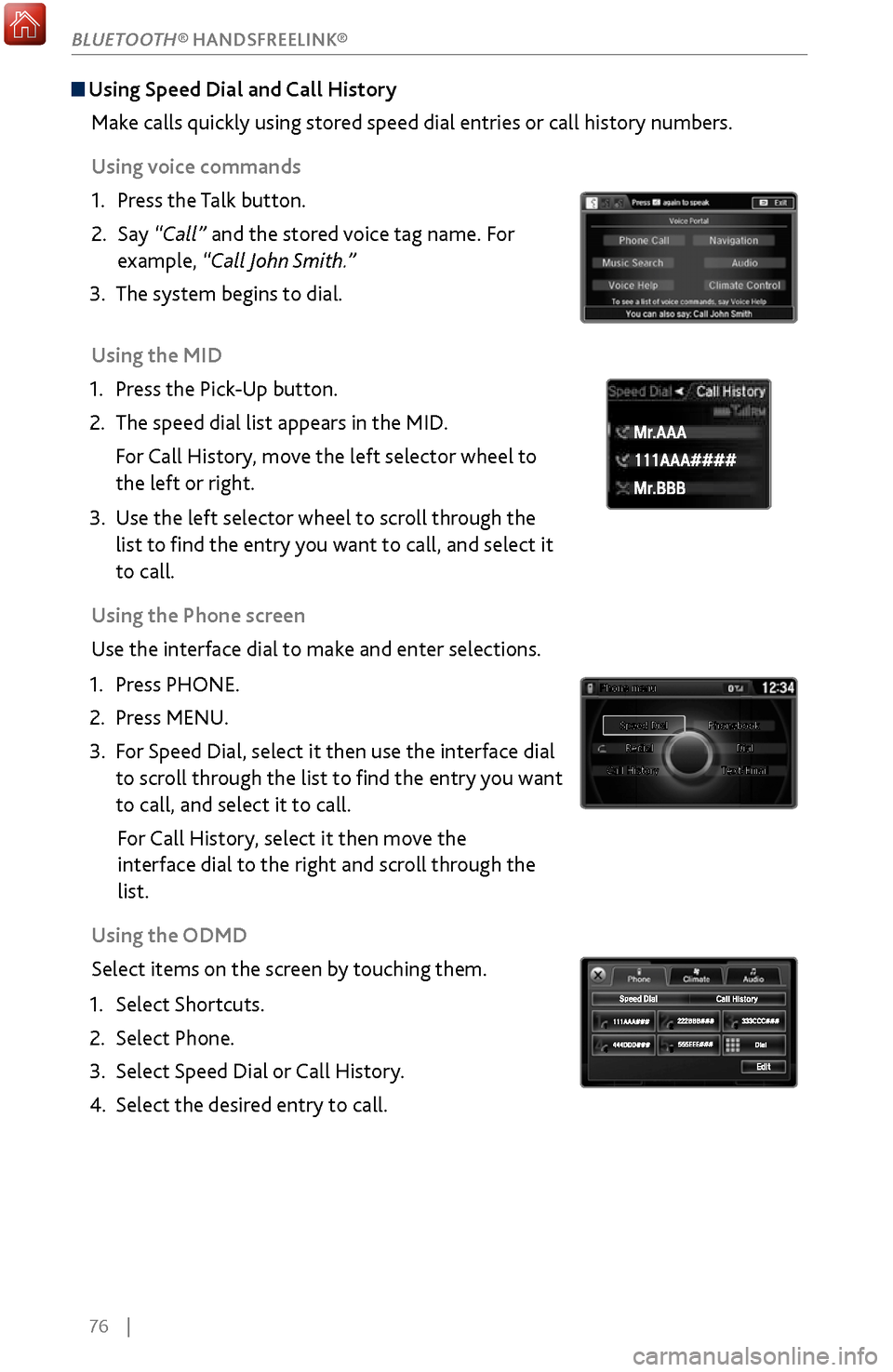
Using Speed Dial and Call History
Make calls quickly using stored speed dial entries or call history numbers.
Using voice commands
1.
Press the T
alk button.
2.
Say “Call”
and the stored voice tag name. For
example, “Call John Smith.”
3.
The system begins to dial.
Using the
MID
1.
Press the Pick
-Up button.
2.
The speed dial list appears in the MID
.
For Call History, move the left selector wheel to
the left or right.
3.
Use the left selector
wheel to scroll through the
list to find the entry you want to call, and select it
to call.
Using the Phone screen
Use the interface dial to make and enter selections.
1.
Press PHONE.
2.
Press MENU.
3.
For Speed Dial, select it
then use the interface dial
to scroll through the list to find the entry you want
to call, and select it to call.
For Call History, select it then move the
interface dial to the right and
scroll through the
list.
Using
the ODMD
Select items on the screen by touching them.
1.
Select Shortcuts.
2.
Select Phone.
3.
Select Speed Dial or
Call History.
4.
Select the desired entry to
call.
111AAA#### Mr.AAA
Mr.BBB
111AAA#### Mr.AAA
Mr.BBB
BLUETOOTH® HANDSFREELINK®
Page 84 of 170
| 77
SMS Text Messaging and E-Mail
Receive and send text messages and e-mails from your paired and linked phone.
Visit www.acura.com/handsfreelink (U.S.) or www.handsfreelink.ca (Canada) to
check phone compatibility. Standard message rates apply. This feature is limited
while the vehicle is moving.
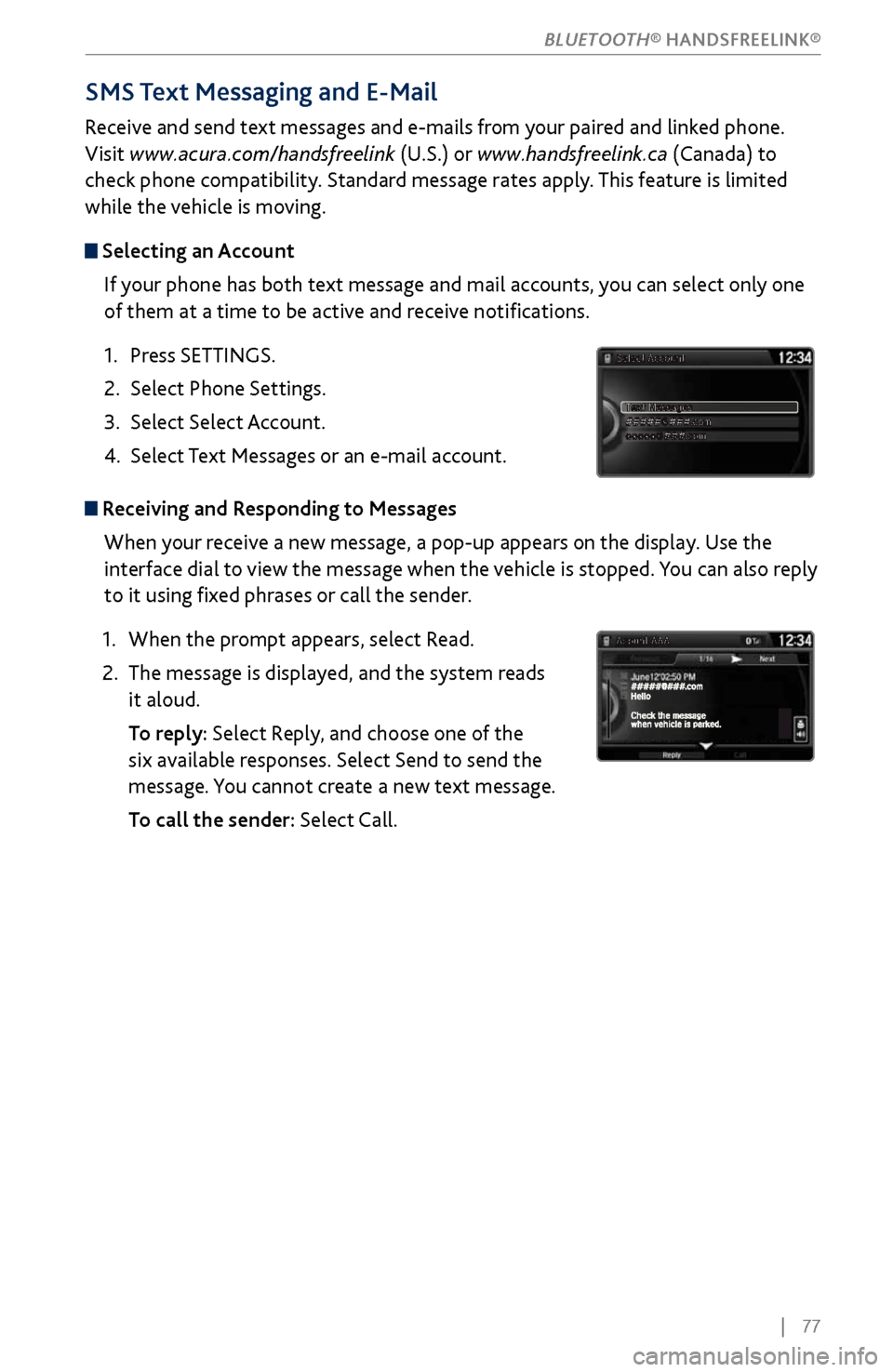
Selecting an Account
If your phone has both text message and mail accounts, you can select only one
of them at a time to be active and receive notifications.
1.
Press SETTINGS.
2.
Select Phone Settings.
3.
Select Select Account
.
4.
Select Text Messages
or an e-mail account.
Receiving and Responding to MessagesWhen your receive a new message, a pop-up appears on the display. Use the
interface dial to view the message when the vehicle is stopped. You can also reply
to it using fixed phrases or call the sender.
1.
When the prompt appears, select R
ead.
2.
The message is displayed, and
the system reads
it aloud.
To repl
y: Select Reply, and choose one of the
six available responses. Select Send to send the
message. You cannot create a new text message.
To call the sender:
Select Call.
BLUETOOTH® HANDSFREELINK®
Page 85 of 170
78 |
Siri™ Eyes Free
Activate Siri through your vehicle when an iPhone® is paired to the system. Visit
www.acura.com/handsfreelink (U.S.) or www.acura.ca/siri (Canada) to check phone
compatibility.
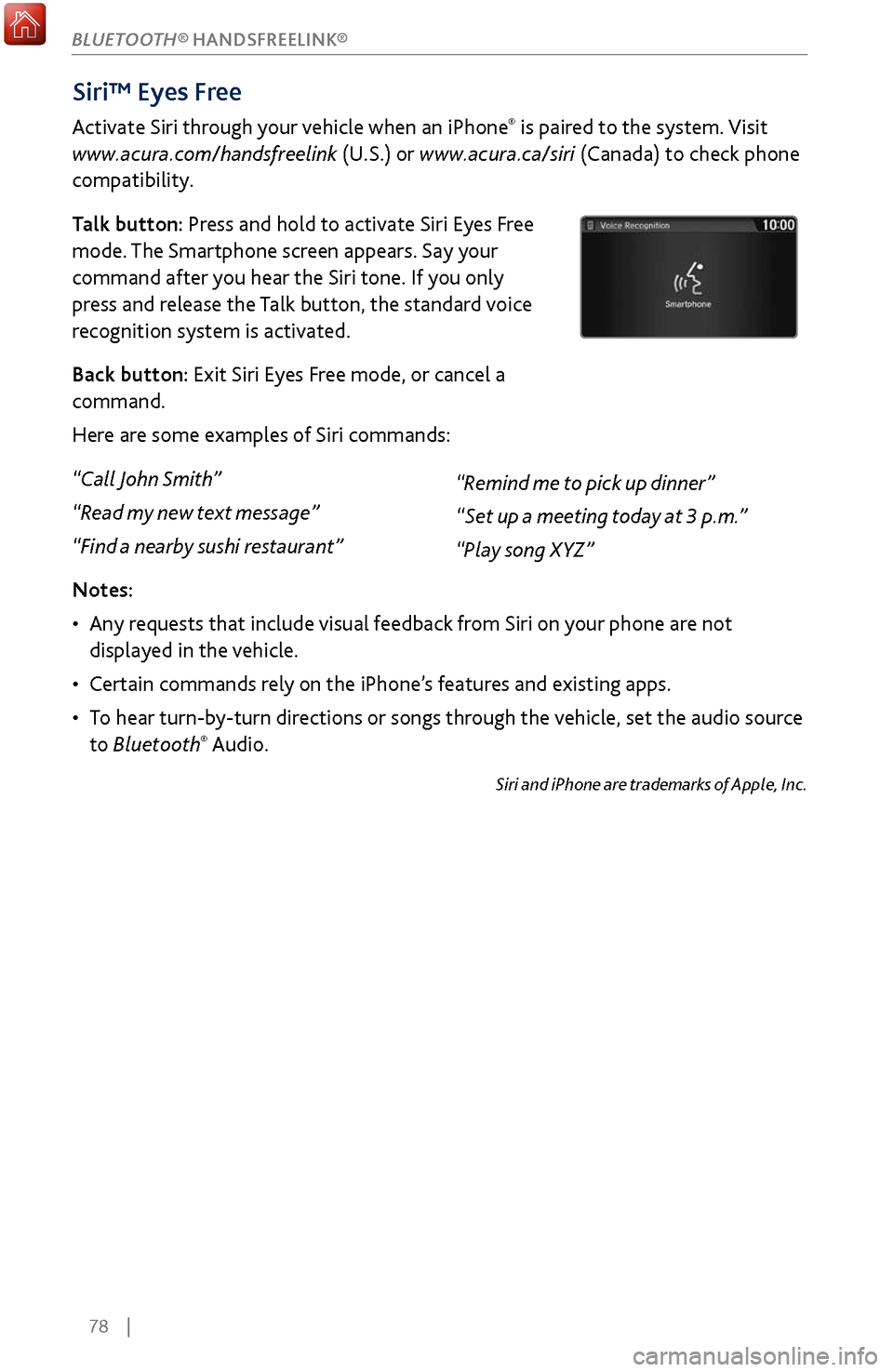
Talk button: Press and hold to activate Siri Eyes Free
mode. The Smartphone screen appears. Say your
command after you hear the Siri tone. If you only
press and release the Talk button, the standard voice
recognition system is activated.
Back button: Exit Siri Eyes Free mode, or cancel a
command.
Here are some examples of Siri commands:
“Call John Smith”
“Read my new text message”
“Find a nearby sushi restaurant”
Notes:
•
Any requests
that include visual feedback from Siri on your phone are not
displayed in the vehicle.
•
Certain commands rel
y on the iPhone’s features and existing apps.
•
To hear turn-b
y-turn directions or songs through the vehicle, set the audio source
to Bluetooth
® Audio.
Siri and iPhone are trademarks of Apple, Inc.
“Remind me to pick up dinner”
“Set up a meeting today at 3 p.m.”
“Play song XYZ”
BLUETOOTH® HANDSFREELINK®
Page 86 of 170
| 79
Learn about Acura’s advanced connectivity services.
AcuraLink Messages
Receive messages on vehicle features, safety and emissions recall campaigns,
maintenance reminders, and diagnostic information.
Some message features require a phone connection. Visit www.acura.com/
handsfreelink (U.S.) or www.handsfreelink.ca (Canada) to check phone
compatibility.
Viewing Messages
When you receive a new message, an envelope icon appears at the top of the
upper display. Use the interface dial to make and enter selections.
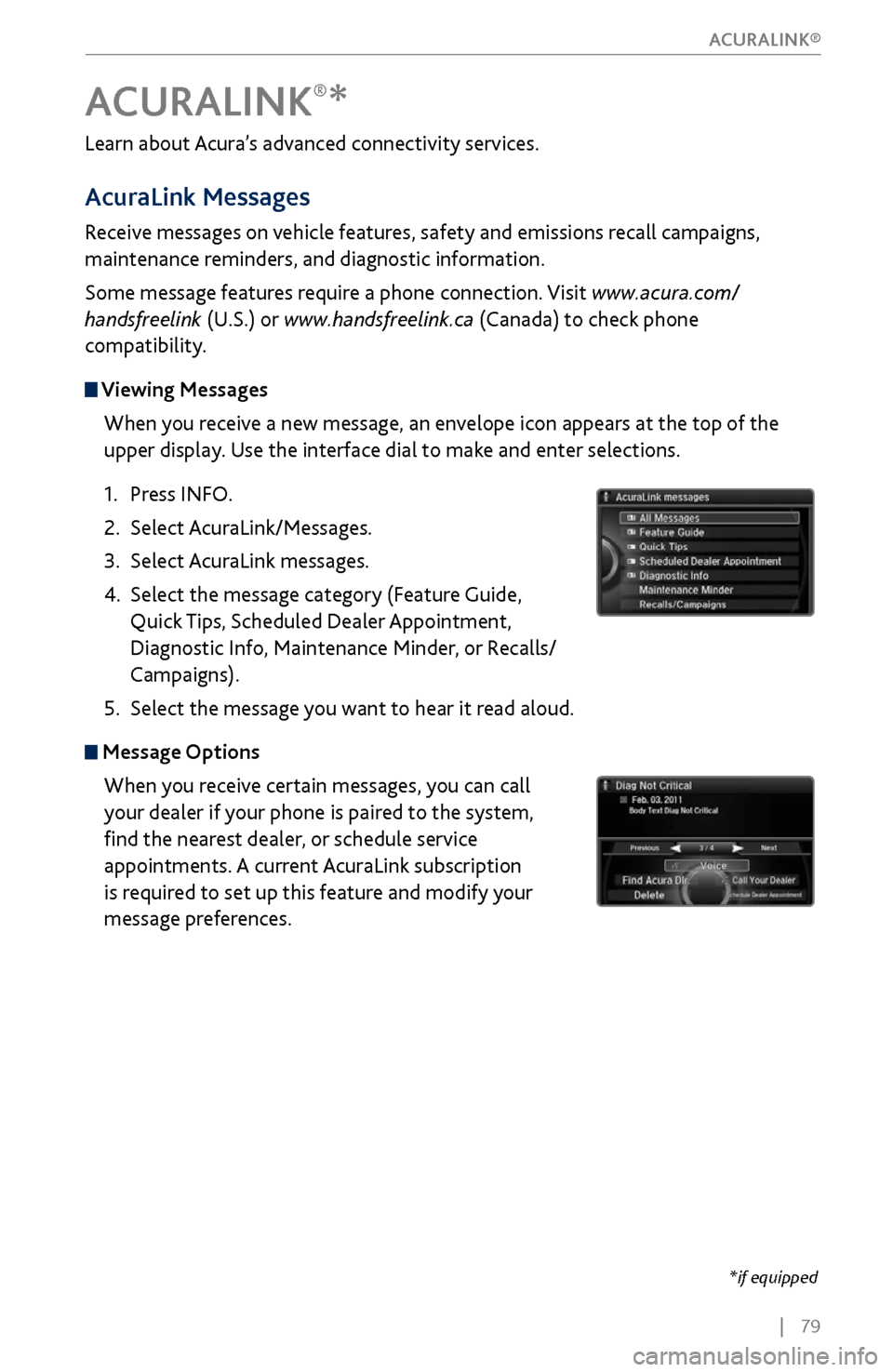
1.
Press INFO.
2.
Select AcuraLink/Messages.
3.
Select AcuraLink messages.
4.
Select the message category (Featur
e Guide,
Quick Tips, Scheduled Dealer Appointment,
Diagnostic Info, Maintenance Minder, or Recalls/
Campaigns).
5.
Select the message y
ou want to hear it read aloud.
Message OptionsWhen you receive certain messages, you can call
your dealer if your phone is paired to the system,
find the nearest dealer, or schedule service
appointments. A current AcuraLink subscription
is required to set up this feature and modify your
message preferences.
ACURALINK®*
*if equipped
ACURALINK®
Page 87 of 170
80 |
Subscription Features
In addition to standard service, receive benefits such as collision notification,
emergency assistance, online security, enhanced navigation searches, and
important messages about your vehicle. Requires enrollment and privacy
agreement. To subscribe or get more information, visit owners.acura.com (U.S.) or
myacura.ca (Canada) or contact a dealer.
Emergency AssistanceIf your vehicle’s airbags deploy or if the unit detects that the vehicle is severely
impacted, your vehicle automatically attempts to connect to the AcuraLink
operator if your phone is paired to the system and there is sufficient cellular
coverage.
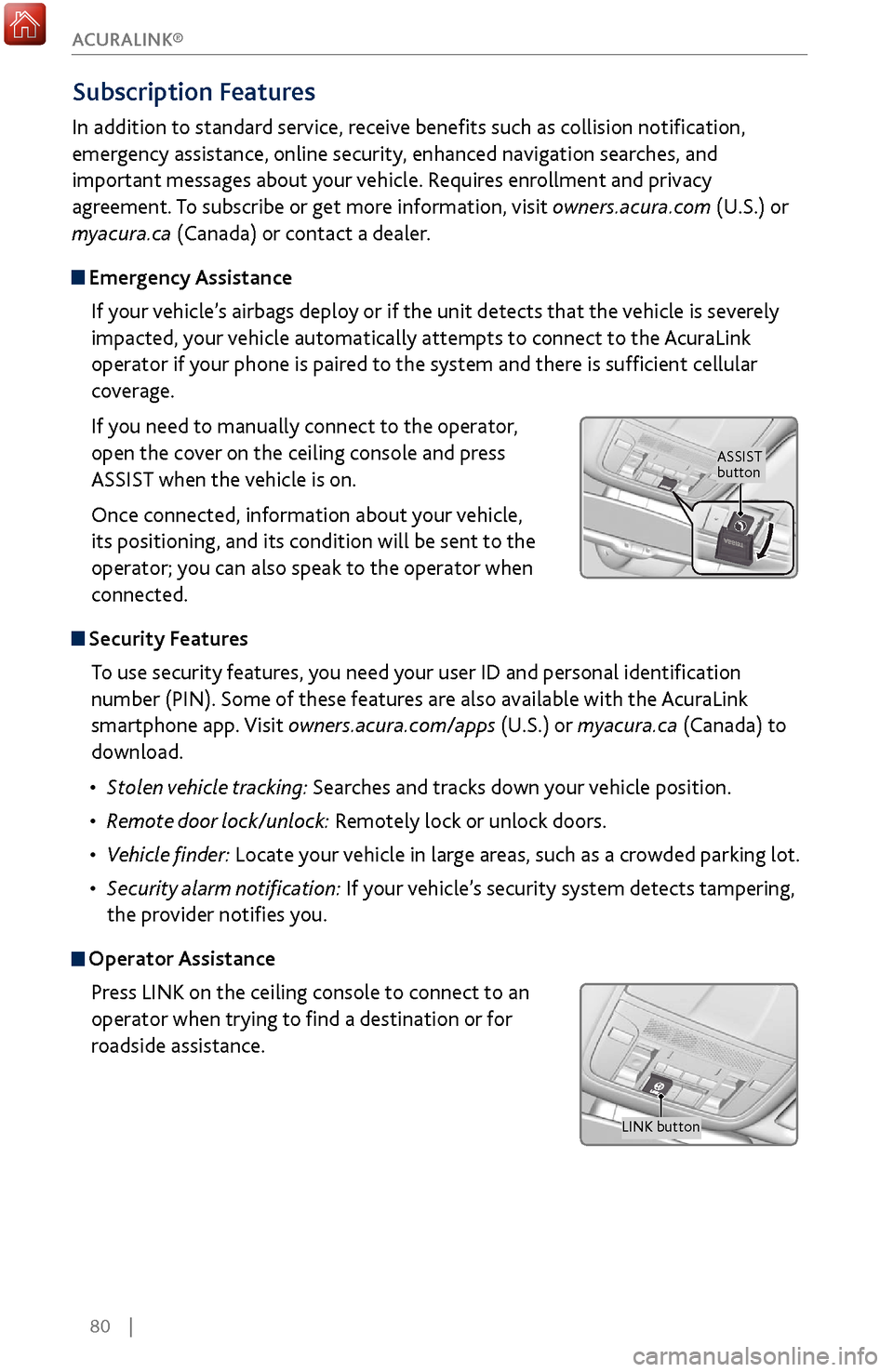
If you need to manually connect to the operator,
open the cover on the ceiling console and press
ASSIST when the vehicle is on.
Once connected, information about your vehicle,
its positioning, and its condition will be sent to the
operator; you can also speak to the operator when
connected.
Security FeaturesTo use security features, you need your user ID and personal identification
number (PIN). Some of these features are also available with the AcuraLink
smartphone app. Visit owners.acura.com/apps (U.S.) or myacura.ca (Canada) to
download.
•
Stolen
vehicle tracking: Searches and tracks down your vehicle position.
•
Remote door
lock/unlock: Remotely lock or unlock doors.
•
Vehicle finder: Locate
your vehicle in large areas, such as a crowded parking lot.
•
Security alarm
notification: If your vehicle’s security system detects tampering,
the provider notifies you.
Operator Assistance
Press LINK on the ceiling console to connect to an
operator when trying to find a destination or for
roadside assistance.
ASSIST
button
LINK button
ACURALINK®
Page 88 of 170
| 81
NAVIGATION
Learn how to enter a destination and operate the navigation system.
Basic Navigation Operation
A real-time navigation system uses GPS and a map database to show your current
location and help guide you to a desired destination. You can operate the system
using voice commands or the system controls.
To reduce the potential for driver distraction, certain manual functions may
be inoperable or grayed out while the vehicle is moving. Voice commands are
always available.
Steering Wheel Controls
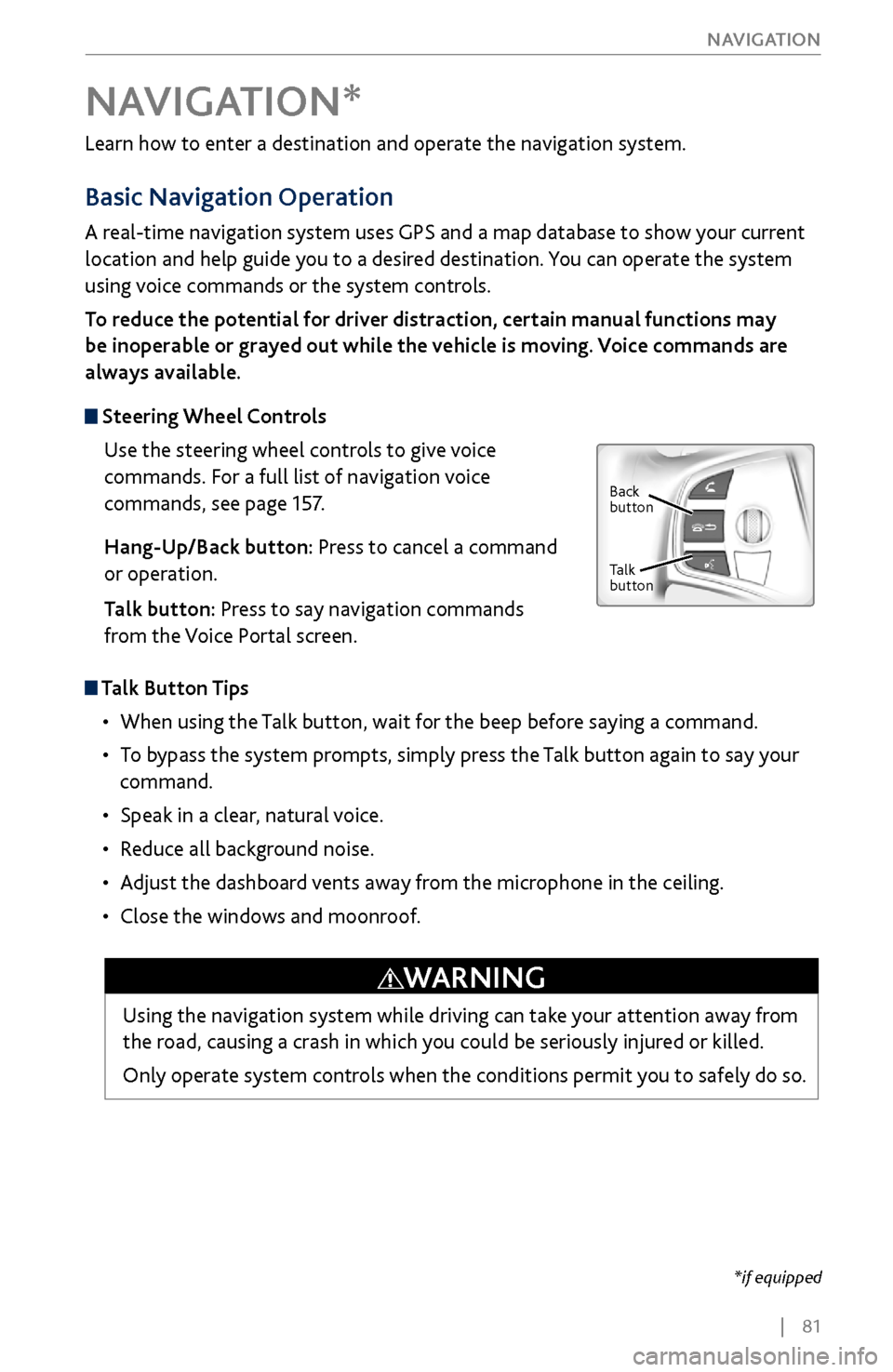
Use the steering wheel controls to give voice
commands. For a full list of navigation voice
commands, see page 157.
Hang-Up/Back button: Press to cancel a command
or operation.
Talk button: Press to say navigation commands
from the Voice Portal screen.
Talk Button Tips
•
When using the T
alk button, wait for the beep before saying a command.
•
To bypass
the system prompts, simply press the Talk button again to say your
command.
•
Speak in a clear, natural v
oice.
•
Reduce all background noise.
•
Adjust the dashboard
vents away from the microphone in the ceiling.
•
Close the windows and moonr
oof.
NAVIGATION*
Using the navigation system while driving can take your attention away from
the road, causing a crash in which you could be seriously injured or killed.
Only operate system controls when the conditions permit you to safely do so.
WARNING
*if equipped
Back
button
Talk
button
Page 161 of 170
154 |
CLIENT INFORMATION
Learn about information specific to you as an Acura client and how to get help.
Frequently Asked Questions/Troubleshooting
Below are some frequently asked questions and troubleshooting items that you
may have about the vehicle.
Q: How do I set the vehicle clock?
A:
For vehicles without navigation, see page 55. For vehicles with navigation, the
time is automatically set using GPS signals.
Q:
Why doesn’t the vehicle start when I press the ENGINE START/STOP button?
A: The brake pedal must be pressed to start the engine.
Q: What is the AUTO setting on my headlight lever?
A: When in the AUTO position, the vehicle’s exterior lights will automatically turn
on or off depending on the ambient lighting.
Q:
Why won’t the driver’s door unlock when I grab the door handle, even though the
keyless ac
cess remote is within range?
A: If you pull the handle too quickly, the system may not have time to confirm the
door is unlocked. W
ait to hear a beep to confirm the door is unlocked. If you are
wearing gloves,
the system may be slow to respond.
Q: After my battery was disconnected or went dead, the audio system is asking for a
code. Wher
e do I find this?
A: In most cases, you do not need to enter a code. Turn on the vehicle and the audio
system, and press and hold the power button until
the system reactivates.
Q: Why can’t I operate Pandora* through the audio system?
A: Audio may be streaming through Bluetooth® Audio. Make sure Pandora mode
is selected and the phone cable is properl
y connected to the USB adapter. Some
phones may prompt y
ou to “Allow” a connection.
Q: Is my phone compatible with Bluetooth features?
A: Visit www.acura.com/handsfreelink (U.S) or www.handsfreelink.ca (Canada) to
check phone compatibility for Bluet
ooth® Audio, Bluetooth® HandsFreeLink®,
and SMS text messaging.
Q:
Every time I press the Talk button, the system gives me voice prompts. Can I turn
these off?*
A: Pr
ess SETTINGS. Use the interface dial to select System Settings then Voice Rec.
For the V
oice Prompt option, select Off.
CLIENT INFORMATION
*if equipped
Page 162 of 170
| 155
CLIENT INFORMATION
Q: Why can’t I select an item using the interface dial?
A:
To prevent driver distraction, certain items are limited are inoperable while the
vehicle is moving.
Use voice commands or pull over to select the items.
Q: Where can I find the vehicle identification number (VIN)?
A: Check the label on the driver’s doorjamb.
Contact Us
Acura dealer personnel are trained professionals. They should be able to answer
all your questions. If you encounter a problem that your dealership does not solve
to your satisfaction, please discuss it with the dealership’s service manager or
general manager. If you are dissatisfied with the decision made by the dealership’s
management, contact Acura Client Relations/Services.
U.S. Owners:
American Honda Motor Co., Inc.
Acura Client Relations
1919 Torrance Blvd.
Mail Stop 500-2N-7E
Torrance, CA 90501-2746
Tel: (800) 382-2238
In Puerto Rico and
the U.S. Virgin Islands:
Bella International
P.O. Box 190816
San Juan, PR 00919-0816
Tel: (787) 620-7546 Canadian Owners:
Honda Canada, Inc.
Acura Client Services
180 Honda Blvd.
Markham, ON
L6C 0H9
Tel: (888)-922-8729
Fax: (877)-939-0909
E-Mail: [email protected]
When you call or write, please give us the following information:
•
Vehicle Identification Number
•
Date of purchase
•
Odometer reading of y
our vehicle
•
Your name, address, and
telephone number
•
A detailed description of the problem
•
Name of the dealer who sold the
vehicle to you