phone Acura MDX 2017 Owner's Guide
[x] Cancel search | Manufacturer: ACURA, Model Year: 2017, Model line: MDX, Model: Acura MDX 2017Pages: 170, PDF Size: 12.43 MB
Page 6 of 170
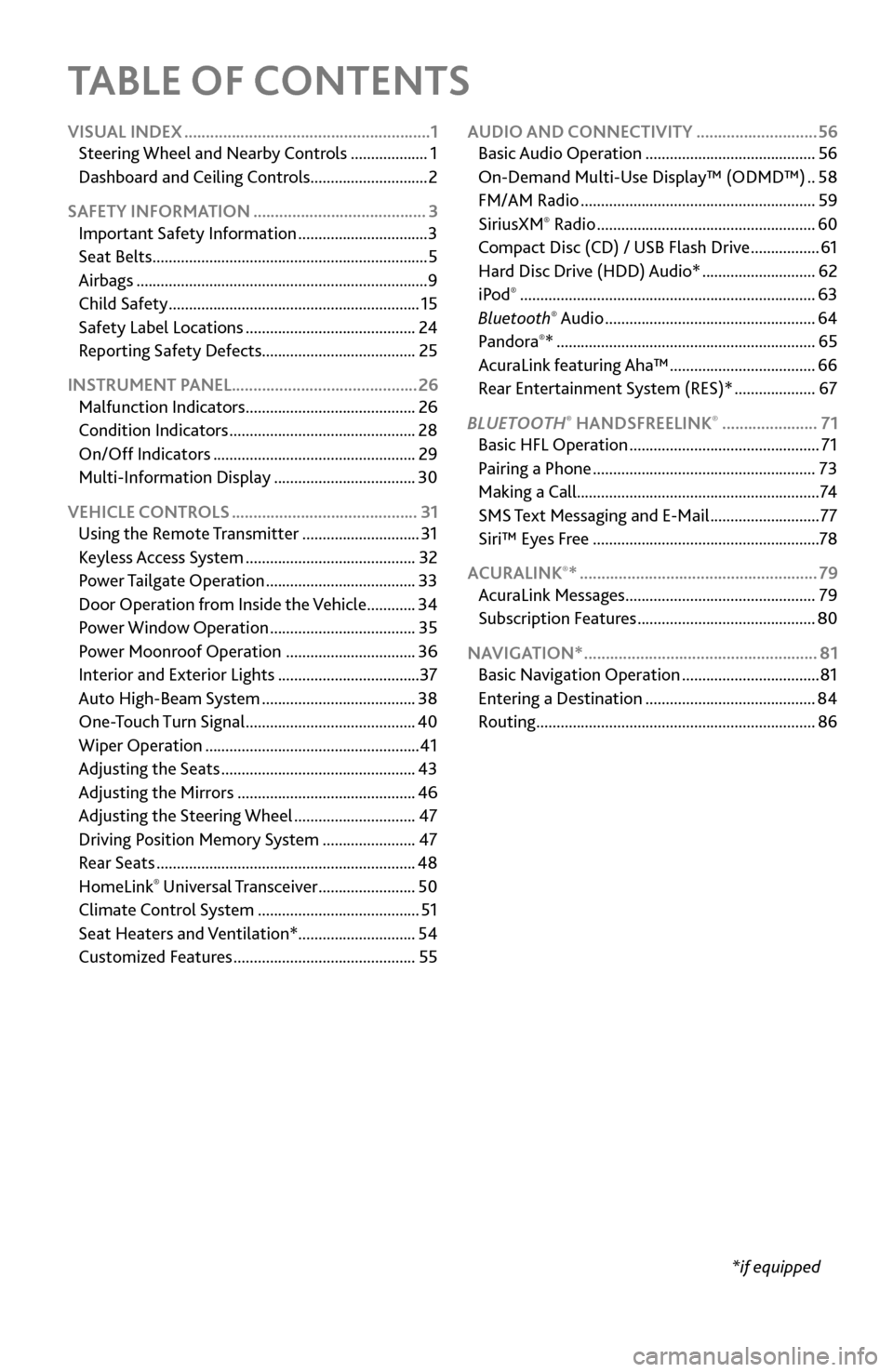
TABLE OF CONTENTS
*if equipped
VISUAL INDEX
.........................................................
1
Steering Wheel and Nearb
y Controls
...................
1
Dashboard
and Ceiling Controls
.............................
2
SAFETY INFORMATION
........................................ 3
Important Safety Information ................................ 3
Seat Belts .................................................................... 5
Airbags ........................................................................\
9
Child Safety .............................................................. 15
Safety Label Locations .......................................... 24
Reporting Safety
Defects...................................... 25
INSTRUMENT PANEL........................................... 26 Malfunction Indicators
.......................................... 26
Condition Indicators .............................................. 28
On/Off Indicators .................................................. 29
Multi-Information Display ................................... 30
VEHICLE CONTROLS
........................................... 31
Using the
Remote Transmitter
.............................
31
Keyless A
ccess System
..........................................
32
Power T
ailgate Operation
.....................................
33
Door Operation
from Inside the Vehicle
............
34
Power Window
Operation
....................................
35
Power
Moonroof Operation
................................
36
Interior and Exterior Lights ................................... 37
Auto High-Beam S
ystem
......................................
38
One-T
ouch Turn Signal
..........................................
40
Wiper Operation ..................................................... 41
Adjusting
the Seats
................................................
43
Adjusting the
Mirrors
............................................
46
Adjusting
the Steering Wheel
..............................
47
Driving Position Memory
System
.......................
47
Rear Seats ................................................................ 48
HomeLink® Universal Transceiver ........................ 50
Climate Control System ........................................ 51
Seat Heaters and V
entilation*............................. 54
Customized Features
............................................. 55AUDIO AND CONNECTIVITY
............................
56
Basic Audio Operation .......................................... 56
On-Demand Multi-Use Display™ (ODMD™) .. 58
FM/AM Radio .......................................................... 59
SiriusXM® Radio ...................................................... 60
Compact Disc (CD) / USB Flash Driv e .................61
Hard Disc Driv
e (HDD) Audio*
............................ 62
iPod® ........................................................................\
. 63
Bluetooth® Audio .................................................... 64
Pandora®* ................................................................ 65
AcuraLink featuring Aha™ .................................... 66
Rear Entertainment
System (RES)*
.................... 67
BLUET
OOTH
® HANDSFREELINK® ...................... 71
Basic HFL Operation ............................................... 71
Pairing a Phone ....................................................... 73
Making a Call ............................................................ 74
SMS
Text Messaging and E-Mail
........................... 77
Siri™ Eyes F
ree
........................................................ 78
ACURALINK
®* ....................................................... 79
AcuraLink Messages ............................................... 79
Subscription Featur
es
............................................ 80
NAVIGA
TION*
...................................................... 81
Basic Navigation Operation .................................. 81
Entering a Destination .......................................... 84
Routing ..................................................................... 86
Page 9 of 170
2 |
V
ISUAL INDEX
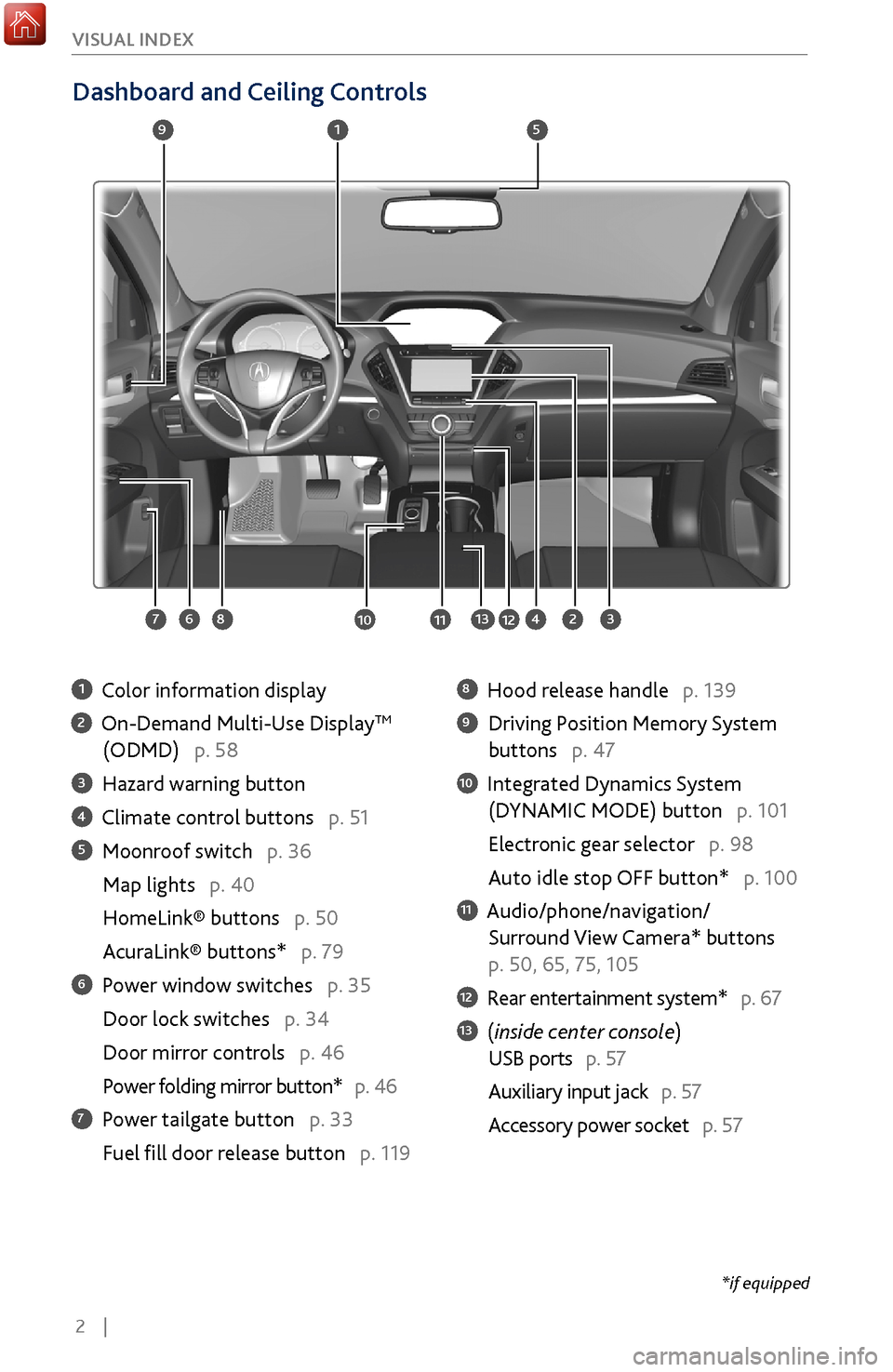
Dashboard and Ceiling Controls
1 Color information display
2 On-Demand Multi-Use DisplayTM
(ODMD) p. 58
3 Hazard warning button
4 Climate control buttons p. 51
5 Moonroof switch p. 36
Map lights p. 40
HomeLink® buttons p. 50
AcuraLink® buttons* p. 79
6 Power window switches p. 35
Door lock switches p. 34
Door mirror controls
p. 46
Power folding mirr
or button* p. 46
7 Power tailgate button p. 33
Fuel fill door r
elease button p. 119
8 Hood release handle p. 139
9 Driving Position Memory System
buttons p. 47
10 Integrated Dynamics System
(D
YNAMIC MODE) button p. 101
Electronic gear selector p. 98
Auto idle stop OFF button* p. 100
11 Audio/phone/navigation/
Surround View Camera*
buttons
p. 50, 65, 75, 105
12 Rear entertainment system* p. 67
13 (inside center console)
USB ports p. 57
Auxiliary input jack p. 57
Accessory power socket
p. 57
1
2834
5
67
9
101112
*if equipped
13
Page 10 of 170
| 3
S
AFETY
Your safety—and the safety of others—is very important, and operating this vehicle
safely is an important responsibility. While we strive to help you make informed
decisions about safety, it is not practical or possible to warn you about all the
hazards associated with operating or maintaining your vehicle. Therefore, you must
use your own good judgment.
Important Safety Information
This guide explains many of your vehicle’s safety features and how to use them.
Please read this information carefully. Following the instructions below will also
help to keep you and your passengers safe.
Important Safety Precautions
•
Always wear
your seat belt.
•
Secure all children in
the proper restraint system.
•
Be aware of airbag hazar
ds.
•
Don’t drink and drive.
•
Pay appr
opriate attention to the task of driving safely.
•
Control y
our speed.
•
Keep y
our vehicle in safe condition.
Engaging in cell phone conversation or other activities that keep you from paying
close attention to the road, other vehicles, and pedestrians could lead to a crash.
Remember, situations can change quickly, and only you can decide when it is safe
to divert some attention away from driving.
Important Handling Information Your vehicle has a higher ground clearance than a passenger vehicle designed for
use only on pavement. Higher ground clearance has many advantages for off-
highway driving. It allows you to travel over bumps, obstacles, and rough terrain.
It also provides good visibility so you can anticipate problems earlier.
These advantages come at some cost. Because your vehicle is taller and rides
higher off the ground, it has a higher center of gravity, making it more susceptible
to tipping or rollover if you make abrupt turns. Utility vehicles have a significantly
higher rollover rate than other types of vehicles. In a rollover crash, an unbelted
person is significantly more likely to die than a person wearing a seat belt. As a
reminder, make sure you and your passengers always wear seat belts.
SAFETY INFORMATION
Page 71 of 170
64 |
AUDIO AND CONNECTIVITY
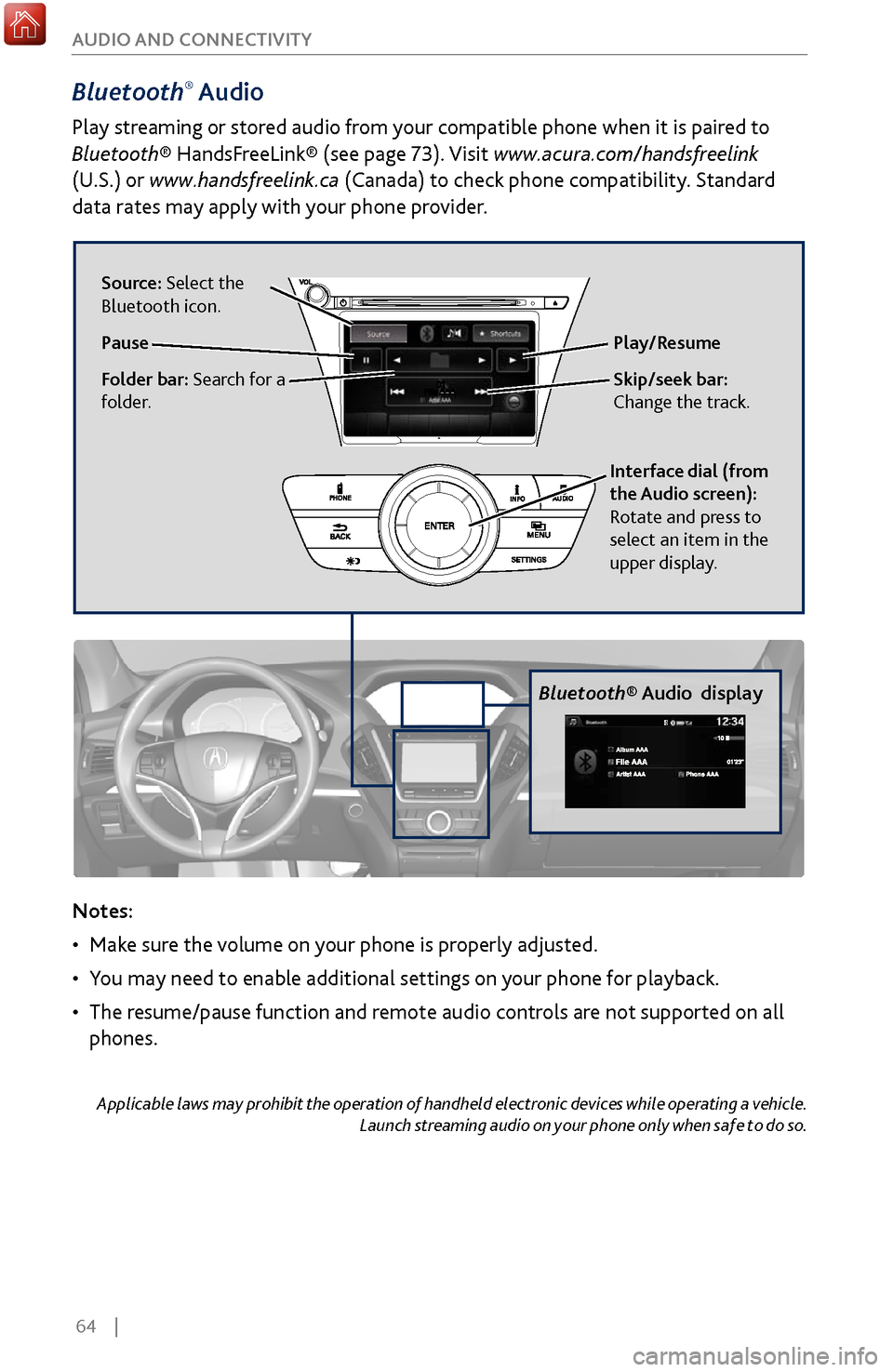
Bluetooth® Audio
Play streaming or stored audio from your compatible phone when it is paired to
Bluetooth® HandsFreeLink® (see page 73). Visit www.acura.com/handsfreelink
(U.S.) or
www.handsfreelink.ca (Canada) to check phone compatibility. Standard
data rates may apply with your phone provider.
Bluetooth® Audio display
Notes:
•
Make sure
the volume on your phone is properly adjusted.
•
You may need to enable additional settings
on your phone for playback.
•
The resume/pause function and r
emote audio controls are not supported on all
phones.
Applicable laws may prohibit the operation of handheld electronic devices while operating a vehicle. Launch streaming audio on your phone only when safe to do so.
Play/Resume
Interface dial (from
the Audio screen):
Rotate and press to
select an item in the
upper display.
Source: Select the
Bluetooth icon.
Pause
Folder bar: Search for a
folder.Skip/seek bar:
Change the track.
Page 72 of 170
| 65
AUDIO AND CONNECTIVITY
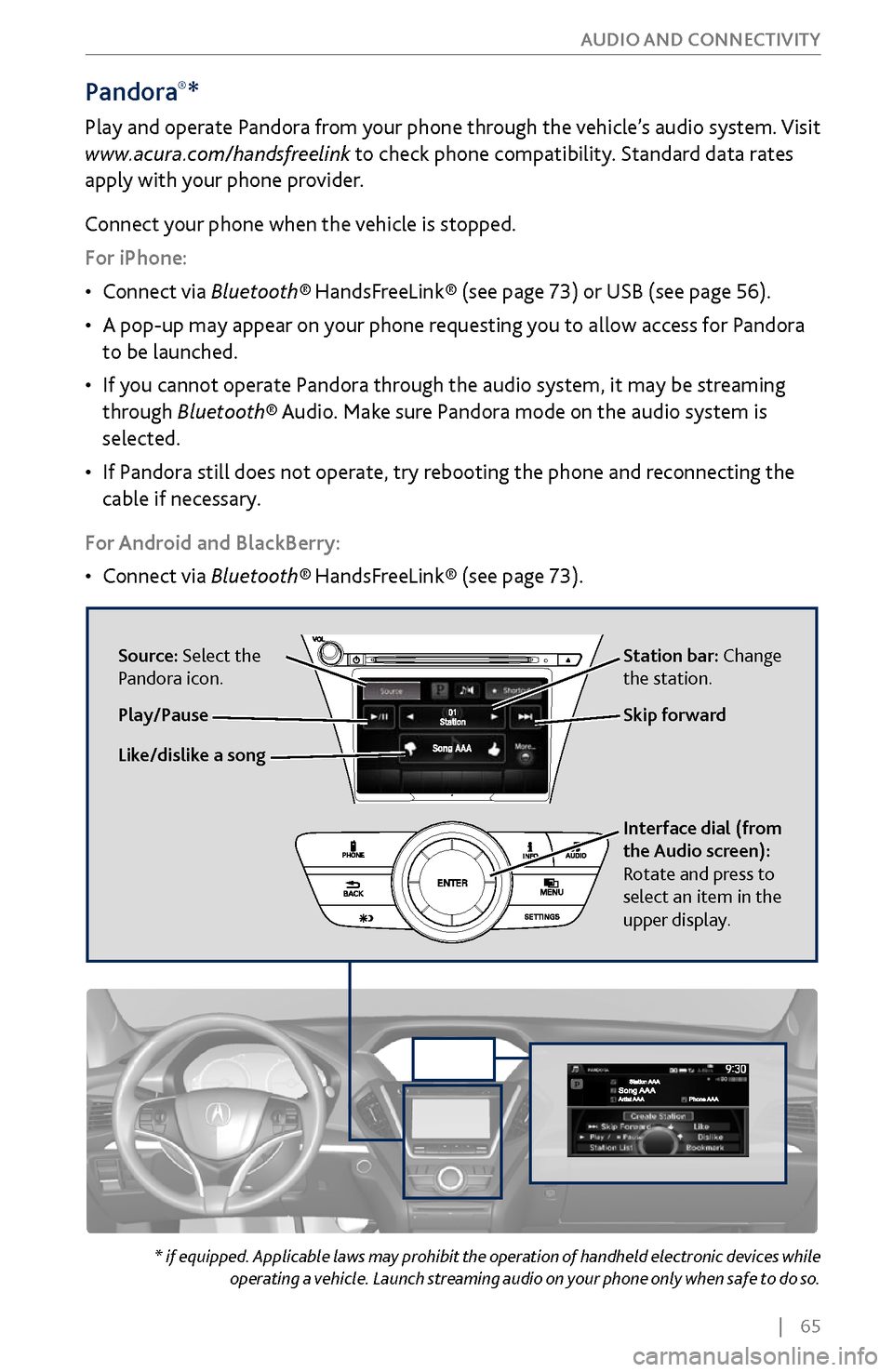
Pandora®*
Play and operate Pandora from your phone through the vehicle’s audio system. Visit
www.acura.com/handsfreelink to check phone compatibility. Standard data rates
apply with your phone provider.
Connect your phone when the vehicle is stopped.
For iPhone:
•
Connect via
Bluetooth®
HandsFreeLink® (see page 73) or USB (see page 56).
•
A pop-up may appear on y
our phone requesting you to allow access for Pandora
to be launched.
•
If you cannot
operate Pandora through the audio system, it may be streaming
through Bluetooth® Audio. Make sure Pandora mode on the audio system is
selected.
•
If Pandora still does not
operate, try rebooting the phone and reconnecting the
cable if necessary.
For Android and BlackBerry:
•
Connect via Bluetooth®
HandsFreeLink® (see page 73).
* if equipped. Applicable laws may prohibit the operation of handheld electronic devices while operating a vehicle. Launch streaming audio on your phone only when safe to do so.
Source: Select the
Pandora icon. Station bar: Change
the station.
Like/dislike a song Skip forward
Interface dial (from
the Audio screen):
Rotate and press to
select an item in the
upper display.
Play/Pause
Page 73 of 170
66 |
AUDIO AND CONNECTIVITY
Applicable laws may prohibit the operation of handheld electronic devices while operating a vehicle.
Launch streaming audio on your phone only when safe to do so.
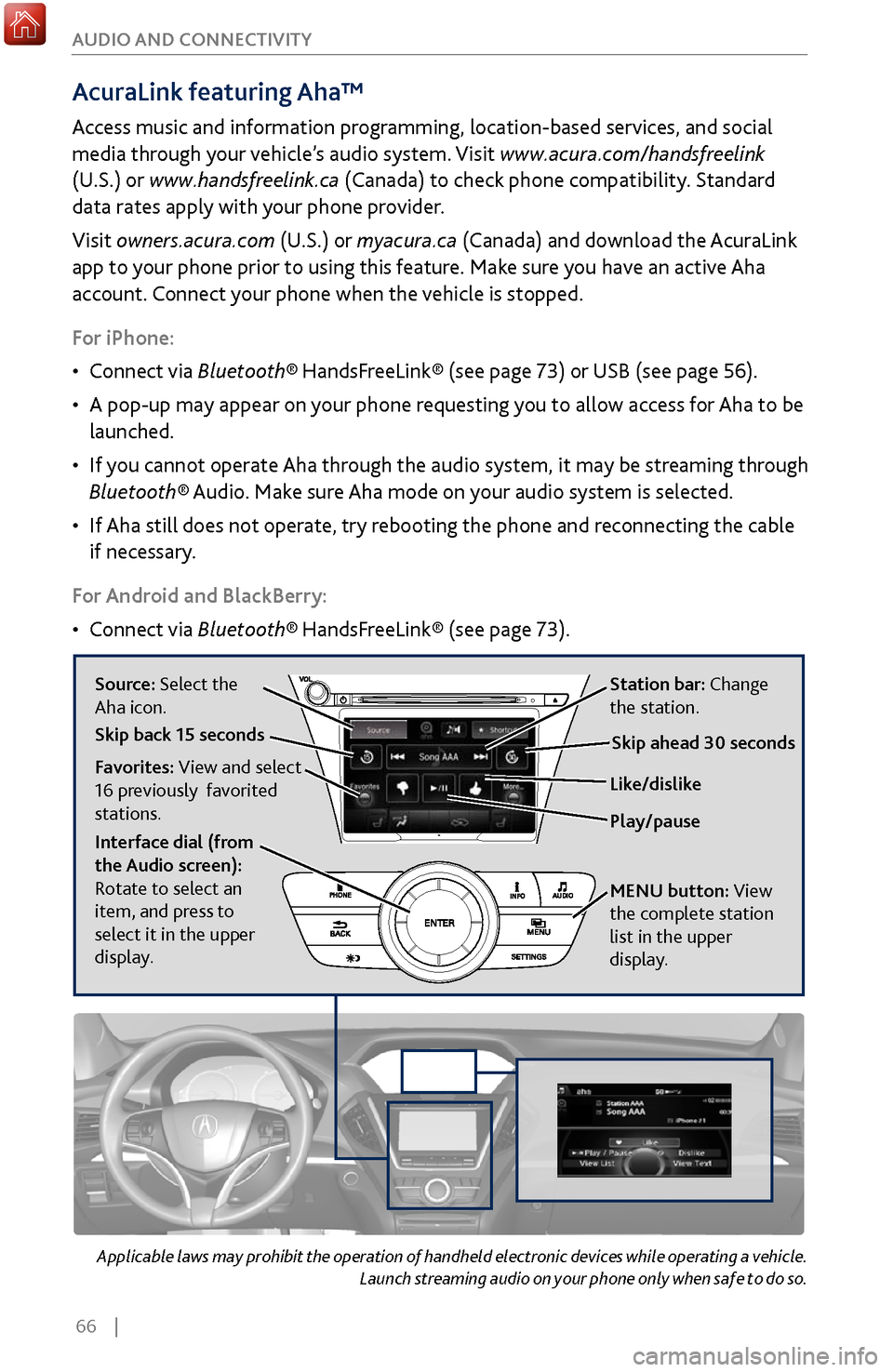
AcuraLink featuring Aha™
Access music and information programming, location-based services, and social
media through your vehicle’s audio system. Visit www.acura.com/handsfreelink
(U.S.) or www.handsfreelink.ca (Canada) to check phone compatibility. Standard
data rates apply with your phone provider.
Visit owners.acura.com (U.S.) or myacura.ca (Canada) and download the AcuraLink
app to your phone prior to using this feature. Make sure you have an active Aha
account. Connect your phone when the vehicle is stopped.
For iPhone:
•
Connect via Bluetooth®
HandsFreeLink® (see page 73) or USB (see page 56).
•
A pop-up may appear on y
our phone requesting you to allow access for Aha to be
launched.
•
If you cannot
operate Aha through the audio system, it may be streaming through
Bluetooth® Audio. Make sure Aha mode on your audio system is selected.
•
If Aha still does not
operate, try rebooting the phone and reconnecting the cable
if necessary.
For Android and BlackBerry:
•
Connect via Bluetooth®
HandsFreeLink® (see page 73).
Source: Select the
Aha icon. Station bar: Change
the station.
Play/pause Like/dislike
Favorites: View and select
16 previously favorited
stations.
Interface dial (from
the Audio screen):
Rotate to select an
item, and press to
select it in the upper
display. MENU
button:
View
the complete station
list in the upper
display
.
Skip back 15 secondsSkip ahead 30 seconds
Page 75 of 170
68 |
AUDIO AND CONNECTIVITY
*if equipped
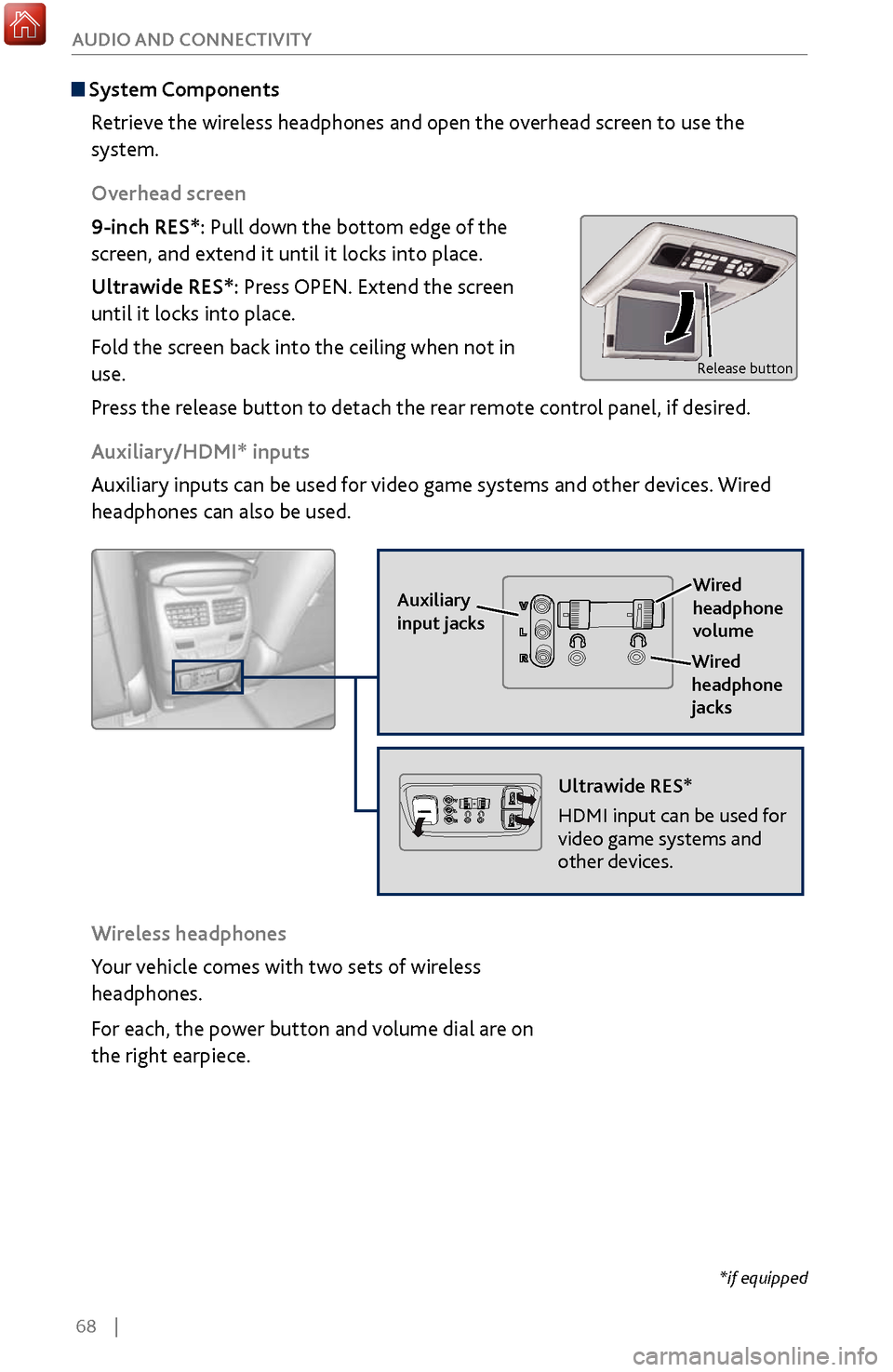
System Components
Retrieve the wireless headphones and open the overhead screen to use the
system.
Overhead screen
9-inch RES*: Pull down the bottom edge of the
screen, and extend it until it locks into place.
Ultrawide RES*: Press OPEN. Extend the screen
until it locks into place.
Fold the screen back into the ceiling when not in
use.
Press the release button to detach the rear remote control panel, if desired.
Auxiliary/HDMI* inputs
Auxiliary inputs can be used for video game systems and other devices. Wired
headphones can also be used.
Wireless headphones
Your vehicle comes with two sets of wireless
headphones.
For each, the power button and volume dial are on
the right earpiece.
Auxiliary
input jacks
Release button
Ultrawide RES*
HDMI input can be used for
video game systems and
other devices.
Wired
headphone
volume
Wired
headphone
jacks
Page 78 of 170
| 71
Learn how to operate the vehicle’s hands-free calling system.
Basic HFL Operation
Make and receive phone calls using the vehicle’s audio system, without handling
your phone. Visit www.acura.com/handsfreelink (U.S.) or www.handsfreelink.ca
(Canada) to check phone compatibility.
To reduce the potential for driver distraction, certain manual functions may
be inoperable or grayed out while the vehicle is moving. Voice commands are
always available.
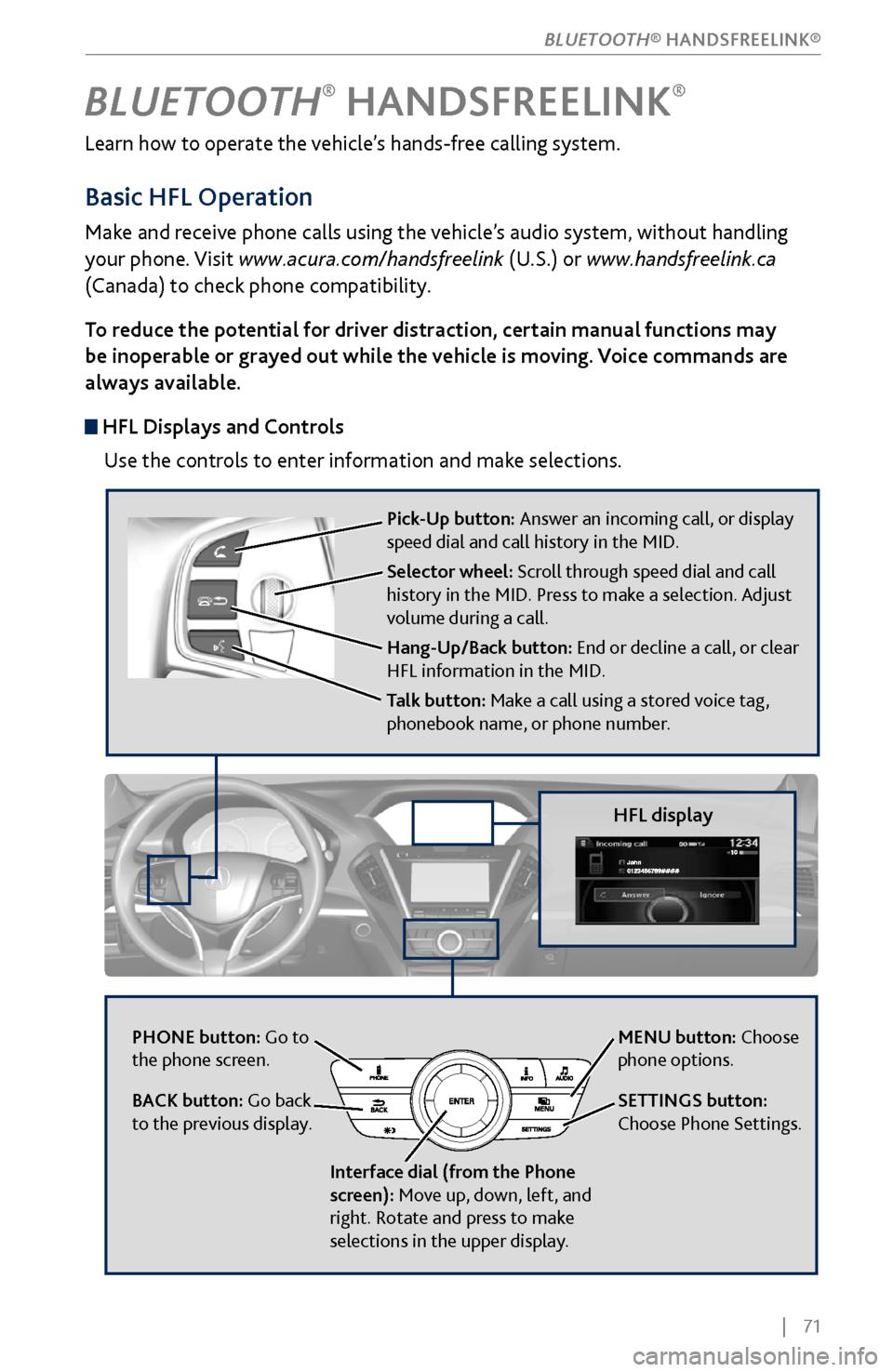
HFL Displays and Controls
Use the controls to enter information and make selections.
BLUETOOTH® HANDSFREELINK®
HFL display
PHONE button: Go to
the phone screen.
BACK button: Go back
to the previous display.
Interface dial (from the Phone
screen): Move up, down, left, and
right. Rotate and press to make
selections in the upper display.
Pick-Up button: Answer an incoming call, or display
speed dial and call history in the MID.
Selector wheel: Scroll through speed dial and call
history in the MID. Press to make a selection. Adjust
volume during a call.
Hang-Up/Back button: End or decline a call, or clear
HFL information in the MID.
Talk button: Make a call using a stored voice tag,
phonebook name, or phone number.
MENU button: Choose
phone options.
SETTINGS button:
Choose Phone Settings.
BLUETOOTH® HANDSFREELINK®
Page 79 of 170
72 |
Talk Button Tips
On vehicles with navigation, you can say voice commands to operate system
functions. For a list of available voice commands, see page 157. Below are some
helpful tips:
•
When using the T
alk button, wait for the beep before saying a command.
•
To bypass
the system prompts, simply press the Talk button again to say your
command.
•
Speak in a clear, natural v
oice.
•
Reduce all background noise.
•
Adjust the dashboard
vents away from the microphone in the ceiling.
•
Close the windows and moonr
oof.
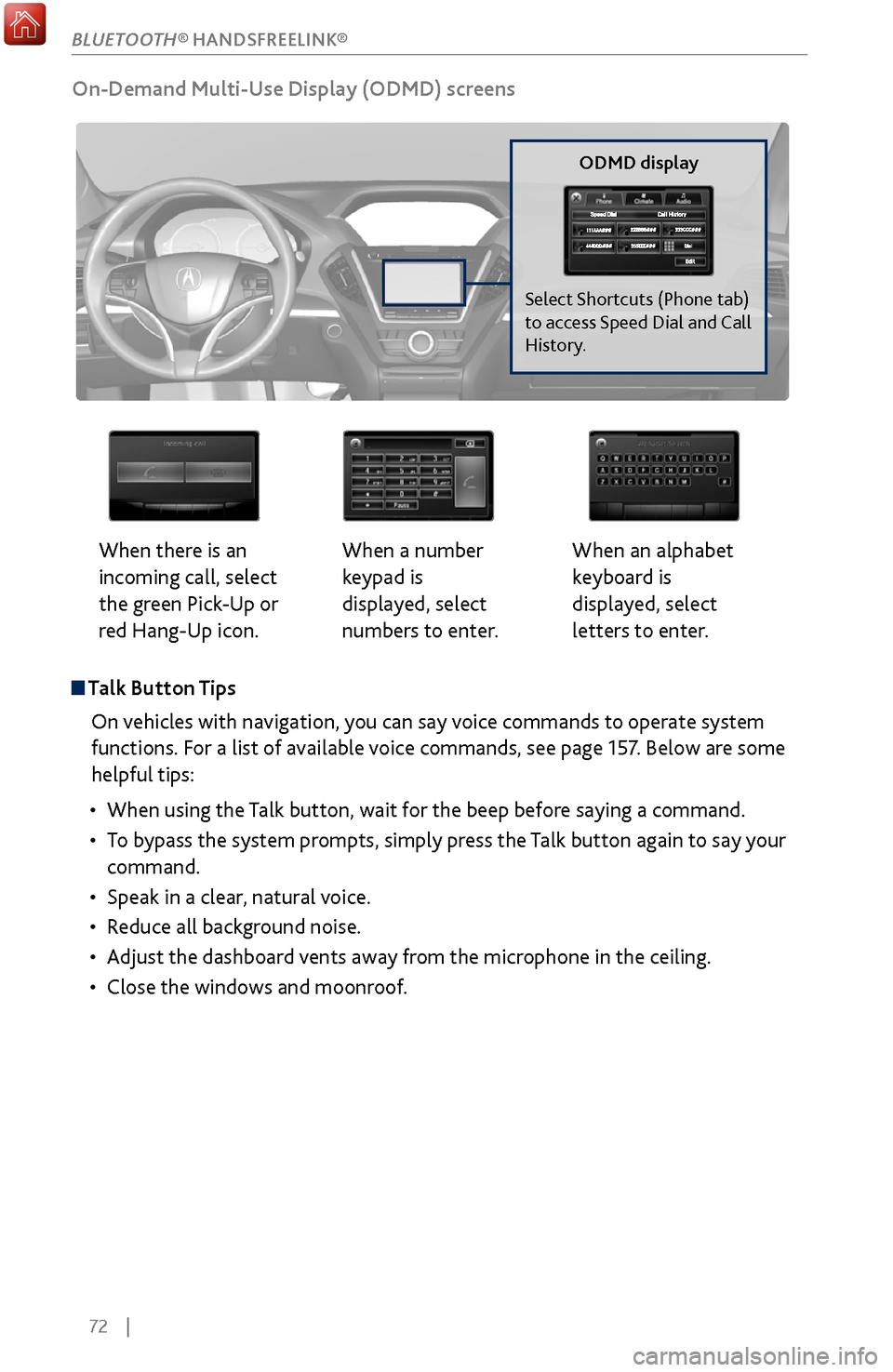
On-Demand Multi-Use Display (ODMD) screens
When there is an
incoming call, select
the green Pick-Up or
red Hang-Up icon. When a number
keypad is
displayed, select
numbers to enter.When an alphabet
keyboard is
displayed, select
letters to enter.
ODMD display
Select Shortcuts (Phone tab)
to access Speed Dial and Call
History.
BLUETOOTH® HANDSFREELINK®
Page 80 of 170
| 73
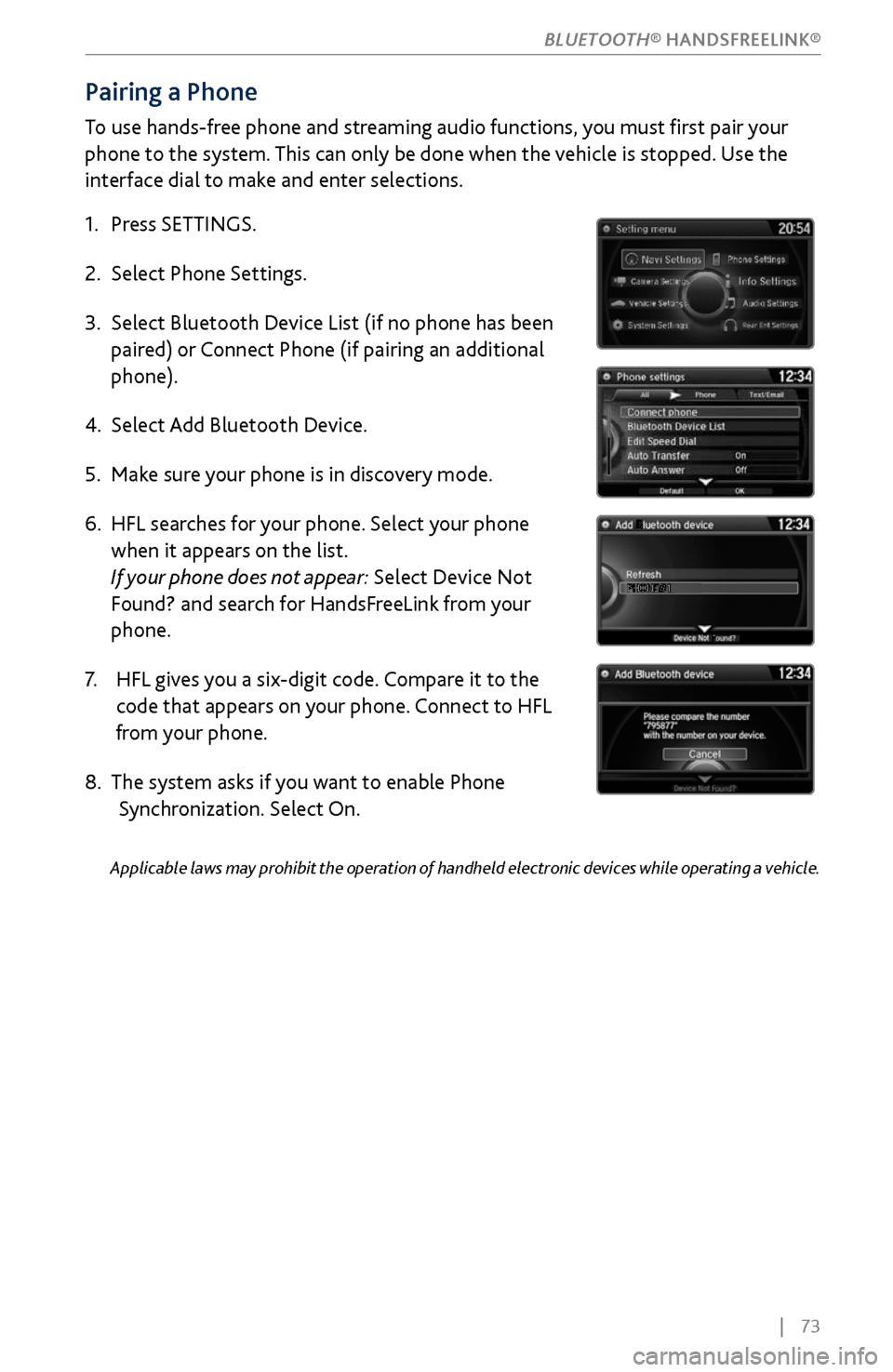
Pairing a Phone
To use hands-free phone and streaming audio functions, you must first pair your
phone to the system. This can only be done when the vehicle is stopped. Use the
interface dial to make and enter selections.
1.
Press SETTINGS.
2.
Select Phone Settings.
3.
Select Bluetooth Device List (if no phone has been
paired) or
Connect Phone (if pairing an additional
phone).
4.
Select Add Bluetooth Device.
5.
Make sure
your phone is in discovery mode.
6.
HFL searches for
your phone. Select your phone
when it appears on the list
.
If your phone does not appear: Select Device Not
Found? and search for HandsFreeLink from your
phone.
7.
HFL gives y
ou a six-digit code. Compare it to the
code that appears on
your phone. Connect to HFL
from y
our phone.
8.
The system asks if you
want to enable Phone
Synchronization.
Select On.
Applicable laws may prohibit the operation of handheld electronic devices while operating a vehicle.
BLUETOOTH® HANDSFREELINK®