Seat Acura MDX 2017 Owner's Manual
[x] Cancel search | Manufacturer: ACURA, Model Year: 2017, Model line: MDX, Model: Acura MDX 2017Pages: 170, PDF Size: 12.43 MB
Page 29 of 170
22 |
S
AFETY
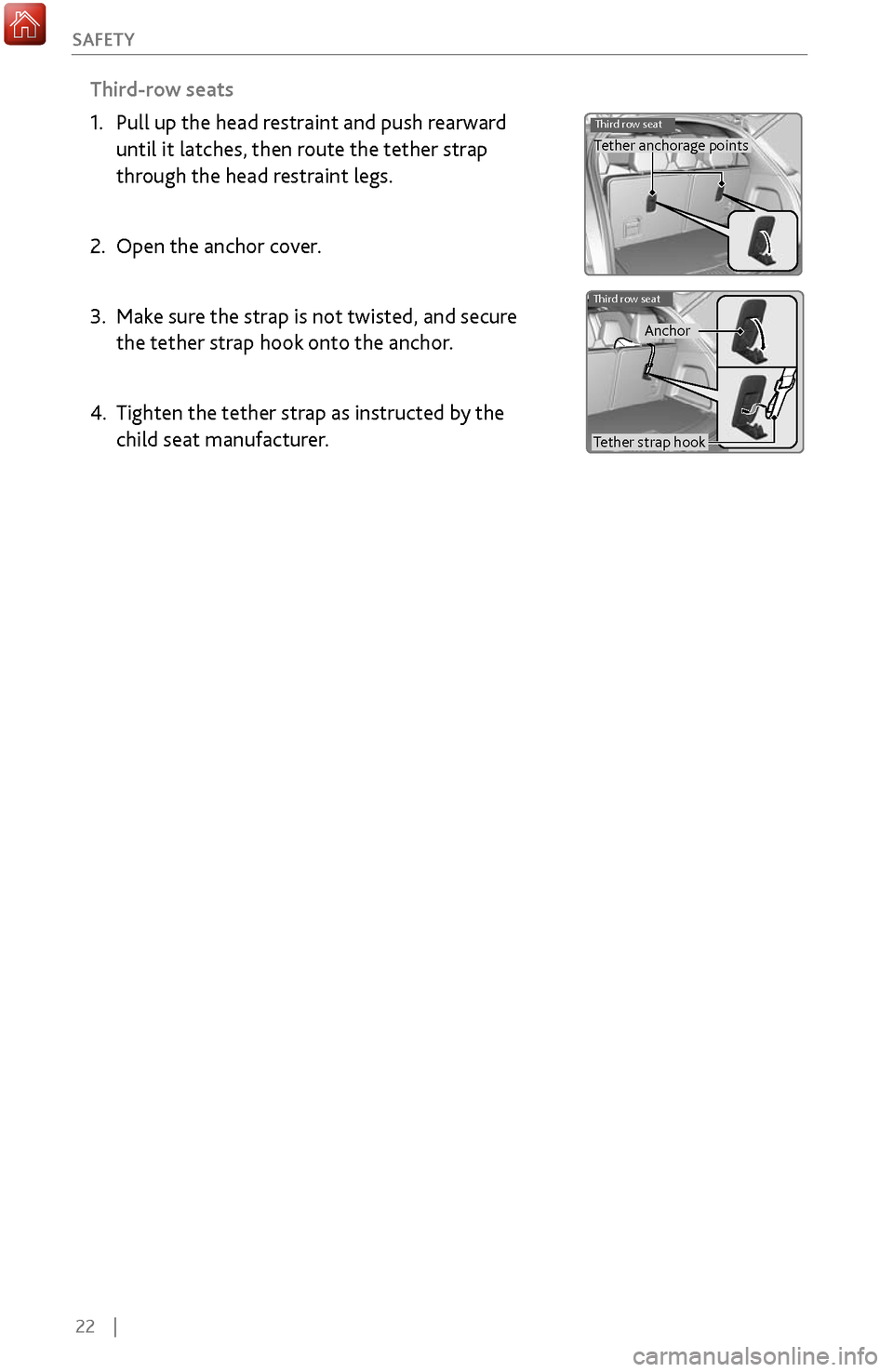
Third-row seats
1.
Pull up the head restraint and push r
earward
until it latches, then route the tether strap
through the head restraint legs.
2.
Open the anchor cov
er.
3.
Make sure
the strap is not twisted, and secure
the tether strap hook onto the anchor.
4.
Tighten the tether strap as instructed b
y the
child seat manufacturer.
Third row seatTether anchorage points
Third row seat
Tether strap hook Anchor
Page 30 of 170
| 23
S
AFETY
Allowing a child age 12 or under to sit in the front can result in injury or
death if the passenger’s front airbag inflates.
If a larger child must ride in front, move the vehicle seat as far to the rear as
possible, have the child sit up properly and wear the seat belt properly, using
a booster seat if needed.
WARNING
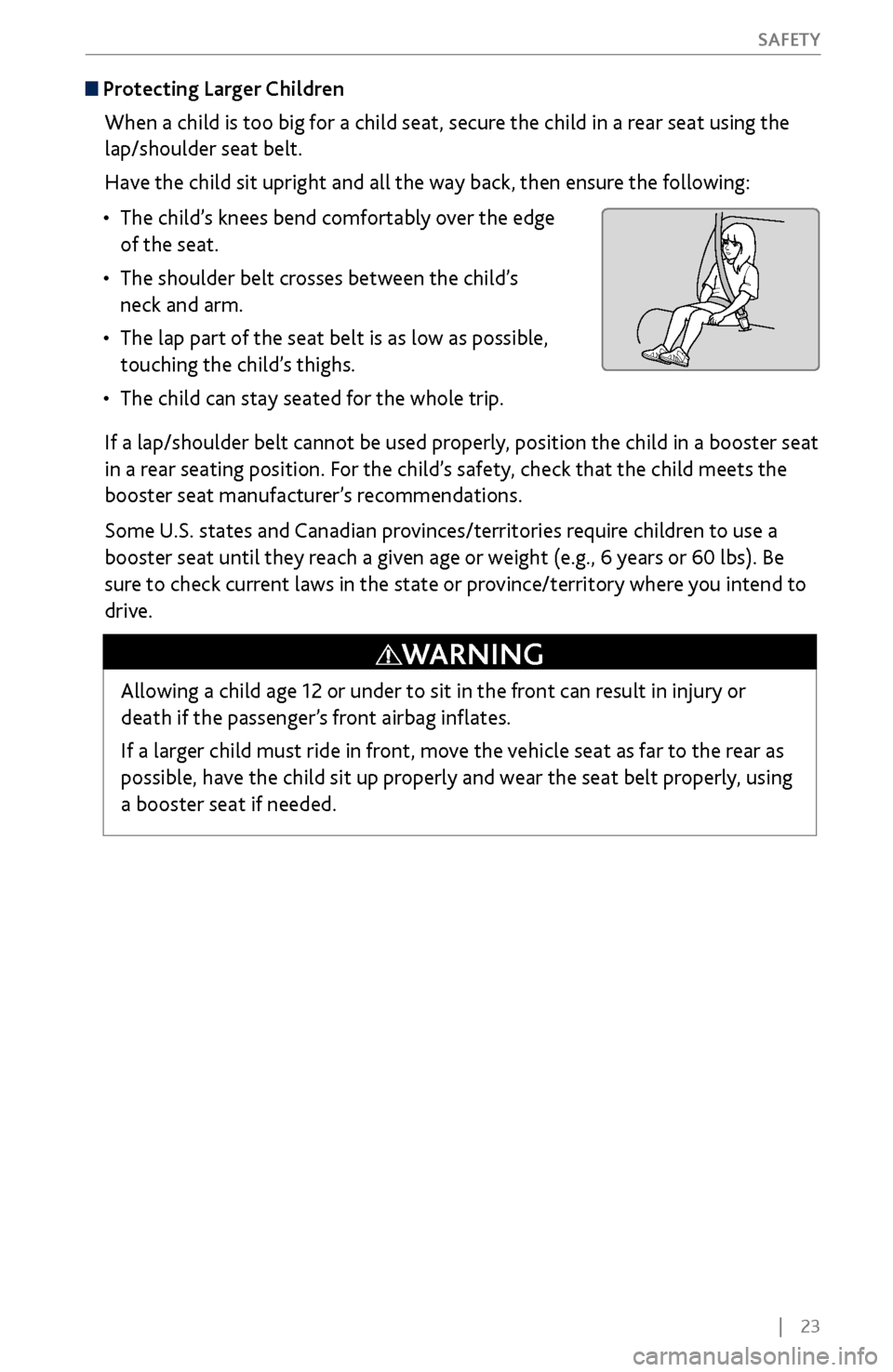
Protecting Larger Children
When a child is too big for a child seat, secure the child in a rear seat using the
lap/shoulder seat belt.
Have the child sit upright and all the way back, then ensure the following:
•
The child’s knees bend comfortably
over the edge
of the seat.
•
The shoulder belt crosses between the child’
s
neck and arm.
•
The lap part of the seat belt is as low as possible,
touching the
child’s thighs.
•
The child can stay seated for the
whole trip.
If a lap/shoulder belt cannot be used properly, position the child in a booster seat
in a rear seating position. For the child’s safety, check that the child meets the
booster seat manufacturer’s recommendations.
Some U.S. states and Canadian provinces/territories require children to use a
booster seat until they reach a given age or weight (e.g., 6 years or 60 lbs). Be
sure to check current laws in the state or province/territory where you intend to
drive.
Page 34 of 170
| 27
I
NSTRUMENT PANEL
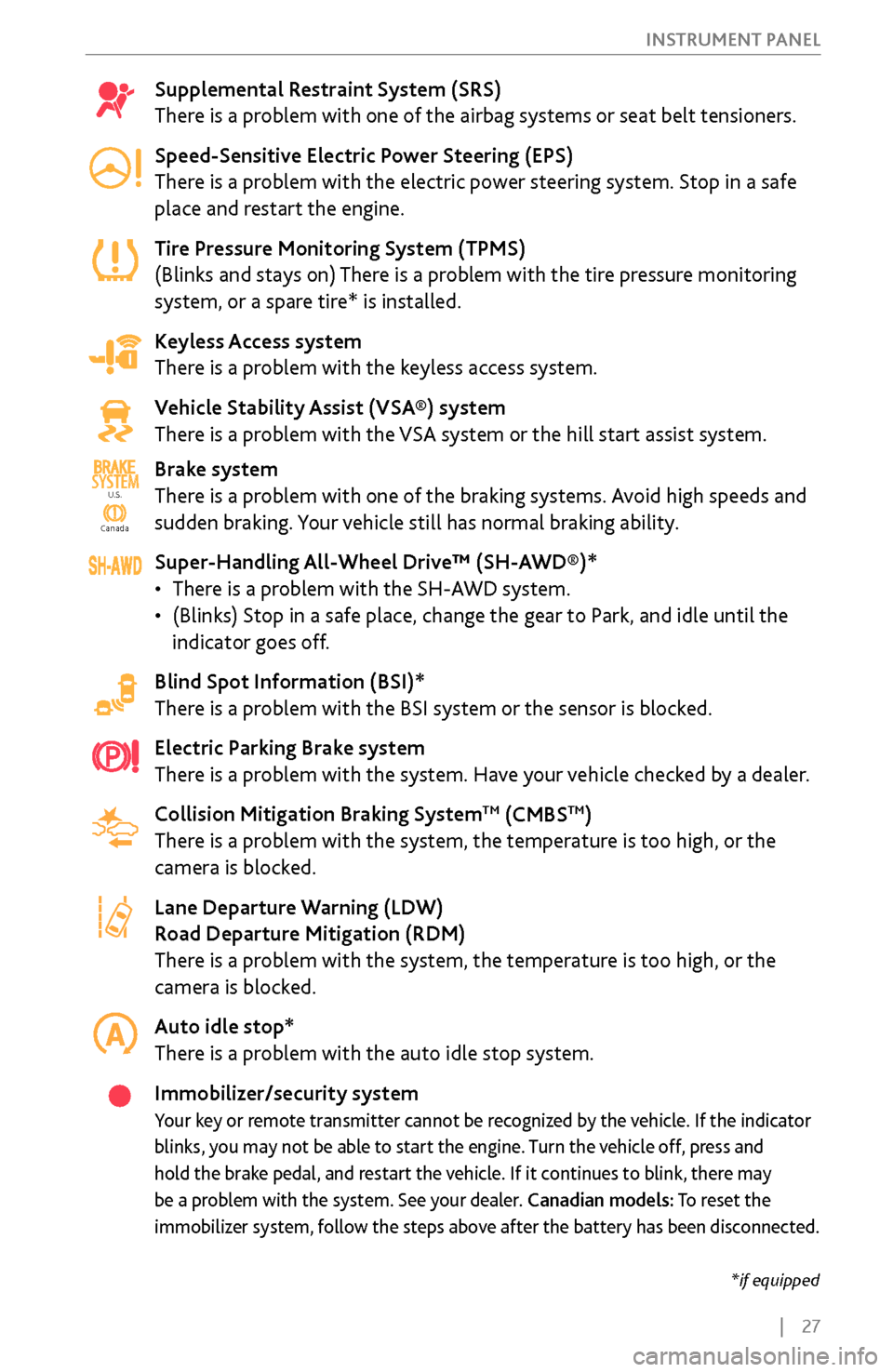
Supplemental Restraint System (SRS)
There is a problem with one of the airbag systems or seat belt tensioners.
Speed-Sensitive Electric Power Steering (EPS)
There is a problem with the electric power steering system. Stop in a safe
place and restart the engine.
Tire Pressure Monitoring System (TPMS)
(Blinks and stays on) There is a problem with the tire pressure monitoring
system, or a spare tire* is installed.
Keyless Access system
There is a problem with the keyless access system.
Vehicle Stability Assist (VSA®) system
There is a problem with the VSA system or the hill start assist system.
Brake system
There is a problem with one of the braking systems. Avoid high speeds and
sudden braking. Your vehicle still has normal braking ability.
Super-Handling All-Wheel Drive™ (SH-AWD®)*
•
There is a problem
with the SH-AWD system.
•
(Blinks) Stop in a safe place, change the gear
to Park, and idle until the
indicator goes off.
Blind Spot Information (BSI)*
There is a problem with the BSI system or the sensor is blocked.
Electric Parking Brake system
There is a problem with the system. Have your vehicle checked by a dealer.
Collision Mitigation Braking System
TM (CMBSTM)
There is a problem with the system, the temperature is too high, or the
camera is blocked.
Lane Departure Warning (LDW)
Road Departure Mitigation (RDM)
There is a problem with the system, the temperature is too high, or the
camera is blocked.
Auto idle stop*
There is a problem with the auto idle stop system.
Immobilizer/security system
Your key or remote transmitter cannot be recognized by the vehicle. If the indicator
blinks, you may not be able to start the engine. Turn the vehicle off, press and
hold the brake pedal, and restart the vehicle. If it continues to blink, there may
be a problem with the system. See your dealer. Canadian models: To reset the
immobilizer system, follow the steps above after the battery has been disconnected.
Ca nada
U.S.SYSTEM
U.S.
Canada
*if equipped
Page 35 of 170
28 |
I
NSTRUMENT PANEL
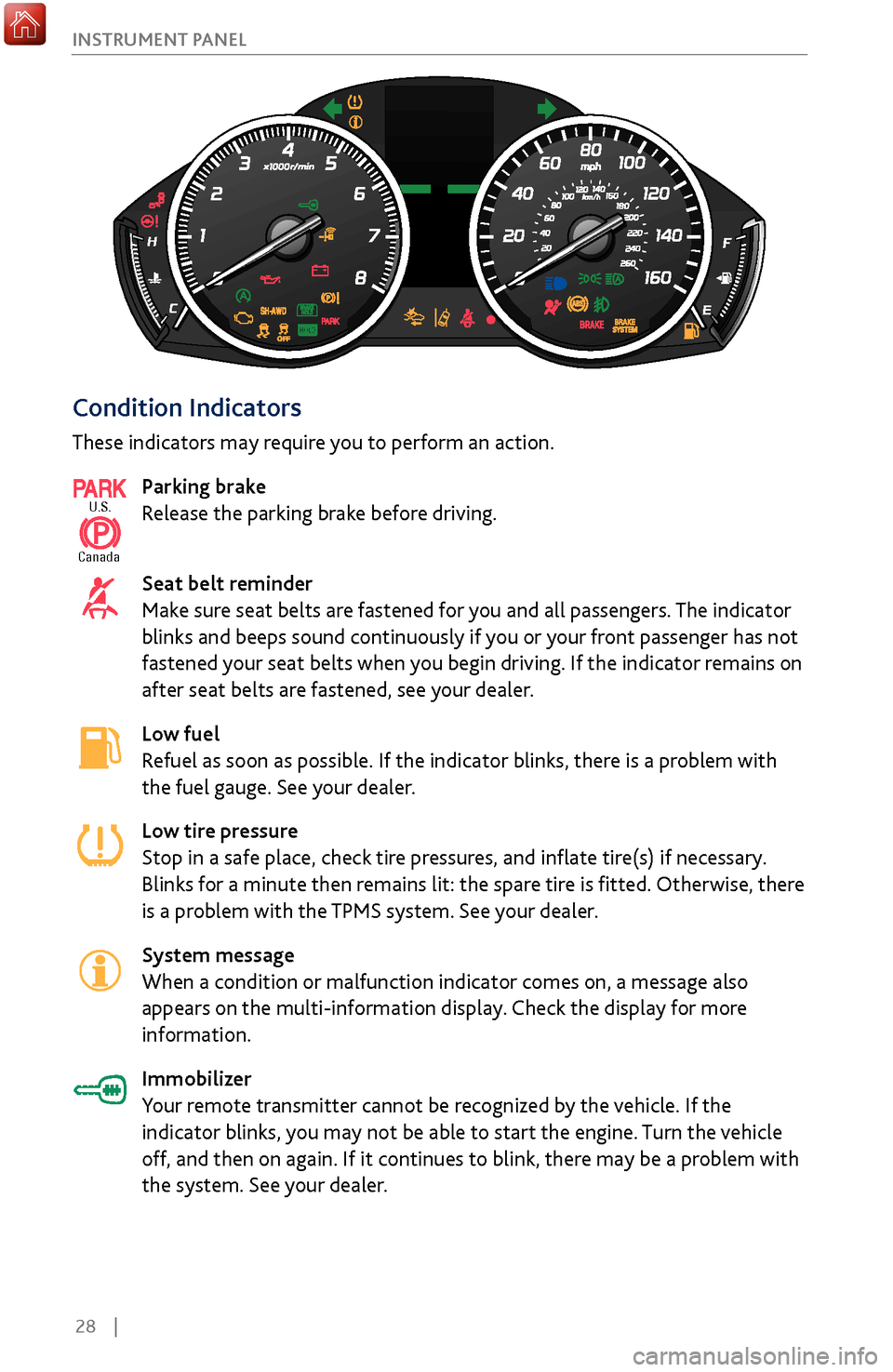
Condition Indicators
These indicators may require you to perform an action.
Parking brake
Release the parking brake before driving.
Seat belt reminder
Make sure seat belts are fastened for you and all passengers. The indicator
blinks and beeps sound continuously if you or your front passenger has not
fastened your seat belts when you begin driving. If the indicator remains on
after seat belts are fastened, see your dealer.
Low fuel
Refuel as soon as possible. If the indicator blinks, there is a problem with
the fuel gauge. See your dealer.
Low tire pressure
Stop in a safe place, check tire pressures, and inflate tire(s) if necessary.
Blinks for a minute then remains lit: the spare tire is fitted. Otherwise, there
is a problem with the TPMS system. See your dealer.
System message
When a condition or malfunction indicator comes on, a message also
appears on the multi-information display. Check the display for more
information.
Immobilizer
Your remote transmitter cannot be recognized by the vehicle. If the
indicator blinks, you may not be able to start the engine. Turn the vehicle
off, and then on again. If it continues to blink, there may be a problem with
the system. See your dealer.
U.S.
Canada
Page 50 of 170
| 43
V
EHICLE CONTROLS
Adjusting the
Seats
Make seat adjustments before driving to ensure the best comfort and safety.
Adjusting the Front Seats
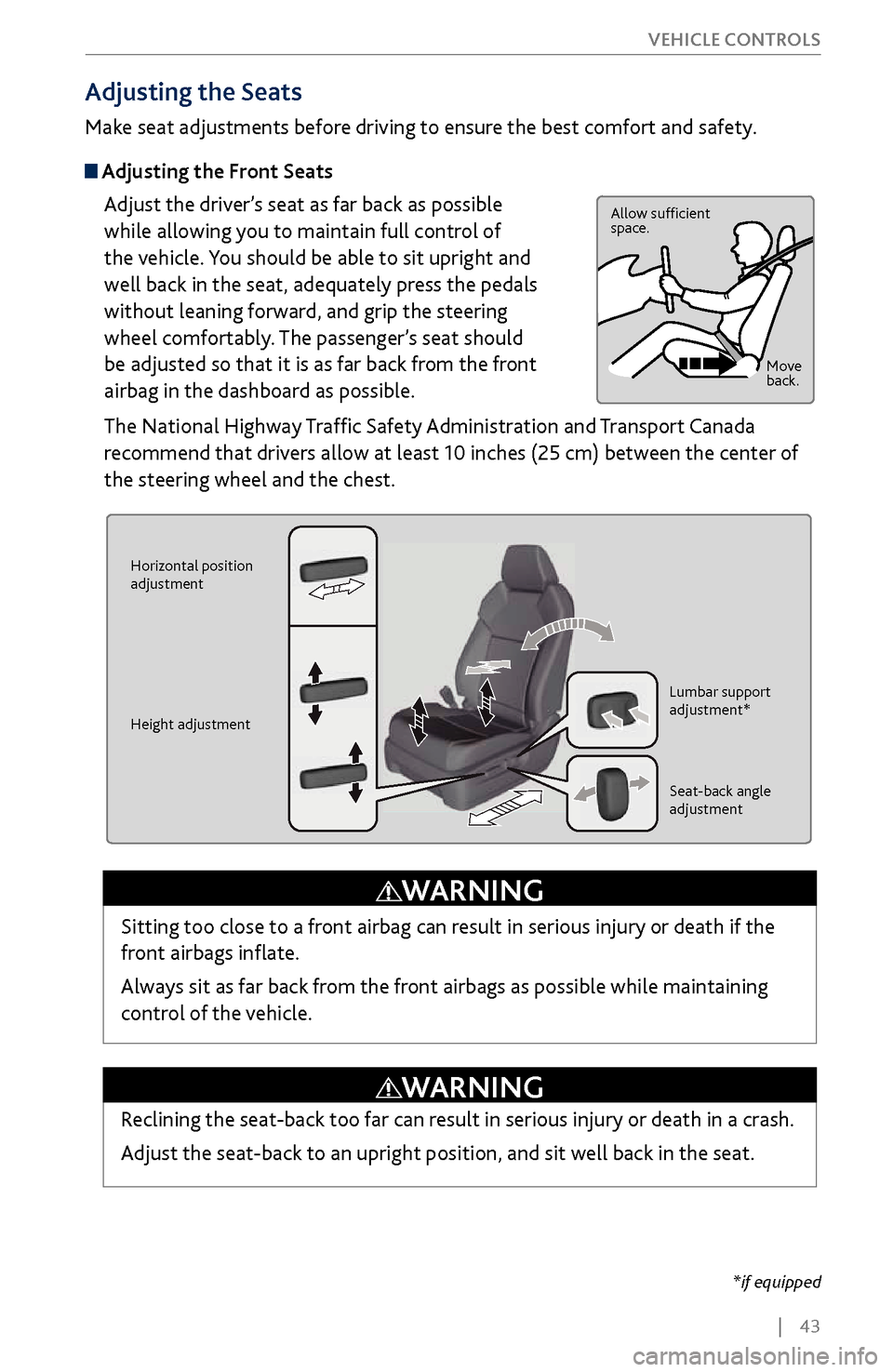
Adjust the driver’s seat as far back as possible
while allowing you to maintain full control of
the vehicle. You should be able to sit upright and
well back in the seat, adequately press the pedals
without leaning forward, and grip the steering
wheel comfortably. The passenger’s seat should
be adjusted so that it is as far back from the front
airbag in the dashboard as possible.
The National Highway Traffic Safety Administration and Transport Canada
recommend that drivers allow at least 10 inches (25 cm) between the center of
the steering wheel and the chest.
Allow sufficient
space.
Move
back.
Horizontal position
adjustment
Height adjustment Lumbar support
adjustment*
Seat-back angle
adjustment
Sitting too close to a front airbag can result in serious injury or death if the
front airbags inflate.
Always sit as far back from the front airbags as possible while maintaining
control of the vehicle.
WARNING
*if equipped
Reclining the seat-back too far can result in serious injury or death in a crash.
Adjust the seat-back to an upright position, and sit well back in the seat.
WARNING
Page 51 of 170
44 |
V
EHICLE CONTROLS
Adjusting the
Head Restraints
Your vehicle is equipped with head restraints in all seating positions. Head
restraints are most effective for protection against whiplash and other rear-
impact crash injuries.
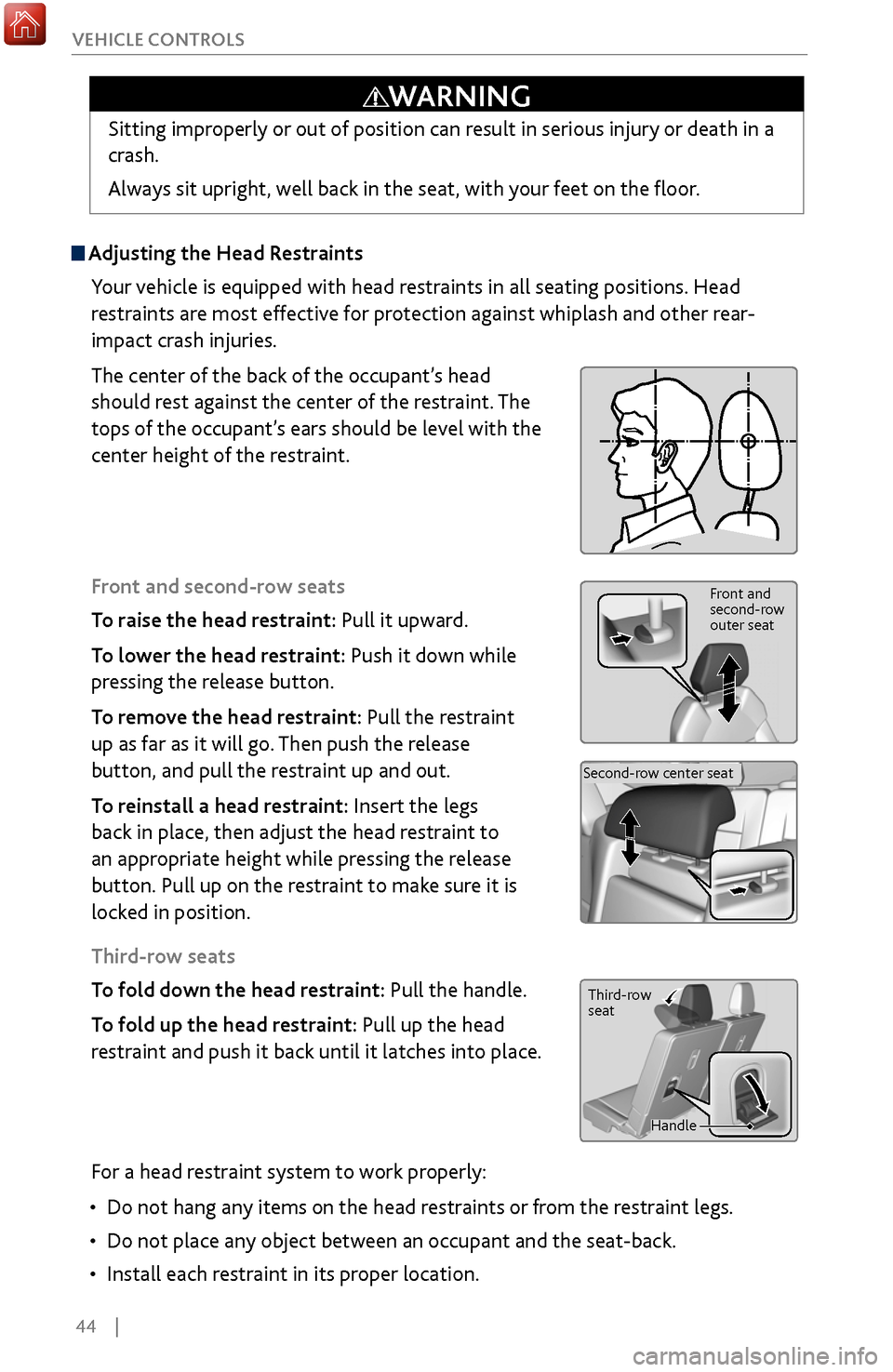
The center of the back of the occupant’s head
should rest against the center of the restraint. The
tops of the occupant’s ears should be level with the
center height of the restraint.
Front and second-row seats
To raise the head restraint: Pull it upward.
To lower the head restraint: Push it down while
pressing the release button.
To remove the head restraint: Pull the restraint
up as far as it will go. Then push the release
button, and pull the restraint up and out.
To reinstall a head restraint: Insert the legs
back in place, then adjust the head restraint to
an appropriate height while pressing the release
button. Pull up on the restraint to make sure it is
locked in position.
Third-row seats
To fold down the head restraint: Pull the handle.
To fold up the head restraint: Pull up the head
restraint and push it back until it latches into place.
Front and
second-row
outer seat
Second-row center seat
Sitting improperly or out of position can result in serious injury or death in a
crash.
Always sit upright, well back in the seat, with your feet on the floor.
WARNING
Third-row
seat
Handle
For a head restraint system to work properly:
•
Do not hang any items on
the head restraints or from the restraint legs.
•
Do not place any object between an
occupant and the seat-back.
•
Install each restraint in its proper location.
Page 52 of 170
| 45
V
EHICLE CONTROLS
Failure to reinstall, or correctly reinstall, the head restraints can result in
severe injury during a crash.
Always replace the head restraints before driving.
WARNING
Improperly positioning head restraints reduces their effectiveness and
increases the likelihood of serious injury in a crash.
Make sure head restraints are in place and positioned properly before driving.
WARNING
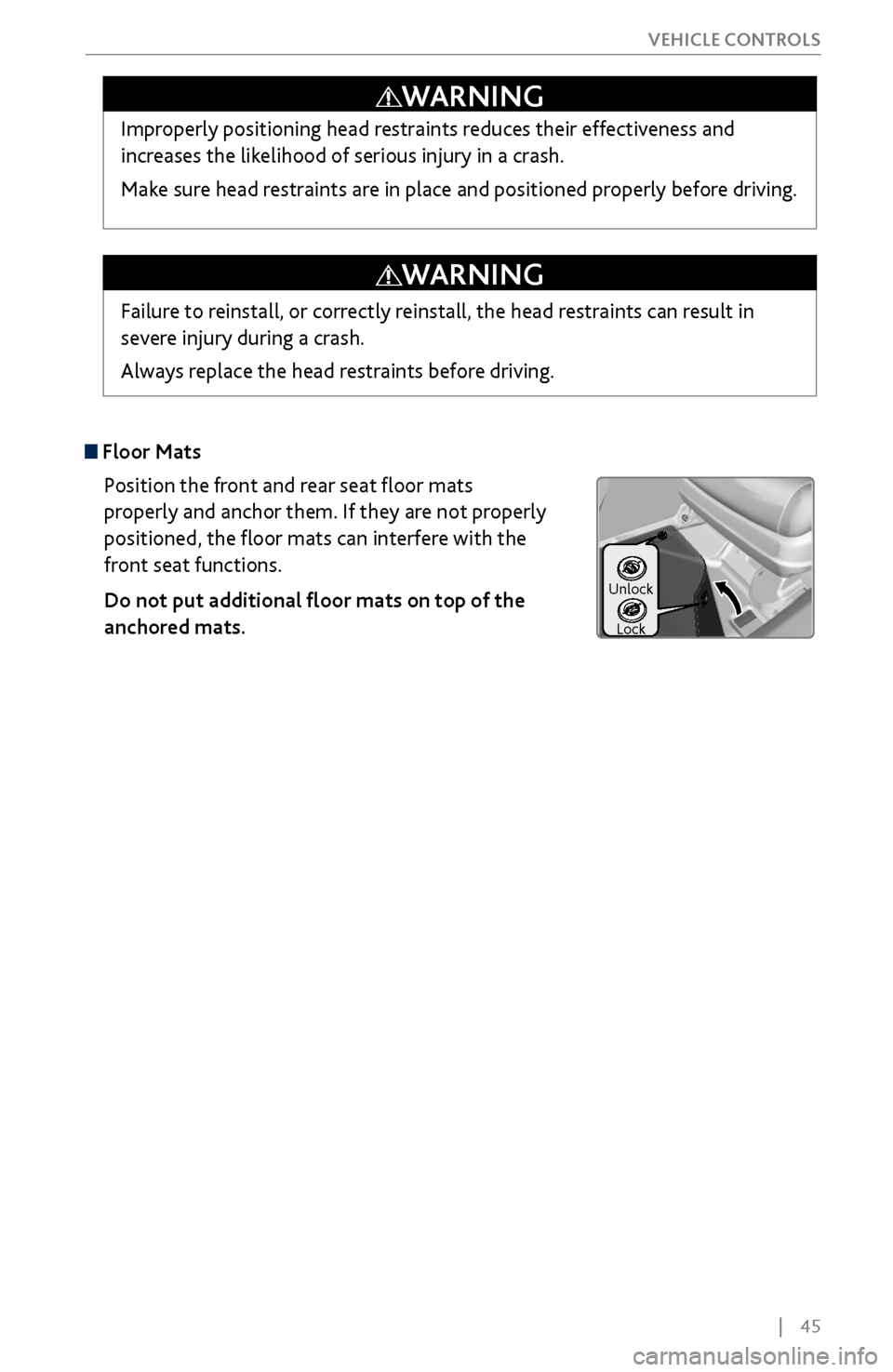
Floor Mats
Position the front and rear seat floor mats
properly and anchor them. If they are not properly
positioned, the floor mats can interfere with the
front seat functions.
Do not put additional floor mats on top of the
anchored mats.
Unlock
Lock
Page 54 of 170
| 47
V
EHICLE CONTROLS
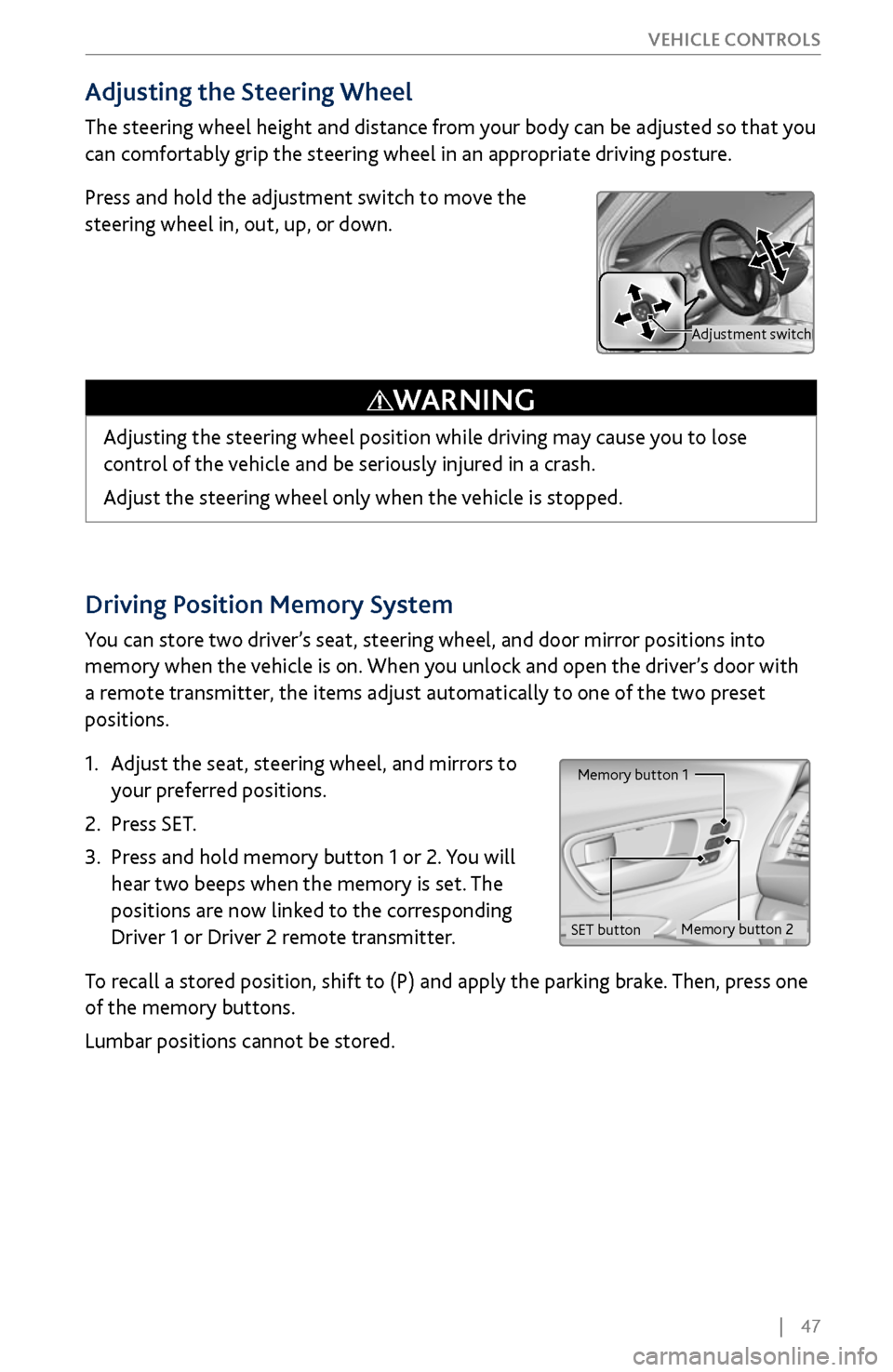
Driving Position Memory System
You can store two driver’s seat, steering wheel, and door mirror positions into
memory when the vehicle is on. When you unlock and open the driver’s door with
a remote transmitter, the items adjust automatically to one of the two preset
positions.
1.
Adjust the seat
, steering wheel, and mirrors to
your preferred positions.
2.
Press SET.
3.
Press and hold memory button 1 or 2.
You will
hear two beeps when the memory is set. The
positions are now linked to the corresponding
Driver 1 or Driver 2 remote transmitter.
To recall a stored position, shift to (P) and apply the parking brake. Then, press one
of the memory buttons.
Lumbar positions cannot be stored.
Memory button 1
Memory button 2
SET button
Adjusting the Steering Wheel
The steering wheel height and distance from your body can be adjusted so that you
can comfortably grip the steering wheel in an appropriate driving posture.
Press and hold the adjustment switch to move the
steering wheel in, out, up, or down.
Adjusting the steering wheel position while driving may cause you to lose
control of the vehicle and be seriously injured in a crash.
Adjust the steering wheel only when the vehicle is stopped.
WARNING
Adjustment switch
Page 55 of 170
48 |
V
EHICLE CONTROLS
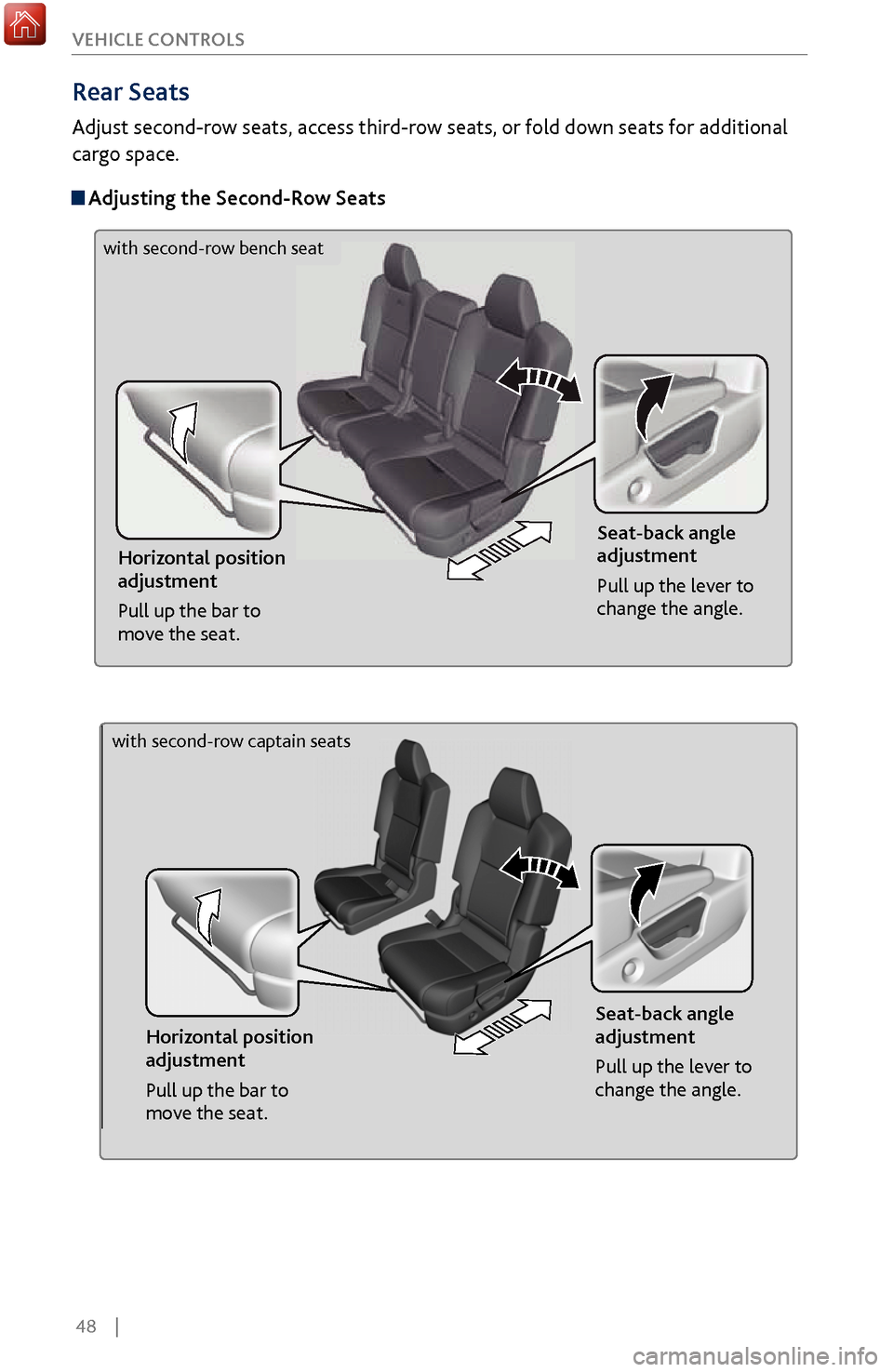
Rear Seats
Adjust second-row seats, access third-row seats, or fold down seats for additional
cargo space.
Adjusting the
Second-Row Seats
Horizontal position
adjustment
Pull up the bar to
move the seat. Seat-back angle
adjustment
Pull up the lever to
change the angle.
Horizontal position
adjustment
Pull up the bar to
move the seat.
Seat-back angle
adjustment
Pull up the lever to
change the angle.
with second-row bench seat
with second-row captain seats
Page 56 of 170
| 49
V
EHICLE CONTROLS
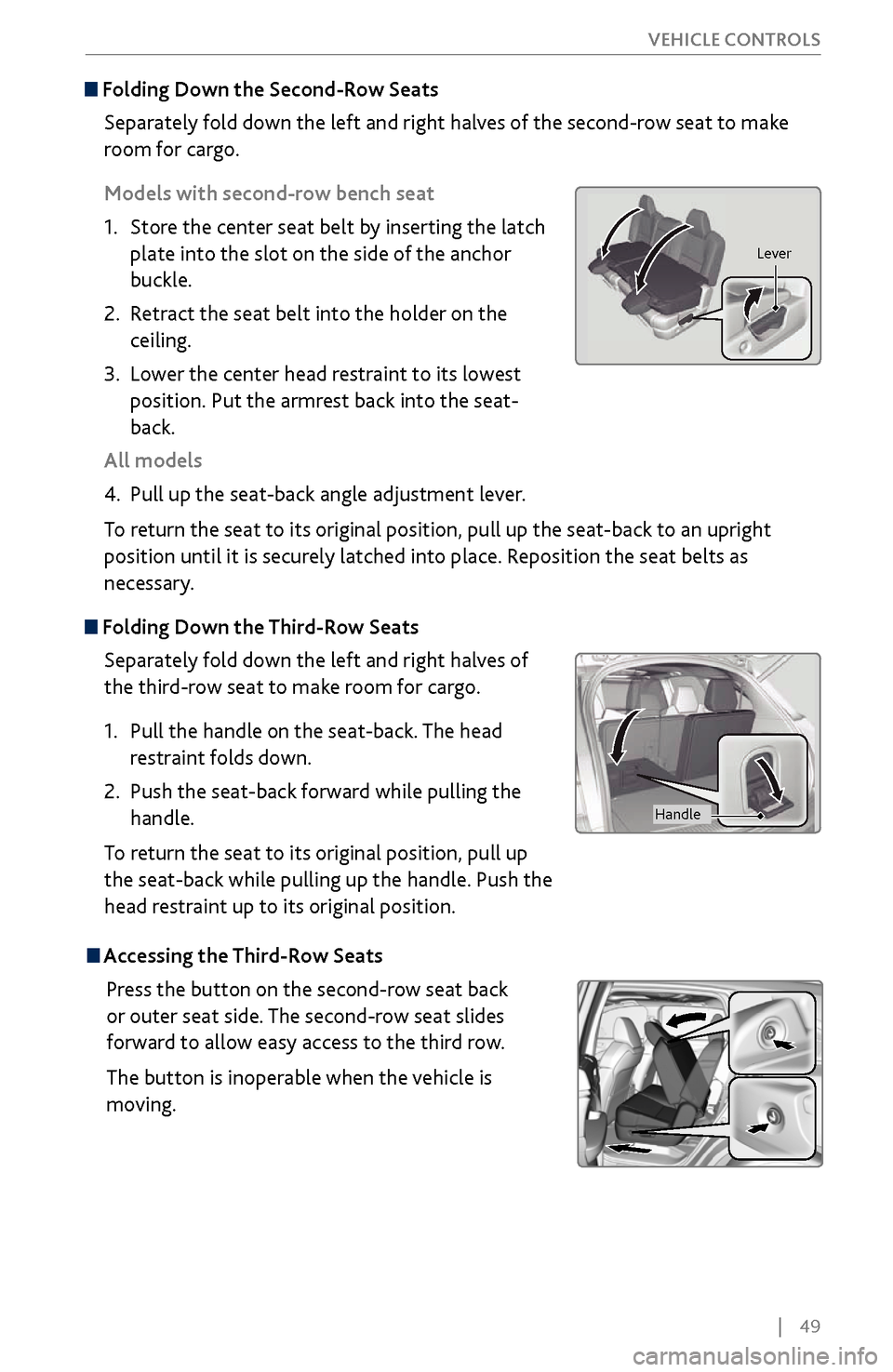
Folding Down the
Second-Row Seats
Separately fold down the left and right halves of the second-row seat to make
room for cargo.
Models with second-row bench seat
1.
Store the center seat belt b
y inserting the latch
plate into the slot on the side of the anchor
buckle.
2.
Retract the seat
belt into the holder on the
ceiling.
3.
Lower the center head restraint
to its lowest
position. Put the armrest back into the seat-
back.
All models
4.
Pull up the seat-back angle adjustment lev
er.
To return the seat to its original position, pull up the seat-back to an upright
position until it is securely latched into place. Reposition the seat belts as
necessary.
Folding Down the Third-Row Seats
Separately fold down the left and right halves of
the third-row seat to make room for cargo.
1.
Pull the handle on the seat
-back. The head
restraint folds down.
2.
Push the seat-back
forward while pulling the
handle.
To return the seat to its original position, pull up
the seat-back while pulling up the handle. Push the
head restraint up to its original position.
Lever
Handle
Accessing the Third-Row Seats
Press the button on the second-row seat back
or outer seat side. The second-row seat slides
forward to allow easy access to the third row.
The button is inoperable when the vehicle is
moving.