belt Acura MDX 2017 Owner's Manual
[x] Cancel search | Manufacturer: ACURA, Model Year: 2017, Model line: MDX, Model: Acura MDX 2017Pages: 170, PDF Size: 12.43 MB
Page 30 of 170
| 23
S
AFETY
Allowing a child age 12 or under to sit in the front can result in injury or
death if the passenger’s front airbag inflates.
If a larger child must ride in front, move the vehicle seat as far to the rear as
possible, have the child sit up properly and wear the seat belt properly, using
a booster seat if needed.
WARNING
Protecting Larger Children
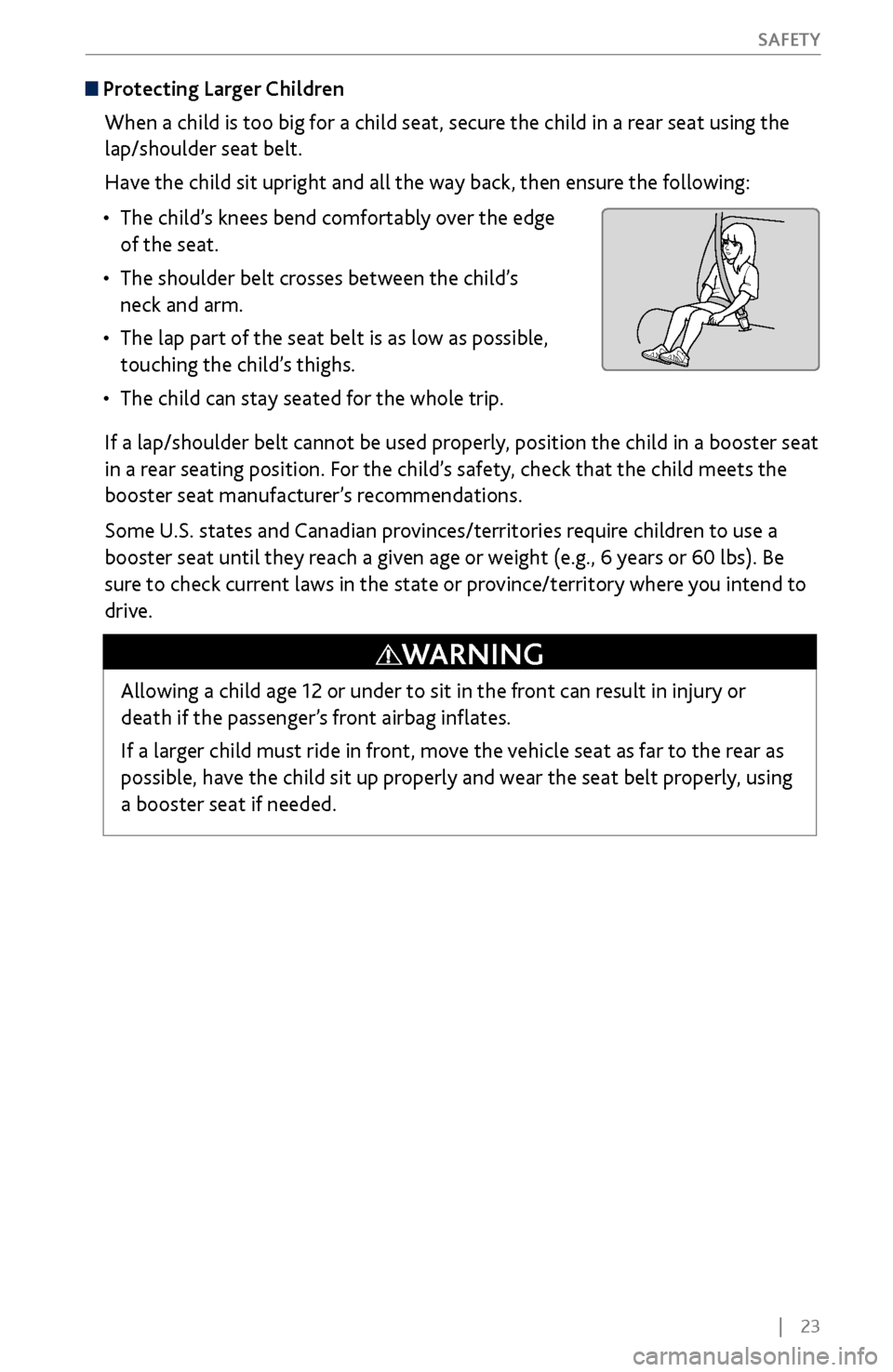
When a child is too big for a child seat, secure the child in a rear seat using the
lap/shoulder seat belt.
Have the child sit upright and all the way back, then ensure the following:
•
The child’s knees bend comfortably
over the edge
of the seat.
•
The shoulder belt crosses between the child’
s
neck and arm.
•
The lap part of the seat belt is as low as possible,
touching the
child’s thighs.
•
The child can stay seated for the
whole trip.
If a lap/shoulder belt cannot be used properly, position the child in a booster seat
in a rear seating position. For the child’s safety, check that the child meets the
booster seat manufacturer’s recommendations.
Some U.S. states and Canadian provinces/territories require children to use a
booster seat until they reach a given age or weight (e.g., 6 years or 60 lbs). Be
sure to check current laws in the state or province/territory where you intend to
drive.
Page 34 of 170
| 27
I
NSTRUMENT PANEL
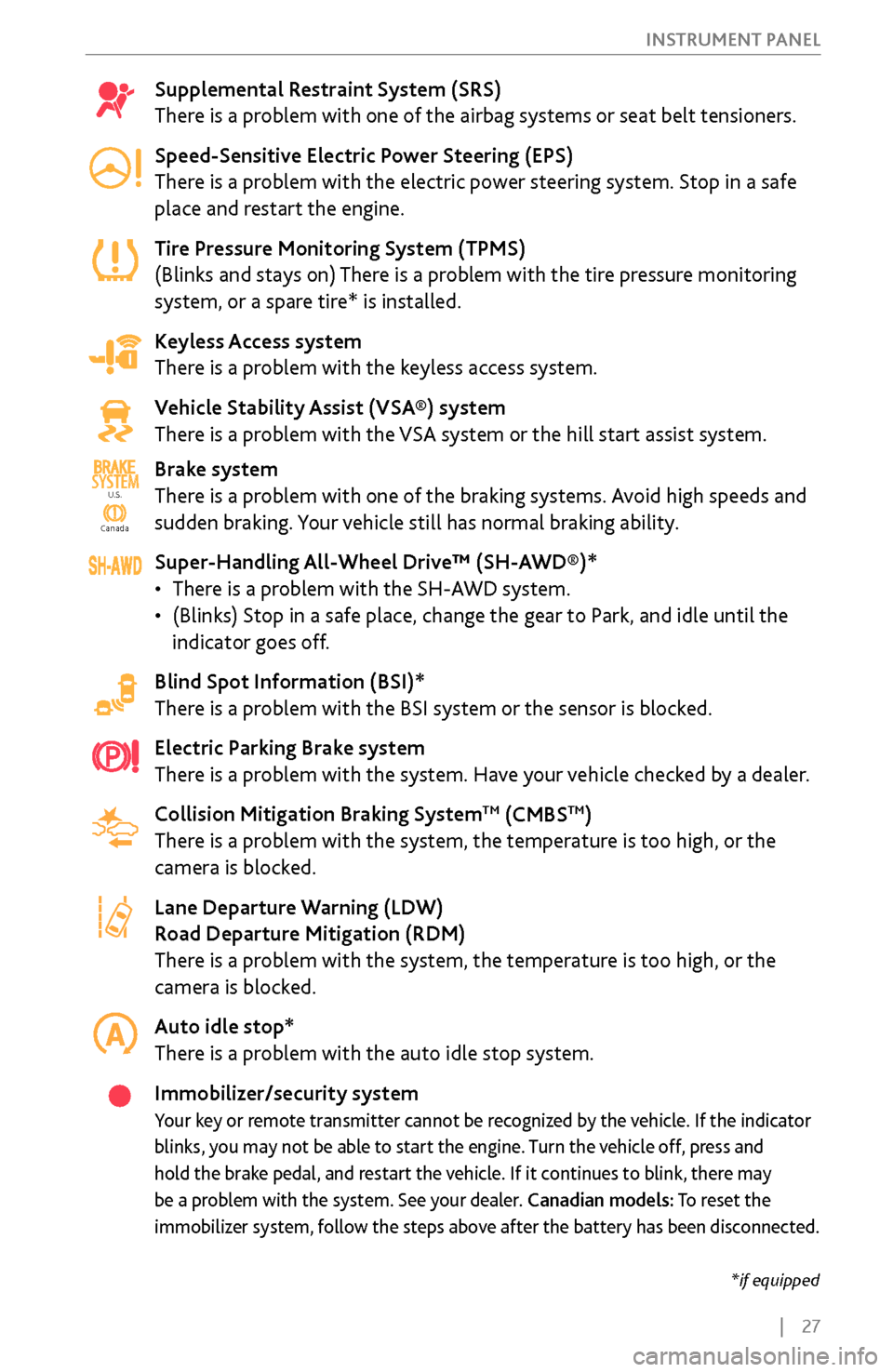
Supplemental Restraint System (SRS)
There is a problem with one of the airbag systems or seat belt tensioners.
Speed-Sensitive Electric Power Steering (EPS)
There is a problem with the electric power steering system. Stop in a safe
place and restart the engine.
Tire Pressure Monitoring System (TPMS)
(Blinks and stays on) There is a problem with the tire pressure monitoring
system, or a spare tire* is installed.
Keyless Access system
There is a problem with the keyless access system.
Vehicle Stability Assist (VSA®) system
There is a problem with the VSA system or the hill start assist system.
Brake system
There is a problem with one of the braking systems. Avoid high speeds and
sudden braking. Your vehicle still has normal braking ability.
Super-Handling All-Wheel Drive™ (SH-AWD®)*
•
There is a problem
with the SH-AWD system.
•
(Blinks) Stop in a safe place, change the gear
to Park, and idle until the
indicator goes off.
Blind Spot Information (BSI)*
There is a problem with the BSI system or the sensor is blocked.
Electric Parking Brake system
There is a problem with the system. Have your vehicle checked by a dealer.
Collision Mitigation Braking System
TM (CMBSTM)
There is a problem with the system, the temperature is too high, or the
camera is blocked.
Lane Departure Warning (LDW)
Road Departure Mitigation (RDM)
There is a problem with the system, the temperature is too high, or the
camera is blocked.
Auto idle stop*
There is a problem with the auto idle stop system.
Immobilizer/security system
Your key or remote transmitter cannot be recognized by the vehicle. If the indicator
blinks, you may not be able to start the engine. Turn the vehicle off, press and
hold the brake pedal, and restart the vehicle. If it continues to blink, there may
be a problem with the system. See your dealer. Canadian models: To reset the
immobilizer system, follow the steps above after the battery has been disconnected.
Ca nada
U.S.SYSTEM
U.S.
Canada
*if equipped
Page 35 of 170
28 |
I
NSTRUMENT PANEL
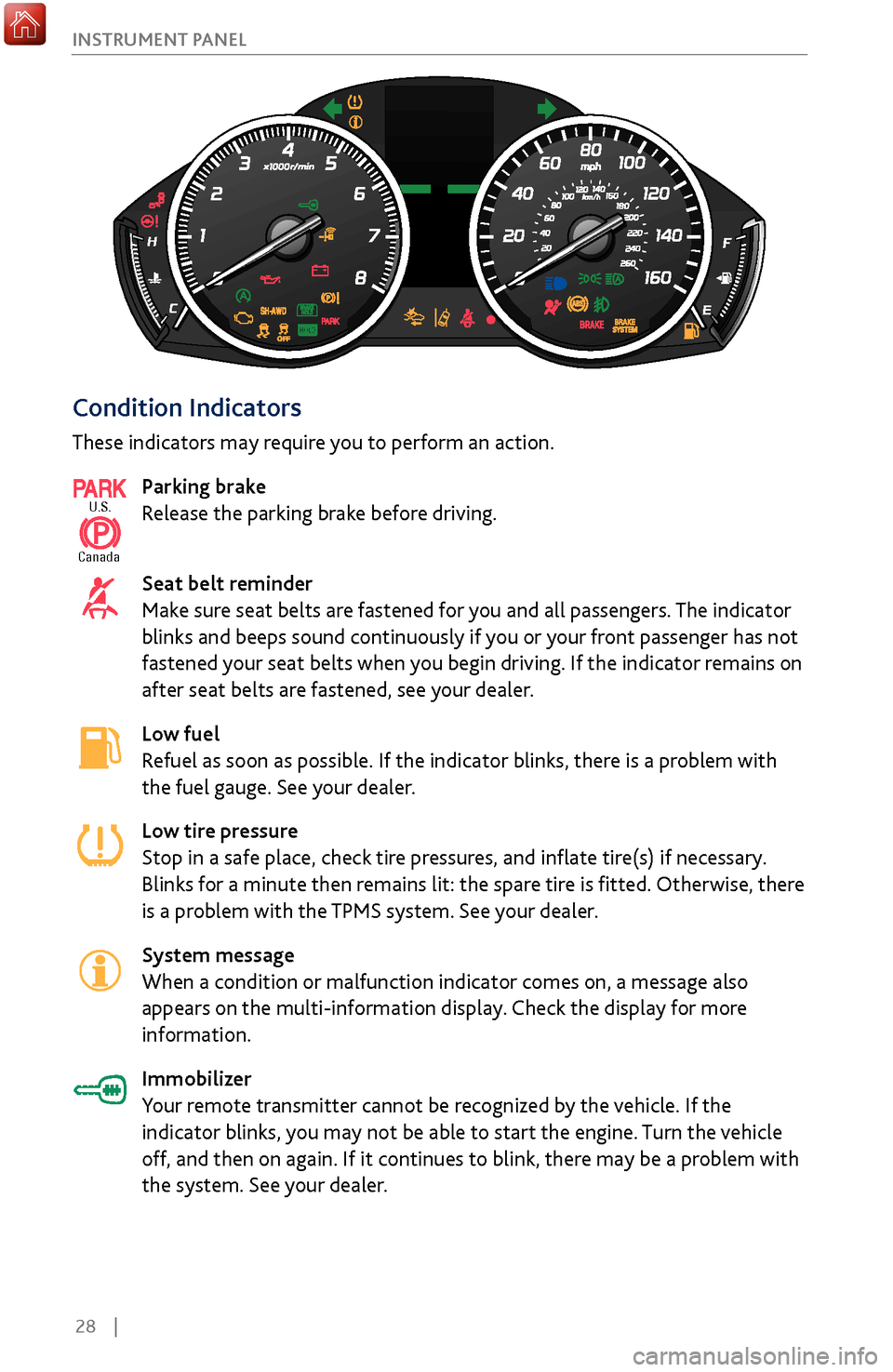
Condition Indicators
These indicators may require you to perform an action.
Parking brake
Release the parking brake before driving.
Seat belt reminder
Make sure seat belts are fastened for you and all passengers. The indicator
blinks and beeps sound continuously if you or your front passenger has not
fastened your seat belts when you begin driving. If the indicator remains on
after seat belts are fastened, see your dealer.
Low fuel
Refuel as soon as possible. If the indicator blinks, there is a problem with
the fuel gauge. See your dealer.
Low tire pressure
Stop in a safe place, check tire pressures, and inflate tire(s) if necessary.
Blinks for a minute then remains lit: the spare tire is fitted. Otherwise, there
is a problem with the TPMS system. See your dealer.
System message
When a condition or malfunction indicator comes on, a message also
appears on the multi-information display. Check the display for more
information.
Immobilizer
Your remote transmitter cannot be recognized by the vehicle. If the
indicator blinks, you may not be able to start the engine. Turn the vehicle
off, and then on again. If it continues to blink, there may be a problem with
the system. See your dealer.
U.S.
Canada
Page 56 of 170
| 49
V
EHICLE CONTROLS
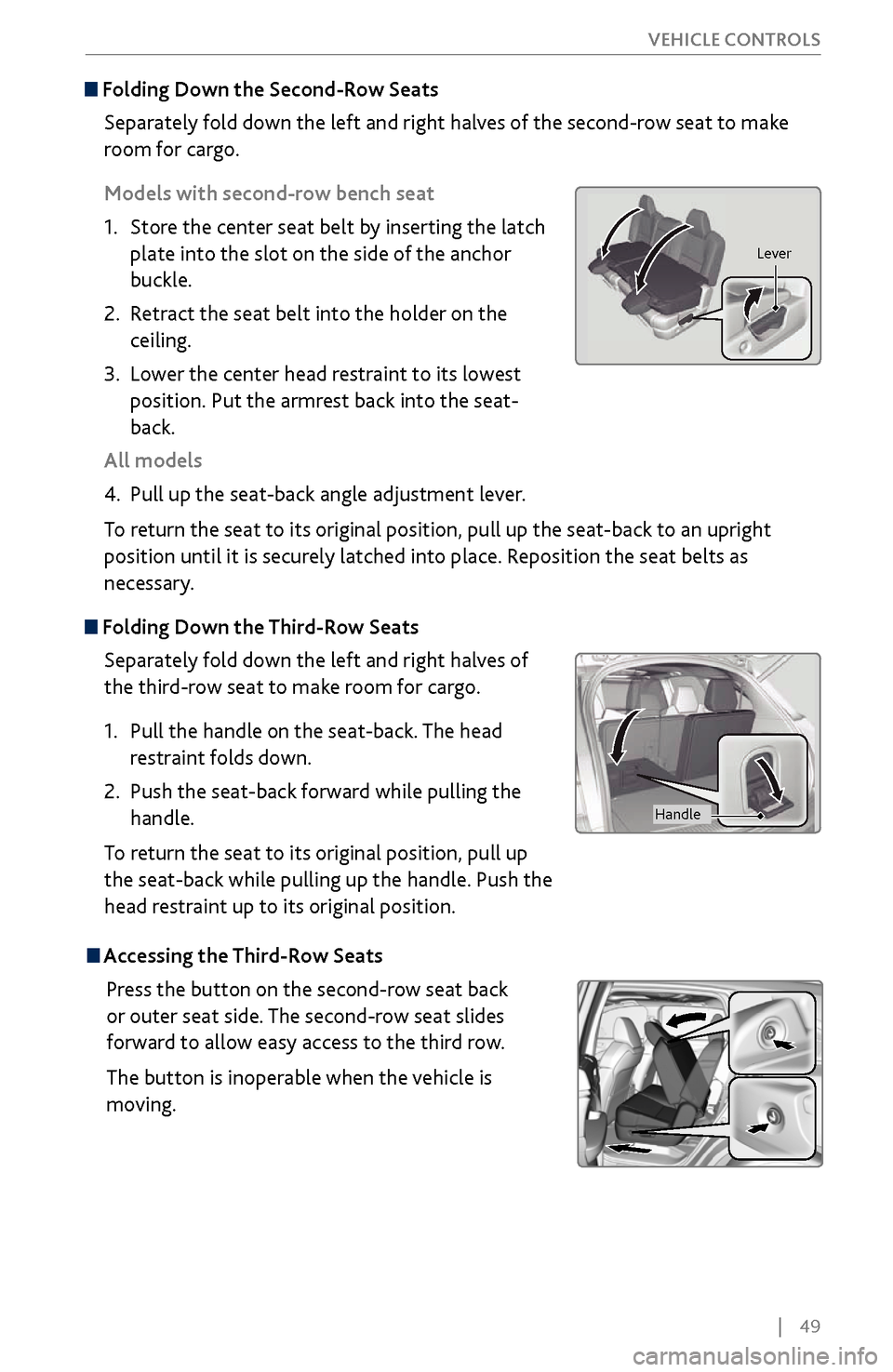
Folding Down the
Second-Row Seats
Separately fold down the left and right halves of the second-row seat to make
room for cargo.
Models with second-row bench seat
1.
Store the center seat belt b
y inserting the latch
plate into the slot on the side of the anchor
buckle.
2.
Retract the seat
belt into the holder on the
ceiling.
3.
Lower the center head restraint
to its lowest
position. Put the armrest back into the seat-
back.
All models
4.
Pull up the seat-back angle adjustment lev
er.
To return the seat to its original position, pull up the seat-back to an upright
position until it is securely latched into place. Reposition the seat belts as
necessary.
Folding Down the Third-Row Seats
Separately fold down the left and right halves of
the third-row seat to make room for cargo.
1.
Pull the handle on the seat
-back. The head
restraint folds down.
2.
Push the seat-back
forward while pulling the
handle.
To return the seat to its original position, pull up
the seat-back while pulling up the handle. Push the
head restraint up to its original position.
Lever
Handle
Accessing the Third-Row Seats
Press the button on the second-row seat back
or outer seat side. The second-row seat slides
forward to allow easy access to the third row.
The button is inoperable when the vehicle is
moving.
Page 95 of 170
88 |
DRIVING
Learn about preparation for driving, as well as other features.
Before Driving
Check the following items before you begin driving.
Exterior Checks
•
Make sur
e there are no obstructions on the windows, door mirrors, exterior
lights, or other parts of the vehicle.
•
Remov
e any frost, snow, or ice.
•
Make sure
the hood is securely closed.
•
Heat from
the engine and exhaust can ignite flammable materials left under
the hood, causing a fire. If you’ve parked your vehicle for an extended period,
inspect and remove any debris that may have collected, such as dried grass
and leaves that have fallen or have been carried in for use as a nest by a small
animal. Also check under the hood for leftover flammable materials after you
or someone else has performed maintenance on your vehicle.
•
Make sure
the tires are in good condition.
•
Make sure
there are no people or objects behind or around the vehicle.
DRIVING
Interior Checks•
Store or secur
e all items on board properly.
•
Do not pile items higher than the seat height
.
•
Do not place anything in the
front seat footwells. Make sure to secure the floor
mats.
•
If you hav
e any animals on board, do not let them move freely in the vehicle.
•
Securely close and lock all
doors and the tailgate.
•
Adjust y
our seating position, mirrors, and steering wheel properly.
•
Make sure items placed
on the floor behind the front seats cannot roll under
the seats.
•
Everyone in
the vehicle must fasten their seat belt.
•
Make sure
that the indicators in the instrument panel come on when you start
the vehicle, and go off soon after.
If the doors are frozen shut, use warm water around the door edges to melt any
ice. Do not try to force them open, as this can damage the rubber trim around the
doors. When done, wipe dry to avoid further freezing.
NOTICE
Page 105 of 170
98 |
DRIVING
When you change from D to R and vice versa, press the brake pedal and come
to a complete stop, then select the intended gear position while maintaining
brake pressure.
NOTICE
Shifting
Change your vehicle’s gears to begin driving.
Electronic Gear Selector
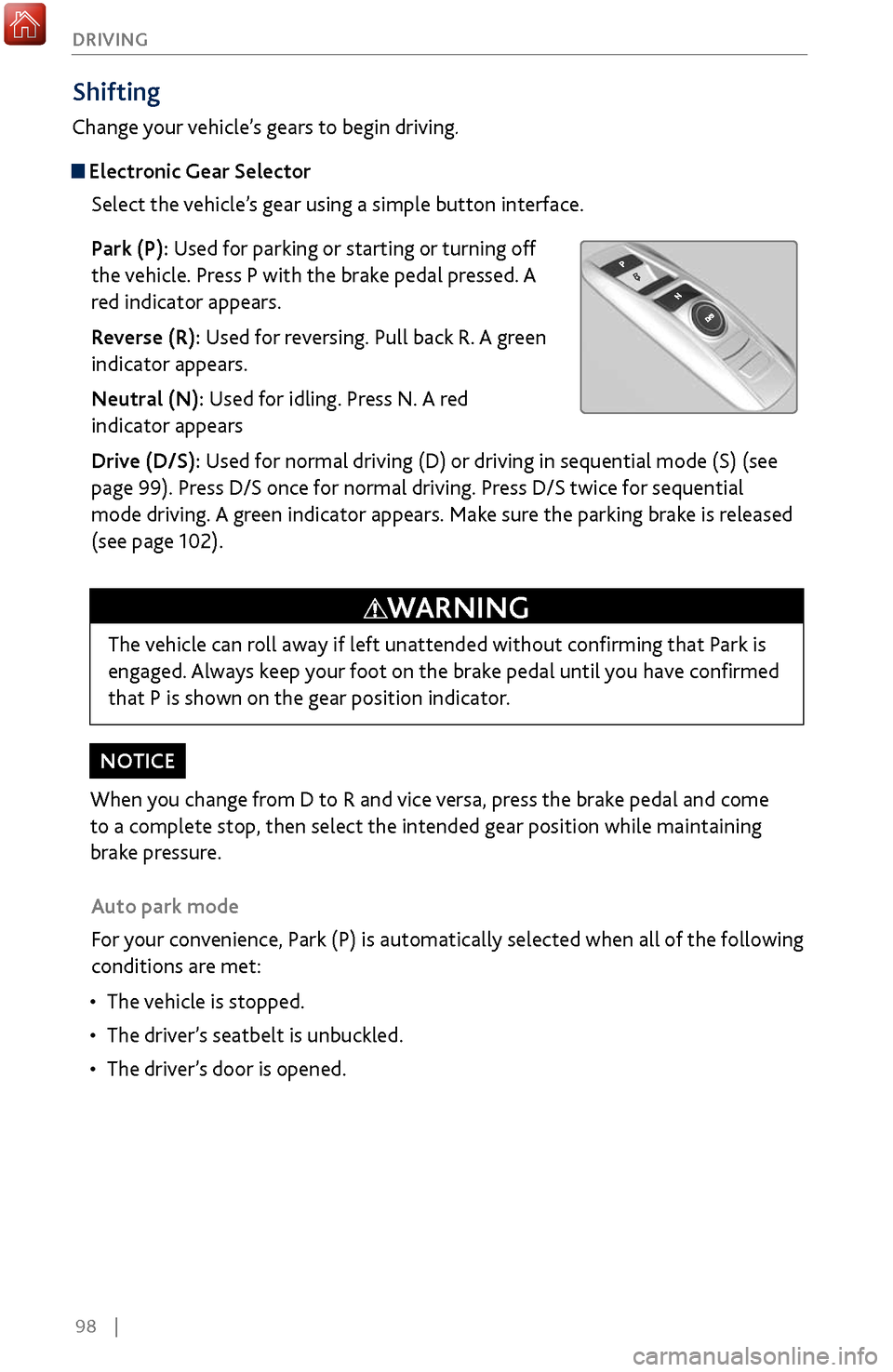
Select the vehicle’s gear using a simple button interface.
Park (P): Used for parking or starting or turning off
the vehicle. Press P with the brake pedal pressed. A
red indicator appears.
Reverse (R): Used for reversing. Pull back R. A green
indicator appears.
Neutral (N): Used for idling. Press N. A red
indicator appears
Drive (D/S): Used for normal driving (D) or driving in sequential mode (S) (see
page 99). Press D/S once for normal driving. Press D/S twice for sequential
mode driving. A green indicator appears. Make sure the parking brake is released
(see page 102).
Auto park mode
For your convenience, Park (P) is automatically selected when all of the following
conditions are met:
•
The vehicle is stopped.
•
The driver
’s seatbelt is unbuckled.
•
The driver’
s door is opened.
The vehicle can roll away if left unattended without confirming that Park is
engaged. Always keep your foot on the brake pedal until you have confirmed
that P is shown on the gear position indicator.
WARNING
Page 107 of 170
100 |
DRIVING
Auto Idle Stop*
Automatically stops and restarts the engine to help maximize your fuel economy,
depending on environmental and vehicle conditions.
Activating Auto Idle Stop
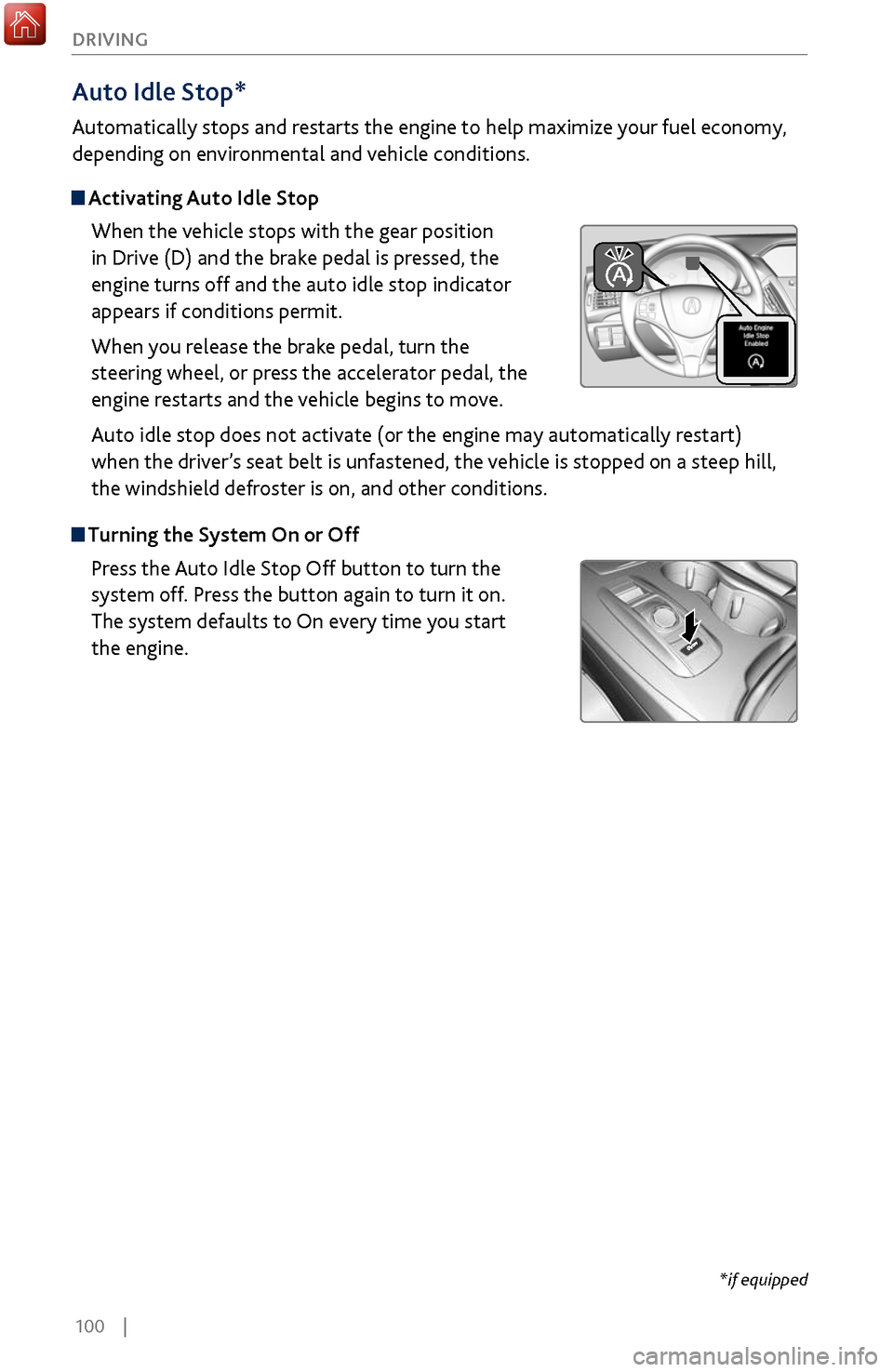
When the vehicle stops with the gear position
in Drive (D) and the brake pedal is pressed, the
engine turns off and the auto idle stop indicator
appears if conditions permit.
When you release the brake pedal, turn the
steering wheel, or press the accelerator pedal, the
engine restarts and the vehicle begins to move.
Auto idle stop does not activate (or the engine may automatically restart)
when the driver’s seat belt is unfastened, the vehicle is stopped on a steep hill,
the windshield defroster is on, and other conditions.
Turning the System On or Off
Press the Auto Idle Stop Off button to turn the
system off. Press the button again to turn it on.
The system defaults to On every time you start
the engine.
*if equipped
Page 115 of 170
108 |
DRIVING
Collision Mitigation Braking System™ (CMBS™)
Can assist you when there is a possibility of your vehicle colliding with a vehicle or a
pedestrian detected in front of yours.
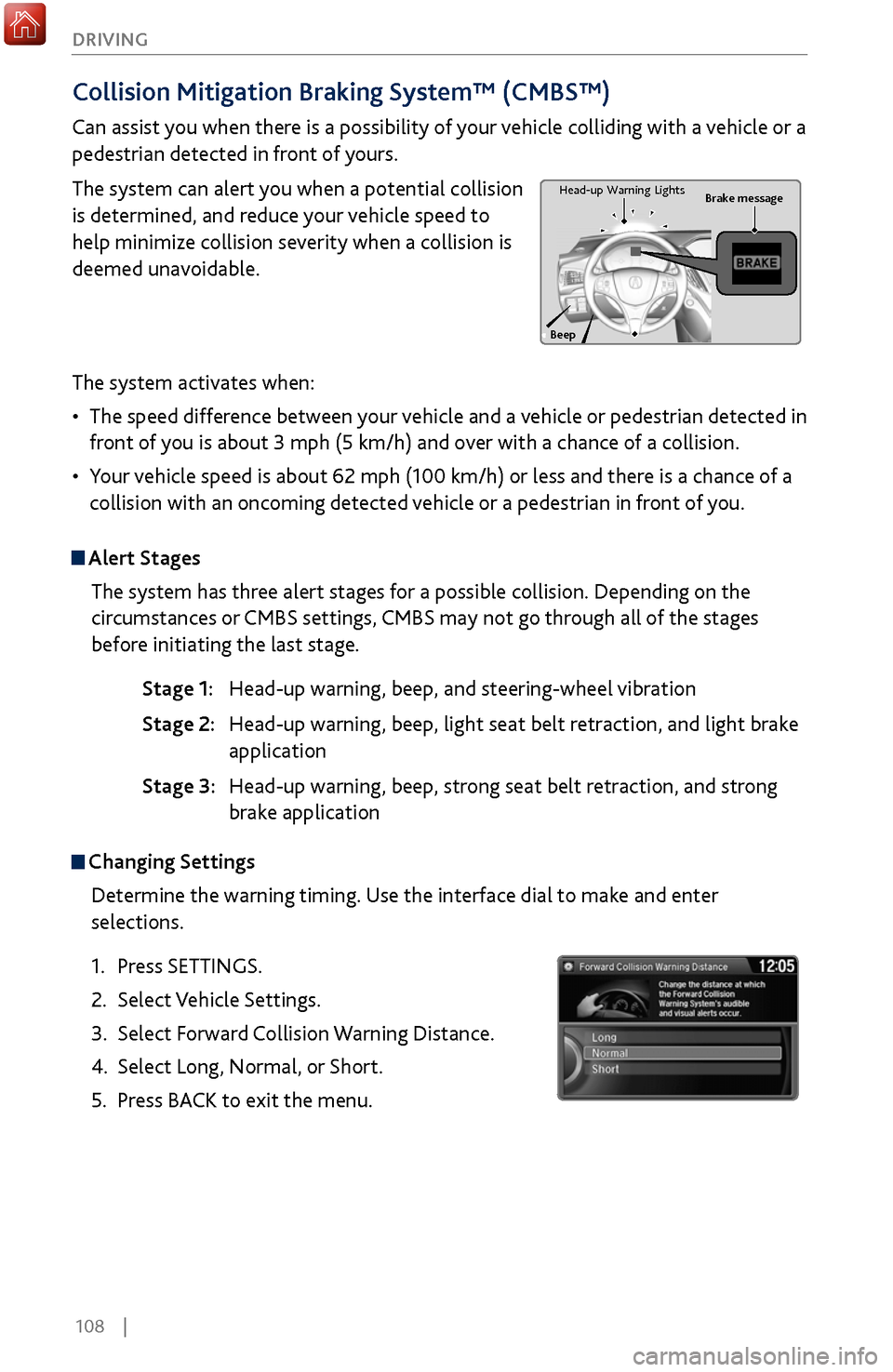
The system can alert you when a potential collision
is determined, and reduce your vehicle speed to
help minimize collision severity when a collision is
deemed unavoidable.
The system activates when:
•
The speed difference between
your vehicle and a vehicle or pedestrian detected in
front of you is about 3 mph (5 km/h) and over with a chance of a collision.
•
Your v
ehicle speed is about 62 mph (100 km/h) or less and there is a chance of a
collision with an oncoming detected vehicle or a pedestrian in front of you.
Alert Stages
The system has three alert stages for a possible collision. Depending on the
circumstances or CMBS settings, CMBS may not go through all of the stages
before initiating the last stage.
Stage 1: Head-up warning, beep
, and steering-wheel vibration
Stage 2: Head-up warning, beep
, light seat belt retraction, and light brake
application
Stage 3:
Head-up warning, beep
, strong seat belt retraction, and strong
brake application
Beep Brake message
Head-up
Warning Lights
Changing Settings
Determine the warning timing. Use the interface dial to make and enter
selections.
1.
Press SETTINGS.
2.
Select Vehicle Settings.
3.
Select Forward
Collision Warning Distance.
4.
Select Long, Normal, or
Short.
5.
Press BACK
to exit the menu.
Page 145 of 170
138 |
MAINTENANCE
*if equipped
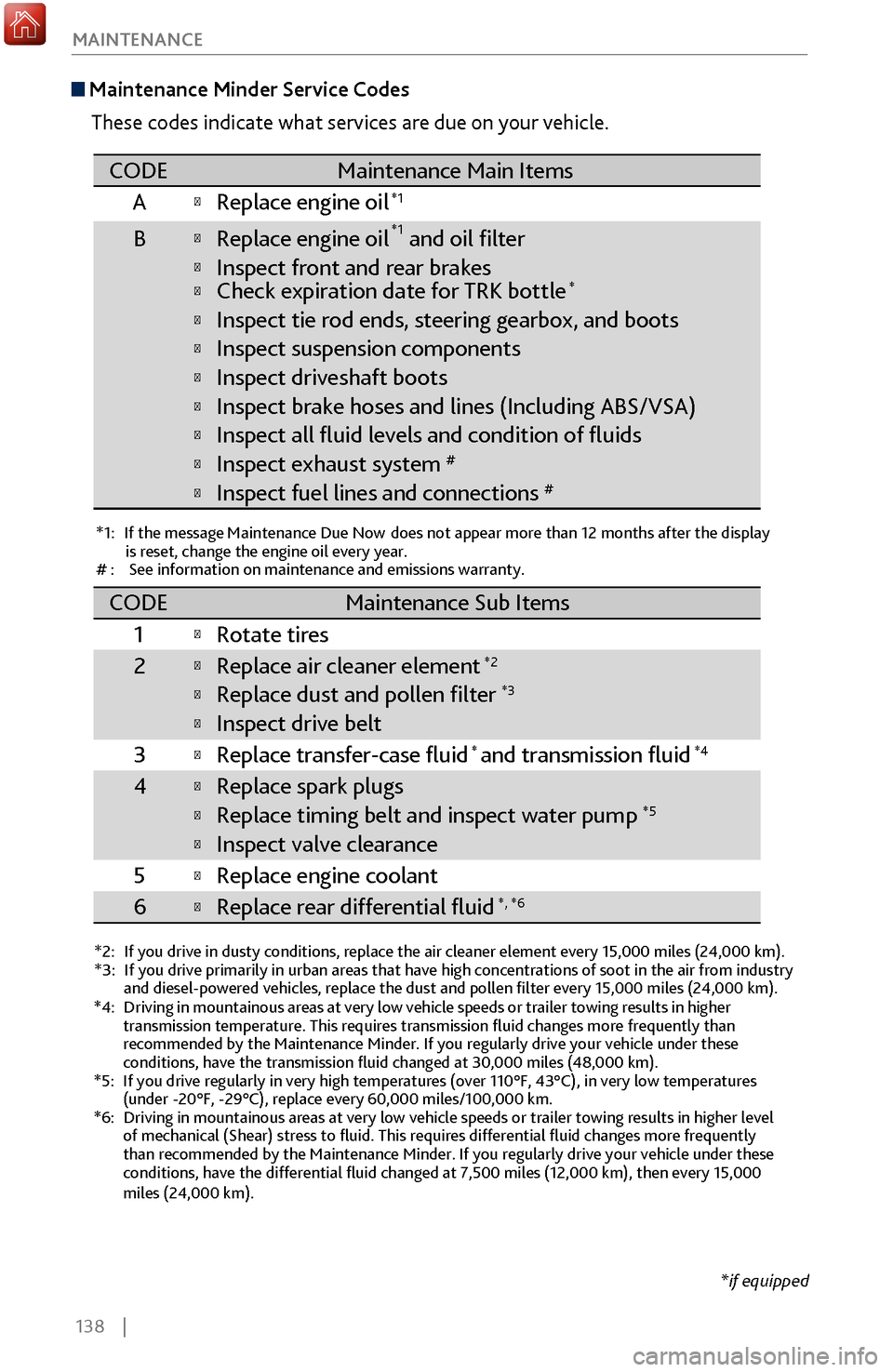
Maintenance Minder
Service Codes
These codes indicate what services are due on your vehicle.
*1: If the message Maintenance Due Now does not appear more than 12 months after the display is reset, change the engine oil every year.
#: See information on maintenance and emissions warranty.
*2:If you drive in dusty conditions, replace the air cleaner element every \
15,000 miles (24,000 km).*3:If you drive primarily in urban areas that have high concentrations of s\
oot in the air from industry and diesel-powered vehicles, replace the dust and pollen lter every \
15,000 miles (24,000 km).
CODEMaintenance Main Items
A
Replace engine oi l*1
BReplace engine oil*1 and oil lter
Inspect front and rear brakesCheck expiration date for TRK bottle*
Inspect tie rod ends, steering gearbox, and boots
Inspect suspension component s
Inspect driveshaft boots
Inspect brake hoses and lines (Including ABS/VSA)
Inspect all uid levels and condition of uids
Inspect exhaust system#
Inspect fuel lines and connections#
*4:Driving in mountainous areas at very low vehicle speeds or trailer towing results in higher
transmission temperature. This requires transmission uid changes mor\
e frequently than
recommended by the Maintenance Minder. If you regularly drive your vehic\
le under these
conditions, have the transmission uid changed at 30,000 miles (48,0\
00 km).
*5:If you drive regularly in very high temperatures (over 110°F, 43°\
C), in very low temperatures
(under -20°F, -29°C), replace every 60,000 miles/100,000 km.
*6:Driving in mountainous areas at very low vehicle speeds or trailer towin\
g results in higher level
of mechanical (Shear) stress to uid. This requires differential \
uid changes more frequently
than recommended by the Maintenance Minder. If you regularly drive your \
vehicle under these
conditions, have the differential uid changed at 7,500 miles (12,00\
0 km), then every 15,000
miles (24,000 km).
CODEMaintenance Sub Items
1
Rotate tires
2Replace air cleaner element*2
Replace dust and pollen lter*3
Inspect drive belt
3
Replace transfer-case uid and transmission ui d*4
4Replace spark plugs
Replace timing belt and inspect water pum p*5
Inspect valve clearance
5
Replace engine coolant
6Replace rear differential uid*, *6
*
Page 163 of 170
156 |
CLIENT INFORMATION
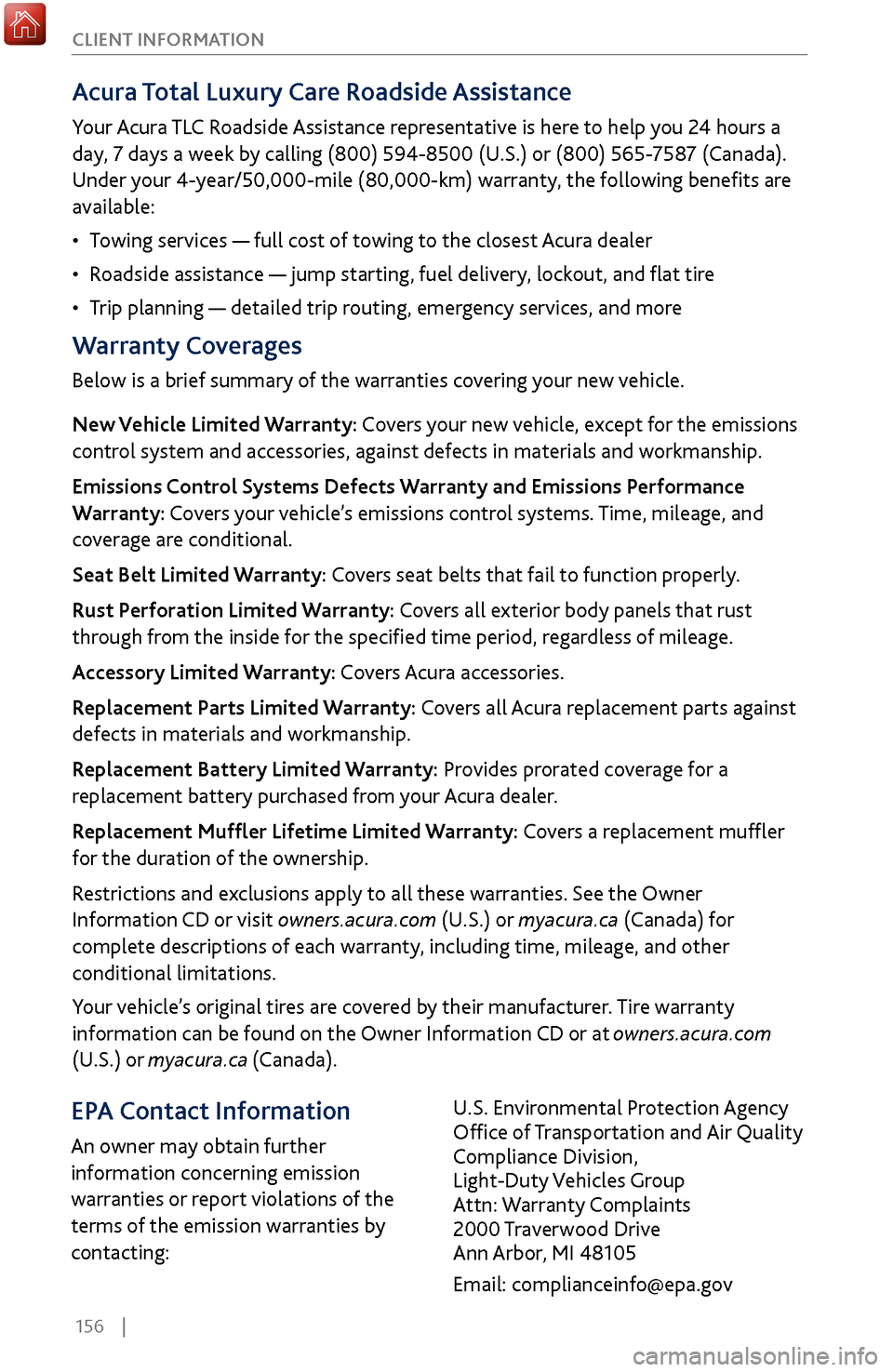
Acura Total Luxury Care
Roadside Assistance
Your Acura TLC Roadside Assistance representative is here to help you 24 hours a
day, 7 days a week by calling (800) 594-8500 (U.S.) or (800) 565-7587 (Canada).
Under your 4-year/50,000-mile (80,000-km) warranty, the following benefits are
available:
•
Towing services
— full cost of towing to the closest Acura dealer
•
Roadside assistance — jump starting,
fuel delivery, lockout, and flat tire
•
Trip planning — detailed
trip routing, emergency services, and more
Warranty Coverages
Below is a brief summary of the warranties covering your new vehicle.
New Vehicle Limited Warranty: Covers your new vehicle, except for the emissions
control system and accessories, against defects in materials and workmanship.
Emissions Control Systems Defects Warranty and Emissions Performance
Warranty: Covers your vehicle’s emissions control systems. Time, mileage, and
coverage are conditional.
Seat Belt Limited Warranty: Covers seat belts that fail to function properly.
Rust Perforation Limited Warranty: Covers all exterior body panels that rust
through from the inside for the specified time period, regardless of mileage.
Accessory Limited Warranty: Covers Acura accessories.
Replacement Parts Limited Warranty: Covers all Acura replacement parts against
defects in materials and workmanship.
Replacement Battery Limited Warranty: Provides prorated coverage for a
replacement battery purchased from your Acura dealer.
Replacement Muffler Lifetime Limited Warranty: Covers a replacement muffler
for the duration of the ownership.
Restrictions and exclusions apply to all these warranties. See the Owner
Information CD or visit owners.acura.com (U.S.) or myacura.ca (Canada) for
complete descriptions of each warranty, including time, mileage, and other
conditional limitations.
Your vehicle’s original tires are covered by their manufacturer. Tire warranty
information can be found on the Owner Information CD or at owners.acura.com
(U.S.) or myacura.ca (Canada).
EPA Contact Information
An owner may obtain further
information concerning emission
warranties or report violations of the
terms of the emission warranties by
contacting: U.S. Environmental Protection Agency
Office of Transportation and Air Quality
Compliance Division,
Light-Duty Vehicles Group
Attn: Warranty Complaints
2000 Traverwood Drive
Ann Arbor, MI 48105
Email: [email protected]