driver 1 Acura MDX 2017 Owner's Manual
[x] Cancel search | Manufacturer: ACURA, Model Year: 2017, Model line: MDX, Model: Acura MDX 2017Pages: 170, PDF Size: 12.43 MB
Page 88 of 170
| 81
NAVIGATION
Learn how to enter a destination and operate the navigation system.
Basic Navigation Operation
A real-time navigation system uses GPS and a map database to show your current
location and help guide you to a desired destination. You can operate the system
using voice commands or the system controls.
To reduce the potential for driver distraction, certain manual functions may
be inoperable or grayed out while the vehicle is moving. Voice commands are
always available.
Steering Wheel Controls
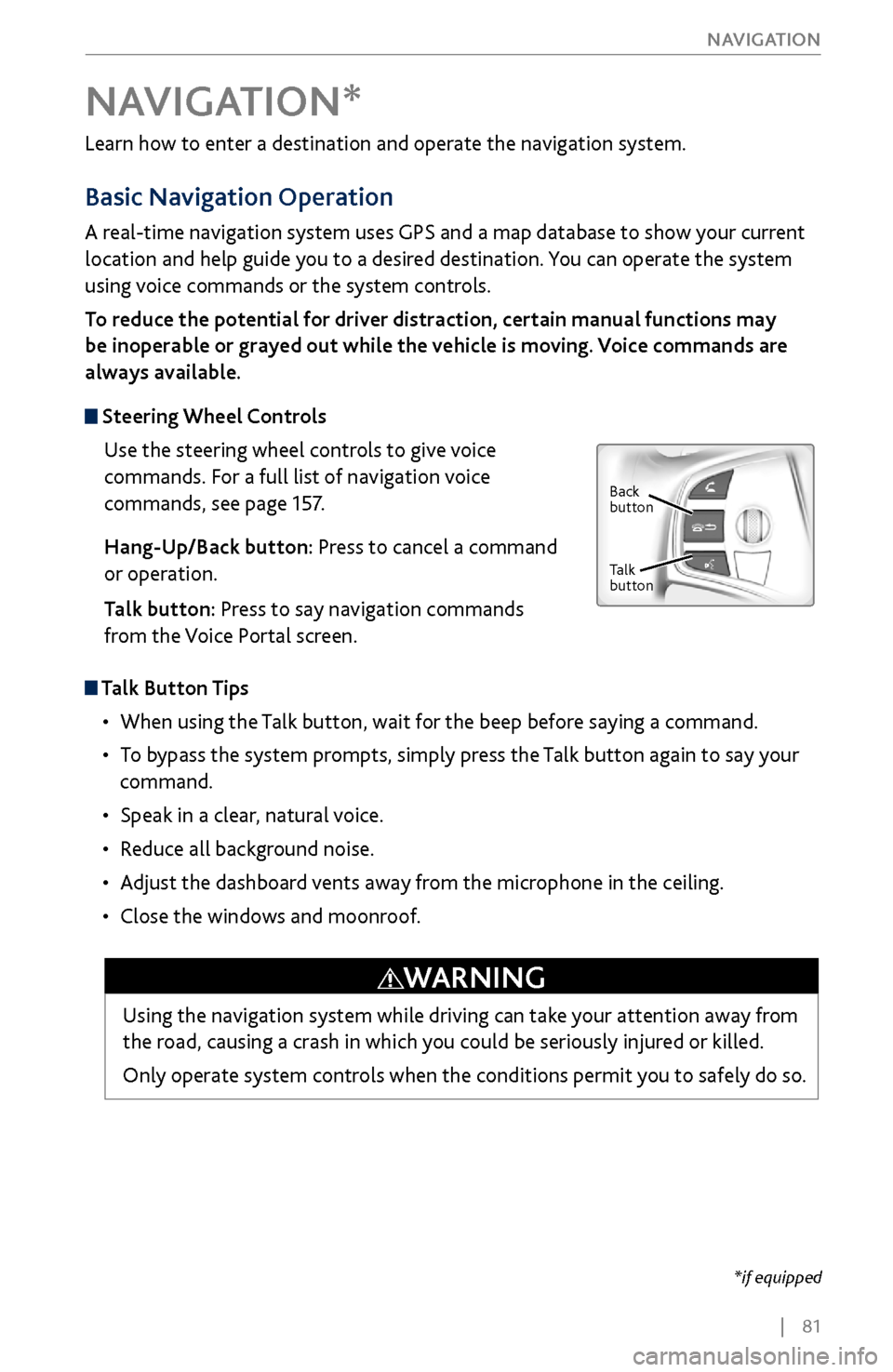
Use the steering wheel controls to give voice
commands. For a full list of navigation voice
commands, see page 157.
Hang-Up/Back button: Press to cancel a command
or operation.
Talk button: Press to say navigation commands
from the Voice Portal screen.
Talk Button Tips
•
When using the T
alk button, wait for the beep before saying a command.
•
To bypass
the system prompts, simply press the Talk button again to say your
command.
•
Speak in a clear, natural v
oice.
•
Reduce all background noise.
•
Adjust the dashboard
vents away from the microphone in the ceiling.
•
Close the windows and moonr
oof.
NAVIGATION*
Using the navigation system while driving can take your attention away from
the road, causing a crash in which you could be seriously injured or killed.
Only operate system controls when the conditions permit you to safely do so.
WARNING
*if equipped
Back
button
Talk
button
Page 97 of 170
90 |
DRIVING
Maximum Load Limit
Carrying too much cargo or improperly storing it can affect your vehicle’s handling,
stability, stopping distance, and tires, and make it unsafe. See the Tire and Loading
Information label on the driver’s doorjamb.
Maximum load for a vehicle with with second-row bench seats: 1,173 lbs (532 kg).
Maximum load for a vehicle with with second-rowcaptain seats: 1,005 lbs (456 kg).
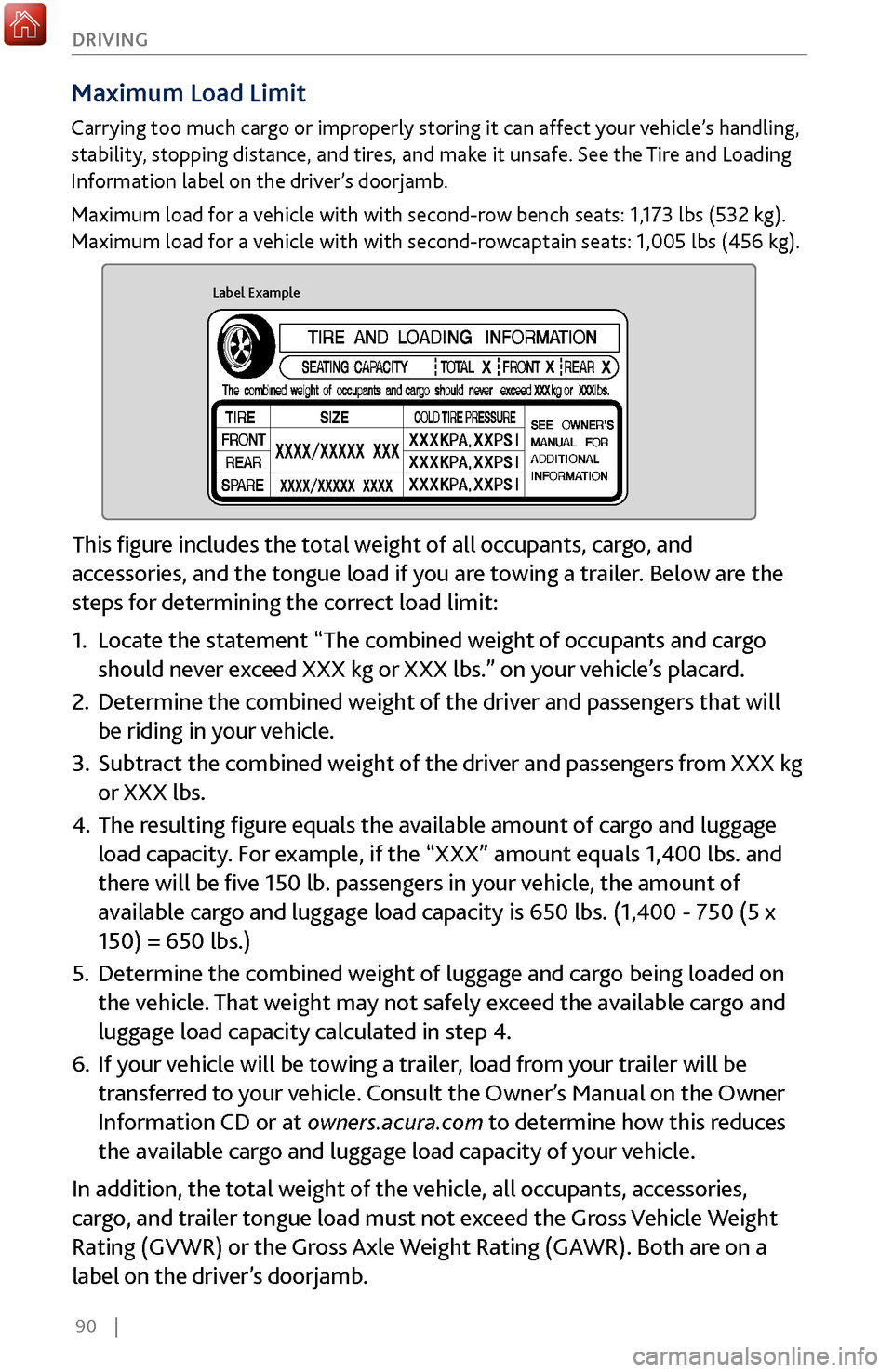
Label Example
This figure includes the total weight of all occupants, cargo, and
accessories, and the tongue load if you are towing a trailer. Below are the
steps for determining the correct load limit:
1.
Locate the statement “The combined
weight of occupants and cargo
should never exceed XXX kg or XXX lbs.” on your vehicle’s placard.
2.
Determine the combined weight of the driv
er and passengers that will
be riding in your vehicle.
3.
Subtract the combined weight of the driv
er and passengers from XXX kg
or XXX lbs.
4.
The resulting figur
e equals the available amount of cargo and luggage
load capacity. For example, if the “XXX” amount equals 1,400 lbs. and
there will be five 150 lb. passengers in your vehicle, the amount of
available cargo and luggage load capacity is 650 lbs. (1,400 - 750 (5 x
150) = 650 lbs.)
5.
Determine the combined weight
of luggage and cargo being loaded on
the vehicle. That weight may not safely exceed the available cargo and
luggage load capacity calculated in step 4.
6.
If your v
ehicle will be towing a trailer, load from your trailer will be
transferred to your vehicle. Consult the Owner’s Manual on the Owner
Information CD or at owners.acura.com to determine how this reduces
the available cargo and luggage load capacity of your vehicle.
In addition, the total weight of the vehicle, all occupants, accessories,
cargo, and trailer tongue load must not exceed the Gross Vehicle Weight
Rating (GVWR) or the Gross Axle Weight Rating (GAWR). Both are on a
label on the driver’s doorjamb.
Page 105 of 170
98 |
DRIVING
When you change from D to R and vice versa, press the brake pedal and come
to a complete stop, then select the intended gear position while maintaining
brake pressure.
NOTICE
Shifting
Change your vehicle’s gears to begin driving.
Electronic Gear Selector
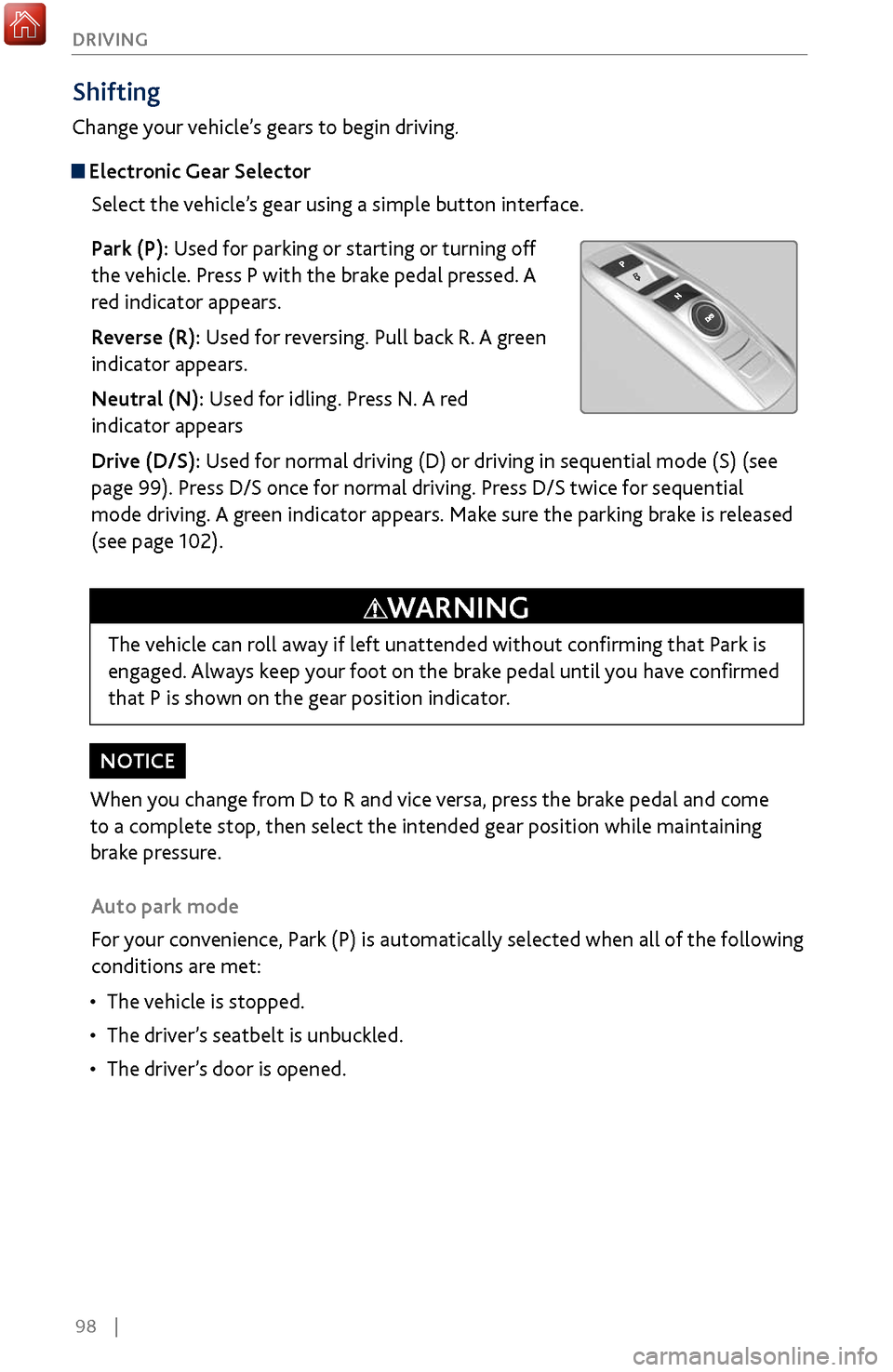
Select the vehicle’s gear using a simple button interface.
Park (P): Used for parking or starting or turning off
the vehicle. Press P with the brake pedal pressed. A
red indicator appears.
Reverse (R): Used for reversing. Pull back R. A green
indicator appears.
Neutral (N): Used for idling. Press N. A red
indicator appears
Drive (D/S): Used for normal driving (D) or driving in sequential mode (S) (see
page 99). Press D/S once for normal driving. Press D/S twice for sequential
mode driving. A green indicator appears. Make sure the parking brake is released
(see page 102).
Auto park mode
For your convenience, Park (P) is automatically selected when all of the following
conditions are met:
•
The vehicle is stopped.
•
The driver
’s seatbelt is unbuckled.
•
The driver’
s door is opened.
The vehicle can roll away if left unattended without confirming that Park is
engaged. Always keep your foot on the brake pedal until you have confirmed
that P is shown on the gear position indicator.
WARNING
Page 107 of 170
100 |
DRIVING
Auto Idle Stop*
Automatically stops and restarts the engine to help maximize your fuel economy,
depending on environmental and vehicle conditions.
Activating Auto Idle Stop
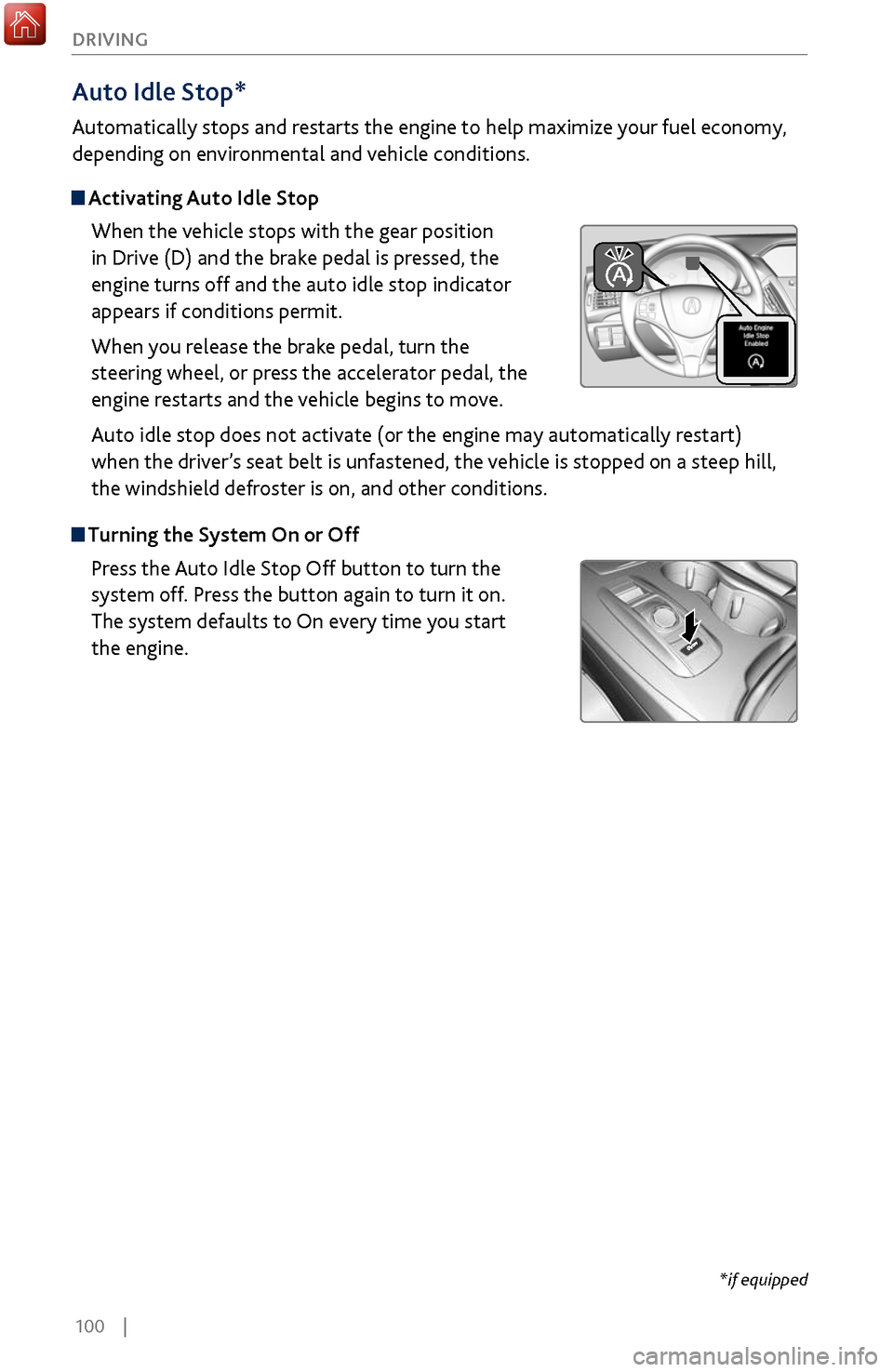
When the vehicle stops with the gear position
in Drive (D) and the brake pedal is pressed, the
engine turns off and the auto idle stop indicator
appears if conditions permit.
When you release the brake pedal, turn the
steering wheel, or press the accelerator pedal, the
engine restarts and the vehicle begins to move.
Auto idle stop does not activate (or the engine may automatically restart)
when the driver’s seat belt is unfastened, the vehicle is stopped on a steep hill,
the windshield defroster is on, and other conditions.
Turning the System On or Off
Press the Auto Idle Stop Off button to turn the
system off. Press the button again to turn it on.
The system defaults to On every time you start
the engine.
*if equipped
Page 108 of 170
| 101
DRIVING
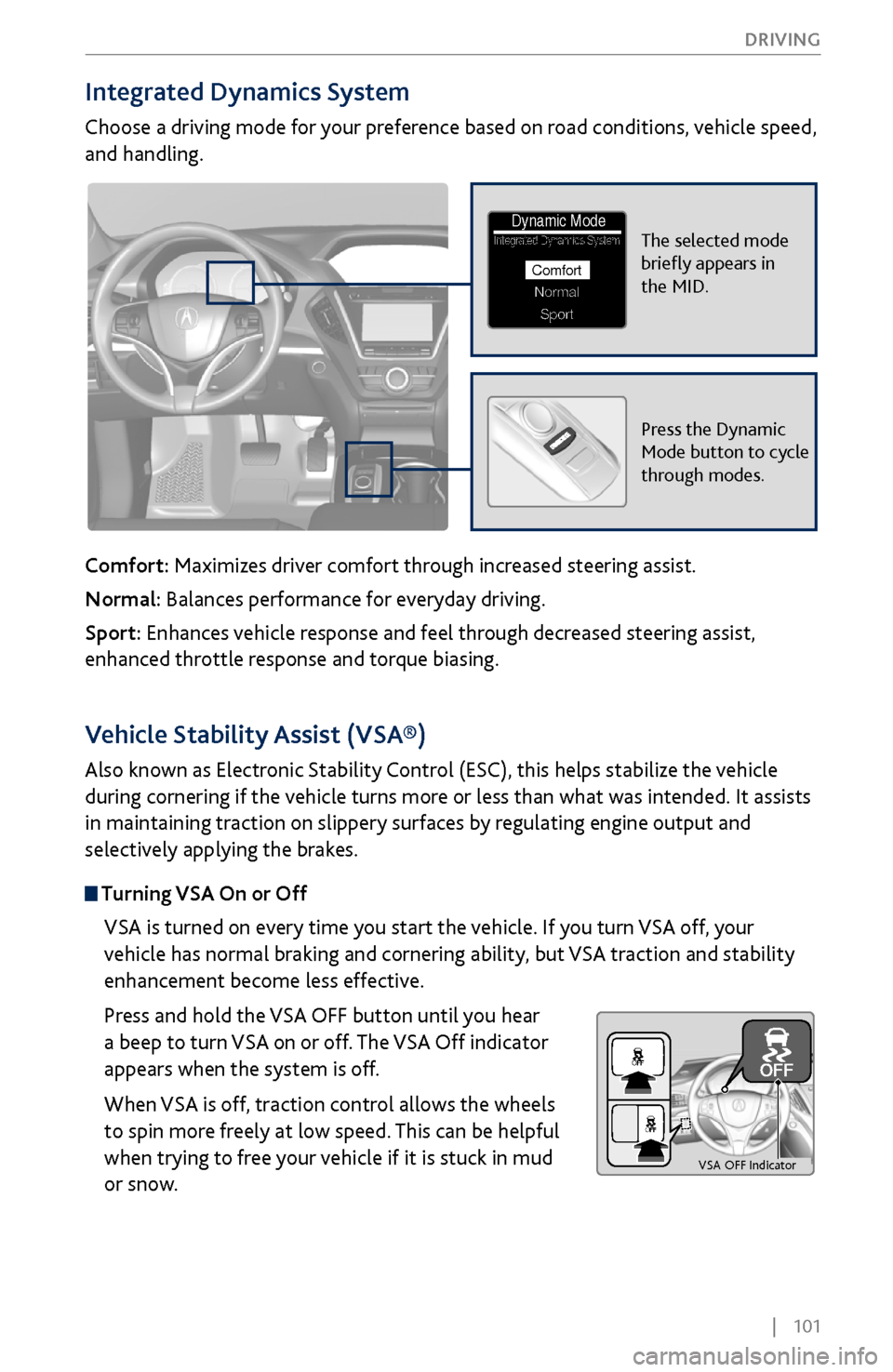
Integrated Dynamics System
Choose a driving mode for your preference based on road conditions, vehicle speed,
and handling.
Comfort: Maximizes driver comfort through increased steering assist.
Normal: Balances performance for everyday driving.
Sport: Enhances vehicle response and feel through decreased steering assist,
enhanced throttle response and torque biasing.
The selected mode
briefly appears in
the MID.Integrated Dynamics System
NormalSport
Comfort
Dynamic Mode
Press the Dynamic
Mode button to cycle
through modes.
Vehicle Stability Assist (VSA®)
Also known as Electronic Stability Control (ESC), this helps stabilize the vehicle
during cornering if the vehicle turns more or less than what was intended. It assists
in maintaining traction on slippery surfaces by regulating engine output and
selectively applying the brakes.
Turning VSA On or Off
VSA is turned on every time you start the vehicle. If you turn VSA off, your
vehicle has normal braking and cornering ability, but VSA traction and stability
enhancement become less effective.
Press and hold the VSA OFF button until you hear
a beep to turn VSA on or off. The VSA Off indicator
appears when the system is off.
When VSA is off, traction control allows the wheels
to spin more freely at low speed. This can be helpful
when trying to free your vehicle if it is stuck in mud
or snow.
VS A OFF Indicator
Page 119 of 170
112 |
DRIVING
Road Departure Mitigation (RDM)
Alerts and helps to assist you if the system determines a possibility of your vehicle
unintentionally crossing over detected lane markings while driving between 45–90
mph (72–145 km/h).
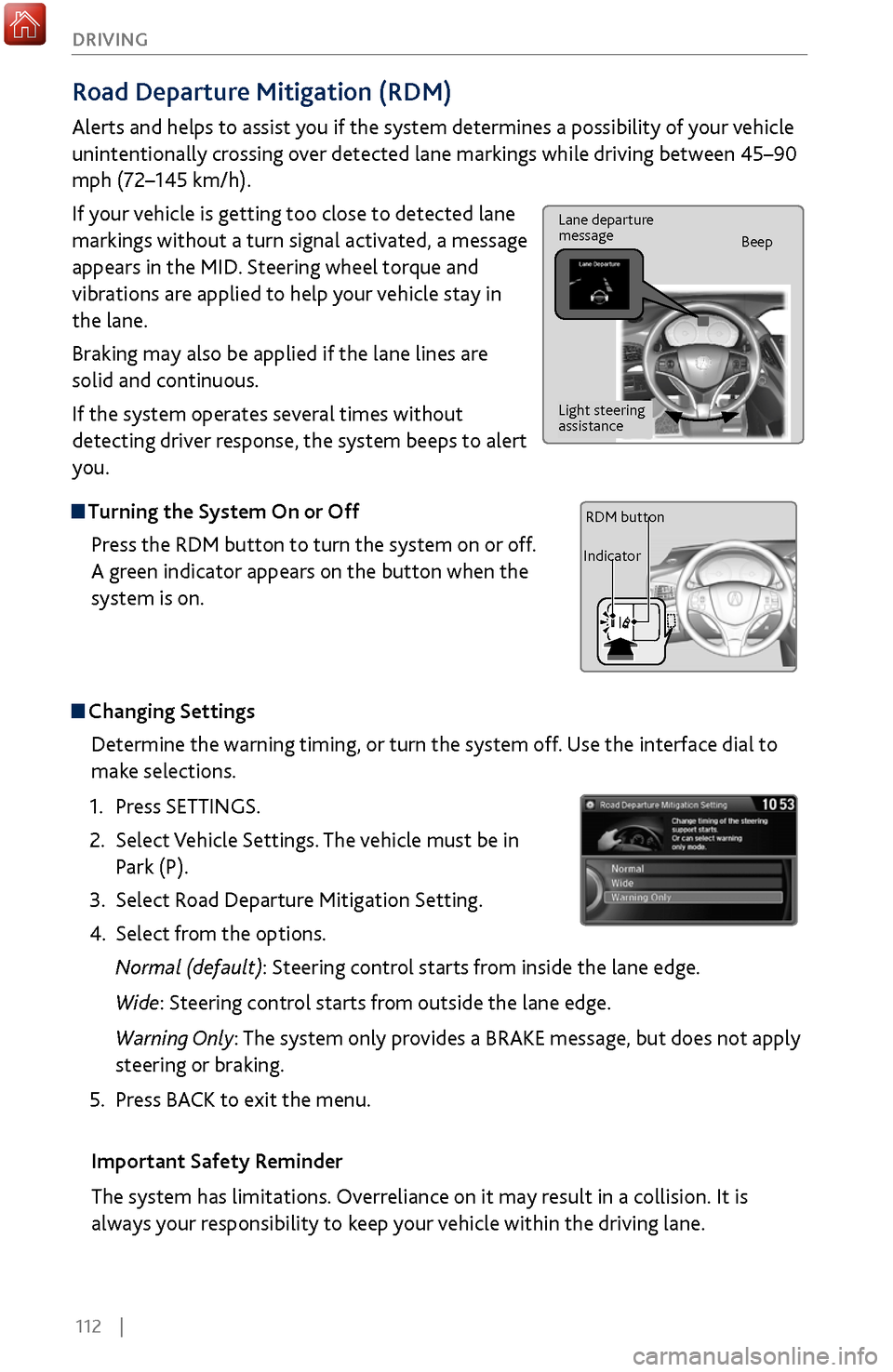
If your vehicle is getting too close to detected lane
markings without a turn signal activated, a message
appears in the MID. Steering wheel torque and
vibrations are applied to help your vehicle stay in
the lane.
Braking may also be applied if the lane lines are
solid and continuous.
If the system operates several times without
detecting driver response, the system beeps to alert
you.
Turning the System On or Off
Press the RDM button to turn the system on or off.
A green indicator appears on the button when the
system is on.
Steering vibrations
Changing SettingsDetermine the warning timing, or turn the system off. Use the interface dial to
make selections.
1.
Press SETTINGS.
2.
Select Vehicle
Settings. The vehicle must be in
Park (P).
3.
Select Road Departure Mitigation
Setting.
4.
Select from the options.
Normal (def
ault): Steering control starts from inside the lane edge.
Wide: Steering control starts from outside the lane edge.
Warning Only: The system only provides a BRAKE message, but does not apply
steering or braking.
5.
Press BACK
to exit the menu.
Important Safety Reminder
The system has limitations. Overreliance on it may result in a collision. It is
always your responsibility to keep your vehicle within the driving lane.
Lane departure
message Beep
Light steering
assistance
IndicatorRDM button
Page 130 of 170
| 123
HANDLING THE UNEXPECTED
Tire Pressure Monitoring System (TPMS)
Monitors the tire pressure while you are driving.
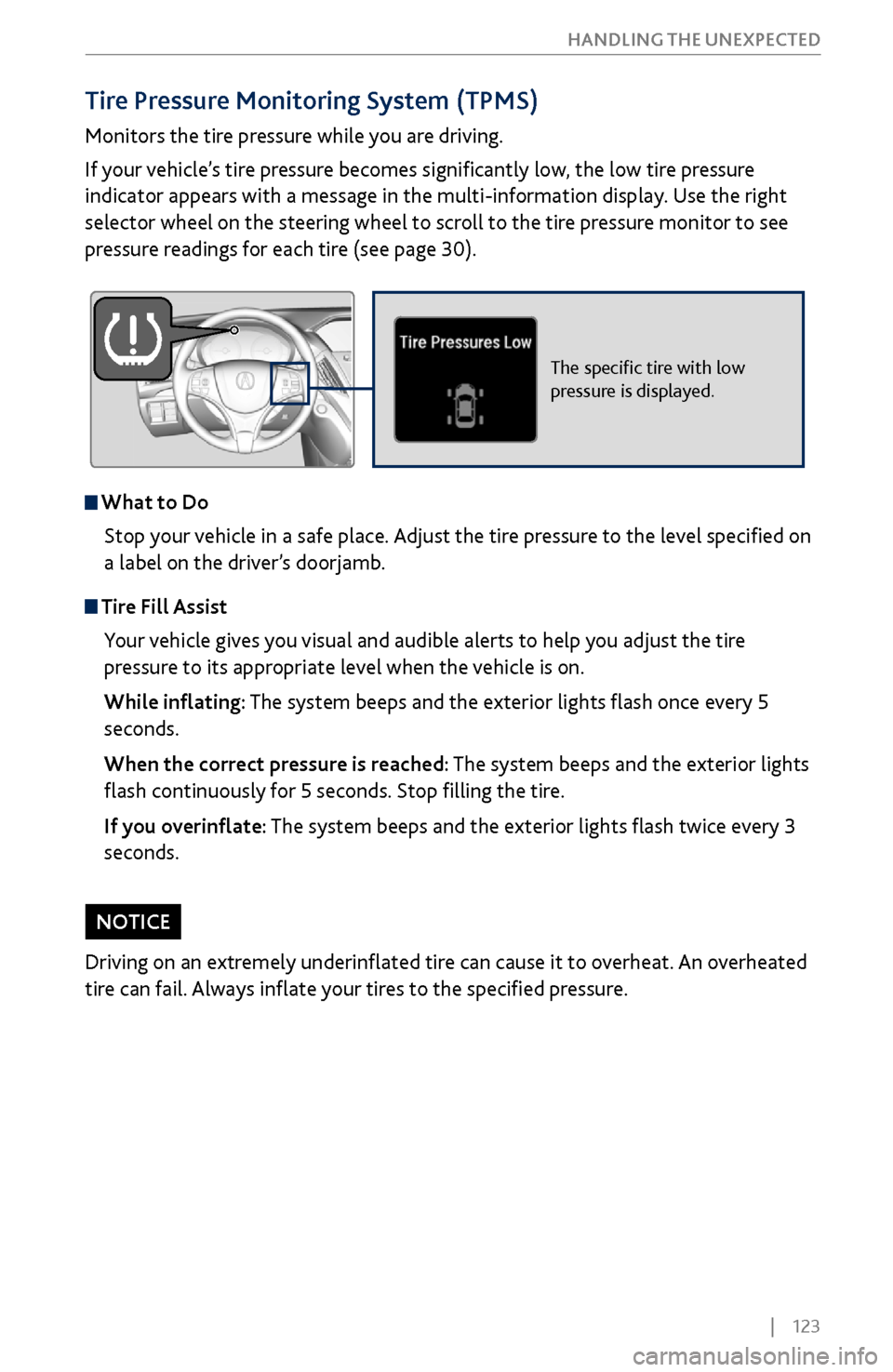
If your vehicle’s tire pressure becomes significantly low, the low tire pressure
indicator appears with a message in the multi-information display. Use the right
selector wheel on the steering wheel to scroll to the tire pressure monitor to see
pressure readings for each tire (see page 30).
The specific tire with low
pressure is displayed.
What to Do
Stop your vehicle in a safe place. Adjust the tire pressure to the level specified on
a label on the driver’s doorjamb.
Tire Fill AssistYour vehicle gives you visual and audible alerts to help you adjust the tire
pressure to its appropriate level when the vehicle is on.
While inflating: The system beeps and the exterior lights flash once every 5
seconds.
When the correct pressure is reached: The system beeps and the exterior lights
flash continuously for 5 seconds. Stop filling the tire.
If you overinflate: The system beeps and the exterior lights flash twice every 3
seconds.
Driving on an extremely underinflated tire can cause it to overheat. An overheated
tire can fail. Always inflate your tires to the specified pressure.
NOTICE
Page 131 of 170
124 |
HANDLING THE UNEXPECTED
Tire Pressure Monitoring System (TPMS) - Required Federal Explanation
Each tire, including the spare (if provided), should be checked monthly
when cold and inflated to the inflation pressure recommended by the
vehicle manufacturer on the vehicle placard or tire inflation pressure
label.
(If your vehicle has tires of a different size than the size indicated on the
vehicle placard or tire inflation pressure label, you should determine the
proper tire inflation pressure for those tires.)
As an added safety feature, your vehicle has been equipped
with a tire pressure monitoring system (TPMS) that
illuminates a low tire pressure telltale when one or more of
your tires is significantly under-inflated.
Accordingly, when the low tire pressure telltale illuminates, you should
stop and check your tires as soon as possible, and inflate them to the
proper pressure.
Driving on a significantly under-inflated tire causes the tire to overheat
and can lead to tire failure. Under-inflation also reduces fuel efficiency
and tire tread life, and may affect the vehicle’s handling and stopping
ability.
Please note that the TPMS is not a substitute for proper tire
maintenance, and it is the driver’s responsibility to maintain correct
tire pressure, even if under-inflation has not reached the level to trigger
illumination of the TPMS low tire pressure telltale.
Your vehicle has also been equipped with a TPMS malfunction indicator
to indicate when the system is not operating properly. The TPMS
malfunction indicator is combined with the low tire pressure telltale.
When the system detects a malfunction, the telltale will flash for
approximately one minute and then remain continuously illuminated.
This sequence will continue upon subsequent vehicle start-ups as long as
the malfunction exists.
When the malfunction indicator is illuminated, the system may not be
able to detect or signal low tire pressure as intended.
TPMS malfunctions may occur for a variety of reasons, including the
installation of replacement or alternate tires or wheels on the vehicle
that prevent the TPMS from functioning properly.
Always check the TPMS malfunction telltale after replacing one or
more tires or wheels on your vehicle to ensure that the replacement
or alternate tires and wheels allow the TPMS to continue to function
properly.
Page 138 of 170
| 131
HANDLING THE UNEXPECTED
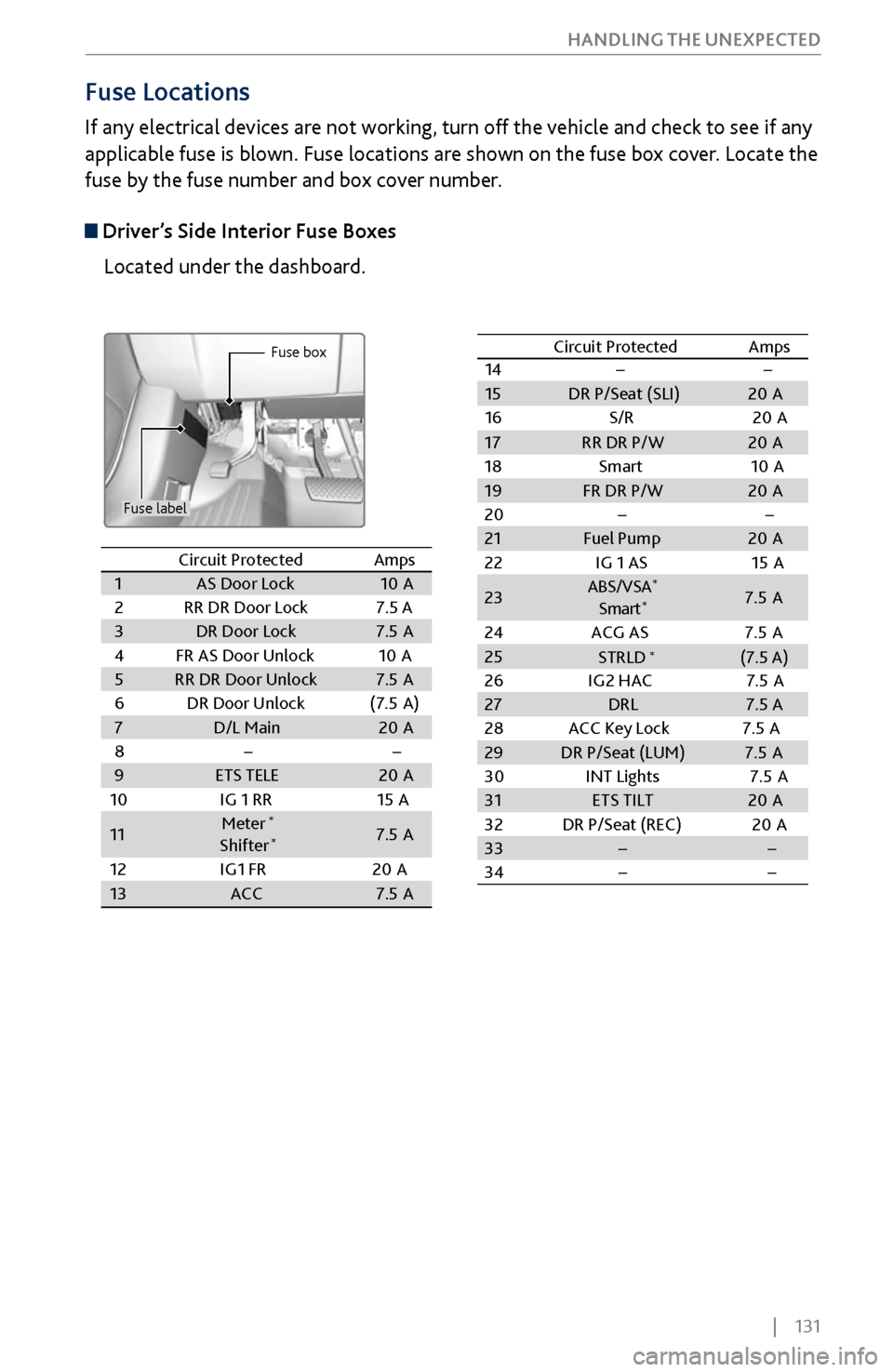
Fuse Locations
If any electrical devices are not working, turn off the vehicle and check to see if any
applicable fuse is blown. Fuse locations are shown on the fuse box cover. Locate the
fuse by the fuse number and box cover number.
Driver’s Side Interior Fuse Boxes
Located under the dashboard.
Fuse box
Fuse label
Circuit ProtectedAmps1AS Door Lock10 A2RR DR Door Lock7.5 A3DR Door Lock7.5A4FR AS Door Unlock10 A5RR DR Door Unlock7.5A6DR Door Unloc k(7.5A )7D/L Main20A89ETS TELE20A
10 IG 1 RR 15A
11Meter*
Shifter*7.5A
12 IG1 FR 20A
13ACC7.5A
14
15 DR P/Seat (SLI) 20A
16 S/R2 0A
17RR DR P/W 20A
18 Smart1 0A
19 FR DR P/W 20A
20
21 Fuel Pump 20A
22 IG 1 AS 15A
23 ABS/VS
A
*
Smar t*7.5 A
24 ACG AS 7.5 A
25
26 IG2 HAC 7.5 A
27 DRL 7.5 A
28 ACC Key Lock 7.5A
29 DR P/Seat (LUM) 7.5 A
30 INT Lights 7.5A
31 ETS TILT 20A
32 DR P/Seat (REC) 20A
33
34
Circuit Protected
Amps
STRLD (7.5 A)
*
Circuit Protected Amps
1 AS Door Lock 10A
2 RR DR Door Lock 7.5 A
3 DR Door Lock 7.5A
4 FR AS Door Unlock 10A
5 RR DR Door Unlock 7.5A
6 DR Door Unloc k(7.5A )
7 D/L Main 20A
8
9 ETS TELE 20A
10 IG 1 RR 15A
11 Meter
*
Shifter*7.
5A
12 IG1 FR 20A
13 ACC 7.5A
1415DR P/Seat (SLI)20 A
16 S/R20A
17RR DR P/W20A
18 Smart10A19FR DR P/W20A
2021Fuel Pump20 A
22 IG 1 AS 15A
23ABS/VS A*
Smar t*7.5 A
24 ACG AS 7.5 A
2526 IG2 HAC 7.5 A27DRL7.5 A
28 ACC Key Lock 7.5A
29DR P/Seat (LUM)7.5 A
30 INT Lights 7.5A
31ETS TILT20A
32 DR P/Seat (REC) 20A
3334
Circuit ProtectedAmps
STRLD (7.5 A)*
Page 141 of 170
134 |
HANDLING THE UNEXPECTED
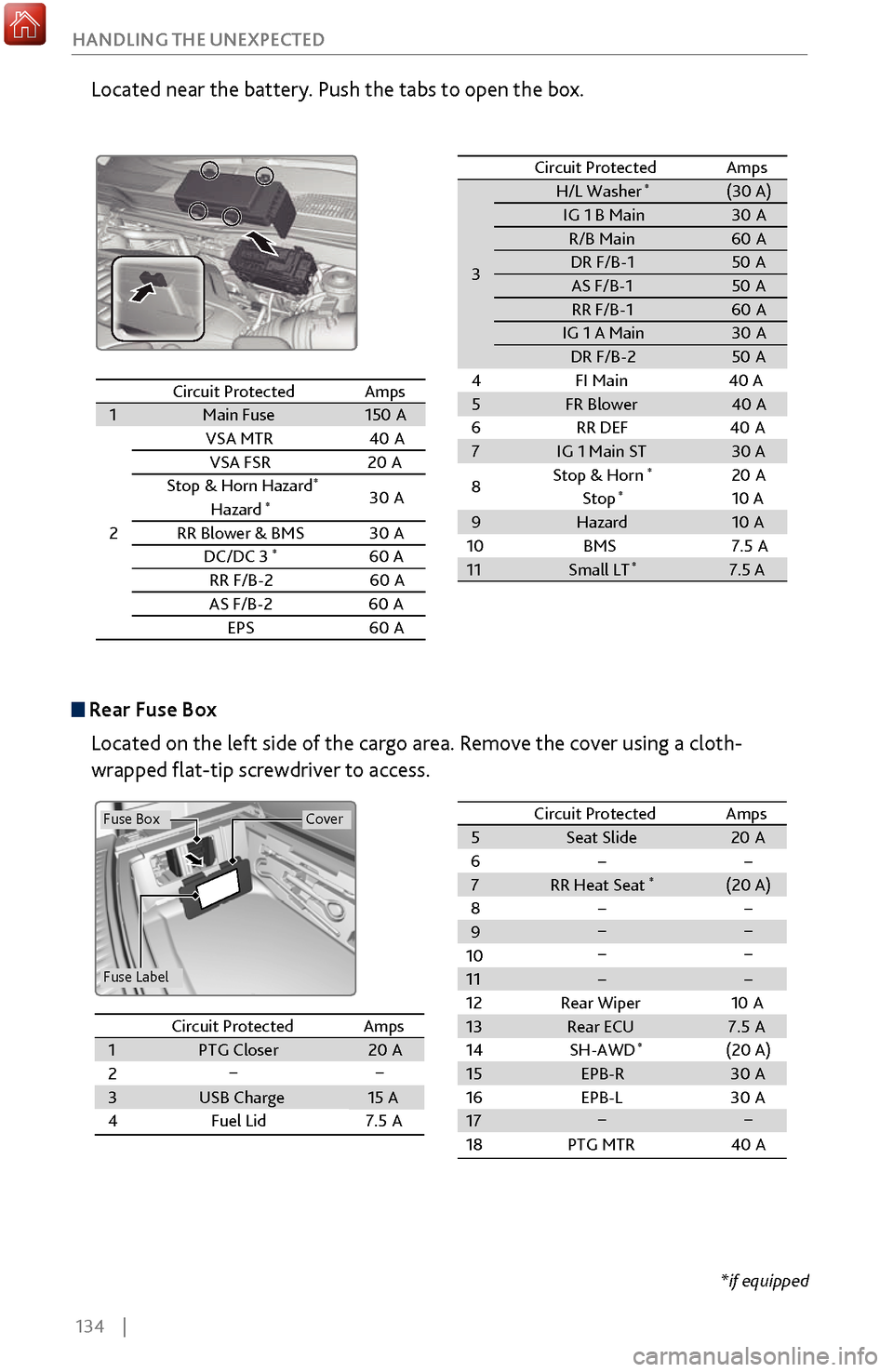
Located near the battery. Push the tabs to open the box.
Circuit ProtectedAmps1Main Fus
e150A
2
VSA MTR40A
VSA FSR20A
Stop & Horn Hazard*30 A
Hazard*
RR Blower & BM S
DC/DC 3*60 A
RR F/B-2 60A
AS F/B-
260A
EPS60A
3 H/L Washer
*(30 A)
IG 1 B Main 30A
R/B Main 60A
DR F/B-1 50A
AS F/B- 1 50A
RR F/B-1 60A
IG 1 A Mai n 30A
DR F/B-2 50A
4F I Main 40 A
5 FR Blower 40A
6R R DEF4 0A
7 IG 1 Main ST 30 A
8 Stop & Horn
*20
A
Stop*10 A
9 Hazard 10A
10 BMS
11 Small LT
*7.5 A
Circuit Protected
Amps
30A
7.5A
Circuit Protected Amps
1 Main Fuse 150A
2 VSA MTR
40A
VSA FS R2 0A
Stop & Horn Hazard
*30 A
Hazard*
RR Blower & BM S
DC/DC 3*60 A
RR F/B-2 60A
AS F/B- 26 0A
EPS6 0A
3
H/L Washer*(30 A)IG 1 B Main30AR/B Main60 ADR F/B-150AAS F/B- 150ARR F/B-160 AIG 1 A Mai n30ADR F/B-250A
4F I Main 40 A
5FR Blower40 A
6R R DEF40A7IG 1 Main ST30 A
8 Stop & Horn*20
A
Stop*10 A9Hazard10 A
10 BMS
11Small LT*7.5 A
Circuit ProtectedAmps
30A
7.5A
Rear Fuse Box
Located on the left side of the cargo area. Remove the cover using a cloth-
wrapped flat-tip screwdriver to access.
Fuse Label
Fuse BoxCover
Circuit ProtectedAmpsCircuit Protected Amps1PTG Closer20 A23USB Charge15 A4Fuel Lid 7.5A
5 Seat Slide 20A
6
7 RR Heat Seat
*(20 A)
8
9
10
11
12 Rear Wiper 10A
13 Rear ECU 7.5 A
14 (20 A)
15
16
17
18 PTG MTR 40A
SH-AWD
*
EPB-R
30A
EPB-L 30A
Circuit Protected AmpsCircuit ProtectedAmps1 PTG Closer 20A
2
3 USB Charge 15 A
4 Fuel Lid 7.5A5Seat Slide20A67RR Heat Seat*(20 A)89101112Rear Wiper10A13Rear ECU7.5 A14(20 A)15161718PTG MTR40 A
SH-AWD*
EPB-R30A
EPB-L 30A
*if equipped