Ecom Acura MDX 2017 User Guide
[x] Cancel search | Manufacturer: ACURA, Model Year: 2017, Model line: MDX, Model: Acura MDX 2017Pages: 581, PDF Size: 32.65 MB
Page 73 of 581

72
Safe Driving
Safety Labels
Label Locations
These labels are in the locations shown. They warn you of potential hazards that can cause serious injury or death. Read these labels
carefully.
If a label comes off or becomes hard to read (except for the U. S. dashboard label which may be removed by the owner), contact a dealer
for a replacement.
Sun Visor
U.S. models Canadian models
Radiator Cap U.S. models
U.S. models only
Dashboard
Canadian modelsDoorjambs
U.S. models only
Sun Visor
17 ACURA MDX-31TZ56300.book 72 ページ 2016年5月13日 金曜日 午後7時46分
Page 85 of 581
84
uuIndicators u
Instrument Panel
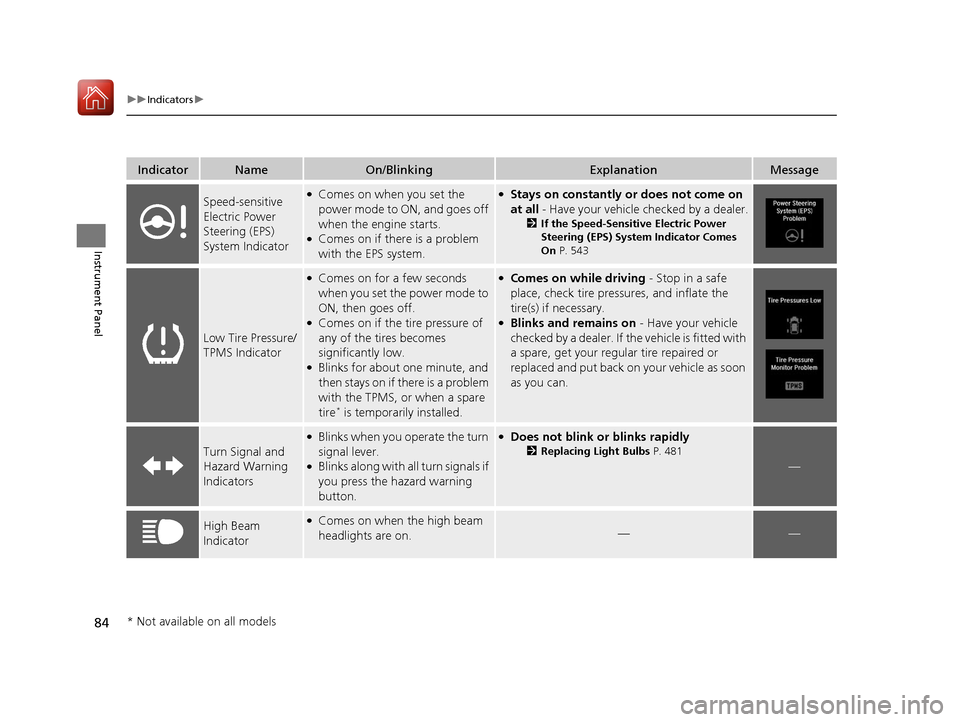
IndicatorNameOn/BlinkingExplanationMessage
Speed-sensitive
Electric Power
Steering (EPS)
System Indicator●Comes on when you set the
power mode to ON, and goes off
when the engine starts.
●Comes on if there is a problem
with the EPS system.
●Stays on constantly or does not come on
at all - Have your vehicle checked by a dealer.
2If the Speed-Sensitive Electric Power
Steering (EPS) System Indicator Comes
On P. 543
Low Tire Pressure/
TPMS Indicator
●Comes on for a few seconds
when you set the power mode to
ON, then goes off.
●Comes on if the tire pressure of
any of the tires becomes
significantly low.
●Blinks for about one minute, and
then stays on if there is a problem
with the TPMS, or when a spare
tire
* is temporarily installed.
●Comes on while driving - Stop in a safe
place, check tire pres sures, and inflate the
tire(s) if necessary.
●Blinks and remains on - Have your vehicle
checked by a dealer. If the vehicle is fitted with
a spare, get your regular tire repaired or
replaced and put back on your vehicle as soon
as you can.
Turn Signal and
Hazard Warning
Indicators
●Blinks when you operate the turn
signal lever.
●Blinks along with all turn signals if
you press the hazard warning
button.
●Does not blink or blinks rapidly
2 Replacing Light Bulbs P. 481
—
High Beam
Indicator●Comes on when the high beam
headlights are on.——
* Not available on all models
17 ACURA MDX-31TZ56300.book 84 ページ 2016年5月13日 金曜日 午後7時46分
Page 101 of 581
100
uuIndicators uMulti-Information Display (MID) Warning and Information Messages
Instrument Panel
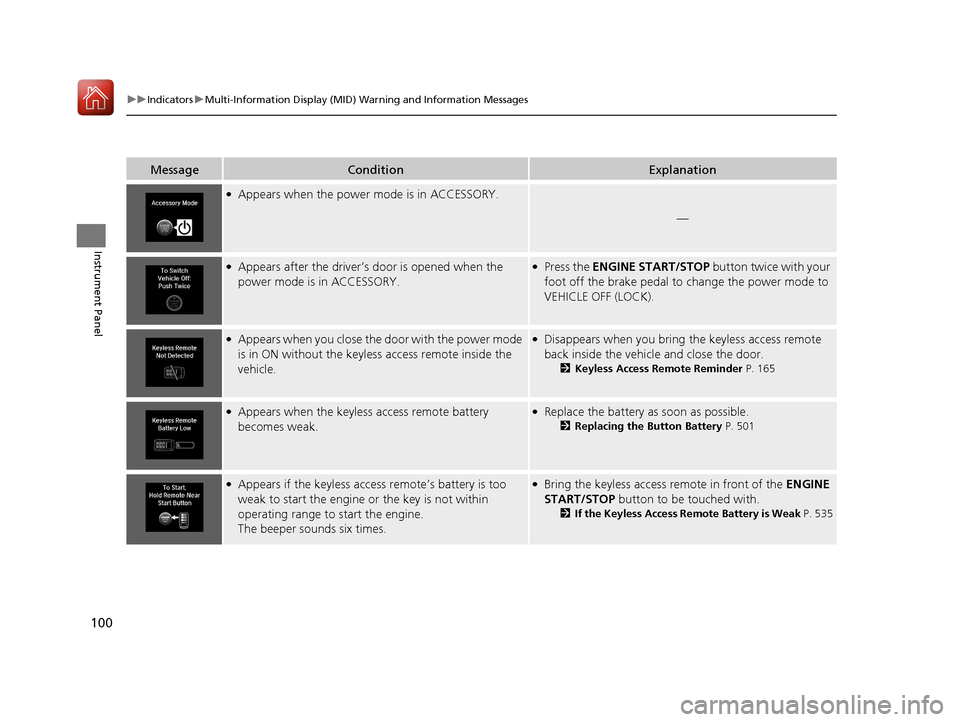
MessageConditionExplanation
●Appears when the power mode is in ACCESSORY.
—
●Appears after the driver’s door is opened when the
power mode is in ACCESSORY.●Press the ENGINE START/STOP button twice with your
foot off the brake pedal to change the power mode to
VEHICLE OFF (LOCK).
●Appears when you close the door with the power mode
is in ON without the keyless access remote inside the
vehicle.●Disappears when you bring the keyless access remote
back inside the vehicle and close the door.
2 Keyless Access Remote Reminder P. 165
●Appears when the keyless access remote battery
becomes weak.●Replace the battery as soon as possible.
2Replacing the Button Battery P. 501
●Appears if the keyless access remote’s battery is too
weak to start the engine or the key is not within
operating range to start the engine.
The beeper sounds six times.●Bring the keyless access remote in front of the ENGINE
START/STOP button to be touched with.
2 If the Keyless Access Remote Battery is Weak P. 535
17 ACURA MDX-31TZ56300.book 100 ページ 2016年5月13日 金曜日 午後7時46分
Page 115 of 581
114
uuIndicators uMulti-Information Display (MID) Warning and Information Messages
Instrument Panel
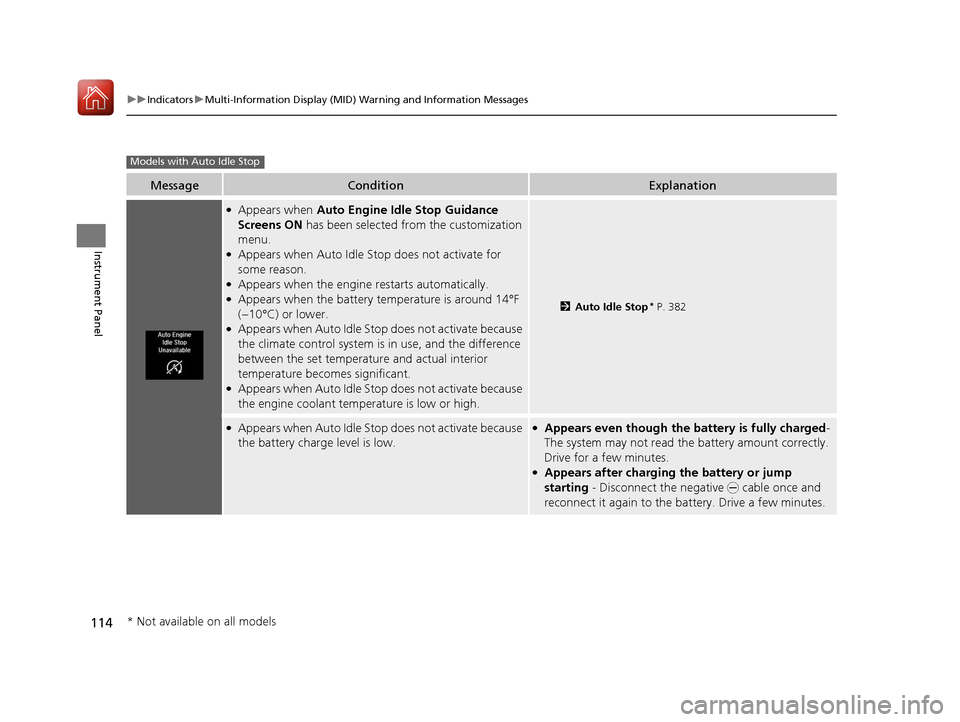
MessageConditionExplanation
●Appears when Auto Engine Idle Stop Guidance
Screens ON has been selected from the customization
menu.
●Appears when Auto Idle Stop does not activate for
some reason.
●Appears when the engine restarts automatically.●Appears when the battery te mperature is around 14°F
(−10°C) or lower.
●Appears when Auto Idle Stop does not activate because
the climate control system is in use, and the difference
between the set temperature and actual interior
temperature becomes significant.
●Appears when Auto Idle Stop does not activate because
the engine coolant temperature is low or high.
2 Auto Idle Stop* P. 382
●Appears when Auto Idle Stop does not activate because
the battery charge level is low.●Appears even though the battery is fully charged -
The system may not read the battery amount correctly.
Drive for a few minutes.
●Appears after charging the battery or jump
starting - Disconnect the negative - cable once and
reconnect it again to the battery. Drive a few minutes.
Models with Auto Idle Stop
* Not available on all models
17 ACURA MDX-31TZ56300.book 114 ページ 2016年5月13日 金曜日 午後7時46分
Page 116 of 581
115
uuIndicators uMulti-Information Display (MID) Warning and Information Messages
Instrument Panel
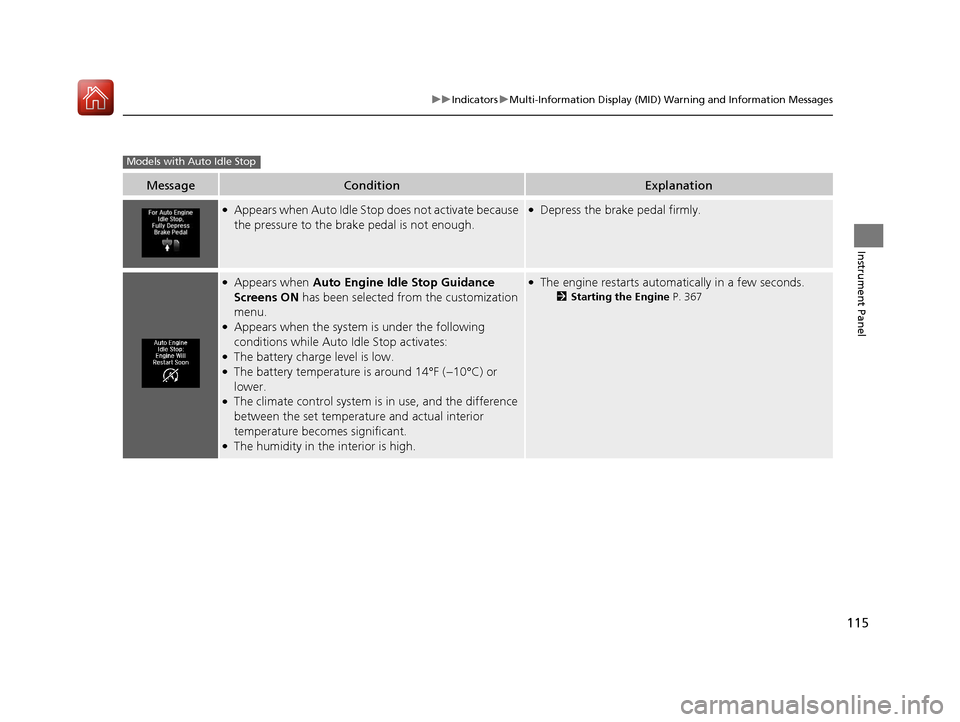
MessageConditionExplanation
●Appears when Auto Idle Stop does not activate because
the pressure to the brake pedal is not enough.●Depress the brake pedal firmly.
●Appears when Auto Engine Idle Stop Guidance
Screens ON has been selected from the customization
menu.
●Appears when the system is under the following
conditions while Auto Idle Stop activates:
●The battery charge level is low.●The battery temperature is around 14°F (−10°C) or
lower.
●The climate control system is in use, and the difference
between the set temperature and actual interior
temperature becomes significant.
●The humidity in the interior is high.
●The engine restarts automatically in a few seconds.
2Starting the Engine P. 367
Models with Auto Idle Stop
17 ACURA MDX-31TZ56300.book 115 ページ 2016年5月13日 金曜日 午後7時46分
Page 137 of 581
136
uuLocking and Unlocking the Doors uKey Types and Functions
Controls
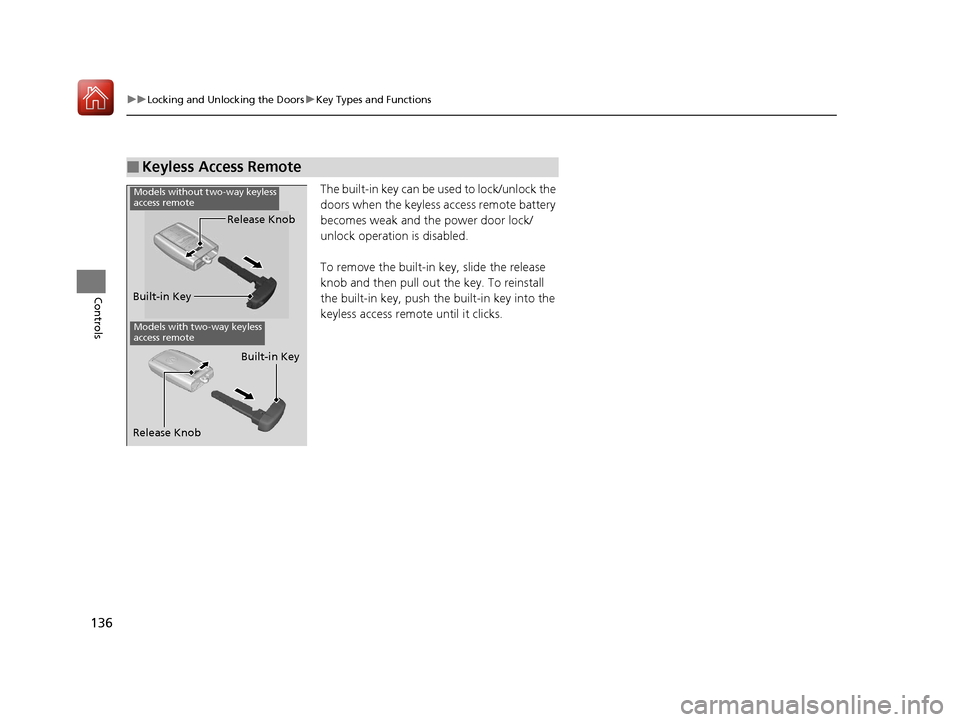
The built-in key can be us ed to lock/unlock the
doors when the keyless access remote battery
becomes weak and th e power door lock/
unlock operation is disabled.
To remove the built-in key, slide the release
knob and then pull out the key. To reinstall
the built-in key, push th e built-in key into the
keyless access remote until it clicks.
■Keyless Access Remote
Built-in Key Release Knob
Models with two-way keyless
access remote
Release Knob
Built-in Key
Models without two-way keyless
access remote
17 ACURA MDX-31TZ56300.book 136 ページ 2016年5月13日 金曜日 午後7時46分
Page 138 of 581
137
uuLocking and Unlocking the Doors uLow Keyless Access Remote Signal Strength
Controls
Contains a number that you will need if you
purchase a replacement key.
Low Keyless Access Re mote Signal Strength
The vehicle transmits radio waves to locate the keyless access remote when locking/
unlocking the doors and tailgate, or to start the engine.
In the following cases, locking/unlocking the doors and tailgate, or starting the
engine may be inhibited or operation may be unstable:
• Strong radio waves are being transmitted by nearby equipment.
• You are carrying the keyless access re mote together with telecommunications
equipment, laptop computers, ce ll phones, or wireless devices.
• A metallic object is touching or covering the keyless access remote.
■Key Number Tag1Key Number Tag
Keep the key number tag separate from the key in a
safe place outside of your vehicle.
If you wish to purchase an additional key, contact a
dealer.
If you lose your key and you cannot start the engine,
contact a dealer.
1 Low Keyless Access Remote Signal Strength
Communication between the keyless access remote
and the vehicle consumes the keyless access remote’s
battery.
Battery life is about two years, but this varies
depending on regularity of use.
The battery is consumed whenever the keyless access
remote is receivi ng strong radio wave s. Avoid placing
it near electrical appliances such as televisions and
personal computers.
17 ACURA MDX-31TZ56300.book 137 ページ 2016年5月13日 金曜日 午後7時46分
Page 158 of 581
157Continued
Controls
Security System
Immobilizer System
The immobilizer system prevents a key that has not been pre-registered from
starting the engine. Each key contains electronic transmitters that use electronic
signals to verify the key.
Pay attention to the follo wing when pressing the ENGINE START/STOP button:
• Do not allow objects that emit strong radio waves near the ENGINE START/
STOP button.
• Make sure the key is not covered by or touching a metal object.
• Do not bring a key from another vehicle’s immobilizer system near the ENGINE
START/STOP button.
• Do not put the key near magnetic items. Electronic devices, such as televisions
and audio systems emit strong magnetic fields. Note that even a key chain can
become magnetic.
Security System Alarm
The security system alarm activates when the tailgate, hood or doors are forcibly
opened. The alarm does not activate if the tailgate or doors are opened with the key,
remote transmitter or keyless access system.
However, the alarm activates if a door is op ened with the key and then the hood is
opened before the power mode is set to ON.
■When the security system alarm activates
The horn sounds intermittently, and some exterior lights flash.
■To deactivate the security system alarm
Unlock the vehicle using the key, remote tra nsmitter, or keyless access system. The
system, along with the horn and flashing lights, is deactivated.
1 Immobilizer System
NOTICE
Leaving the key in the vehicl e can result in theft or
accidental movement of the vehicle.
Always take the key with you whenever you leave the
vehicle unattended.
Do not alter the system or add other devices to it.
Doing so may damage the system and make your
vehicle inoperable.
1 Security System Alarm
Do not alter the system or add other devices to it.
Doing so may damage the system and make your
vehicle inoperable.
The security alarm continues for a maximum of two
minutes until the security system alarm deactivates.
17 ACURA MDX-31TZ56300.book 157 ページ 2016年5月13日 金曜日 午後7時46分
Page 169 of 581
uuOperating the Switches Around the Steering Wheel uLight Switches
168
Controls
Automatic lighting control can be used when
the power mode is in ON.
When the light switch is in AUTO, the
headlights and other exterior lights will switch
on and off automatica lly depending on the
ambient brightness. u You can change the au to light sensitivity
setting.
2 Customized Features P. 123, 285
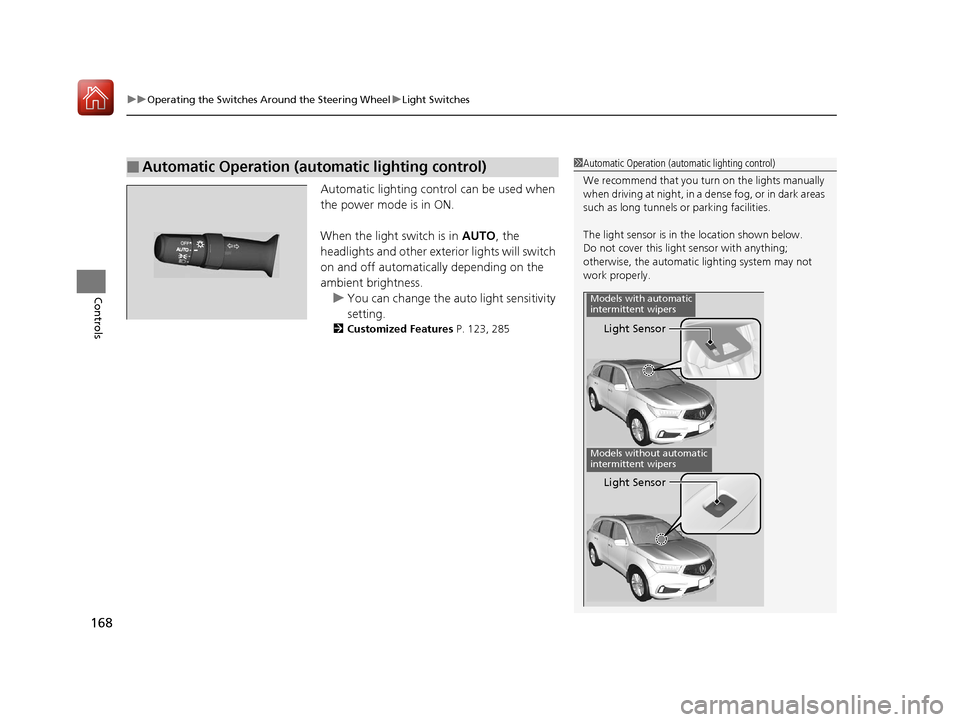
■Automatic Operation (automatic lighting control)1Automatic Operation (aut omatic lighting control)
We recommend that you tu rn on the lights manually
when driving at night, in a dense fog, or in dark areas
such as long tunnels or parking facilities.
The light sensor is in the location shown below.
Do not cover this light sensor with anything;
otherwise, the automatic lighting system may not
work properly.
Light Sensor
Models with automatic
intermittent wipers
Models without automatic
intermittent wipers
Light Sensor
17 ACURA MDX-31TZ56300.book 168 ページ 2016年5月13日 金曜日 午後7時46分
Page 175 of 581
174
uuOperating the Switches Around the Steering Wheel uWipers and Washers
Controls
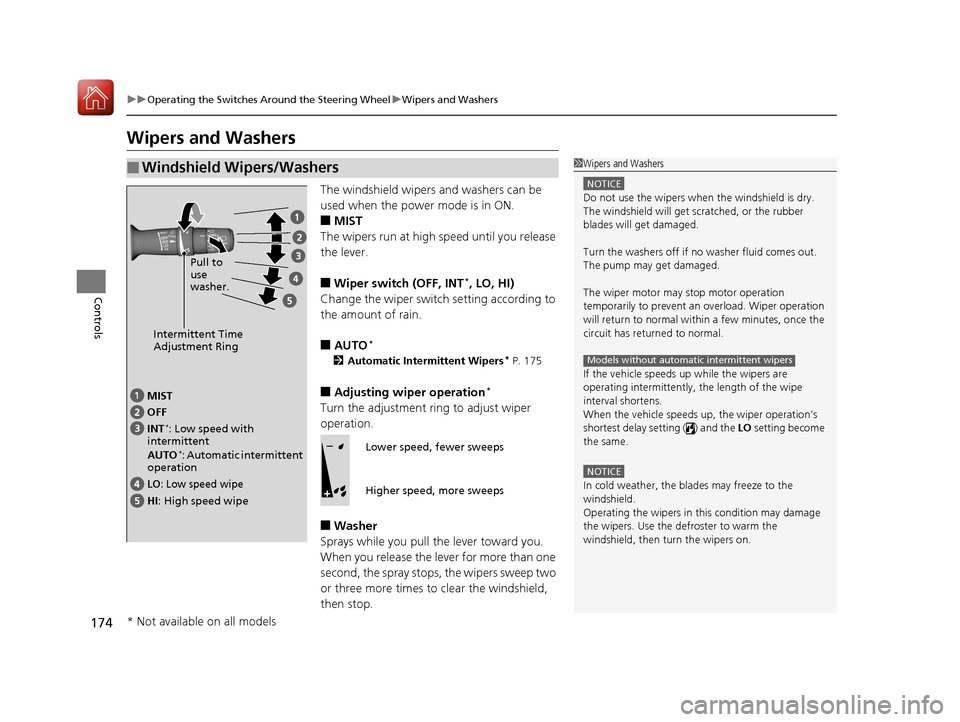
Wipers and Washers
The windshield wipers and washers can be
used when the power mode is in ON.
■MIST
The wipers run at high speed until you release
the lever.
■Wiper switch (OFF, INT*, LO, HI)
Change the wiper switch setting according to
the amount of rain.
■AUTO*
2 Automatic Intermittent Wipers* P. 175
■Adjusting wiper operation*
Turn the adjustment ri ng to adjust wiper
operation.
■Washer
Sprays while you pull the lever toward you.
When you release the lever for more than one
second, the spray stops, the wipers sweep two
or three more times to clear the windshield,
then stop.
■Windshield Wipers/Washers1 Wipers and Washers
NOTICE
Do not use the wipers when the windshield is dry.
The windshield will get sc ratched, or the rubber
blades will get damaged.
Turn the washers off if no washer fluid comes out.
The pump may get damaged.
The wiper motor may stop motor operation
temporarily to prevent an overload. Wiper operation
will return to normal within a few minutes, once the
circuit has returned to normal.
If the vehicle speeds up while the wipers are
operating intermittently, the length of the wipe
interval shortens.
When the vehicle speeds up, the wiper operation’s
shortest delay setting ( ) and the LO setting become
the same.
NOTICE
In cold weather, the blades may freeze to the
windshield.
Operating the wipers in th is condition may damage
the wipers. Use the defroster to warm the
windshield, then turn the wipers on.
Models without automatic intermittent wipers
Intermittent Time
Adjustment Ring
MIST
INT
*: Low speed with
intermittent
AUTO
*: Automatic intermittent
operation OFF
LO: Low speed wipe
HI: High speed wipe Pull to
use
washer.
Lower speed, fewer sweeps
Higher speed, more sweeps
* Not available on all models
17 ACURA MDX-31TZ56300.book 174 ページ 2016年5月13日 金曜日 午後7時46分