reset Acura MDX 2017 Owner's Guide
[x] Cancel search | Manufacturer: ACURA, Model Year: 2017, Model line: MDX, Model: Acura MDX 2017Pages: 581, PDF Size: 32.65 MB
Page 288 of 581

287
uuCustomized Features u
Continued
Features“Trip B” Reset Timing
Turn by Turn Display*
Adjust Outside Temp. Display
“Trip A” Reset Timing
Default
Keyless Access Light Flash
Keyless Access Beep
Meter
Setup
Keyless Access
Setup
Remote Start System On/Off*
Memory Position Link
Driving
Position
Setup
Door Unlock Mode
Lane Keeping Assist Suspend Beep
Blind Spot Info*
ACC Forward Vehicle Detect Beep
ACC Display Speed Unit
Driver Assist
System SetupForward Collision Warning Distance
Language Selection
Easy Entry/Exit
Keyless Access Beep Volume*
Reverse Alert Tone
Auto Engine Idle Stop Guidance Screens*
Road Departure Mitigation Setting
Vehicle
Settings
Walk Away Auto Lock
* Not available on all models
17 ACURA MDX-31TZ56300.book 287 ページ 2016年5月13日 金曜日 午後7時46分
Page 289 of 581

288
uuCustomized Features u
Features
Fixed Guideline
Dynamic Guideline
Default
Maintenance ResetMaintenance Info.
Keyless Open Mode
Power Open By Outer Handle
Power
Tailgate Setup
Camera
Settings*1
Preferred Dynamic ModeDynamic Mode Setup
Key And Remote Unlock Mode
Keyless Lock Answer Back
Security Relock Timer
Auto Door Lock
Auto Door Unlock
Door
Setup
*1: Models without Cross Traffic Monitor
Interior Light Dimming Time
Headlight Auto Off Timer
Auto Light Sensitivity
Lighting
Setup
Auto Folding Door Mirror*
* Not available on all models
17 ACURA MDX-31TZ56300.book 288 ページ 2016年5月13日 金曜日 午後7時46分
Page 294 of 581
293
uuCustomized Features u
Continued
Features
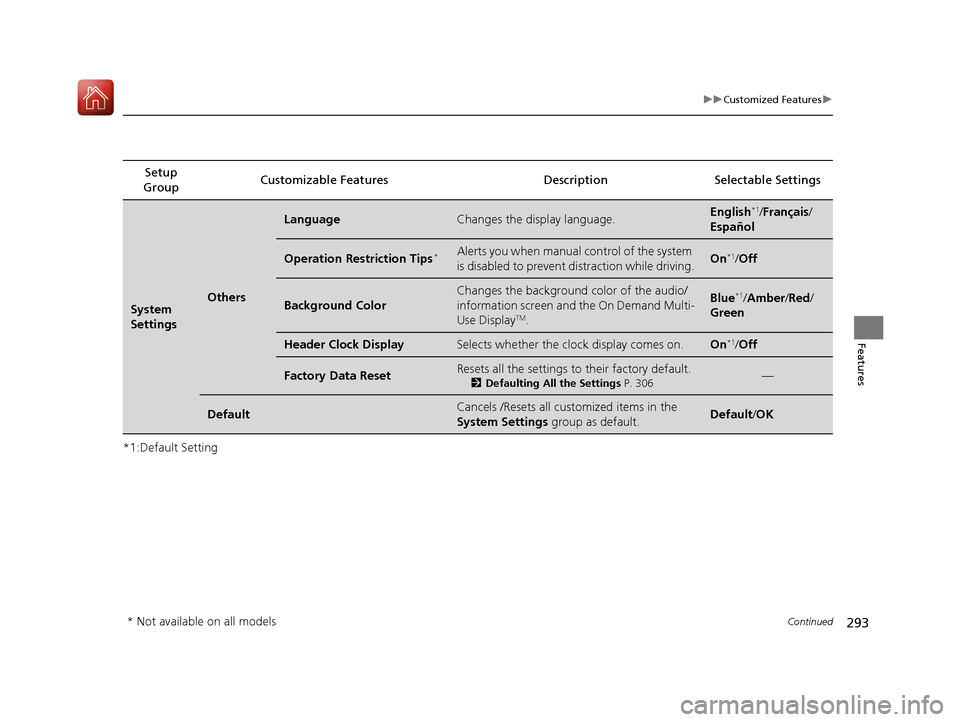
*1:Default SettingSetup
Group Customizable Features Descri
ption Selectable Settings
System
SettingsOthers
LanguageChanges the display language.English*1/Français /
Español
Operation Restriction Tips*Alerts you when manual control of the system
is disabled to prevent distraction while driving.On*1/ Off
Background Color
Changes the background color of the audio/
information screen and the On Demand Multi-
Use Display
TM.
Blue*1/Amber /Red/
Green
Header Clock DisplaySelects whether the clock display comes on.On*1/ Off
Factory Data ResetResets all the settings to their factory default.
2 Defaulting All the Settings P. 306—
DefaultCancels /Resets all customized items in the
System Settings group as default.Default/OK
* Not available on all models
17 ACURA MDX-31TZ56300.book 293 ページ 2016年5月13日 金曜日 午後7時46分
Page 296 of 581
295
uuCustomized Features u
Continued
Features
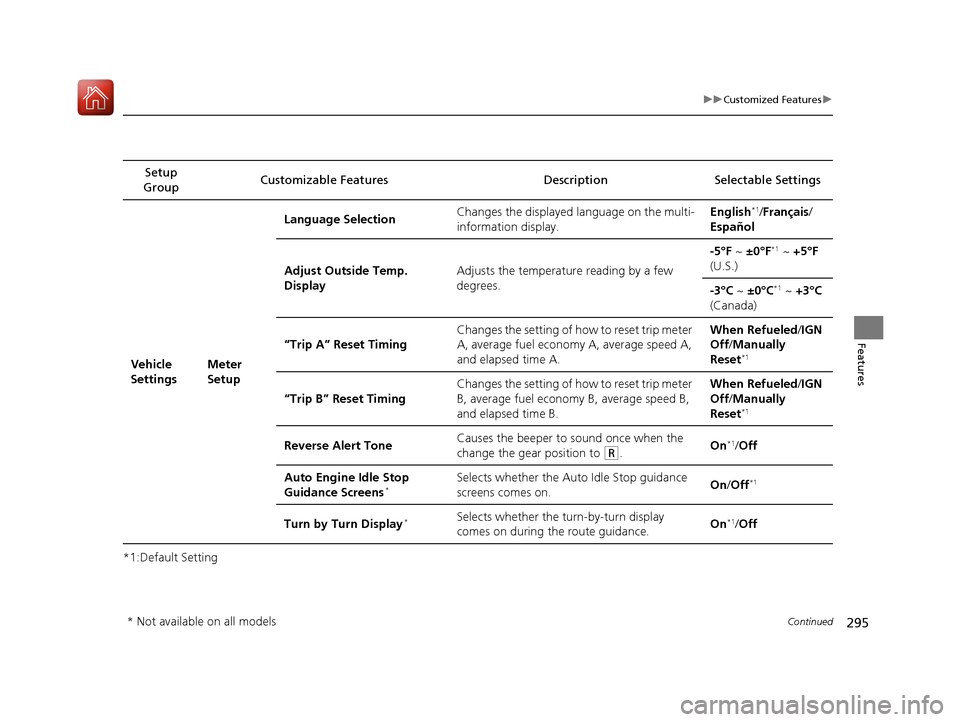
*1:Default SettingSetup
Group Customizable Features Descri
ption Selectable Settings
Vehicle
SettingsMeter
SetupLanguage Selection
Changes the displayed language on the multi-
information display. English
*1/
Français /
Español
Adjust Outside Temp.
Display Adjusts the temperature reading by a few
degrees. -5°F ~
±0°F
*1 ~ +5°F
(U.S.)
-3°C ~ ±0°C
*1 ~ +3°C
(Canada)
“Trip A” Reset Timing Changes the setting of how to reset trip meter
A, average fuel economy A, average speed A,
and elapsed time A. When Refueled
/IGN
Off /Manually
Reset
*1
“Trip B” Reset Timing Changes the setting of how to reset trip meter
B, average fuel economy B, average speed B,
and elapsed time B. When Refueled
/IGN
Off /Manually
Reset*1
Reverse Alert Tone Causes the beeper to sound once when the
change the gear position to (R.
On*1/
Off
Auto Engine Idle Stop
Guidance Screens
*Selects whether the Auto Idle Stop guidance
screens comes on. On
/Off*1
Turn by Turn Display*Selects whether the turn-by-turn display
comes on during the route guidance. On*1/
Off
* Not available on all models
17 ACURA MDX-31TZ56300.book 295 ページ 2016年5月13日 金曜日 午後7時46分
Page 300 of 581
299
uuCustomized Features u
Continued
Features
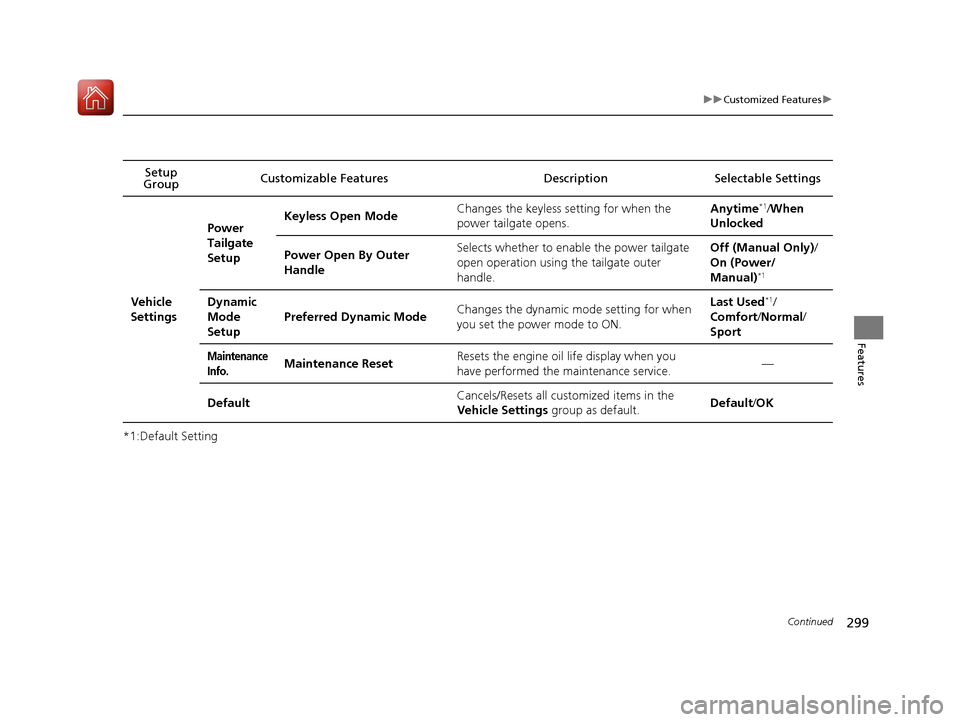
*1:Default SettingSetup
Group Customizable Features Descri
ption Selectable Settings
Vehicle
Settings Power
Tailgate
Setup
Keyless Open Mode
Changes the keyless setting for when the
power tailgate opens. Anytime
*1/
When
Unlocked
Power Open By Outer
Handle Selects whether to enable the power tailgate
open operation using the tailgate outer
handle. Off (Manual Only)
/
On (Power/
Manual)
*1
Dynamic
Mode
Setup Preferred Dynamic Mode
Changes the dynamic mode setting for when
you set the power mode to ON. Last Used*1/
Comfort /Normal /
Sport
Maintenance
Info.Maintenance Reset Resets the engine oil life display when you
have performed the maintenance service. —
Default Cancels/Resets all customized items in the
Vehicle Settings
group as default. Default
/OK
17 ACURA MDX-31TZ56300.book 299 ページ 2016年5月13日 金曜日 午後7時46分
Page 301 of 581
300
uuCustomized Features u
Features
*1:Default Setting
*2:Models without Cross Traffic Monitor
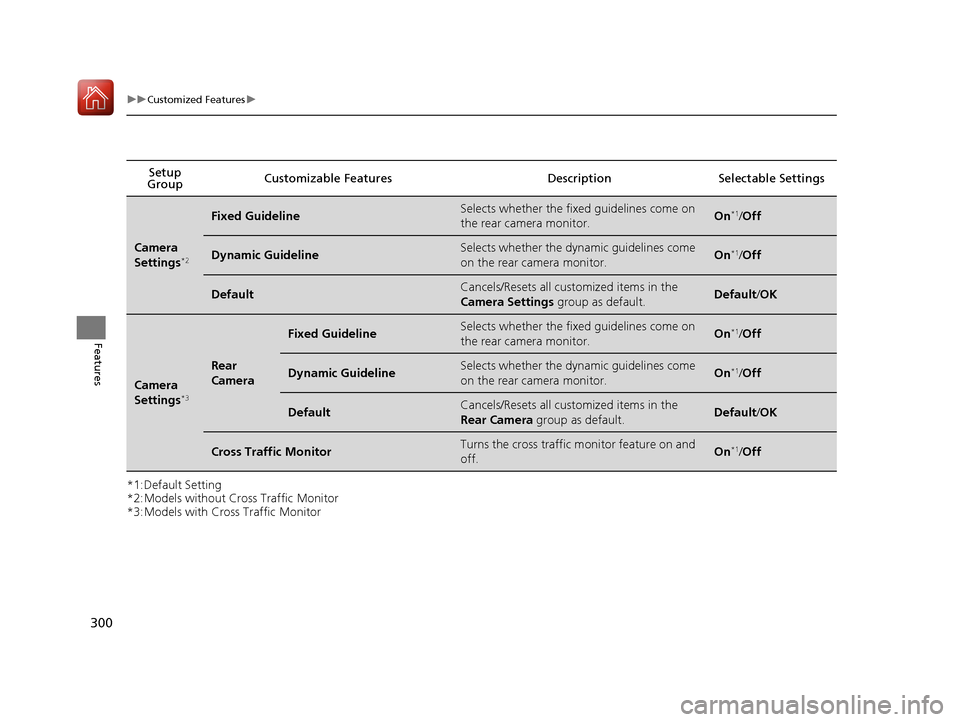
*3:Models with Cross Traffic MonitorSetup
Group Customizable Features Description Selectable Settings
Camera
Settings*2
Fixed GuidelineSelects whether the fixe
d guidelines come on
the rear camera monitor.On*1/ Off
Dynamic GuidelineSelects whether the dynamic guidelines come
on the rear camera monitor.On*1/Off
DefaultCancels/Resets all customized items in the
Camera Settings group as default.Default/OK
Camera
Settings*3
Rear
Camera
Fixed GuidelineSelects whether the fixe d guidelines come on
the rear camera monitor.On*1/ Off
Dynamic GuidelineSelects whether the dynamic guidelines come
on the rear camera monitor.On*1/Off
DefaultCancels/Resets all customized items in the
Rear Camera group as default.Default/OK
Cross Traffic MonitorTurns the cross traffic monitor feature on and
off.On*1/Off
17 ACURA MDX-31TZ56300.book 300 ページ 2016年5月13日 金曜日 午後7時46分
Page 303 of 581

302
uuCustomized Features u
Features
*1:Default SettingSetup
Group Customizable Features Description Selectable Settings
Audio
SettingsBluetooth
Bluetooth Device List Edits or deletes a
Bluetooth® Audio device
paired to HFL. —
Connect Bluetooth Audio
Device Connects, disconnects or pairs a
Bluetooth®
Audio device to HFL. —
Other Source Select Popup
Selects whether the list of selectable audio
sources comes on when the
AUDIO button is
pressed. On
/Off
*1
Cover Art Turns on and off the cover art display.
On
*1/Off
Default Cancels/Resets all customized items in the
Audio Settings
group as default. Default/
OK
Bluetooth ® Audio, Pandora ®* or
AhaTM mode
Bluetooth ® Audio, Pandora ®* or
AhaTM mode
iPod, USB, Pandora ®* or AhaTM
mode
* Not available on all models
17 ACURA MDX-31TZ56300.book 302 ページ 2016年5月13日 金曜日 午後7時46分
Page 305 of 581
304
uuCustomized Features u
Features
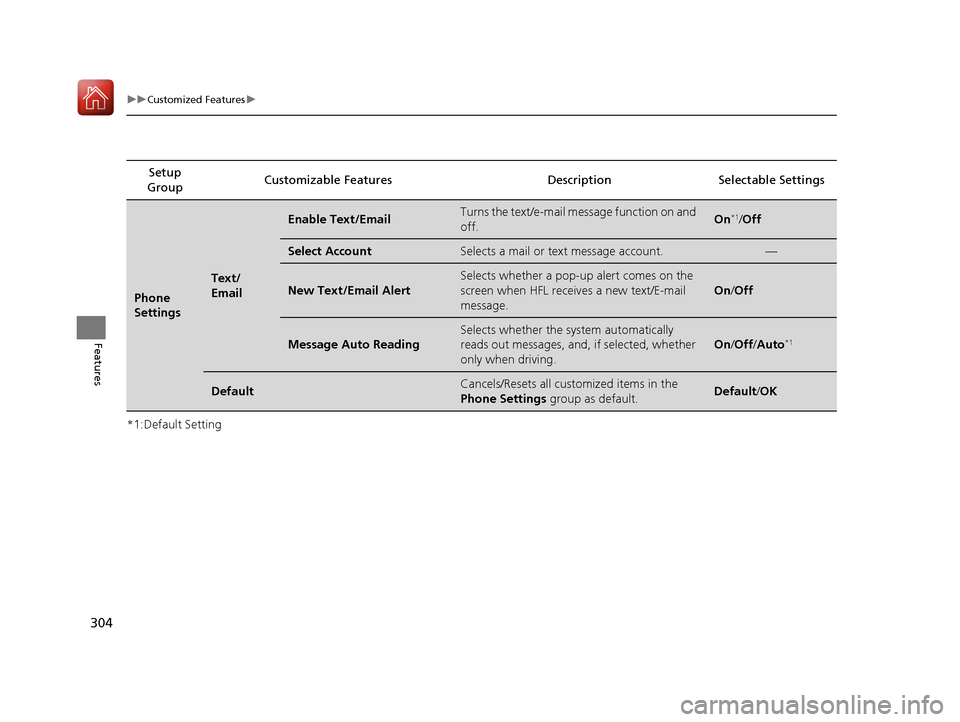
*1:Default SettingSetup
Group Customizable Features Description Selectable Settings
Phone
Settings
Text/
Email
Enable Text/EmailTurns the text/e-mail me
ssage function on and
off.On*1/ Off
Select AccountSelects a mail or text message account.—
New Text/Email Alert
Selects whether a pop-up alert comes on the
screen when HFL receives a new text/E-mail
message.
On /Off
Message Auto Reading
Selects whether the system automatically
reads out messages, and, if selected, whether
only when driving.
On /Off /Auto*1
DefaultCancels/Resets all customized items in the
Phone Settings group as default.Default/ OK
17 ACURA MDX-31TZ56300.book 304 ページ 2016年5月13日 金曜日 午後7時46分
Page 306 of 581
305
uuCustomized Features u
Features
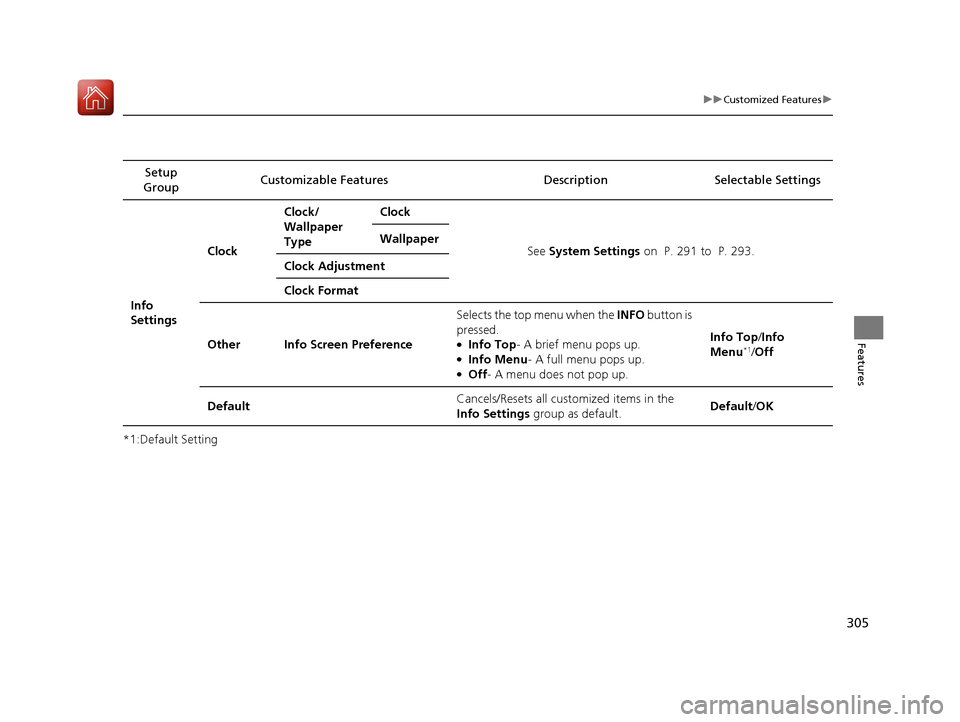
*1:Default SettingSetup
Group Customizable Features Descri
ption Selectable Settings
Info
SettingsClock
Clock/
Wallpaper
Type
Clock
See System Settings on P. 291 to P. 293.
Wallpaper
Clock Adjustment
Clock Format
Other Info Screen Preference Selects the top menu when the
INFO button is
pressed.
●Info Top - A brief menu pops up.●Info Menu- A full menu pops up.●Off- A menu does not pop up. Info Top
/Info
Menu
*1/ Off
Default Cancels/Resets all customized items in the
Info Settings
group as default. Default
/OK
17 ACURA MDX-31TZ56300.book 305 ページ 2016年5月13日 金曜日 午後7時46分
Page 307 of 581

306
uuCustomized Features uDefaulting All the Settings
Features
Defaulting All the Settings
You can reset all the menu and customiz ed settings as the factory defaults.
1. Press the SETTINGS button.
2. Rotate to select System Settings, then
press .
3. Move or to select the Others tab.
4. Rotate to select Factory Data Reset ,
then press .
u The pop-up menu appears on the screen.
5. Rotate to select Yes, then press .
u The confirmation message will appear.
6. Rotate to select Yes, then press
again to reset the settings.
u The confirmation message will appear.
Press to select OK.1Defaulting All the Settings
When you transfer the vehicle to a third party, reset
all settings to default a nd delete all personal data.
The following settin gs will be reset:
•Routing & Guidance: Rerout ing, Unverified Area
Routing, Traffic Re routing, Edit Waypoint Search
Area, Guidance Mode, Street Name Guidance
•Route Preference•Audio preset settings
•Phonebook entries
•Other display and each item settings
Models with navigation system
17 ACURA MDX-31TZ56300.book 306 ページ 2016年5月13日 金曜日 午後7時46分