ERROR Acura MDX 2017 Owner's Manual
[x] Cancel search | Manufacturer: ACURA, Model Year: 2017, Model line: MDX, Model: Acura MDX 2017Pages: 581, PDF Size: 32.65 MB
Page 4 of 581
Contents
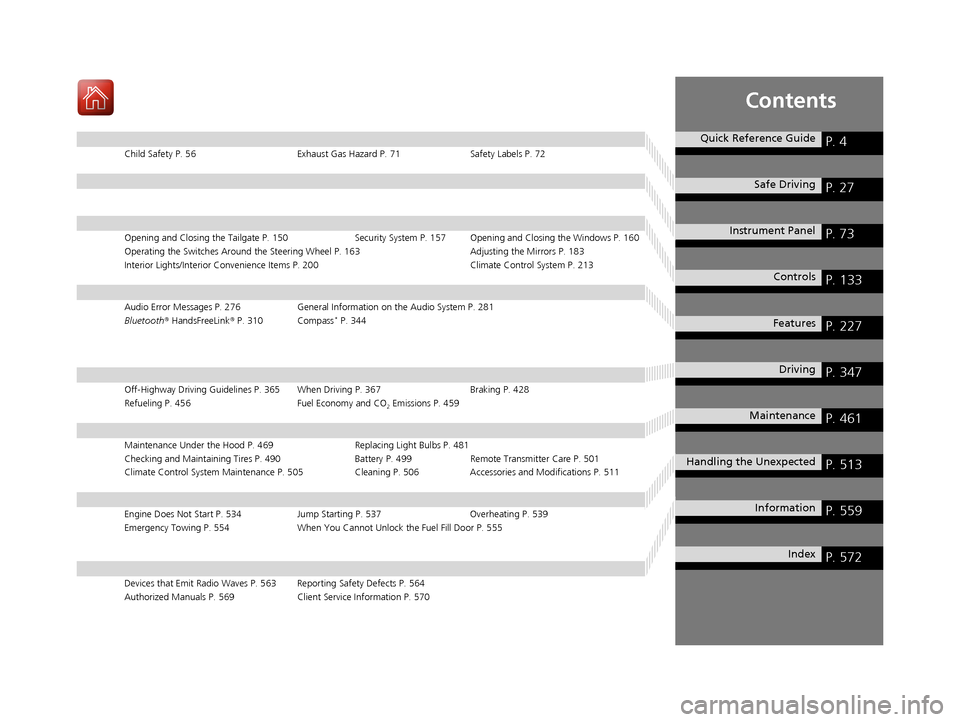
Child Safety P. 56Exhaust Gas Hazard P. 71Safety Labels P. 72
Opening and Closing the Tailgate P. 150 Security System P. 157 Opening and Closing the Windows P. 160
Operating the Switches Around the Steering Wheel P. 163 Adjusting the Mirrors P. 183
Interior Lights/Interior Convenience It ems P. 200 Climate Control System P. 213
Audio Error Messages P. 276General Information on the Audio System P. 281
Bluetooth® HandsFreeLink ® P. 310 Compass* P. 344
Off-Highway Driving Guidelines P. 365 When Driving P. 367 Braking P. 428
Refueling P. 456 Fuel Economy and CO
2 Emissions P. 459
Maintenance Under the Hood P. 469 Replacing Light Bulbs P. 481
Checking and Maintaining Tires P. 490 Battery P. 499 Remote Transmitter Care P. 501
Climate Control System Maintenance P. 505 Cleaning P. 506Accessories and Modifications P. 511
Engine Does Not Start P. 534 Jump Starting P. 537Overheating P. 539
Emergency Towing P. 554 When You Cannot Unlock the Fuel Fill Door P. 555
Devices that Emit Radio Waves P. 563 Reporting Safety Defects P. 564
Authorized Manuals P. 569 Client Service Information P. 570
Quick Reference GuideP. 4
Safe DrivingP. 27
Instrument PanelP. 73
ControlsP. 133
FeaturesP. 227
DrivingP. 347
MaintenanceP. 461
Handling the UnexpectedP. 513
InformationP. 559
IndexP. 572
17 ACURA MDX-31TZ56300.book 3 ページ 2016年5月13日 金曜日 午後7時46分
Page 82 of 581
81
uuIndicators u
Continued
Instrument Panel
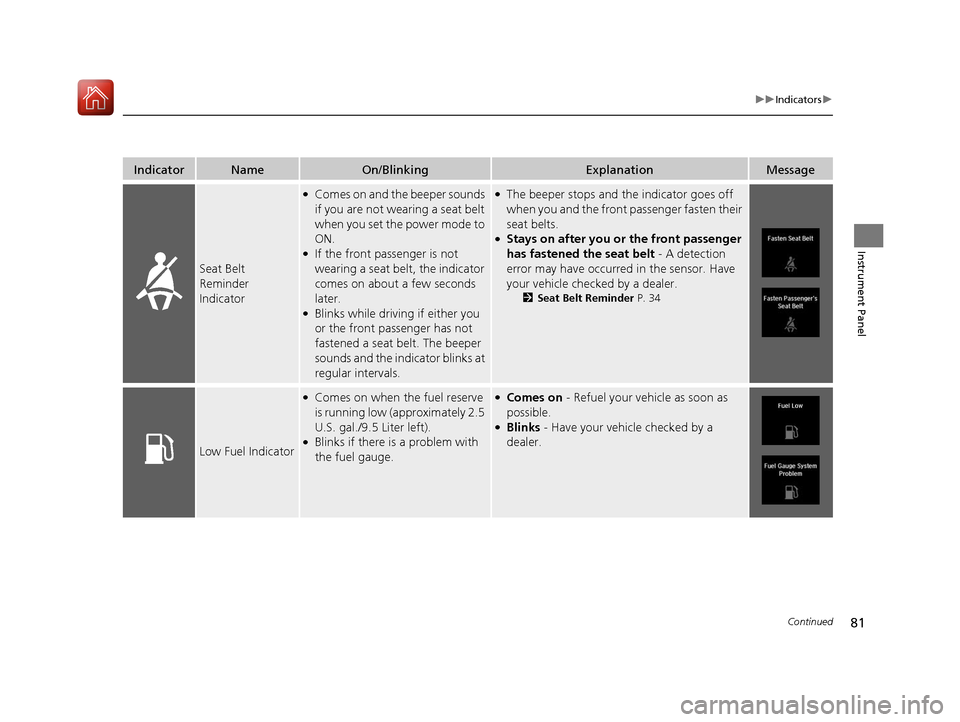
IndicatorNameOn/BlinkingExplanationMessage
Seat Belt
Reminder
Indicator
●Comes on and the beeper sounds
if you are not wearing a seat belt
when you set the power mode to
ON.
●If the front passenger is not
wearing a seat belt, the indicator
comes on about a few seconds
later.
●Blinks while driving if either you
or the front passenger has not
fastened a seat belt. The beeper
sounds and the indicator blinks at
regular intervals.
●The beeper stops and the indicator goes off
when you and the front passenger fasten their
seat belts.
●Stays on after you or the front passenger
has fastened the seat belt - A detection
error may have occurred in the sensor. Have
your vehicle checked by a dealer.
2 Seat Belt Reminder P. 34
Low Fuel Indicator
●Comes on when the fuel reserve
is running low (approximately 2.5
U.S. gal./9.5 Liter left).
●Blinks if there is a problem with
the fuel gauge.
●Comes on - Refuel your vehicle as soon as
possible.
●Blinks - Have your vehicle checked by a
dealer.
17 ACURA MDX-31TZ56300.book 81 ページ 2016年5月13日 金曜日 午後7時46分
Page 228 of 581
227
Features
This chapter describes how to operate technology features.
Audio SystemAbout Your Audio System ................ 228
USB Ports ......................................... 229
Auxiliary Input Jack .......................... 230
Audio System Theft Protection ......... 230
Audio Remote Controls .................... 231
Audio System Basic Operation ........ 232
On Demand Multi-Use Display
TM....... 233
Audio/Information Screen ................ 239
Adjusting the Sound ........................ 243
Display Setup ................................... 244
Playing AM/FM Radio ....................... 245
Playing SiriusXM ® Radio ................... 249 Playing a CD .................................... 260
Playing an iPod ................................ 263
Playing Internet Radio ...................... 267
Playing a USB Flash Drive ................. 270
Playing
Bluetooth ® Audio................. 273
Siri Eyes Free .................................... 275
Audio Error Messages CD Player ......................................... 276
iPod/USB Flash Drive ........................ 277
Pandora ®......................................... 278
Aha
TM Radio ..................................... 280 General Information on the Audio
SystemSiriusXM ® Radio Service ................... 281
Recommended CDs ......................... 282
Compatible iPod, iPhone, and USB Flash Drives ................................................. 284
Customized Features ........................ 285
Defaulting All the Settings ............... 306
HomeLink ® Universal Transceiver ... 307
Bluetooth ® HandsFreeLink®
Using HFL ........................................ 310
HFL Menus ...................................... 312
Compass
*.......................................... 344
* Not available on all models
17 ACURA MDX-31TZ56300.book 227 ページ 2016年5月13日 金曜日 午後7時46分
Page 266 of 581
Continued265
uuAudio System Basic Operation uPlaying an iPod
Features
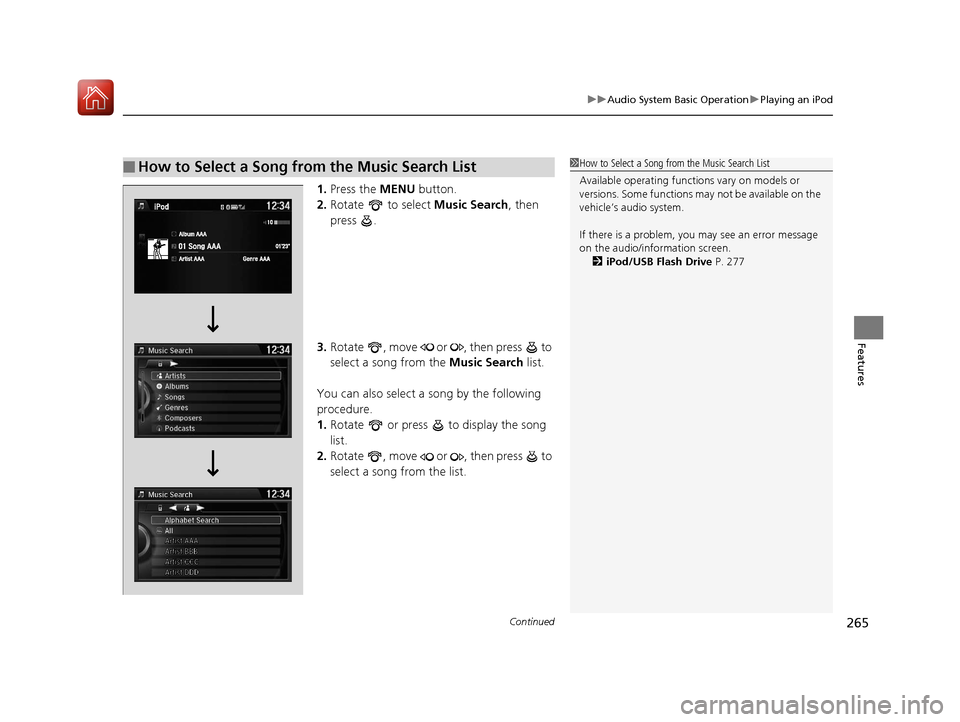
1. Press the MENU button.
2. Rotate to select Music Search, then
press .
3. Rotate , move or , then press to
select a song from the Music Search list.
You can also select a song by the following
procedure.
1. Rotate or press to display the song
list.
2. Rotate , move or , then press to
select a song from the list.
■How to Select a Song from the Music Search List1How to Select a Song from the Music Search List
Available operating functi ons vary on models or
versions. Some functions ma y not be available on the
vehicle’s audio system.
If there is a problem, you may see an error message
on the audio/information screen. 2 iPod/USB Flash Drive P. 277
17 ACURA MDX-31TZ56300.book 265 ページ 2016年5月13日 金曜日 午後7時46分
Page 269 of 581
uuAudio System Basic Operation uPlaying Internet Radio
268
Features
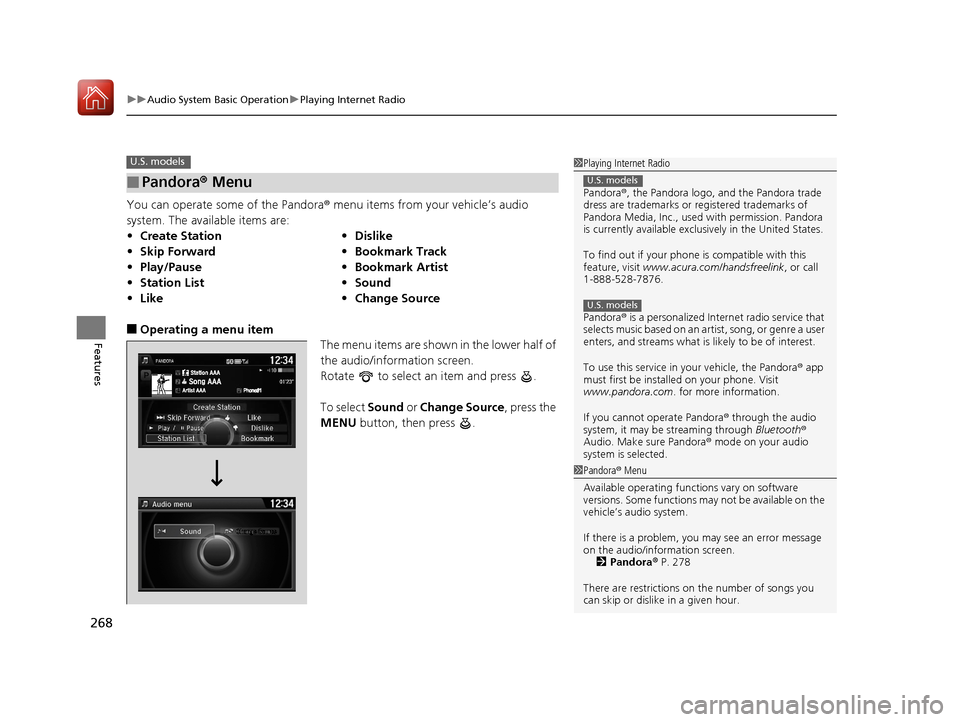
You can operate some of the Pandora® menu items from your vehicle’s audio
system. The available items are:
■Operating a menu item The menu items are shown in the lower half of
the audio/information screen.
Rotate to select an item and press .
To select Sound or Change Source , press the
MENU button, then press .
■Pandora® Menu
•Create Station •Dislike
• Skip Forward •Bookmark Track
• Play/Pause •Bookmark Artist
• Station List •Sound
• Like •Change Source
U.S. models1Playing Internet Radio
Pandora ®, the Pandora logo, and the Pandora trade
dress are trademarks or registered trademarks of
Pandora Media, Inc., used with permission. Pandora
is currently available exclusively in the United States.
To find out if your phone is compatible with this
feature, visit www.acura.com/handsfreelink , or call
1-888-528-7876.
Pandora ® is a personalized Internet radio service that
selects music based on an artist, song, or genre a user
enters, and streams what is likely to be of interest.
To use this service in your vehicle, the Pandora ® app
must first be installed on your phone. Visit
www.pandora.com . for more information.
If you cannot operate Pandora ® through the audio
system, it may be streaming through Bluetooth®
Audio. Make sure Pandora ® mode on your audio
system is selected.
U.S. models
U.S. models
1 Pandora ® Menu
Available operating functi ons vary on software
versions. Some functions ma y not be available on the
vehicle’s audio system.
If there is a problem, you may see an error message
on the audio/information screen. 2 Pandora ® P. 278
There are restrictions on the number of songs you
can skip or dislike in a given hour.
17 ACURA MDX-31TZ56300.book 268 ページ 2016年5月13日 金曜日 午後7時46分
Page 270 of 581

269
uuAudio System Basic Operation uPlaying Internet Radio
Features
You can operate some of the AhaTM menu items from your vehicle’s audio system.
The available items are:
■Operating a menu item The menu items are shown in the lower half of
the audio/information screen.
Rotate to select an item and press .
To select Sound, Change Source or Station
List , press the MENU button, then press .
■AhaTM Radio Menu
•Like •Reply
• Dislike •Call
• Play/Pause •Detail
• 15sec rewind •Sound
• 30sec skip •Change Source
• Tracks •Station List
1AhaTM Radio Menu
Aha
TM by Harman is a clou d-based service that
organizes your favorite we b content into live radio
stations. You can access podcasts, internet radio,
location-based services , and audio updates from
social media sites.
Available operating functi ons vary on software
versions. Some functions ma y not be available on the
vehicle’s audio system.
If there is a problem, you may see an error message
on the audio/information screen. 2 Aha
TM Radio P. 280
The menu items vary depending on the station you
selected.
To use this service in y our vehicle, the AcuraLink
Streams app must be installed on your phone.
For more information visit:
•U.S.: owners.acura.com/apps
•Canada: acura.ca/owners/acuralink/streams
You must have a previously set up Aha account prior
to using the service in your vehicle.
For more information visit:
•U.S.: www.aharadio.com
•Canada: acura.ca/owners/acuralink/streams
17 ACURA MDX-31TZ56300.book 269 ページ 2016年5月13日 金曜日 午後7時46分
Page 272 of 581

Continued271
uuAudio System Basic Operation uPlaying a USB Flash Drive
Features
1. Press the MENU button.
2. Rotate to select Music Search, then
press .
3. Rotate , move or , then press to
select a file from the Music Search list.
You can also select a file by the following
procedure.
1. Rotate or press to display the song
list.
2. Rotate , move or , then press to
select a file from the list.
■How to Select a File from the Music Search List1Playing a USB Flash Drive
Use the recommended USB flash drives.
2 General Information on the Audio System
P. 281
Files in WMA/ACC format protected by digital rights
management (DRM) cannot be played.
The audio system displays Unplayable File, and then
skips to the next file.
If there is a problem, you may see an error message
on the audio/information screen.
2 iPod/USB Flash Drive P. 277
Folder Selection
File Selection
17 ACURA MDX-31TZ56300.book 271 ページ 2016年5月13日 金曜日 午後7時46分
Page 277 of 581
276
Features
Audio Error Messages
CD Player
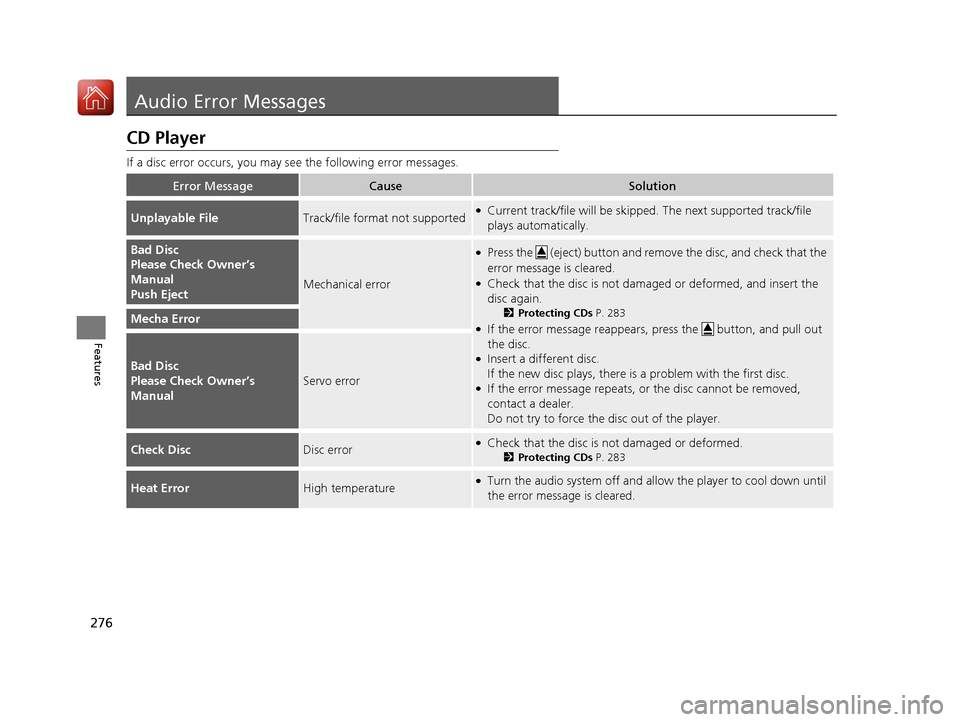
If a disc error occurs, you may see the following error messages.
Error MessageCauseSolution
Unplayable FileTrack/file format not supported●Current track/file will be skippe d. The next supported track/file
plays automatically.
Bad Disc
Please Check Owner’s
Manual
Push Eject
Mechanical error
●Press the (eject) button and remove the disc, and check that the
error message is cleared.
●Check that the disc is not damaged or deformed, and insert the
disc again.
2 Protecting CDs P. 283
●If the error message reappears, press the button, and pull out
the disc.
●Insert a different disc.
If the new disc plays, there is a problem with the first disc.
●If the error message repeats, or the disc cannot be removed,
contact a dealer.
Do not try to force the disc out of the player.
Mecha Error
Bad Disc
Please Check Owner’s
Manual
Servo error
Check DiscDisc error●Check that the disc is not damaged or deformed.
2Protecting CDs P. 283
Heat ErrorHigh temperature●Turn the audio system off and allo w the player to cool down until
the error message is cleared.
17 ACURA MDX-31TZ56300.book 276 ページ 2016年5月13日 金曜日 午後7時46分
Page 278 of 581
277
uuAudio Error Messages uiPod/USB Flash Drive
Features
iPod/USB Flash Drive
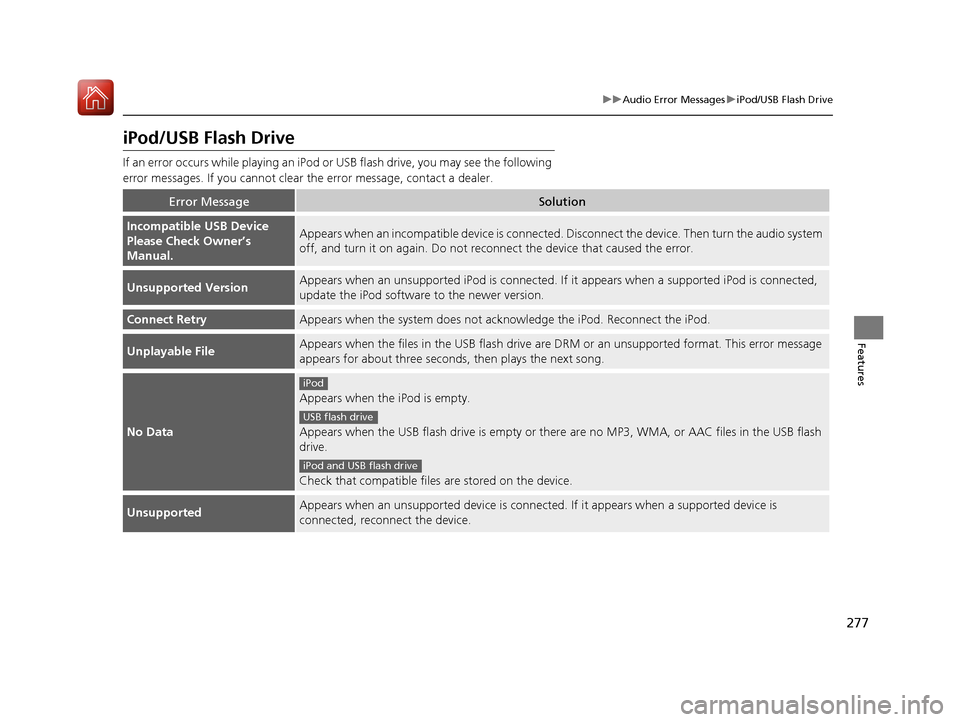
If an error occurs while playing an iPod or USB flash drive, you may see the following
error messages. If you cannot clear the error message, contact a dealer.
Error MessageSolution
Incompatible USB Device
Please Check Owner’s
Manual.Appears when an incompatib le device is connected. Disconnect the device. Then turn the audio system
off, and turn it on again. Do not reco nnect the device that caused the error.
Unsupported VersionAppears when an unsupported iPod is connected. If it appears when a supported iPod is connected,
update the iPod software to the newer version.
Connect RetryAppears when the system does not acknowledge the iPod. Reconnect the iPod.
Unplayable FileAppears when the files in the USB flash drive are DRM or an unsupported format. This error message
appears for about three seconds, then plays the next song.
No Data
Appears when the iPod is empty.
Appears when the USB flash drive is empty or there are no MP3, WMA, or AAC files in the USB flash
drive.
Check that compatible files are stored on the device.
UnsupportedAppears when an unsupported device is connected . If it appears when a supported device is
connected, reconnect the device.
iPod
USB flash drive
iPod and USB flash drive
17 ACURA MDX-31TZ56300.book 277 ページ 2016年5月13日 金曜日 午後7時46分
Page 279 of 581

278
uuAudio Error Messages uPandora®
Features
Pandora ®
If an error occurs while playing Pandora ®, you may see the following error messages.
If you cannot clear the error message, contact a dealer.
Error MessageSolution
Incompatible USB Device
Please Check Owner’s ManualAppears when an incompatible device is connected. Disconnect
the device. Then turn the audio system off, and turn it again. Do
not reconnect the device that caused the error.
No stations have been created.
Please create a station on the device.Appears when there is no station list on the device. Use the device
to create a station.
No active station.
Music licenses force us to limi t the number of tracks you may
skip each hour.Appears when you try to skip a song or select Dislike over the
predetermined number of times in an hour.
Unable to save rating.
Unable to save bookmark.
or
Unable to skip.
Appears when the commanded operation is failed. Try again later.
No dataAppears when no data is available with Pandora® activated.
Reboot the app and reconnect the device.
PANDORA App version is not supported.Appears when Pandora ® version is not supported. Update
Pandora® to the latest version.
PANDORA system maintenance.Appears when the Pandora ® server is in maintenance. Try again
later.
U.S. models
17 ACURA MDX-31TZ56300.book 278 ページ 2016年5月13日 金曜日 午後7時46分