charging Acura MDX 2018 User Guide
[x] Cancel search | Manufacturer: ACURA, Model Year: 2018, Model line: MDX, Model: Acura MDX 2018Pages: 697, PDF Size: 38.45 MB
Page 612 of 697
611
Maintenance
Battery
Checking the Battery
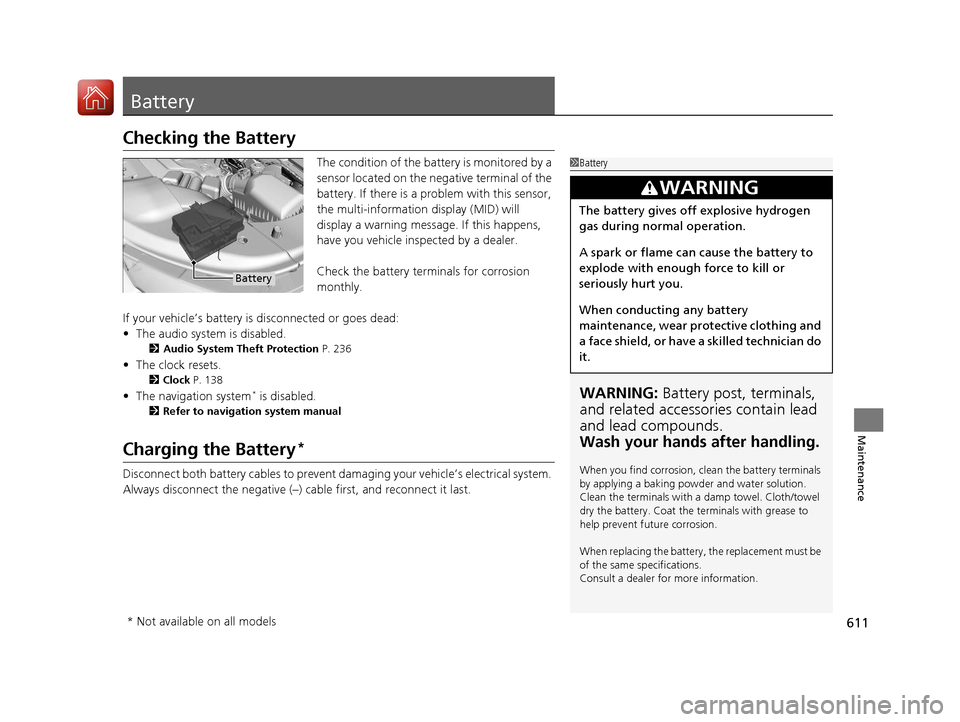
The condition of the battery is monitored by a
sensor located on the negative terminal of the
battery. If there is a problem with this sensor,
the multi-information display (MID) will
display a warning message. If this happens,
have you vehicle inspected by a dealer.
Check the battery terminals for corrosion
monthly.
If your vehicle’s battery is disconnected or goes dead:
• The audio system is disabled.
2 Audio System Theft Protection P. 236
•The clock resets.
2 Clock P. 138
•The navigation system* is disabled.
2 Refer to navigation system manual
Charging the Battery*
Disconnect both battery cables to prevent damaging your vehicle’s electrical system.
Always disconnect the negative (–) cable first, and reconnect it last.
1Battery
WARNING: Battery post, terminals,
and related accessories contain lead
and lead compounds.
Wash your hands after handling.
When you find corrosion, cl ean the battery terminals
by applying a baking powder and water solution.
Clean the terminals with a damp towel. Cloth/towel
dry the battery. Coat the terminals with grease to
help prevent future corrosion.
When replacing the battery, the replacement must be
of the same specifications.
Consult a dealer for more information.
3WARNING
The battery gives off explosive hydrogen
gas during normal operation.
A spark or flame can cause the battery to
explode with enough force to kill or
seriously hurt you.
When conducting any battery
maintenance, wear prot ective clothing and
a face shield, or have a skilled technician do
it.
Battery
* Not available on all models
18 ACURA MDX-31TZ56400.book 611 ページ 2017年8月23日 水曜日 午後4時1分
Page 613 of 697

612
uuBattery uCharging the AGM Battery*
Maintenance
Charging the AGM Battery*
AGM labeled batteries like those installed in your vehicle require a compatible
charger to be properly charged. Damage to the battery can result if the battery is
charged improperly or with the wrong equi pment. For more information on how to
charge your vehicle’s AGM battery, consult a dealer.1Battery
The battery installed in this vehicle is specifically
designed for a model wi th Auto Idle Stop.
Using a battery other than this specified type may
shorten the battery life, a nd prevent Auto Idle Stop
from activating. If you need to replace the battery,
make sure to select the specified type. Ask a dealer
for more details.
Models with Auto Idle Stop
* Not available on all models
18 ACURA MDX-31TZ56400.book 612 ページ 2017年8月23日 水曜日 午後4時1分
Page 626 of 697
625
Handling the Unexpected
This chapter explains how to handle unexpected troubles.
ToolsTypes of Tools .................................. 626
If a Tire Goes Flat Changing a Flat Tire
*....................... 627
Temporarily Repair ing a Flat Tire*..... 634
Engine Does Not Start Checking the Engine ........................ 646
If the Keyless Access Remote Battery is Weak ............................................. 647
Emergency Engine Stop ................... 648
Jump Starting .................................... 649 Overheating
How to Handle Overheating............. 651
Indicator, Coming On/Blinking
If the Low Oil Pressure Indicator Comes On ... 653
If the Charging System Indicator Comes On ................................................. 653
If the Malfunction Indicator Lamp Comes On or Blinks ................................... 654
If the Brake System Indicator (Red) Comes On ................................................... 655
If the Speed-Sensitive Electric Power Steering
(EPS) System Indicator Comes On........... 655
If the Low Tire Pressure/TPMS Indicator Comes On or Blinks ....................... 657
If the Transmission System Indicator Blinks along with the Warning Message ...... 657
Fuses Fuse Locations ................................. 658
Inspecting and Changing Fuses ........ 665
Emergency Towing ........................... 666
When You Cannot Unlock the Fuel Fill Door.. 667
When You Cannot Open the Tailgate.. 668
Refueling........................................... 669
Refueling From a Portable Fuel Container.. 669
* Not available on all models
18 ACURA MDX-31TZ56400.book 625 ページ 2017年8月23日 水曜日 午後4時1分
Page 650 of 697

649Continued
Handling the Unexpected
Jump Starting
Turn off the power to electric devices, such as audio and lights. Turn off the engine,
then open the hood. 1.Pull up on the engine cover, remove it from
the pins.
u Start on the passenger side and lift the
outermost edge of the cover.
u Move towards the driver side while
applying uniform upward pressure.
2. Connect the first jumper cable to your
vehicle’s battery + terminal.
3. Connect the other end of the first jumper
cable to the booster battery + terminal.
u Use a 12-volt booster battery only.
u When using an automotive battery
charger to boost your 12-volt battery,
select a lower charging voltage than 15
volt. Check the charger manual for the
proper setting.
4. Connect the second jumper cable to the
booster battery - terminal.
■Jump Starting Procedure1Jump Starting
Securely attach the jumper cables clips so that they
do not come off when the e ngine vibrates. Also be
careful not to tangle the ju mper cables or allow the
cable ends to touch each other while attaching or
detaching the jumper cables.
Battery performance degrades in cold conditions and
may prevent the engi ne from starting.
3WARNING
A battery can explode if you do not follow
the correct procedure, seriously injuring
anyone nearby.
Keep all sparks, open flames, and smoking
materials away from the battery.
Engine CoverPin
Booster Battery
18 ACURA MDX-31TZ56400.book 649 ページ 2017年8月23日 水曜日 午後4時1分
Page 654 of 697

653
Handling the Unexpected
Indicator, Coming On/Blinking
If the Low Oil Pressure Indicator Comes On
■Reasons for the indicator to come on
Comes on when the engine oil pressure is low.
■What to do as soon as the indicator comes on
1. Immediately park the vehicle on level ground in a safe place.
2. If necessary, turn the hazard warning lights on.
■What to do after parking the vehicle
1. Stop the engine and let it sit for approximately three minutes.
2. Open the hood and check the oil level.
2 Oil Check P. 585
3.Start the engine and check th e low oil pressure indicator.
u The indicator goes off: Start driving again.
u The indicator does not go off within 10 seconds: Immediately stop
the engine and contact a dealer for repairs.
If the Charging System Indicator Comes On
■Reasons for the indicator to come on
Comes on when the battery is not being charged.
■What to do when th e indicator comes on
Turn off the climate control system, rear defogger, and other electrical
systems, and immediately co ntact a dealer for repairs.
1If the Low Oil Pressure Indicator Comes On
NOTICE
Running the engine with low oil pressure can cause
serious mechanical damage almost immediately.
1If the Charging System Indicator Comes On
If you need to stop temporarily, do not turn off the
engine. Restarting the engi ne may rapidly discharge
the battery.
18 ACURA MDX-31TZ56400.book 653 ページ 2017年8月23日 水曜日 午後4時1分
Page 689 of 697
688
Index
Automatic Transmission........................... 471
Creeping ................................................. 471
Fluid ........................................................ 591
Kickdown ................................................ 471
Operating the Shift Button....................... 474
Shifting.................................................... 472
Auxiliary Console Panel ............................ 336
Auxiliary Input Jack .................................. 236
Average Fuel Economy ............................. 122
Average Speed .......................................... 123
AWD .......................................................... 523
B
Back-Up Light ............................................ 596
Battery ....................................................... 611
Charging System Indicator ................. 82, 653
Jump Starting .......................................... 649
Maintenance (Checking the Battery) ........ 611
Belts (Seat) .................................................. 33
Beverage Holders ...................................... 211
Blind Spot Information (BSI) System ........ 520
Indicator .................................................... 99
Bluetooth ® Audio ..................................... 296
Bluetooth ® HandsFreeLink ®..................... 393
Blu-ray/DVD Rear Entertainment System Operating the System .............................. 339
Overhead Screen ..................................... 338
Playing a DVD/Blu-ray
TM........................... 340
Booster Seats (For Children) ....................... 73Brake System
............................................ 528
Anti-lock Brake System (ABS)................... 534
Automatic Brake Hold ............................. 532
Brake Assist System ................................. 535
Brake System Indicator .............................. 79
Fluid ........................................................ 592
Foot Brake............................................... 531
Indicator...................................... 78, 79, 655
Parking Brake .......................................... 528
Brake System (Amber) Indicator.................................................... 79
Brake System (Red) Indicator............................................ 78, 655
Brightness Control (Instrument Panel).... 184
BSI (Blind Spot Information) System ....... 520
Built-in Key ............................................... 140
Bulb Replacement .................................... 593
Back-Up Light.......................................... 596
Brake Light and Rear Turn Signal Light .... 594
Fog Lights ............................................... 593
Front Turn Signal/Parking, Daytime Running and Front Side Marker Lights ... 593
Headlights ............................................... 593
High-Mount Brake Light .......................... 597
Puddle Lights........................................... 597
Rear License Plate Lights .......................... 597
Side Turn Signal/Emergency Indicator Lights .................................................... 593
Taillights.................................................. 596
Taillights/Rear Side Maker Lights.............. 595
Bulb Specifications ................................... 672
C
CAMERA Button....................................... 559
Carbon Monoxide Gas ............................... 74
Carrying Cargo ................................. 447, 449
CD Player .................................................. 268
Center Pocket ........................................... 210
Certification Label ................................... 674
Changing Bulbs ........................................ 593
Charging System Indicator ................ 82, 653
Child Safety ................................................ 56
Childproof Door Locks ............................ 153
Child Seat ................................................... 56
Booster Seats ............................................ 73
Child Seat for Infants ................................ 58
Child Seat for Small Children .................... 59
Installing a Child Seat with a Lap/Shoulder
Seat Belt ................................................. 66
Larger Children ......................................... 72
Rear-facing Child Seat............................... 58
Selecting a Child Seat ............................... 60
Childproof Door Locks ............................. 153
Cleaning the Exterior ............................... 620
Cleaning the Interior ............................... 618
Client Service Information ....................... 683
Climate Control System ........................... 219
Changing the Mode................................ 222
Defrosting the Windshield and Windows .............................................. 225
Dust and Pollen Filter .............................. 617
Rear Climate Control System................... 226
Sensors ................................................... 230
18 ACURA MDX-31TZ56400.book 688 ページ 2017年8月23日 水曜日 午後4時1分
Page 692 of 697
691
Index
Heater (Steering Wheel).......................... 216
Heaters (Seat) ................................... 217, 218
HFL (HandsFreeLink ®) .............................. 393
High Beam Indicator .................................. 88
Hill Start Assist System ............................. 469
HomeLink ® Universal Transceiver ........... 390
Honda App License Agreement .............. 319
I
Identification Numbers............................ 674
Engine and Transmission ......................... 674
Vehicle Identification............................... 674
IDS (Integrated Dynamics System) .......... 486
Illumination Control ................................ 184
Button .................................................... 184
Immobilizer System .................................. 163
Indicator ................................................... 89
Indicators .................................................... 78
Adaptive Cruise Control (ACC) with Low Speed Follow (LSF) ................... 95, 489
Anti-lock Brake System (ABS) .................... 86
Auto High-Beam ....................................... 86
Auto Idle Stop........................................... 92
Auto Idle Stop System ............................... 92
Automatic Brake Hold ....................... 81, 532
Automatic Brake Hold System ........... 81, 532
Blind Spot Information (BSI) .............. 99, 521
Brake System (Amber) ............................... 79
Brake System (Red) ........................... 78, 655
Charging System............................... 82, 653 Collision Mitigation Braking System
TM
(CMBSTM) ........................................... 97, 98
Electric Parking Brake ................................ 80
Electric Parking Brake System ..................... 80
Fog Lights .................................................. 89
Gear Position ............................................. 83
High Beam ................................................ 88
Immobilizer System .................................... 89
Keyless Access System ............................... 91
Lane Keeping Assist System (LKAS) .... 93, 511
Lights On ................................................... 89
Low Fuel .................................................... 85
Low Oil Pressure ................................ 82, 653
Low Tire Pressure/TPMS ............................. 88
Malfunction Indicator Lamp ............... 82, 654
Parking Brake and Brake System ........ 78, 655
Road Departure Mitigation (RDM) .............. 94
Seat Belt Reminder .............................. 34, 85
Security System Alarm ............................... 90
Speed-sensitive Electric Power Steering (EPS) System ....................... 88, 655
Super Handling-All Wheel Drive
TM.............. 91
Supplemental Restraint System ............ 53, 86
System Message ........................................ 90
Transmission System .......................... 84, 657
Turn Signal ................................................ 88
Vehicle Stability Assist (VSA ®)
System............................................. 87, 517
VSA ® OFF .......................................... 87, 518
Information ............................................... 671
Information Screen ................................... 244 Instrument Panel
........................................ 77
Brightness Control................................... 184
Integrated Dynamics System (IDS) ........... 486
Dynamic Mode button ............................ 486
Interface Dial ............................................ 239
Interior Lights ........................................... 206
Interior Rearview Mirror .......................... 189
Internet Radio .......................................... 291
iPhone ............................................... 291, 318
iPod ................................................... 284, 318
J
Jack (Wheel Nut Wrench) ........................ 631
Jump Starting ........................................... 649
K
Key Number Tag ....................................... 141
Keyless Access System .............................. 142
Keyless Lockout Prevention ..................... 149
Keys ........................................................... 139
Lockout Prevention.................................. 149
Number Tag ............................................ 141
Rear Door Won’t Open............................ 153
Remote Transmitter ................................. 147
Types and Functions ................................ 139
Kickdown (Automatic Transmission) ....... 471
18 ACURA MDX-31TZ56400.book 691 ページ 2017年8月23日 水曜日 午後4時1分