brake Acura MDX 2018 Owner's Guide
[x] Cancel search | Manufacturer: ACURA, Model Year: 2018, Model line: MDX, Model: Acura MDX 2018Pages: 697, PDF Size: 38.45 MB
Page 106 of 697
105
uuIndicators uMulti-Information Display (MID) Warning and Information Messages
Continued
Instrument Panel
MessageConditionExplanation
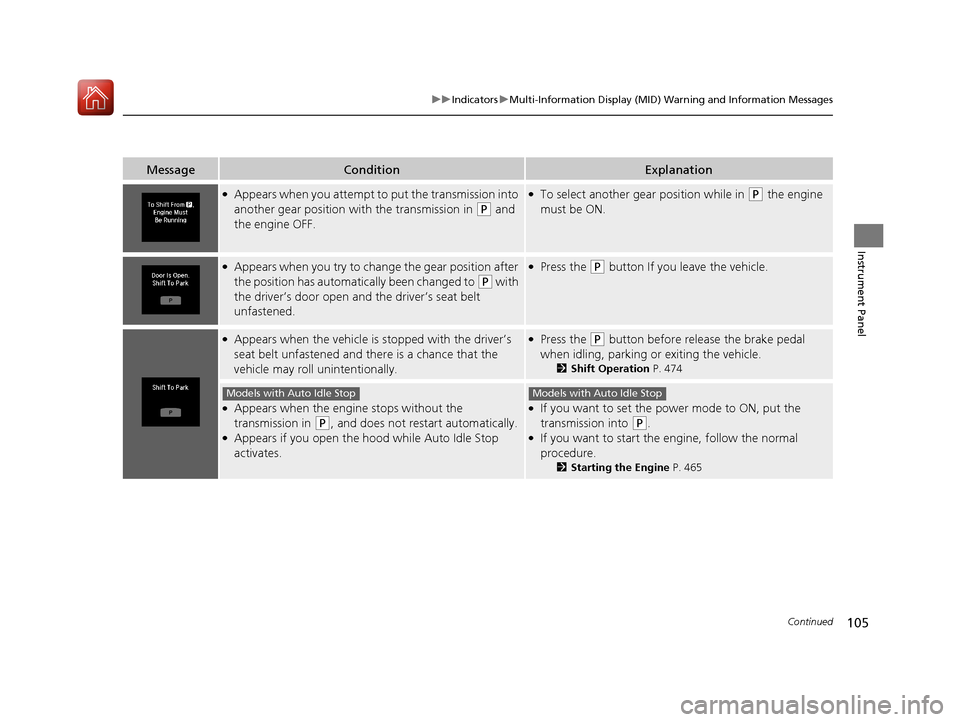
●Appears when you attempt to put the transmission into
another gear position wi th the transmission in
(P and
the engine OFF.
●To select another gear position while in (P the engine
must be ON.
●Appears when you try to change the gear position after
the position has automatically been changed to
(P with
the driver’s door open and the driver’s seat belt
unfastened.
●Press the (P button If you leave the vehicle.
●Appears when the vehicle is stopped with the driver’s
seat belt unfastened and there is a chance that the
vehicle may roll unintentionally.●Press the (P button before release the brake pedal
when idling, parking or exiting the vehicle.
2 Shift Operation P. 474
●Appears when the engine stops without the
transmission in
(P, and does not restart automatically.●Appears if you open the hood while Auto Idle Stop
activates.
●If you want to set the power mode to ON, put the
transmission into
(P.●If you want to start the engine, follow the normal
procedure.
2Starting the Engine P. 465
Models with Auto Idle StopModels with Auto Idle Stop
18 ACURA MDX-31TZ56400.book 105 ページ 2017年8月23日 水曜日 午後4時1分
Page 108 of 697

107
uuIndicators uMulti-Information Display (MID) Warning and Information Messages
Continued
Instrument Panel
MessageConditionExplanation
●Appears when you try to change the gear position
without depressing the brake pedal.●Depress the brake pedal, then select a shift button.
●Appears when you try to change the gear position
without releasing your foot off the accelerator pedal.●Release your foot off the acce lerator pedal, then select a
shift button.
●Appears when the (P button is pressed while the
vehicle is moving.
●Appears if you change the gear position to (R while the
vehicle is moving forward, or to
(D while the vehicle is
reversing.
●Make sure that the vehicle comes to a stop before
operating the select button.
●Appears when you set the po wer mode to ON without
fastening the driver’s seat belt.
●Appears when you change the gear position after (P
has been automatically selected with the driver’s door
open, the driver’s seat belt unfastened, then the brake
pedal is released.
●Fasten the seat belt properly before you start to drive.
2 Shift Operation P. 474
●Appears when you press the (P button but it is not
engaged due to low ATF temperature.●Depress the brake pedal until this message disappear.
18 ACURA MDX-31TZ56400.book 107 ページ 2017年8月23日 水曜日 午後4時1分
Page 110 of 697

109
uuIndicators uMulti-Information Display (MID) Warning and Information Messages
Continued
Instrument Panel
MessageConditionExplanation
●Appears if the automatic br ake hold is automatically
canceled while it is in operation.●Immediately depress the brake pedal.
●Appears when the automatic brake hold system is
turned off.
2 Automatic Brake Hold P. 532
●Appears when the automatic brake hold button is
pressed without wearing the driver’s seat belt.●Fasten the driver’s seat belt.
2Automatic Brake Hold P. 532
●Appears when the automatic brake hold button is
pressed without depressing the brake pedal while the
automatic brake hold is in operation.●Press the automatic brake hold button with the brake
pedal depressed.
2 Automatic Brake Hold P. 532
●Appears when the parking brake is applied
automatically while it is in operation.
2Automatic Brake Hold P. 532
2 Parking Brake P. 528
18 ACURA MDX-31TZ56400.book 109 ページ 2017年8月23日 水曜日 午後4時1分
Page 112 of 697

111
uuIndicators uMulti-Information Display (MID) Warning and Information Messages
Continued
Instrument Panel
MessageConditionExplanation
●Flashes when the system sens es a likely collision with a
vehicle in front of you.●Take the appropriate means to prevent a collision (apply
the brakes, change lanes, etc.)
2 Collision Mitigation Braking SystemTM (CMBSTM)
P. 536
2 Adaptive Cruise Control (ACC) with Low Speed
Follow (LSF) P. 489
●Appears when ACC with LSF has been automatically
canceled.●You can resume the set speed after the condition that
caused ACC with LSF to cancel improves. Press the RES/
+/ SET/– switch up.
2Adaptive Cruise Control (ACC) with Low Speed
Follow (LSF) P. 489
●Appears when the vehicle speed slows down to 25 mph
(40 km/h) and the vehicle ahead of you goes out of the
ACC with LSF range while ACC with LSF is in operation.●ACC with LSF has been automatically canceled.
2Adaptive Cruise Control (ACC) with Low Speed
Follow (LSF) P. 489
●Appears when pressing the RES/+/SET/– switch down
while the vehicle speed is le ss than 25 mph (40 km/h)
and the vehicle ahead of yo u goes out of the ACC with
LSF range.●ACC with LSF cannot be set.
2 Adaptive Cruise Control (ACC) with Low Speed
Follow (LSF) P. 489
●Appears when the distance between your vehicle and
the vehicle ahead of you is too close while ACC with LSF
is in operation.●ACC with LSF has been automatically canceled.
2 Adaptive Cruise Control (ACC) with Low Speed
Follow (LSF) P. 489
18 ACURA MDX-31TZ56400.book 111 ページ 2017年8月23日 水曜日 午後4時1分
Page 113 of 697
112
uuIndicators uMulti-Information Display (MID) Warning and Information Messages
Instrument Panel
MessageConditionExplanation
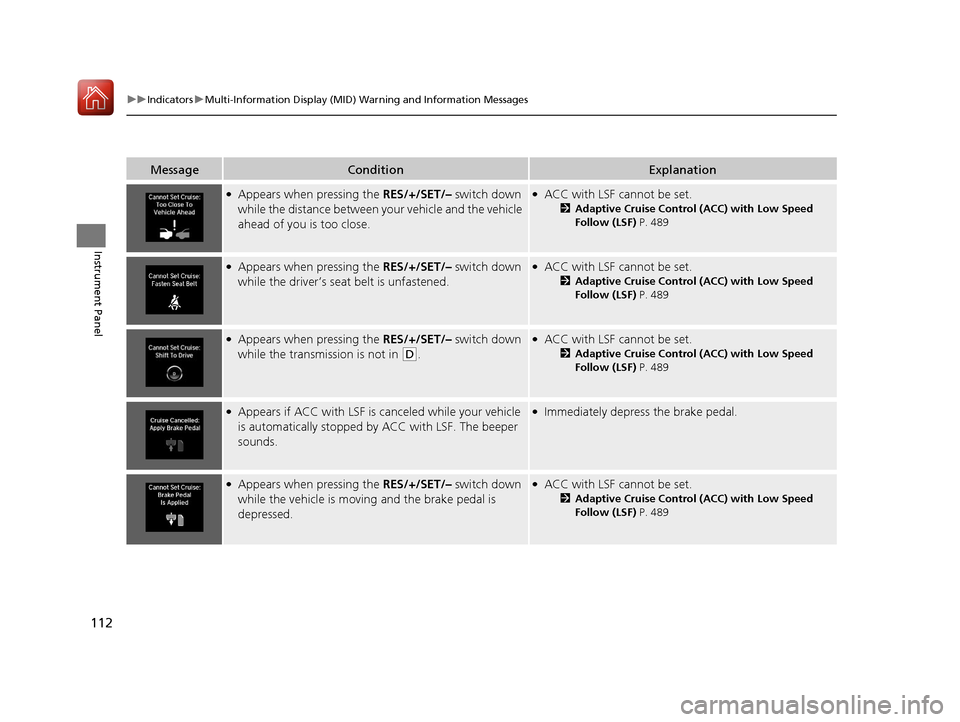
●Appears when pressing the RES/+/SET/– switch down
while the distance between y our vehicle and the vehicle
ahead of you is too close.●ACC with LSF cannot be set.
2 Adaptive Cruise Control (ACC) with Low Speed
Follow (LSF) P. 489
●Appears when pressing the RES/+/SET/– switch down
while the driver’s seat belt is unfastened.●ACC with LSF cannot be set.
2 Adaptive Cruise Control (ACC) with Low Speed
Follow (LSF) P. 489
●Appears when pressing the RES/+/SET/– switch down
while the transmission is not in
(D.
●ACC with LSF cannot be set.
2 Adaptive Cruise Control (ACC) with Low Speed
Follow (LSF) P. 489
●Appears if ACC with LSF is canceled while your vehicle
is automatically stopped by ACC with LSF. The beeper
sounds.●Immediately depress the brake pedal.
●Appears when pressing the RES/+/SET/– switch down
while the vehicle is moving and the brake pedal is
depressed.●ACC with LSF cannot be set.
2 Adaptive Cruise Control (ACC) with Low Speed
Follow (LSF) P. 489
18 ACURA MDX-31TZ56400.book 112 ページ 2017年8月23日 水曜日 午後4時1分
Page 114 of 697

113
uuIndicators uMulti-Information Display (MID) Warning and Information Messages
Continued
Instrument Panel
MessageConditionExplanation
●Appears when the vehicle is stopped on a very steep
slope while ACC with LSF is in operation.●ACC with LSF has been automatically canceled.
2 Adaptive Cruise Control (ACC) with Low Speed
Follow (LSF) P. 489
●Appears when pressing the RES/+/SET/– switch down
while the vehicle is stoppe d on a very steep slope.●ACC with LSF cannot be set.
2Adaptive Cruise Control (ACC) with Low Speed
Follow (LSF) P. 489
●Appears when pressing the RES/+/SET/– switch down
while the parking brake is applied.●ACC with LSF cannot be set.
2Adaptive Cruise Control (ACC) with Low Speed
Follow (LSF) P. 489
2 Parking Brake P. 528
18 ACURA MDX-31TZ56400.book 113 ページ 2017年8月23日 水曜日 午後4時1分
Page 117 of 697
116
uuIndicators uMulti-Information Display (MID) Warning and Information Messages
Instrument Panel
MessageConditionExplanation
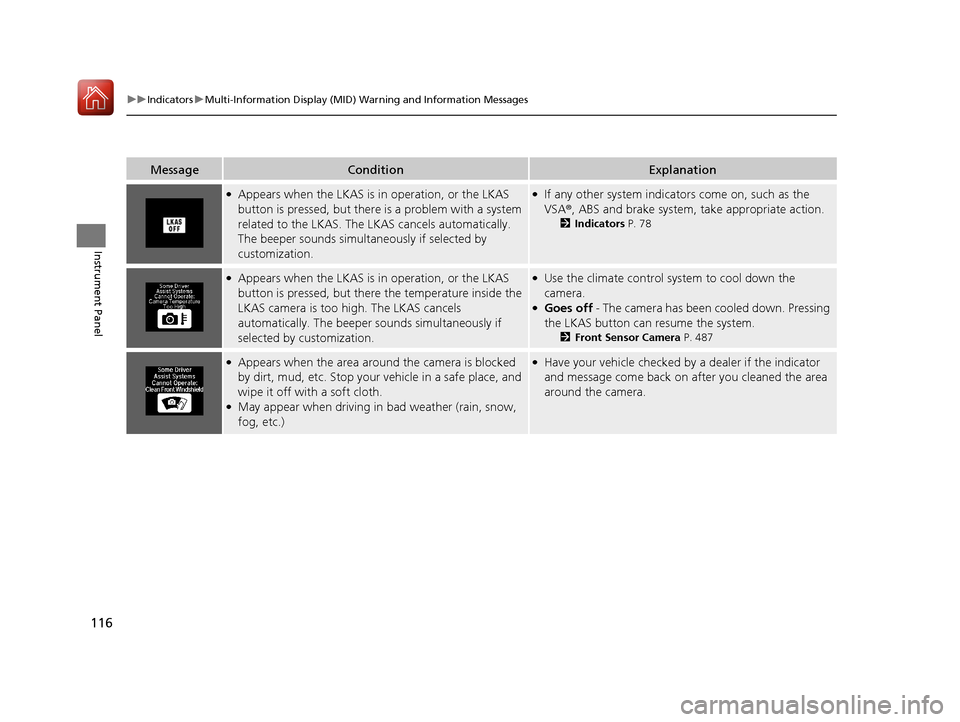
●Appears when the LKAS is in operation, or the LKAS
button is pressed, but there is a problem with a system
related to the LKAS. The LK AS cancels automatically.
The beeper sounds simultaneously if selected by
customization.●If any other system indicators come on, such as the
VSA ®, ABS and brake system, take appropriate action.
2Indicators P. 78
●Appears when the LKAS is in operation, or the LKAS
button is pressed, but there the temperature inside the
LKAS camera is too high. The LKAS cancels
automatically. The beeper sounds simultaneously if
selected by customization.●Use the climate control sy stem to cool down the
camera.
●Goes off - The camera has been cooled down. Pressing
the LKAS button can resume the system.
2 Front Sensor Camera P. 487
●Appears when the area around the camera is blocked
by dirt, mud, etc. Stop your vehicle in a safe place, and
wipe it off with a soft cloth.
●May appear when driving in bad weather (rain, snow,
fog, etc.)
●Have your vehicle checked by a dealer if the indicator
and message come back on after you cleaned the area
around the camera.
18 ACURA MDX-31TZ56400.book 116 ページ 2017年8月23日 水曜日 午後4時1分
Page 119 of 697
118
uuIndicators uMulti-Information Display (MID) Warning and Information Messages
Instrument Panel
MessageConditionExplanation
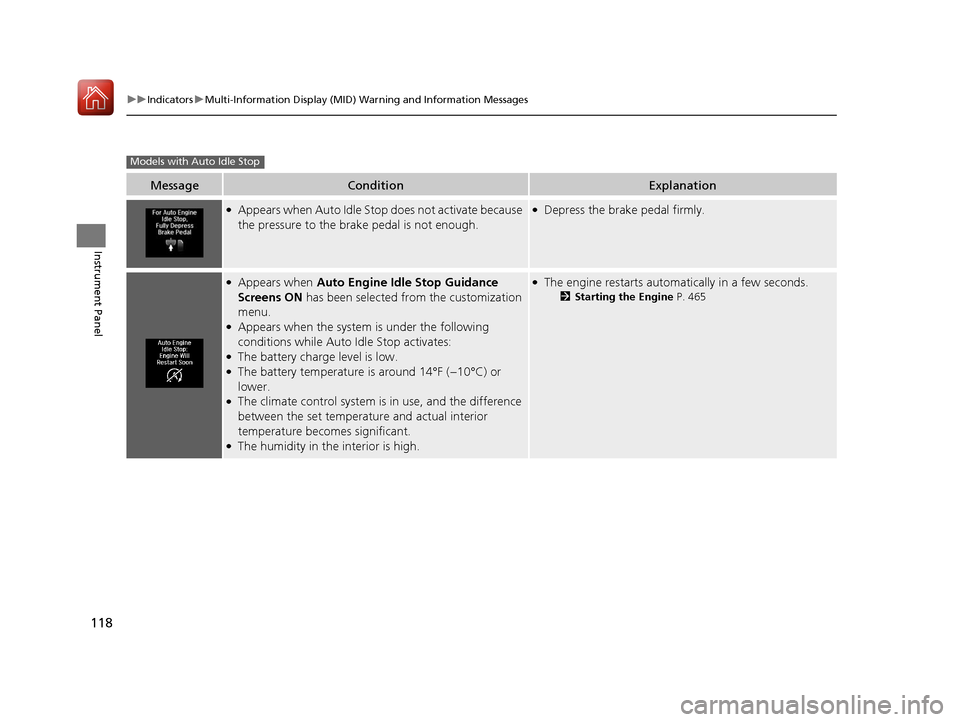
●Appears when Auto Idle Stop does not activate because
the pressure to the brake pedal is not enough.●Depress the brake pedal firmly.
●Appears when Auto Engine Idle Stop Guidance
Screens ON has been selected from the customization
menu.
●Appears when the system is under the following
conditions while Auto Idle Stop activates:
●The battery charge level is low.●The battery temperature is around 14°F (−10°C) or
lower.
●The climate control system is in use, and the difference
between the set temperature and actual interior
temperature becomes significant.
●The humidity in the interior is high.
●The engine restarts automatically in a few seconds.
2 Starting the Engine P. 465
Models with Auto Idle Stop
18 ACURA MDX-31TZ56400.book 118 ページ 2017年8月23日 水曜日 午後4時1分
Page 170 of 697
169Continued
Controls
Operating the Switches Around the Steering Wheel
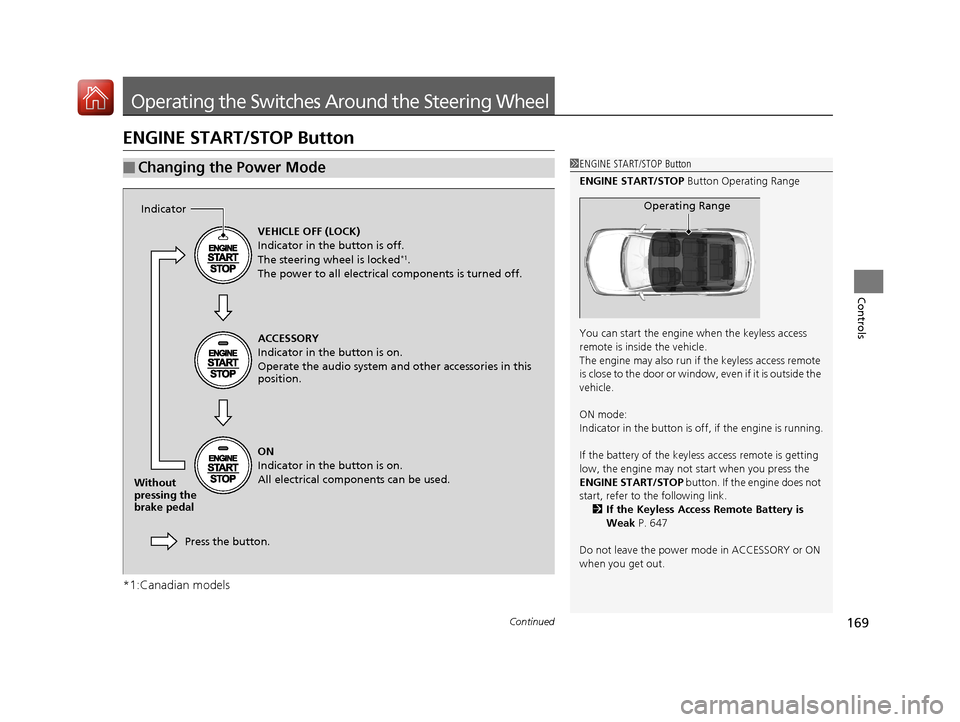
ENGINE START/STOP Button
*1:Canadian models
■Changing the Power Mode1ENGINE START/STOP Button
ENGINE START/STOP Button Operating Range
You can start the engine when the keyless access
remote is inside the vehicle.
The engine may also run if the keyless access remote
is close to the door or window, even if it is outside the
vehicle.
ON mode:
Indicator in the button is of f, if the engine is running.
If the battery of the keyless access remote is getting
low, the engine may not start when you press the
ENGINE START/STOP button. If the engine does not
start, refer to the following link.
2 If the Keyless Access Remote Battery is
Weak P. 647
Do not leave the power mode in ACCESSORY or ON
when you get out.
Operating Range
VEHICLE OFF (LOCK)
Indicator in the button is off.
The steering wheel is locked
*1.
The power to all electrical components is turned off.
ACCESSORY
Indicator in the button is on.
Operate the audio system and other accessories in this
position.
ON
Indicator in the button is on.
All electrical components can be used.
Press the button.
Indicator
Without
pressing the
brake pedal
18 ACURA MDX-31TZ56400.book 169 ページ 2017年8月23日 水曜日 午後4時1分
Page 174 of 697
173
uuOperating the Switches Around the Steering Wheel uLight Switches
Continued
Controls
Light Switches
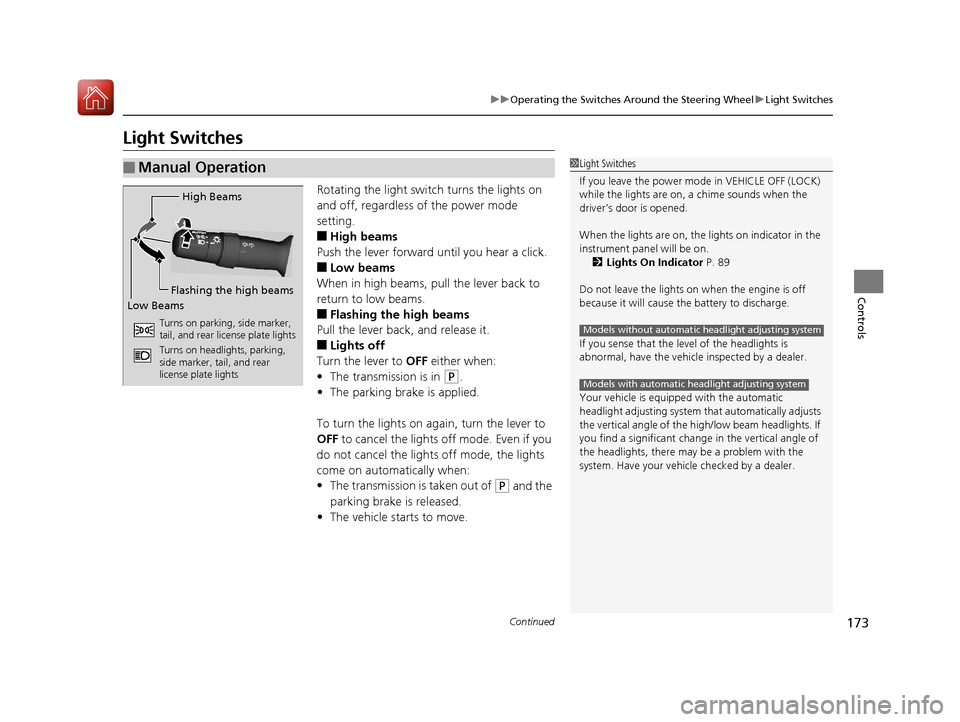
Rotating the light switch turns the lights on
and off, regardless of the power mode
setting.
■High beams
Push the lever forward until you hear a click.
■Low beams
When in high beams, pull the lever back to
return to low beams.
■Flashing the high beams
Pull the lever back, and release it.
■Lights off
Turn the lever to OFF either when:
• The transmission is in
(P.
• The parking brake is applied.
To turn the light s on again, turn the lever to
OFF to cancel the lights off mode. Even if you
do not cancel the lights off mode, the lights
come on automatically when:
• The transmission is taken out of
(P and the
parking brake is released.
• The vehicle starts to move.
■Manual Operation1Light Switches
If you leave the power mode in VEHICLE OFF (LOCK)
while the lights are on, a chime sounds when the
driver’s door is opened.
When the lights are on, the lights on indicator in the
instrument pane l will be on.
2 Lights On Indicator P. 89
Do not leave the lights on when the engine is off
because it will cause the battery to discharge.
If you sense that the le vel of the headlights is
abnormal, have the vehicl e inspected by a dealer.
Your vehicle is equipped with the automatic
headlight adjusting system that automatically adjusts
the vertical angle of the high/low beam headlights. If
you find a significant change in the vertical angle of
the headlights, there may be a problem with the
system. Have your vehicle checked by a dealer.
Models without automatic headlight adjusting system
Models with automatic headlight adjusting system
High Beams
Flashing the high beams
Low Beams
Turns on parking, side marker,
tail, and rear license plate lights
Turns on headlights, parking,
side marker, tail, and rear
license plate lights
18 ACURA MDX-31TZ56400.book 173 ページ 2017年8月23日 水曜日 午後4時1分