brake Acura MDX 2018 Workshop Manual
[x] Cancel search | Manufacturer: ACURA, Model Year: 2018, Model line: MDX, Model: Acura MDX 2018Pages: 697, PDF Size: 38.45 MB
Page 477 of 697
![Acura MDX 2018 Workshop Manual uuWhen Driving uShifting
476
Driving
■If you want to keep the transmission in (N position [car wash mode]
With the engine running:
1. Press and hold the brake pedal.
2. Select
(N, then release the](/img/32/9712/w960_9712-476.png "Acura MDX 2018 Workshop Manual uuWhen Driving uShifting
476
Driving
■If you want to keep the transmission in (N position [car wash mode]
With the engine running:
1. Press and hold the brake pedal.
2. Select
(N, then release the")
uuWhen Driving uShifting
476
Driving
■If you want to keep the transmission in (N position [car wash mode]
With the engine running:
1. Press and hold the brake pedal.
2. Select
(N, then release the button to display (N (Neutral) hold mode on the MID.
3. Press and hold
(N again for two seconds.
u This puts the vehicle in car wash mode which must be used when your vehicle
is pulled through a conveyor type automatic car wash where you or an
attendant do not remain in the vehicle.
If the ENGINE STOP/START button is pressed
after car wash mode has been activated, the
power mode will change to ACCESSORY and
a message will be displayed on the multi-
information display.u The gear position remains in
(N with the
power mode in ACCESSORY for 15
minutes, then, it automatically changes
to
(P and the power mode changes to
OFF.
u Manually changing to
(P cancels
ACCESSORY mode. The
(P indicator
comes on and the power mode changes
to OFF. You must always shift to
(P
when car wash mode is no longer
needed.
1 If you want to keep the transmission in (N position [car wash
mode]
The transmission may not stay in
(N position while
the following indicators ar e on or when the message
below appears:
•Malfunction indicator lamp
•Transmission system indicator
•Charging system indicator•The Charging System Problem message on the
MID.
18 ACURA MDX-31TZ56400.book 476 ページ 2017年8月23日 水曜日 午後4時1分
Page 478 of 697
477
uuWhen Driving uShifting
Continued
Driving
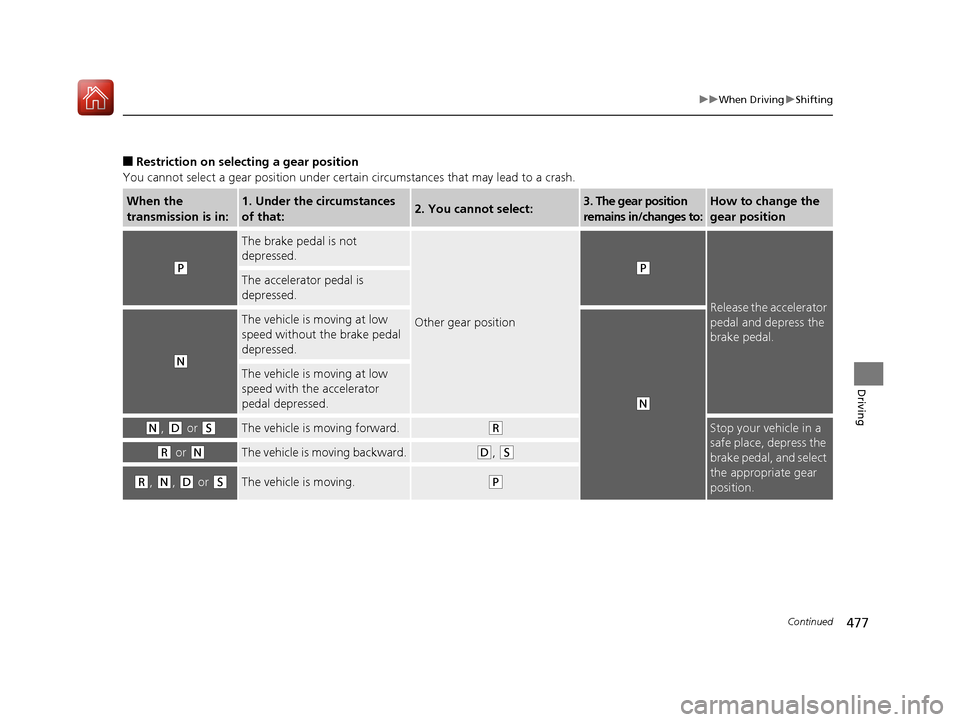
■Restriction on select ing a gear position
You cannot select a gear position under certain circumstances that may lead to a crash.
When the
transmission is in:1. Under the circumstances
of that:2. You cannot select:3. The gear position
remains in/changes to:How to change the
gear position
(P
The brake pedal is not
depressed.
Other gear position
(P
Release the accelerator
pedal and depress the
brake pedal.
The accelerator pedal is
depressed.
(N
The vehicle is moving at low
speed without the brake pedal
depressed.
(N
The vehicle is moving at low
speed with the accelerator
pedal depressed.
(N, (D or (SThe vehicle is moving forward.(RStop your vehicle in a
safe place, depress the
brake pedal, and select
the appropriate gear
position.
(R or (NThe vehicle is moving backward.(D, (S
(R, (N, (D or (SThe vehicle is moving.(P
18 ACURA MDX-31TZ56400.book 477 ページ 2017年8月23日 水曜日 午後4時1分
Page 483 of 697
uuWhen Driving uAuto Idle Stop*
482
Driving
The vehicle stops with the gear position in (D and the brake pedal depressed.
■Auto Idle Stop does not activate when:
• The driver’s seat belt is not fastened.
• The engine coolant temperature is low or high.
• The transmission fluid temperature is low or high.
• The vehicle comes to a stop again befo re the vehicle speed reaches 3 mph (5
km/h) after the engine starts.
• Stopped on a steep incline.
• The transmission is in a position other than
(D.
• The Auto Idle Stop OFF button is pressed.
• The engine is started with the hood open.
u Turn off the engine. Close the hood before you restart the engine to activate
Auto Idle Stop.
• The battery charge is low.
• The internal temperature of the ba ttery is 14°F (−10°C). or less.
• The climate control system is in use, an d the outside temperature is below −4°F
(−20°C) or over 104°F (40°C).
• The climate control system temperature is set to the Hi or Lo .
• is ON (indicator on).
• When the rear fan is set to maximum speed.
u Auto Idle Stop may not ac tivate under other conditions when the rear climate
control system is in use.
■Auto Idle Stop Activates When:1 Auto Idle Stop Activates When:
When ACC with LSF is in operation, the vehicle stops
without depressing the br ake pedal and Auto Idle
Stop may activate.
Do not open the hood while the Auto Idle Stop
function is activated. If the hood is opened, the
engine will not re start automatically.
In this case, restart the engine with the ENGINE
START/STOP button. 2 Starting the Engine P. 465
Pressing the ENGINE START/STOP button changes
the power mode to ACCESSORY even while Auto Idle
Stop is in operation. Once in ACCESSORY, the engine
no longer restarts automatica lly. Follow the standard
procedure to start the engine.
2 Starting the Engine P. 465
18 ACURA MDX-31TZ56400.book 482 ページ 2017年8月23日 水曜日 午後4時1分
Page 485 of 697

uuWhen Driving uAuto Idle Stop*
484
Driving
• The brake pedal is released (without the automatic brake hold system activated).
• The accelerator pedal is depressed (with the automatic brake hold system
activated).
2 Automatic Brake Hold P. 532
■The engine restarts even if the brake pedal is depressed*1 when:
• The Auto Idle Stop OFF button is pressed.
• The steering wheel is operated.
• The transmission is change to
(R or (S, or when it is change from (N to (D.
• The pressure on the brake pedal is redu ced and the vehicle starts moving while
stopped on an incline.
• The pressure on the brake pedal is repeated ly applied and released slightly during
a stop.
• The battery charge becomes low.
• The accelerator pedal is depressed.
• The driver’s seat belt is unlatched.
• is ON (indicator on).
• The climate control system is in us e, and the difference between the set
temperature and actual interior temperature becomes significant.
• The climate control system is bein g used to dehumidify the interior.
• The vehicle ahead of you starts again when your vehicle stops automatically with
ACC with LSF.
■The Engine Automatically Restarts When:1 The Engine Automatically Restarts When:
•If you are using an elec tronic device during Auto
Idle Stop, the device may temporarily be turned off
when the engine restarts.
1 The engine restarts even if the brake pedal is depressed*1 when:
*1: With the automatic brake hold system activated,
you can release the brake pe dal during Auto Idle Stop
is in operation.
18 ACURA MDX-31TZ56400.book 484 ページ 2017年8月23日 水曜日 午後4時1分
Page 486 of 697

485
uuWhen Driving uAuto Idle Stop*
Driving
■The engine restarts even if the automatic brake hold system is activated
when:
• The automatic brake hold system is canc eled and the electric parking brake is
applied automatically.
The automatic brake hold system has a problem.
Briefly keeps the brake applied after releasin g the brake pedal to restart the engine.
This can keep your vehicle from unexpe ctedly moving while on an incline.
■Starting Assist Brake Function
18 ACURA MDX-31TZ56400.book 485 ページ 2017年8月23日 水曜日 午後4時1分
Page 490 of 697
489
uuWhen Driving uAdaptive Cruise Control (ACC) with Low Speed Follow (LSF)
Continued
Driving
Adaptive Cruise Control (ACC) with Low Speed
Follow (LSF)
Helps maintain a constant vehicle speed an d a set following-interval behind a vehicle
detected ahead of yours and, if the detect ed vehicle comes to a stop, can decelerate
and stop your ve hicle, without yo u having to keep your foot on the brake or the
accelerator.
When ACC with LSF slows your vehicle by applying the brakes, your vehicle’s brake
lights will illuminate.
1 Adaptive Cruise Control (ACC) with Low Speed Follow (LSF)
Important Reminder
As with any system, there are limits to ACC with LSF.
Use the brake pedal whenever necessary, and always
keep a safe interval between your vehicle and other
vehicles.
Be careful not to severely impact the radar sensor
cover.
3WARNING
Improper use of ACC wi th LSF can lead to a
crash.
Use ACC with LSF only when driving on
expressways or freeways and in good
weather conditions.
3WARNING
ACC with LSF has limited braking capability
and may not stop your vehicle in time to
avoid a collision with a vehicle that quickly
stops in front of you.
Always be prepared to apply the brake
pedal if the conditions require.
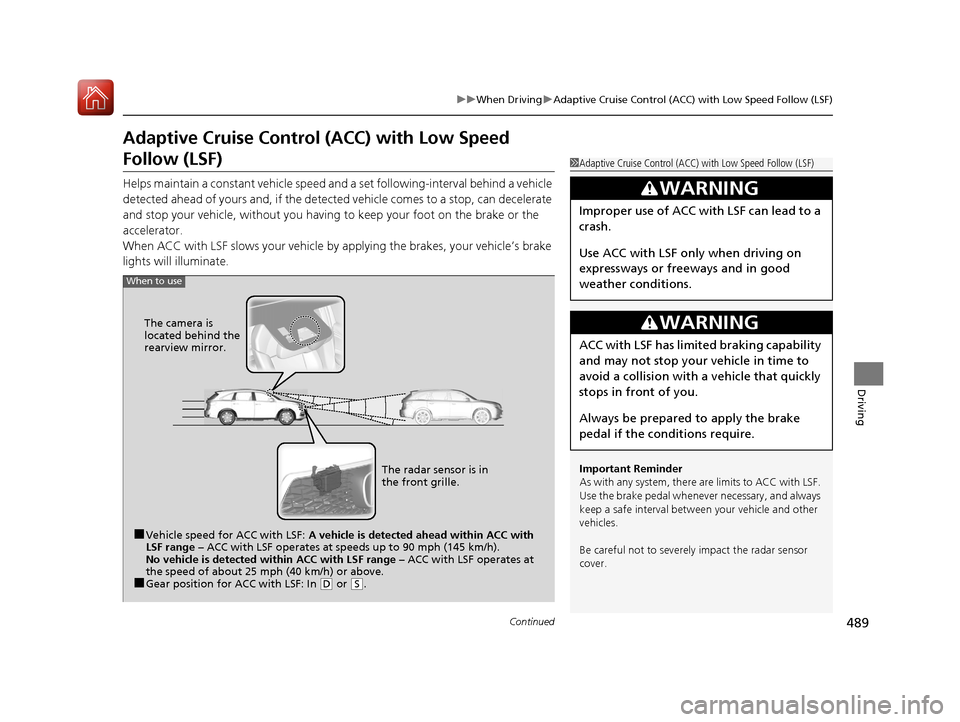
When to use
■Vehicle speed for ACC with LSF: A vehicle is detected ahead within ACC with
LSF range – ACC with LSF operates at speeds up to 90 mph (145 km/h).
No vehicle is detected within ACC with LSF range – ACC with LSF operates at
the speed of about 25 mph (40 km/h) or above.
■Gear position for ACC with LSF: In ( D or (S. The radar sensor is in
the front grille.
The camera is
located behind the
rearview mirror.
18 ACURA MDX-31TZ56400.book 489 ページ 2017年8月23日 水曜日 午後4時1分
Page 491 of 697

uuWhen Driving uAdaptive Cruise Control (ACC) with Low Speed Follow (LSF)
490
Driving
■How to activate the system1Adaptive Cruise Control (ACC) with Low Speed Follow (LSF)
When the MAIN button is pressed, both ACC with
LSF and the Lane Keeping Assist System (LKAS) are
either turned on or off.
ACC with LSF may not work properly under certain
conditions. 2 ACC with LSF Conditions and Limitations
P. 495
When not using ACC with LSF: Turn off adaptive
cruise by pressing the MAIN button. This also will
turn off the Lane Keeping Assist System (LKAS).
Do not use ACC with LSF under the following
conditions.
•On roads with heavy traf fic or while driving in
continuous stop and go traffic.
•On roads with sharp turns.
•On roads with steep downhill sections, as the set
vehicle speed can be exceeded by coasting. In such
cases, ACC with LSF will not apply the brakes to
maintain the set speed.
•On roads with toll collection facilities or other
objects between lanes of traffic, or in parking
areas, or faci lities with driv e through access.
■Press the MAIN button on
the steering wheel. ACC
(green) is on in the
instrument panel.
ACC with LSF is ready to
use.
18 ACURA MDX-31TZ56400.book 490 ページ 2017年8月23日 水曜日 午後4時1分
Page 492 of 697

491
uuWhen Driving uAdaptive Cruise Control (ACC) with Low Speed Follow (LSF)
Continued
DrivingWhen driving at about 25 mph (40 km/h) or above: Take your foot off the
pedal and press down the RES/+/SET/– switch when you reach the desired speed.
The moment you release the switch, the set speed is fixed, and ACC with LSF begins.
When driving at slower th an about 25 mph (40 km/h): If the vehicle is moving
and the brake pedal is not de pressed, pressing the switch fixes the set speed to about
25 mph (40 km/h) regardless of current vehi cle speed. While stationary and a vehicle
is ahead of you, the vehicle speed can be set, even with the brake pedal depressed. When ACC with LSF starts operating, the
vehicle icon, interval bars and set speed
appear on the MID.
■To Set the Vehicle Speed
On when ACC with LSF
beginsPress down and release
RES/+/SET/− Switch
Set Vehicle Speed
Set Vehicle Interval
18 ACURA MDX-31TZ56400.book 491 ページ 2017年8月23日 水曜日 午後4時1分
Page 493 of 697
uuWhen Driving uAdaptive Cruise Control (ACC) with Low Speed Follow (LSF)
492
Driving
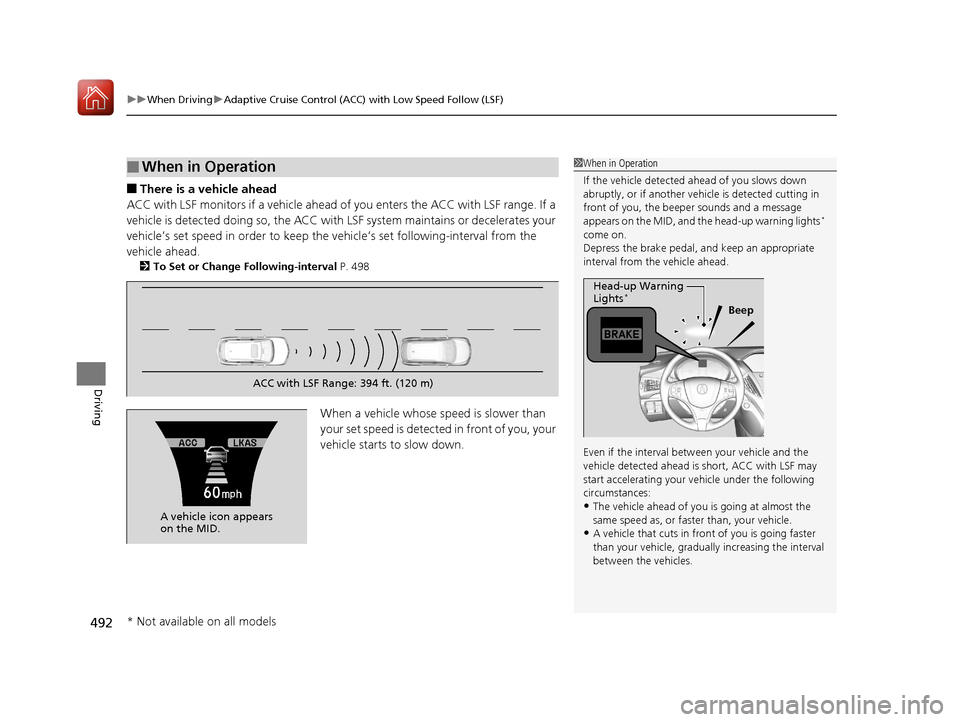
■There is a vehicle ahead
ACC with LSF monitors if a vehicle ahead of you enters the ACC with LSF range. If a
vehicle is detected doing so, the ACC with LSF system maintains or decelerates your
vehicle’s set speed in order to keep the vehicle’s set following-interval from the
vehicle ahead.
2 To Set or Change Following-interval P. 498
When a vehicle whose speed is slower than
your set speed is detected in front of you, your
vehicle starts to slow down.
■When in Operation1 When in Operation
If the vehicle detected ahead of you slows down
abruptly, or if a nother vehicle is de tected cutting in
front of you, the beep er sounds and a message
appears on the MID, and the head-up warning lights
*
come on.
Depress the brake pedal, and keep an appropriate
interval from the vehicle ahead.
Even if the interval betw een your vehicle and the
vehicle detected ahead is short, ACC with LSF may
start accelerating your vehicle under the following
circumstances:
•The vehicle ahead of you is going at almost the
same speed as, or faster than, your vehicle.
•A vehicle that cuts in front of you is going faster
than your vehicle, gradua lly increasing the interval
between the vehicles.
Beep
Head-up Warning
Lights
*
ACC with LSF Range: 394 ft. (120 m)
A vehicle icon appears
on the MID.
* Not available on all models
18 ACURA MDX-31TZ56400.book 492 ページ 2017年8月23日 水曜日 午後4時1分
Page 494 of 697

Continued493
uuWhen Driving uAdaptive Cruise Control (ACC) with Low Speed Follow (LSF)
Driving
■There is no vehicle ahead
Your vehicle maintains the set speed without
having to keep your foot on the brake or
accelerator pedal.
If there previously was a vehicle detected
ahead that kept your vehicle from traveling at
the set speed, ACC with LSF accelerates your
vehicle to the set speed, and then maintains it.
While stationary and no vehicle is detected,
ACC with LSF automatically cancels and a
beeper sounds.
■When you depress the accelerator pedal
You can temporarily increase the vehicle speed . In this case, there is no audible or
visual alert even if a vehicl e is in the ACC with LSF range.
ACC with LSF stays on unless you cancel it . Once you release the accelerator pedal,
the system resumes the set speed.
There are times when the vehicle speed will decrease when the accelerator pedal is
lightly applied.
A vehicle icon with dotted-line
contour appears on the MID.
1 When in Operation
You can also set the system to beep when a vehicle
detected in front of you co mes in and goes out of the
ACC with LSF detecting range. Change the ACC
Forward Vehicle Detect Beep setting.
2 Customized Features P. 126, 358
Limitations
You may need to use the brake to maintain a safe
interval when using ACC wi th LSF. Additionally, ACC
with LSF may not work properly under certain
conditions. 2 ACC with LSF Conditions and Limitations
P. 495
18 ACURA MDX-31TZ56400.book 493 ページ 2017年8月23日 水曜日 午後4時1分