phone Acura MDX 2018 Manual Online
[x] Cancel search | Manufacturer: ACURA, Model Year: 2018, Model line: MDX, Model: Acura MDX 2018Pages: 697, PDF Size: 38.45 MB
Page 435 of 697

uuBluetooth ® HandsFreeLink ®u HFL Menus
434
Features
Provides a nationwide service for unexpecte d incidents. You can call for assistance
using a phone paired and connected to Bluetooth® HandsFreeLink ®.
1. Press the PHONE button.
2. Rotate to select Roadside Assistance ,
then press .
3. Rotate to select a phone number, then
press .
u Dialing starts automatically.
■Roadside Assistance*1Roadside Assistance*
If you are subscribed to a paid AcuraLink package,
you can call roadside assistance using the LINK
button instead of your phone. 2 AcuraLink ®
* P. 435
* Not available on all models
18 ACURA MDX-31TZ56400.book 434 ページ 2017年8月23日 水曜日 午後4時1分
Page 436 of 697

435Continued
Features
AcuraLink®*
Is a subscription-based service that provid es convenient features such as voice
communication in case of emergency, online security, one-on-one operator
assistance, and the transmission of importa nt messages regarding your vehicle’s
status.
For information on traffic rero uting and traffic information updates, provided by the
AcuraLink server, see the Navigation System Manual.
■Automatic collis ion notification
If your vehicle’s airbags deploy or if the unit
detects that the vehicle is severely impacted,
your vehicle will automatically attempt to
connect to the AcuraLink operator. Once
connected, information about your vehicle, its
positioning, and its condition will be sent to
the operator; you also can speak to the
operator when connected.
■In Case of Emergency
1AcuraLink ®*
AcuraLink also provides services you can operate
from the Internet or your smartphone.
To subscribe to AcuraLink, or to get more
information about all of its features, contact an Acura
dealer, or visit owners.acura.com (U.S.) or
www.acura.ca/owners/acuralink (Canada).
Canadian models
1In Case of Emergency
Your vehicle may not be able to connect to the operator
if the battery level is low, the line is disconnected, or you
do not have adequate cellular coverage.
You cannot use emergency services when:
•You travel outside the AcuraLink service coverage
areas.
•There is a problem with the connecting devices,
such as the ASSIST button, microphone, speakers,
or the unit itself.
•You are not subscribed to the service or your
subscription is no longer valid.
You cannot operate othe r navigation or phone
related functions using the screens while talking to
the operator.
Only the operator can terminate the connection to
your vehicle.
1 Automatic collision notification
If the unit fails to connect to the operator, it
repeatedly tries until it succeeds.
Information screen
On Demand Multi-Use DisplayTM
When connected to the AcuraLink
operator:
* Not available on all models
18 ACURA MDX-31TZ56400.book 435 ページ 2017年8月23日 水曜日 午後4時1分
Page 438 of 697

Continued437
uuAcuraLink ®*u
Features
Your subscribed telematics service prov ider can track your vehicle’s location,
remotely lock or unlock doors, and help you find your vehicle.
To use these features, you n eed your user ID and personal identification number
(PIN).
■Stolen vehicle tracking
This feature searches and tracks down your vehicle position even if it is on the move.
If you believe that your vehicle has been stolen, contact the police as well as the
provider.
■Remote door lock/unlock
The provider can remotely lock or unlock doors upon your request.
■Vehicle finder
This feature is convenient to use when trying to locate your vehicle in large areas,
such as a crowded parking lot. If you cannot locate your vehicle after using the
remote transmitter’s answerback function, you can contact the provider which can
then flash your vehicle’s exterior lights and sound the horn.
■Security ala rm notification
If the security system in your vehicle detects an abnormal condition, such as
someone tampering with the lock on your vehicle, the provider notifies you by your
preferred method.
■Security Features1 Security Features
The contact information of your provider, your user
ID and PIN will be given when you subscribe to
AcuraLink. If you forget any of the above, contact a
dealer, or visit owners.acura.com (U.S.) or
www.acura.ca/owners/acuralink (Canada).
You can also activate the remote door lock/unlock
and vehicle finder features from the Internet or using
your smartphone app. As k a dealer, or visit
owners.acura.com (U.S.) or www.acura.ca/owners/
acuralink (Canada) for details.
1Vehicle finder
The lights will stop flas hing and horn will stop
sounding under the foll owing conditions:
•When 30 seconds have elapsed.
•You unlock the doors using the remote transmitter.•You unlock the doors using the keyless access
system.
•You unlock the doors using the built-in key.
•The power mode is set to ACCESSORY or ON.
18 ACURA MDX-31TZ56400.book 437 ページ 2017年8月23日 水曜日 午後4時1分
Page 441 of 697

uuAcuraLink ®*u
440
Features
■Reading a message
1.Press the INFO button or press , follow
the message on the information screen.
2. Rotate to select AcuraLink/Messages ,
then press .
u AcuraLink messages appears.
3. Rotate to select a category, then press
.
u If there are unread messages in a
category, a message icon appears next to
that category.
4. Rotate to select a message you want to
read, then press .
■Message Options
While a message is displayed, you can use options to take immediate action to the
message.
Available options are:
• Read Messages Aloud : Reads the message aloud. Select Stop Reading
Messages to cancel it.
• View Full Message : Displays the entire message.
• Phone number : Dials a number displaye d in the message via HFL.
• Delete: Deletes the displayed message.
• Call Your Dealer : Calls your Acura dealer using HFL.
• Find Acura Dealer : Searches for the nearest Acura dealer.
• Roadside Assistance : Makes a call to the number for the Roadside Assistance
service.
• Schedule Dealer Appoi…: Automatically sets an appointment date at your
dealer.
1Reading a message
If there is no message listed on the menu, each
category items are gray ed out and cannot be
selected.
The message icon disappears once you read the
message.
However, the exclamation mark that indicates that
the message has a high priority remains.
•: A read message with high priority.
1 Message Options
The available options vary by message category.
You can delete all message s in a category at once.
2 Customized Features P. 358
18 ACURA MDX-31TZ56400.book 440 ページ 2017年8月23日 水曜日 午後4時1分
Page 574 of 697
573
Maintenance
This chapter discusses basic maintenance.
Before Performing MaintenanceInspection and Maintenance ............ 574
Safety When Performing Maintenance ..575
Parts and Fluids Used in Maintenance Service...576Maintenance MinderTM..................... 577
Maintenance Under the Hood
Maintenance Items Under the Hood .. 581
Opening the Hood ........................... 582
Engine Compartment Cover ............. 583
Recommended Engine Oil ................ 584
Oil Check ......................................... 585
Adding Engine Oil ............................ 586
Changing the Engine Oil and Oil Filter ...587 Engine Coolant ................................ 589
Transmission Fluid ............................ 591
Brake Fluid ....................................... 592
Refilling Window Washer Fluid......... 592
Replacing Light Bulbs ....................... 593Checking and Maintaining Wiper Blades... 598Checking and Maintaining Tires
Checking Tires ................................. 602
Tire and Loading Information Label .. 603
Tire Labeling .................................... 603
DOT Tire Quality Grading (U.S. Vehicles).. 605Wear Indicators................................ 607
Tire Service Life ................................ 607 Tire and Wheel Replacement ........... 608
Tire Rotation .................................... 609
Winter Tires ..................................... 610
Battery ............................................... 611
Remote Transmitter Care Replacing the Button Battery ........... 613
Remote Control and Wireless Headphone Care
*........................... 615Climate Control System Maintenance.. 617Cleaning Interior Care .................................... 618
Exterior Care.................................... 620
Accessories and Modifications ........ 623
* Not available on all models
18 ACURA MDX-31TZ56400.book 573 ページ 2017年8月23日 水曜日 午後4時1分
Page 616 of 697
615Continued
Maintenance
Remote Control and Wireless Headphone Care*
Replacing the Battery
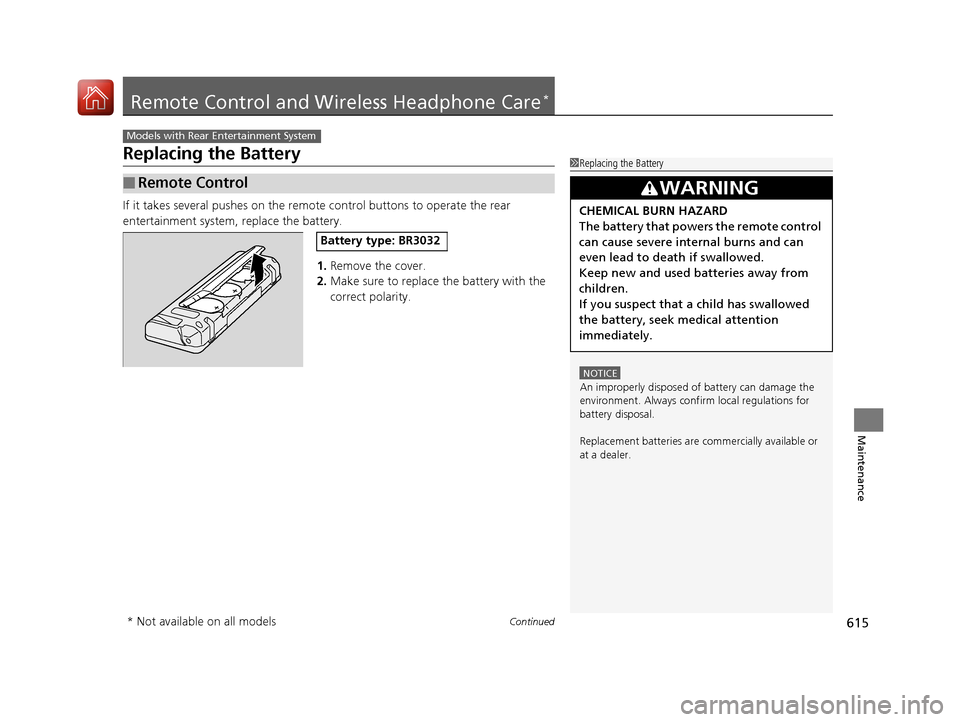
If it takes several pushes on the remo te control buttons to operate the rear
entertainment system, replace the battery.
1.Remove the cover.
2. Make sure to replace the battery with the
correct polarity.
■Remote Control
Models with Rear Entertainment System
1Replacing the Battery
NOTICE
An improperly disposed of battery can damage the
environment. Always conf irm local regulations for
battery disposal.
Replacement batteries are commercially available or
at a dealer.
3WARNING
CHEMICAL BURN HAZARD
The battery that powers the remote control
can cause severe internal burns and can
even lead to death if swallowed.
Keep new and used batteries away from
children.
If you suspect that a child has swallowed
the battery, seek medical attention
immediately.
Battery type: BR3032
* Not available on all models
18 ACURA MDX-31TZ56400.book 615 ページ 2017年8月23日 水曜日 午後4時1分
Page 617 of 697

616
uuRemote Control and Wireless Headphone Care*uReplacing the Battery
Maintenance
If there is no sound coming from th e wireless headphone, replace the battery.
1. Remove the screw.
2. Open the cover.
3. Make sure to replace the battery with the
correct polarity.
■Wireless Headphone
Battery type: AAA
Cover
Battery
18 ACURA MDX-31TZ56400.book 616 ページ 2017年8月23日 水曜日 午後4時1分
Page 683 of 697

682
Information
Authorized Manuals
■Service Express
For electronic copies of se rvice publications, you can purchase a subscription to
Service Express. Visit www.techinfo.honda.com for pricing and options.
■For U.S. Owners
Manuals can be purchased from Helm Incorporated. You can order a manual by
phone at 1 (800) 782-4356 (credit ca rd orders only), or online at www.helminc.com.
■For Canadian Owners
Please contact a dealer to order any manuals that you may require.
18 ACURA MDX-31TZ56400.book 682 ページ 2017年8月23日 水曜日 午後4時1分
Page 684 of 697

683Continued
Information
Client Service Information
Acura dealership personnel are trained professionals who should be able to deal
with any problems you may encounter with your vehicle. If, however, you are faced
with a problem that they cannot resolve to your satisf action, contact Acura Client
Relations/Services.
U.S. Owners
American Honda Motor Co., Inc.
Acura Client Relations
Mail Stop 100-5E-8F
1919 Torrance Blvd.
Torrance, CA 90501-2746
Tel: 1 (800) 382-2238 Canadian Owners
Honda Canada Inc.
Acura Client Services
180 Honda Boulevard
Markham, ON
L6C 0H9
Tel: 1-888-9-ACURA-9
Fax: 1-877-939-0909
E-mail: [email protected]
In Puerto Rico and the U.S. Virgin
Islands
Bella International
P.O. Box 190816
San Juan, PR 00919-0816
Tel: 1 (787) 620-75461 Client Service Information
When you call or write, pl ease give us the following
information:
•Vehicle Identification Number
2Vehicle Identification Number (VIN),
Engine Number, and Transmission
Number P. 674
•Date of purchase•Odometer reading of your vehicle
•Your name, address, and telephone number
•A detailed description of the problem•Name of the dealer who sold the vehicle to you
18 ACURA MDX-31TZ56400.book 683 ページ 2017年8月23日 水曜日 午後4時1分
Page 687 of 697

686
uuClient Service Information u
Information
Requirements to access Pandora ®
• Latest version of the Pandora app
installed on your Android, Blackberry, or
iPhone.
• Registered Pandora account (you can
create a free account at
www.pandora.com
smartphone)
• Connection to the internet via Wi-Fi or
cellular data network.
■Disclaimer of Pandora ®*Limitations
•Access to Pandora requires an active
internet connection
• Ability to access Pandora through this
system is subject to change without
notice
• Certain functionality of Pandora service is
not available when accessing the service
through this system including, but not
limited to, creating new stations, deleting
stations, emailing current stations,
buying tracks, viewing additional text
information, logging in to Pandora, and
adjusting Cell Network Audio Quality.
Pandora internet radio is a music service
not affiliated with HONDA. More
information is available at http://
www.pandora.com
Pandora logo, and the Pandora trade
dress are trademarks or registered
trademarks of Pandora Media, Inc., used
with permission.
• Mobile access requires a smartphone
with an active data plan. Standard data
rates may apply.
• Pandora is only available in the United
States.
* Not available on all models
18 ACURA MDX-31TZ56400.book 686 ページ 2017年8月23日 水曜日 午後4時1分