brake Acura MDX 2019 Owners Manual
[x] Cancel search | Manufacturer: ACURA, Model Year: 2019, Model line: MDX, Model: Acura MDX 2019Pages: 701, PDF Size: 38.75 MB
Page 597 of 701
596
uuReplacing Light Bulbs uBrake Light and Rear Turn Signal Light Bulbs
Maintenance
Brake Light and Rear Tu rn Signal Light Bulbs
When replacing, use the following bulbs.
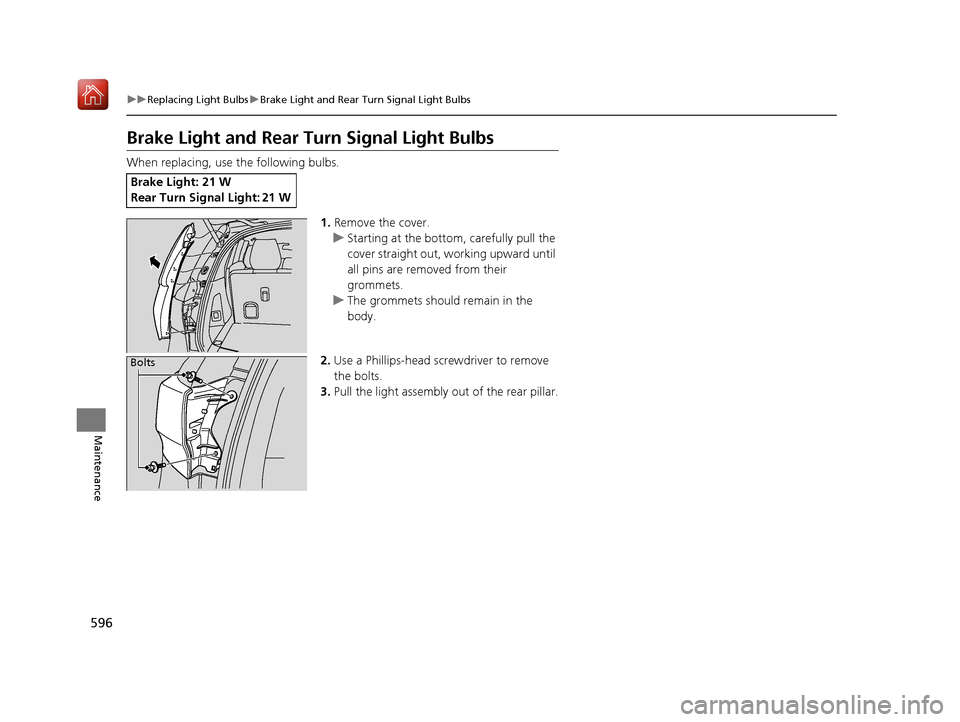
1.Remove the cover.
u Starting at the bottom, carefully pull the
cover straight out, working upward until
all pins are removed from their
grommets.
u The grommets should remain in the
body.
2. Use a Phillips-head screwdriver to remove
the bolts.
3. Pull the light assembly out of the rear pillar.
Brake Light: 21 W
Rear Turn Signal Light: 21 W
Bolts
19 ACURA MDX-31TZ56510.book 596 ページ 2018年12月11日 火曜日 午後4時47分
Page 600 of 701
599
uuReplacing Light Bulbs uRear License Plate Lights
Maintenance
Rear License Plate Lights
Rear license plate lights are LED type. Have an authorized Acura dealer inspect and
replace the light assembly.
High-Mount Brake Light
High-mount brake light is LED type. Have an authorized Acura dealer inspect and
replace the light assembly.
Puddle Lights*
Puddle lights are LED type. Have an authorized Acura dealer inspect and replace the
light assembly.
* Not available on all models
19 ACURA MDX-31TZ56510.book 599 ページ 2018年12月11日 火曜日 午後4時47分
Page 613 of 701
612
uuChecking and Maintaining Tires uWinter Tires
Maintenance
Winter Tires
If driving on snowy or frozen roads, mount all season marked M+S tires, snow tires,
or tire chains; reduce speed; and maintain sufficient distance be tween vehicles when
driving.
Be particularly careful when operating the steering wheel or brakes to prevent
skidding.
Use tire chains, snow tires, or all season ti res when necessary or according to the law.
When mounting, refer to the following points.
For winter tires:
• Select the size and load ranges that are the same as the original tires.
• Mount the tires to all four wheels.
For tire chains:
• Install them on the front tires only.
• Because your vehicle has limited tire clearance, we strongly recommend using the
chains listed below:
• Follow the chain manufacturer’s instruction when installing. Mount them as
tightly as you can.
• Check that the chains do not to uch the brake lines or suspension.
• Drive slowly.
Cable-type: SCC Cable Ch ain Super Z LT - ZT735
Cable-type: SCC Cable Chain Super Z6 - SZ435
1Winter Tires
NOTICE
Traction devices that are th e wrong size or improperly
installed can damage your vehicle’s brake lines,
suspension, body, and wheels. Stop driving if they are
hitting any part of the vehicle.
When tire chains are mounted, follow the chain
manufacturer’s instructi ons regarding vehicle
operational limits.
If your vehicle is equipped with summer tires, be
aware that these tires are not designed for winter
driving conditions. For more information, contact a
dealer.
3WARNING
Using the wrong chains, or not properly
installing chains, can damage the brake
lines and cause a crash in which you can be
seriously injured or killed.
Follow all instruction s in this owner’s
manual regarding the selection and use of
tire chains.
Models with 245/60R18 105H tires
Models with 245/50R20 102H tires
Models with 265/45R20 104H tires
Models with 265/45R20 104V tires
19 ACURA MDX-31TZ56510.book 612 ページ 2018年12月11日 火曜日 午後4時47分
Page 625 of 701
624
uuCleaning uExterior Care
Maintenance
Aluminum is susceptible to deterioration caused by salt and other road
contaminants. When necessary, as early as possible use a sponge and mild detergent
to wipe away these contaminants. Do no t use a stiff brush or harsh chemicals
(including some commercial wheel cleaners). These can damage the protective finish
on aluminum alloy wheels, resulting in corrosion. Depending on the type of finish,
the wheels also may lose their luster or appear burnished. To avoid water stains,
wipe the wheels dry with a cloth while they are still wet.
The inside lenses of exterior lights (headlig hts, brake lights, etc.) may fog temporarily
if you have driven in the rain, or after the vehicle has been run through a car wash.
Dew condensation also may build up inside the lenses when there is a significant
enough difference between the ambient and inside lens temperatures (similar to
vehicle windows fogging up in rainy conditions). These conditions are natural
processes, not structural design problems in the exterior lights.
Lens design characteristics may result in mo isture developing on the light lens frame
surfaces. This also is not a malfunction.
However, if you see large amounts of wa ter accumulation, or large water drops
building up inside the lenses, have your vehicle inspected by a dealer.
■Maintaining Aluminum Wheels
■Fogged Exterior Light Lenses
19 ACURA MDX-31TZ56510.book 624 ページ 2018年12月11日 火曜日 午後4時47分
Page 628 of 701
627
Handling the Unexpected
This chapter explains how to handle unexpected troubles.
ToolsTypes of Tools .................................. 628
If a Tire Goes Flat Changing a Flat Tire
*....................... 629
Temporarily Repair ing a Flat Tire*..... 636
Engine Does Not Start Checking the Engine ........................ 650
If the Keyless Access Remote Battery is Weak ............................................. 651
Emergency Engine Stop ................... 652
Jump Starting .................................... 653 Overheating
How to Handle Overheating............. 655
Indicator, Coming On/Blinking
If the Low Oil Pressure Indicator Comes On ... 657
If the Charging System Indicator Comes On ................................................. 657
If the Malfunction Indicator Lamp Comes On or Blinks ................................... 658
If the Brake System Indicator (Red) Comes On ................................................... 659
If the Speed-Sensitive Electric Power Steering
(EPS) System Indicator Comes On........... 659
If the Low Tire Pressure/TPMS Indicator Comes On or Blinks ....................... 661
If the Transmission System Indicator Blinks along with the Warning Message ...... 661
Fuses Fuse Locations ................................. 662
Inspecting and Changing Fuses ........ 669
Emergency Towing ........................... 670
When You Cannot Unlock the Fuel Fill Door.. 671
When You Cannot Open the Tailgate.. 672
Refueling........................................... 673
Refueling From a Portable Fuel Container.. 673
* Not available on all models
19 ACURA MDX-31TZ56510.book 627 ページ 2018年12月11日 火曜日 午後4時47分
Page 630 of 701
629Continued
Handling the Unexpected
If a Tire Goes Flat
Changing a Flat Tire*
If a tire goes flat while driving, grasp the steering wheel firmly, and brake gradually
to reduce speed. Then, stop in a safe plac e. Replace the flat tire with a compact
spare tire. Go to a dealer as soon as possib le to have the full-size tire repaired or
replaced.
1. Park the vehicle on firm, level, non-slip pery surface and apply the parking brake.
2. Change the gear position to
(P.
3. Turn on the hazard warning lights an d set the power mode to VEHICLE OFF
(LOCK).
1 Changing a Flat Tire*
Periodically check the tire pressure of the compact
spare. It should be set to the specified pressure.
Specified Pressure: 60 psi (420 kPa, 4.2 kgf/cm
2)
When driving with the compact spare tire, keep the
vehicle speed under 50 mph (80 km/h). Replace with
a full-size tire as soon as possible.
The compact spare tire and wheel in your vehicle are
specifically for this model. Do not use them with
another vehicle. Do not us e another type of compact
spare tire or wheel with your vehicle.
Do not mount tire chains on a compact spare tire.
If a chain-mounted front tire goes flat, remove one of
the full-size rear tires and replace it with the compact
spare tire. Remove the flat front tire and replace it
with the full-size tire that was removed from the rear.
Mount the tire chains on the front tire.
Do not use a puncture-repairing agent other than the
one provided in the kit that came with your vehicle (if
equipped). If a different agent is used, you may
permanently damage the tire pressure sensor.
* Not available on all models
19 ACURA MDX-31TZ56510.book 629 ページ 2018年12月11日 火曜日 午後4時47分
Page 637 of 701
636
uuIf a Tire Goes Flat uTemporarily Repairing a Flat Tire*
Handling the Unexpected
Temporarily Repairing a Flat Tire*
If the tire has a large cut or is otherwise se verely damaged, you will need to have the
vehicle towed. If the tire only has a smal l puncture, from a nail for instance, you can
use the temporary tire repair kit so that you can drive to the nearest service station
for a more permanent repair.
If a tire goes flat while driving, grasp the steering wheel firmly, and brake gradually
to reduce speed. Then stop in a safe place.
1. Park the vehicle on a firm, level, and non-slippery surface and apply the parking
brake.
2. Change the gear position to
(P.
3. Turn on the hazard warning lights an d set the power mode to VEHICLE OFF
(LOCK).
1 Temporarily Repairing a Flat Tire*
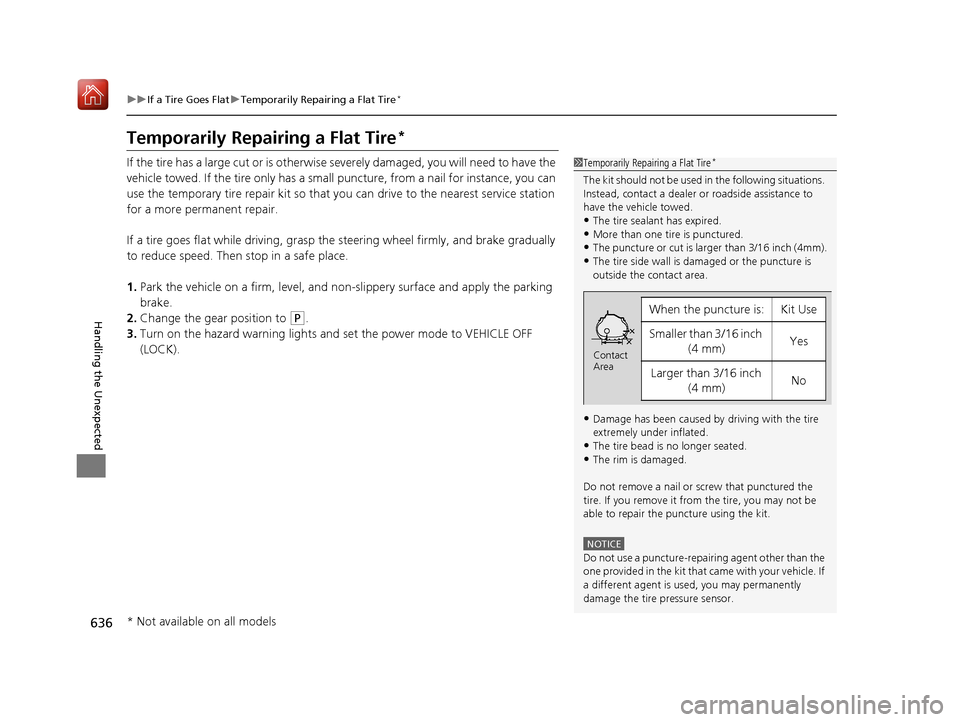
The kit should not be used in the following situations.
Instead, contact a dealer or roadside assistance to
have the vehicle towed.
•The tire sealant has expired.
•More than one tire is punctured.•The puncture or cut is larger than 3/16 inch (4mm).
•The tire side wall is da maged or the puncture is
outside the contact area.
•Damage has been caused by driving with the tire
extremely under inflated.
•The tire bead is no longer seated.
•The rim is damaged.
Do not remove a nail or screw that punctured the
tire. If you remove it from the tire, you may not be
able to repair the puncture using the kit.
NOTICE
Do not use a puncture-repairing agent other than the
one provided in the kit that came with your vehicle. If
a different agent is used, you may permanently
damage the tire pressure sensor.
When the puncture is:Kit Use
Smaller than 3/16 inch (4 mm)Yes
Larger than 3/16 inch (4 mm)No
Contact
Area
* Not available on all models
19 ACURA MDX-31TZ56510.book 636 ページ 2018年12月11日 火曜日 午後4時47分
Page 652 of 701

651
uuEngine Does Not Start uIf the Keyless Access Remote Battery is Weak
Handling the Unexpected
If the Keyless Access Re mote Battery is Weak
If the beeper sounds, the To Start, Hold Remote Near Start Button message
appears on the multi-information di splay, and the indicator on the ENGINE START/
STOP button flashes, and the engine won’t start, start the engine as follows:
1. Touch the center of the ENGINE START/
STOP button with the A logo on the keyless
access remote while the indicator on the
ENGINE START/STOP button is flashing.
The buttons on the keyless access remote
should be facing you.
u The indicator flashes for about 30
seconds.
2. Depress the brake pedal and press the
ENGINE START/STOP button within 10
seconds after the beeper sounds while the
indicator stays on.
u If you don’t depress the pedal, the mode
will change to ACCESSORY.
ENGINE
START
STOP
19 ACURA MDX-31TZ56510.book 651 ページ 2018年12月11日 火曜日 午後4時47分
Page 653 of 701
652
uuEngine Does Not Start uEmergency Engine Stop
Handling the Unexpected
Emergency Engine Stop
The ENGINE START/STOP button may be used to st op the engine due to an
emergency situation even while driving. If you must stop the engine, do either of the
following operations:
• Press and hold the ENGINE START/STOP button for about two seconds.
• Firmly press the ENGINE START/STOP button three times.
The steering wheel will not lock. However, because turning off the engine disables
the power assist the engine provides to the steering and braking systems, it will
require significantly more physical effort an d time to steer and slow the vehicle. Use
both feet on the brake pedal to slow down the vehicle and stop immediately in a
safe place.
The gear position auto matically changes to
(P after the vehicle comes to a complete
stop. Then, the power mode changes to VEHICLE OFF.
The gear position automatically changes to P after the vehicle comes to a complete
stop. Then press the ENGINE START/STOP button twice without depressing the
brake pedal to change th e mode to VEHICLE OFF.
1Emergency Engine Stop
Do not press the ENGINE START/STOP button while
driving unless it is absolute ly necessary for the engine
to be turned off.
If you press the ENGINE START/STOP button while
driving, the beeper sounds.
U.S. models
Canadian models
19 ACURA MDX-31TZ56510.book 652 ページ 2018年12月11日 火曜日 午後4時47分
Page 660 of 701
659
uuIndicator, Comin g On/BlinkinguIf the Brake System Indicator (Red) Comes On
Handling the Unexpected
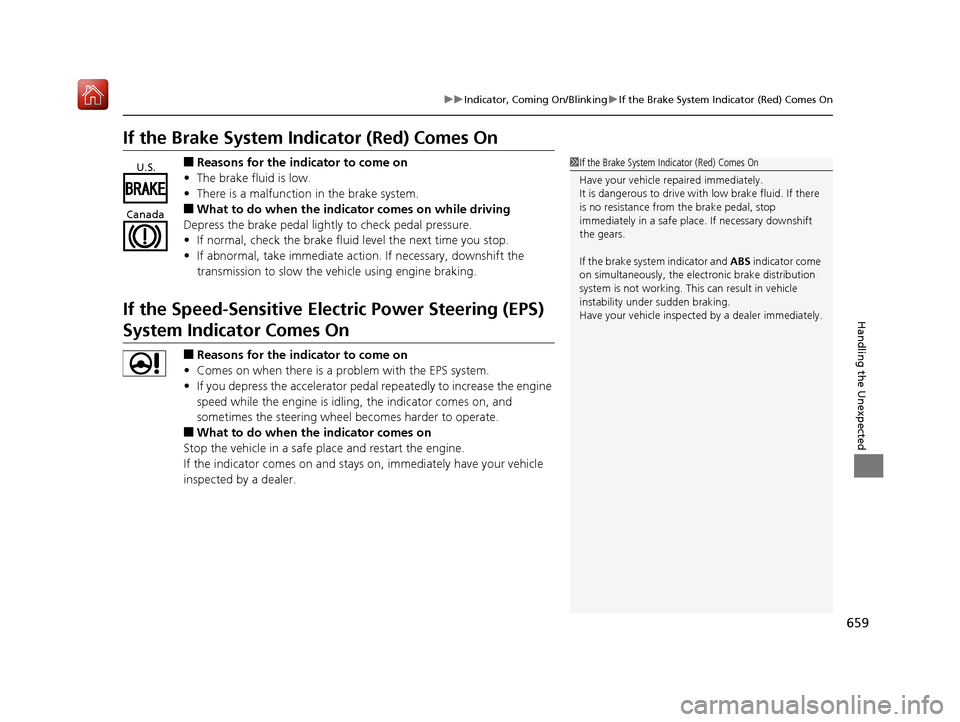
If the Brake System Indicator (Red) Comes On
■Reasons for the indicator to come on
• The brake fluid is low.
• There is a malfunction in the brake system.
■What to do when the indica tor comes on while driving
Depress the brake pedal lightly to check pedal pressure.
• If normal, check the brake fluid level the next time you stop.
• If abnormal, take immediate acti on. If necessary, downshift the
transmission to slow the vehicle using engine braking.
If the Speed-Sensitive Electric Power Steering (EPS)
System Indicator Comes On
■Reasons for the indicator to come on
• Comes on when there is a problem with the EPS system.
• If you depress the accelerator pedal repeatedly to increase the engine
speed while the engine is idling, the indicator comes on, and
sometimes the steering wheel becomes harder to operate.
■What to do when th e indicator comes on
Stop the vehicle in a safe place and restart the engine.
If the indicator comes on and stays on, immediately have your vehicle
inspected by a dealer.
1 If the Brake System Indicator (Red) Comes On
Have your vehicle re paired immediately.
It is dangerous to drive with low brake fluid. If there
is no resistance from the brake pedal, stop
immediately in a safe plac e. If necessary downshift
the gears.
If the brake system indicator and ABS indicator come
on simultaneously, the elec tronic brake distribution
system is not working. Th is can result in vehicle
instability under sudden braking.
Have your vehicle inspecte d by a dealer immediately.U.S.
Canada
19 ACURA MDX-31TZ56510.book 659 ページ 2018年12月11日 火曜日 午後4時47分