lights Acura MDX 2019 User Guide
[x] Cancel search | Manufacturer: ACURA, Model Year: 2019, Model line: MDX, Model: Acura MDX 2019Pages: 701, PDF Size: 38.75 MB
Page 109 of 701
108
uuIndicators uMulti-Information Display (MID) Warning and Information Messages
Instrument Panel
MessageConditionExplanation
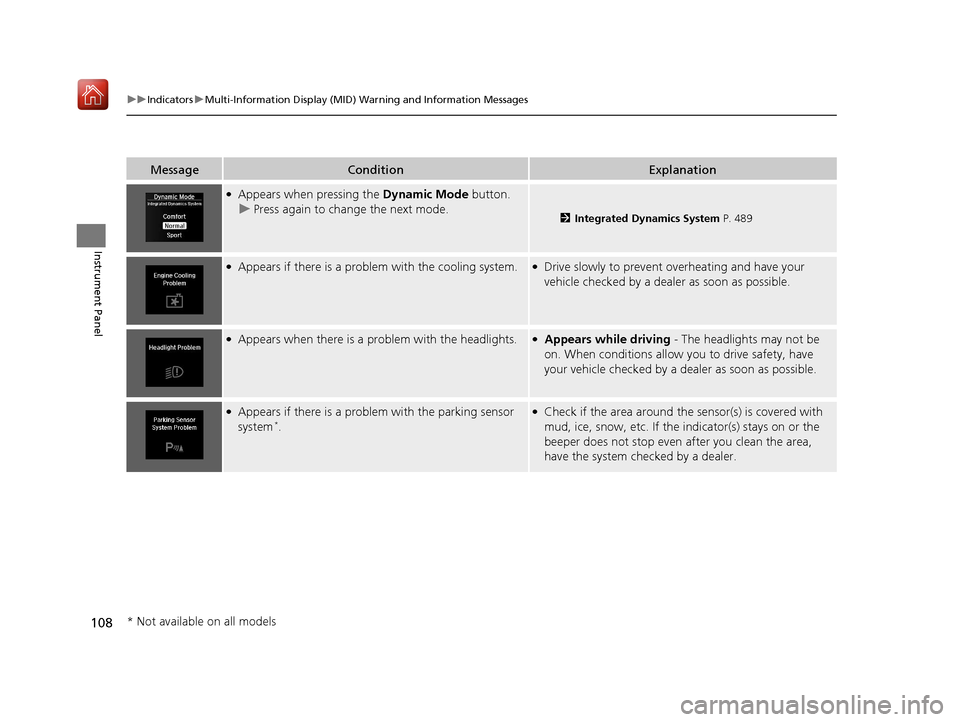
●Appears when pressing the Dynamic Mode button.
u Press again to change the next mode.
2 Integrated Dynamics System P. 489
●Appears if there is a problem with the cooling system.●Drive slowly to prevent overheating and have your
vehicle checked by a dealer as soon as possible.
●Appears when there is a problem with the headlights.●Appears while driving - The headlights may not be
on. When conditions allow you to drive safety, have
your vehicle checked by a d ealer as soon as possible.
●Appears if there is a problem with the parking sensor
system*.
●Check if the area around the sensor(s) is covered with
mud, ice, snow, etc. If the indicator(s) stays on or the
beeper does not stop even after you clean the area,
have the system checked by a dealer.
* Not available on all models
19 ACURA MDX-31TZ56510.book 108 ページ 2018年12月11日 火曜日 午後4時47分
Page 111 of 701
110
uuIndicators uMulti-Information Display (MID) Warning and Information Messages
Instrument Panel
MessageConditionExplanation
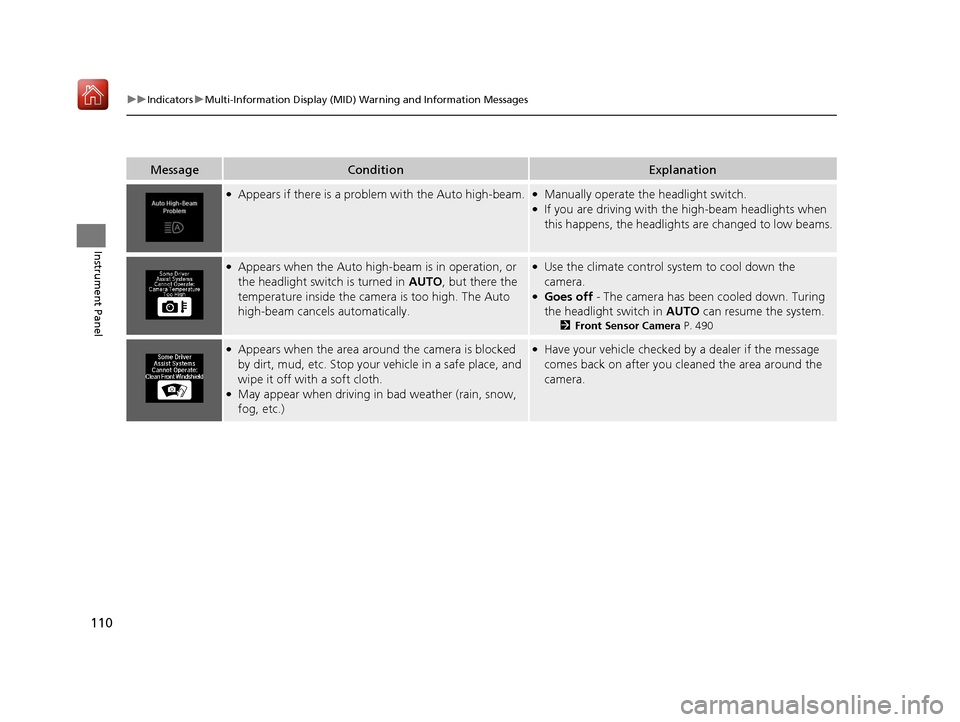
●Appears if there is a problem with the Auto high-beam.●Manually operate the headlight switch.●If you are driving with th e high-beam headlights when
this happens, the headlights are changed to low beams.
●Appears when the Auto high-b eam is in operation, or
the headlight switch is turned in AUTO , but there the
temperature inside the camera is too high. The Auto
high-beam cancels automatically.●Use the climate control sy stem to cool down the
camera.
●Goes off - The camera has been cooled down. Turing
the headlight switch in AUTO can resume the system.
2Front Sensor Camera P. 490
●Appears when the area around the camera is blocked
by dirt, mud, etc. Stop your vehicle in a safe place, and
wipe it off with a soft cloth.
●May appear when driving in bad weather (rain, snow,
fog, etc.)
●Have your vehicle checked by a dealer if the message
comes back on after you cl eaned the area around the
camera.
19 ACURA MDX-31TZ56510.book 110 ページ 2018年12月11日 火曜日 午後4時47分
Page 133 of 701
132
uuGauges and Multi-Information Display (MID) uMID
Instrument Panel
*1: Default SettingSetup Group Customizable Features
Description Selectable Settings
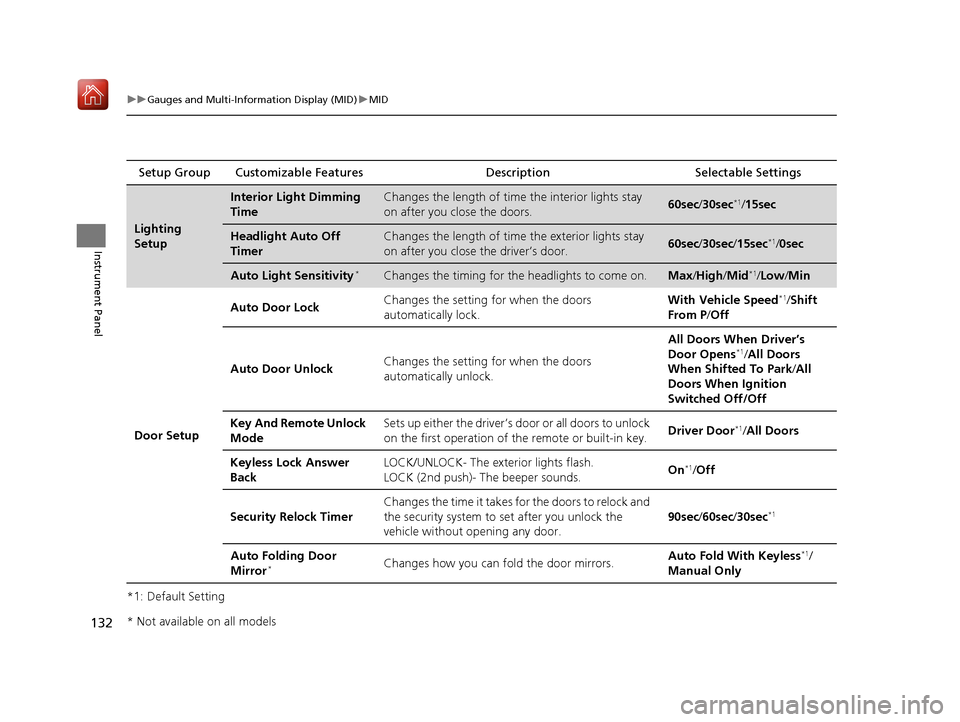
Lighting
Setup
Interior Light Dimming
TimeChanges the length of time the interior lights stay
on after you close the doors.60sec /30sec*1/ 15sec
Headlight Auto Off
TimerChanges the length of time the exterior lights stay
on after you close the driver’s door.60sec /30sec /15sec*1/0sec
Auto Light Sensitivity*Changes the timing for the headlights to come on.Max/High /Mid*1/Low /Min
Door Setup Auto Door Lock
Changes the setting for when the doors
automatically lock. With Vehicle Speed
*1/
Shift
From P /Off
Auto Door Unlock Changes the setting for when the doors
automatically unlock. All Doors When Driver’s
Door Opens
*1/
All Doors
When Shifted To Park /All
Doors When Ignition
Switched Off/Off
Key And Remote Unlock
Mode Sets up either the driver’s door or all doors to unlock
on the first operation of the remote or built-in key.
Driver Door
*1/
All Doors
Keyless Lock Answer
Back LOCK/UNLOCK- The exterior lights flash.
LOCK (2nd push)- The beeper sounds.
On
*1/
Off
Security Relock Timer Changes the time it takes for the doors to relock and
the security system to set after you unlock the
vehicle without opening any door.
90sec
/60sec /30sec
*1
Auto Folding Door
Mirror*Changes how you can fold the door mirrors. Auto Fold Wi
th Keyless*1/
Manual Only
* Not available on all models
19 ACURA MDX-31TZ56510.book 132 ページ 2018年12月11日 火曜日 午後4時47分
Page 138 of 701
137
Controls
This chapter explains how to operate the various controls necessary for driving.
Clock.................................................. 138
Locking and Unlocking the Doors Key Types and Functions .................. 139
Low Keyless Access Remote Signal Strength ......................................... 141
Locking/Unlocking the Doors from the
Outside .......................................... 142
Locking/Unlocking the Doors from the Inside ............................................. 151
Childproof Door Locks ..................... 153
Auto Door Locking/Unlocking .......... 154
Opening and Closing the Tailgate ... 155
Security System Immobilizer System .......................... 163
Security System Alarm ...................... 163 Opening and Closing the Windows
... 166
Moonroof .......................................... 168
Operating the Switches Around the
Steering Wheel ENGINE START/STOP Button............. 169
Turn Signals ..................................... 172
Light Switches.................................. 173
Fog Lights
*...................................... 176
Daytime Running Lights ................... 176
Auto High-Beam .............................. 177
Wipers and Washers ........................ 180
Brightness Control ........................... 184
Rear Defogger/Heated Door Mirror Button.. 185Driving Position Memory System ...... 186
Adjusting the Steering Wheel........... 188 Adjusting the Mirrors
Interior Rearview Mirror ................... 189
Power Door Mirrors ......................... 190
Adjusting the Seats Front Seats ...................................... 192
Second Row Seats ........................... 195
Third Row Seats ............................... 204
Armrest ........................................... 205
Interior Lights/Interior Convenience Items
Interior Lights .................................. 207
Interior Convenience Items .............. 209
Climate Control System
Using Automatic Climate Control .... 220
Rear Climate Control System ........... 227
Automatic Climate Control Sensors ... 231
* Not available on all models
19 ACURA MDX-31TZ56510.book 137 ページ 2018年12月11日 火曜日 午後4時47分
Page 143 of 701

142
uuLocking and Unlocking the Doors uLocking/Unlocking the Doors from the Outside
Controls
Locking/Unlocking the Doors from the Outside
When you carry the keyless access remote,
you can lock/unlock the doors and the
tailgate.
You can lock/unlock the doors and tailgate
within a radius of about 32 inches (80 cm) of
the outside door handle or tailgate outer
handle.
■Using the Keyless Access System1Locking/Unlocking the Doors from the Outside
If the interior light switch is in the door activated
position, the interior light comes on when you unlock
the doors and tailgate.
No doors opened: The li ght fades out after 30
seconds.
Doors and tailgate relo cked: The light goes off
immediately. 2 Interior Lights P. 207
1Using the Keyless Access System
If you do not open a door or the tailgate within 30
seconds of unlocking the vehicle with the keyless
access system, the doors and tailgate will
automatically relock.
You can lock or unlock doors using the keyless access
system only when the power mode is in VEHICLE OFF.
Models without rear door touch sensor
Models with rear door touch sensor
19 ACURA MDX-31TZ56510.book 142 ページ 2018年12月11日 火曜日 午後4時47分
Page 144 of 701
Continued143
uuLocking and Unlocking the Doors uLocking/Unlocking the Doors from the Outside
Controls
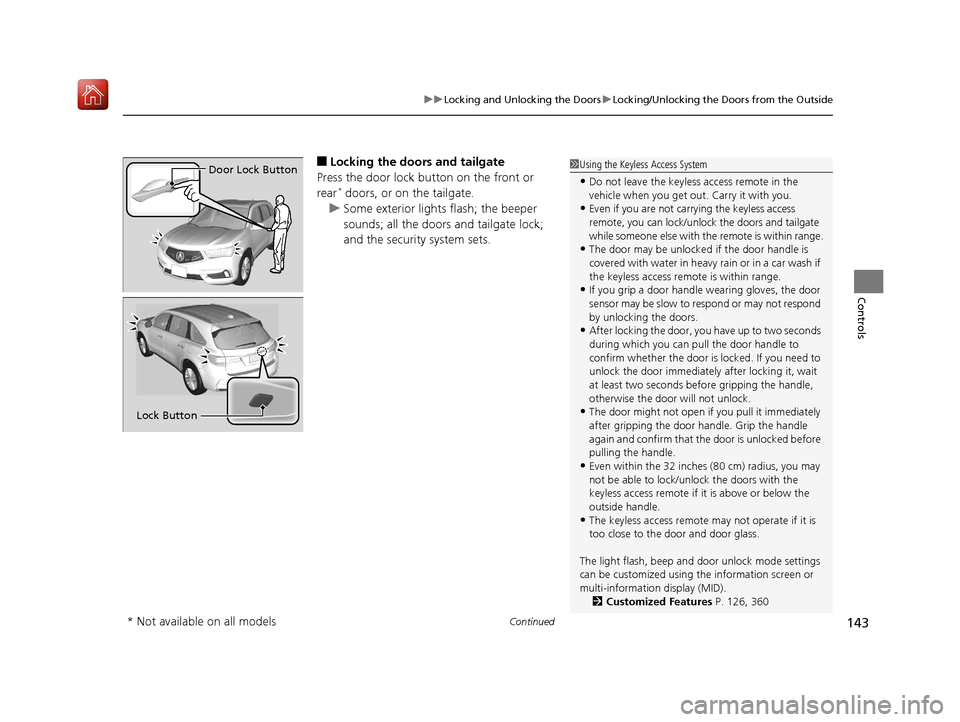
■Locking the doors and tailgate
Press the door lock button on the front or
rear
* doors, or on the tailgate.
u Some exterior lights flash; the beeper
sounds; all the doors and tailgate lock;
and the security system sets.
1Using the Keyless Access System
•Do not leave the keyless access remote in the
vehicle when you get out . Carry it with you.
•Even if you are not carrying the keyless access
remote, you can lock/unl ock the doors and tailgate
while someone else with th e remote is within range.
•The door may be unlocked if the door handle is
covered with water in heavy rain or in a car wash if
the keyless access remote is within range.
•If you grip a door handle wearing gloves, the door
sensor may be slow to respond or may not respond
by unlocking the doors.
•After locking the door, you have up to two seconds
during which you can pull the door handle to
confirm whether the door is locked. If you need to
unlock the door immediately after locking it, wait
at least two seconds befo re gripping the handle,
otherwise the door will not unlock.
•The door might not open if you pull it immediately
after gripping the door handle. Grip the handle
again and confirm that th e door is unlocked before
pulling the handle.
•Even within the 32 inches (80 cm) radius, you may
not be able to lock/unl ock the doors with the
keyless access remote if it is above or below the
outside handle.
•The keyless access remote may not operate if it is
too close to the door and door glass.
The light flash, beep and door unlock mode settings
can be customized using th e information screen or
multi-information display (MID). 2 Customized Features P. 126, 360
Door Lock Button
Lock Button
* Not available on all models
19 ACURA MDX-31TZ56510.book 143 ページ 2018年12月11日 火曜日 午後4時47分
Page 145 of 701

uuLocking and Unlocking the Doors uLocking/Unlocking the Doors from the Outside
144
Controls
■Locking the doors and tailgate (Walk
away auto lock ®)
When you walk away from the vehicle while
carrying the keyless acce ss remote, the doors
will automatically lock.
The auto lock function activates when all
doors and tailgate are closed, and the keyless
access remote is within about 5 feet (1.5 m)
radius of the outside door handle.
Exit vehicle while carrying keyless access
remote and close door(s).
1. While within about 5 feet (1.5 m) radius of
the vehicle.
u The beeper sounds; the auto lock
function will be activated.
2. Carry the keyless access remote beyond
about 5 feet (1.5 m) from the vehicle and
remain outside this range for 2 or more
seconds.
u Some exterior lights flash; the beeper
sounds; all doors and tailgate will then
lock.1Locking the doors and tailg ate (Walk away auto lock®)
The auto lock function is set to OFF as the factory
default setting. The auto lo ck function can be set to
ON using the information screen or MID.
If you set the auto lock function to ON using the
information screen or the MID, only the remote
transmitter that was used to unlock the driver’s door
prior to the setting change can activate auto lock. 2 Customized Features P. 126, 360
After the auto lock function has been activated,
when you stay within the locking/unlocking
operation range, the indica tor on the keyless access
remote will continue to flash until the doors are
locked.
When you stay beside the vehicle within the
operation range, the doors wi ll automatically lock
approximately 30 seconds after the auto lock
function activating beeper sounds.
When you open a door after the auto lock function
activating beeper sounds, the auto lock function will
be delayed until all doors and tailgate are closed.
Under the following circumstances, the auto lock
function will not activate:
•The remote is inside the vehicle.
•The remote is taken out of its operational range
before all the doors an d tailgate are closed.
u
The beeper will not sound.
u The beeper will sound.
The activation range of
the auto lock function is
about 5 feet (1.5 m)
19 ACURA MDX-31TZ56510.book 144 ページ 2018年12月11日 火曜日 午後4時47分
Page 147 of 701

uuLocking and Unlocking the Doors uLocking/Unlocking the Doors from the Outside
146
Controls
■Unlocking the doors and tailgate
Grab the driver’s door handle: u The driver’s door unlocks.
u Some exterior lights flash twice and the
beeper sounds twice.
Grab the front passenger’s door or rear
* door
handle: u All doors and the tailgate unlock.
u Some exterior lights flash twice and the
beeper sounds twice.
Press and hold the tailgate outer handle: u The tailgate unlocks and opens.
u Some exterior lights flash twice and the
beeper sounds twice.
2 Opening/Closing the Tailgate P. 162
1Using the Keyless Access System
When you go into the keyless access system working
range with all the doors locked, the LED puddle lights
come on for 30 seconds.
The lights do not come on if you have previously
stayed within the range for more than two minutes,
or the doors have been locked for a few days.
The feature activates again after you drive the
vehicle, then lock the doors.
You can also unlock and open with the power
tailgate. 2 Opening/Closing the Tailgate P. 162
Models with puddle lights
Tailgate Outer
Handle
* Not available on all models
19 ACURA MDX-31TZ56510.book 146 ページ 2018年12月11日 火曜日 午後4時47分
Page 148 of 701
Continued147
uuLocking and Unlocking the Doors uLocking/Unlocking the Doors from the Outside
Controls
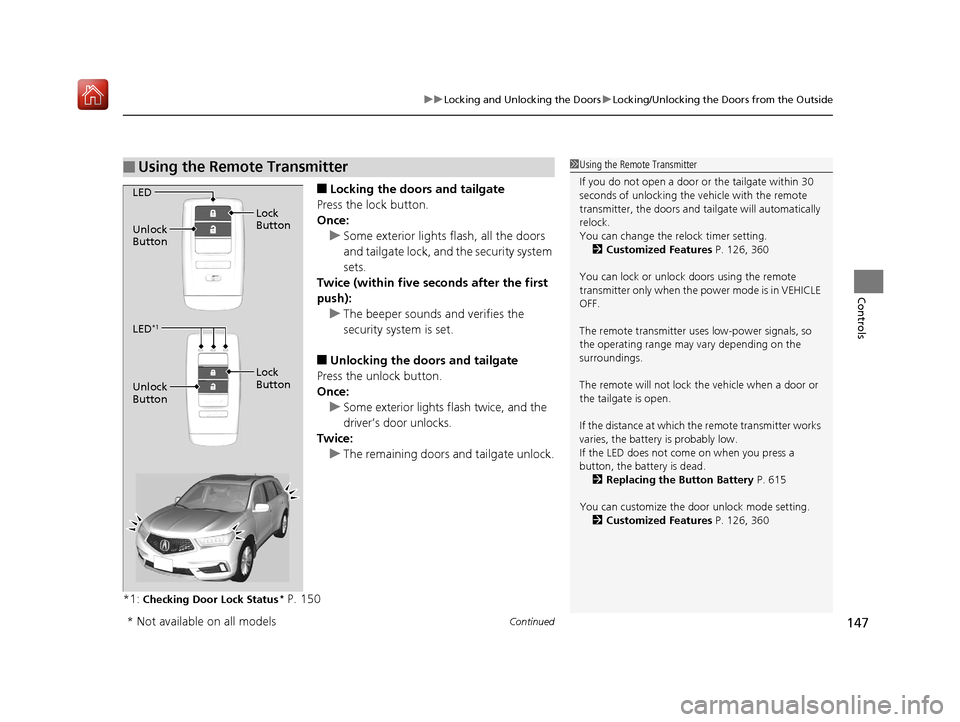
■Locking the doors and tailgate
Press the lock button.
Once: u Some exterior lights flash, all the doors
and tailgate lock, and the security system
sets.
Twice (within five se conds after the first
push):
u The beeper sounds and verifies the
security system is set.
■Unlocking the doors and tailgate
Press the unlock button.
Once: u Some exterior lights flash twice, and the
driver’s door unlocks.
Twice:
u The remaining doors and tailgate unlock.
*1:
Checking Door Lock Status* P. 150
■Using the Remote Transmitter1 Using the Remote Transmitter
If you do not open a door or the tailgate within 30
seconds of unlocking the vehicle with the remote
transmitter, the doors and ta ilgate will automatically
relock.
You can change the relock timer setting. 2 Customized Features P. 126, 360
You can lock or unlock doors using the remote
transmitter only when the power mode is in VEHICLE
OFF.
The remote transmitter us es low-power signals, so
the operating range may vary depending on the
surroundings.
The remote will not lock th e vehicle when a door or
the tailgate is open.
If the distance at which the remote transmitter works
varies, the batter y is probably low.
If the LED does not come on when you press a
button, the battery is dead.
2 Replacing the Button Battery P. 615
You can customize the door unlock mode setting. 2 Customized Features P. 126, 360
LED
Unlock
Button Lock
Button
LED
*1
Unlock
Button Lock
Button
* Not available on all models
19 ACURA MDX-31TZ56510.book 147 ページ 2018年12月11日 火曜日 午後4時47分
Page 158 of 701

157
uuOpening and Closing the Tailgate uOpening/Closing the Power Tailgate
Continued
Controls
Opening/Closing the Power Tailgate
Press the power tailgate button for more than
one second to operate when the power mode
is in VEHICLE OFF (LOCK).
u Some exterior lights flash and the beeper
sounds.
If you press the button again while the power
tailgate is moving, it reverses direction.
■Customizing when to open the tailgate
Anytime: The power tailgate unlocks and open s at the same time. This is the
default setting.
When Unlocked: The tailgate opens when all doors are unlocked.
2Customized Features P. 126, 360
■Using the Remote Transmitter1Opening/Closing the Power Tailgate
If you close the power tail gate when all the doors are
locked, the power tailgate locks automatically.
If you replace the battery or the power tailgate fuse
while the tailgate is open, the power tailgate may be
disabled. The power tail gate resumes once you
manually close the tailgate.
Installing aftermarket com ponents other than Acura
genuine accessories on the power tailgate may
prevent it from fully opening or closing.
Make sure the power tailgate is fully open before you
get your luggage in and out.
Make sure the power tailgat e is fully closed before
you start the vehicle.
The beeper sounds when you start driving while the
power tailgate is still open, or closing.
Power
Tailgate
Button
19 ACURA MDX-31TZ56510.book 157 ページ 2018年12月11日 火曜日 午後4時47分