surround Acura MDX 2019 User Guide
[x] Cancel search | Manufacturer: ACURA, Model Year: 2019, Model line: MDX, Model: Acura MDX 2019Pages: 701, PDF Size: 38.75 MB
Page 385 of 701
384
uuCustomized Features u
Features
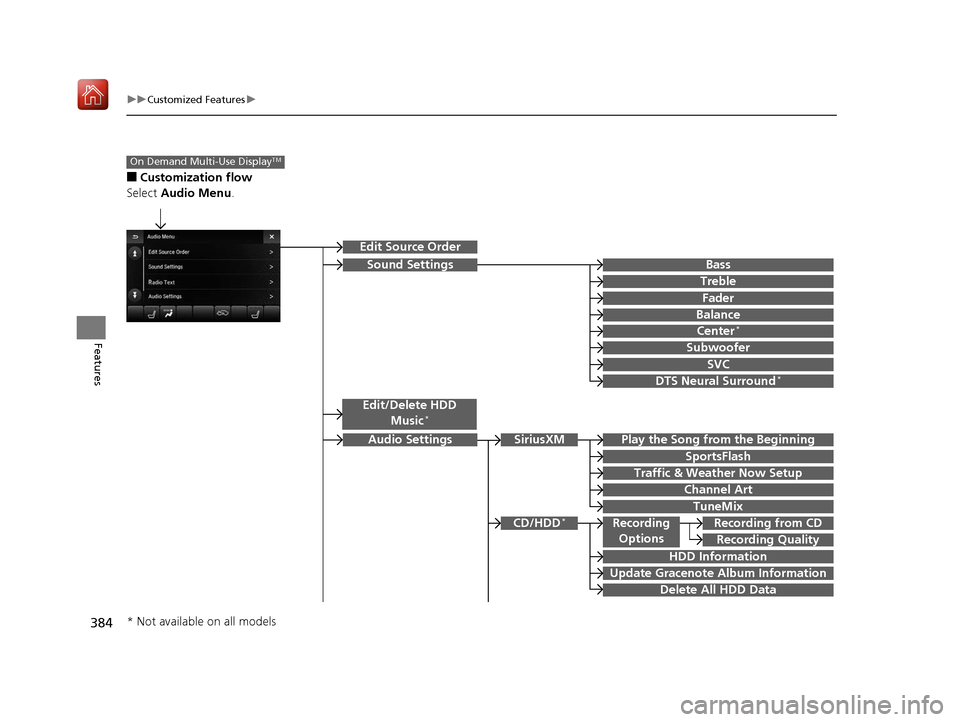
■Customization flow
Select Audio Menu .
On Demand Multi-Use DisplayTM
Play the Song from the Beginning
SportsFlash
Traffic & Weather Now Setup
Channel Art
TuneMix
SiriusXM
Bass
Treble
Fader
Balance
Subwoofer
SVC
Edit Source Order
Sound Settings
Audio Settings
CD/HDD*
Recording Quality
Recording from CDRecording
Options
HDD Information
Update Gracenote Album Information
Delete All HDD Data
DTS Neural Surround*
Edit/Delete HDD
Music*
Center*
* Not available on all models
19 ACURA MDX-31TZ56510.book 384 ページ 2018年12月11日 火曜日 午後4時47分
Page 387 of 701
386
uuCustomized Features u
Features
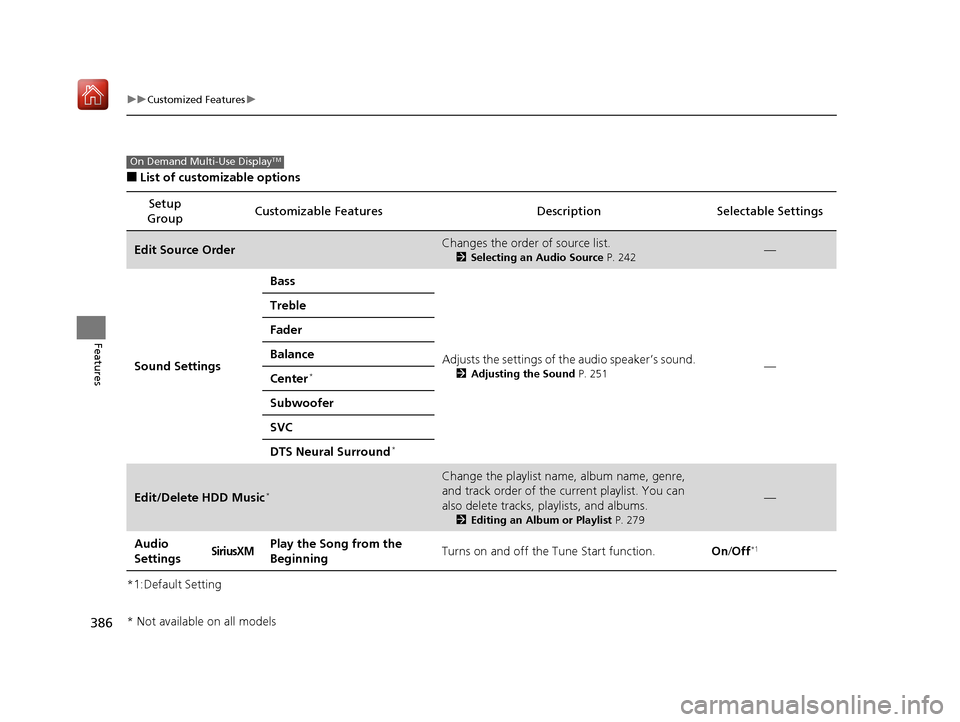
■List of customizable options
*1:Default Setting Setup
Group Customizable Features Descri
ption Selectable Settings
Edit Source OrderChanges the order of source list.
2Selecting an Audio Source P. 242—
Sound Settings Bass
Adjusts the settings of the audio speaker’s sound.
2Adjusting the Sound P. 251—
Treble
Fader
Balance
Center*
Subwoofer
SVC
DTS Neural Surround
*
Edit/Delete HDD Music*
Change the playlist name, album name, genre,
and track order of the cu
rrent playlist. You can
also delete tracks, playlists, and albums.
2 Editing an Album or Playlist P. 279
—
Audio
SettingsSiriusXMPlay the Song from the
BeginningTurns on and off the Tune Start function.On/Off*1
On Demand Multi-Use DisplayTM
* Not available on all models
19 ACURA MDX-31TZ56510.book 386 ページ 2018年12月11日 火曜日 午後4時47分
Page 448 of 701
447
Driving
This chapter discusses driving and refueling.
Before Driving................................... 448
Towing a Trailer ................................ 454
Off-Highway Driving Guidelines ..... 465
When Driving Starting the Engine .......................... 467
Automatic Transmission ................... 474
Shifting ............................................ 475
Auto Idle Stop .................................. 483
Integrated Dynamics System............. 489
Front Sensor Camera ....................... 490
Adaptive Cruise Control (ACC) with Low
Speed Follow (LSF) ............................. 492
Road Departure Mi tigation (RDM)
System ........................................ 507
Lane Keeping Assist System (LKAS) .. 512Vehicle Stability Assist® (VSA®), aka Electronic
Stability Control (ESC), System ............... 520
Agile Handling Assist ....................... 522
Blind spot information System*........ 523
Super Handling-All Wheel DriveTM (SH-
AWD® )*......................................... 526
Tire Pressure Monitoring System (TPMS)
with Tire Fill Assist .......................... 527
Tire Pressure Monitoring System (TPMS) - Required Federal Explanation ......... 529
Braking Brake System ................................... 531
Anti-lock Brake System (ABS) ........... 537 Brake Assist System ......................... 538
Collision Mitigation Braking System
TM
(CMBSTM) ....................................... 539
Parking Your Vehicle When Stopped ................................ 548
Parking Sensor System
*................... 550
Cross Traffic Monitor*..................... 554
Multi-View Rear Camera*................ 559
Surround View Camera System*..... 561
Refueling Fuel Information .............................. 571
How to Refuel ................................. 572
Fuel Economy and CO
2 Emissions .... 574
* Not available on all models
19 ACURA MDX-31TZ56510.book 447 ページ 2018年12月11日 火曜日 午後4時47分
Page 547 of 701
546
uuBraking uCollision Mitigation Braking SystemTM (CMBSTM)
Driving
Limitations applicable to pedestrian detection only
• When there is a group of people in front of your vehicle walking together side by
side.
• Surrounding conditions or belongings of the pedestrian alter the pedestrian’s
shape, preventing the system from recogn izing that the person is a pedestrian.
• When the pedestrian is slouching or squatting.
• When the pedestrian is shorter than about 3 feet (1 meter) or taller than about 7
feet (2 meter) in height.
• When a pedestrian blends in with the background.
• When a pedestrian is bent over or squa tting, or when their hands are raised or
they are running.
• When several pedestrians are walking ahead in a group.
• When the camera cannot correctly identify that a pedestrian is present due to an
unusual shape (holding luggage, body position, size).
■Automatic shutoff
The CMBSTM may automatically shut itself off and the CMBSTM indicator comes and
stays on when:
• The temperature inside the system is high.
• You drive off-road or on a mountain road, or curved and wi nding road for an
extended period.
• An abnormal tire condition is detected (wrong tire size, flat tire, etc.).
• The camera behind the rearview mirror, or the area around the camera, including
the windshield, gets dirty.
Once the conditions that caused CMBS
TM to shut off improve or are addressed (e.g.,
cleaning), the system comes back on.
19 ACURA MDX-31TZ56510.book 546 ページ 2018年12月11日 火曜日 午後4時47分
Page 553 of 701
552
uuParking Your Vehicle uParking Sensor System*
Driving
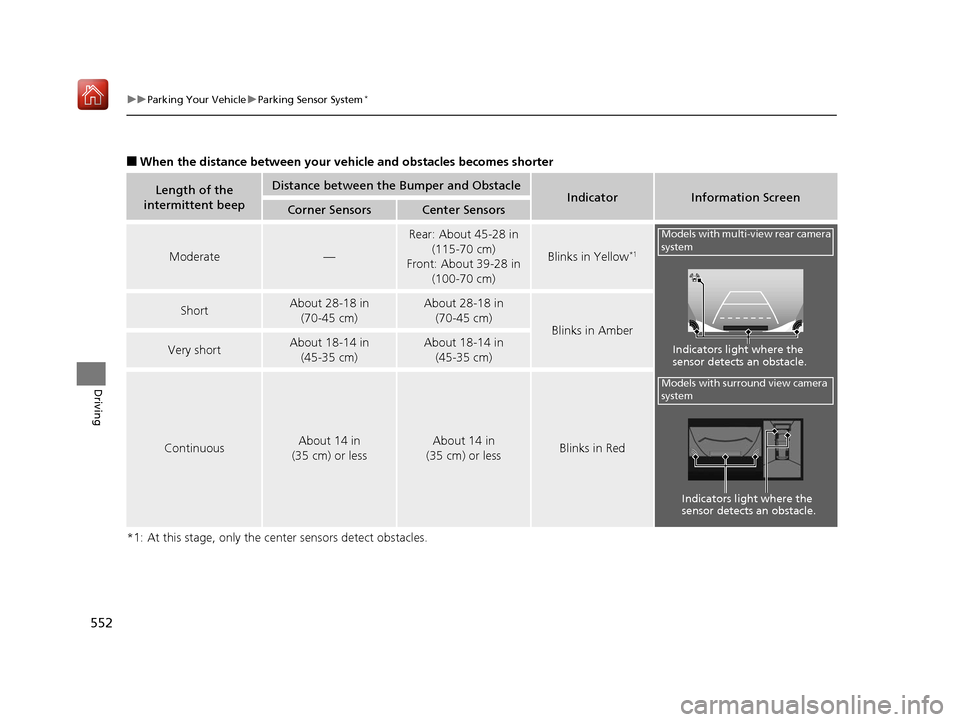
■When the distance between your ve hicle and obstacles becomes shorter
*1: At this stage, only the ce nter sensors detect obstacles.
Length of the
intermittent beepDistance between the Bumper and ObstacleIndicatorInformation ScreenCorner SensorsCenter Sensors
Moderate—
Rear: About 45-28 in (115-70 cm)
Front: About 39-28 in
(100-70 cm)
Blinks in Yellow*1
ShortAbout 28-18 in (70-45 cm) About 28-18 in (70-45 cm)
Blinks in Amber
Very shortAbout 18-14 in (45-35 cm) About 18-14 in (45-35 cm)
ContinuousAbout 14 in
(35 cm) or lessAbout 14 in
(35 cm) or lessBlinks in Red
Models with multi-view rear camera
system
Indicators light where the
sensor detects an obstacle.
Models with surround view camera
system
Indicators light where the
sensor detects an obstacle.
19 ACURA MDX-31TZ56510.book 552 ページ 2018年12月11日 火曜日 午後4時47分
Page 558 of 701

Continued557
uuParking Your Vehicle uCross Traffic Monitor*
Driving
An arrow icon appears on the side a ve hicle is approaching on the information
screen.
■When the System Detects a Vehicle1 When the System Detects a Vehicle
If the on the lower right changes to in amber
when the transmission is in
( R, mud snow or ice, etc.
may have accumulated in th e vicinity of the sensor.
Check the bumper corners for any obstructions, and
thoroughly clean the area if necessary.
If the comes on when the transmission is in
( R,
there may be a problem with the Cross Traffic
Monitor system. Do not use the system and have your
vehicle checked by a dealer.
If the display remains the same with the transmission
in
( R, there may be a problem with the rear camera
system and the Cross Traffic Monitor system.
Do not use the system and have your vehicle checked
by a dealer.
Wide View
Normal View Arrow Icon
Models with multi-view rear camera system
Top Down View
Rear Normal View
Rear Wide View
Rear Ground View Arrow Icon
Models with surround view camera system
19 ACURA MDX-31TZ56510.book 557 ページ 2018年12月11日 火曜日 午後4時47分
Page 562 of 701
561
Driving
Surround View Camera System*
Is a four camera system that views areas commonly known as “blind spots” from
different angles, then displays the images on the information screen. This system
can be used to:
• Check the right and left sides of the vehi cle while crossing at intersections with
poor visibility (fog, heavy rain, obstructed view, etc.).
2Checking from the front wide view at intersections P. 569
•Check for obstacles in front of the vehicle when parking or maneuvering in
confined areas.
2 Checking the sides of your vehicle P. 569
•Check for obstacles when you are moving in (R.
2 Checking for Obstacles at the Back of Your Vehicle P. 565
•Assist you when backing into or parallel parking the vehicle in a lined parking
space.
2 Reversing into a Parking Space Marked with Parking Lines P. 566
2 Parallel Parking into a Parking Space Marked with Parking Lines P. 567
1Surround View Camera System*
3WARNING
Failure to visually assess the area around
the vehicle (directly or by use of the
mirrors) may result in a crash causing
serious injury or death.
The areas shown in the surround view
camera system display are limited. The
display may not show all pedestrians or
other objects around your vehicle.
Do not solely rely only on the surround
view camera system display to assess
whether it is safe to move your vehicle.
3WARNING
Failure to pay proper attention to your
surroundings while driv ing may result in a
crash causing serious injury or death.
To help mitigate the ch ances of a collision,
only look at the surround view camera
system display when it is safe to do so.
* Not available on all models
19 ACURA MDX-31TZ56510.book 561 ページ 2018年12月11日 火曜日 午後4時47分
Page 563 of 701

562
uuSurround View Camera System*uDisplaying an Image From the Surround View Cameras
Driving
Displaying an Image From the Surround View
Cameras
■For frontal views:
Press the CAMERA button when the vehicle is
stationary or moving at 7 mph (12 km/h) or
slower. Press the butto n again to switch
camera views.
■For rear reviews:
Change the gear position to
(R when the
vehicle is stationary. Press the CAMERA
button to switch to rear view mode.
You can customize the display setting.
2 Customized Features P. 358
1Surround View Camera System*
The surround view ca mera system does not eliminate
all blind spots. The system is for your convenience
only.
Always keep the camera le nses clean and free from
debris.
1 Displaying an Image From the Surround View Cameras
The navigation system is disabled when the gear
position is in
(R.
Operating the audio system while the surround view
camera system screen is displayed cancels the
surround view camera system screen and starts up
the audio system screen.
If you press the CAMERA button while the vehicle
speed is more than 9 mph (15 km/h), the standby
screen appears.
When Show Camera When Decelerating is on,
and the vehicle speed is reduced below 7 mph (12
km/h), the screen switches to a surround view camera
system image. 2 Customized Features P. 358
CAMERA
Button
* Not available on all models
19 ACURA MDX-31TZ56510.book 562 ページ 2018年12月11日 火曜日 午後4時47分
Page 564 of 701
563
uuSurround View Camera System*uDisplaying an Image From the Surround View Cameras
Continued
Driving
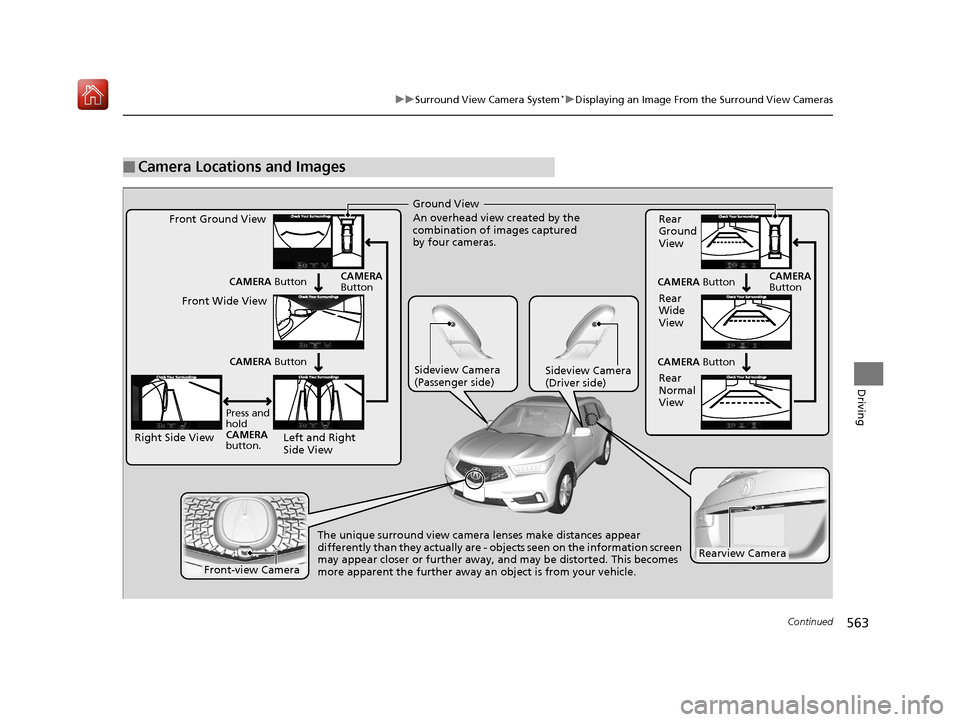
■Camera Locations and Images
Ground View
An overhead view created by the
combination of images captured
by four cameras.
Left and Right
Side View
Front Ground View
Right Side View Front Wide View
Sideview Camera
(Passenger side)Sideview Camera
(Driver side)
The unique surround view camera lenses make distances appear
differently than they actually are - objects seen on the information screen
may appear closer or further away, and may be distorted. This becomes
more apparent the further away an object is from your vehicle.
CAMERA
Button
Rear
Ground
View
Rear
Wide
View
Rear
Normal
View
CAMERA Button
CAMERA Button
CAMERA
Button
Press and
hold
CAMERA
button. CAMERA
Button
CAMERA Button
Rearview Camera
Front-view Camera
19 ACURA MDX-31TZ56510.book 563 ページ 2018年12月11日 火曜日 午後4時47分
Page 565 of 701
uuSurround View Camera System*uDisplaying an Image From the Surround View Cameras
564
Driving
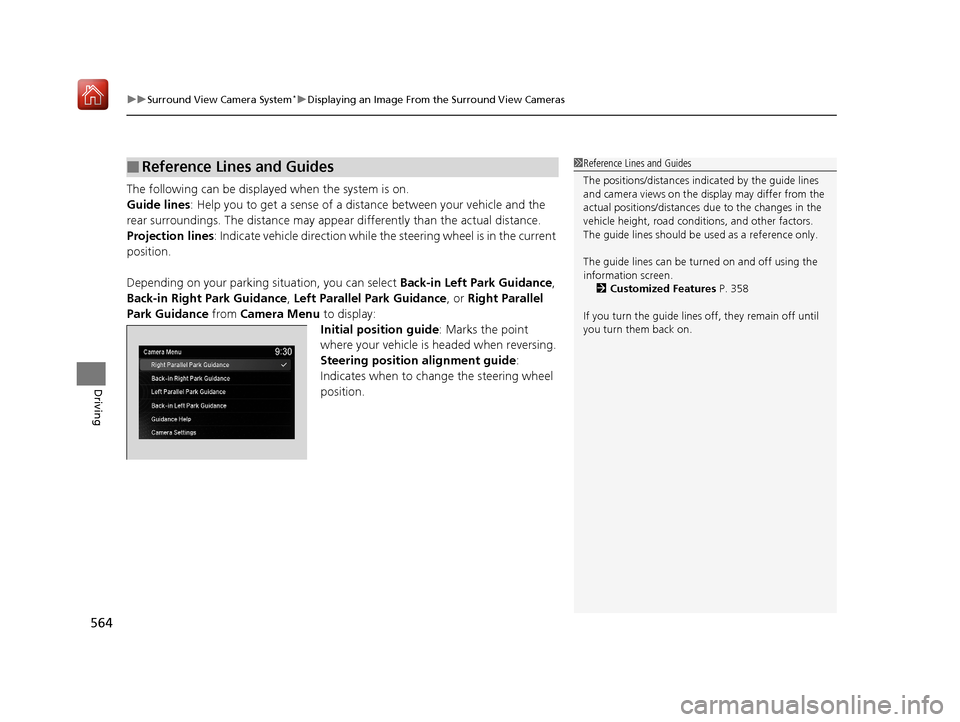
The following can be displaye d when the system is on.
Guide lines: Help you to get a sense of a distance between your vehicle and the
rear surroundings. The distan ce may appear differently than the actual distance.
Projection lines: Indicate vehicle direction while the steering wheel is in the current
position.
Depending on your parking situation, you can select Back-in Left Park Guidance,
Back-in Right Park Guidance, Left Parallel Park Guidance, or Right Parallel
Park Guidance from Camera Menu to display:
Initial position guide : Marks the point
where your vehicle is headed when reversing.
Steering position alignment guide :
Indicates when to change the steering wheel
position.
■Reference Lines and Guides1 Reference Lines and Guides
The positions/distances indi cated by the guide lines
and camera views on the display may differ from the
actual positions/distances due to the changes in the
vehicle height, road conditions, and other factors.
The guide lines should be used as a reference only.
The guide lines can be tu rned on and off using the
information screen.
2 Customized Features P. 358
If you turn the guide lines off, they remain off until
you turn them back on.
19 ACURA MDX-31TZ56510.book 564 ページ 2018年12月11日 火曜日 午後4時47分