surround Acura MDX 2019 Owner's Guide
[x] Cancel search | Manufacturer: ACURA, Model Year: 2019, Model line: MDX, Model: Acura MDX 2019Pages: 701, PDF Size: 38.75 MB
Page 566 of 701
565
uuSurround View Camera System*uUsing the Surround View Camera System
Continued
Driving
Using the Surround View Camera System
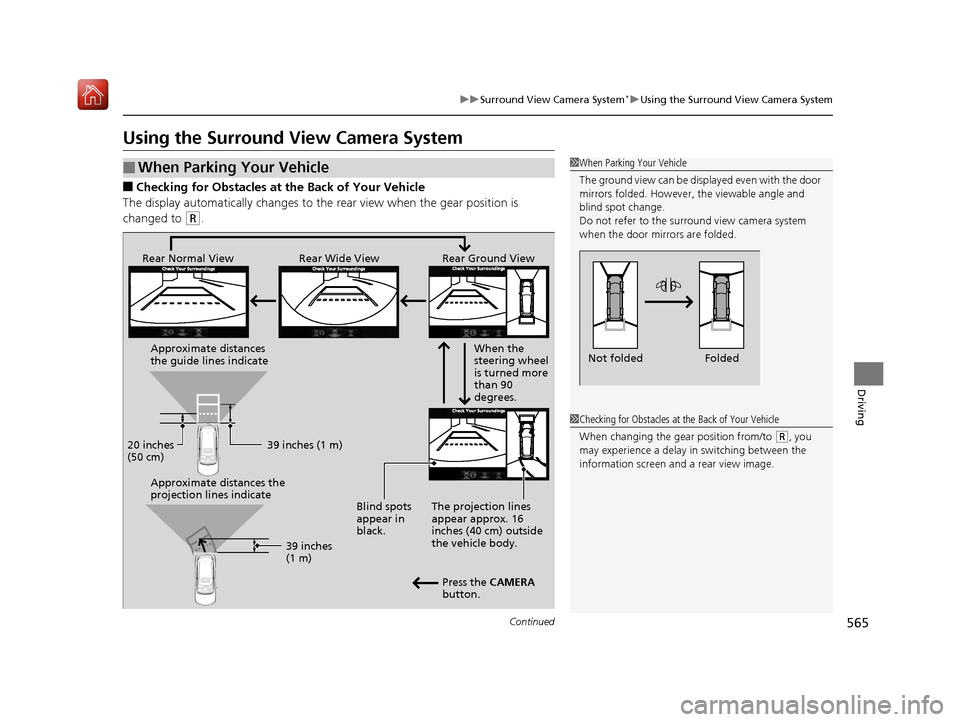
■Checking for Obstacles at the Back of Your Vehicle
The display automatically changes to the rear view when the gear position is
changed to
(R.
■When Parking Your Vehicle1 When Parking Your Vehicle
The ground view can be disp layed even with the door
mirrors folded. However, the viewable angle and
blind spot change.
Do not refer to the surround view camera system
when the door mirrors are folded.
Folded
Not folded
1 Checking for Obstacles at the Back of Your Vehicle
When changing the gear position from/to
(R, you
may experience a delay in switching between the
information screen and a rear view image.
Rear Wide View
Rear Normal View Rear Ground View
When the
steering wheel
is turned more
than 90
degrees.
The projection lines
appear approx. 16
inches (40 cm) outside
the vehicle body.
Blind spots
appear in
black.
Press the CAMERA
button.
Approximate distances
the guide lines indicate
Approximate distances the
projection lines indicate
39 inches (1 m)
20 inches
(50 cm)
39 inches
(1 m)
19 ACURA MDX-31TZ56510.book 565 ページ 2018年12月11日 火曜日 午後4時47分
Page 567 of 701

uuSurround View Camera System*uUsing the Surround View Camera System
566
Driving1. With your vehicle at a complete stop, press the CAMERA button, then press the
ENTER/MENU button. Rotate to select Back-in Left Park Guidance or
Back-in Right Park Guidance . Press .
2. Move the vehicle forward perpendicular to the parking space and stop where the
initial positioning guide in the display is at the center of the parking space.
3. Turn the steering wheel fully to the left (if the parking space is on the passenger
side) at a stop.
u The steering position alignment guide is displayed.
4. Slowly move the vehicle forward.
u
Stop the vehicle when the steering position alignment guide enters the parking space.
5. Turn the steering wheel fully to the right (if the parking space is on the passenger
side) at a stop. Start reve rsing the vehicle slowly.
6. Stop the vehicle when it is parallel to the parking lines.
7. Return the steering wheel to its center po sition, then reverse the vehicle slowly
until it is parked within the space.
■Reversing into a Parking Space Marked with Parking Lines1 Reversing into a Parking Space Marked with Parking Lines
If the steering position ali gnment guide does not fit in
the parking lines, the parking space is too small for
the vehicle.
Reference lines can be usef ul only when the parking
space is in a rectangular shape with straight parking
marks and when vehicles in the next parking spaces
are within the spaces.
Must be wider than approx. 8 feet (2.5 m)
The initial positioning
guide must come here.
Must be wider than approx. 20 feet (6 m) Make sure the guides
are within the parking
space when reversing.Initial
Positioning
Guide
Steering Position
Alignment Guide
A
B
C
Steering position alignment
guide enters the parking
space. (Step 4)
19 ACURA MDX-31TZ56510.book 566 ページ 2018年12月11日 火曜日 午後4時47分
Page 568 of 701
Continued567
uuSurround View Camera System*uUsing the Surround View Camera System
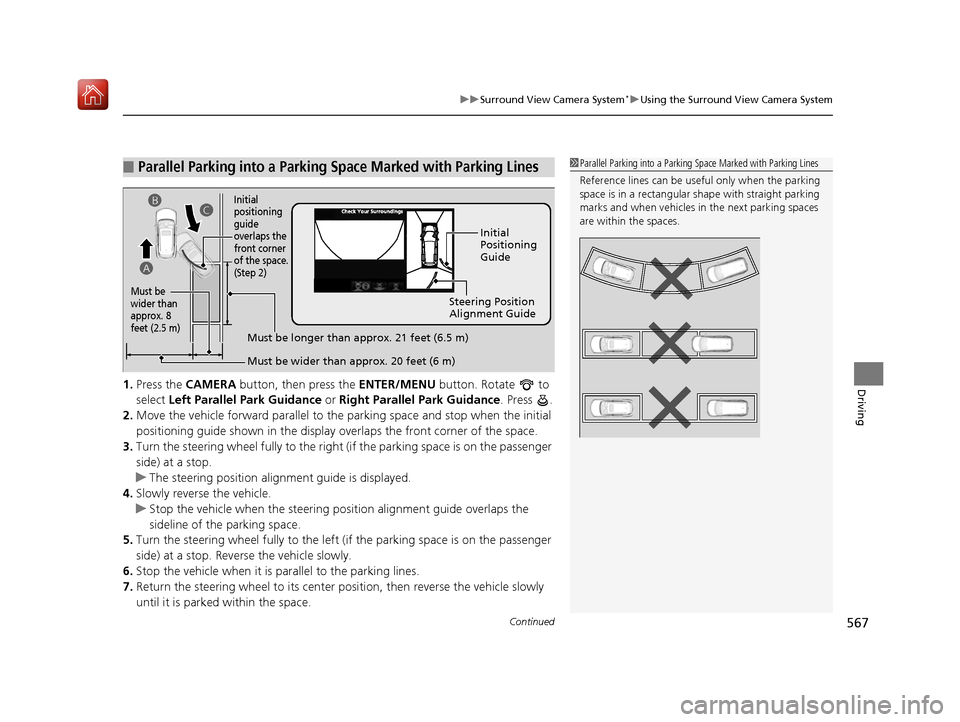
Driving1. Press the CAMERA button, then press the ENTER/MENU button. Rotate to
select Left Parallel Park Guidance or Right Parallel Park Guidance . Press .
2. Move the vehicle forward parallel to the parking space and stop when the initial
positioning guide shown in the display overlaps the front corner of the space.
3. Turn the steering wheel fully to the right (if the parking space is on the passenger
side) at a stop.
u The steering position alig nment guide is displayed.
4. Slowly reverse the vehicle.
u Stop the vehicle when the steering position alignment guide overlaps the
sideline of the parking space.
5. Turn the steering wheel fully to the left (if the parking space is on the passenger
side) at a stop. Revers e the vehicle slowly.
6. Stop the vehicle when it is parallel to the parking lines.
7. Return the steering wheel to its center pos ition, then reverse the vehicle slowly
until it is parked within the space.
■Parallel Parking into a Parking Space Marked with Parking Lines1Parallel Parking into a Parking Space Marked with Parking Lines
Reference lines can be usef ul only when the parking
space is in a rectangular shape with straight parking
marks and when vehicles in the next parking spaces
are within the spaces.
Initial
Positioning
Guide
Steering Position
Alignment Guide
Must be wider than approx. 20 feet (6 m)
Must be
wider than
approx. 8
feet (2.5 m)
Must be longer than approx. 21 feet (6.5 m)
A B
C
Initial
positioning
guide
overlaps the
front corner
of the space.
(Step 2)
19 ACURA MDX-31TZ56510.book 567 ページ 2018年12月11日 火曜日 午後4時47分
Page 569 of 701
uuSurround View Camera System*uUsing the Surround View Camera System
568
Driving
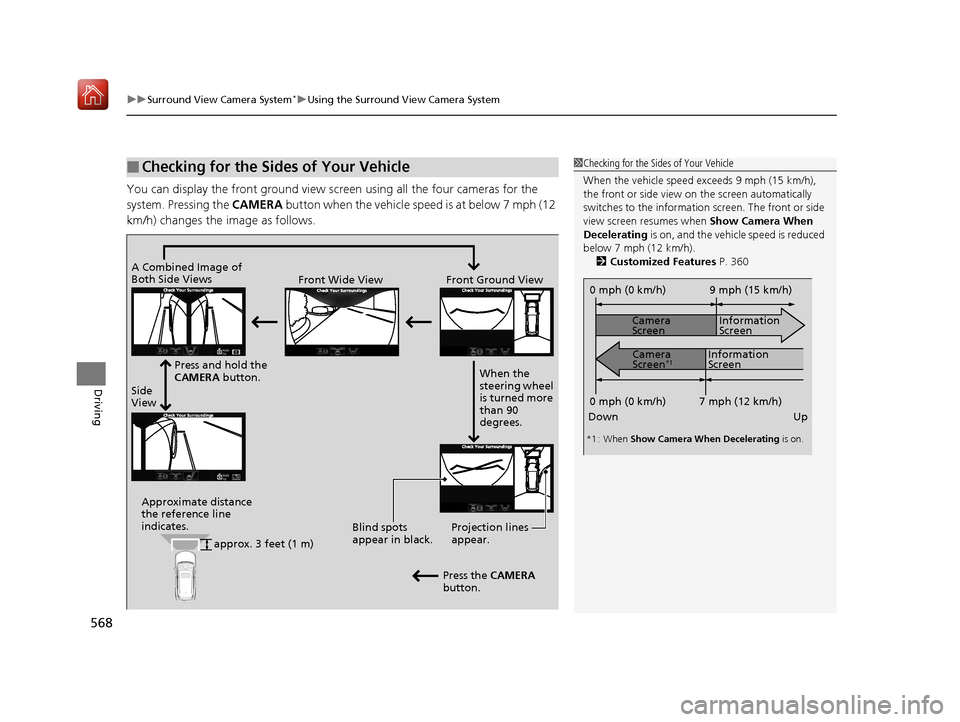
You can display the front ground view screen using all the four cameras for the
system. Pressing the CAMERA button when the vehicle sp eed is at below 7 mph (12
km/h) changes the image as follows.
■Checking for the Sides of Your Vehicle1Checking for the Sides of Your Vehicle
When the vehicle speed exceeds 9 mph (15 km/h),
the front or side view on the screen automatically
switches to the information screen. The front or side
view screen resumes when Show Camera When
Decelerating is on, and the vehicle speed is reduced
below 7 mph (12 km/h). 2 Customized Features P. 360
0 mph (0 km/h)
Down Up Camera
Screen
Camera
Screen
*1
Information
Screen
Information
Screen 9 mph (15 km/h)
7 mph (12 km/h)
0 mph (0 km/h)
*1 : When Show Camera When Decelerating is on.
Side
ViewFront Wide View Front Ground View
Press and hold the
CAMERA button.
A Combined Image of
Both Side Views
Approximate distance
the reference line
indicates. Blind spots
appear in black.Projection lines
appear.
Press the CAMERA
button. When the
steering wheel
is turned more
than 90
degrees.
approx. 3 feet (1 m)
19 ACURA MDX-31TZ56510.book 568 ページ 2018年12月11日 火曜日 午後4時47分
Page 570 of 701
Continued569
uuSurround View Camera System*uUsing the Surround View Camera System
Driving
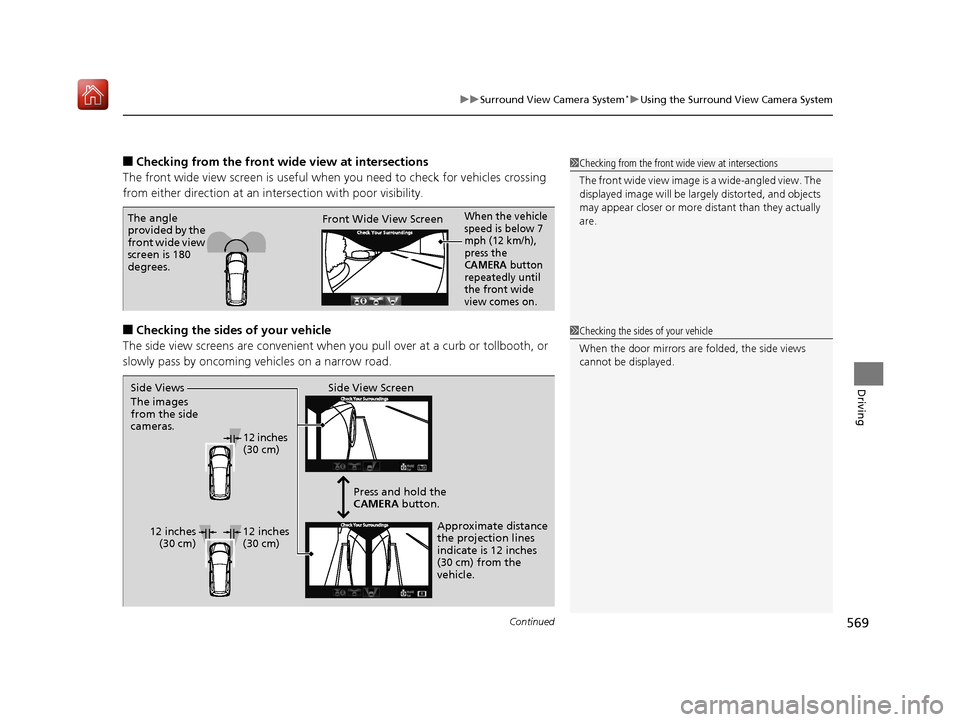
■Checking from the front wide view at intersections
The front wide view screen is useful when you need to check for vehicles crossing
from either direction at an inte rsection with poor visibility.
■Checking the sides of your vehicle
The side view screens are conv enient when you pull over at a curb or tollbooth, or
slowly pass by oncoming vehicles on a narrow road.
1 Checking from the front wide view at intersections
The front wide view image is a wide-angled view. The
displayed image will be largely distorted, and objects
may appear closer or more distant than they actually
are.
The angle
provided by the
front wide view
screen is 180
degrees. Front Wide View ScreenWhen the vehicle
speed is below 7
mph (12 km/h),
press the
CAMERA button
repeatedly until
the front wide
view comes on.
1 Checking the sides of your vehicle
When the door mirrors are folded, the side views
cannot be displayed.
Side View Screen
12 inches
(30 cm)
12 inches (30 cm) Press and hold the
CAMERA
button.
Approximate distance
the projection lines
indicate is 12 inches
(30 cm) from the
vehicle.
Side Views
The images
from the side
cameras.
12 inches
(30 cm)
19 ACURA MDX-31TZ56510.book 569 ページ 2018年12月11日 火曜日 午後4時47分
Page 571 of 701
570
uuSurround View Camera System*uUsing the Surround View Camera System
Driving
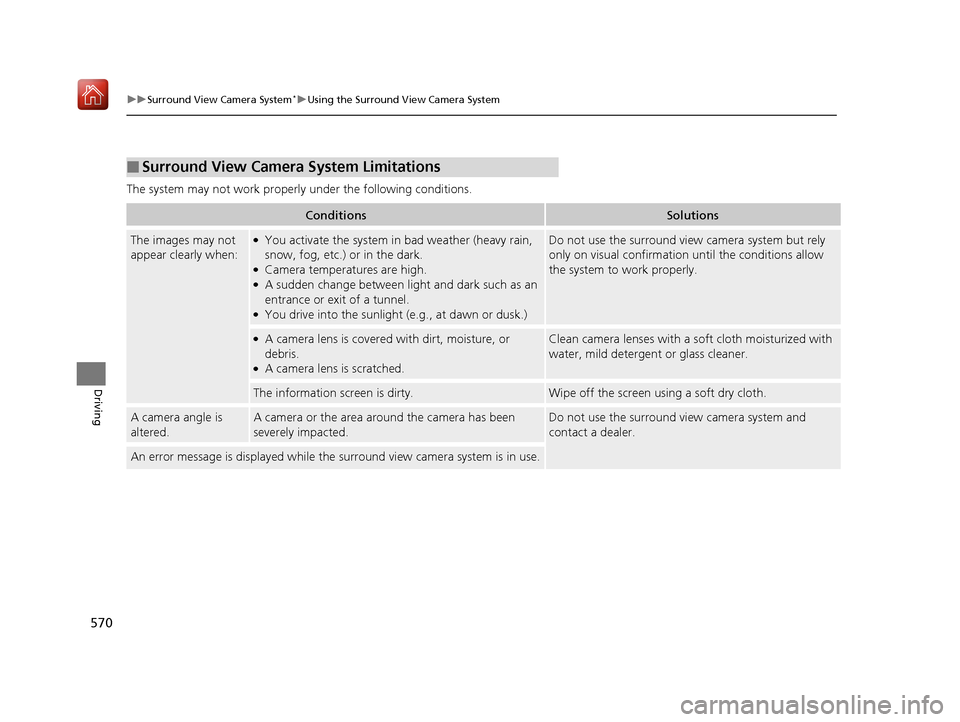
The system may not work properly under the following conditions.
■Surround View Camera System Limitations
ConditionsSolutions
The images may not
appear clearly when:●You activate the system in bad weather (heavy rain,
snow, fog, etc.) or in the dark.
●Camera temperatures are high.●A sudden change between lig ht and dark such as an
entrance or exit of a tunnel.
●You drive into the sunlight (e.g., at dawn or dusk.)
Do not use the surround view camera system but rely
only on visual confirmation until the conditions allow
the system to work properly.
●A camera lens is covered with dirt, moisture, or
debris.
●A camera lens is scratched.
Clean camera lenses with a soft cloth moisturized with
water, mild detergent or glass cleaner.
The information screen is dirty.Wipe off the screen using a soft dry cloth.
A camera angle is
altered.A camera or the area around the camera has been
severely impacted.Do not use the surround view camera system and
contact a dealer.
An error message is displayed while the surround view camera system is in use.
19 ACURA MDX-31TZ56510.book 570 ページ 2018年12月11日 火曜日 午後4時47分
Page 678 of 701
677
uuSpecifications u
Information
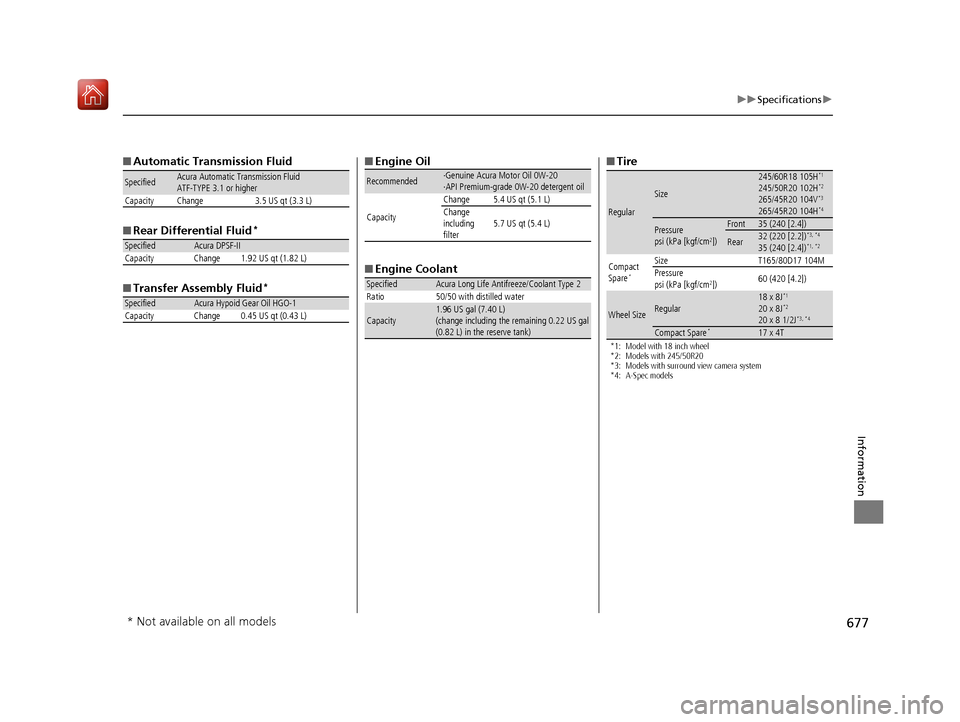
■Automatic Transmission Fluid
■ Rear Differential Fluid
*
■Transfer Assembly Fluid*
SpecifiedAcura Automatic Transmission Fluid
ATF-TYPE 3.1 or higher
Capacity Change 3.5 US qt (3.3 L)
SpecifiedAcura DPSF-II
Capacity Change 1.92 US qt (1.82 L)
SpecifiedAcura Hypoid Gear Oil HGO-1
Capacity Change 0.45 US qt (0.43 L)
■ Engine Oil
■ Engine Coolant
Recommended·Genuine Acura Motor Oil 0W-20
·API Premium-grade 0W-20 detergent oil
Capacity Change 5.4 US qt (5.1 L)
Change
including
filter
5.7 US qt (5.4 L)
SpecifiedAcura Long Life Antifreeze/Coolant Type 2
Ratio 50/50 with distilled water
Capacity1.96 US gal (7.40 L)
(change including the remaining 0.22 US gal
(0.82 L) in the reserve tank)
■ Tire
*1: Model with 18 inch wheel
*2: Models with 245/50R20
*3: Models with surround view camera system
*4: A-Spec models
Regular
Size
245/60R18 105H*1
245/50R20 102H*2
265/45R20 104V*3
265/45R20 104H*4
Pressure
psi (kPa [kgf/cm2])
Front35 (240 [2.4])
Rear32 (220 [2.2])*3, *4
35 (240 [2.4])*1, *2
Compact
Spare*
Size T165/80D17 104M
Pressure
psi (kPa [kgf/cm
2]) 60 (420 [4.2])
Wheel SizeRegular18 x 8J*1
20 x 8J*2
20 x 8 1/2J*3, *4
Compact Spare*17 x 4T
* Not available on all models
19 ACURA MDX-31TZ56510.book 677 ページ 2018年12月11日 火曜日 午後4時47分
Page 698 of 701
697
Index
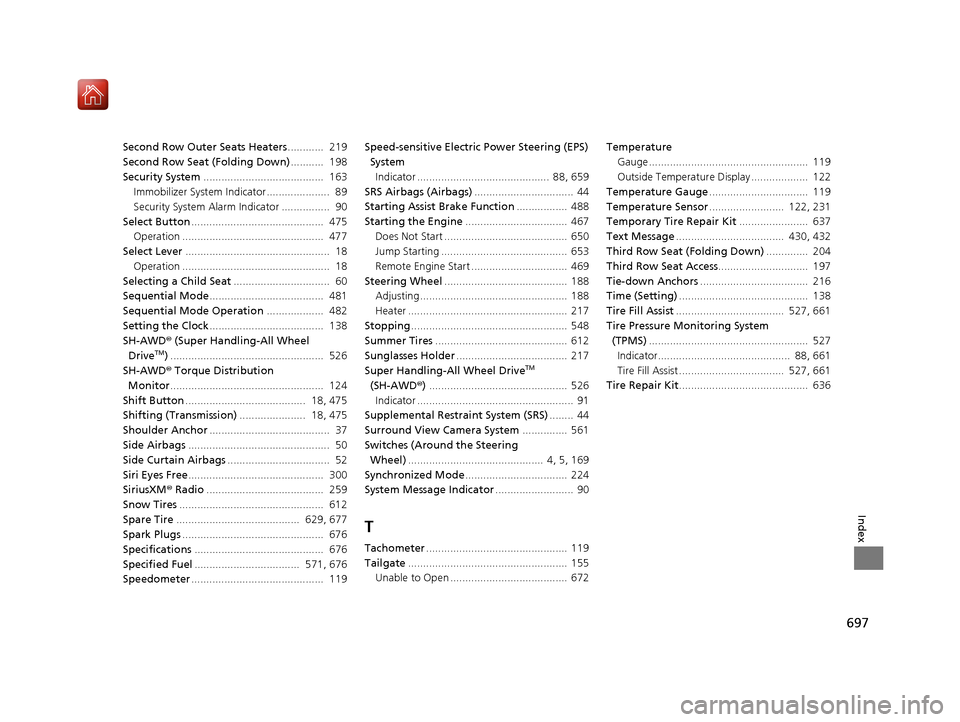
Second Row Outer Seats Heaters............ 219
Second Row Seat (Folding Down) ........... 198
Security System ........................................ 163
Immobilizer System Indicator..................... 89
Security System Alarm Indicator ................ 90
Select Button ............................................ 475
Operation ............................................... 477
Select Lever ................................................ 18
Operation ................................................. 18
Selecting a Child Seat ................................ 60
Sequential Mode ...................................... 481
Sequential Mode Operation ................... 482
Setting the Clock ...................................... 138
SH-AWD ® (Super Handling-All Wheel
Drive
TM) ................................................... 526
SH-AWD ® Torque Distribution
Monitor ................................................... 124
Shift Button ........................................ 18, 475
Shifting (Transmission) ...................... 18, 475
Shoulder Anchor ........................................ 37
Side Airbags ............................................... 50
Side Curtain Airbags .................................. 52
Siri Eyes Free ............................................. 300
SiriusXM ® Radio ....................................... 259
Snow Tires ................................................ 612
Spare Tire ......................................... 629, 677
Spark Plugs ............................................... 676
Specifications ........................................... 676
Specified Fuel ................................... 571, 676
Speedometer ............................................ 119 Speed-sensitive Electric Power Steering (EPS)
System
Indicator ............................................ 88, 659
SRS Airbags (Airbags) ................................. 44
Starting Assist Brake Function ................. 488
Starting the Engine .................................. 467
Does Not Start ......................................... 650
Jump Starting .......................................... 653
Remote Engine Start ................................ 469
Steering Wheel ......................................... 188
Adjusting ................................................. 188
Heater ..................................................... 217
Stopping .................................................... 548
Summer Tires ............................................ 612
Sunglasses Holder ..................................... 217
Super Handling-All Wheel DriveTM
(SH-AWD ®) .............................................. 526
Indicator .................................................... 91
Supplemental Restraint System (SRS) ........ 44
Surround View Camera System ............... 561
Switches (Around the Steering Wheel) ............................................. 4, 5, 169
Synchronized Mode .................................. 224
System Message Indicator .......................... 90
T
Tachometer............................................... 119
Tailgate ..................................................... 155
Unable to Open ....................................... 672 Temperature
Gauge ..................................................... 119
Outside Temperature Display ................... 122
Temperature Gauge ................................. 119
Temperature Sensor ......................... 122, 231
Temporary Tire Repair Kit ....................... 637
Text Message .................................... 430, 432
Third Row Seat (Folding Down) .............. 204
Third Row Seat Access .............................. 197
Tie-down Anchors .................................... 216
Time (Setting) ........................................... 138
Tire Fill Assist .................................... 527, 661
Tire Pressure Monitoring System (TPMS) ..................................................... 527
Indicator............................................ 88, 661
Tire Fill Assist ................................... 527, 661
Tire Repair Kit ........................................... 636
19 ACURA MDX-31TZ56510.book 697 ページ 2018年12月11日 火曜日 午後4時47分