accessory mode Acura MDX 2019 Owner's Guide
[x] Cancel search | Manufacturer: ACURA, Model Year: 2019, Model line: MDX, Model: Acura MDX 2019Pages: 701, PDF Size: 38.75 MB
Page 440 of 701

Continued439
uuAcuraLink ®*u
Features
Your subscribed telematics service prov ider can track your vehicle’s location,
remotely lock or unlock doors, and help you find your vehicle.
To use these features, you n eed your user ID and personal identification number
(PIN).
■Stolen vehicle tracking
This feature searches and tracks down your vehicle position even if it is on the move.
If you believe that your vehicle has been stolen, contact the police as well as the
provider.
■Remote door lock/unlock
The provider can remotely lock or unlock doors upon your request.
■Vehicle finder
This feature is convenient to use when trying to locate your vehicle in large areas,
such as a crowded parking lot. If you cannot locate your vehicle after using the
remote transmitter’s answerback function, you can contact the provider which can
then flash your vehicle’s exterior lights and sound the horn.
■Security ala rm notification
If the security system in your vehicle detects an abnormal condition, such as
someone tampering with the lock on your vehicle, the provider notifies you by your
preferred method.
■Security Features1 Security Features
The contact information of your provider, your user
ID and PIN will be given when you subscribe to
AcuraLink. If you forget any of the above, contact a
dealer, or visit owners.acura.com (U.S.) or
www.acura.ca/owners/acuralink (Canada).
You can also activate the remote door lock/unlock
and vehicle finder features from the Internet or using
your smartphone app. As k a dealer, or visit
owners.acura.com (U.S.) or www.acura.ca/owners/
acuralink (Canada) for details.
1Vehicle finder
The lights will stop flas hing and horn will stop
sounding under the foll owing conditions:
•When 30 seconds have elapsed.
•You unlock the doors using the remote transmitter.•You unlock the doors using the keyless access
system.
•You unlock the doors using the built-in key.•The power mode is set to ACCESSORY or ON.
19 ACURA MDX-31TZ56510.book 439 ページ 2018年12月11日 火曜日 午後4時47分
Page 474 of 701
473
uuWhen Driving uPrecautions While Driving
Driving
Precautions While Driving
Utility vehicles have a significantly higher rollover rate than other types of vehicles.
To prevent rollovers or loss of control:
• Take corners at slower speeds than yo u would with a passenger vehicle.
• Avoid sharp turns and abrupt maneuvers whenever possible.
• Do not modify your vehicle in any way th at you would raise the center of gravity.
• Do not carry heavy cargo on the roof.
Never carry more than 165 lbs (75 kg) of ca rgo on the roof rack (Acura accessory).
Avoid driving in deep water and on flooded roads. This can damage the engine or
driveline, or cause electrical component failure.
If there is a strong impact with something under the vehicle, stop in a safe location.
Check the underside of the vehicle for damage or any fluid leaks.
■Driving Guidelines for Your Utility Vehicle
■In Rain
■Other Precautions
1 Precautions While Driving
NOTICE
Do not change the gear position while pressing the
accelerator pedal. You could damage the
transmission.
NOTICE
If you repeatedly turn the steering wheel at an
extremely low speed, or hold the steering wheel in
the full left or right position for a while, the system
heats up. The system goes into a protective mode,
and limits its performa nce. The steering wheel
becomes harder and harder to operate. Once the
system cools down, the EPS system is restored.
Repeated operation under these conditions can
eventually damage the system.
If the power mode is set to ACCESSORY while
driving, the engine will shut down and all steering
and brake power assist functi ons will stop, making it
difficult to control the vehicle.
Do not change the gear position to
( N, as you will
lose engine braking (and acceleration) performance.
During the first 600 miles (1,000 km) of operation,
avoid sudden acceleration or full throttle operation so
as not to damage the engine or powertrain.
Avoid hard braking for the first 200 miles (300 km).
You should also follow this when the brake pads are
replaced.
19 ACURA MDX-31TZ56510.book 473 ページ 2018年12月11日 火曜日 午後4時47分
Page 480 of 701
![Acura MDX 2019 Owners Guide Continued479
uuWhen Driving uShifting
Driving
■If you want to keep the transmission in (N position [car wash mode]
With the engine running:
1. Press and hold the brake pedal.
2. Select
(N, then rel](/img/32/9711/w960_9711-479.png "Acura MDX 2019 Owners Guide Continued479
uuWhen Driving uShifting
Driving
■If you want to keep the transmission in (N position [car wash mode]
With the engine running:
1. Press and hold the brake pedal.
2. Select
(N, then rel")
Continued479
uuWhen Driving uShifting
Driving
■If you want to keep the transmission in (N position [car wash mode]
With the engine running:
1. Press and hold the brake pedal.
2. Select
(N, then release the button to display (N (Neutral) hold mode on the MID.
3. Press and hold
(N again for two seconds.
u This puts the vehicle in car wash mode which must be used when your vehicle
is pulled through a conveyor type automatic car wash where you or an
attendant do not remain in the vehicle.
If the ENGINE START/STOP button is pressed
after car wash mode has been activated, the
power mode will change to ACCESSORY and
a message will be displayed on the multi-
information display. u The gear position remains in
(N with the
power mode in ACCESSORY for 15
minutes, then, it automatically changes
to
(P and the power mode changes to
OFF.
u Manually changing to
(P cancels
ACCESSORY mode. The
(P indicator
comes on and the power mode changes
to OFF. You must always shift to
(P
when car wash mode is no longer
needed.
1 If you want to keep the transmission in (N position [car wash
mode]
The transmission may not stay in
(N position while
the following indicators ar e on or when the message
below appears:
•Malfunction indicator lamp
•Transmission system indicator
•Charging system indicator•The Charging System Problem message on the
MID.
19 ACURA MDX-31TZ56510.book 479 ページ 2018年12月11日 火曜日 午後4時47分
Page 486 of 701
Continued485
uuWhen Driving uAuto Idle Stop
Driving
The vehicle stops with the gear position in (D and the brake pedal depressed.
When you put the transmission into
(P, the Auto Idle Stop continues to operate,
even if the brake pedal is released. u If you change the gear position, th e engine may automatically restarts.
■Auto Idle Stop does not activate when:
• The Auto Idle Stop OFF button is pressed.
• The driver’s seat belt is not fastened.
• The engine coolant temperature is low or high.
• The transmission fluid temperature is low or high.
• The vehicle comes to a stop again befo re the vehicle speed reaches 3 mph (5
km/h) after the engine starts.
• Stopped on a steep incline.
• The transmission is in a position other than
(D.
• The engine is started with the hood open.
u Turn off the engine. Close the hood before you restart the engine to activate
Auto Idle Stop.
• The battery charge is low.
• The internal temperature of the ba ttery is 14°F (−10°C). or less.
• The climate control system is in use, and the outside temperature is below −4°F
(−20°C) or over 104°F (40°C).
• The climate control system is in use, and the temperature is set to the Hi or Lo.
• is ON (indicator on).
• When the rear fan is set to maximum speed.
u Auto Idle Stop may not activate under other conditions when the rear climate
control system is in use.
■Auto Idle Stop Activates When:1 Auto Idle Stop Activates When:
When ACC with LSF is in operation, the vehicle stops
without depressing the br ake pedal and Auto Idle
Stop may activate.
Do not open the hood while the Auto Idle Stop
function is activated. If the hood is opened, the
engine will not re start automatically.
In this case, restart the engine with the ENGINE
START/STOP button. 2 Starting the Engine P. 467
Pressing the ENGINE START/STOP button changes
the power mode to ACCESSORY even while Auto Idle
Stop is in operation. Once in ACCESSORY, the engine
no longer restarts automatica lly. Follow the standard
procedure to start the engine.
2 Starting the Engine P. 467
19 ACURA MDX-31TZ56510.book 485 ページ 2018年12月11日 火曜日 午後4時47分
Page 642 of 701
Continued641
uuIf a Tire Goes Flat uTemporarily Repairing a Flat Tire*
Handling the Unexpected
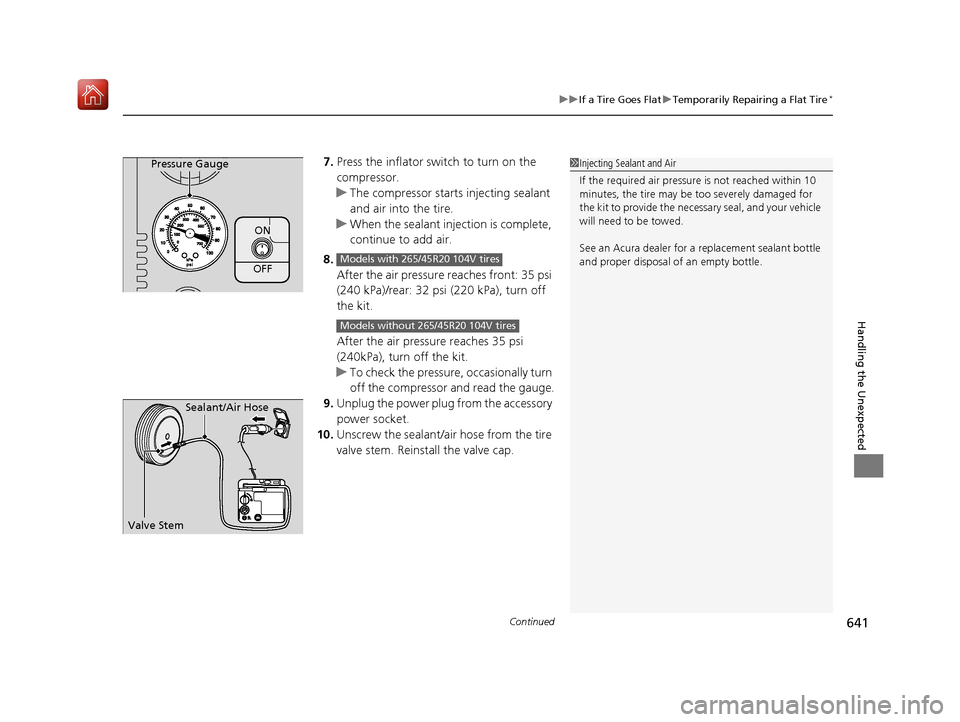
7. Press the inflator switch to turn on the
compressor.
u The compressor starts injecting sealant
and air into the tire.
u When the sealant injection is complete,
continue to add air.
8. After the air pressure reaches front: 35 psi
(240 kPa)/rear: 32 psi (220 kPa), turn off
the kit.
After the air pressure reaches 35 psi
(240kPa), turn off the kit.
u To check the pressure, occasionally turn
off the compressor and read the gauge.
9. Unplug the power plug from the accessory
power socket.
10. Unscrew the sealant/ai r hose from the tire
valve stem. Reinstall the valve cap.Pressure Gauge
ON
OFFModels with 265/45R20 104V tires
Models without 265/45R20 104V tires
1 Injecting Sealant and Air
If the required air pressure is not reached within 10
minutes, the tire may be too severely damaged for
the kit to provide the necessa ry seal, and your vehicle
will need to be towed.
See an Acura dealer for a replacement sealant bottle
and proper disposal of an empty bottle.
Sealant/Air Hose
Valve Stem
19 ACURA MDX-31TZ56510.book 641 ページ 2018年12月11日 火曜日 午後4時47分
Page 652 of 701

651
uuEngine Does Not Start uIf the Keyless Access Remote Battery is Weak
Handling the Unexpected
If the Keyless Access Re mote Battery is Weak
If the beeper sounds, the To Start, Hold Remote Near Start Button message
appears on the multi-information di splay, and the indicator on the ENGINE START/
STOP button flashes, and the engine won’t start, start the engine as follows:
1. Touch the center of the ENGINE START/
STOP button with the A logo on the keyless
access remote while the indicator on the
ENGINE START/STOP button is flashing.
The buttons on the keyless access remote
should be facing you.
u The indicator flashes for about 30
seconds.
2. Depress the brake pedal and press the
ENGINE START/STOP button within 10
seconds after the beeper sounds while the
indicator stays on.
u If you don’t depress the pedal, the mode
will change to ACCESSORY.
ENGINE
START
STOP
19 ACURA MDX-31TZ56510.book 651 ページ 2018年12月11日 火曜日 午後4時47分
Page 691 of 701
Index
690
Index
Index
A
AAC.................................................... 270, 295
ABS (Anti-lock Brake System) ................... 537
AC Power Outlet ....................................... 215
Accessories and Modifications ................. 625
Accessory Power Sockets .......................... 214
AcuraLink .................................................. 437
Adaptive Cruise Control (ACC) with Low
Speed Follow (LSF) .................................. 492
Indicator .................................................... 95
Additives
Coolant ................................................... 591
Washer .................................................... 594
Adjusting
Armrest ................................................... 205
Front Seats .............................................. 192
Head Restraints........................ 199, 201, 202
Headlights ............................................... 595
Mirrors .................................................... 189
Rear Seats................................................ 204
Steering Wheel ........................................ 188
Temperature ............................................ 122
Agile Handling Assist ................................ 522
Air Conditioning System (Climate Control System) .................................................... 220
Changing the Mode ................................ 223
Defrosting the Windshield and Windows ............................................... 226
Dust and Pollen Filter ............................... 619
Rear Climate Control System ................... 227
Sensors .................................................... 231 Synchronized Mode................................. 224
Using Automatic Climate Control ............ 220
Air Pressure ....................................... 605, 677
Airbags ........................................................ 41
Advanced Airbags ..................................... 47
After a Collision ........................................ 45
Airbag Care............................................... 55
Driver’s Knee Airbag.................................. 48
Event Data Recorder .................................... 0
Front Airbags (SRS) .................................... 44
Indicator.............................................. 53, 86
Passenger Front Airbag Off Indicator ......... 54
Sensors ..................................................... 41
Side Airbags .............................................. 50
Side Curtain Airbags.................................. 52
AM/FM Radio ............................................ 256
Android Auto ........................................... 305
Anti-lock Brake System (ABS) .................. 537
Indicator.................................................... 86
Apple CarPlay ........................................... 301
Armrest ..................................................... 205
Audio Remote Controls ........................... 239
Audio System ............................................ 234
Adjusting the Sound................................ 251
Auxiliary Input Jack.................................. 238
Error Messages ........................................ 310
General Information ................................ 318
HDD ........................................................ 273
Internet Radio ......................................... 293
iPhone............................................. 293, 320
iPod ........................................................ 286 MP3/WMA/AAC ............................. 270, 295
Reactivating ............................................ 238
Recommended CDs ................................ 319
Recommended Devices ........................... 320
Remote Controls ..................................... 239
Security Code ......................................... 238
Theft Protection ...................................... 238
USB Flash Drives...................................... 320
USB Port ................................................. 235
Authorized Manuals ................................ 685
Auto Door Locking/Unlocking ................ 154
Customize ...................................... 132, 376
Auto High-Beam ...................................... 177
Indicator ................................................... 86
Auto Idle Stop .......................................... 483
OFF Button ............................................. 484
Auto Idle Stop Indicator (Green) .............. 92
Auto Idle Stop System Indicator (Amber) ..................................................... 92
Automatic Brake Hold ............................. 535
Indicator ................................................. 535
Automatic Brake Hold System
Indicator ................................................. 535
Automatic Folding Door Mirror .............. 191
Automatic Intermittent Wipers .............. 181
Aut o
matic Lighting .................................. 174
Automatic Transmission .......................... 474
Creeping................................................. 474
Fluid ....................................................... 593
Kickdown ............................................... 474
Operating the Shift Button ...................... 477
19 ACURA MDX-31TZ56510.book 690 ページ 2018年12月11日 火曜日 午後4時47分