Hood Acura MDX 2019 Owner's Guide
[x] Cancel search | Manufacturer: ACURA, Model Year: 2019, Model line: MDX, Model: Acura MDX 2019Pages: 701, PDF Size: 38.75 MB
Page 591 of 701
uuMaintenance Under the Hood uChanging the Engine Oil and Oil Filter
590
Maintenance
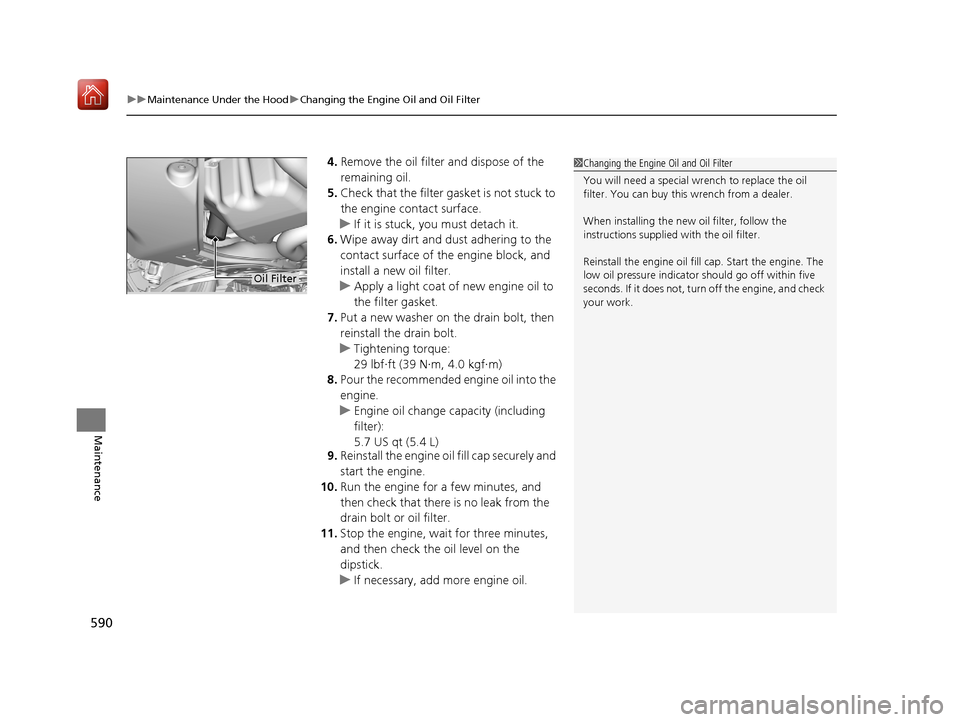
4. Remove the oil filter and dispose of the
remaining oil.
5. Check that the filter ga sket is not stuck to
the engine contact surface.
u If it is stuck, you must detach it.
6. Wipe away dirt and dust adhering to the
contact surface of the engine block, and
install a new oil filter.
u Apply a light coat of new engine oil to
the filter gasket.
7. Put a new washer on the drain bolt, then
reinstall the drain bolt.
u Tightening torque:
29 lbf∙ft (39 N∙m, 4.0 kgf∙m)
8. Pour the recommended engine oil into the
engine.
u Engine oil change capacity (including
filter):
5.7 US qt (5.4 L)
9. Reinstall the engine oil fill cap securely and
start the engine.
10. Run the engine for a few minutes, and
then check that there is no leak from the
drain bolt or oil filter.
11. Stop the engine, wait for three minutes,
and then check the oil level on the
dipstick.
u If necessary, add more engine oil.1Changing the Engine Oil and Oil Filter
You will need a special wrench to replace the oil
filter. You can buy this wrench from a dealer.
When installing the new oil filter, follow the
instructions supplied with the oil filter.
Reinstall the engine oil fill cap. Start the engine. The
low oil pressure indicator should go off within five
seconds. If it does not, turn off the engine, and check
your work.
Oil Filter
19 ACURA MDX-31TZ56510.book 590 ページ 2018年12月11日 火曜日 午後4時47分
Page 592 of 701
591
uuMaintenance Under the Hood uEngine Coolant
Continued
Maintenance
Engine Coolant
This coolant is premixed with 50% an tifreeze and 50% water. Do not add any
straight antifreeze or water.
We recommend you check the engine coolant level every time you refuel. Check the
reserve tank first. If it is completely empty, also check the coolant level in the
radiator. Add the engine coolant accordingly.
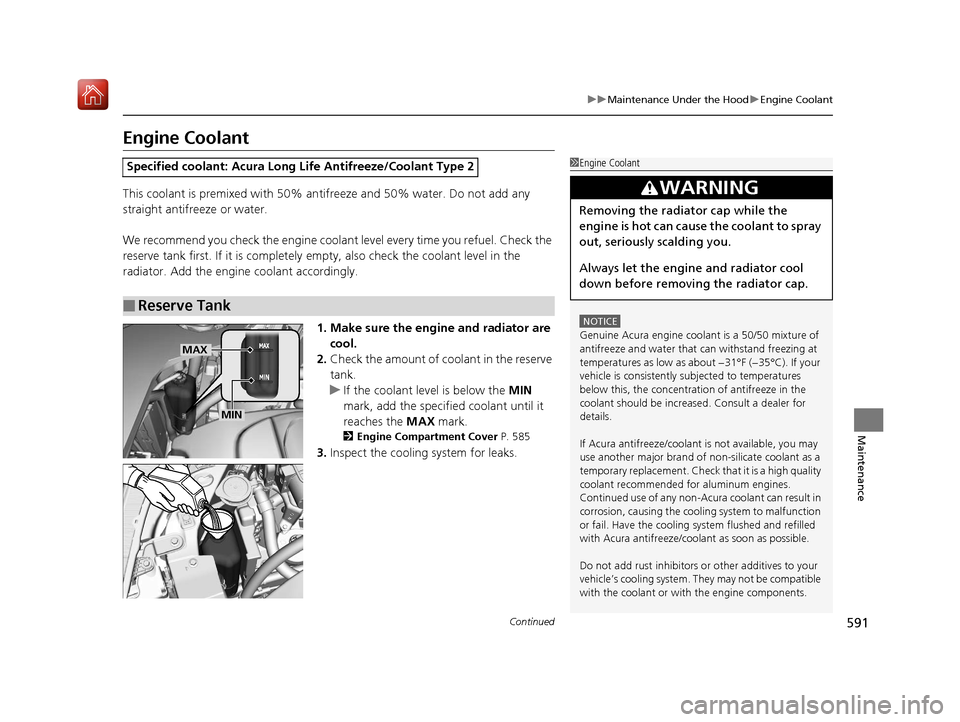
1. Make sure the engine and radiator are cool.
2. Check the amount of coolant in the reserve
tank.
u If the coolant level is below the MIN
mark, add the specified coolant until it
reaches the MAX mark.
2Engine Compartment Cover P. 585
3.Inspect the cooling system for leaks.
Specified coolant: Acura Long Life Antifreeze/Coolant Type 2
■Reserve Tank
1Engine Coolant
NOTICE
Genuine Acura engine cool ant is a 50/50 mixture of
antifreeze and water that can withstand freezing at
temperatures as low as about −31°F (−35°C). If your
vehicle is consistently subjected to temperatures
below this, the concentration of antifreeze in the
coolant should be increased. Consult a dealer for
details.
If Acura antifreeze/coolant is not available, you may
use another major brand of non-silicate coolant as a
temporary replacement. Check that it is a high quality
coolant recommended for aluminum engines.
Continued use of any non-Acur a coolant can result in
corrosion, causing the cooling system to malfunction
or fail. Have the cooling system flushed and refilled
with Acura antifreeze/cool ant as soon as possible.
Do not add rust inhibitors or other additives to your
vehicle’s cooling system. They may not be compatible
with the coolant or with the engine components.
3WARNING
Removing the radiator cap while the
engine is hot can cause the coolant to spray
out, seriously scalding you.
Always let the engine and radiator cool
down before removing the radiator cap.
MAX
MIN
19 ACURA MDX-31TZ56510.book 591 ページ 2018年12月11日 火曜日 午後4時47分
Page 593 of 701
uuMaintenance Under the Hood uEngine Coolant
592
Maintenance
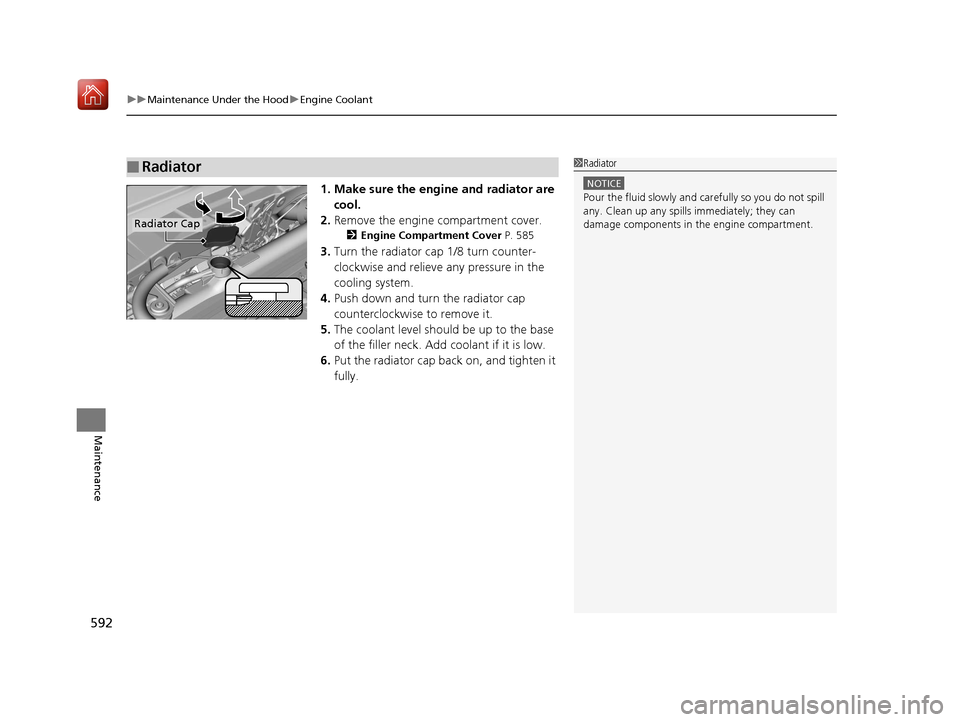
1. Make sure the engine and radiator are
cool.
2. Remove the engine compartment cover.
2 Engine Compartment Cover P. 585
3.Turn the radiator cap 1/8 turn counter-
clockwise and relieve any pressure in the
cooling system.
4. Push down and turn the radiator cap
counterclockwise to remove it.
5. The coolant level should be up to the base
of the filler neck. Add coolant if it is low.
6. Put the radiator cap back on, and tighten it
fully.
■Radiator1Radiator
NOTICE
Pour the fluid slowly and ca refully so you do not spill
any. Clean up any spills immediately; they can
damage components in the engine compartment.
Radiator Cap
19 ACURA MDX-31TZ56510.book 592 ページ 2018年12月11日 火曜日 午後4時47分
Page 594 of 701
593
uuMaintenance Under the Hood uTransmission Fluid
Maintenance
Transmission Fluid
Have a dealer check the fluid level and replace if necessary.
Do not attempt to check or change th e automatic transmission fluid yourself.
■Automatic Transmission Fluid
Specified fluid: Acura Automatic Transmission Flui d ATF-TYPE 3.1 or higher
1Automatic Transmission Fluid
NOTICE
Do not mix Acura ATF-TYPE 3.1 (or higher) with
other transmission fluids.
Using a transmission fluid ot her than Acura ATF-TYPE
3.1 (or higher) may advers ely affect the operation
and durability of your ve hicle’s transmission, and
damage the transmission.
Any damage caused by usi ng a transmission fluid that
is not equivalent to Acura ATF-TYPE 3.1 (or higher) is
not covered by Acura’s new vehicle limited warranty.
19 ACURA MDX-31TZ56510.book 593 ページ 2018年12月11日 火曜日 午後4時47分
Page 595 of 701
594
uuMaintenance Under the Hood uBrake Fluid
Maintenance
Brake Fluid
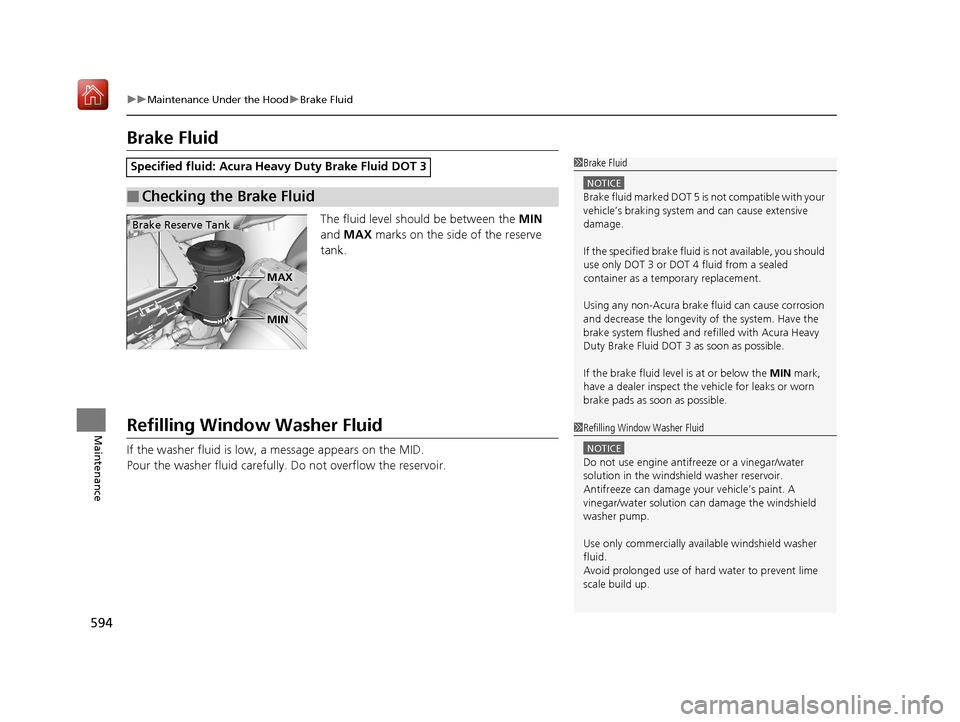
The fluid level should be between the MIN
and MAX marks on the side of the reserve
tank.
Refilling Window Washer Fluid
If the washer fluid is low, a message appears on the MID.
Pour the washer fluid carefully. Do not overflow the reservoir.
Specified fluid: Acura Heavy Duty Brake Fluid DOT 3
■Checking the Brake Fluid
1Brake Fluid
NOTICE
Brake fluid marked DOT 5 is not compatible with your
vehicle’s braking system and can cause extensive
damage.
If the specified brake fluid is not available, you should
use only DOT 3 or DOT 4 fluid from a sealed
container as a temporary replacement.
Using any non-Acura brake fl uid can cause corrosion
and decrease the longevity of the system. Have the
brake system flushed and re filled with Acura Heavy
Duty Brake Fluid DOT 3 as soon as possible.
If the brake fluid level is at or below the MIN mark,
have a dealer inspect the vehicle for leaks or worn
brake pads as soon as possible.
Brake Reserve Tank
MIN
MAX
1 Refilling Window Washer Fluid
NOTICE
Do not use engine antifreeze or a vinegar/water
solution in the windshield washer reservoir.
Antifreeze can damage y our vehicle’s paint. A
vinegar/water solution ca n damage the windshield
washer pump.
Use only commercially avai lable windshield washer
fluid.
Avoid prolonged use of hard water to prevent lime
scale build up.
19 ACURA MDX-31TZ56510.book 594 ページ 2018年12月11日 火曜日 午後4時47分
Page 620 of 701
619
Maintenance
Climate Control System Maintenance
Air Conditioning
To ensure proper and safe operation, the Society of Automotive Engineers (SAE
J2845) recommends that the refrigerant system only be serviced by trained and
certified technicians.
Never repair or replace the air conditio ning evaporator (cooling coil) with one
removed from a used or salvaged vehicle.
New replacement mobile air conditioning evaporators must be certified (and
labeled) as meeting SAE Standard J2842.
Dust and Pollen Filter
The climate control system is equipped with a dust and pollen filter that collects
pollen, dust, and other debris in the air. The Maintenance MinderTM messages will let
you know when to replace the filter.
We recommend that you replace the dust an d pollen filter sooner when using your
vehicle in areas with high concentrations of dust.
U.S. models
1 Air Conditioning
NOTICE
Vented refrigerant is harmful to the environment.
To avoid refrigerant from venting, never replace the
evaporator with one re moved from a used or
salvaged vehicle.
Refrigerant in your vehicle’s air conditioning system is
flammable and can be igni ted during servicing if
proper procedures are not followed.
The air conditioner labe l is found under the hood:
2 Safety Labels P. 75
2 Specifications P. 676
1Dust and Pollen Filter
If the airflow from the climate control system
deteriorates noticeably, and the windows fog up
easily, the filter may need to be replaced. Please
contact a dealer for replacement.
19 ACURA MDX-31TZ56510.book 619 ページ 2018年12月11日 火曜日 午後4時47分
Page 654 of 701
653Continued
Handling the Unexpected
Jump Starting
Turn off the power to electric devices, such as audio and lights. Turn off the engine,
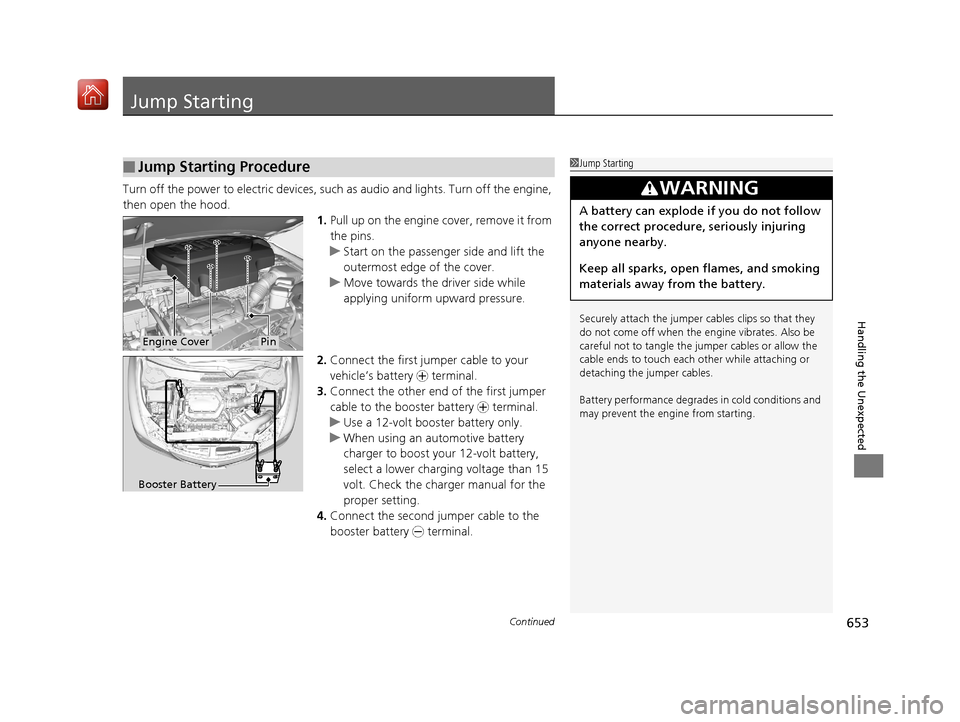
then open the hood. 1.Pull up on the engine cover, remove it from
the pins.
u Start on the passenger side and lift the
outermost edge of the cover.
u Move towards the driver side while
applying uniform upward pressure.
2. Connect the first jumper cable to your
vehicle’s battery + terminal.
3. Connect the other end of the first jumper
cable to the booster battery + terminal.
u Use a 12-volt booster battery only.
u When using an automotive battery
charger to boost your 12-volt battery,
select a lower charging voltage than 15
volt. Check the charger manual for the
proper setting.
4. Connect the second jumper cable to the
booster battery - terminal.
■Jump Starting Procedure1Jump Starting
Securely attach the jumper cables clips so that they
do not come off when the e ngine vibrates. Also be
careful not to tangle the ju mper cables or allow the
cable ends to touch each other while attaching or
detaching the jumper cables.
Battery performance degrades in cold conditions and
may prevent the engi ne from starting.
3WARNING
A battery can explode if you do not follow
the correct procedure, seriously injuring
anyone nearby.
Keep all sparks, open flames, and smoking
materials away from the battery.
Engine CoverPin
Booster Battery
19 ACURA MDX-31TZ56510.book 653 ページ 2018年12月11日 火曜日 午後4時47分
Page 656 of 701
655Continued
Handling the Unexpected
Overheating
How to Handle Overheating
Overheating symptoms are as follows:
•The temperature gauge needle is at the mark or the engine suddenly loses
power.
• The Stop Driving When Safe. En gine Temperature Too Hot message appears
on the multi-information display (MID).
• Steam or spray comes out of the engine compartment.
■First thing to do
1. Immediately park the vehicle in a safe place.
2. Turn off all accessories and turn on the hazard warning lights.
u No steam or spray present: Keep the engine running and open the hood.
u Steam or spray is present: Turn off the engine and wait until it subsides.
Then, open the hood.
1 How to Handle Overheating
NOTICE
Continuing to drive with the temperature gauge
needle at the mark may damage the engine.
3WARNING
Steam and spray from an overheated
engine can seriously scald you.
Do not open the hood if steam is coming
out.
H
H
19 ACURA MDX-31TZ56510.book 655 ページ 2018年12月11日 火曜日 午後4時47分
Page 658 of 701
657
Handling the Unexpected
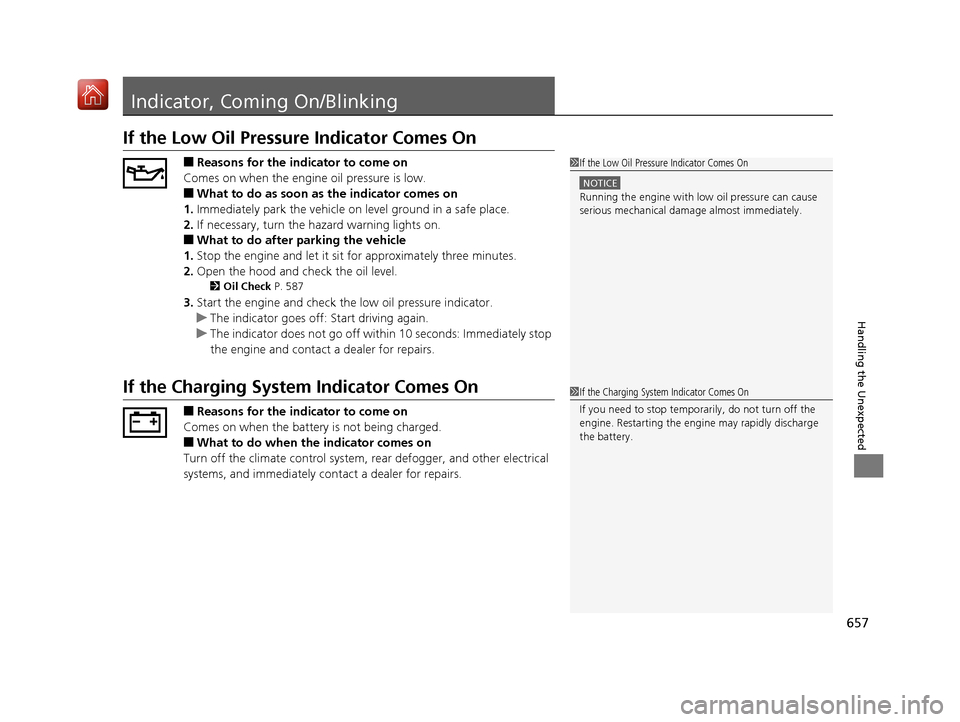
Indicator, Coming On/Blinking
If the Low Oil Pressure Indicator Comes On
■Reasons for the indicator to come on
Comes on when the engine oil pressure is low.
■What to do as soon as the indicator comes on
1. Immediately park the vehicle on level ground in a safe place.
2. If necessary, turn the hazard warning lights on.
■What to do after parking the vehicle
1. Stop the engine and let it sit for approximately three minutes.
2. Open the hood and check the oil level.
2 Oil Check P. 587
3.Start the engine and check th e low oil pressure indicator.
u The indicator goes off: Start driving again.
u The indicator does not go off within 10 seconds: Immediately stop
the engine and contact a dealer for repairs.
If the Charging System Indicator Comes On
■Reasons for the indicator to come on
Comes on when the battery is not being charged.
■What to do when th e indicator comes on
Turn off the climate control system, rear defogger, and other electrical
systems, and immediately co ntact a dealer for repairs.
1If the Low Oil Pressure Indicator Comes On
NOTICE
Running the engine with low oil pressure can cause
serious mechanical damage almost immediately.
1If the Charging System Indicator Comes On
If you need to stop temporarily, do not turn off the
engine. Restarting the engi ne may rapidly discharge
the battery.
19 ACURA MDX-31TZ56510.book 657 ページ 2018年12月11日 火曜日 午後4時47分
Page 696 of 701
695
Index
Bulb Replacement ................................... 595
Daytime Running Lights .......................... 176
High Beam Indicator ................................. 88
Interior.................................................... 207
Light Switches......................................... 173
Lights On Indicator.................................... 89
Turn Signals ............................................ 172
Load Limits ............................................... 451
Locking/Unlocking ................................... 139
Auto Door Locking/Unlocking ................. 154
Childproof Door Locks ............................ 153
From Inside ............................................. 151
From Outside .......................................... 142
Keys........................................................ 139
Using a Key............................................. 148
Lockout Prevention System ..................... 149
Low Battery Charge ................................. 657
Low Fuel Indicator ..................................... 85
Low Oil Pressure Indicator ................. 82, 657
Lower Anchors ..................................... 61, 68
Lubricant Specifications Chart ................ 677
Luggage (Maximum Load Limit) ............. 451
Lumbar Support ....................................... 192
M
Maintenance............................................ 575
Battery .................................................... 613
Brake Fluid .............................................. 594
Cleaning ................................................. 620
Climate Control System .......................... 619 Coolant ................................................... 591
Maintenance Minder
TM............................ 579
Oil ........................................................... 587
Precautions .............................................. 576
Radiator .................................................. 592
Remote Control ....................................... 617
Remote Transmitter ......................... 615, 616
Replacing Light Bulbs ............................... 595
Safety ...................................................... 577
Service Items ........................................... 581
Tires ........................................................ 604
Transmission Fluid ................................... 593
Under the Hood ...................................... 583
Wireless Headphone ................................ 618
Malfunction Indicator Lamp .............. 82, 658
Map Lights ................................................ 208
Maximum Load Limit ............................... 451
Meters, Gauges ......................................... 119
MID (Multi-information Display) ............. 120
Mirrors ....................................................... 189
Adjusting ................................................. 189
Door........................................................ 190
Exterior .................................................... 190
Interior Rearview ..................................... 189
Modifications (and Accessories) .............. 625
Moonroof .................................................. 168
MP3 ................................................... 270, 295
Multi-function Steering-wheel
Controls ................................................... 120
Multi-Information Display (MID) ............. 120
Multi-View Rear Camera .......................... 559N
Numbers (Identification).......................... 678
O
Odometer................................................. 121
Off-Highway Driving Guidelines ............. 465
Oil (Engine) Adding .................................................... 588
Checking................................................. 587
Displaying Oil Life .................................... 579
Low Oil Pressure Indicator ................. 82, 657
On Demand Multi-Use Display
TM............. 242
Open Source Licenses ............................... 335
Opening/Closing Hood....................................................... 584
Moonroof ............................................... 168
Power Windows ...................................... 166
Tailgate ................................................... 155
Operating the Switches Around the Steering Wheel ....................................... 169
Outside Temperature Display .................. 122
Overhead Screen ...................................... 340
Overheating .............................................. 655
P
Paddle Shifters (Sequential Mode) .......... 482
Panic Mode ............................................... 165
Parking ...................................................... 548
Parking Brake ........................................... 531
19 ACURA MDX-31TZ56510.book 695 ページ 2018年12月11日 火曜日 午後4時47分