Hood Acura MDX 2019 Owner's Guide
[x] Cancel search | Manufacturer: ACURA, Model Year: 2019, Model line: MDX, Model: Acura MDX 2019Pages: 701, PDF Size: 38.75 MB
Page 491 of 701

490
uuWhen Driving uFront Sensor Camera
Driving
Front Sensor Camera
The camera, used in systems such as LKAS, RDM, ACC with LSF, CMBSTM, and auto
high-beam, is designed to detect an obje ct that triggers any of the systems to
operate its functions.
This camera is located behind the rearview
mirror.
To help reduce the likelihood that high interior
temperatures will cause the camera’s sensing
system to shut off, when parking, find a shady
area or face the front of the vehicle away from
the sun. If you use a re flective sun shade, do
not allow it to cover the camera housing.
Covering the camera can concentrate heat on
it.
■Camera Location and Handling Tips
1 Front Sensor Camera
Never apply a film or attach any objects to the
windshield, hood, or front grille that could obstruct
the camera’s field of vision and cause the system to
operate abnormally.
Scratches, nicks, and othe r damage to the windshield
within the camera’s fiel d of vision can cause the
system to operate abnormall y. If this occurs, we
recommend that you replac e the windshield with a
genuine Acura replacement windshield. Making even
minor repairs within the ca mera’s field of vision or
installing an aftermarke t replacement windshield
may also cause the system to operate abnormally.
After replacing the winds hield, have a dealer
recalibrate the camera. Pr oper calibration of the
camera is necessary for the system to operate
properly.
Do not place an object on the top of the instrument
panel. It may reflect onto the windshield and prevent
the system from detecting lane lines properly.
Front Sensor
Camera
19 ACURA MDX-31TZ56510.book 490 ページ 2018年12月11日 火曜日 午後4時47分
Page 576 of 701
575
Maintenance
This chapter discusses basic maintenance.
Before Performing MaintenanceInspection and Maintenance ............ 576
Safety When Performing Maintenance ..577
Parts and Fluids Used in Maintenance Service...578Maintenance MinderTM..................... 579
Maintenance Under the Hood
Maintenance Items Under the Hood .. 583
Opening the Hood ........................... 584
Engine Compartment Cover ............. 585
Recommended Engine Oil ................ 586
Oil Check ......................................... 587
Adding Engine Oil ............................ 588
Changing the Engine Oil and Oil Filter ...589 Engine Coolant ................................ 591
Transmission Fluid ............................ 593
Brake Fluid ....................................... 594
Refilling Window Washer Fluid......... 594
Replacing Light Bulbs ....................... 595Checking and Maintaining Wiper Blades... 600Checking and Maintaining Tires
Checking Tires ................................. 604
Tire and Loading Information Label .. 605
Tire Labeling .................................... 605
DOT Tire Quality Grading (U.S. Vehicles).. 607Wear Indicators................................ 609
Tire Service Life ................................ 609 Tire and Wheel Replacement ........... 610
Tire Rotation .................................... 611
Winter Tires ..................................... 612
Battery ............................................... 613
Remote Transmitter Care Replacing the Button Battery ........... 615
Remote Control and Wireless Headphone Care
*........................... 617Climate Control System Maintenance.. 619Cleaning Interior Care .................................... 620
Exterior Care.................................... 622
Accessories and Modifications ........ 625
* Not available on all models
19 ACURA MDX-31TZ56510.book 575 ページ 2018年12月11日 火曜日 午後4時47分
Page 578 of 701
577
uuBefore Performing Maintenance uSafety When Performing Maintenance
Maintenance
Safety When Performing Maintenance
Some of the most important safe ty precautions are given here.
However, we cannot warn you of every conceivable hazard that can arise in
performing maintenance. Only you can decide whether you should perform a given
task.
• To reduce the possibility of fire or explos ion, keep cigarettes, sparks, and flames
away from the battery and all fuel related parts.
• Never leave rags, towels, or other flammable objects under the hood.
u Heat from the engine and exhaust can ignite them, causing a fire.
• To clean parts, use a co mmercially available degreaser or parts cleaner, not
gasoline.
• Wear eye protection and prot ective clothing when working with the battery or
compressed air.
• Engine exhaust contains carbon monoxide, which is poisonous and can kill you.
u Only operate the engine if th ere is sufficient ventilation.
• The vehicle must be in a stationary condition.
u Make sure your vehicle is parked on le vel ground, the parking brake is set, and
the engine is off.
• Be aware that hot parts can burn you.
u Make sure to let the engine and exhaust system cool thoroughly before
touching vehicle parts.
• Be aware that moving parts can injure you.
u Do not start the engine unless instruct ed, and keep your hands and limbs away
from moving parts.
u Do not open the hood while the Auto Idle Stop function
* is activated.
■Maintenance Safety
■Vehicle Safety
1Safety When Performing Maintenance
3WARNING
Improperly maintaining this vehicle or
failing to correct a pr oblem before driving
can cause a crash in which you can be
seriously hurt or killed.
Always follow the inspection and
maintenance recommendations according
to the schedules in this owner’s manual.
3WARNING
Failure to properly follow maintenance
instructions and prec autions can cause you
to be seriously hurt or killed.
Always follow the procedures and
precautions in this owner’s manual.
* Not available on all models
19 ACURA MDX-31TZ56510.book 577 ページ 2018年12月11日 火曜日 午後4時47分
Page 584 of 701
583
Maintenance
Maintenance Under the Hood
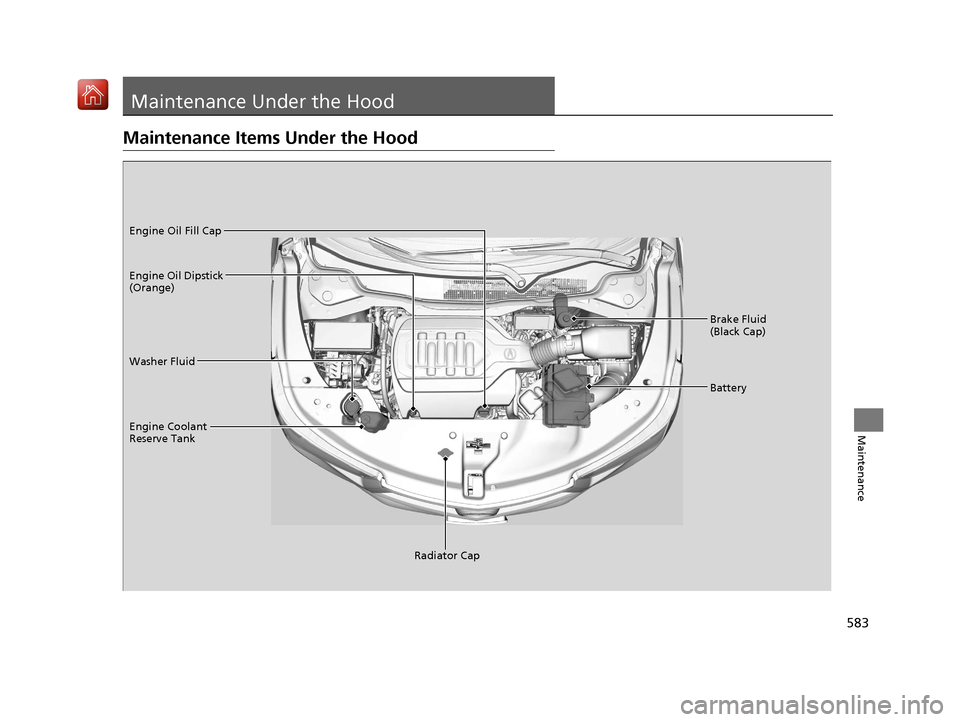
Maintenance Items Under the Hood
Brake Fluid
(Black Cap)
Washer Fluid
Radiator Cap
Engine Coolant
Reserve Tank Engine Oil Dipstick
(Orange) Engine Oil Fill Cap
Battery
19 ACURA MDX-31TZ56510.book 583 ページ 2018年12月11日 火曜日 午後4時47分
Page 585 of 701
584
uuMaintenance Under the Hood uOpening the Hood
Maintenance
Opening the Hood
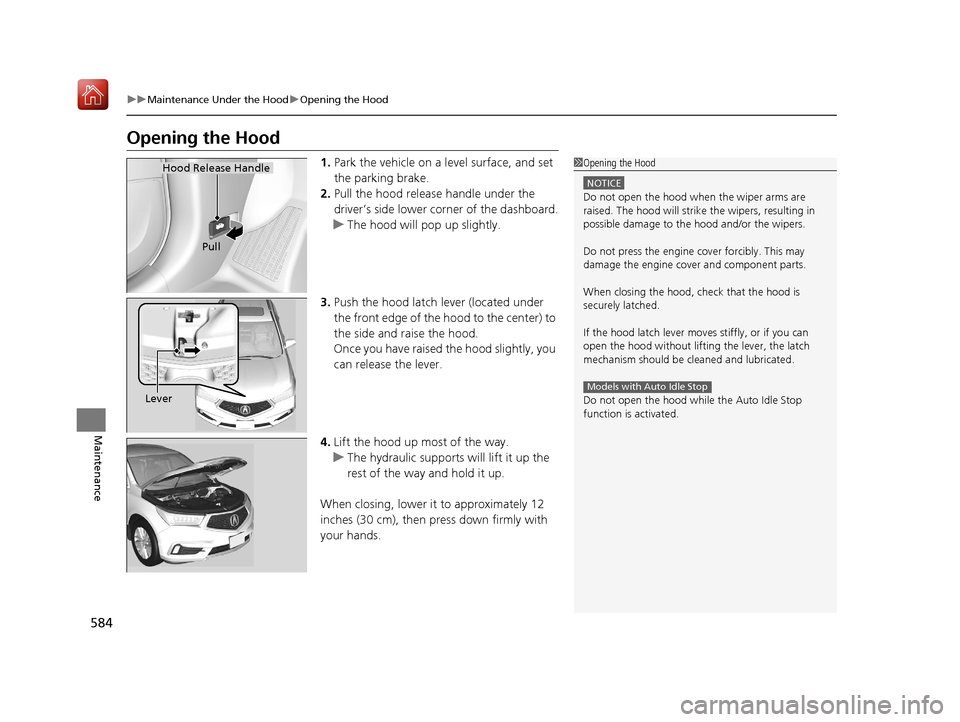
1. Park the vehicle on a level surface, and set
the parking brake.
2. Pull the hood release handle under the
driver’s side lower co rner of the dashboard.
u The hood will pop up slightly.
3. Push the hood latch lever (located under
the front edge of the hood to the center) to
the side and raise the hood.
Once you have raised the hood slightly, you
can release the lever.
4. Lift the hood up most of the way.
u The hydraulic supports will lift it up the
rest of the way and hold it up.
When closing, lower it to approximately 12
inches (30 cm), then pr ess down firmly with
your hands.1 Opening the Hood
NOTICE
Do not open the hood when the wiper arms are
raised. The hood will strike the wipers, resulting in
possible damage to the hood and/or the wipers.
Do not press the engine cover forcibly. This may
damage the engine cover and component parts.
When closing the hood, check that the hood is
securely latched.
If the hood latch lever moves stiffly, or if you can
open the hood without lifti ng the lever, the latch
mechanism should be cleaned and lubricated.
Do not open the hood while the Auto Idle Stop
function is activated.
Models with Auto Idle Stop
Hood Release Handle
Pull
Lever
19 ACURA MDX-31TZ56510.book 584 ページ 2018年12月11日 火曜日 午後4時47分
Page 586 of 701
585
uuMaintenance Under the Hood uEngine Compartment Cover
Maintenance
Engine Compartment Cover
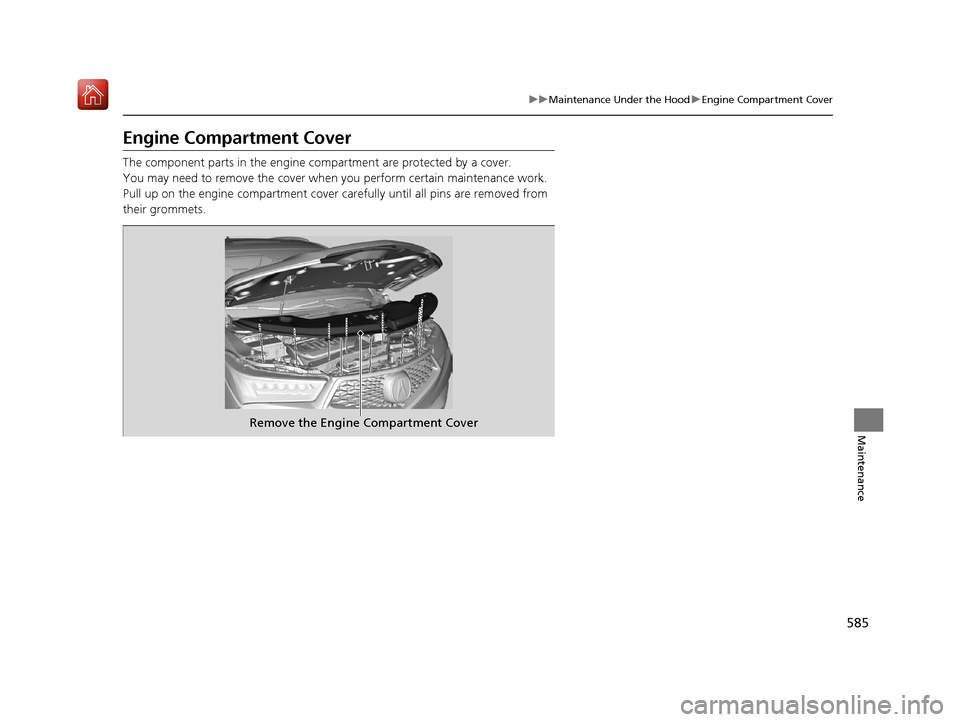
The component parts in the engine co mpartment are protected by a cover.
You may need to remove the cover when you perform certain maintenance work.
Pull up on the engine compartment cover carefully until all pins are removed from
their grommets.
Remove the Engine Compartment Cover
19 ACURA MDX-31TZ56510.book 585 ページ 2018年12月11日 火曜日 午後4時47分
Page 587 of 701
586
uuMaintenance Under the Hood uRecommended Engine Oil
Maintenance
Recommended Engine Oil
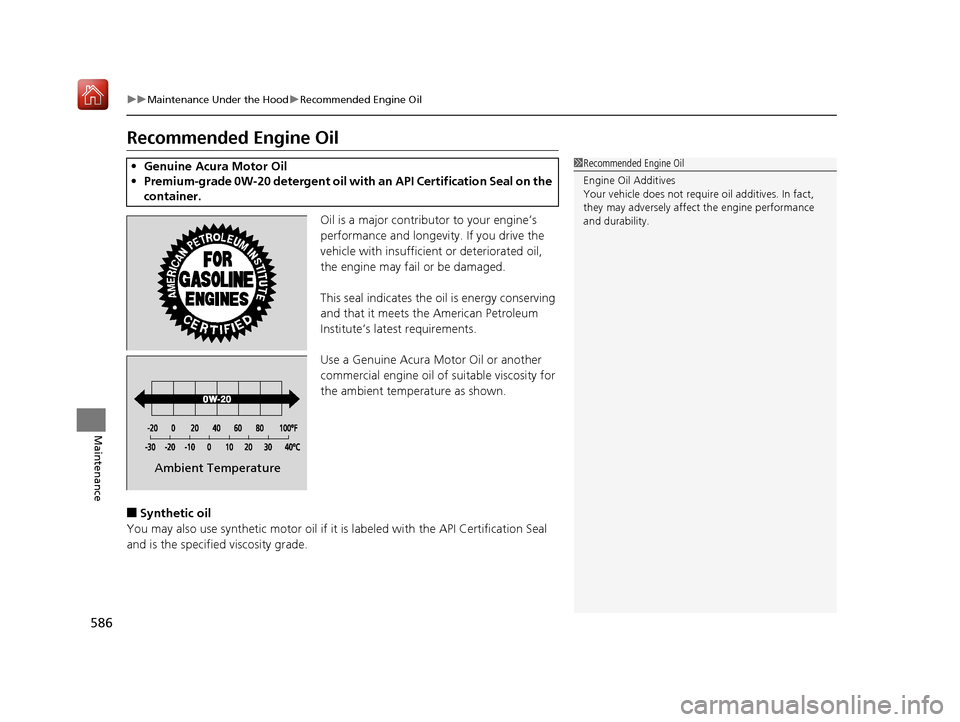
Oil is a major contributor to your engine’s
performance and longevity. If you drive the
vehicle with insufficient or deteriorated oil,
the engine may fail or be damaged.
This seal indicates the oil is energy conserving
and that it meets the American Petroleum
Institute’s latest requirements.
Use a Genuine Acura Motor Oil or another
commercial engine oil of suitable viscosity for
the ambient temperature as shown.
■Synthetic oil
You may also use synthetic motor oil if it is labeled with the API Certification Seal
and is the specified viscosity grade.
• Genuine Acura Motor Oil
• Premium-grade 0W-20 detergent oil with an API Certification Seal on the
container.1 Recommended Engine Oil
Engine Oil Additives
Your vehicle does not require oil additives. In fact,
they may adversely affect the engine performance
and durability.
Ambient Temperature
19 ACURA MDX-31TZ56510.book 586 ページ 2018年12月11日 火曜日 午後4時47分
Page 588 of 701
587
uuMaintenance Under the Hood uOil Check
Maintenance
Oil Check
We recommend that you check the engi ne oil level every time you refuel.
Park the vehicle on level ground.
Wait approximately three minutes after turn ing the engine off before you check the
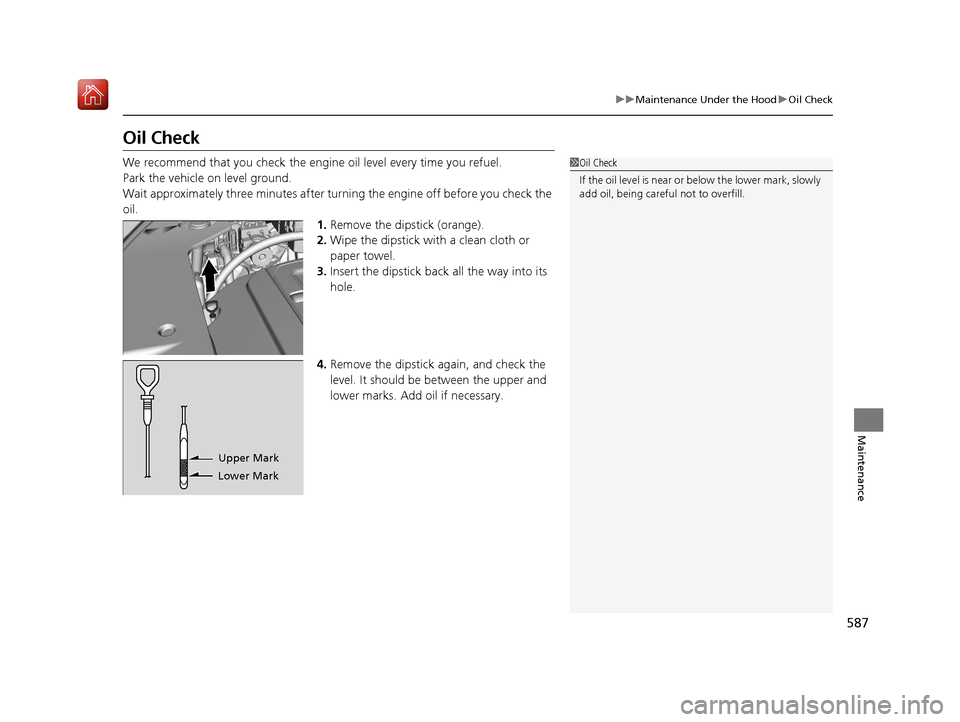
oil. 1.Remove the dipstick (orange).
2. Wipe the dipstick with a clean cloth or
paper towel.
3. Insert the dipstick back all the way into its
hole.
4. Remove the dipstick again, and check the
level. It should be between the upper and
lower marks. Add oil if necessary.1Oil Check
If the oil level is near or below the lower mark, slowly
add oil, being careful not to overfill.
Lower MarkUpper Mark
19 ACURA MDX-31TZ56510.book 587 ページ 2018年12月11日 火曜日 午後4時47分
Page 589 of 701
588
uuMaintenance Under the Hood uAdding Engine Oil
Maintenance
Adding Engine Oil
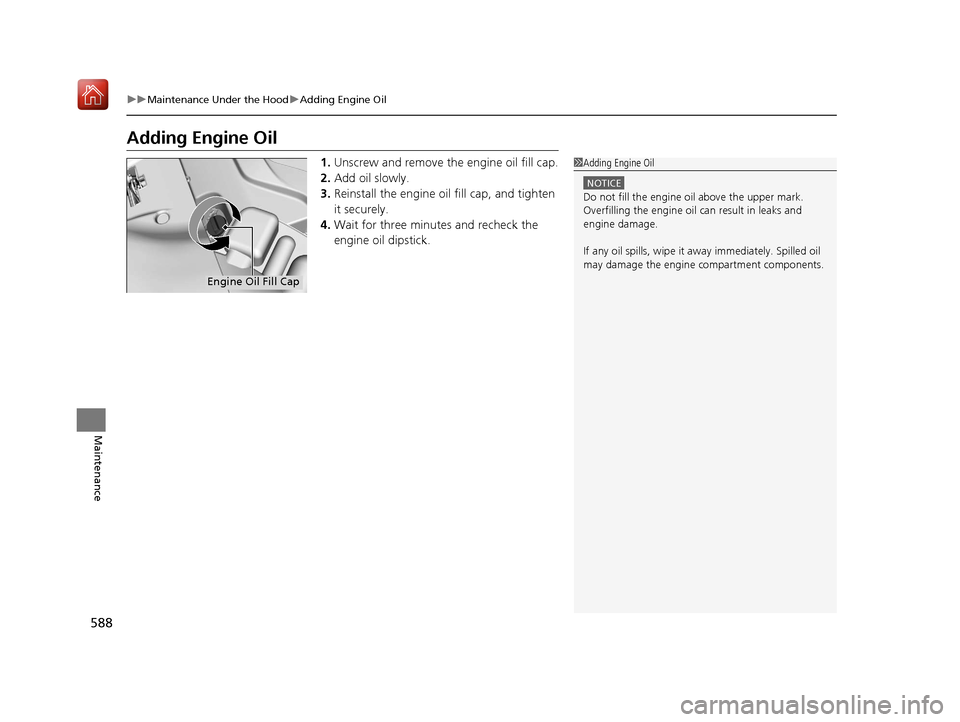
1. Unscrew and remove the engine oil fill cap.
2. Add oil slowly.
3. Reinstall the engine oil fill cap, and tighten
it securely.
4. Wait for three minutes and recheck the
engine oil dipstick.1Adding Engine Oil
NOTICE
Do not fill the engine oil above the upper mark.
Overfilling the engine oil can result in leaks and
engine damage.
If any oil spills, wipe it away immediately. Spilled oil
may damage the engine compartment components.
Engine Oil Fill Cap
19 ACURA MDX-31TZ56510.book 588 ページ 2018年12月11日 火曜日 午後4時47分
Page 590 of 701
589
uuMaintenance Under the Hood uChanging the Engine Oil and Oil Filter
Continued
Maintenance
Changing the Engine Oil and Oil Filter
You must change the engine oil and oil fi lter regularly in order to maintain the
engine’s lubrication. The engine may be damaged if they are not changed regularly.
Change the oil and filter in accordance with the maintenance message on the multi-
information display. 1.Run the engine until it reaches normal
operating temperature, and then turn the
engine off.
2. Open the hood and remove the engine oil
fill cap.
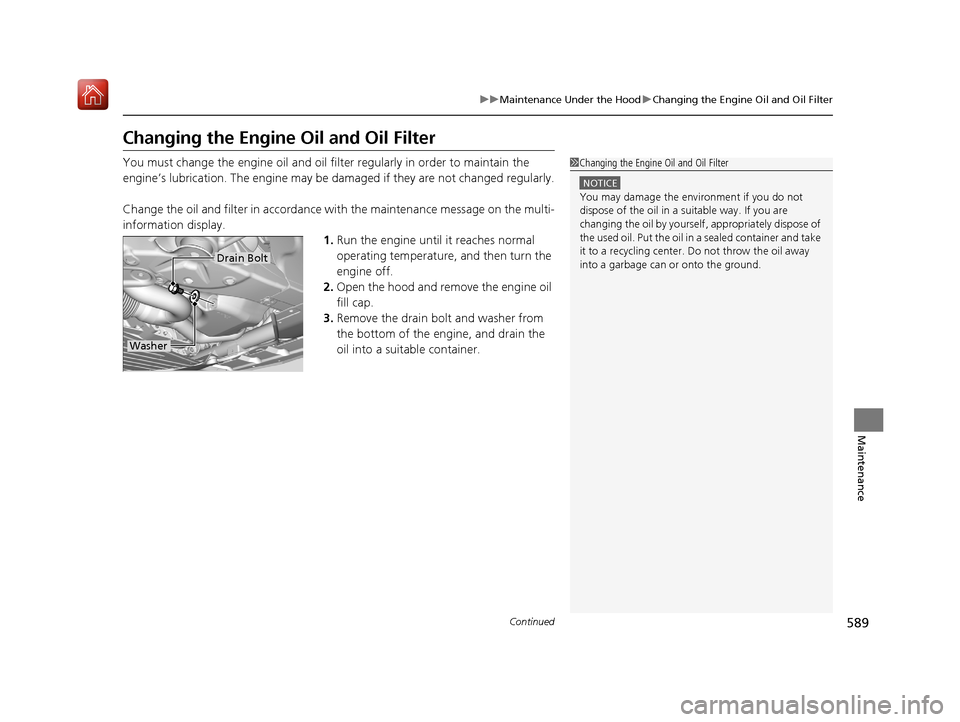
3. Remove the drain bolt and washer from
the bottom of the engine, and drain the
oil into a suitable container.1Changing the Engine Oil and Oil Filter
NOTICE
You may damage the environment if you do not
dispose of the oil in a suitable way. If you are
changing the oil by yourself , appropriately dispose of
the used oil. Put the oil in a sealed container and take
it to a recycling center. Do not throw the oil away
into a garbage can or onto the ground.
Drain Bolt
Washer
19 ACURA MDX-31TZ56510.book 589 ページ 2018年12月11日 火曜日 午後4時47分