Icons Acura MDX 2019 Owner's Manual
[x] Cancel search | Manufacturer: ACURA, Model Year: 2019, Model line: MDX, Model: Acura MDX 2019Pages: 701, PDF Size: 38.75 MB
Page 17 of 701
16
Quick Reference Guide
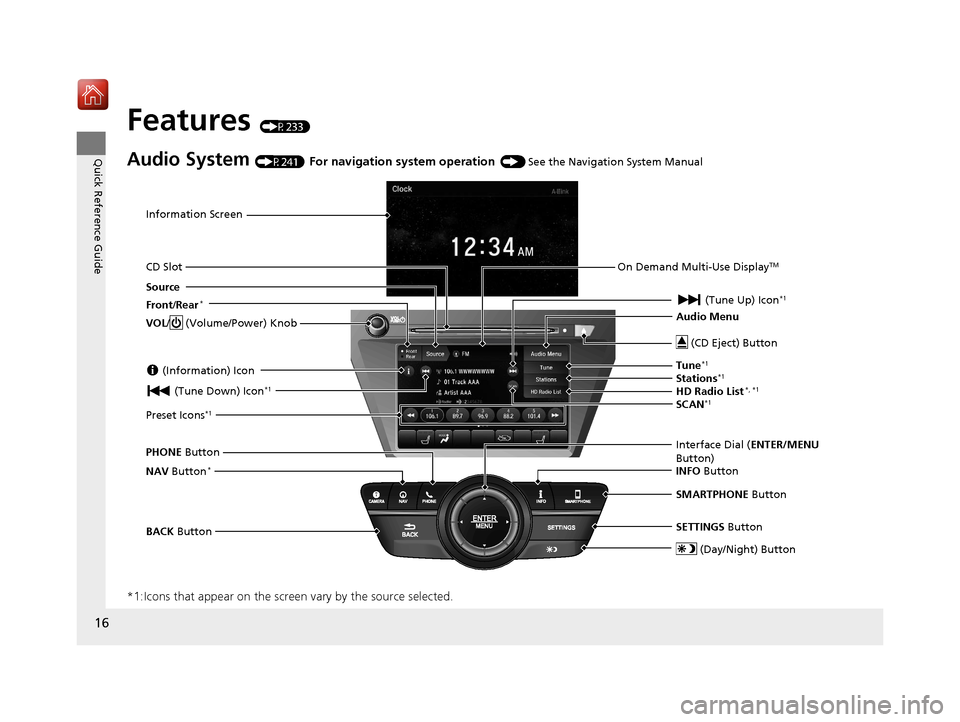
Features (P233)
Audio System (P241) For navigation system operation () See the Navigation System Manual
*1:Icons that appear on the screen vary by the source selected.
Information Screen
Audio Menu (CD Eject) Button
VOL / (Volume/Power) Knob
BACK Button Interface Dial (
ENTER/MENU
Button)
INFO Button
On Demand Multi-Use Display
TM
PHONE
Button
(Tune Down) Icon
*1
Source
(Day/Night) Button
Tune*1
CD Slot (Information) Icon
Preset Icons*1
(Tune Up) Icon*1
Stations*1
SCAN*1
SMARTPHONE Button
SETTINGS Button
Front /Rear*
NAV Button*
HD Radio List*, *1
19 ACURA MDX-31TZ56510.book 16 ページ 2018年12月11日 火曜日 午後4時47分
Page 221 of 701
220
Controls
Climate Control System
Using Automatic Climate Control
The automatic climate control system maintains the interior temperature you select.
The system also selects the proper mix of heated or cooled air that raises or lowers
the interior temperature to your pr eference as quickly as possible.
Use the system when the engine is running.
1. Press the AUTO button.
2. Adjust the interior temperature using the driver’s side or passenger’s side
temperature control switch.
3. Press the (On/Off) button to cancel.1Using Automatic Climate Control
If any buttons/icons on the touch screen are pressed
while using the climate control system in auto, the
function of the button/icon th at was pressed will take
priority.
The AUTO indicator will go off, but functions
unrelated to the button/icon that was pressed will be
controlled automatically.
During idle-stops, air-conditioning is suspended, and
only the blower remains active.
If you do not want air-cond itioning suspended, press
the Auto Idle Stop OFF button to cancel idle-stop.
To prevent cold air from bl owing in from outside, the
fan may operate at low speed for a while after the
AUTO button has been pressed.
If the interior is very warm, you can cool it down
more rapidly by partial ly opening the windows,
turning the system on auto, and setting the
temperature to low. Change the fresh air mode to
recirculation mode until the temperature cools down.
When you set the temperat ure to the lower or upper
limit, Lo or Hi is displayed.
Pressing the button switches the climate control
system between on and off. When turned on, the
system returns to your last selection.
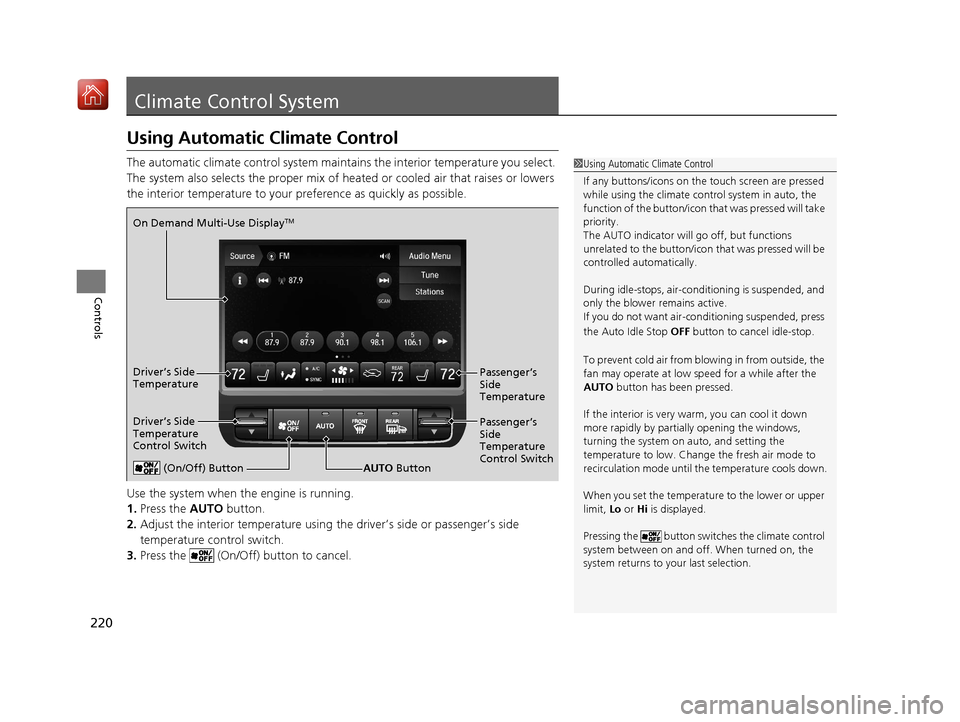
(On/Off) ButtonAUTO Button
On Demand Multi-Use Display
TM
Driver’s Side
Temperature
Control Switch
Passenger’s
Side
Temperature
Control Switch Passenger’s
Side
Temperature
Driver’s Side
Temperature
19 ACURA MDX-31TZ56510.book 220 ページ 2018年12月11日 火曜日 午後4時47分
Page 228 of 701
227
uuClimate Control System uRear Climate Control System
Continued
Controls
Rear Climate Control System
Use the system when the engine is running.
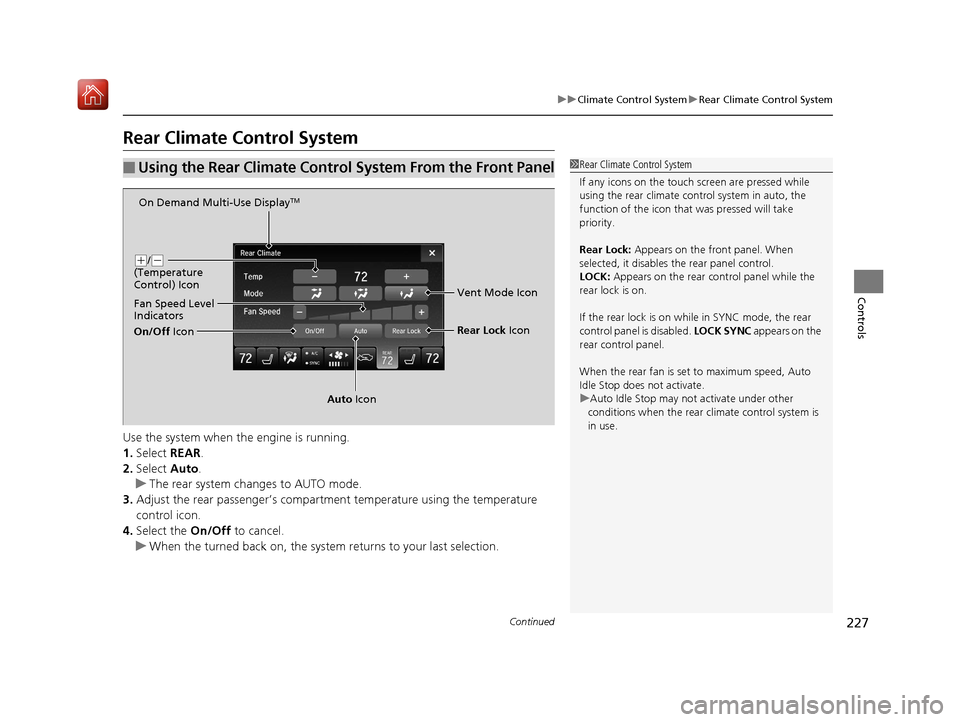
1. Select REAR.
2. Select Auto.
u The rear system changes to AUTO mode.
3. Adjust the rear passenger’s compartm ent temperature using the temperature
control icon.
4. Select the On/Off to cancel.
u When the turned back on, the system returns to your last selection.
■Using the Rear Climate Control System From the Front Panel1Rear Climate Control System
If any icons on the touch screen are pressed while
using the rear climate control system in auto, the
function of the icon that was pressed will take
priority.
Rear Lock: Appears on the front panel. When
selected, it disables the rear panel control.
LOCK: Appears on the rear c ontrol panel while the
rear lock is on.
If the rear lock is on while in SYNC mode, the rear
control panel is disabled. LOCK SYNC appears on the
rear control panel.
When the rear fan is set to maximum speed, Auto
Idle Stop does not activate.
u Auto Idle Stop may not activate under other
conditions when the rear climate control system is
in use.
On Demand Multi-Use DisplayTM
( +/(-
(Temperature
Control) Icon
Fan Speed Level
Indicators
On/Off Icon
Auto Icon Rear Lock
Icon
Vent Mode Icon
19 ACURA MDX-31TZ56510.book 227 ページ 2018年12月11日 火曜日 午後4時47分
Page 235 of 701
234
Features
Audio System
About Your Audio System
The audio system features AM/FM radio and SiriusXM® Radio service. It can also play
audio CDs, WMA/MP3/AAC files, Hard Disk Drive (HDD) audio*, USB flash drives,
and iPod, iPhone and Bluetooth® devices.
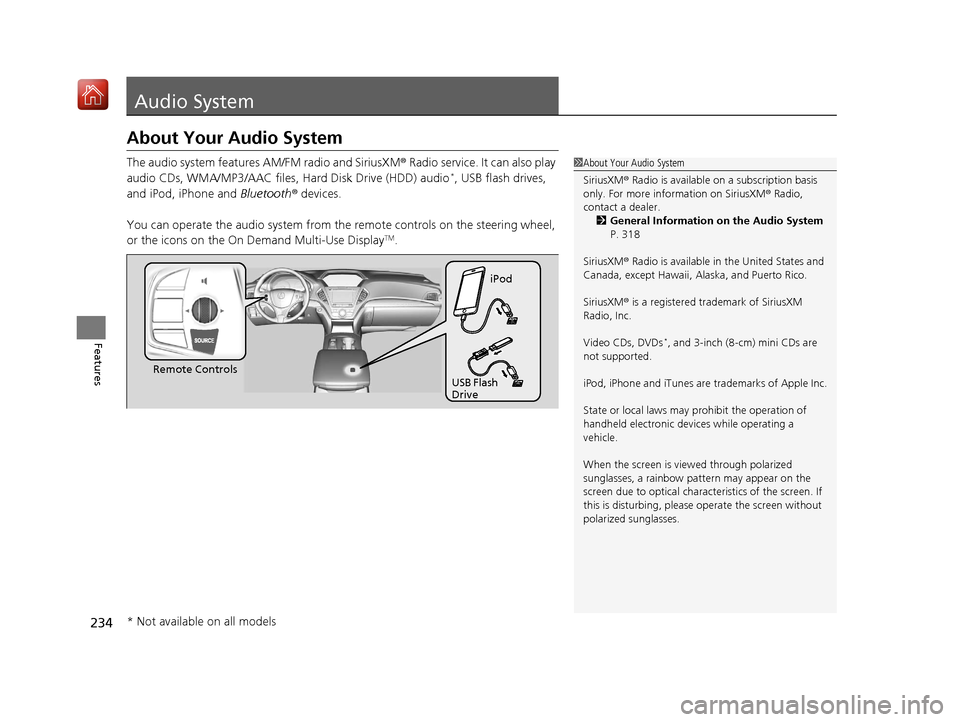
You can operate the audio system from th e remote controls on the steering wheel,
or the icons on the On Demand Multi-Use Display
TM.
1 About Your Audio System
SiriusXM ® Radio is available on a subscription basis
only. For more information on SiriusXM ® Radio,
contact a dealer.
2 General Information on the Audio System
P. 318
SiriusXM ® Radio is available in the United States and
Canada, except Ha waii, Alaska, and Puerto Rico.
SiriusXM ® is a registered trademark of SiriusXM
Radio, Inc.
Video CDs, DVDs
*, and 3-inch (8-cm) mini CDs are
not supported.
iPod, iPhone and iTunes are trademarks of Apple Inc.
State or local laws may pr ohibit the operation of
handheld electronic devi ces while operating a
vehicle.
When the screen is vi ewed through polarized
sunglasses, a rainbow pa ttern may appear on the
screen due to optical characteristics of the screen. If
this is disturbing, please operate the screen without
polarized sunglasses.
Remote Controls iPod
USB Flash
Drive
* Not available on all models
19 ACURA MDX-31TZ56510.book 234 ページ 2018年12月11日 火曜日 午後4時47分
Page 243 of 701
242
uuAudio System Basic Operation uOn Demand Multi-Use DisplayTM
Features
On Demand Multi-Use DisplayTM
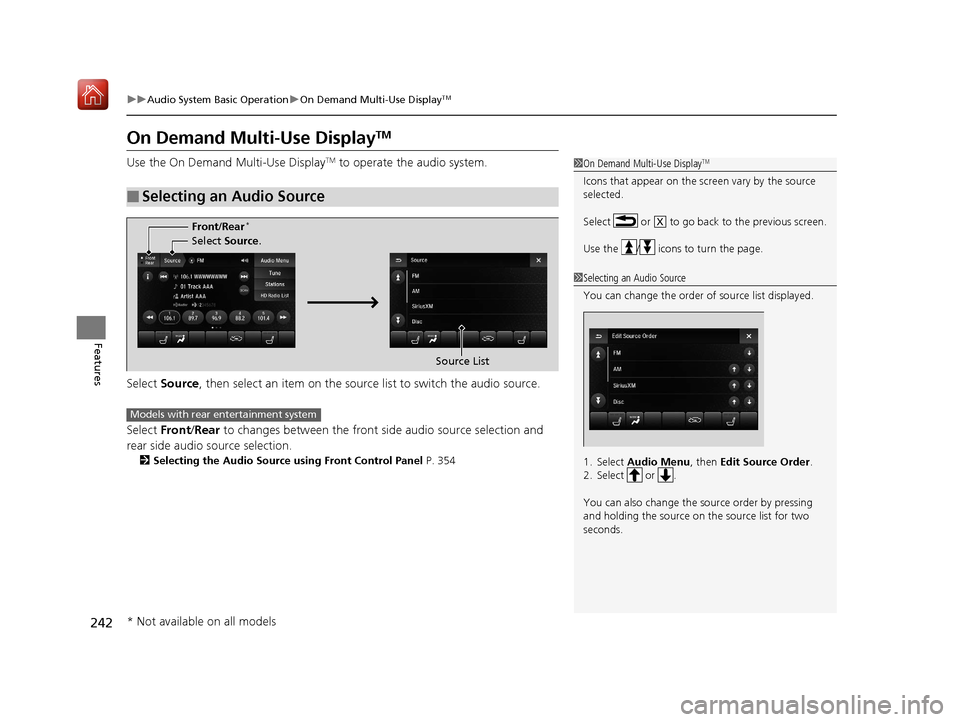
Use the On Demand Multi-Use DisplayTM to operate the audio system.
Select Source , then select an item on the sour ce list to switch the audio source.
Select Front/Rear to changes between the front side audio source selection and
rear side audio source selection.
2 Selecting the Audio Source using Front Control Panel P. 354
■Selecting an Audio Source
1On Demand Multi-Use DisplayTM
Icons that appear on the sc reen vary by the source
selected.
Select or to go back to the previous screen.
Use the / icons to turn the page.
X
1 Selecting an Audio Source
You can change the order of source list displayed.
1. Select Audio Menu, then Edit Source Order .
2. Select or .
You can also change the source order by pressing
and holding the source on the source list for two
seconds.
Select Source.
Source List
Front
/Rear
*
Models with rear entertainment system
* Not available on all models
19 ACURA MDX-31TZ56510.book 242 ページ 2018年12月11日 火曜日 午後4時47分
Page 246 of 701
245
uuAudio System Basic Operation uOn Demand Multi-Use DisplayTM
Features
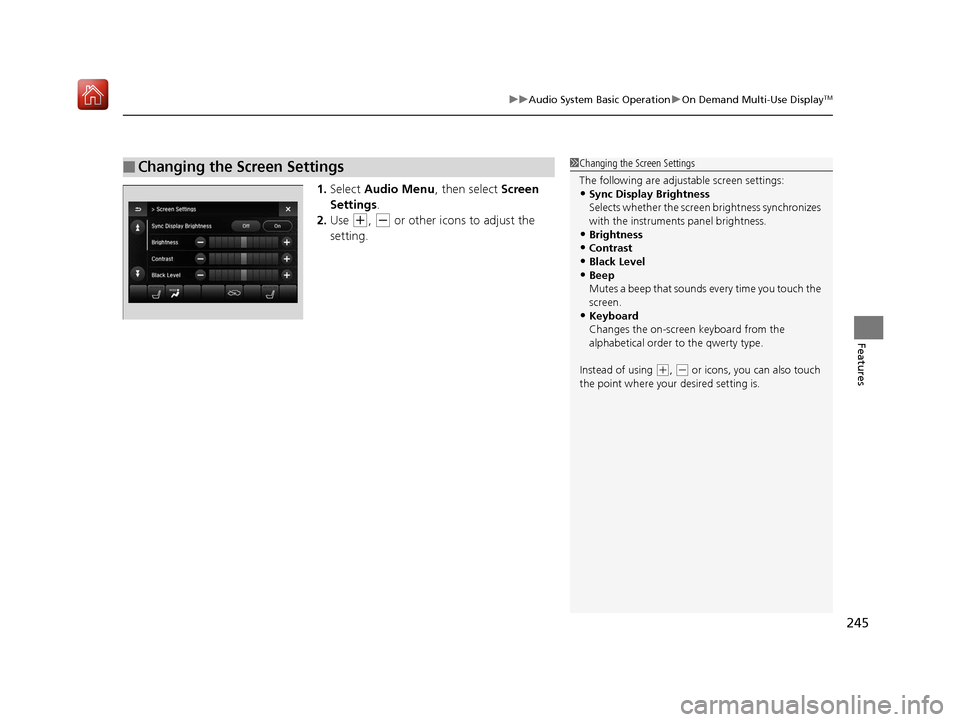
1. Select Audio Menu , then select Screen
Settings .
2. Use
(+, (- or other icons to adjust the
setting.
■Changing the Screen Settings1 Changing the Screen Settings
The following are adjustable screen settings:
•Sync Display Brightness
Selects whether the screen brightness synchronizes
with the instruments panel brightness.
•Brightness
•Contrast
•Black Level•Beep
Mutes a beep that sounds every time you touch the
screen.
•Keyboard
Changes the on-screen keyboard from the
alphabetical order to the qwerty type.
Instead of using
( +, (- or icons, you can also touch
the point where your desired setting is.
19 ACURA MDX-31TZ56510.book 245 ページ 2018年12月11日 火曜日 午後4時47分
Page 252 of 701
251
uuAudio System Basic Operation uAdjusting the Sound
Features
Adjusting the Sound
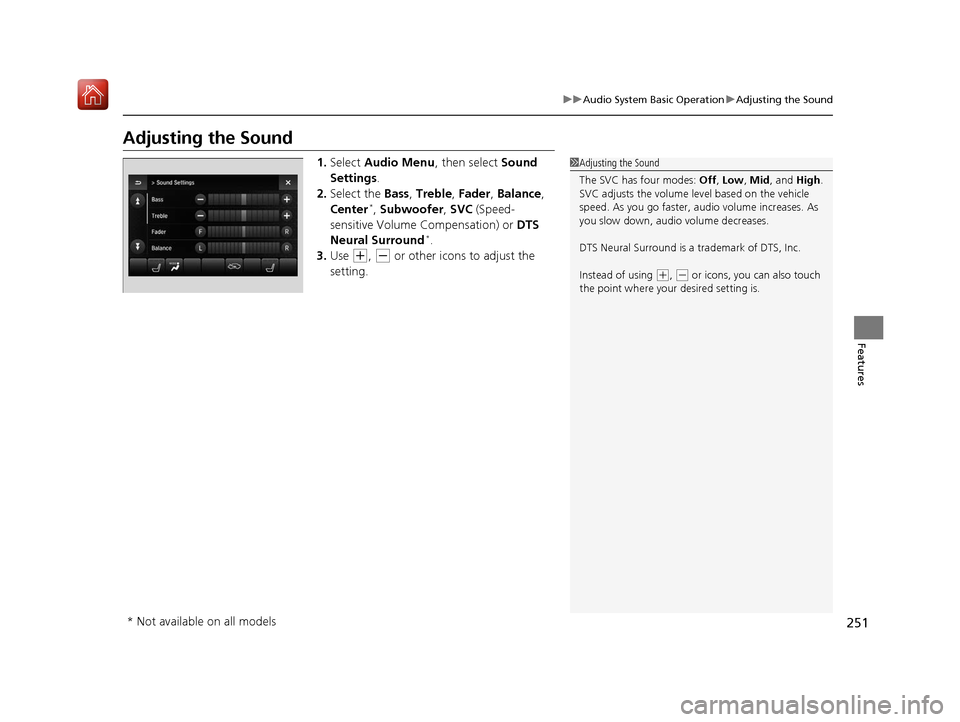
1. Select Audio Menu , then select Sound
Settings .
2. Select the Bass, Treble , Fader , Balance ,
Center
*, Subwoofer, SVC (Speed-
sensitive Volume Compensation) or DTS
Neural Surround
*.
3. Use
(+, (- or other icons to adjust the
setting.
1 Adjusting the Sound
The SVC has four modes: Off, Low , Mid, and High.
SVC adjusts the volume level based on the vehicle
speed. As you go faster, audio volume increases. As
you slow down, audi o volume decreases.
DTS Neural Surround is a trademark of DTS, Inc.
Instead of using
( +, (- or icons, you can also touch
the point where your desired setting is.
* Not available on all models
19 ACURA MDX-31TZ56510.book 251 ページ 2018年12月11日 火曜日 午後4時47分
Page 257 of 701
256
uuAudio System Basic Operation uPlaying AM/FM Radio
Features
Playing AM/FM Radio
On Demand Multi-Use DisplayTM
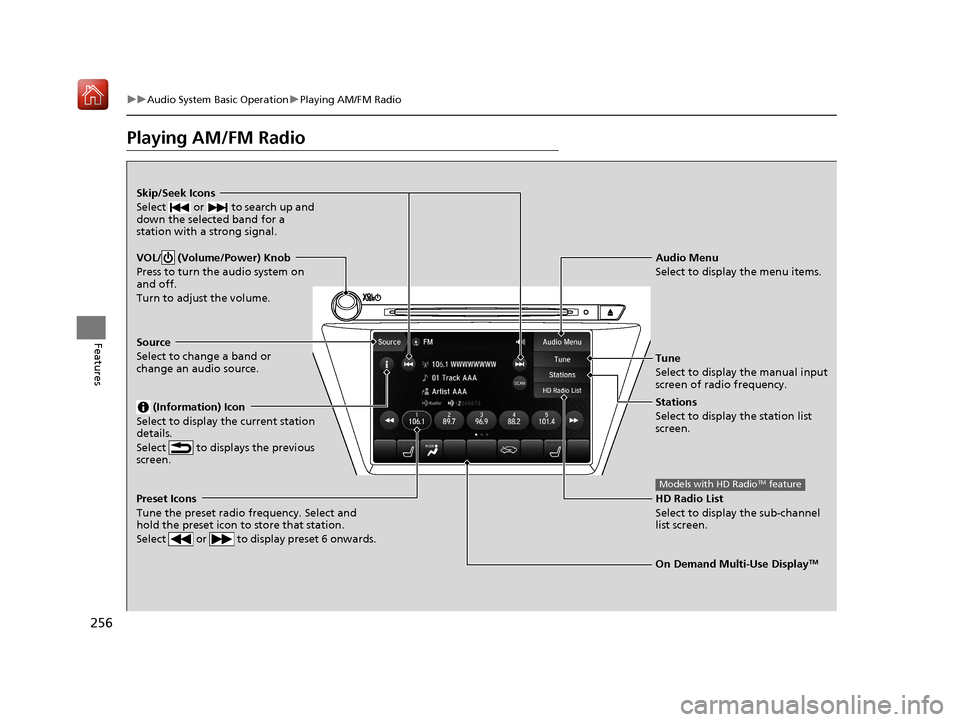
VOL/ (Volume/Power) Knob
Press to turn the audio system on
and off.
Turn to adjust the volume.
Skip/Seek Icons
Select or to search up and
down the selected band for a
station with a strong signal.
Audio Menu
Select to display the menu items.
Source
Select to change a band or
change an audio source. (Information) Icon
Select to display the current station
details.
Select to displays the previous
screen.
Preset Icons
Tune the preset radio frequency. Select and
hold the preset icon to store that station.
Select or to display preset 6 onwards.
Tune
Select to display the manual input
screen of radio frequency.
Stations
Select to display the station list
screen.
HD Radio List
Select to display the sub-channel
list screen.
Models with HD RadioTM feature
19 ACURA MDX-31TZ56510.book 256 ページ 2018年12月11日 火曜日 午後4時47分
Page 259 of 701
uuAudio System Basic Operation uPlaying AM/FM Radio
258
Features
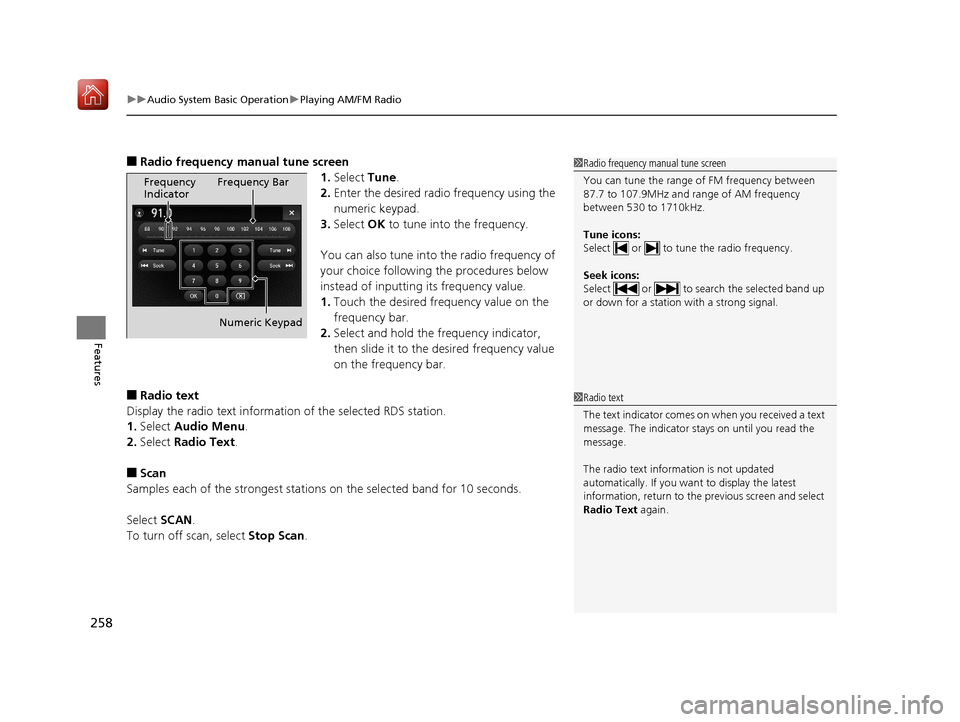
■Radio frequency manual tune screen
1.Select Tune.
2. Enter the desired radio frequency using the
numeric keypad.
3. Select OK to tune into the frequency.
You can also tune into the radio frequency of
your choice following the procedures below
instead of inputting its frequency value.
1. Touch the desired frequency value on the
frequency bar.
2. Select and hold the fre quency indicator,
then slide it to the desired frequency value
on the frequency bar.
■Radio text
Display the radio text information of the selected RDS station.
1. Select Audio Menu .
2. Select Radio Text .
■Scan
Samples each of the strongest stations on the selected band for 10 seconds.
Select SCAN.
To turn off scan, select Stop Scan.
1Radio frequency manual tune screen
You can tune the range of FM frequency between
87.7 to 107.9MHz and range of AM frequency
between 530 to 1710kHz.
Tune icons:
Select or to tune the radio frequency.
Seek icons:
Select or to search the selected band up
or down for a station with a strong signal.
Frequency
Indicator Frequency Bar
Numeric Keypad
1 Radio text
The text indicator comes on when you received a text
message. The indicator stays on until you read the
message.
The radio text inform ation is not updated
automatically. If you want to display the latest
information, return to the previous screen and select
Radio Text again.
19 ACURA MDX-31TZ56510.book 258 ページ 2018年12月11日 火曜日 午後4時47分
Page 260 of 701

259
uuAudio System Basic Operation uPlaying SiriusXM ® Radio
Continued
Features
Playing SiriusXM® Radio
On Demand Multi-Use DisplayTM
VOL/ (Volume/Power) Knob
Press to turn the audio system on
and off.
Turn to adjust the volume.
Category Up/Down Icons
Select or to display and select
a SiriusXM® Radio category.
Audio Menu
Select to display the menu items.
Source
Select to change an audio source. (Information) Icon
Select to display the current
channel details.
Select to display the previous
screen.
Preset Icons
Tune the preset channel. Select and hold the
preset icon to store that channel. Select or to display preset 4 onwards.
Tune
Select to display the channel
number input screen.
Presets/Controls
Select to changes between the
Presets mode and Controls mode
of the Replay function.
Browse
Select to display the channel list
of Categories , Channels or
Featured channels types.
Channel Up/Down Icons
Select or to the previous or
next channel.
Select and hold to rapidly skip 10
channels at a time.
19 ACURA MDX-31TZ56510.book 259 ページ 2018年12月11日 火曜日 午後4時47分