suspen Acura MDX 2019 Owner's Manual
[x] Cancel search | Manufacturer: ACURA, Model Year: 2019, Model line: MDX, Model: Acura MDX 2019Pages: 701, PDF Size: 38.75 MB
Page 47 of 701
46
uuAirbags uFront Airbags (SRS)
Safe Driving
■When front airbags should not deploy
Minor frontal crashes: Front airbags were designed to supplement seat belts and
help save lives, not to prevent minor scrapes, or even broken bones that might occur
during a less than moderate-to-severe frontal crash.
Side impacts: Front airbags can provide protection when a sudden deceleration
causes a driver or front passenger to move toward the front of the vehicle. Side
airbags and side curtain airbag s have been specifically designed to help reduce the
severity of injuries that can occur durin g a moderate-to-severe side impact which
can cause the driver or passenger to move toward the side of the vehicle.
Rear impacts: Head restraints and seat belts are your best protection during a rear
impact. Front airbags cannot provide any si gnificant protection and are not designed
to deploy in such collisions.
Rollovers: In a rollover, your best form of protection is a seat belt or, if your vehicle
is equipped with a rollover sensor, both a se at belt and a side curtain airbag. Front
airbags, however, are not designed to deploy in a rollover as they would provide
little if any protection.
■When front airbags deploy with little or no visible damage
Because the airbag system senses sudden deceleration, a strong impact to the
vehicle framework or suspension might caus e one or more of the airbags to deploy.
Examples include running into a curb, the edge of a hole, or other low fixed object
that causes a sudden deceleration in th e vehicle chassis. Since the impact is
underneath the vehicle, damage may not be readily apparent.
■When front airbags may not deploy, even though exterior damage
appears severe
Since crushable body parts absorb crash energy during an impact, the amount of
visible damage does not always indicate proper airbag operation. In fact, some
collisions can result in severe damage but no airbag deployment because the airbags
would not have been needed or would not have provided protection even if they
had deployed.
19 ACURA MDX-31TZ56510.book 46 ページ 2018年12月11日 火曜日 午後4時47分
Page 50 of 701
49
uuAirbags uDriver’s Knee Airbag
Safe Driving
■When driver’s knee airbag deploy s with little or no visible damage
Because the airbag system senses sudden deceleration, a strong impact to the
vehicle framework or suspension might cause one or more of the airbags to deploy.
Examples include running into a curb, the edge of a hole, or other low fixed object
that causes a sudden deceleration in th e vehicle chassis. Since the impact is
underneath the vehicle, damage may not be readily apparent.
■When driver’s knee airbag may not de ploy, even though exterior damage
appears severe
Since crushable body parts absorb crash energy during an impact, the amount of
visible damage does not always indicate proper airbag operation. In fact, some
collisions can result in severe damage but no airbag deployment because the airbags
would not have been needed or would not have provided protection even if they
had deployed.
19 ACURA MDX-31TZ56510.book 49 ページ 2018年12月11日 火曜日 午後4時47分
Page 128 of 701
127
uuGauges and Multi-Info rmation Display (MID)uMID
Continued
Instrument Panel
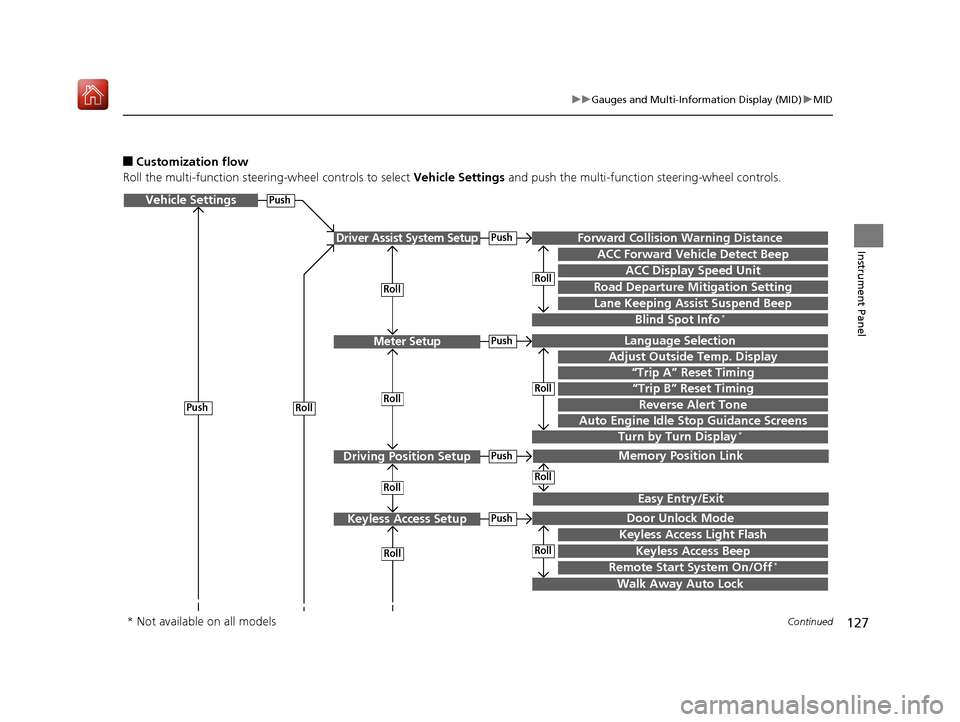
■Customization flow
Roll the multi-function steering-wheel controls to select Vehicle Settings and push the multi-function steering-wheel controls.
Vehicle Settings
“Trip A” Reset Timing
Language Selection
Adjust Outside Temp. Display
Memory Position Link
Door Unlock Mode
Driver Assist System Setup
Meter Setup
Driving Position Setup
Keyless Access Setup
“Trip B” Reset Timing
Forward Collision Warning Distance
ACC Forward Vehicle Detect Beep
ACC Display Speed Unit
Roll
Push
Roll
Lane Keeping Assist Suspend Beep
Blind Spot Info*
Easy Entry/Exit
Roll
Roll
Walk Away Auto Lock
RollPush
Roll
Roll
Roll
Roll
Turn by Turn Display*Auto Engine Idle Stop Guidance Screens
Road Departure Mitigation Setting
Push
Push
Push
Push
Reverse Alert Tone
Remote Start System On/Off*Keyless Access Beep
Keyless Access Light Flash
* Not available on all models
19 ACURA MDX-31TZ56510.book 127 ページ 2018年12月11日 火曜日 午後4時47分
Page 130 of 701
129
uuGauges and Multi-Info rmation Display (MID)uMID
Continued
Instrument Panel
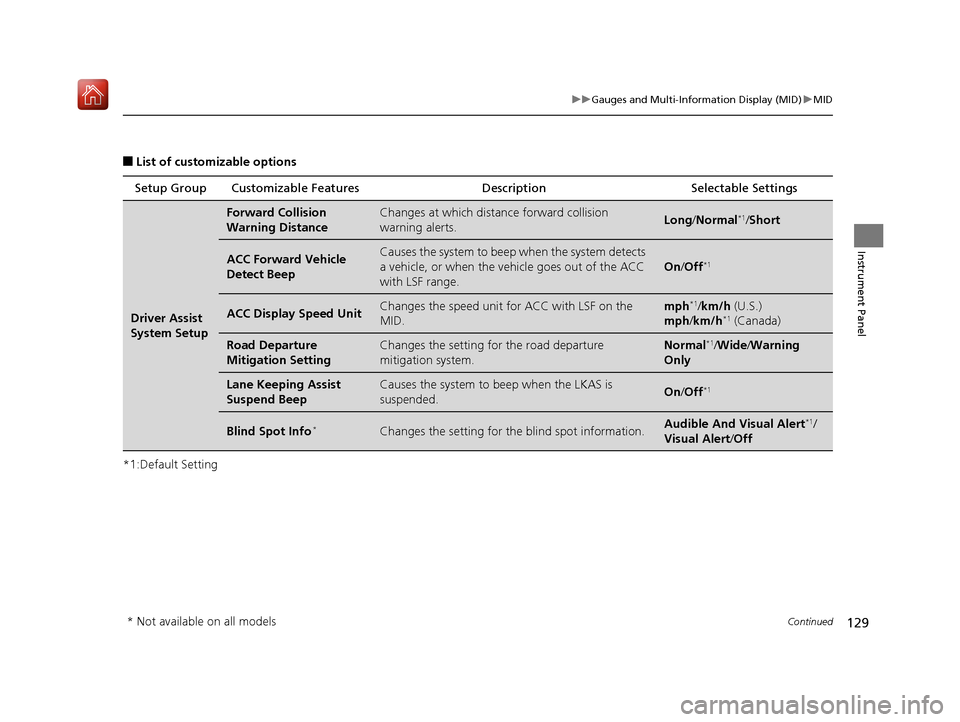
■List of customizable options
*1:Default Setting Setup Group Customizable Features
Description Selectable Settings
Driver Assist
System Setup
Forward Collision
Warning DistanceChanges at which distance forward collision
warning alerts.Long /Normal*1/Short
ACC Forward Vehicle
Detect BeepCauses the system to beep when the system detects
a vehicle, or when the vehicle goes out of the ACC
with LSF range.
On /Off*1
ACC Display Speed UnitChanges the speed unit for ACC with LSF on the
MID.mph*1/km/h (U.S.)
mph /km/h*1 (Canada)
Road Departure
Mitigation SettingChanges the setting fo r the road departure
mitigation system.Normal*1/ Wide /Warning
Only
Lane Keeping Assist
Suspend BeepCauses the system to b eep when the LKAS is
suspended.On /Off*1
Blind Spot Info*Changes the setting for th e blind spot information.Audible And Visual Alert*1/
Visual Alert /Off
* Not available on all models
19 ACURA MDX-31TZ56510.book 129 ページ 2018年12月11日 火曜日 午後4時47分
Page 221 of 701
220
Controls
Climate Control System
Using Automatic Climate Control
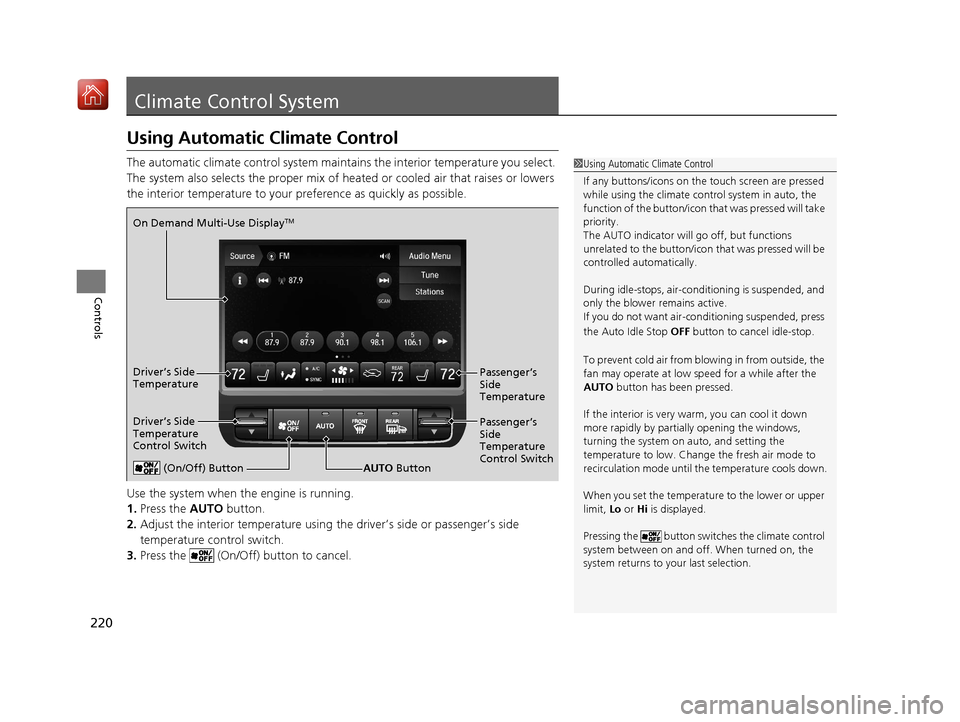
The automatic climate control system maintains the interior temperature you select.
The system also selects the proper mix of heated or cooled air that raises or lowers
the interior temperature to your pr eference as quickly as possible.
Use the system when the engine is running.
1. Press the AUTO button.
2. Adjust the interior temperature using the driver’s side or passenger’s side
temperature control switch.
3. Press the (On/Off) button to cancel.1Using Automatic Climate Control
If any buttons/icons on the touch screen are pressed
while using the climate control system in auto, the
function of the button/icon th at was pressed will take
priority.
The AUTO indicator will go off, but functions
unrelated to the button/icon that was pressed will be
controlled automatically.
During idle-stops, air-conditioning is suspended, and
only the blower remains active.
If you do not want air-cond itioning suspended, press
the Auto Idle Stop OFF button to cancel idle-stop.
To prevent cold air from bl owing in from outside, the
fan may operate at low speed for a while after the
AUTO button has been pressed.
If the interior is very warm, you can cool it down
more rapidly by partial ly opening the windows,
turning the system on auto, and setting the
temperature to low. Change the fresh air mode to
recirculation mode until the temperature cools down.
When you set the temperat ure to the lower or upper
limit, Lo or Hi is displayed.
Pressing the button switches the climate control
system between on and off. When turned on, the
system returns to your last selection.
(On/Off) ButtonAUTO Button
On Demand Multi-Use Display
TM
Driver’s Side
Temperature
Control Switch
Passenger’s
Side
Temperature
Control Switch Passenger’s
Side
Temperature
Driver’s Side
Temperature
19 ACURA MDX-31TZ56510.book 220 ページ 2018年12月11日 火曜日 午後4時47分
Page 325 of 701
324
uuGeneral Information on the Audio System uHonda App License Agreement
Features
7. Export Restrictions: You acknowledge that the SOFTWARE and SERVICES are subject to U.S., European Union, and other export
jurisdictions. You agree to comply with all applicable international and nati onal laws that apply to the SOFTWARE and SERVICES, including
the U.S. Export Administration Regulations, as well as end-user, en d-use, and destination restrictions issued by the U.S. and other
governments.
C. SOFTWARE Operation
1. HONDA reserves the right to suspend or te rminate your access to and use of the SOFTWA RE or SERVICES if you are found to be in
violation of this AGREEMENT or as reasonably deemed necessary by HONDA.
2. Eligibility/Registration/Activation.
The SOFTWARE is intended for and available to indivi duals who (a) are of legal age of majority in their
jurisdiction of residence (and at least 18 years of age), or are younger than 18 years of age and possess a valid driver’s lice nse issued by
their jurisdiction of residence, and (b) own or have permissive access to a compatible VEHICLE. We do not knowingly collect any
information, including personal in formation, from children under 13. If we learn or are notified that we have collected personal
information of a child under 13, we will imme diately take steps to delete such information.
3. Use of PROVIDER SERVICES through the SOFTWARE.
Certain PROVIDER SERVICES made availa ble through the SOFTWARE may require
that you register or otherwise have an account with the PROVIDER and agree to PROVIDER TERMS. Any use of any of such PROVIDER
SERVICES within the SOFTWARE is subject to this AGREEMENT and the applicable PROVIDER TERMS. HONDA does not exercise control
over such PROVIDER SERVICES and is not resp onsible or liable for the availability, security, or content of such PROVIDER SERVIC ES, and the
inclusion of any PROV IDER SERVICES does not imply a referral from, the approv al of, or the endorsement by HONDA of such PROVIDE R
SERVICES. HONDA is not responsible or liable, directly or indirectly, for any damage relating to or resulting from your use of the PROVIDER
SERVICES.
4. Links to Third Party Sites:
The SOFTWARE may provide you with the ability to access third-party sites and content through the use of the
SOFTWARE or SERVICES. The third-party sites and content are not under the control of HONDA. HO NDA is not responsible or liable,
directly or indirectly, fo r such third-party websites and th eir content or for any damage rela ting to or resulting from your access or use of
such websites and content.
19 ACURA MDX-31TZ56510.book 324 ページ 2018年12月11日 火曜日 午後4時47分
Page 332 of 701
331
uuGeneral Information on the Audio System uHonda App License Agreement
Continued
Features
L. Changes to the SOFT WARE or SERVICES. WE may change, modify, or update the SOFTWARE or SERVICES from time to time. Unless
explicitly stated otherwise, any new featur es or services that augment or enhance the SOFTWARE or SERVICES in the future shall
respectively be considered part of the SOFTWARE or SERVICES and s ubject to this AGREEMENT. WE reserve the right at any time and from
time to time to interrupt, res trict, modify, suspend, discontinue, temporarily or permanently, the SOFTWARE or SERVICES (or any portion
thereof), with or without notice to you, and you agree that HONDA shall not be li able to you or to any third party for any modification,
suspension or discontinuance of the SOFTWARE or SERVICES.
M. ARBITRATION:
PLEASE READ THIS ARBITRATION PROVISION CAREFULLY TO UNDER STAND YOUR RIGHTS. YOU AGREE THAT ANY CLAIM THAT YOU
MAY HAVE IN THE FUTURE MUST BE RESOLVED THROUGH BIND ING ARBITRATION. YOU WAIVE THE RIGHT TO HAVE YOUR DISPUTE
HEARD IN COURT AND WAIVE THE RIGHT TO BRING CLASS CL AIMS. YOU UNDERSTAND THAT DISCOVERY AND APPEAL RIGHTS ARE
MORE LIMITED IN ARBITRATION.
Arbitration is a method of resolving a claim, dispute or controversy without filing a lawsuit. By agreeing to arbitrate, the right to go to
court is waived and instead clai ms, disputes or controversies are submitted to binding arbitration. This provision sets forth t he terms and
conditions of our agreement. YOU and HONDA agree and acknowle dge that this Agreement affects interstate commerce and the
Federal Arbitration Act (“FAA”) applies. By using the Software, Vehicle, or Services, YO U elect to have disputes resolved by arbitration.
YOU, HONDA or any involved third party may pursue a Claim. “Claim” means any dispute between YOU, HONDA, or any involved third
party relating to your use of the Software , the Vehicle, or the Services, this Agreement, or our relationship, including any
representations, omissions or warranties. “Claim” does not include personal injury or wrongful death claims. YOU or HONDA may s eek
remedies in small claims court or provisional judicial remedies without arbitrating. In addition, notwithstanding anything here in to the
contrary, YOU or HONDA may seek equitable re lief in a court of competent jurisdiction.
YOU or HONDA may select arbitration with American Arbitration Asso ciation, JAMS or National Arbitration and Mediation. Contact
these sponsors for their rules. The hearing will be in the federal district where YOU reside. If agreed, it may be by telephone or written
submissions. Filing and arbitrator fees to be paid per the sponsor rules. You may contact the sponsor for a fee waiver. If no fee waivers,
HONDA will pay filing and arbitrator fees up to $5,000, unless law requires more. Each party is responsible for other fees. Arbitrator
may award costs or fees to pr evailing party, if permitted by law. HONDA will not seek fees, unless the claims are frivolous.
19 ACURA MDX-31TZ56510.book 331 ページ 2018年12月11日 火曜日 午後4時47分
Page 335 of 701
334
uuGeneral Information on the Audio System uLegal Information on Apple CarPlay/Android Auto
Features
YOU EXPRESSLY ACKNOWLEDGE AND AGREE THAT USE OF APPLE CARPLAY OR ANDROID AUTO (“THE APPLICATIONS”) IS AT YOUR
SOLE RISK AND THAT THE ENTIRE RISK AS TO SATISFACTORY QUALITY, PERFORMANCE, ACCURACY AND EFFORT IS WITH YOU TO THE
MAXIMUM EXTENT PERMITTED BY APPLICABLE LAW, AND THAT TH E APPLICATIONS AND INFORMATION ON THE APPLICATIONS IS
PROVIDED “AS IS” AND “AS AVAILABLE,” WITH ALL FAULTS AND WITHOUT WARRANTY OF ANY KIND, AND HONDA HEREBY
DISCLAIMS ALL WARRANTIES AND CONDITIONS WITH RESPECT TO TH E APPLICATIONS AND INFORMATION ON THE APPLICATIONS,
EITHER EXPRESS, IMPLIED OR STATUTORY, INCLUDING, BUT NOT LIMITED TO, TH E IMPLIED WARRANTIES AND/OR CONDITIONS OF
MERCHANTABILITY, SATISFACTORY QUALITY, FITNESS FOR A PARTICULAR PURPOSE, ACCURACY, QUIET ENJOYMENT, AND NON-
INFRINGEMENT OF THIRD PARTY RIGHTS. NO ORAL OR WRI TTEN INFORMATION OR ADVICE GIVEN BY HONDA OR AN AUTHORIZED
REPRESENTATIVE SHALL CREATE A WARRANT Y. AS EXAMPLES, AND WITHOUT LIMITATION, HONDA DISCLAIMS ANY WARRANTY
REGARDING THE ACCURACY OF DATA PROVIDED BY THE APPL ICATIONS, SUCH AS THE ACCURACY OF DIRECTIONS, ESTIMATED
TRAVEL TIME, SPEED LIMITS, ROAD CONDITIONS, NEWS, WEATHER, TRAFFIC, OR OTHER CONTENT PROVIDED BY APPLE, GOOGLE, THEIR
AFFILIATES, OR THIRD PARTY PROVIDERS; HONDA DOES NOT GUARANTEE AGAINST LOSS OF APPLICATION DATA, WHICH MAY BE LOST
AT ANY TIME; HONDA DOES NOT GUARANTEE THAT THE APPLICATION S OR ANY SERVICES PROVIDED THROUGH THEM WILL BE
PROVIDED AT ALL TIMES OR THAT ANY OR ALL SERVICES WILL BE AVAILABLE AT ANY PA RTICULAR TIME OR LOCATION. FOR EXAMPLE,
SERVICES MAY BE SUSPENDED OR INTERRUPTED WITHOUT NOTICE FOR REPAIR, MAINTENANCE, SECURITY FIXES, UPDATES, ETC.,
SERVICES MAY BE UNAVAILABLE IN YOUR AREA OR LOCATION, ETC. IN ADDITION, YOU UNDERSTAND THAT CHANGES IN THIRD PARTY
TECHNOLOGY OR GOVERNMENT REGULATION MAY RENDER THE SERVICES AND/OR APPLICATIONS OBSOLETE AND/OR UNUSABLE.
TO THE EXTENT NOT PROHIBITED BY LAW, IN NO EVENT SHALL HONDA OR ITS AFFILIATES BE LIABLE FOR PERSONAL INJURY, OR ANY
INCIDENTAL, SPECIAL, INDIRECT OR CONSEQUENTIAL DAMAG ES WHATSOEVER, INCLUDING, WITHOUT LIMITATION, DAMAGES FOR
LOSS OF PROFITS, CORRUPTION OR LOSS OF DATA, FAILURE TO TRANSMIT OR RECEIV E ANY DATA, BUSINESS INTERRUPTION OR ANY
OTHER COMMERCIAL DAMAGES OR LOSSES, ARISING OUT OF OR RELATE D TO THE APPLICATIONS OR YOUR USE OF OR INABILITY TO
USE THE APPLICATIONS OR INFORMATION ON THE APPLICATIONS, HOWEVER CAUSED, REGARDLESS OF THE THEORY OF LIABILITY
(CONTRACT, TORT OR OTHERWISE) AND EVEN IF HONDA WERE AD VISED OF THE POSSIBILITY OF SUCH DAMAGES. SOME STATES AND
JURISDICTIONS DISALLOW THE EXCLUSION OR LIMITATION OF LI ABILITY FOR DAMAGES, SO THESE LIMITATIONS AND EXCLUSIONS MAY
NOT APPLY TO YOU. IN NO EVENT SHALL HONDA’S TOTAL LIABILIT Y TO YOU FOR ALL DAMAGES (OTHER THAN AS MAY BE REQUIRED
BY APPLICABLE LAW IN CASES INVOLVING PERSONAL INJURY) EXC EED THE AMOUNT OF FIVE DOLLARS ($5.00). THE FOREGOING
LIMITATIONS WILL APPLY EVEN IF THE ABOVE STA TED REMEDY FAILS OF ITS ESSENTIAL PURPOSE.
■DISCLAIMER OF WARRANTIES; LIMITATION ON LIABILITY
19 ACURA MDX-31TZ56510.book 334 ページ 2018年12月11日 火曜日 午後4時47分
Page 364 of 701

363
uuCustomized Features u
Continued
Features
“Trip A” Reset Timing
“Trip B” Reset Timing
Language Selection
Adjust Outside Temp. Display
Forward Collision Warning Distance
ACC Forward Vehicle Detect Beep
Turn by Turn Display*
Default
Meter
Driver
Assist
Lane Keeping Assist Suspend Beep
Blind Spot Info*
Driving
Position
Road Departure Mi tigation Setting
ACC Display Speed Unit
Memory Position Link
Auto Engine Idle Stop Guidance Screens
Easy Entry/Exit
Reverse Alert Tone
Vehicle
Settings
* Not available on all models
19 ACURA MDX-31TZ56510.book 363 ページ 2018年12月11日 火曜日 午後4時47分
Page 373 of 701
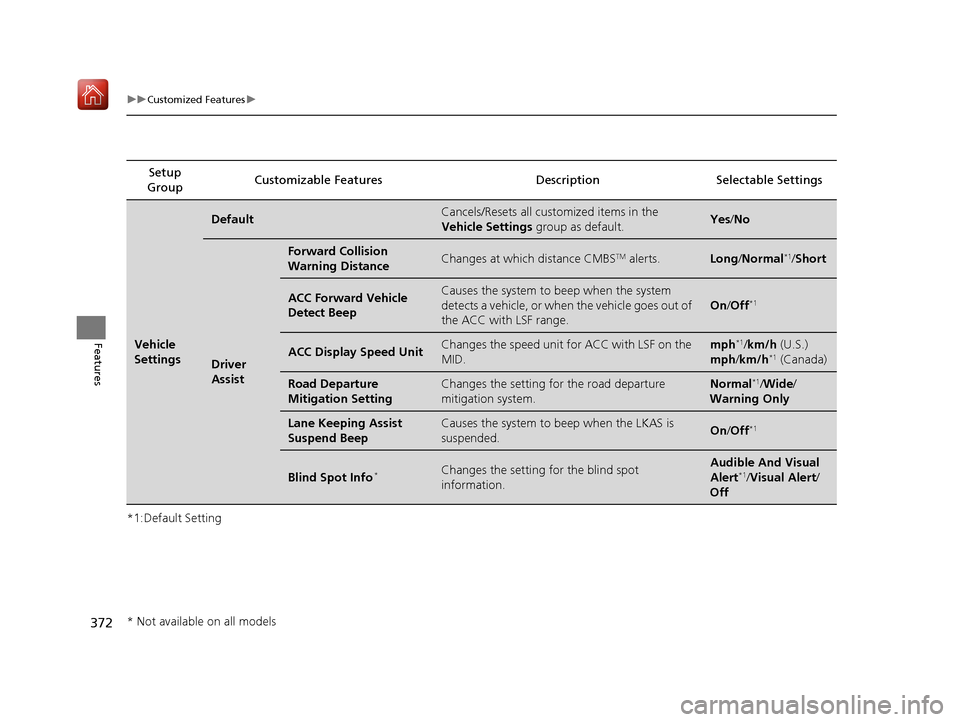
372
uuCustomized Features u
Features
*1:Default SettingSetup
Group Customizable Features Desc
ription Selectable Settings
Vehicle
Settings
DefaultCancels/Resets all customized items in the
Vehicle Settings group as default.Yes/No
Driver
Assist
Forward Collision
Warning DistanceChanges at which distance CMBSTM alerts.Long /Normal*1/Short
ACC Forward Vehicle
Detect BeepCauses the system to beep when the system
detects a vehicle, or when the vehicle goes out of
the ACC with LSF range.
On /Off*1
ACC Display Speed UnitChanges the speed unit for ACC with LSF on the
MID.mph*1/km/h (U.S.)
mph /km/h*1 (Canada)
Road Departure
Mitigation SettingChanges the setting for the road departure
mitigation system.Normal*1/ Wide /
Warning Only
Lane Keeping Assist
Suspend BeepCauses the system to beep when the LKAS is
suspended.On /Off*1
Blind Spot Info*Changes the setting for the blind spot
information.Audible And Visual
Alert*1/Visual Alert /
Off
* Not available on all models
19 ACURA MDX-31TZ56510.book 372 ページ 2018年12月11日 火曜日 午後4時47分