Seat Acura MDX 2020 Owner's Manual
[x] Cancel search | Manufacturer: ACURA, Model Year: 2020, Model line: MDX, Model: Acura MDX 2020Pages: 701, PDF Size: 38.91 MB
Page 596 of 701
595
uuReplacing Light Bulbs uTaillights/Rear Side Marker Lights
Maintenance
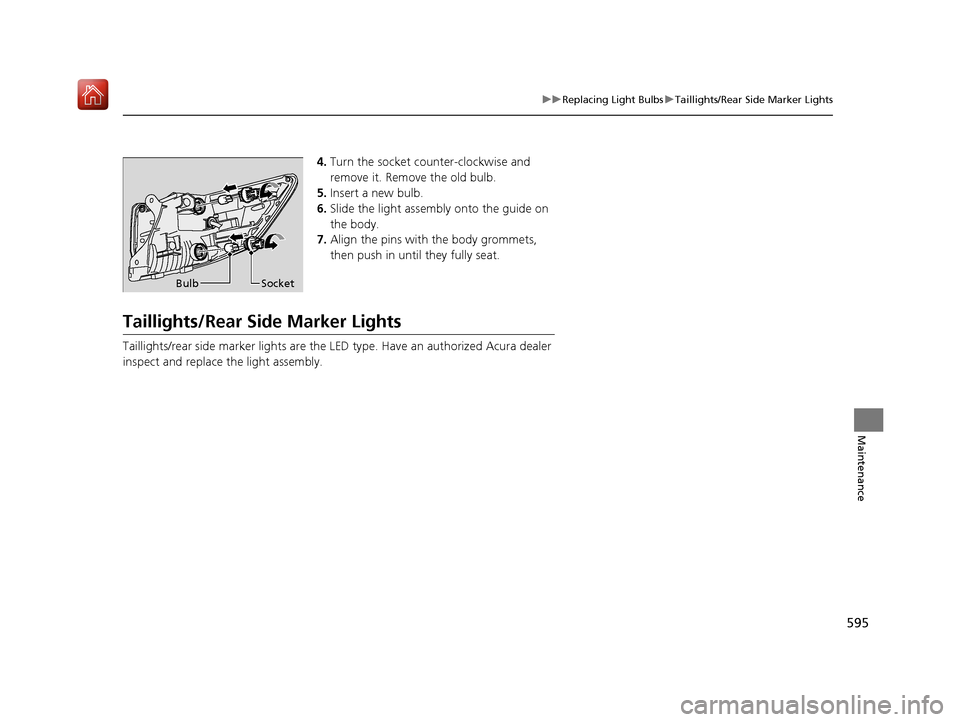
4. Turn the socket counter-clockwise and
remove it. Remove the old bulb.
5. Insert a new bulb.
6. Slide the light assembly onto the guide on
the body.
7. Align the pins with the body grommets,
then push in until they fully seat.
Taillights/Rear Side Marker Lights
Taillights/rear side marker lights are the LE D type. Have an authorized Acura dealer
inspect and replace the light assembly.
Bulb Socket
20 ACURA MDX-31TZ56600.book 595 ページ 2019年4月24日 水曜日 午後5時44分
Page 619 of 701
618
Maintenance
Cleaning
Interior Care
Use a damp cloth with a mixture of mild detergent and warm water to remove dirt.
Use a clean cloth to remove detergent residue.
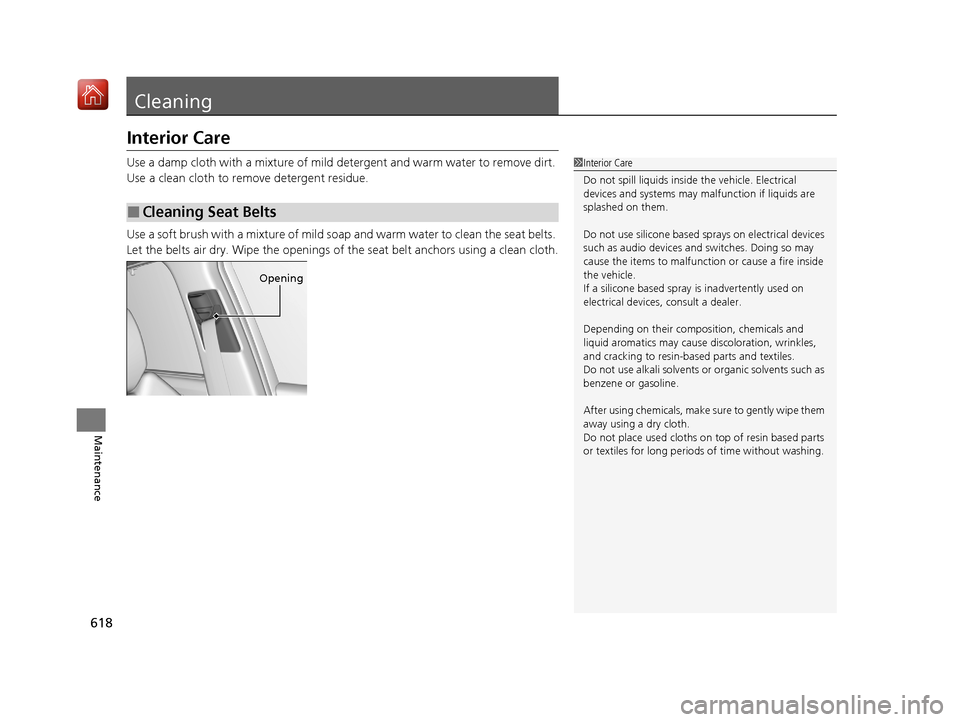
Use a soft brush with a mixture of mild soap and warm water to clean the seat belts.
Let the belts air dry. Wipe the openings of the seat belt anchors using a clean cloth.
■Cleaning Seat Belts
1 Interior Care
Do not spill liquids inside the vehicle. Electrical
devices and systems may ma lfunction if liquids are
splashed on them.
Do not use silicone based sprays on electrical devices
such as audio devices and switches. Doing so may
cause the items to malfunction or cause a fire inside
the vehicle.
If a silicone based spray is inadvertently used on
electrical devices, consult a dealer.
Depending on their compos ition, chemicals and
liquid aromatics may cause discoloration, wrinkles,
and cracking to resin-ba sed parts and textiles.
Do not use alkali solvents or organic solvents such as
benzene or gasoline.
After using chemicals, make su re to gently wipe them
away using a dry cloth.
Do not place used cloths on top of resin based parts
or textiles for long periods of time without washing.
Opening
20 ACURA MDX-31TZ56600.book 618 ページ 2019年4月24日 水曜日 午後5時44分
Page 620 of 701
619
uuCleaning uInterior Care
Maintenance
Wipe using a glass cleaner.
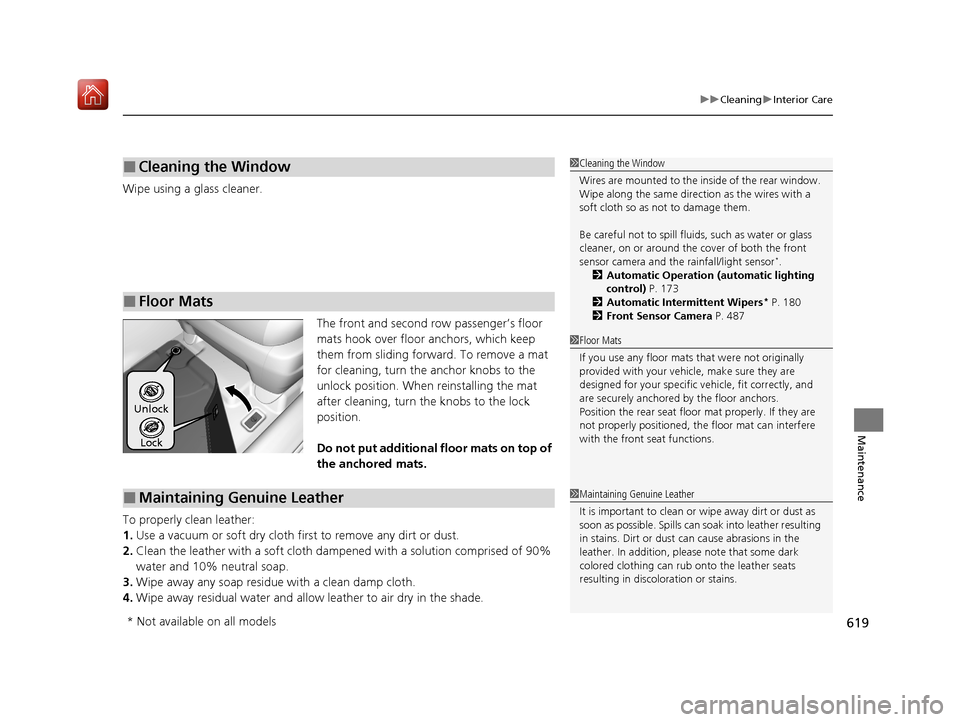
The front and second row passenger’s floor
mats hook over floor anchors, which keep
them from sliding forward. To remove a mat
for cleaning, turn the anchor knobs to the
unlock position. When reinstalling the mat
after cleaning, turn the knobs to the lock
position.
Do not put additional floor mats on top of
the anchored mats.
To properly clean leather:
1. Use a vacuum or soft dry cloth first to remove any dirt or dust.
2. Clean the leather with a soft cloth dampen ed with a solution comprised of 90%
water and 10% neutral soap.
3. Wipe away any soap residu e with a clean damp cloth.
4. Wipe away residual water and allo w leather to air dry in the shade.
■Cleaning the Window
■Floor Mats
1Cleaning the Window
Wires are mounted to the in side of the rear window.
Wipe along the same direct ion as the wires with a
soft cloth so as not to damage them.
Be careful not to spill flui ds, such as water or glass
cleaner, on or around the co ver of both the front
sensor camera and the rainfall/light sensor
*.
2 Automatic Operation (automatic lighting
control) P. 173
2 Automatic Intermittent Wipers
* P. 180
2 Front Sensor Camera P. 487
1Floor Mats
If you use any floor mats that were not originally
provided with your vehicle, make sure they are
designed for your specific ve hicle, fit correctly, and
are securely anchored by the floor anchors.
Position the rear seat floor mat properly. If they are
not properly positioned, th e floor mat can interfere
with the front seat functions.
Lock
Unlock
■Maintaining Genuine Leather1
Maintaining Genuine Leather
It is important to clean or wipe away dirt or dust as
soon as possible. Spills can soak into leather resulting
in stains. Dirt or dust ca n cause abrasions in the
leather. In addition, pl ease note that some dark
colored clothing can rub onto the leather seats
resulting in discol oration or stains.
* Not available on all models
20 ACURA MDX-31TZ56600.book 619 ページ 2019年4月24日 水曜日 午後5時44分
Page 624 of 701
623
Maintenance
Accessories and Modifications
Accessories
When installing accessories, check the following:
• Do not install accessories on the windsh ield. They can obstruct your view and
delay your reaction to driving conditions.
• Do not install any accessories over areas marked SRS Airbag, on the sides or backs
of the front seats, on front or side pillars, or near the side windows.
Accessories installed in these areas may interfere with proper operation of the
vehicle’s airbags or may be propelled into you or another occupant if the airbags
deploy.
• Be sure electronic accessories do not overload electrical circuits or interfere with
proper operation of your vehicle.
2 Fuses P. 662
•Before installing any electro nic accessory, have the installer contact a dealer for
assistance. If possible, have a deal er inspect the final installation.
1Accessories and Modifications
Acura Genuine accessori es are recommended to
ensure proper operati on on your vehicle.
3WARNING
Improper accessories or modifications can
affect your vehicle’s handling, stability, and
performance, and cause a crash in which
you can be seriously hurt or killed.
Follow all instruction s in this owner’s
manual regarding accessories and
modifications.
20 ACURA MDX-31TZ56600.book 623 ページ 2019年4月24日 水曜日 午後5時44分
Page 634 of 701
Continued633
uuIf a Tire Goes Flat uChanging a Flat Tire
Handling the Unexpected
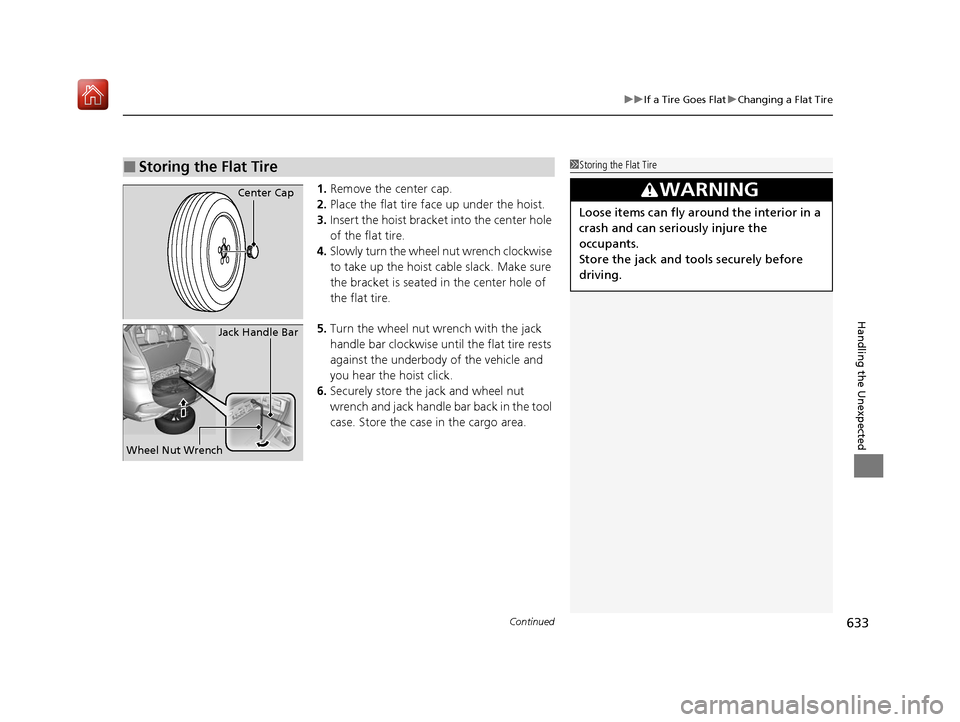
1. Remove the center cap.
2. Place the flat tire face up under the hoist.
3. Insert the hoist bracke t into the center hole
of the flat tire.
4. Slowly turn the wheel nut wrench clockwise
to take up the hoist cable slack. Make sure
the bracket is seated in the center hole of
the flat tire.
5. Turn the wheel nut wrench with the jack
handle bar clockwise until the flat tire rests
against the underbody of the vehicle and
you hear the hoist click.
6. Securely store the jack and wheel nut
wrench and jack handle bar back in the tool
case. Store the case in the cargo area.
■Storing the Flat Tire1Storing the Flat Tire
3WARNING
Loose items can fly around the interior in a
crash and can seriously injure the
occupants.
Store the jack and tools securely before
driving.
Center Cap
Wheel Nut Wrench Jack Handle Bar
20 ACURA MDX-31TZ56600.book 633 ページ 2019年4月24日 水曜日 午後5時44分
Page 636 of 701
635
uuIf a Tire Goes Flat uTemporarily Repairing a Flat Tire
Continued
Handling the Unexpected
Temporarily Repairing a Flat Tire
If the tire has a large cut or is otherwise severely damaged, you will need to have the
vehicle towed. If the tire only has a small puncture, from a nail for instance, you can
use the temporary tire repair kit so that you can drive to the nearest service station
for a more permanent repair.
If a tire goes flat while driving, grasp the steering wheel firmly, and brake gradually
to reduce speed. Then stop in a safe place.
1. Park the vehicle on a firm, level, and n on-slippery surface and apply the parking
brake.
2. Put the transmission into
(P.
3. Turn on the hazard warning lights an d set the power mode to VEHICLE OFF
(LOCK).
Models with temporary tire repair kit
1 Temporarily Repairing a Flat Tire
The kit should not be used in the following situations.
Instead, contact a dealer or roadside assistance to
have the vehicle towed.
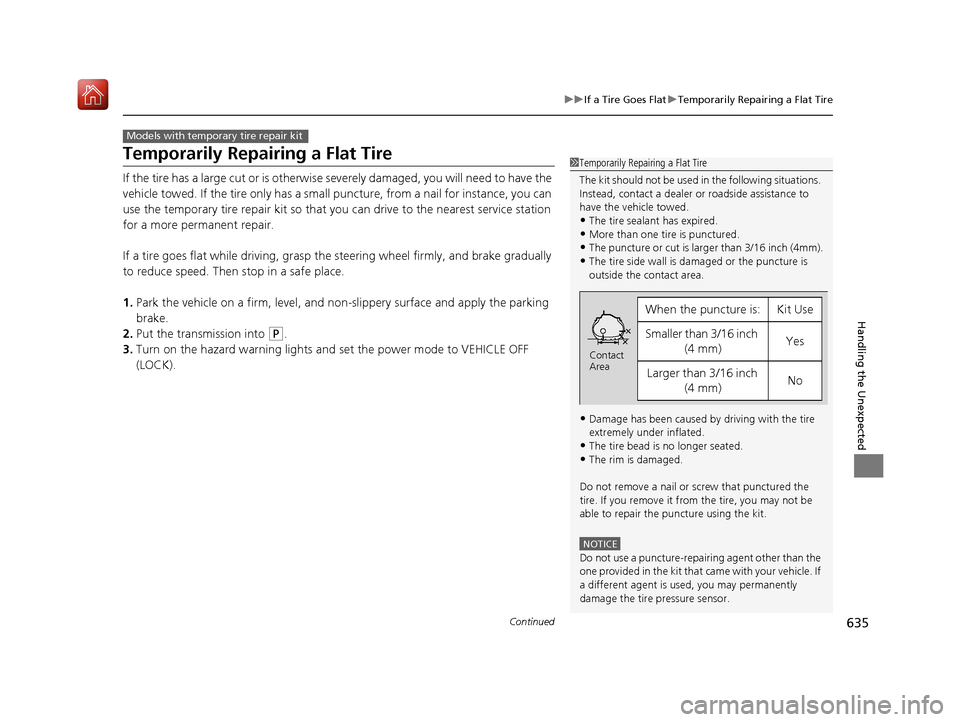
•The tire sealant has expired.
•More than one tire is punctured.•The puncture or cut is larger than 3/16 inch (4mm).
•The tire side wall is da maged or the puncture is
outside the contact area.
•Damage has been caused by driving with the tire
extremely under inflated.
•The tire bead is no longer seated.
•The rim is damaged.
Do not remove a nail or screw that punctured the
tire. If you remove it from the tire, you may not be
able to repair the puncture using the kit.
NOTICE
Do not use a puncture-repairing agent other than the
one provided in the kit that came with your vehicle. If
a different agent is used, you may permanently
damage the tire pressure sensor.
When the puncture is:Kit Use
Smaller than 3/16 inch (4 mm)Yes
Larger than 3/16 inch (4 mm)No
Contact
Area
20 ACURA MDX-31TZ56600.book 635 ページ 2019年4月24日 水曜日 午後5時44分
Page 666 of 701
665
uuFuses uFuse Locations
Continued
Handling the Unexpected
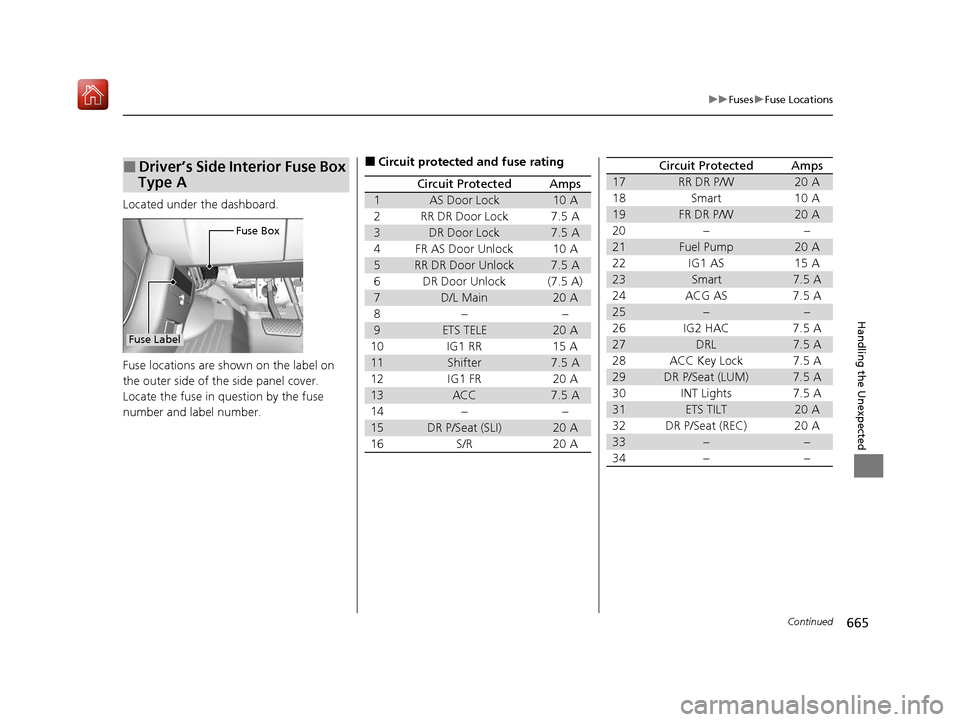
Located under the dashboard.
Fuse locations are shown on the label on
the outer side of the side panel cover.
Locate the fuse in question by the fuse
number and label number.
■Driver’s Side Interior Fuse Box
Type A
Fuse Box
Fuse Label
■Circuit protected and fuse rating
Circuit ProtectedAmps
1AS Door Lock10 A
2RR DR Door Lock7.5 A
3DR Door Lock7.5 A
4FR AS Door Unlock10 A
5RR DR Door Unlock7.5 A
6DR Door Unlock(7.5 A)
7D/L Main20 A
8−−
9ETS TELE20 A
10 IG1 RR 15 A
11Shifter7.5 A
12 IG1 FR 20 A
13ACC7.5 A
14 − −
15DR P/Seat (SLI)20 A
16 S/R 20 A
17RR DR P/W20 A
18 Smart 10 A
19FR DR P/W20 A
20 − −
21Fuel Pump20 A
22 IG1 AS 15 A
23Smart7.5 A
24 ACG AS 7.5 A
25−−
26 IG2 HAC 7.5 A
27DRL7.5 A
28 ACC Key Lock 7.5 A
29DR P/Seat (LUM)7.5 A
30 INT Lights 7.5 A
31ETS TILT20 A
32 DR P/Seat (REC) 20 A
33−−
34−−
Circuit ProtectedAmps
20 ACURA MDX-31TZ56600.book 665 ページ 2019年4月24日 水曜日 午後5時44分
Page 668 of 701
667
uuFuses uFuse Locations
Continued
Handling the Unexpected
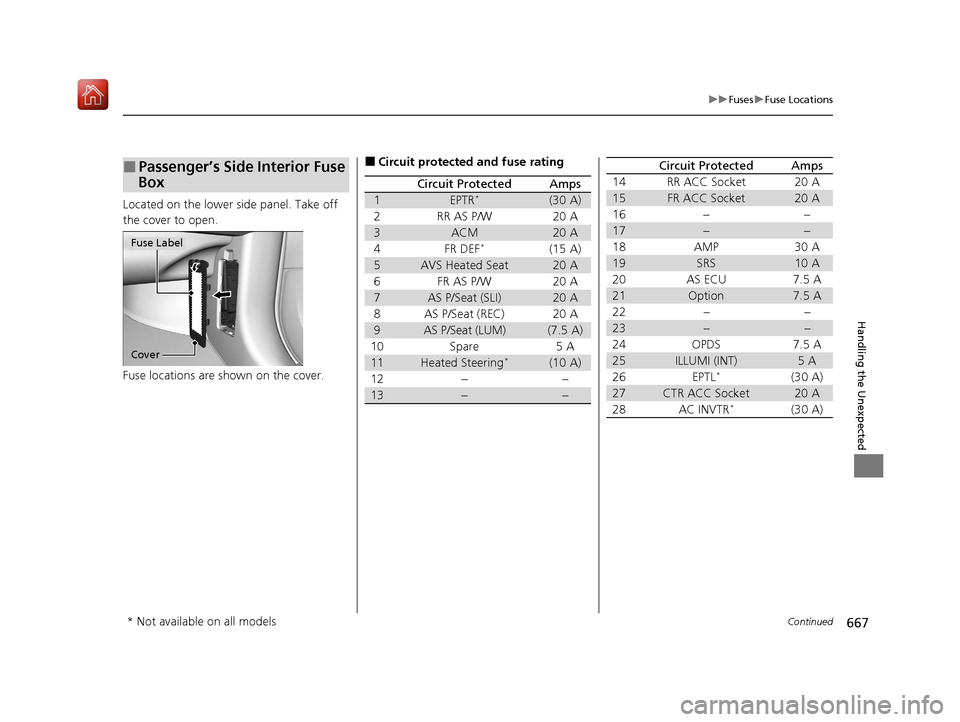
Located on the lower side panel. Take off
the cover to open.
Fuse locations are shown on the cover.
■Passenger’s Side Interior Fuse
Box
Cover
Fuse Label
■Circuit protected and fuse rating
Circuit ProtectedAmps
1EPTR*(30 A)
2RR AS P/W20 A
3ACM20 A
4FR DEF*(15 A)
5AVS Heated Seat20 A
6FR AS P/W20 A
7AS P/Seat (SLI)20 A
8AS P/Seat (REC)20 A
9AS P/Seat (LUM)(7.5 A)
10Spare5 A
11Heated Steering*(10 A)
12−−
13−−
14RR ACC Socket20 A
15FR ACC Socket20 A
16−−
17−−
18AMP30 A
19SRS10 A
20AS ECU7.5 A
21Option7.5 A
22−−
23−−
24OPDS7.5 A
25ILLUMI (INT)5 A
26EPTL*(30 A)
27CTR ACC Socket20 A
28AC INVTR*(30 A)
Circuit ProtectedAmps
* Not available on all models
20 ACURA MDX-31TZ56600.book 667 ページ 2019年4月24日 水曜日 午後5時44分
Page 669 of 701
668
uuFuses uFuse Locations
Handling the Unexpected
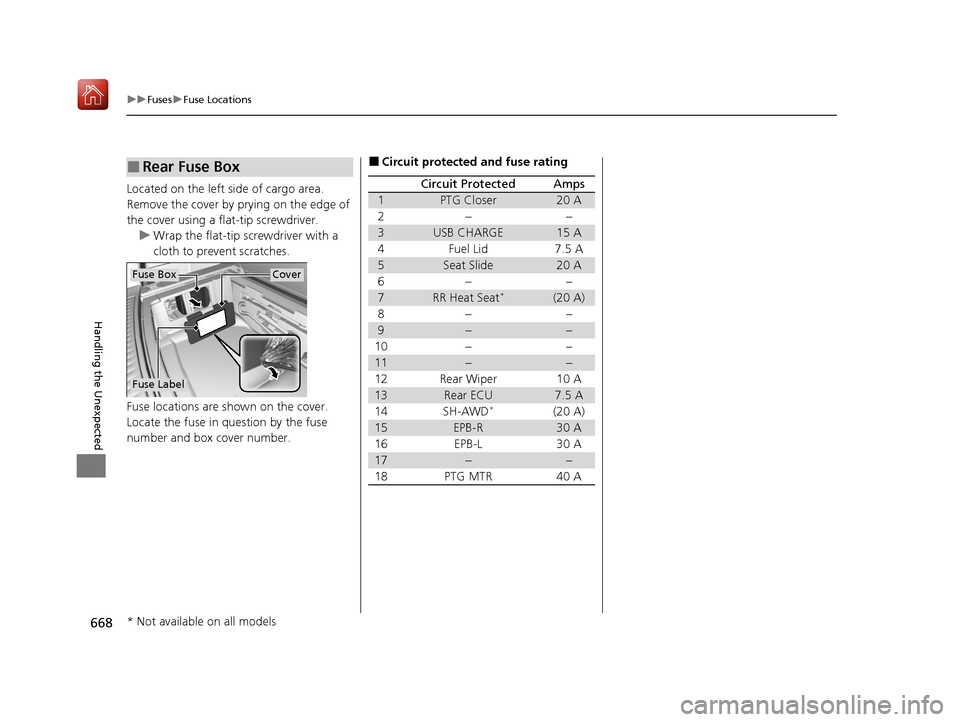
Located on the left side of cargo area.
Remove the cover by prying on the edge of
the cover using a flat-tip screwdriver.
u Wrap the flat-tip screwdriver with a
cloth to prevent scratches.
Fuse locations are shown on the cover.
Locate the fuse in question by the fuse
number and box cover number.
■Rear Fuse Box
Fuse Label
Fuse BoxCover
■Circuit protected and fuse rating
Circuit ProtectedAmps
1PTG Closer20 A
2−−
3USB CHARGE15 A
4Fuel Lid7.5 A
5Seat Slide20 A
6−−
7RR Heat Seat*(20 A)
8−−
9−−
10−−
11−−
12Rear Wiper10 A
13Rear ECU7.5 A
14SH-AWD*(20 A)
15EPB-R30 A
16EPB-L30 A
17−−
18PTG MTR40 A
* Not available on all models
20 ACURA MDX-31TZ56600.book 668 ページ 2019年4月24日 水曜日 午後5時44分
Page 677 of 701
676
Information
Specifications
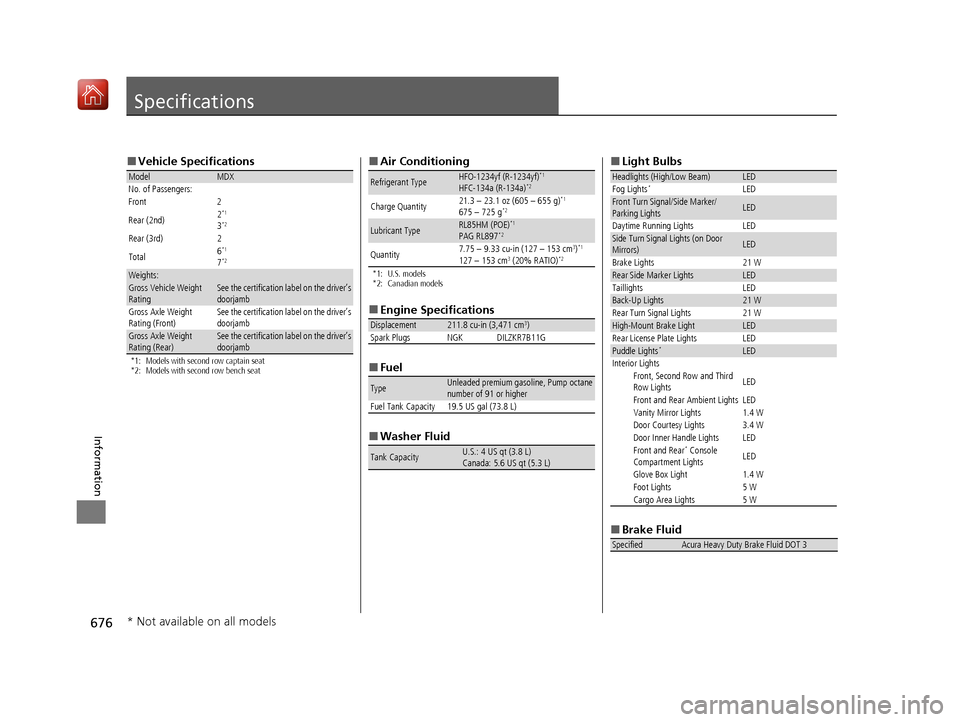
■Vehicle Specifications
*1: Models with second row captain seat
*2: Models with second row bench seat
ModelMDX
No. of Passengers:
Front 2
Rear (2nd) 2
*1
3*2
Rear (3rd)
2
Total 6*1
7*2
Weights:Gross Vehicle Weight
RatingSee the certification label on the driver’s
doorjamb
Gross Axle Weight
Rating (Front)See the certification label on the driver’s
doorjamb
Gross Axle Weight
Rating (Rear)See the certification label on the driver’s
doorjamb
■
Air Conditioning
*1: U.S. models
*2: Canadian models
■Engine Specifications
■ Fuel
■ Washer Fluid
Refrigerant TypeHFO-1234yf (R-1234yf)*1
HFC-134a (R-134a)*2
Charge Quantity 21.3 – 23.1 oz (605 – 655 g)*1
675 – 725 g*2
Lubricant TypeRL85HM (POE)*1
PAG RL897*2
Quantity7.75 – 9.33 cu-in (127 – 153 cm3)*1
127 – 153 cm3 (20% RATIO)*2
Displacement211.8 cu-in (3,471 cm3)
Spark Plugs NGK DILZKR7B11G
TypeUnleaded premium gasoline, Pump octane
number of 91 or higher
Fuel Tank Capacity 19.5 US gal (73.8 L)
Tank CapacityU.S.: 4 US qt (3.8 L)
Canada: 5.6 US qt (5.3 L)
■ Light Bulbs
■ Brake Fluid
Headlights (High/Low Beam)LED
Fog Lights*LEDFront Turn Signal/Side Marker/
Parking LightsLED
Daytime Running Lights LED
Side Turn Signal Lights (on Door
Mirrors)LED
Brake Lights 21 W
Rear Side Marker LightsLED
Taillights LED
Back-Up Lights21 W
Rear Turn Signal Lights 21 W
High-Mount Brake LightLED
Rear License Plate Lights LED
Puddle Lights*LED
Interior Lights Front, Second Row and Third
Row Lights LED
Front and Rear Ambient Lights LED
Vanity Mirror Lights 1.4 W
Door Courtesy Lights 3.4 W
Door Inner Handle Lights LED
Front and Rear
* Console
Compartment Lights LED
Glove Box Light 1.4 W
Foot Lights 5 W
Cargo Area Lights 5 W
SpecifiedAcura Heavy Duty Brake Fluid DOT 3
* Not available on all models
20 ACURA MDX-31TZ56600.book 676 ページ 2019年4月24日 水曜日 午後5時44分