Seat Acura MDX 2020 Manual Online
[x] Cancel search | Manufacturer: ACURA, Model Year: 2020, Model line: MDX, Model: Acura MDX 2020Pages: 701, PDF Size: 38.91 MB
Page 213 of 701
212
uuInterior Lights/Interior Convenience Items uInterior Convenience Items
Controls
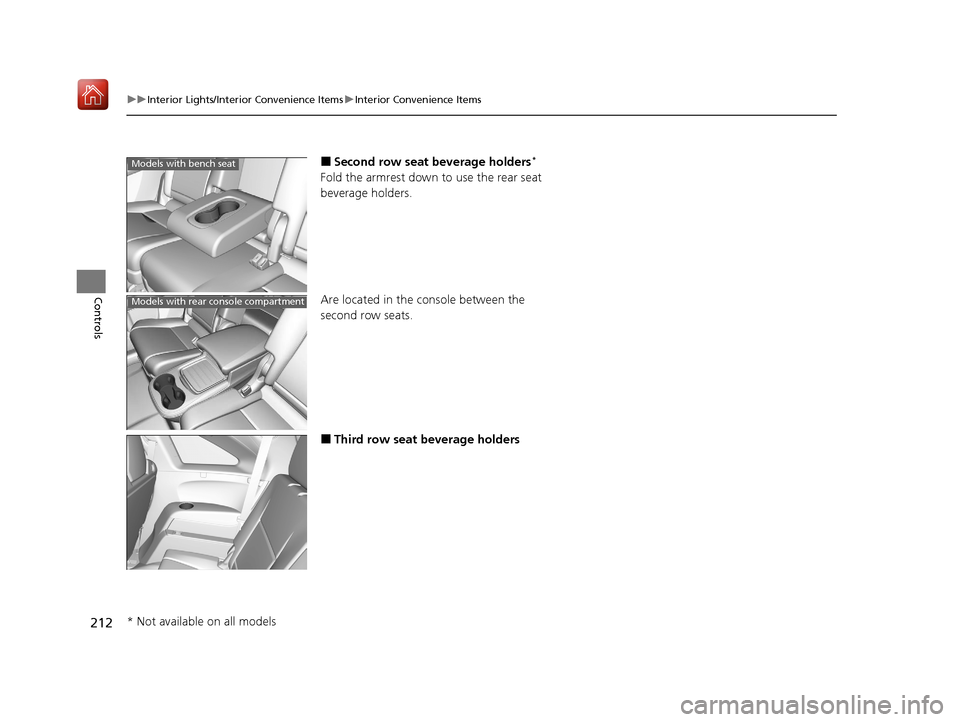
■Second row seat beverage holders*
Fold the armrest down to use the rear seat
beverage holders.
Are located in the console between the
second row seats.
■Third row seat beverage holders
Models with bench seat
Models with rear console compartment
* Not available on all models
20 ACURA MDX-31TZ56600.book 212 ページ 2019年4月24日 水曜日 午後5時44分
Page 218 of 701
Continued217
uuInterior Lights/Interior Convenience Items uInterior Convenience Items
Controls
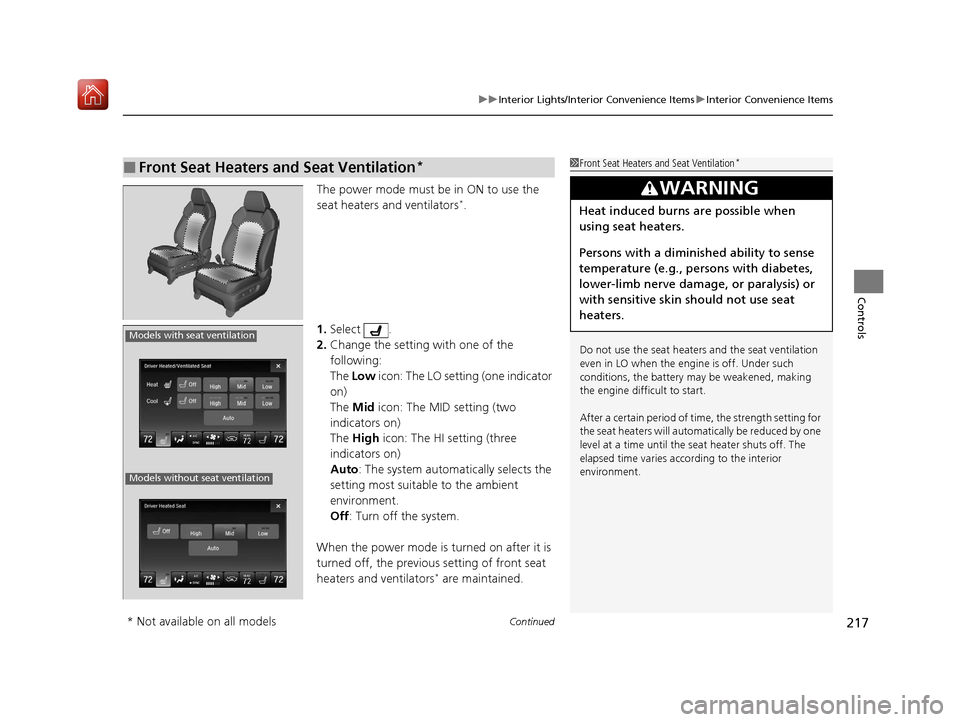
The power mode must be in ON to use the
seat heaters and ventilators*.
1. Select .
2. Change the setting with one of the
following:
The Low icon: The LO setting (one indicator
on)
The Mid icon: The MID setting (two
indicators on)
The High icon: The HI setting (three
indicators on)
Auto : The system automatically selects the
setting most suitable to the ambient
environment.
Off : Turn off the system.
When the power mode is turned on after it is
turned off, the previous setting of front seat
heaters and ventilators
* are maintained.
■Front Seat Heaters and Seat Ventilation*1 Front Seat Heaters and Seat Ventilation*
Do not use the seat heater s and the seat ventilation
even in LO when the engine is off. Under such
conditions, the battery ma y be weakened, making
the engine difficult to start.
After a certain period of time, the strength setting for
the seat heaters will automatically be reduced by one
level at a time until the seat heater shuts off. The
elapsed time varies according to the interior
environment.
3WARNING
Heat induced burns are possible when
using seat heaters.
Persons with a diminished ability to sense
temperature (e.g., persons with diabetes,
lower-limb nerve damage, or paralysis) or
with sensitive skin should not use seat
heaters.
Models with seat ventilation
Models without seat ventilation
* Not available on all models
20 ACURA MDX-31TZ56600.book 217 ページ 2019年4月24日 水曜日 午後5時44分
Page 219 of 701
uuInterior Lights/Interior Convenience Items uInterior Convenience Items
218
Controls
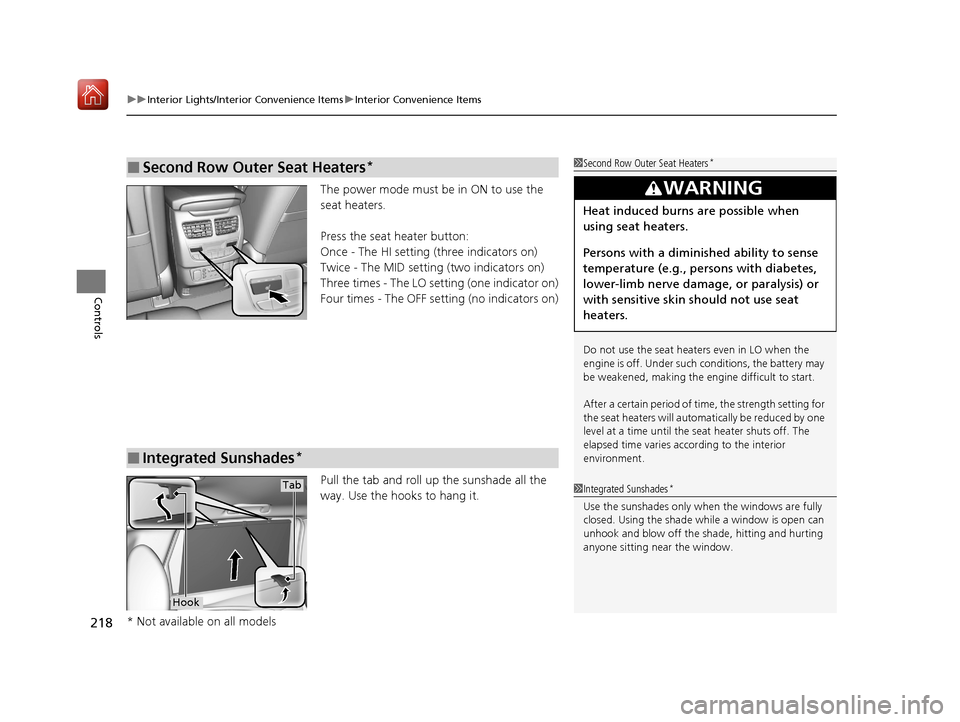
The power mode must be in ON to use the
seat heaters.
Press the seat heater button:
Once - The HI setting (three indicators on)
Twice - The MID setting (two indicators on)
Three times - The LO setting (one indicator on)
Four times - The OFF se tting (no indicators on)
Pull the tab and roll up the sunshade all the
way. Use the hooks to hang it.
■Second Row Outer Seat Heaters*1 Second Row Outer Seat Heaters*
Do not use the seat heaters even in LO when the
engine is off. Under such conditions, the battery may
be weakened, making the engine difficult to start.
After a certain period of time, the strength setting for
the seat heaters will automatically be reduced by one
level at a time until the seat heater shuts off. The
elapsed time varies according to the interior
environment.
3WARNING
Heat induced burns are possible when
using seat heaters.
Persons with a diminished ability to sense
temperature (e.g., persons with diabetes,
lower-limb nerve damage, or paralysis) or
with sensitive skin should not use seat
heaters.
■Integrated Sunshades*
1Integrated Sunshades*
Use the sunshades only when the windows are fully
closed. Using the shade while a window is open can
unhook and blow off the sh ade, hitting and hurting
anyone sitting near the window.
Tab
Hook
* Not available on all models
20 ACURA MDX-31TZ56600.book 218 ページ 2019年4月24日 水曜日 午後5時44分
Page 252 of 701
251
uuAudio System Basic Operation uVoice Control Operation
Continued
Features
Voice Control Operation
Your vehicle has a voice control syst em that allows hands-free operation.
The voice control system uses the (Tal k) and (hang-up/back) buttons on the
steering wheel and a microphone near the map lights in the ceiling.
To achieve optimum voice recognition when using the voice control system:
• Make sure the correct screen is displa yed for the voice command that you are
using.
The system recognizes only certain commands.
Available voice command P. 252
• Close the windows and moonroof.
• Adjust the dashboard and side vents so air does not blow onto the microphone in
the ceiling.
• Speak clearly in a natural speaking vo ice without pausing between words.
• Reduce any background noise if possibl e. The system may misinterpret your
command if more than one person is speaking at the same time.
■Voice Recognition
Models with navigation system
1Voice Control Operation
When you press the button, a helpful prompt asks
what you would like to do. Press and release the
button again to bypass th is prompt and give a
command.
1 Voice Recognition
The voice control system can only be used from the
driver’s seat because the microphone unit removes
noises from the front passenger’s side.
20 ACURA MDX-31TZ56600.book 251 ページ 2019年4月24日 水曜日 午後5時44分
Page 336 of 701
335
Features
Rear Entertainment System (RES)*
Allows the rear passengers to enjoy a different entertainment source, such as DVD,
CD, and radio, than the front passengers.
Wireless Headphones
The rear seat passengers can listen to audio from the rear entertainment system by
a wireless headphone that comes with your vehicle.
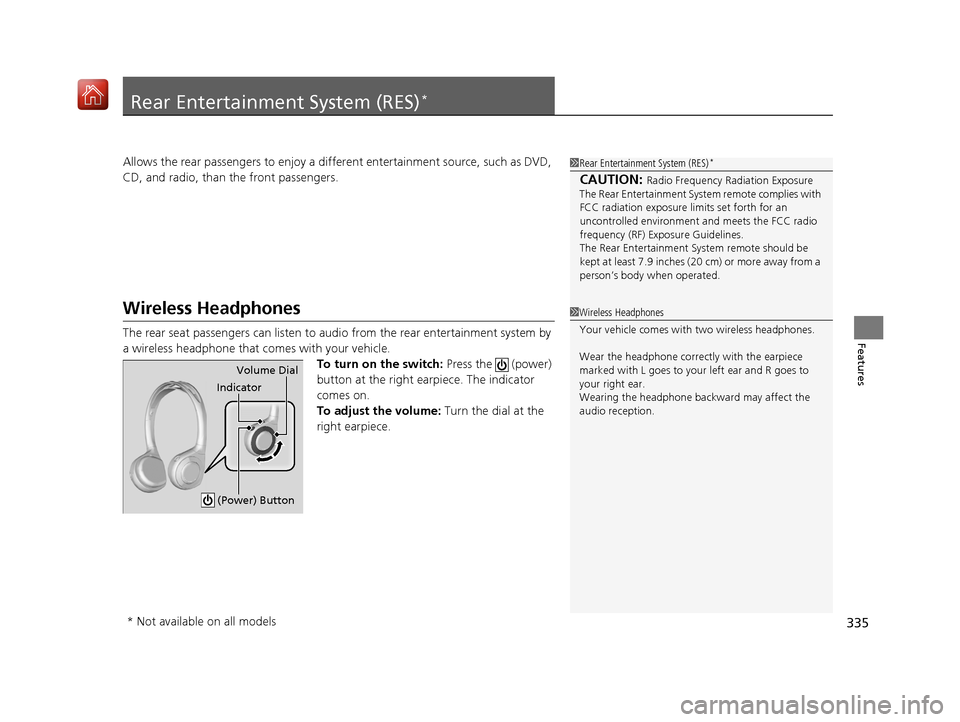
To turn on the switch: Press the (power)
button at the right earpiece. The indicator
comes on.
To adjust the volume: Turn the dial at the
right earpiece.
1 Rear Entertainment System (RES)*
CAUTION: Radio Frequency Radiation Exposure
The Rear Entertainment Syst em remote complies with
FCC radiation exposure lim its set forth for an
uncontrolled environment and meets the FCC radio
frequency (RF) Exposure Guidelines.
The Rear Entertainment Sy stem remote should be
kept at least 7.9 inches ( 20 cm) or more away from a
person’s body when operated.
1 Wireless Headphones
Your vehicle comes with two wireless headphones.
Wear the headphone correctly with the earpiece
marked with L goes to y our left ear and R goes to
your right ear.
Wearing the headphone back ward may affect the
audio reception.
Indicator Volume Dial
(Power) Button
* Not available on all models
20 ACURA MDX-31TZ56600.book 335 ページ 2019年4月24日 水曜日 午後5時44分
Page 373 of 701

372
uuCustomized Features u
Features
*1:Default SettingSetup
Group Customizable Features Desc
ription Selectable Settings
Vehicle
Settings
Driving
Position
Memory Position LinkTurns the driving position memory system on and
off.On*1/Off
Easy Entry/Exit
Moves the seat fully rearward and steering wheel
fully up when you get in/get out of the vehicle.
Changes the setting for this feature.Seat & Steering
Wheel*1/Seat Only /
Steering Wheel
Only /Off
Keyless
Access
Door Unlock ModeChanges which doors unlock when you grab the
driver’s door handle.Driver’s Door or
Tailgate Only*1/All
Doors
Keyless Access Light
FlashCauses some exterior li ghts to flash when you
unlock/lock the doors.On*1/ Off
Keyless Access BeepCauses the beeper to sound when you unlock/
lock the doors.On*1/Off
Remote Start System
On/Off*Turns the remote engine start feature on and off.On*1/Off
Walk Away Auto Lock
Changes the settings for the automatic locking
the doors when you walk away from the vehicle
while carrying the keyless access remote.
On /Off*1
* Not available on all models
20 ACURA MDX-31TZ56600.book 372 ページ 2019年4月24日 水曜日 午後5時44分
Page 448 of 701
Continued447
uuBefore Driving uDriving Preparation
Driving
• Store or secure all items on board properly.
u Carrying too much cargo, or improperly storing it, can affect your vehicle’s
handling, stability, sto pping distance, and tires, and make it unsafe.
2Maximum Load Limit P. 449
•Do not pile items higher than the seat height.
u They can block your view and may be thrown forward in the event of sudden
braking.
• Do not place anything in the front seat footwells. Make sure to secure the floor
mat.
u An object or unsecured floor mat can in terfere with your brake and accelerator
pedal operation while driving.
• If you have any animals on board, do not let them move around in the vehicle.
u They may interfere with driv ing and a crash could occur.
• Securely close and lock al l doors and the tailgate.
2Locking/Unlocking the Doors from the Inside P. 151
•Adjust your seating position properly.
u Adjust the head restraint, too.
2Adjusting the Seats P. 191
2 Adjusting the Front and Second Row Outer Head Restraint Positions P. 198
•Adjust the mirrors and steering wheel properly.
u Adjust them while sitting in the proper driving position.
2 Adjusting the Steering Wheel P. 187
2 Adjusting the Mirrors P. 188
■Interior Checks1Interior Checks
The headlight aim is set by the factory, and does not
need to be adjusted. Howeve r, if you regularly carry
heavy items in the cargo area or tow a trailer, have
the aiming readjusted at a dealer or by a qualified
technician.
Your vehicle is equipped with the automatic
headlight adjusting system that automatically adjusts
the vertical angle of the low beam headlights.
Models with automatic headlight adjusting system
20 ACURA MDX-31TZ56600.book 447 ページ 2019年4月24日 水曜日 午後5時44分
Page 449 of 701

448
uuBefore Driving uDriving Preparation
Driving
• Be sure items placed on the floor behind the front seats cannot roll under the
seats.
u They can interfere with the driver’s ability to operate the pedals, the operation
of the seats, or the operation of the sensors under the seats.
• Everyone in the vehicle must fasten their seat belt.
2Fastening a Seat Belt P. 36
•Make sure that the indicators in the in strument panel come on when you start the
vehicle, and go off soon after.
u Always have a dealer check the vehicle if a problem is indicated.
2 Indicators P. 78
20 ACURA MDX-31TZ56600.book 448 ページ 2019年4月24日 水曜日 午後5時44分
Page 450 of 701
449
uuBefore Driving uMaximum Load Limit
Continued
Driving
Maximum Load Limit
The maximum load for your ve hicle is 1,173 lbs (532 kg).
The maximum load for your ve hicle is 1,005 lbs (456 kg).
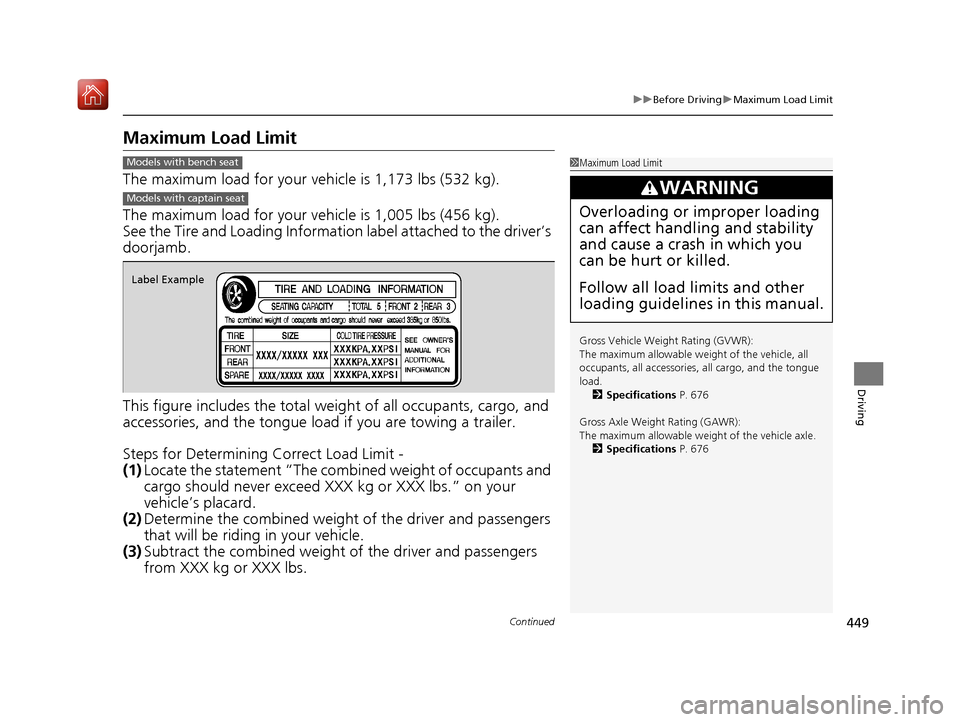
See the Tire and Loading Information label attached to the driver’s
doorjamb.
This figure includes the total weig ht of all occupants, cargo, and
accessories, and the tongue load if you are towing a trailer.
Steps for Determining Correct Load Limit -
(1) Locate the statement “The combined weight of occupants and
cargo should never exceed XXX kg or XXX lbs.” on your
vehicle’s placard.
(2) Determine the combined weight of the driver and passengers
that will be riding in your vehicle.
(3) Subtract the combined weight of the driver and passengers
from XXX kg or XXX lbs.
1Maximum Load Limit
Gross Vehicle Weight Rating (GVWR):
The maximum allowable weight of the vehicle, all
occupants, all a ccessories, all cargo, and the tongue
load. 2 Specifications P. 676
Gross Axle Weight Rating (GAWR):
The maximum allowable weight of the vehicle axle. 2 Specifications P. 676
3WARNING
Overloading or improper loading
can affect handling and stability
and cause a crash in which you
can be hurt or killed.
Follow all load limits and other
loading guidelines in this manual.
Models with bench seat
Models with captain seat
Label Example
20 ACURA MDX-31TZ56600.book 449 ページ 2019年4月24日 水曜日 午後5時44分
Page 453 of 701
452
Driving
Towing a Trailer
Towing Preparation
Your vehicle can tow a trailer if you carefully observe the load limits, use the proper
equipment, and follow the towing guidelin es. Check the load limits before driving.
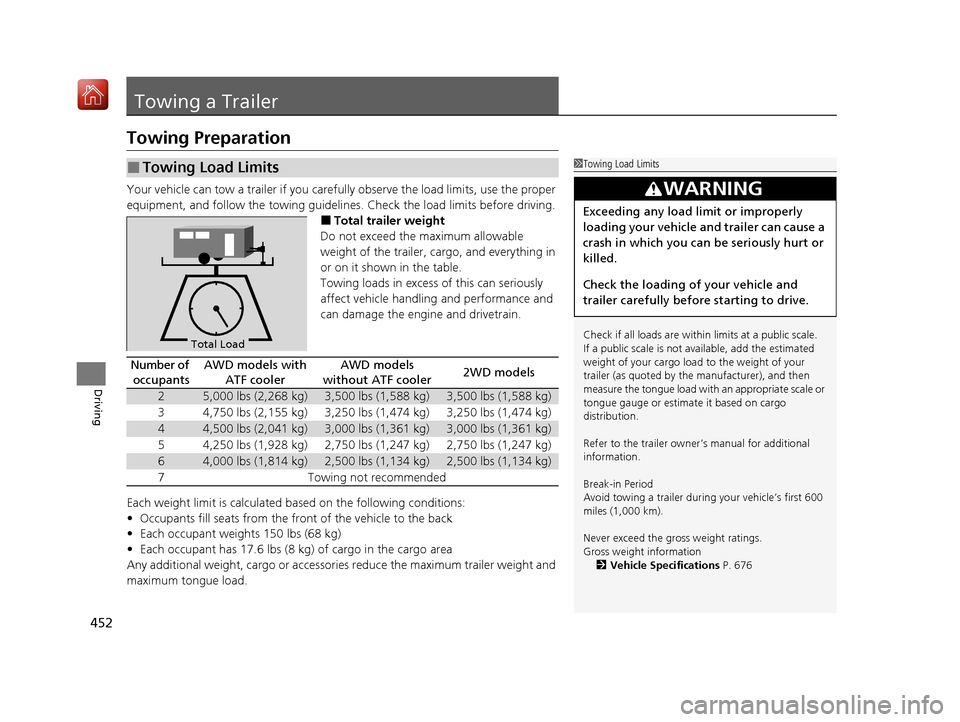
■Total trailer weight
Do not exceed the maximum allowable
weight of the trailer, cargo, and everything in
or on it shown in the table.
Towing loads in excess of this can seriously
affect vehicle handling and performance and
can damage the engine and drivetrain.
Each weight limit is calculated based on the following conditions:
• Occupants fill seats from the front of the vehicle to the back
• Each occupant weights 150 lbs (68 kg)
• Each occupant has 17.6 lbs (8 kg) of cargo in the cargo area
Any additional weight, cargo or accessori es reduce the maximum trailer weight and
maximum tongue load.
■Towing Load Limits1 Towing Load Limits
Check if all loads are within limits at a public scale.
If a public scale is not available, add the estimated
weight of your cargo load to the weight of your
trailer (as quoted by the manufacturer), and then
measure the tongue load with an appropriate scale or
tongue gauge or estima te it based on cargo
distribution.
Refer to the trailer owner’s manual for additional
information.
Break-in Period
Avoid towing a trailer duri ng your vehicle’s first 600
miles (1,000 km).
Never exceed the gross weight ratings.
Gross weight information 2 Vehicle Specifications P. 676
3WARNING
Exceeding any load limit or improperly
loading your vehicle and trailer can cause a
crash in which you can be seriously hurt or
killed.
Check the loading of your vehicle and
trailer carefully before starting to drive.
Total Load
Number of
occupantsAWD models with ATF coolerAWD models
without ATF cooler2WD models
25,000 lbs (2,268 kg)3,500 lbs (1,588 kg)3,500 lbs (1,588 kg)
34,750 lbs (2,155 kg)3,250 lbs (1,474 kg)3,250 lbs (1,474 kg)
44,500 lbs (2,041 kg)3,000 lbs (1,361 kg)3,000 lbs (1,361 kg)
54,250 lbs (1,928 kg)2,750 lbs (1,247 kg)2,750 lbs (1,247 kg)
64,000 lbs (1,814 kg)2,500 lbs (1,134 kg)2,500 lbs (1,134 kg)
7Towing not recommended
20 ACURA MDX-31TZ56600.book 452 ページ 2019年4月24日 水曜日 午後5時44分