amp Acura MDX 2020 User Guide
[x] Cancel search | Manufacturer: ACURA, Model Year: 2020, Model line: MDX, Model: Acura MDX 2020Pages: 701, PDF Size: 38.91 MB
Page 214 of 701
Continued213
uuInterior Lights/Interior Convenience Items uInterior Convenience Items
Controls
The accessory power sockets can be used when the power mode is in ACCESSORY
or ON.
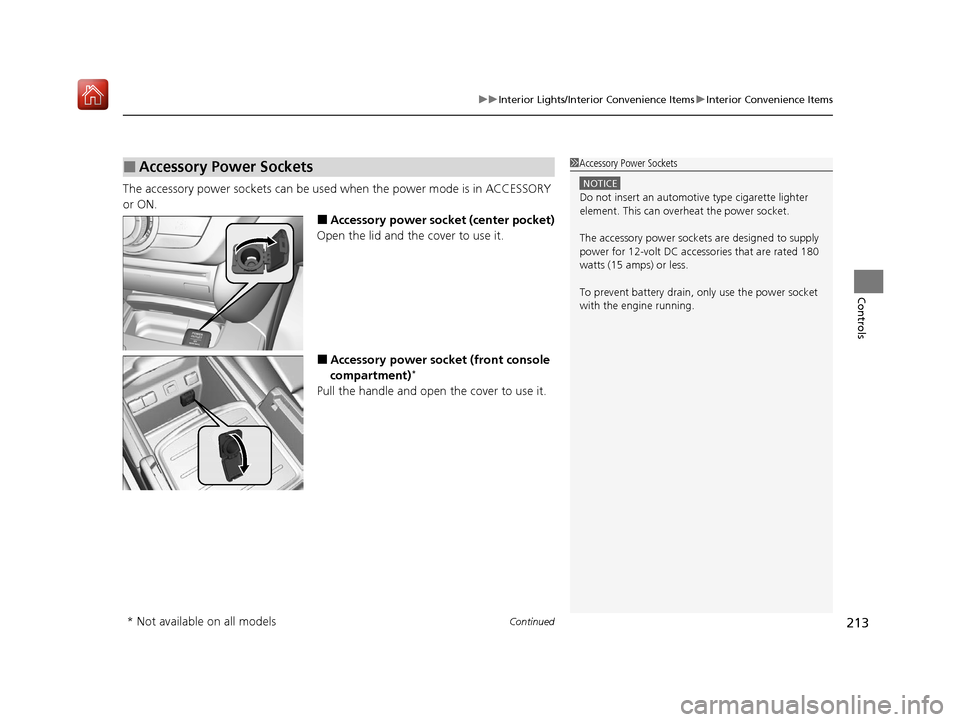
■Accessory power socket (center pocket)
Open the lid and the cover to use it.
■Accessory power socket (front console
compartment)*
Pull the handle and open the cover to use it.
■Accessory Power Sockets1 Accessory Power Sockets
NOTICE
Do not insert an automotive type cigarette lighter
element. This can overheat the power socket.
The accessory power socket s are designed to supply
power for 12-volt DC accessories that are rated 180
watts (15 amps) or less.
To prevent battery drain, only use the power socket
with the engine running.
* Not available on all models
20 ACURA MDX-31TZ56600.book 213 ページ 2019年4月24日 水曜日 午後5時44分
Page 215 of 701
uuInterior Lights/Interior Convenience Items uInterior Convenience Items
214
Controls
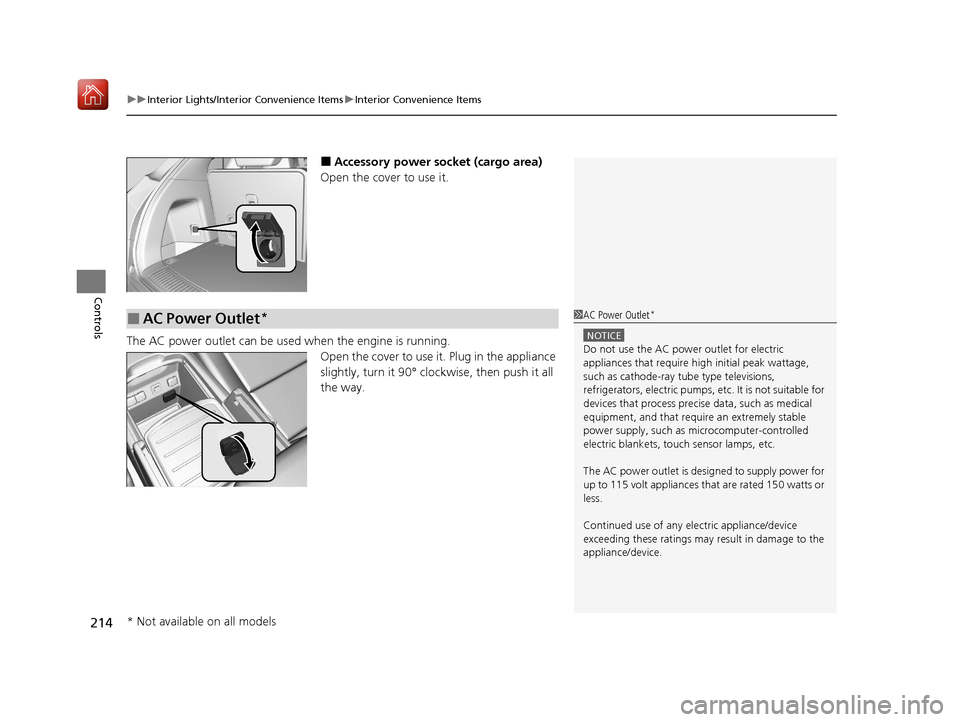
■Accessory power socket (cargo area)
Open the cover to use it.
The AC power outlet can be used when the engine is running. Open the cover to use it. Plug in the appliance
slightly, turn it 90° clockwise, then push it all
the way.
■AC Power Outlet*1AC Power Outlet*
NOTICE
Do not use the AC power outlet for electric
appliances that require hi gh initial peak wattage,
such as cathode-ray tube type televisions,
refrigerators, electric pumps, etc. It is not suitable for
devices that process precis e data, such as medical
equipment, and that require an extremely stable
power supply, such as microcomputer-controlled
electric blankets, touc h sensor lamps, etc.
The AC power outlet is desi gned to supply power for
up to 115 volt appliances that are rated 150 watts or
less.
Continued use of any elec tric appliance/device
exceeding these ratings may result in damage to the
appliance/device.
* Not available on all models
20 ACURA MDX-31TZ56600.book 214 ページ 2019年4月24日 水曜日 午後5時44分
Page 234 of 701
233
uuAudio System uUSB Ports
Continued
Features
USB Ports
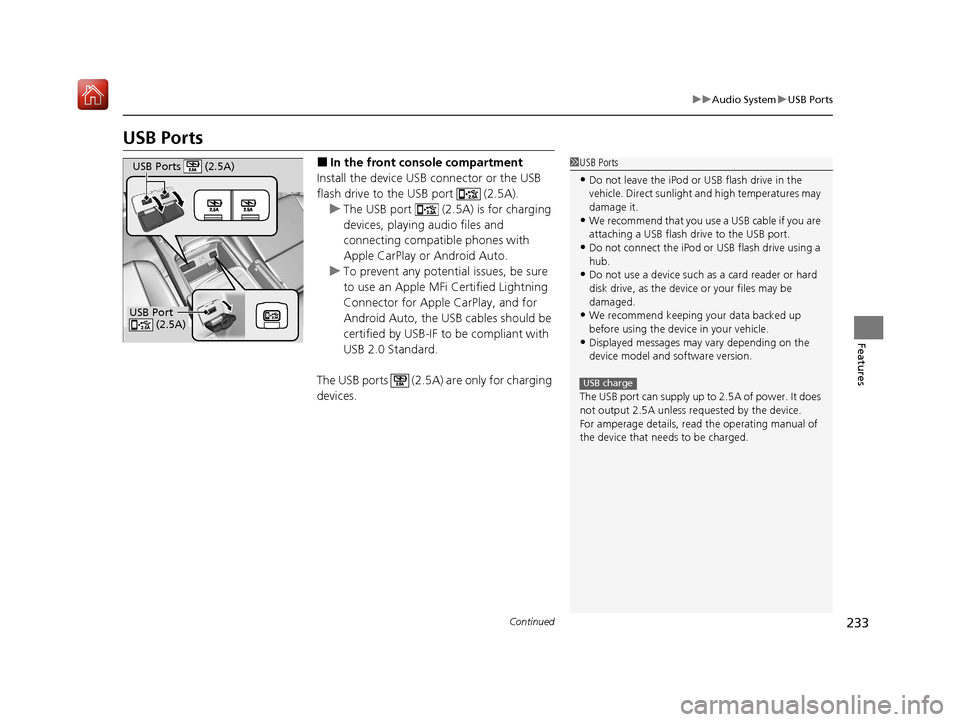
■In the front console compartment
Install the device USB connector or the USB
flash drive to the USB port (2.5A). u The USB port (2.5A) is for charging
devices, playing audio files and
connecting compatib le phones with
Apple CarPlay or Android Auto.
u To prevent any potenti al issues, be sure
to use an Apple MFi Certified Lightning
Connector for Apple CarPlay, and for
Android Auto, the USB cables should be
certified by USB-IF to be compliant with
USB 2.0 Standard.
The USB ports (2.5A) are only for charging
devices.1 USB Ports
•Do not leave the iPod or USB flash drive in the
vehicle. Direct sunlight and high temperatures may
damage it.
•We recommend that you us e a USB cable if you are
attaching a USB flash drive to the USB port.
•Do not connect the iPod or USB flash drive using a
hub.
•Do not use a device such as a card reader or hard
disk drive, as the device or your files may be
damaged.
•We recommend keeping y our data backed up
before using the device in your vehicle.
•Displayed messages may vary depending on the
device model and software version.
The USB port can supply up to 2.5A of power. It does
not output 2.5A unless requested by the device.
For amperage details, read the operating manual of
the device that ne eds to be charged.
USB charge
USB Port
(2.5A)
USB Ports (2.5A)
20 ACURA MDX-31TZ56600.book 233 ページ 2019年4月24日 水曜日 午後5時44分
Page 257 of 701
uuAudio System Basic Operation uPlaying AM/FM Radio
256
Features
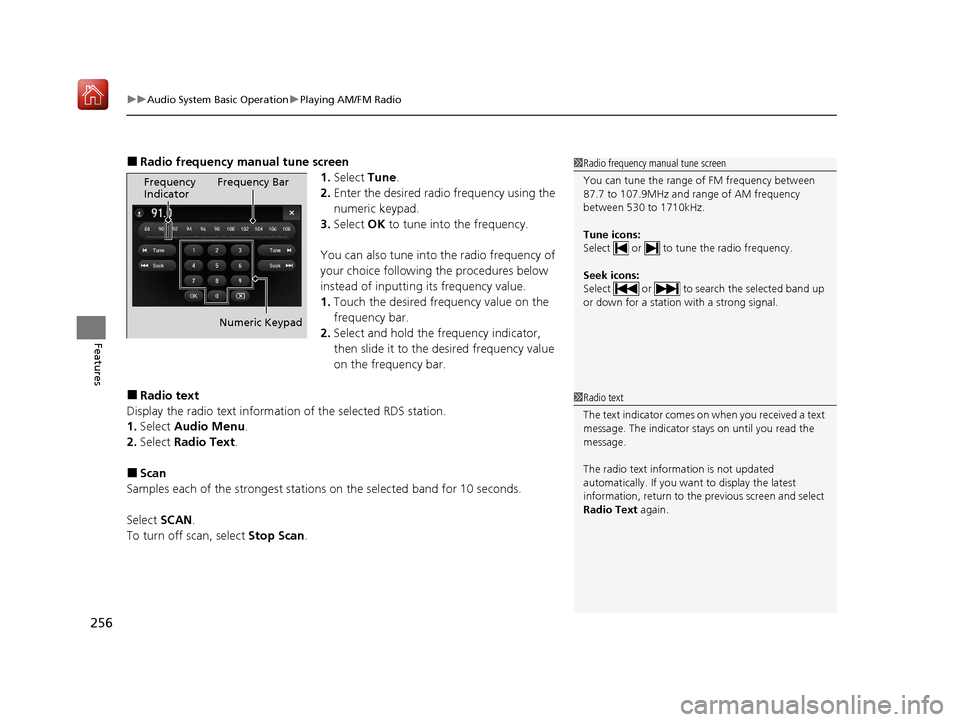
■Radio frequency ma nual tune screen
1.Select Tune.
2. Enter the desired radio frequency using the
numeric keypad.
3. Select OK to tune into the frequency.
You can also tune into the radio frequency of
your choice following the procedures below
instead of inputting its frequency value.
1. Touch the desired frequency value on the
frequency bar.
2. Select and hold the fre quency indicator,
then slide it to the desired frequency value
on the frequency bar.
■Radio text
Display the radio text information of the selected RDS station.
1. Select Audio Menu .
2. Select Radio Text .
■Scan
Samples each of the strongest stations on the selected band for 10 seconds.
Select SCAN.
To turn off scan, select Stop Scan.
1Radio frequency manual tune screen
You can tune the range of FM frequency between
87.7 to 107.9MHz and range of AM frequency
between 530 to 1710kHz.
Tune icons:
Select or to tune the radio frequency.
Seek icons:
Select or to search the selected band up
or down for a station with a strong signal.
Frequency
Indicator Frequency Bar
Numeric Keypad
1 Radio text
The text indicator comes on when you received a text
message. The indicator stays on until you read the
message.
The radio text inform ation is not updated
automatically. If you want to display the latest
information, return to the previous screen and select
Radio Text again.
20 ACURA MDX-31TZ56600.book 256 ページ 2019年4月24日 水曜日 午後5時44分
Page 268 of 701

267
uuAudio System Basic Operation uPlaying SiriusXM ® Radio
Features
Sample each channel on the selected mode for 10 seconds.
1. Select Presets /Controls to set the Controls.
2. Select SCAN.
3. Select Scan Channels or Scan Presets.
To turn off scan, select Stop Scan.
■Scan1Scan
You can select desired channel by songs using Scan
Presets .
The “Scan Songs in Preset s” function is based on
TuneScan
TM technology of SiriusXM ®.
The “Featured Channels ” function is based on
Featured Favorites
TM technology of SiriusXM ®.
TuneScan
TM and Featured FavoritesTM are registered
trademarks of SiriusXM ® Radio, Inc.
Scan Mode Menu Items
Scan Channels: Scans for channels with a strong
signal in the selected mode.
Scan Presets: Scans for desired preset channel by
songs. Select (skip up) or (skip down) to
skip to the next/previ ous stored selection.
20 ACURA MDX-31TZ56600.book 267 ページ 2019年4月24日 水曜日 午後5時44分
Page 269 of 701
268
uuAudio System Basic Operation uPlaying a CD
Features
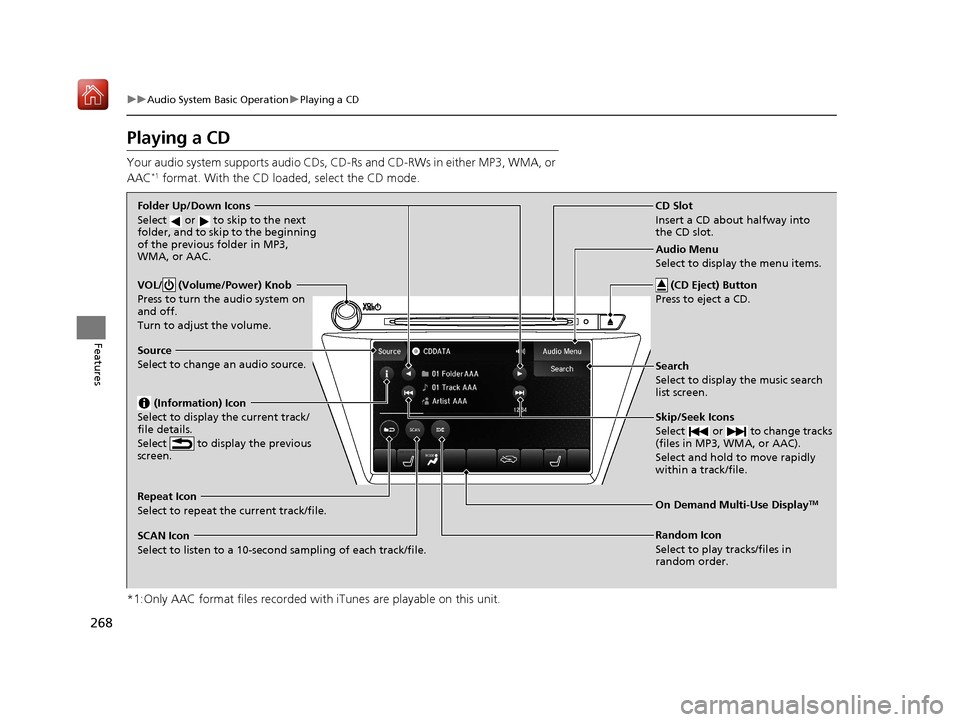
Playing a CD
Your audio system supports audio CDs, CD-Rs and CD-RWs in either MP3, WMA, or
AAC*1 format. With the CD load ed, select the CD mode.
*1:Only AAC format files recorded with iTunes are playable on this unit.
VOL/ (Volume/Power) Knob
Press to turn the audio system on
and off.
Turn to adjust the volume.
Skip/Seek Icons
Select or to change tracks
(files in MP3, WMA, or AAC).
Select and hold to move rapidly
within a track/file.
Audio Menu
Select to display the menu items.
Source
Select to change an audio source. (Information) Icon
Select to display the current track/
file details.
Select to display the previous
screen.
Search
Select to display the music search
list screen.
Folder Up/Down Icons
Select or to skip to the next
folder, and to skip to the beginning
of the previous folder in MP3,
WMA, or AAC.
On Demand Multi-Use DisplayTMRepeat Icon
Select to repeat the current track/file.
SCAN Icon
Select to listen to a 10-second sampling of each track/file. Random Icon
Select to play tracks/files in
random order.
(CD Eject) Button
Press to eject a CD.
CD Slot
Insert a CD about halfway into
the CD slot.
20 ACURA MDX-31TZ56600.book 268 ページ 2019年4月24日 水曜日 午後5時44分
Page 271 of 701
uuAudio System Basic Operation uPlaying a CD
270
Features
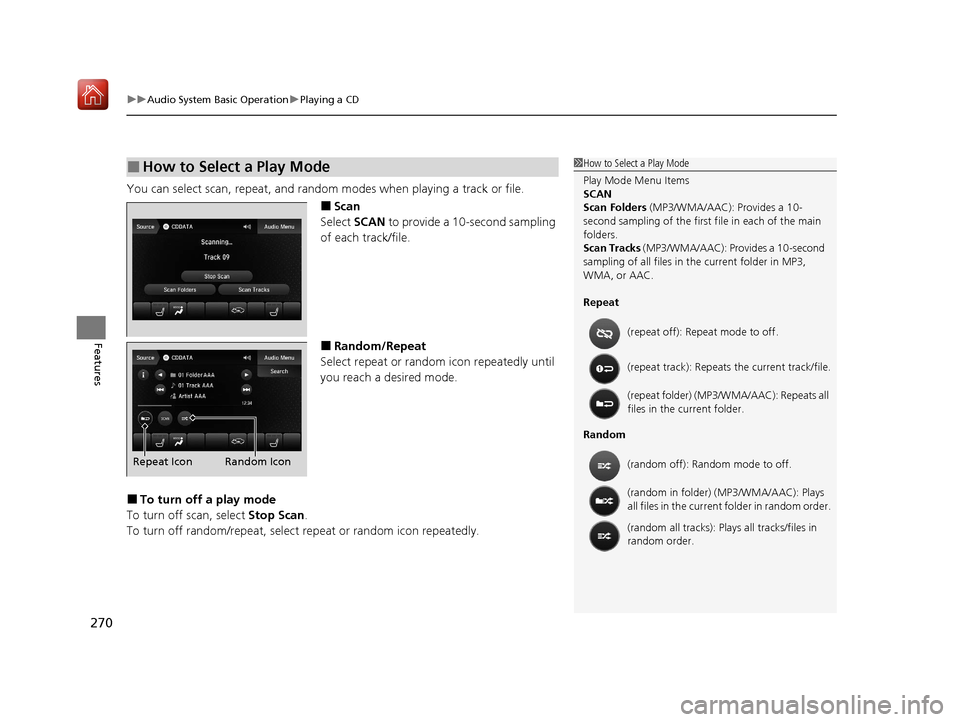
You can select scan, repeat, and random modes when playing a track or file.
■Scan
Select SCAN to provide a 10-second sampling
of each track/file.
■Random/Repeat
Select repeat or random icon repeatedly until
you reach a desired mode.
■To turn off a play mode
To turn off scan, select Stop Scan.
To turn off random/repeat, select repeat or random icon repeatedly.
■How to Select a Play Mode1How to Select a Play Mode
Play Mode Menu Items
SCAN
Scan Folders (MP3/WMA/AAC): Provides a 10-
second sampling of the first f ile in each of the main
folders.
Scan Tracks (MP3/WMA/AAC): Pr ovides a 10-second
sampling of all files in the current folder in MP3,
WMA, or AAC.
Repeat
Random (repeat off): Repe
at mode to off.
(repeat track): Repeats the current track/file.
(repeat folder) (MP3/WMA/AAC): Repeats all
files in the current folder.
(random off): Random mode to off.
(random in folder) (MP3/WMA/AAC): Plays
all files in the current folder in random order.
(random all tracks): Play s all tracks/files in
random order.
Random Icon
Repeat Icon
20 ACURA MDX-31TZ56600.book 270 ページ 2019年4月24日 水曜日 午後5時44分
Page 275 of 701
uuAudio System Basic Operation uPlaying Hard Disk Drive (HDD) Audio
274
Features
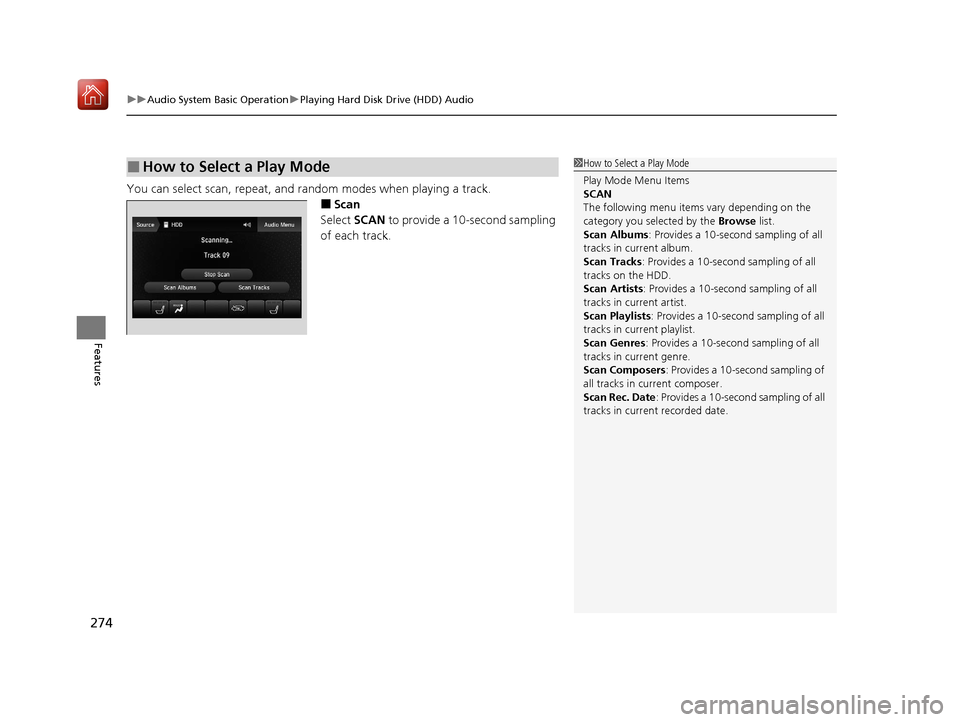
You can select scan, repeat, and ra ndom modes when playing a track.
■Scan
Select SCAN to provide a 10-second sampling
of each track.
■How to Select a Play Mode1 How to Select a Play Mode
Play Mode Menu Items
SCAN
The following menu item s vary depending on the
category you selected by the Browse list.
Scan Albums : Provides a 10-second sampling of all
tracks in current album.
Scan Tracks: Provides a 10-second sampling of all
tracks on the HDD.
Scan Artists: Provides a 10-second sampling of all
tracks in current artist.
Scan Playlists : Provides a 10-second sampling of all
tracks in current playlist.
Scan Genres : Provides a 10-second sampling of all
tracks in current genre.
Scan Composers: Provides a 10-second sampling of
all tracks in current composer.
Scan Rec. Date : Provides a 10-second sampling of all
tracks in current recorded date.
20 ACURA MDX-31TZ56600.book 274 ページ 2019年4月24日 水曜日 午後5時44分
Page 289 of 701
uuAudio System Basic Operation uSong By VoiceTM (SBV)
288
Features
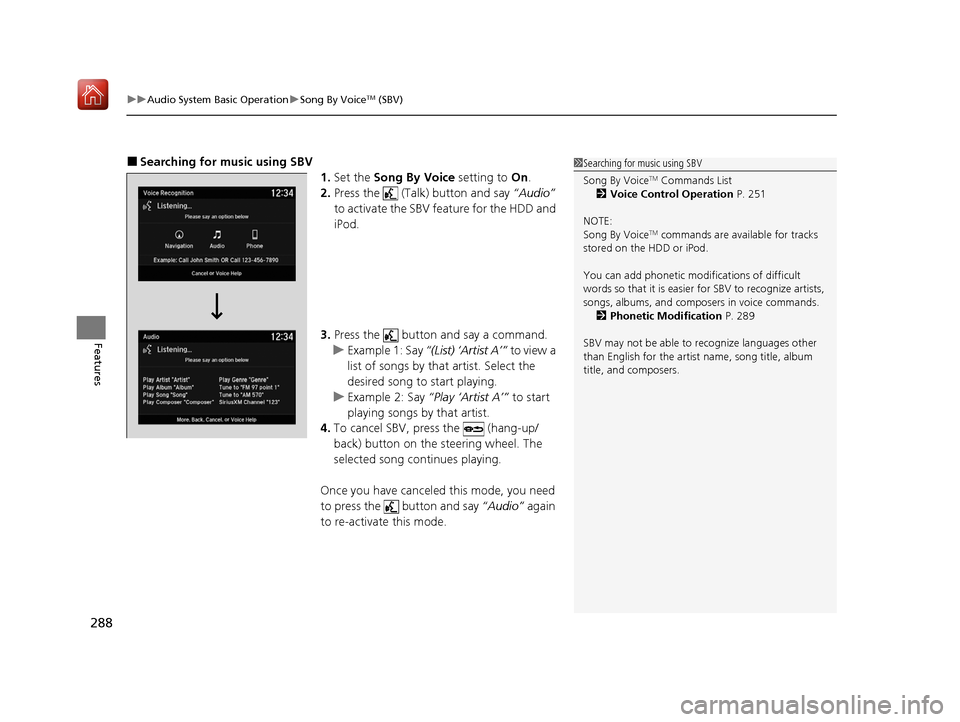
■Searching for mu sic using SBV
1.Set the Song By Voice setting to On.
2. Press the (Talk) button and say “Audio”
to activate the SBV feature for the HDD and
iPod.
3. Press the button and say a command.
u Example 1: Say “(List) ‘Artist A’” to view a
list of songs by that artist. Select the
desired song to start playing.
u Example 2: Say “Play ‘Artist A’” to start
playing songs by that artist.
4. To cancel SBV, pr ess the (hang-up/
back) button on the steering wheel. The
selected song continues playing.
Once you have canceled this mode, you need
to press the button and say “Audio” again
to re-activate this mode.1 Searching for music using SBV
Song By Voice
TM Commands List
2 Voice Control Operation P. 251
NOTE:
Song By Voice
TM commands are available for tracks
stored on the HDD or iPod.
You can add phonetic modi fications of difficult
words so that it is easier for SBV to recognize artists,
songs, albums, and composers in voice commands. 2 Phonetic Modification P. 289
SBV may not be able to recognize languages other
than English for the artist name, song title, album
title, and composers.
20 ACURA MDX-31TZ56600.book 288 ページ 2019年4月24日 水曜日 午後5時44分
Page 294 of 701
293
uuAudio System Basic Operation uPlaying a USB Flash Drive
Continued
Features
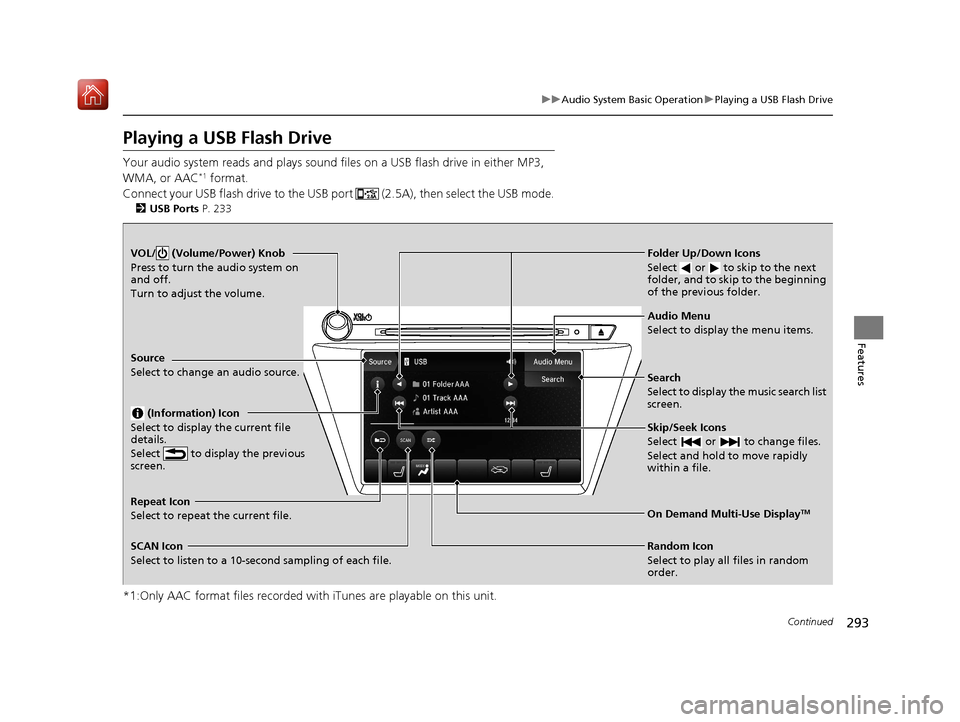
Playing a USB Flash Drive
Your audio system reads and plays sound files on a USB flash drive in either MP3,
WMA, or AAC*1 format.
Connect your USB flash drive to the USB port (2.5A), then select the USB mode.
2 USB Ports P. 233
*1:Only AAC format files recorded with iTunes are playable on this unit.
VOL/ (Volume/Power) Knob
Press to turn the audio system on
and off.
Turn to adjust the volume.
Skip/Seek Icons
Select or to change files.
Select and hold to move rapidly
within a file.
Audio Menu
Select to display the menu items.
Source
Select to change an audio source.
(Information) Icon
Select to display the current file
details.
Select to display the previous
screen.
Search
Select to display the music search list
screen.
Folder Up/Down Icons
Select or to skip to the next
folder, and to skip to the beginning
of the previous folder.
On Demand Multi-Use DisplayTMRepeat Icon
Select to repeat the current file.
SCAN Icon
Select to listen to a 10-second sampling of each file. Random Icon
Select to play all files in random
order.
20 ACURA MDX-31TZ56600.book 293 ページ 2019年4月24日 水曜日 午後5時44分