interval Acura MDX 2020 User Guide
[x] Cancel search | Manufacturer: ACURA, Model Year: 2020, Model line: MDX, Model: Acura MDX 2020Pages: 701, PDF Size: 38.91 MB
Page 495 of 701

uuWhen Driving uAdaptive Cruise Control (ACC) with Low Speed Follow
494
Driving
■There is no vehicle ahead
Your vehicle maintains the set speed without
having to keep your foot on the brake or
accelerator pedal.
If there previously was a vehicle detected
ahead that kept your vehicle from traveling at
the set speed, ACC with Low Speed Follow
accelerates your vehicle to the set speed, and
then maintains it.
While stationary and no vehicle is detected,
ACC with Low Speed Follow automatically
cancels and a beeper sounds.
■When you depress the accelerator pedal
You can temporarily increase the vehicle speed. In this ca se, there is no audible or
visual alert even if a vehicle is in the ACC with Low Speed Follow range.
ACC with Low Speed Follow stays on unless you cancel it. Once you release the
accelerator pedal, the system resumes the set speed.
There are times when the vehicle speed will decrease when the accelerator pedal is
lightly applied.
A vehicle icon with dotted-line
contour appears on the MID.
1 When in Operation
You can also set the system to beep when a vehicle in
front of you comes in and goes out of the ACC with
Low Speed Follow detect ing range. Change the ACC
Forward Vehicle Detect Beep setting.
2 Customized Features P. 126, 358
Limitations
You may need to use the brake to maintain a safe
interval when using ACC with Low Speed Follow.
Additionally, ACC with Lo w Speed Follow may not
work properly under certain conditions.
2 ACC with Low Speed Follow Conditions
and Limitations P. 496
20 ACURA MDX-31TZ56600.book 494 ページ 2019年4月24日 水曜日 午後5時44分
Page 498 of 701
Continued497
uuWhen Driving uAdaptive Cruise Control (ACC) with Low Speed Follow
Driving
■Detection limitations
• A vehicle or pedestrian suddenly crosses in front of you.
• The interval between your vehicle and the vehicle or pedestrian ahead of you is
too short.
• A vehicle cuts in front of you at a slow speed, and it brakes suddenly.
• When you accelerate rapidly and approach the vehicl e or pedestrian ahead of you
at high speed.
• The vehicle ahead of you is a motorcycle, bicycle, mobility scooter, or other small
vehicle.
• When there are animals in front of your vehicle.
• When you drive on a curved or winding or undulating road that makes it difficult
for the sensor to properly detect a vehicle or a pedestrian in front of you.
• The speed difference between your vehi cle and a vehicle in front of you is
significantly large.
• An oncoming vehicle suddenly comes in front of you.
• Your vehicle abruptly crosses over in front of an oncoming vehicle.
• When driving through a narrow iron bridge.
• When the vehicle ahead of you brakes suddenly.
• When the vehicle ahead of you has a unique shape.
• When your vehicle or the vehicle ahead of you is driving on one edge of the lane.1ACC with Low Speed Follow Conditions and Limitations
If you need the radar sensor to be repaired, or
removed, or the radar se nsor cover is strongly
impacted, turn off the system by pressing the MAIN
button and take your vehicle to a dealer.
Have your vehicle checked by a dealer if you find any
unusual behavior of the system (e.g., the warning
message appears too frequently).
If the front of the vehicle is impacted in any of the
following situations, the ra dar sensor may not work
properly. Have your vehi cle checked by a dealer:
•The vehicle impacted a bump, curb, chock,
embankment, etc.
•You drive the vehicle where the water is deep.
•Your vehicle has a frontal collision.
20 ACURA MDX-31TZ56600.book 497 ページ 2019年4月24日 水曜日 午後5時44分
Page 499 of 701
uuWhen Driving uAdaptive Cruise Control (ACC) with Low Speed Follow
498
Driving
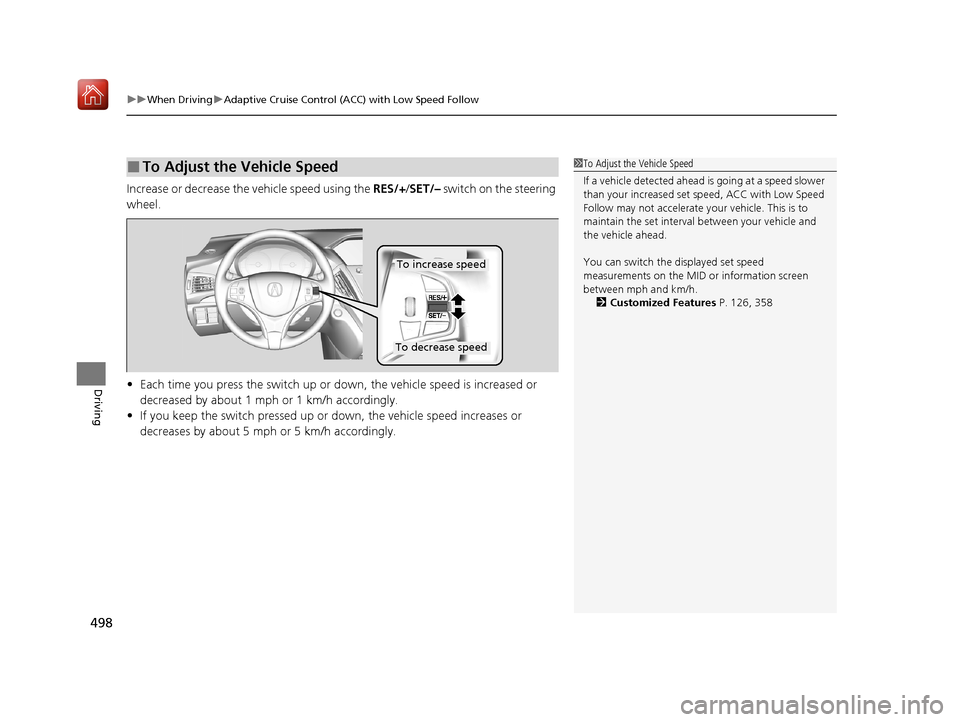
Increase or decrease the vehicle speed using the RES/+/SET/– switch on the steering
wheel.
• Each time you press the switch up or do wn, the vehicle speed is increased or
decreased by about 1 mph or 1 km/h accordingly.
• If you keep the switch pressed up or down, the vehicle speed increases or
decreases by about 5 mph or 5 km/h accordingly.
■To Adjust the Vehicle Speed1 To Adjust the Vehicle Speed
If a vehicle detected ahead is going at a speed slower
than your increased set speed, ACC with Low Speed
Follow may not accelerate y our vehicle. This is to
maintain the set interval between your vehicle and
the vehicle ahead.
You can switch the displayed set speed
measurements on the MID or information screen
between mph and km/h. 2 Customized Features P. 126, 358
To increase speed
To decrease speed
20 ACURA MDX-31TZ56600.book 498 ページ 2019年4月24日 水曜日 午後5時44分
Page 500 of 701

499
uuWhen Driving uAdaptive Cruise Control (ACC) with Low Speed Follow
Continued
Driving
Press the (interval) button to change the
ACC with Low Speed Follow following-
interval.
Each time you press th e button, the following-
interval (the interval behind a vehicle detected
ahead of you) setting cycles through short,
middle, long, and extra long following-
intervals.
Determine the most appropriate following-
interval setting based on your specific driving
conditions. Be sure to adhere to any
following-interval requirements set by local
regulation.
■To Set or Change Following-interval
Interval Button
20 ACURA MDX-31TZ56600.book 499 ページ 2019年4月24日 水曜日 午後5時44分
Page 501 of 701
500
uuWhen Driving uAdaptive Cruise Control (ACC) with Low Speed Follow
Driving
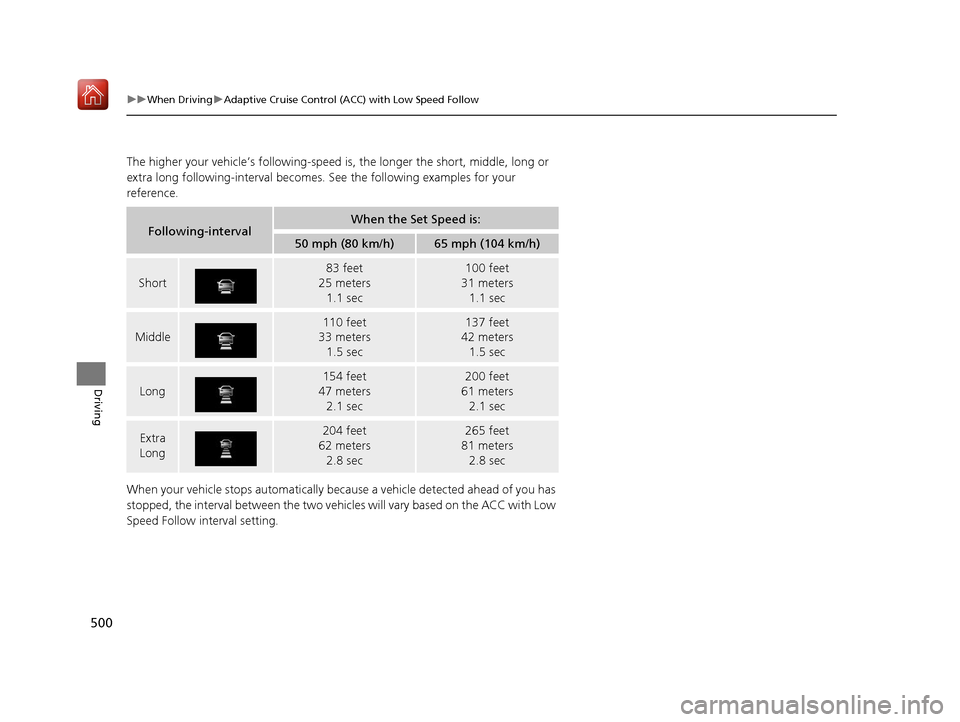
The higher your vehicle’s following-speed is, the longer the short, middle, long or
extra long following-interval becomes. See the following examples for your
reference.
When your vehicle stops automatically beca use a vehicle detected ahead of you has
stopped, the interval between the two vehi cles will vary based on the ACC with Low
Speed Follow interval setting.
Following-intervalWhen the Set Speed is:
50 mph (80 km/h)65 mph (104 km/h)
Short
83 feet
25 meters 1.1 sec100 feet
31 meters 1.1 sec
Middle
110 feet
33 meters
1.5 sec137 feet
42 meters
1.5 sec
Long
154 feet
47 meters 2.1 sec200 feet
61 meters 2.1 sec
Extra
Long204 feet
62 meters 2.8 sec265 feet
81 meters 2.8 sec
20 ACURA MDX-31TZ56600.book 500 ページ 2019年4月24日 水曜日 午後5時44分
Page 504 of 701
Continued503
uuWhen Driving uAdaptive Cruise Control (ACC) with Low Speed Follow
Driving
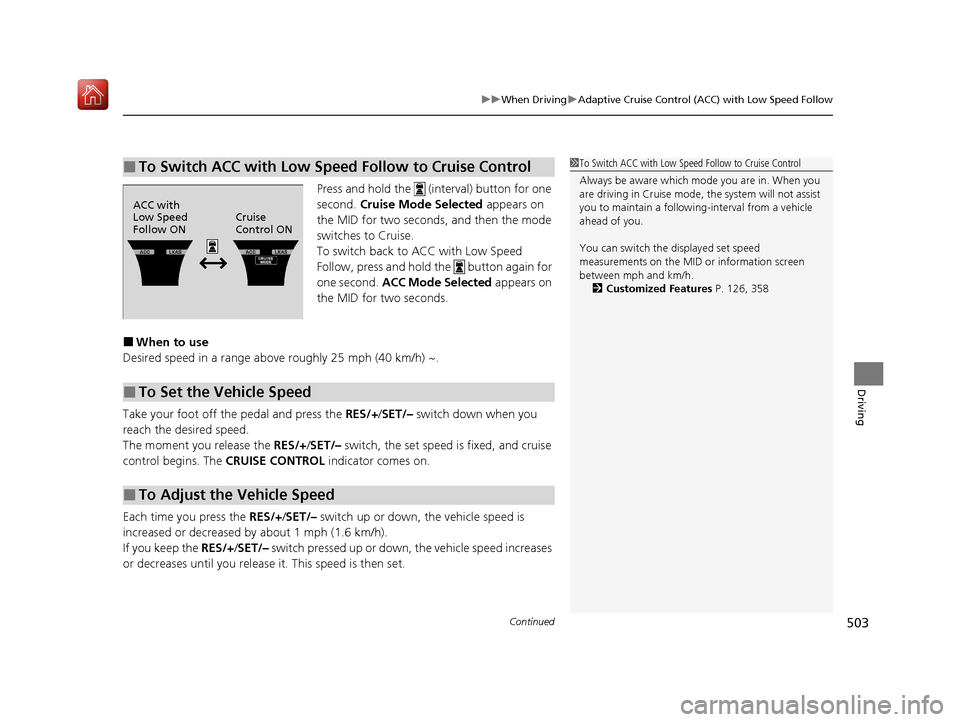
Press and hold the (i nterval) button for one
second. Cruise Mode Selected appears on
the MID for two seconds, and then the mode
switches to Cruise.
To switch back to ACC with Low Speed
Follow, press and hold the button again for
one second. ACC Mode Selected appears on
the MID for two seconds.
■When to use
Desired speed in a range above roughly 25 mph (40 km/h) ~.
Take your foot off the pedal and press the RES/+/SET/– switch down when you
reach the desired speed.
The moment you release the RES/+/SET/– switch, the set speed is fixed, and cruise
control begins. The CRUISE CONTROL indicator comes on.
Each time you press the RES/+/SET/– switch up or down, the vehicle speed is
increased or decreased by about 1 mph (1.6 km/h).
If you keep the RES/+/SET/– switch pressed up or down, the vehicle speed increases
or decreases until you release it. This speed is then set.
■To Switch ACC with Low Speed Follow to Cruise Control1To Switch ACC with Low Speed Follow to Cruise Control
Always be aware which mode you are in. When you
are driving in Cruise mode, the system will not assist
you to maintain a following-interval from a vehicle
ahead of you.
You can switch the displayed set speed
measurements on the MID or information screen
between mph and km/h.
2 Customized Features P. 126, 358
ACC with
Low Speed
Follow ONCruise
Control ON
■To Set the Vehicle Speed
■To Adjust the Vehicle Speed
20 ACURA MDX-31TZ56600.book 503 ページ 2019年4月24日 水曜日 午後5時44分
Page 575 of 701
574
Maintenance
Before Performing Maintenance
Inspection and Maintenance
For your safety, perform all listed inspections and maintenance to keep your vehicle
in good condition. If you become aware of an y abnormality (noise, smell, insufficient
brake fluid, oil residue on the ground, etc.), have your vehicle inspected by a dealer.
(Note, however, that service at a dealer is not mandatory to keep your warranties in
effect.) Refer to the separate maintena nce booklet for detailed maintenance and
inspection information.
■Daily inspections
Perform inspections before long distance trips, when washing the vehicle, or when
refueling.
■Periodic inspections
• Check the brake fluid level monthly.
2 Checking the Brake Fluid P. 592
•Check the tire pressure monthly. Examin e the tread for wear and foreign objects.
2Checking and Maintaining Tires P. 602
•Check the operation of the exterior lights monthly.
2 Replacing Light Bulbs P. 593
•Check the condition of the wiper bl ades at least every six months.
2Checking and Maintaining Wiper Blades P. 598
■Types of Inspection and Maintenance
1Inspection and Maintenance
Maintenance, replacement, or repair of
emissions control devices and systems may be
done by any automotive repair establishment or
individuals using parts that are “certified” to
EPA standards.
According to state and fede ral regulations, failure to
perform maintenance on the maintenance main
items marked with # will not void your emissions
warranties. However, all ma intenance services should
be performed in accordan ce with the intervals
indicated by the multi-information display (MID).
2 Maintenance Service Items P. 579
If you want to perform complex maintenance tasks
that require more skills a nd tools, you can purchase a
subscription to the Service Express website at
www.techinfo.honda.com .
2 Authorized Manuals P. 685
If you want to perform ma intenance yourself, make
sure that you have the necessary tools and skills first.
After performing maintenanc e, update the records in
the separate maintenance booklet.
U.S. models
20 ACURA MDX-31TZ56600.book 574 ページ 2019年4月24日 水曜日 午後5時44分
Page 581 of 701
uuMaintenance MinderTMuTo Use Maintenance MinderTM
580
Maintenance
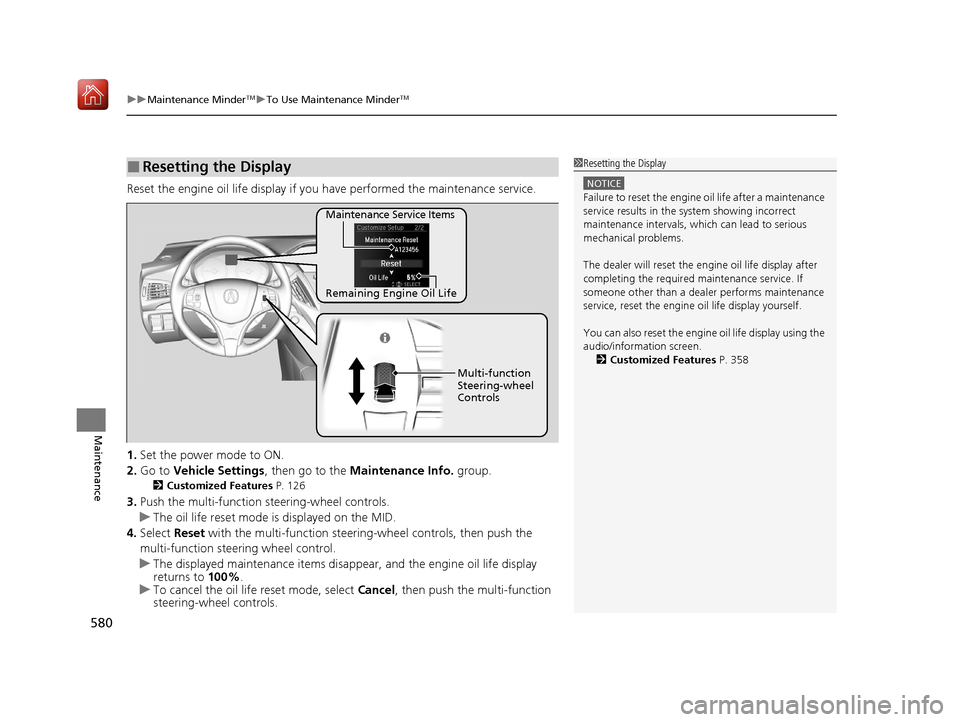
Reset the engine oil life display if you have performed the maintenance service.
1. Set the power mode to ON.
2. Go to Vehicle Settings , then go to the Maintenance Info. group.
2Customized Features P. 126
3.Push the multi-function steering-wheel controls.
u The oil life reset mode is displayed on the MID.
4. Select Reset with the multi-function steeri ng-wheel controls, then push the
multi-function steering wheel control.
u The displayed maintenance items disappea r, and the engine oil life display
returns to 100%.
u To cancel the oil life reset mode, select Cancel, then push the multi-function
steering-wheel controls.
■Resetting the Display1 Resetting the Display
NOTICE
Failure to reset the engine oil life after a maintenance
service results in the sy stem showing incorrect
maintenance intervals, which can lead to serious
mechanical problems.
The dealer will reset the en gine oil life display after
completing the required ma intenance service. If
someone other than a deal er performs maintenance
service, reset the engine oil life display yourself.
You can also reset the engine oil life display using the
audio/information screen. 2 Customized Features P. 358
Remaining Engine Oil Life Maintenance Service Items
Multi-function
Steering-wheel
Controls
20 ACURA MDX-31TZ56600.book 580 ページ 2019年4月24日 水曜日 午後5時44分
Page 661 of 701

660
uuIndicator, Coming On/Blinking uIf the Low Tire Pressure/TPMS Indicator Comes On or Blinks
Handling the Unexpected
If the Low Tire Pressure/TPMS Indicator Comes On or
Blinks
■Reasons for the indicator to come on or blink
A tire pressure is significantly low. If there is a problem with the TPMS
with Tire Fill Assist or the compact spare tire
* is installed, the indicator
blinks for about one mi nute, and then stays on.
■What to do when the indicator comes on
Drive carefully and avoid abrupt cornering and hard braking.
Stop your vehicle in a safe place. Ch eck the tire pressure and adjust the
pressure to the specified level. The sp ecified tire pressure is on a label on
the driver side doorjamb.
If the compact spare tire causes th e indicator to come on, change the
tire to a full-size tire.
■What to do when the indicator blinks
Have the tire inspected by a dealer as soon as possible. If the compact
spare tire
* causes the indicator to first b link, and then stays on, change
the tire to a full-size tire. The indi cator goes off after driving for a few
miles (kilometers).
1 If the Low Tire Pressure/TPMS Indicator Comes On or Blinks
NOTICE
Driving on an extremely unde rinflated tire can cause
it to overheat. An overheated tire can fail. Always
inflate your tires to the prescribed level.
TPMS with Tire Fill Assist provides visual and audible
assistance during tire pre ssure adjustment. With the
power mode in ON, while y ou adjust tire pressure up
or down, the system alerts you as follows:
Below recommended pressure: The beeper
sounds and exterior lights flash once every five
seconds.
At recommended pressure: The beeper sounds
and exterior lights flash ra pidly for three seconds with
five seconds intervals.
Above recommended pressure: The beeper
sounds and lights flash tw ice every two seconds.
* Not available on all models
20 ACURA MDX-31TZ56600.book 660 ページ 2019年4月24日 水曜日 午後5時44分