interval Acura MDX 2020 Owner's Manual
[x] Cancel search | Manufacturer: ACURA, Model Year: 2020, Model line: MDX, Model: Acura MDX 2020Pages: 701, PDF Size: 38.91 MB
Page 6 of 701
5
Quick Reference Guide
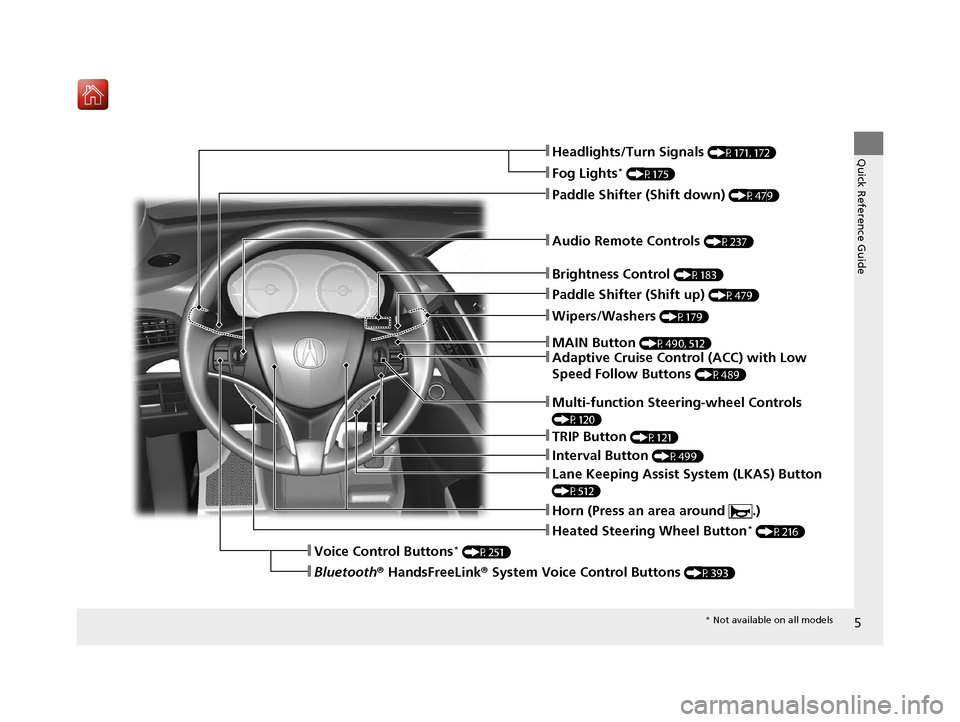
❚Wipers/Washers (P179)
❚Audio Remote Controls (P237)
❚Paddle Shifter (Shift down) (P479)
❚Paddle Shifter (Shift up) (P479)
❚Horn (Press an area around .)
❚Voice Control Buttons* (P251)
❚Bluetooth® HandsFreeLink ® System Voice Control Buttons (P393)
❚Brightness Control (P183)
❚Adaptive Cruise Control (ACC) with Low
Speed Follow Buttons
(P489)
❚TRIP Button (P121)
❚Interval Button (P499)
❚Lane Keeping Assist System (LKAS) Button
(P512)
❚Multi-function Steering-wheel Controls
(P120)
❚Heated Steering Wheel Button* (P216)
❚Headlights/Turn Signals (P171, 172)
❚Fog Lights* (P175)
❚MAIN Button (P490, 512)
* Not available on all models
20 ACURA MDX-31TZ56600.book 5 ページ 2019年4月24日 水曜日 午後5時44分
Page 22 of 701
21
Quick Reference Guide
AcuraWatchTM
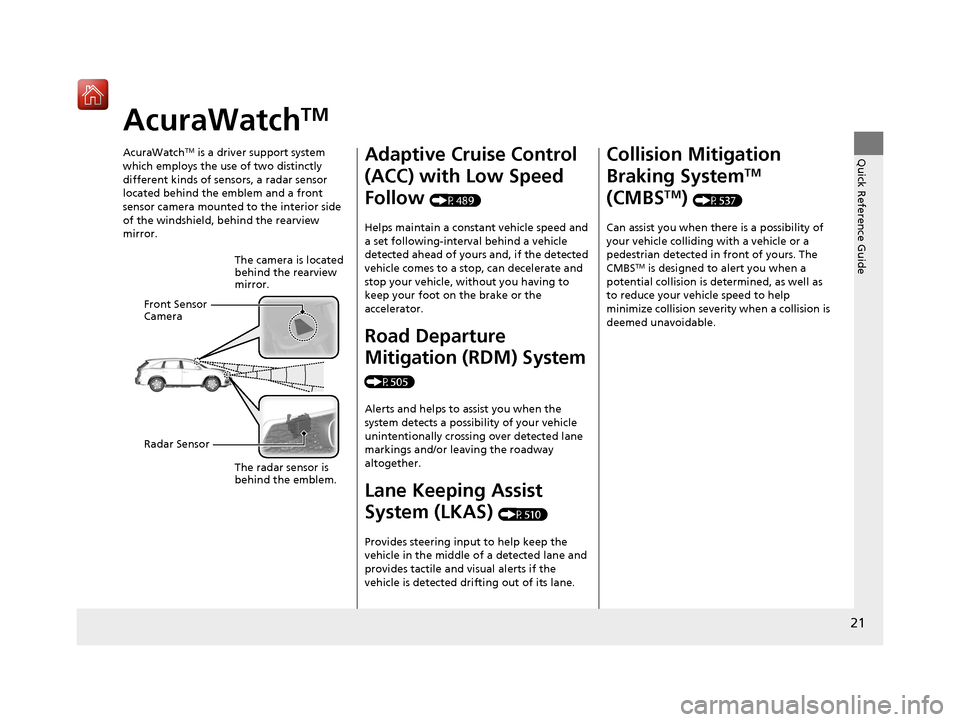
AcuraWatchTM is a driver support system
which employs the use of two distinctly
different kinds of sensors, a radar sensor
located behind the emblem and a front
sensor camera mounted to the interior side
of the windshield, behind the rearview
mirror.
The camera is located
behind the rearview
mirror.
The radar sensor is
behind the emblem.
Front Sensor
Camera
Radar Sensor
Adaptive Cruise Control
(ACC) with Low Speed
Follow
(P489)
Helps maintain a constant vehicle speed and
a set following-interval behind a vehicle
detected ahead of yours and, if the detected
vehicle comes to a stop, can decelerate and
stop your vehicle, without you having to
keep your foot on the brake or the
accelerator.
Road Departure
Mitigation (RDM) System
(P505)
Alerts and helps to assist you when the
system detects a possibility of your vehicle
unintentionally crossing over detected lane
markings and/or leaving the roadway
altogether.
Lane Keeping Assist
System (LKAS)
(P510)
Provides steering input to help keep the
vehicle in the middle of a detected lane and
provides tactile and visual alerts if the
vehicle is detected drifting out of its lane.
Collision Mitigation
Braking System
TM
(CMBS
TM) (P537)
Can assist you when there is a possibility of
your vehicle colliding with a vehicle or a
pedestrian detected in front of yours. The
CMBS
TM is designed to alert you when a
potential collision is determined, as well as
to reduce your vehi cle speed to help
minimize collision severity when a collision is
deemed unavoidable.
20 ACURA MDX-31TZ56600.book 21 ページ 2019年4月24日 水曜日 午後5時44分
Page 86 of 701
85
uuIndicators u
Continued
Instrument Panel
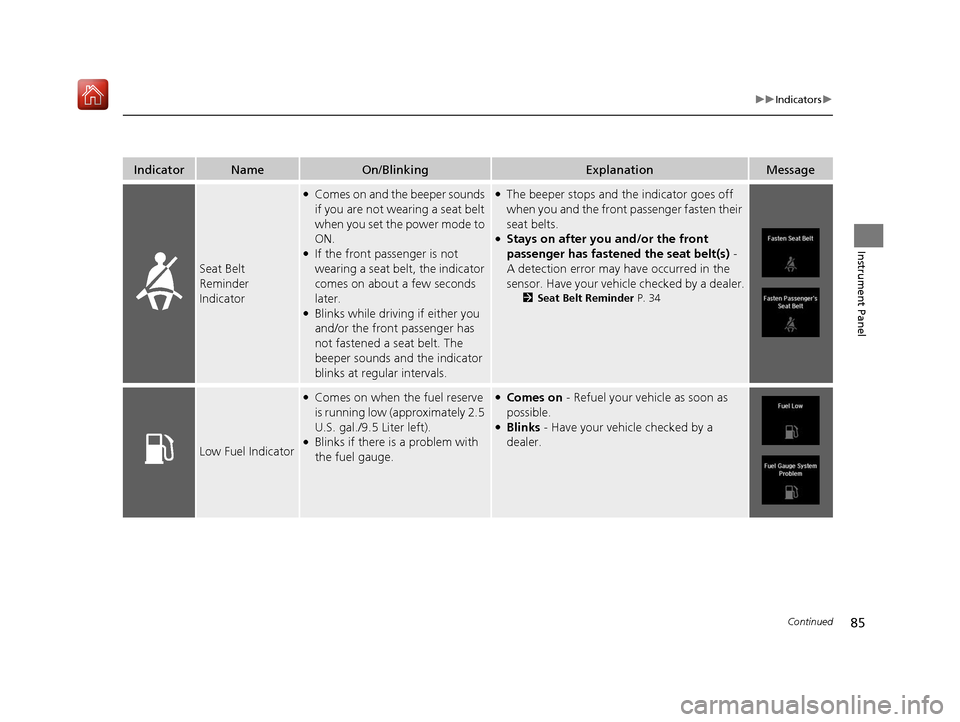
IndicatorNameOn/BlinkingExplanationMessage
Seat Belt
Reminder
Indicator
●Comes on and the beeper sounds
if you are not wearing a seat belt
when you set the power mode to
ON.
●If the front passenger is not
wearing a seat belt, the indicator
comes on about a few seconds
later.
●Blinks while driving if either you
and/or the front passenger has
not fastened a seat belt. The
beeper sounds an d the indicator
blinks at regular intervals.
●The beeper stops and the indicator goes off
when you and the front passenger fasten their
seat belts.
●Stays on after you and/or the front
passenger has fastened the seat belt(s) -
A detection error may have occurred in the
sensor. Have your vehicle checked by a dealer.
2 Seat Belt Reminder P. 34
Low Fuel Indicator
●Comes on when the fuel reserve
is running low (approximately 2.5
U.S. gal./9.5 Liter left).
●Blinks if there is a problem with
the fuel gauge.
●Comes on - Refuel your vehicle as soon as
possible.
●Blinks - Have your vehicle checked by a
dealer.
20 ACURA MDX-31TZ56600.book 85 ページ 2019年4月24日 水曜日 午後5時44分
Page 123 of 701

uuGauges and Multi-Information Display (MID) uMID
122
Instrument Panel
Shows the total number of miles (U.S.) or kilometers (Canada) driven since the last
reset. Meters A and B can be used to measure two separate trips.
■Resetting a trip meter
To reset a trip meter, display it, then press and hold the TRIP button until the trip
meter is reset to 0.0.
Shows the outside temperature in Fahr enheit (U.S.) or Celsius (Canada).
■Adjusting the outside temperature display
Adjust the temperature reading up to ±5°F or ±3°C if the temperature reading
seems incorrect.
Shows the estimated average fuel economy of each trip meter in mpg (U.S.) or l/100
km (Canada). The display is updated at set intervals. When a trip meter is reset, the
average fuel economy is also reset.
■Trip Meter
■Outside Temperature
■Average Fuel Economy
1 Trip Meter
Switch between trip meter A and trip meter B by
pressing the TRIP button.
1Outside Temperature
The temperature sensor is located in the front
bumper.
Road heat and exhaust fr om another vehicle can
affect the temperature reading when your vehicle
speed is less than 19 mph (30 km/h).
It may take several minutes for the display to be
updated after the temperature reading has stabilized.
Use the MID’s customized features to correct the
temperature.
2 Customized Features P. 126
1Average Fuel Economy
You can change when to reset the average fuel
economy.
2 Customized Features P. 126
20 ACURA MDX-31TZ56600.book 122 ページ 2019年4月24日 水曜日 午後5時44分
Page 164 of 701
Continued163
uuSecurity System uSecurity System Alarm
Controls
■To deactivate the security system alarm
Unlock the vehicle using the key, remote tra nsmitter or keyless access system, or set
the power mode to ON. The system, along with the horn and flashing lights, is
deactivated.
■Setting the security system alarm
The security system alarm automatically sets when the following conditions have
been met:
• The power mode is set to VEHICLE OFF (LOCK).
• The hood is closed.
• All doors and the tailgate are locked from outside with the key, remote
transmitter, or keyle ss access system.
■When the security system alarm sets
The security system alarm in dicator in the instrument panel blinks and the blinking
interval changes after about 15 seconds.
■To cancel the security system alarm
The security system alarm is canceled when the vehicle is unlocked using the remote
transmitter or keyless access system, or when the power mode is set to ON. The
security system alarm indicato r goes off at the same time.
1Security System Alarm
Do not set the security system alarm when someone
is in the vehicle or a window is open. The system can
accidentally activate when:
•Unlocking the door with the lock tab.•Opening the hood with the hood release.
If the battery goes dead after you have set the
security system alarm, the security alarm may go off
once the battery is re charged or replaced.
If this occurs, deactivate the security system alarm by
unlocking a door using the ke y, remote transmitter,
or keyless access system.
20 ACURA MDX-31TZ56600.book 163 ページ 2019年4月24日 水曜日 午後5時44分
Page 175 of 701
uuOperating the Switches Around the Steering Wheel uLight Switches
174
Controls
The headlights automatically come on when the wipers are used several times within
a certain number of intervals wi th the headlight switch in AUTO.
The headlights automatically go off a few minutes later if the wipers are stopped.
The headlights, all other exterior lights, an d the instrument panel lights turn off 15
seconds after you set the power mode to VE HICLE OFF (LOCK), take the remote with
you, and close th e driver’s door.
If you set the power mode to VEHICLE OFF (LOCK) with the headlight switch on, but
do not open the door, the lights turn off after 10 minutes (3 minutes, if the switch
is in the AUTO position).
The lights turn on again when you unlock or open the driver’s door. If you unlock
the door, but do not open it within 15 seconds, the lights go off. If you open the
driver’s door, you will hear a lights on reminder chime.
■Headlight Integration with Wiper
■Automatic Lighting Off Feature
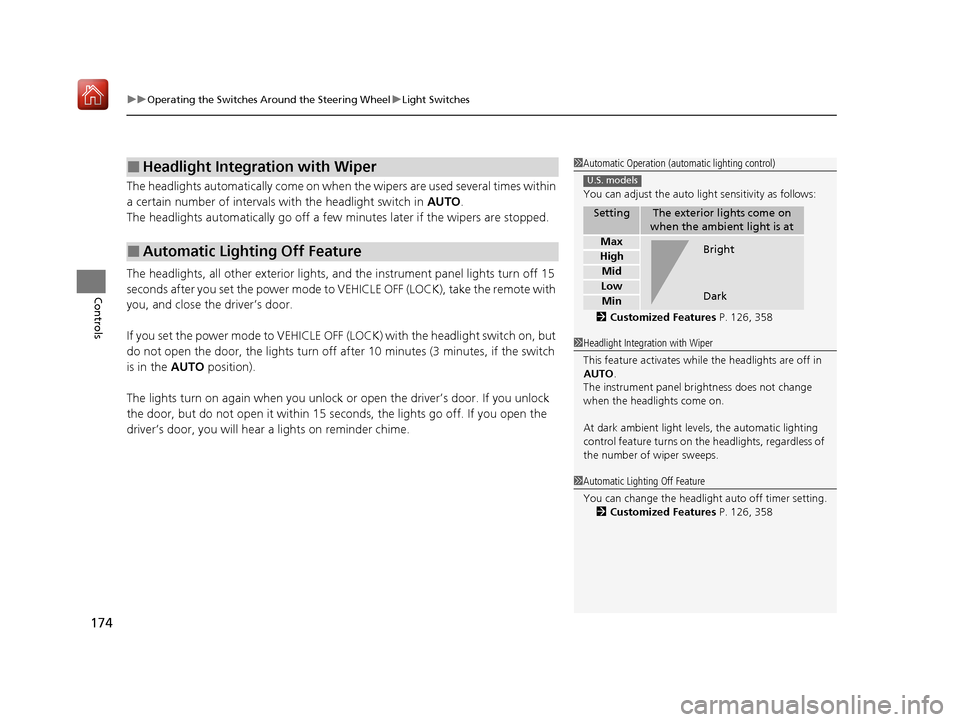
1Automatic Operation (aut omatic lighting control)
You can adjust the auto li ght sensitivity as follows:
2 Customized Features P. 126, 358
SettingThe exterior lights come on
when the ambient light is at
Max
High
Mid
Low
Min
U.S. models
Bright
Dark
1 Headlight Integration with Wiper
This feature activates while the headlights are off in
AUTO .
The instrument panel br ightness does not change
when the headlights come on.
At dark ambient light levels, the automatic lighting
control feature turns on the headlights, regardless of
the number of wiper sweeps.
1 Automatic Lighting Off Feature
You can change the headlight auto off timer setting.
2 Customized Features P. 126, 358
20 ACURA MDX-31TZ56600.book 174 ページ 2019年4月24日 水曜日 午後5時44分
Page 180 of 701
179
uuOperating the Switches Around the Steering Wheel uWipers and Washers
Continued
Controls
Wipers and Washers
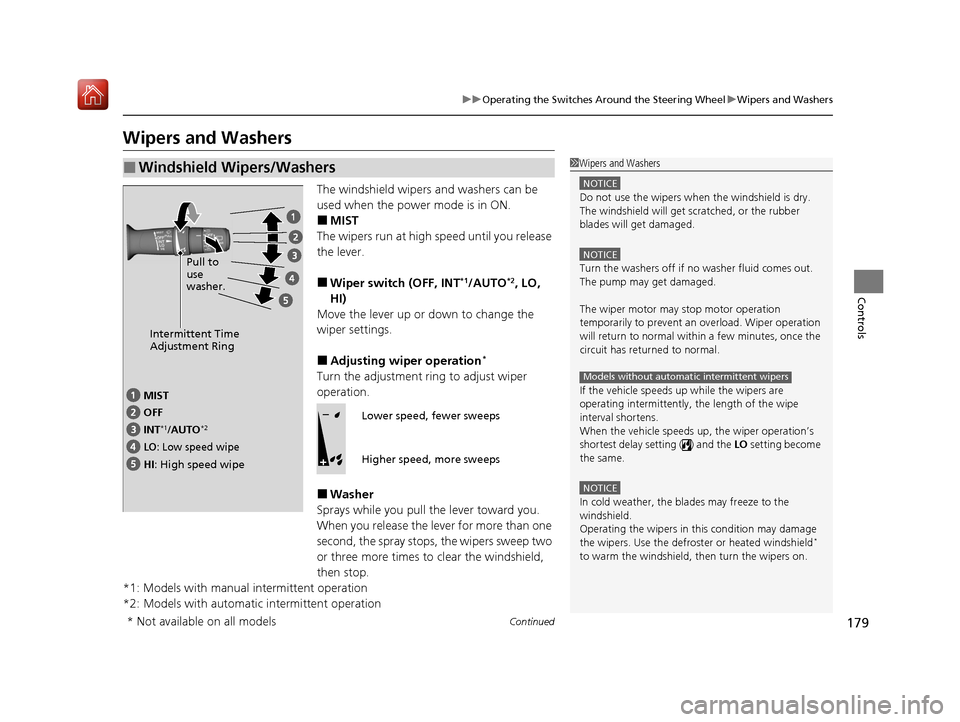
The windshield wipers and washers can be
used when the power mode is in ON.
■MIST
The wipers run at high speed until you release
the lever.
■Wiper switch (OFF, INT*1/AUTO*2, LO,
HI)
Move the lever up or down to change the
wiper settings.
■Adjusting wiper operation*
Turn the adjustment ring to adjust wiper
operation.
■Washer
Sprays while you pull the lever toward you.
When you release the le ver for more than one
second, the spray stops, the wipers sweep two
or three more times to clear the windshield,
then stop.
*1: Models with manual intermittent operation
*2: Models with automatic intermittent operation
■Windshield Wipers/Washers1 Wipers and Washers
NOTICE
Do not use the wipers when the windshield is dry.
The windshield will get sc ratched, or the rubber
blades will get damaged.
NOTICE
Turn the washers off if no washer fluid comes out.
The pump may get damaged.
The wiper motor may stop motor operation
temporarily to prevent an overload. Wiper operation
will return to normal within a few minutes, once the
circuit has returned to normal.
If the vehicle speeds up while the wipers are
operating intermittently, the length of the wipe
interval shortens.
When the vehicle speeds up, the wiper operation’s
shortest delay setting ( ) and the LO setting become
the same.
NOTICE
In cold weather, the blades may freeze to the
windshield.
Operating the wipers in th is condition may damage
the wipers. Use the defrost er or heated windshield
*
to warm the windshield, then turn the wipers on.
Models without automatic intermittent wipers
Intermittent Time
Adjustment Ring
MIST
INT
*1/AUTO*2
OFF
LO: Low speed wipe
HI: High speed wipe Pull to
use
washer.
Lower speed, fewer sweeps
Higher speed, more sweeps
* Not available on all models
20 ACURA MDX-31TZ56600.book 179 ページ 2019年4月24日 水曜日 午後5時44分
Page 490 of 701
489
uuWhen Driving uAdaptive Cruise Control (ACC) with Low Speed Follow
Continued
Driving
Adaptive Cruise Control (ACC) with Low Speed
Follow
Helps maintain a constant vehicle speed a nd a set following-interval behind a vehicle
detected ahead of yours and, if the detect ed vehicle comes to a stop, can decelerate
and stop your ve hicle, without yo u having to keep your foot on the brake or the
accelerator.
When ACC with Low Speed Follow slows your vehicle by applying the brakes, your
vehicle’s brake lights will illuminate.
1 Adaptive Cruise Control (ACC) with Low Speed Follow
Important Reminder
As with any system, there are limits to ACC with Low
Speed Follow. Use the brake pedal whenever
necessary, and always keep a safe interval between
your vehicle and other vehicles.
Be careful not to severely impact the radar sensor
cover.
3WARNING
Improper use of ACC with Low Speed
Follow can lead to a crash.
Use ACC with Low Spee d Follow only when
driving on expressways or freeways and in
good weather conditions.
3WARNING
ACC with Low Speed Follow has limited
braking capability and may not stop your
vehicle in time to avoid a collision with a
vehicle that quickly stops in front of you.
Always be prepared to apply the brake
pedal if the conditions require.
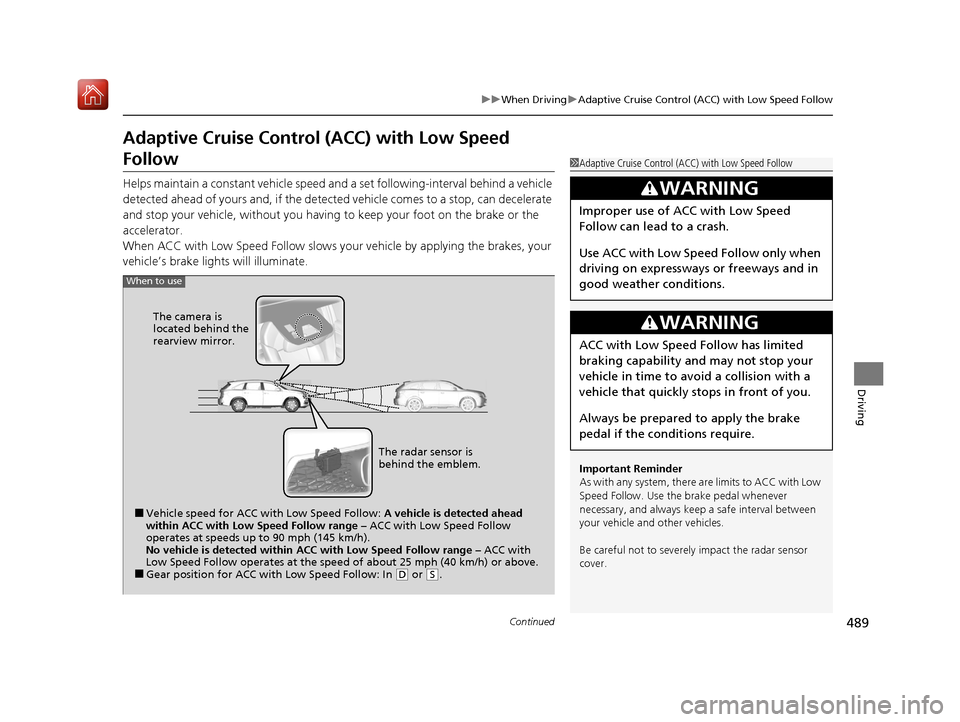
When to use
■Vehicle speed for ACC wi th Low Speed Follow: A vehicle is detected ahead
within ACC with Low Speed Follow range – ACC with Low Speed Follow
operates at speeds up to 90 mph (145 km/h).
No vehicle is detected within ACC with Low Speed Follow range – ACC with
Low Speed Follow operates at the speed of about 25 mph (40 km/h) or above.
■Gear position for ACC wi th Low Speed Follow: In (D or (S.
The radar sensor is
behind the emblem.
The camera is
located behind the
rearview mirror.
20 ACURA MDX-31TZ56600.book 489 ページ 2019年4月24日 水曜日 午後5時44分
Page 493 of 701
492
uuWhen Driving uAdaptive Cruise Control (ACC) with Low Speed Follow
Driving
When driving at slower than about 25 mph (40 km/h): If the vehicle is moving
and the brake pedal is not depressed, pres sing the switch fixes the set speed to
about 25 mph (40 km/h) regardless of current vehicle speed. While stationary and a
vehicle is ahead of you, the vehicle speed can be set, even with the brake pedal
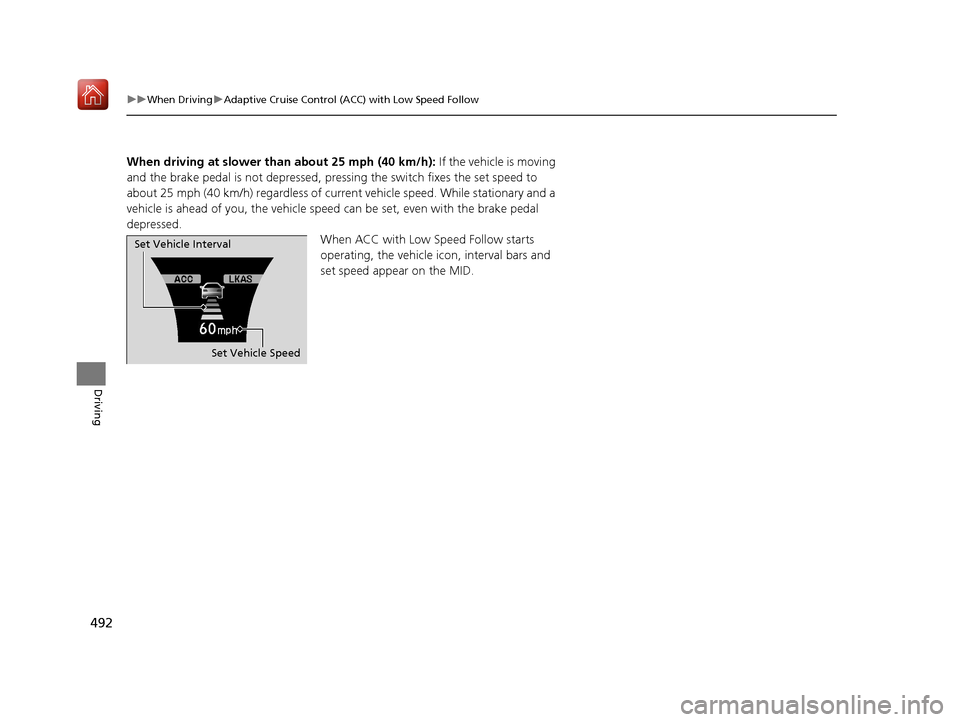
depressed. When ACC with Low Speed Follow starts
operating, the vehicle icon, interval bars and
set speed appear on the MID.
Set Vehicle Speed
Set Vehicle Interval
20 ACURA MDX-31TZ56600.book 492 ページ 2019年4月24日 水曜日 午後5時44分
Page 494 of 701

Continued493
uuWhen Driving uAdaptive Cruise Control (ACC) with Low Speed Follow
Driving
■There is a vehicle ahead
ACC with Low Speed Follow monitors if a vehicle ahead of you enters the ACC with
Low Speed Follow range. If a vehicle is de tected doing so, the ACC with Low Speed
Follow system maintains or decelerates your vehicle’s set speed in order to keep the
vehicle’s set following-interval from the vehicle ahead.
2 To Set or Change Following-interval P. 499
When a vehicle whose speed is slower than
your set speed is detected in front of you, your
vehicle starts to slow down.
■When in Operation1 When in Operation
If the vehicle detected ahead of you slows down
abruptly, or if a nother vehicle is de tected cutting in
front of you, the beep er sounds and a message
appears on the MID, and the head-up warning lights
*
come on.
Depress the brake pedal, and keep an appropriate
interval from the vehicle ahead.
Even if the interval betw een your vehicle and the
vehicle detected ahead is short, ACC with Low Speed
Follow may start accelerati ng your vehicle under the
following circumstances:
•The vehicle ahead of you is going at almost the
same speed as, or faster than, your vehicle.
•A vehicle that cuts in front of you is going faster
than your vehicle, gradua lly increasing the interval
between the vehicles.
Beep
Head-up Warning
Lights
*
ACC with Low Speed Follow Range: 394 ft. (120 m)
A vehicle icon appears
on the MID.
* Not available on all models
20 ACURA MDX-31TZ56600.book 493 ページ 2019年4月24日 水曜日 午後5時44分