parking system Acura MDX 2020 Owner's Guide
[x] Cancel search | Manufacturer: ACURA, Model Year: 2020, Model line: MDX, Model: Acura MDX 2020Pages: 701, PDF Size: 38.91 MB
Page 552 of 701

551
uuParking Your Vehicle uParking Sensor System*
Driving
1. Make sure that the parking sensor system is not activated. Set the power mode to
VEHICLE OFF (LOCK).
2. Press and hold the parking sensor system button, and set the power mode to ON.
3. Keep pressing the button for 10 seconds. Release the button when the indicator
in the button flashes.
4. Press the button again. The indi cator in the button goes off.
u The beeper sounds twice. The r ear sensors are now turned off.
To turn the rear sensors on again, follo w the above procedure. The beeper sounds
three times when the rear sensors come back on.
■Turning off All Rear Sensors1 Turning off All Rear Sensors
When you set the gear position to
(R, the indicator
in the parking sensor system button blinks as a
reminder that the rear sens ors have been turned off.
20 ACURA MDX-31TZ56600.book 551 ページ 2019年4月24日 水曜日 午後5時44分
Page 553 of 701

552
uuParking Your Vehicle uCross Traffic Monitor*
Driving
Cross Traffic Monitor*
Monitors the rear corner areas using the radar sensors when reversing, and alerts
you if a vehicle approaching fro m a rear corner is detected.
The system is convenient when you are backing out of a parking space.1 Cross Traffic Monitor*
3CAUTION
Cross Traffic Monitor cannot detect all
approaching vehicles and may not detect
an approaching vehicle at all.
Failure to visually confirm that it is safe to
back up the vehicle before doing so may
result in a collision.
Do not solely rely on the system when
reversing; always also use your mirrors, and
look behind and to the sides of your vehicle
before reversing.
* Not available on all models
20 ACURA MDX-31TZ56600.book 552 ページ 2019年4月24日 水曜日 午後5時44分
Page 554 of 701
Continued553
uuParking Your Vehicle uCross Traffic Monitor*
Driving
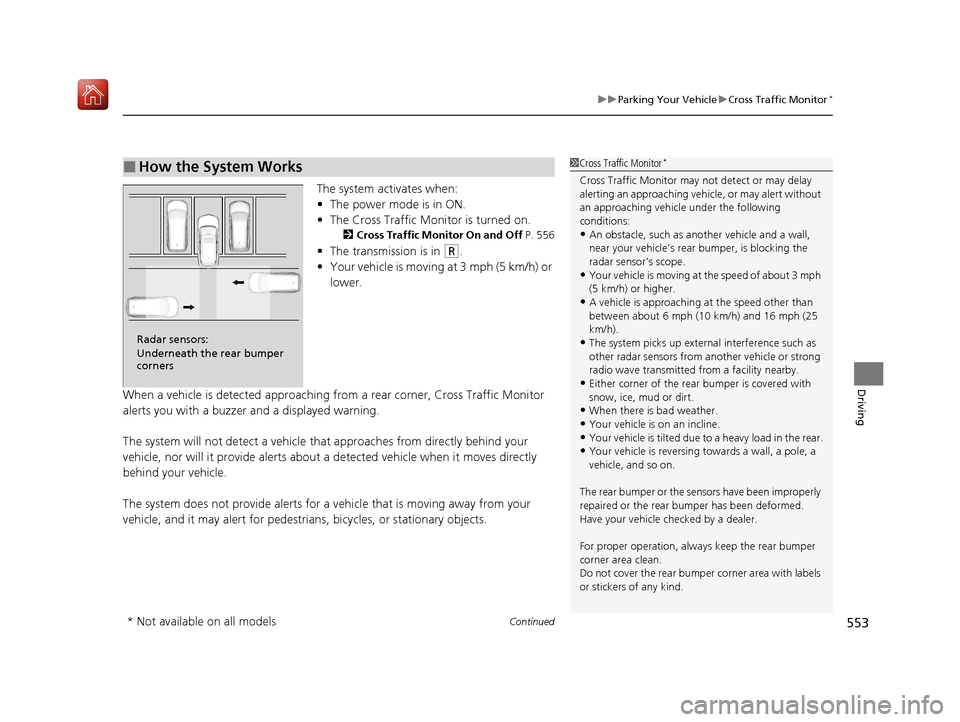
The system activates when:
• The power mode is in ON.
• The Cross Traffic Monitor is turned on.
2 Cross Traffic Monitor On and Off P. 556
•The transmission is in (R.
• Your vehicle is moving at 3 mph (5 km/h) or
lower.
When a vehicle is detected approaching from a rear corner, Cross Traffic Monitor
alerts you with a buzzer and a displayed warning.
The system will not detect a vehicle that approaches from directly behind your
vehicle, nor will it provide alerts about a detected vehicle when it moves directly
behind your vehicle.
The system does not provide alerts for a vehicle that is moving away from your
vehicle, and it may alert for pedestrians, bicycles, or stationary objects.
■How the System Works1 Cross Traffic Monitor*
Cross Traffic Monitor may not detect or may delay
alerting an approaching vehi cle, or may alert without
an approaching vehicle under the following
conditions:
•An obstacle, such as a nother vehicle and a wall,
near your vehicle’s rear bumper, is blocking the
radar sensor’s scope.
•Your vehicle is moving at the speed of about 3 mph
(5 km/h) or higher.
•A vehicle is approaching at the speed other than
between about 6 mph (10 km/h) and 16 mph (25
km/h).
•The system picks up external interference such as
other radar sensors from an other vehicle or strong
radio wave transmitted fr om a facility nearby.
•Either corner of the rear bumper is covered with
snow, ice, mud or dirt.
•When there is bad weather.
•Your vehicle is on an incline.
•Your vehicle is tilted due to a heavy load in the rear.•Your vehicle is reversing towards a wall, a pole, a
vehicle, and so on.
The rear bumper or the sens ors have been improperly
repaired or the rear bum per has been deformed.
Have your vehicle checked by a dealer.
For proper operation, always keep the rear bumper
corner area clean.
Do not cover the rear bumper corner area with labels
or stickers of any kind.
Radar sensors:
Underneath the rear bumper
corners
* Not available on all models
20 ACURA MDX-31TZ56600.book 553 ページ 2019年4月24日 水曜日 午後5時44分
Page 555 of 701

uuParking Your Vehicle uCross Traffic Monitor*
554
Driving
1Cross Traffic Monitor*
The parking sensor system’s alerting buzzer overrides
the Cross Traffic Monitor buzzer when the sensors
are detecting obstacles at the closest range.
Models with parking sensor system
* Not available on all models
20 ACURA MDX-31TZ56600.book 554 ページ 2019年4月24日 水曜日 午後5時44分
Page 556 of 701
Continued555
uuParking Your Vehicle uCross Traffic Monitor*
Driving
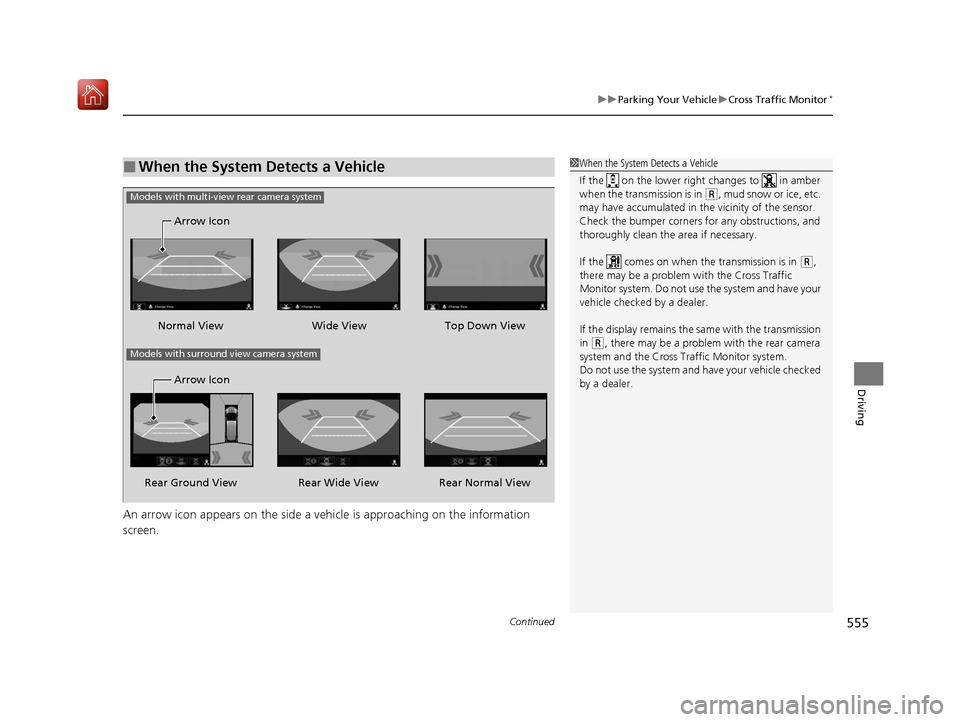
An arrow icon appears on the side a ve hicle is approaching on the information
screen.
■When the System Detects a Vehicle1 When the System Detects a Vehicle
If the on the lower right changes to in amber
when the transmission is in
( R, mud snow or ice, etc.
may have accumulated in th e vicinity of the sensor.
Check the bumper corners for any obstructions, and
thoroughly clean the area if necessary.
If the comes on when the transmission is in
( R,
there may be a problem with the Cross Traffic
Monitor system. Do not use the system and have your
vehicle checked by a dealer.
If the display remains the same with the transmission
in
( R, there may be a problem with the rear camera
system and the Cross Traffic Monitor system.
Do not use the system and have your vehicle checked
by a dealer.
Wide View
Normal View Arrow Icon
Models with multi-view rear camera system
Top Down View
Rear Normal View
Rear Wide View
Rear Ground View Arrow Icon
Models with surround view camera system
20 ACURA MDX-31TZ56600.book 555 ページ 2019年4月24日 水曜日 午後5時44分
Page 560 of 701

559
Driving
Surround View Camera System*
Is a four camera system that views areas commonly known as “blind spots” from
different angles, then displays the images on the inform ation screen. This system
can be used to:
• Check the right and left sides of the vehi cle while crossing at intersections with
poor visibility (fog, heavy rain, obstructed view, etc.).
2Checking from the front wide view at intersections P. 567
•Check for obstacles in front of the vehicle when parking or maneuvering in
confined areas.
2 Checking the sides of your vehicle P. 567
•Check for obstacles when you are moving in (R.
2 Checking for Obstacles at the Back of Your Vehicle P. 563
•Assist you when backing into or parallel parking the vehicle in a lined parking
space.
2 Reversing into a Parking Space Marked with Parking Lines P. 564
2 Parallel Parking into a Parking Space Marked with Parking Lines P. 565
1Surround View Camera System*
3WARNING
Failure to visually assess the area around
the vehicle (directly or by use of the
mirrors) may result in a crash causing
serious injury or death.
The areas shown in the surround view
camera system display are limited. The
display may not show all pedestrians or
other objects around your vehicle.
Do not solely rely only on the surround
view camera system display to assess
whether it is safe to move your vehicle.
3WARNING
Failure to pay proper attention to your
surroundings while driv ing may result in a
crash causing serious injury or death.
To help mitigate the ch ances of a collision,
only look at the surround view camera
system display when it is safe to do so.
* Not available on all models
20 ACURA MDX-31TZ56600.book 559 ページ 2019年4月24日 水曜日 午後5時44分
Page 563 of 701

uuSurround View Camera System*uDisplaying an Image From the Surround View Cameras
562
Driving
The following can be displaye d when the system is on.
Guide lines: Help you to get a sense of a distance between your vehicle and the
rear surroundings. The distan ce may appear differently than the actual distance.
Projection lines : Indicate vehicle direction while the steering wheel is in the current
position.
Depending on your parking situation, you can select Back-in Left Park Guidance,
Back-in Right Park Guidance , Left Parallel Park Guidance, or Right Parallel
Park Guidance from Camera Menu to display:
Initial position guide : Marks the point
where your vehicle is headed when reversing.
Steering position alignment guide :
Indicates when to change the steering wheel
position.
■Reference Lines and Guides1 Reference Lines and Guides
The positions/distances indi cated by the guide lines
and camera views on the display may differ from the
actual positions/distances due to the changes in the
vehicle height, road conditions, and other factors.
The guide lines should be used as a reference only.
The guide lines can be tu rned on and off using the
information screen.
2 Customized Features P. 358
If you turn the guide lines off, they remain off until
you turn them back on.
20 ACURA MDX-31TZ56600.book 562 ページ 2019年4月24日 水曜日 午後5時44分
Page 564 of 701

563
uuSurround View Camera System*uUsing the Surround View Camera System
Continued
Driving
Using the Surround View Camera System
■Checking for Obstacles at the Back of Your Vehicle
The display automatically changes to the rear view when the gear position is
changed to
(R.
■When Parking Your Vehicle1 When Parking Your Vehicle
The ground view can be displayed even with the door
mirrors folded. However, the viewable angle and
blind spot change.
Do not refer to the surround view camera system
when the door mirrors are folded.
Folded
Not folded
1 Checking for Obstacles at the Back of Your Vehicle
When changing the gear position from/to
(R, you
may experience a delay in switching between the
information screen and a rear view image.
Rear Wide View
Rear Normal View Rear Ground View
When the
steering wheel
is turned more
than 90
degrees.
The projection lines
appear approx. 16
inches (40 cm) outside
the vehicle body.
Blind spots
appear in
black.
Press the CAMERA
button.
Approximate distances
the guide lines indicate
Approximate distances the
projection lines indicate
39 inches (1 m)
20 inches
(50 cm)
39 inches
(1 m)
20 ACURA MDX-31TZ56600.book 563 ページ 2019年4月24日 水曜日 午後5時44分
Page 565 of 701

uuSurround View Camera System*uUsing the Surround View Camera System
564
Driving1. With your vehicle at a complete stop, press the CAMERA button, then press the
ENTER/MENU button. Rotate to select Back-in Left Park Guidance or
Back-in Right Park Guidance . Press .
2. Move the vehicle forward perpendicular to the parking space and stop where the
initial positioning guide in the display is at the center of the parking space.
3. Turn the steering wheel fully to the left (if the parking space is on the passenger
side) at a stop.
u The steering position alignment guide is displayed.
4. Slowly move the vehicle forward.
u
Stop the vehicle when the steering position alignment guide enters the parking space.
5. Turn the steering wheel fully to the right (if the parking space is on the passenger
side) at a stop. Start reve rsing the vehicle slowly.
6. Stop the vehicle when it is parallel to the parking lines.
7. Return the steering wheel to its center po sition, then reverse the vehicle slowly
until it is parked within the space.
■Reversing into a Parking Space Marked with Parking Lines1 Reversing into a Parking Space Marked with Parking Lines
If the steering position ali gnment guide does not fit in
the parking lines, the parking space is too small for
the vehicle.
Reference lines can be usef ul only when the parking
space is in a rectangular shape with straight parking
marks and when vehicles in the next parking spaces
are within the spaces.
Must be wider than approx. 8 feet (2.5 m)
The initial positioning
guide must come here.
Must be wider than approx. 20 feet (6 m) Make sure the guides
are within the parking
space when reversing.Initial
Positioning
Guide
Steering Position
Alignment Guide
A
B
C
Steering position alignment
guide enters the parking
space. (Step 4)
20 ACURA MDX-31TZ56600.book 564 ページ 2019年4月24日 水曜日 午後5時44分
Page 566 of 701

Continued565
uuSurround View Camera System*uUsing the Surround View Camera System
Driving1. Press the CAMERA button, then press the ENTER/MENU button. Rotate to
select Left Parallel Park Guidance or Right Parallel Park Guidance . Press .
2. Move the vehicle forward parallel to the parking space and stop when the initial
positioning guide shown in the display overlaps the front corner of the space.
3. Turn the steering wheel fully to the right (if the parking space is on the passenger
side) at a stop.
u The steering position alig nment guide is displayed.
4. Slowly reverse the vehicle.
u Stop the vehicle when the steering position alignment guide overlaps the
sideline of the parking space.
5. Turn the steering wheel fully to the left (if the parking space is on the passenger
side) at a stop. Revers e the vehicle slowly.
6. Stop the vehicle when it is parallel to the parking lines.
7. Return the steering wheel to its center pos ition, then reverse the vehicle slowly
until it is parked within the space.
■Parallel Parking into a Parking Space Marked with Parking Lines1Parallel Parking into a Parking Space Marked with Parking Lines
Reference lines can be usef ul only when the parking
space is in a rectangular shape with straight parking
marks and when vehicles in the next parking spaces
are within the spaces.
Initial
Positioning
Guide
Steering Position
Alignment Guide
Must be wider than approx. 20 feet (6 m)
Must be
wider than
approx. 8
feet (2.5 m)
Must be longer than approx. 21 feet (6.5 m)
A B
C
Initial
positioning
guide
overlaps the
front corner
of the space.
(Step 2)
20 ACURA MDX-31TZ56600.book 565 ページ 2019年4月24日 水曜日 午後5時44分