parking system Acura MDX 2020 User Guide
[x] Cancel search | Manufacturer: ACURA, Model Year: 2020, Model line: MDX, Model: Acura MDX 2020Pages: 701, PDF Size: 38.91 MB
Page 361 of 701

360
uuCustomized Features u
Features
Camera
SettingsFixed Guideline
Dynamic Guideline
Fixed Guideline
Dynamic Guideline
Camera
Settings*1Default
*1 : Models without cross traffic monitor
*2 : Models with cross traffic monitor and multi-view rear camera
*3 : Models with surround view camera system
Default Camera
Settings*2
Surround View
Camera
Auto Show Camera after Reverse
Default Camera Mode in Forward
Default Camera
Settings*3
Default Camera Mode in Reverse
Show Camera When Decelerating
Clear Parking Guidance Automatically
Fixed Guideline
Dynamic Guideline
Cross Traffic Monitor
Cross Traffic MonitorCross Traffic Monitor
Cross Traffic Monitor
20 ACURA MDX-31TZ56600.book 360 ページ 2019年4月24日 水曜日 午後5時44分
Page 370 of 701

369
uuCustomized Features u
Continued
Features
*1:Default SettingSetup
Group Customizable Features Desc
ription Selectable Settings
Camera
Settings Surround
View
Camera
Clear Parking Guidance
Automatically
Turns the parking guide lines on and off.
On
*1/Off
Cross
Traffic
Monitor Cross Traffic Monitor
Turns the cross traffic monitor feature on and off. On
*1/Off
Models with
surround
view camera
system
20 ACURA MDX-31TZ56600.book 369 ページ 2019年4月24日 水曜日 午後5時44分
Page 438 of 701
Continued437
uuAcuraLink ®*u
Features
Your subscribed telematics service prov ider can track your vehicle’s location,
remotely lock or unlock doors, and help you find your vehicle.
To use these features, you n eed your user ID and personal identification number
(PIN).
■Stolen vehicle tracking
This feature searches and tracks down your vehicle position even if it is on the move.
If you believe that your vehicle has been stolen, contact the police as well as the
provider.
■Remote door lock/unlock
The provider can remotely lock or unlock doors upon your request.
■Vehicle finder
This feature is convenient to use when trying to locate your vehicle in large areas,
such as a crowded parking lot. If you cannot locate your vehicle after using the
remote transmitter’s answerback function, you can contact the provider which can
then flash your vehicle’s exterior lights and sound the horn.
■Security alarm notification
If the security system in your vehicle detects an abnormal condition, such as
someone tampering with the lock on your vehicle, the provider notifies you by your
preferred method.
■Security Features1 Security Features
The contact information of your provider, your user
ID and PIN will be given when you subscribe to
AcuraLink. If you forget any of the above, contact a
dealer, or visit owners.acura.com (U.S.) or
www.acura.ca/owners/acuralink (Canada).
You can also activate the remote door lock/unlock
and vehicle finder features from the Internet or using
your smartphone app. As k a dealer, or visit
owners.acura.com (U.S.) or www.acura.ca/owners/
acuralink (Canada) for details.
1Vehicle finder
The lights will stop flas hing and horn will stop
sounding under the foll owing conditions:
•When 30 seconds have elapsed.
•You unlock the doors using the remote transmitter.•You unlock the doors using the keyless access
system.
•You unlock the doors using the built-in key.•The power mode is set to ACCESSORY or ON.
20 ACURA MDX-31TZ56600.book 437 ページ 2019年4月24日 水曜日 午後5時44分
Page 446 of 701
445
Driving
This chapter discusses driving and refueling.
Before Driving................................... 446
Towing a Trailer ................................ 452
Off-Highway Driving Guidelines ..... 462
When Driving Starting the Engine .......................... 464
Automatic Transmission ................... 471
Shifting ............................................ 472
Auto Idle Stop .................................. 480
Integrated Dynamics System............. 486
Front Sensor Camera ....................... 487
Adaptive Cruise Control (ACC) with Low
Speed Follow ................................. 489
Road Departure Mi tigation (RDM)
System ........................................ 505
Lane Keeping Assist System (LKAS) .. 510Vehicle Stability Assist® (VSA®), aka Electronic
Stability Control (ESC), System ............... 518
Agile Handling Assist ....................... 520
Super Handling-All Wheel DriveTM (SH-
AWD® )*......................................... 521
Tire Pressure Monitoring System (TPMS) with Tire Fill Assist .......................... 522
Tire Pressure Monitoring System (TPMS) - Required Federal Explanation ......... 524
Blind spot information System
*........ 526
Braking Brake System ................................... 529
Anti-lock Brake System (ABS) ........... 535 Brake Assist System ......................... 536
Collision Mitigation Braking System
TM
(CMBSTM) ....................................... 537
Parking Your Vehicle When Stopped ................................ 546
Parking Sensor System
*................... 548
Cross Traffic Monitor*..................... 552
Multi-View Rear Camera*................ 557
Surround View Camera System*..... 559
Refueling Fuel Information .............................. 569
How to Refuel ................................. 570
Fuel Economy and CO
2 Emissions .... 572
* Not available on all models
20 ACURA MDX-31TZ56600.book 445 ページ 2019年4月24日 水曜日 午後5時44分
Page 465 of 701
464
Driving
When Driving
Starting the Engine
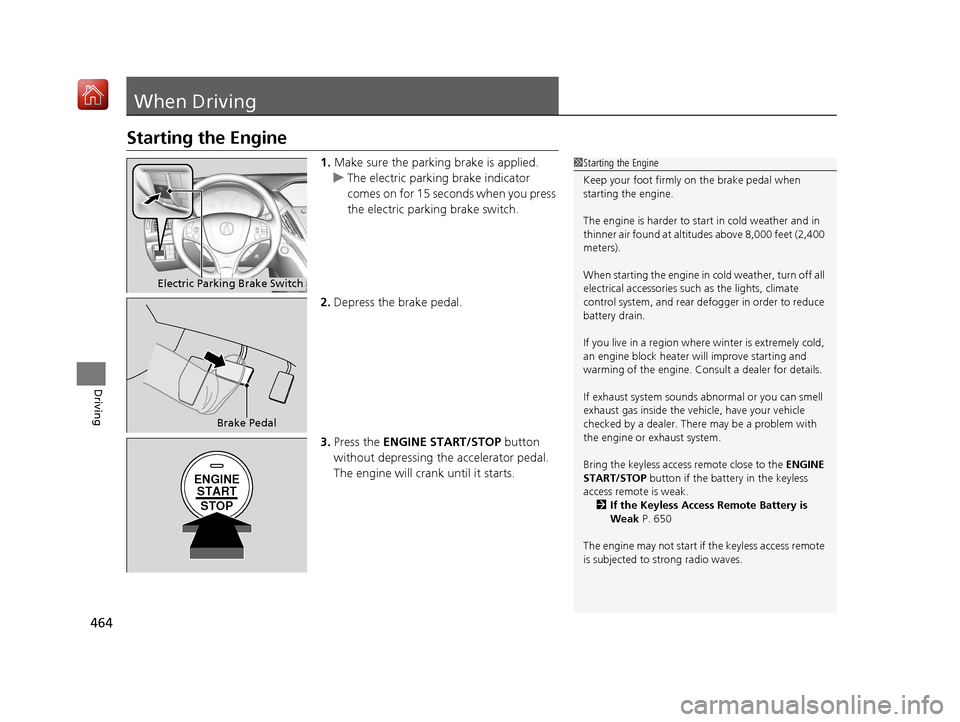
1.Make sure the parking brake is applied.
u The electric parking brake indicator
comes on for 15 seconds when you press
the electric parking brake switch.
2. Depress the brake pedal.
3. Press the ENGINE START/STOP button
without depressing the accelerator pedal.
The engine will crank until it starts.1 Starting the Engine
Keep your foot firmly on the brake pedal when
starting the engine.
The engine is harder to st art in cold weather and in
thinner air found at altit udes above 8,000 feet (2,400
meters).
When starting the engine in cold weather, turn off all
electrical accessories such as the lights, climate
control system, and rear de fogger in order to reduce
battery drain.
If you live in a region where winter is extremely cold,
an engine block heater will improve starting and
warming of the engine. Cons ult a dealer for details.
If exhaust system sounds abnormal or you can smell
exhaust gas inside the vehi cle, have your vehicle
checked by a dealer. There may be a problem with
the engine or exhaust system.
Bring the keyless access remote close to the ENGINE
START/STOP button if the batte ry in the keyless
access remote is weak. 2 If the Keyless Access Remote Battery is
Weak P. 650
The engine may not start if the keyless access remote
is subjected to strong radio waves.
Electric Parking Brake Switch
Brake Pedal
ENGINE START
STOP
20 ACURA MDX-31TZ56600.book 464 ページ 2019年4月24日 水曜日 午後5時44分
Page 470 of 701
469
uuWhen Driving uStarting the Engine
Driving
1. Depress the brake pedal and press the ENGINE START/STOP button
simultaneously.
2. Keeping your right foot on the br ake pedal, press the button. Select
(R
when reversing.
3. With the parking brake applied, release the brake pedal and gently depress the
accelerator pedal.
u Make sure the electric parkin g brake indicator goes off.
2Parking Brake P. 529
2 If the Transmission System Indicator Blinks along with the Warning Message
P. 661
■Hill start assist system
Hill start assist keeps the brake engaged br iefly to help prevent the vehicle from
rolling on inclines as you move your foot from the brake pedal to the accelerator.
Change the gear position to
(D or (S when facing uphill, or (R when facing
downhill, then release the brake pedal.
The brakes remain engaged briefly as you release the brake pedal.
■Starting to Drive1 Starting to Drive
The engine stops when the gear position is changed
from
( P before the ENGINE START/STOP button is
pressed. Follow step 1 when starting to drive.
You can also release the parking brake by pulling the
electric parking brake sw itch while depressing the
brake pedal.
When facing downhill, you can start your vehicle
more smoothly by manually releasing it with the
electric parking brake switch than by releasing it with
the accelerator pedal.
When the engine was started using the keyless access
remote*When the engine was started using the keyless access remote*
When the engine was started in any case
D/S
1 Hill start assist system
Hill start assist may not prevent the vehicle from
rolling downhill on a very steep or slippe ry slope, and
will not operate on small inclines.
Hill start assist is not a replacement for the parking
brake.
Hill start assist will operate even when VSA ® is
switched off.
* Not available on all models
20 ACURA MDX-31TZ56600.book 469 ページ 2019年4月24日 水曜日 午後5時44分
Page 488 of 701
487
uuWhen Driving uFront Sensor Camera
Continued
Driving
Front Sensor Camera
The camera, used in systems such as LKAS, RDM, ACC with Low Speed Follow,
CMBSTM, and auto high-beam, is designed to detect an object that triggers any of
the systems to operate its functions.
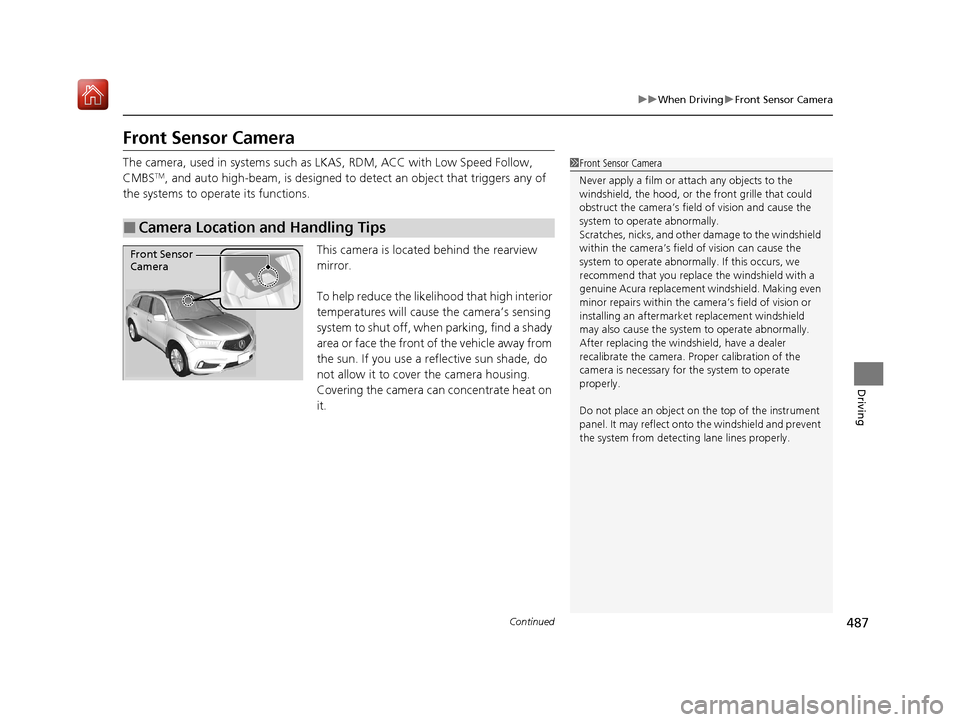
This camera is located behind the rearview
mirror.
To help reduce the likelihood that high interior
temperatures will cause the camera’s sensing
system to shut off, when parking, find a shady
area or face the front of the vehicle away from
the sun. If you use a reflective sun shade, do
not allow it to cover the camera housing.
Covering the camera can concentrate heat on
it.
■Camera Location and Handling Tips
1 Front Sensor Camera
Never apply a film or attach any objects to the
windshield, the hood, or th e front grille that could
obstruct the camera’s fiel d of vision and cause the
system to operate abnormally.
Scratches, nicks, and othe r damage to the windshield
within the camera’s fiel d of vision can cause the
system to operate abnormall y. If this occurs, we
recommend that you replac e the windshield with a
genuine Acura replacement windshield. Making even
minor repairs within the ca mera’s field of vision or
installing an aftermarke t replacement windshield
may also cause the system to operate abnormally.
After replacing the winds hield, have a dealer
recalibrate the camera. Pr oper calibration of the
camera is necessary for the system to operate
properly.
Do not place an object on the top of the instrument
panel. It may reflect onto the windshield and prevent
the system from detecting lane lines properly.
Front Sensor
Camera
20 ACURA MDX-31TZ56600.book 487 ページ 2019年4月24日 水曜日 午後5時44分
Page 491 of 701
uuWhen Driving uAdaptive Cruise Control (ACC) with Low Speed Follow
490
Driving
■How to activate the system1Adaptive Cruise Control (ACC) with Low Speed Follow
When the MAIN button is pressed, both ACC with
Low Speed Follow and the Lane Keeping Assist
System (LKAS) are either turned on or off.
ACC with Low Speed Follow may not work properly
under certain conditions.
2 ACC with Low Speed Follow Conditions
and Limitations P. 496
When not using ACC with Low Speed Follow: Turn
off adaptive cruise by pressing the MAIN button. This
also will turn off the Lane Keeping Assist System
(LKAS).
Do not use ACC with Low Speed Follow under the
following conditions.
•On roads with heavy traf fic or while driving in
continuous stop and go traffic.
•On roads with sharp turns.
•On roads with steep downhill sections, as the set
vehicle speed can be exceeded by coasting. In such
cases, ACC with Low Speed Follow will not apply
the brakes to maintain the set speed.
•On roads with toll collection facilities or other
objects between lanes of traffic, or in parking
areas, or faci lities with driv e through access.
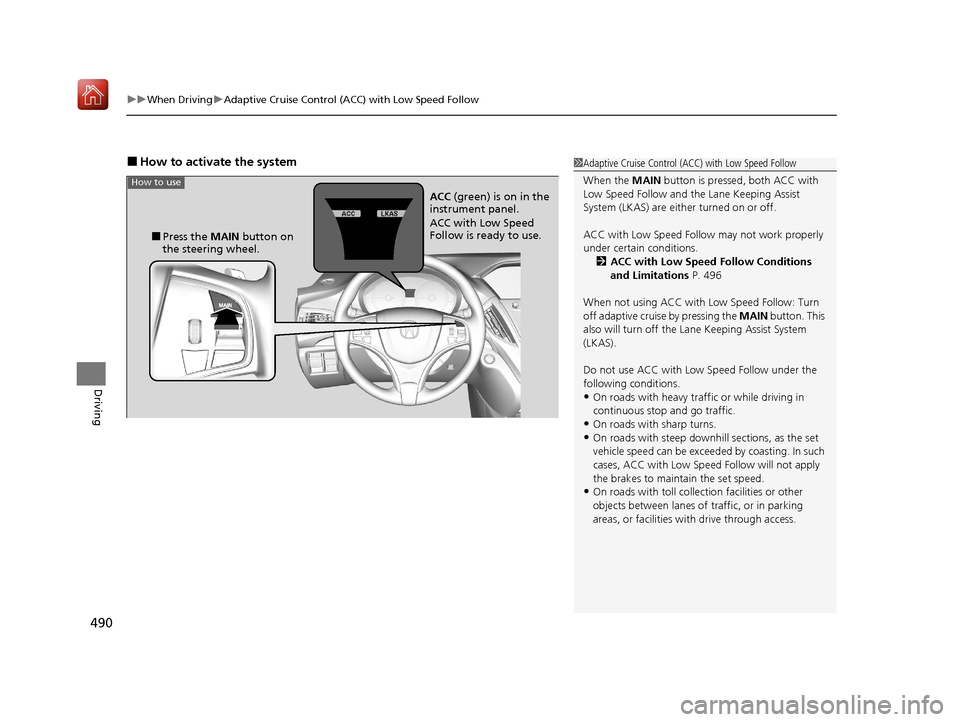
■Press the MAIN button on
the steering wheel. ACC
(green) is on in the
instrument panel.
ACC with Low Speed
Follow is ready to use.
How to use
20 ACURA MDX-31TZ56600.book 490 ページ 2019年4月24日 水曜日 午後5時44分
Page 497 of 701
uuWhen Driving uAdaptive Cruise Control (ACC) with Low Speed Follow
496
Driving
The system may automatically shut off and the ACC indicator will come on under
certain conditions. Some examples of th ese conditions are listed below. Other
conditions may reduce some of the ACC functions.
2 Front Sensor Camera P. 487
■Environmental conditions
Driving in bad weather (r ain, fog, snow, etc.).
■Roadway conditions
Driving on a snowy or wet roadway (obscure d lane marking, vehicle tracks, reflected
lights, road spray, high contrast).
■Vehicle conditions
• The outside of the windshie ld is blocked by dirt, mud, leaves, wet snow, etc.
• An abnormal tire or wheel condition (Wrong sized, varied size or construction,
improperly inflated, compact spare tire
*, etc.).
• The camera temperature gets too high.
• The parking brake is applied.
• When the front grille is dirty.
• The vehicle is tilted due to a heav y load or suspension modifications.
• When tire chains are installed.
■ACC with Low Speed Follow Conditions and Limitations1ACC with Low Speed Follow Conditions and Limitations
The radar sensor for ACC with Low Speed Follow is
shared with the Collision Mitigation Braking System
TM
(CMBSTM).
2 Collision Mitigation Braking SystemTM
(CMBSTM) P. 537
You can read about handling information for the
camera equipped with this system. 2 Front Sensor Camera P. 487
Always keep the radar sensor cover clean.
Never use chemical solvents or polishing powder for
cleaning the sensor cover. Clean it with water or a
mild detergent.
Do not put a sticker on the radar sensor cover or
replace the radar sensor cover.
* Not available on all models
20 ACURA MDX-31TZ56600.book 496 ページ 2019年4月24日 水曜日 午後5時44分
Page 503 of 701
uuWhen Driving uAdaptive Cruise Control (ACC) with Low Speed Follow
502
Driving
■Automatic cancellation
The beeper sounds and a message appear s on the MID when ACC with Low Speed
Follow is automatically canceled. Any of these conditions may cause the ACC with
Low Speed Follow to automatically cancel:
• Bad weather (rain, fog, snow, etc.)
• When the radar sensor behind the emblem gets dirty.
• The vehicle ahead of you cannot be detected.
• An abnormal tire condition is detected, or the tires are skidding.
• Driving on a mountainous road, or driving off road for extended periods.
• Abrupt steering wheel movement.
• When the ABS, VSA ® or CMBS
TM is activated.
• When the ABS or VSA ® system indicator comes on.
• When the vehicle is stopped on a very steep slope.
• When you manually apply the parking brake.
• When the detected vehicle within the ACC with Low Speed Follow range is too
close to your vehicle.
• When a detected vehicle goe s out of the ACC with Low Speed Follow range while
your vehicle is stationary.
• The camera behind the rearview mirror, or the area around the camera, including
the windshield, gets dirty.
The ACC with Low Speed Follow automatic ca ncellation can be also triggered by the
following causes. In these cases, the el ectric parking brake will be automatically
applied.
• The driver’s seat belt is unfasten ed when the vehicle is stationary.
• The vehicle stops for mo re than 10 minutes.
• The engine is turned off.
• When trailer stability assist is activated.
2 Trailer Stability Assist P. 459
1Automatic cancellation
Even though ACC with Low Speed Follow has been
automatically canceled, you can still resume the prior
set speed. Wait until the condition that caused ACC
with Low Speed Follow to cancel improves, then
press the RES/+/SET/– switch up or down.
20 ACURA MDX-31TZ56600.book 502 ページ 2019年4月24日 水曜日 午後5時44分