Seat Acura MDX 2020 Workshop Manual
[x] Cancel search | Manufacturer: ACURA, Model Year: 2020, Model line: MDX, Model: Acura MDX 2020Pages: 701, PDF Size: 38.91 MB
Page 86 of 701
85
uuIndicators u
Continued
Instrument Panel
IndicatorNameOn/BlinkingExplanationMessage
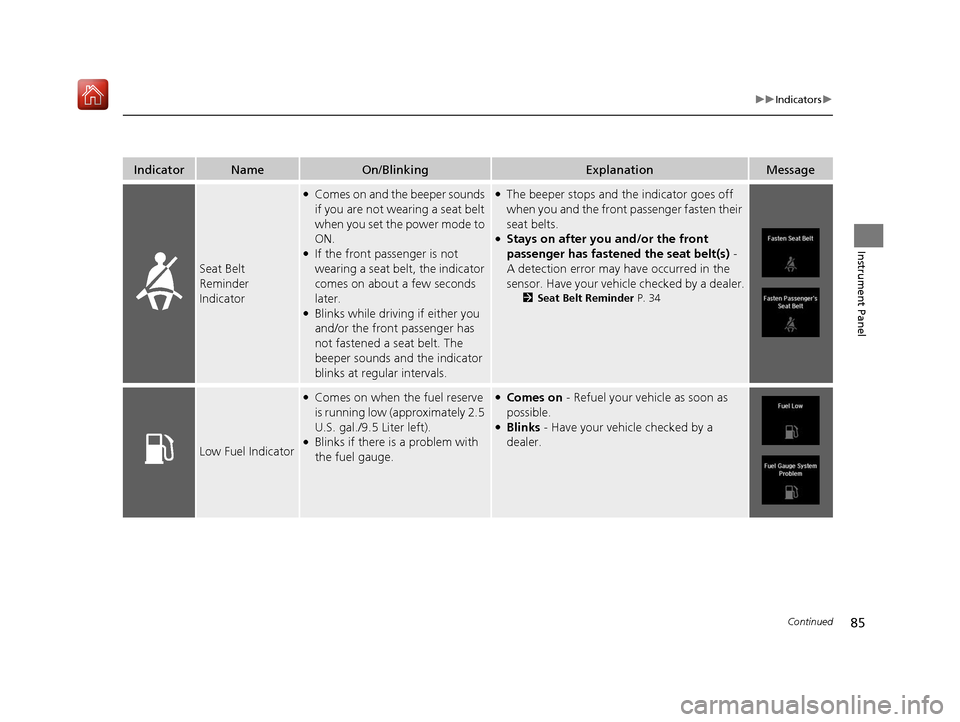
Seat Belt
Reminder
Indicator
●Comes on and the beeper sounds
if you are not wearing a seat belt
when you set the power mode to
ON.
●If the front passenger is not
wearing a seat belt, the indicator
comes on about a few seconds
later.
●Blinks while driving if either you
and/or the front passenger has
not fastened a seat belt. The
beeper sounds an d the indicator
blinks at regular intervals.
●The beeper stops and the indicator goes off
when you and the front passenger fasten their
seat belts.
●Stays on after you and/or the front
passenger has fastened the seat belt(s) -
A detection error may have occurred in the
sensor. Have your vehicle checked by a dealer.
2 Seat Belt Reminder P. 34
Low Fuel Indicator
●Comes on when the fuel reserve
is running low (approximately 2.5
U.S. gal./9.5 Liter left).
●Blinks if there is a problem with
the fuel gauge.
●Comes on - Refuel your vehicle as soon as
possible.
●Blinks - Have your vehicle checked by a
dealer.
20 ACURA MDX-31TZ56600.book 85 ページ 2019年4月24日 水曜日 午後5時44分
Page 87 of 701
86
uuIndicators u
Instrument Panel
IndicatorNameOn/BlinkingExplanationMessage
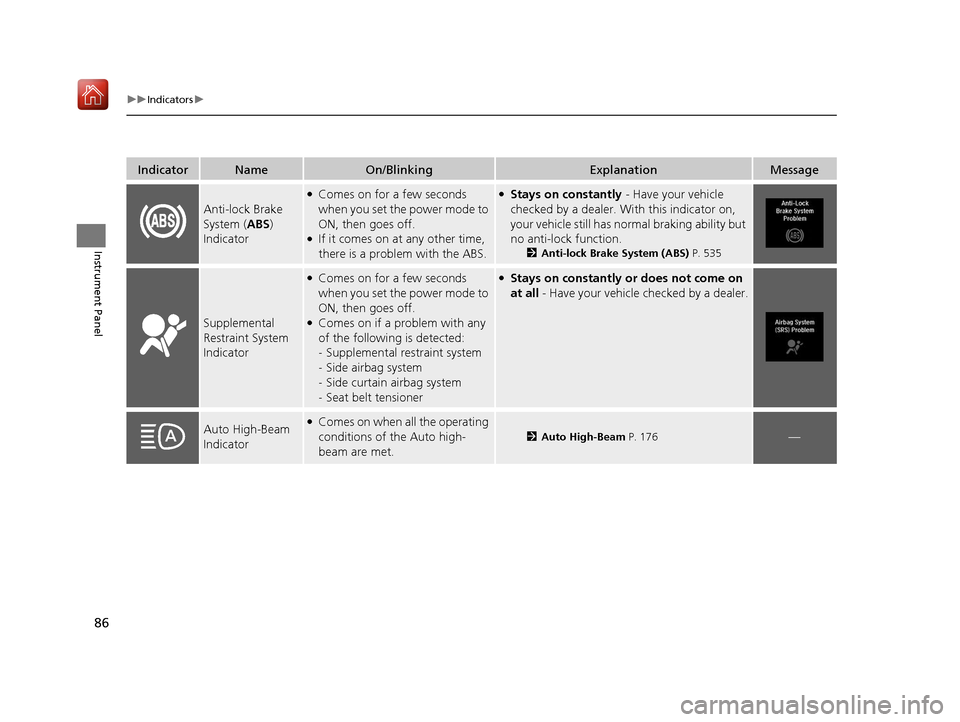
Anti-lock Brake
System (ABS)
Indicator
●Comes on for a few seconds
when you set the power mode to
ON, then goes off.
●If it comes on at any other time,
there is a problem with the ABS.
●Stays on constantly - Have your vehicle
checked by a dealer. Wi th this indicator on,
your vehicle still has normal braking ability but
no anti-lock function.
2 Anti-lock Brake System (ABS) P. 535
Supplemental
Restraint System
Indicator
●Comes on for a few seconds
when you set the power mode to
ON, then goes off.
●Comes on if a problem with any
of the following is detected:
-Supplemental restraint system
- Side airbag system
- Side curtain airbag system
- Seat belt tensioner
●Stays on constantly or does not come on
at all - Have your vehicle checked by a dealer.
Auto High-Beam
Indicator●Comes on when all the operating
conditions of the Auto high-
beam are met.
2 Auto High-Beam P. 176—
20 ACURA MDX-31TZ56600.book 86 ページ 2019年4月24日 水曜日 午後5時44分
Page 106 of 701
105
uuIndicators uMulti-Information Display (MID) Warning and Information Messages
Continued
Instrument Panel
MessageConditionExplanation
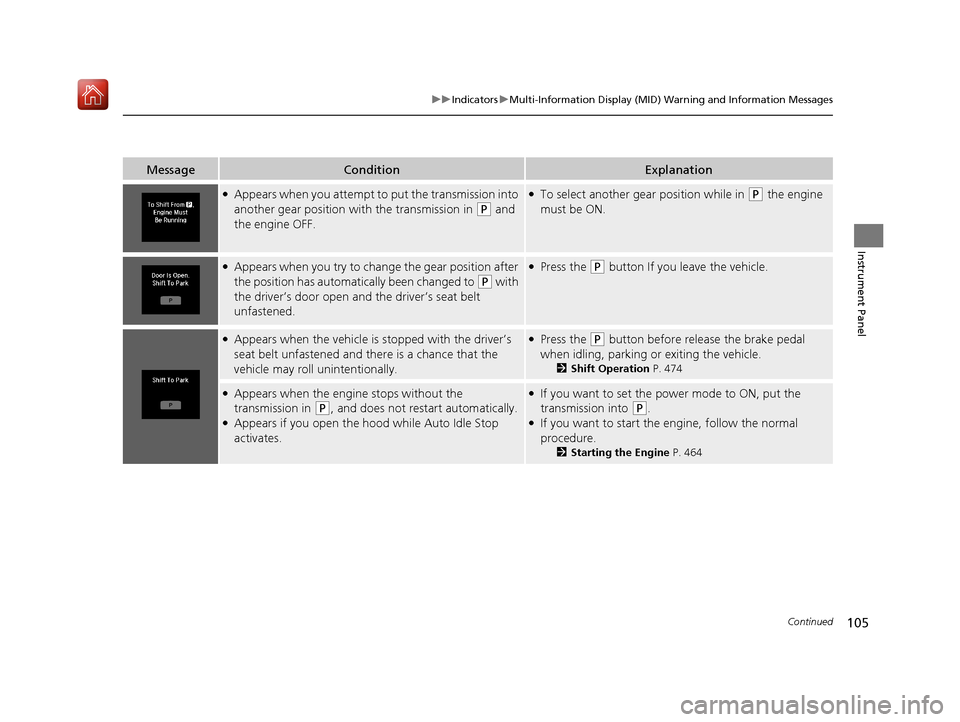
●Appears when you attempt to put the transmission into
another gear position wi th the transmission in
(P and
the engine OFF.
●To select another gear position while in (P the engine
must be ON.
●Appears when you try to change the gear position after
the position has automatically been changed to
( P with
the driver’s door open and the driver’s seat belt
unfastened.
●Press the (P button If you leave the vehicle.
●Appears when the vehicle is stopped with the driver’s
seat belt unfastened and there is a chance that the
vehicle may roll unintentionally.●Press the (P button before release the brake pedal
when idling, parking or exiting the vehicle.
2 Shift Operation P. 474
●Appears when the engine stops without the
transmission in
(P, and does not restart automatically.●Appears if you open the hood while Auto Idle Stop
activates.
●If you want to set the power mode to ON, put the
transmission into
(P.●If you want to start the engine, follow the normal
procedure.
2Starting the Engine P. 464
20 ACURA MDX-31TZ56600.book 105 ページ 2019年4月24日 水曜日 午後5時44分
Page 108 of 701

107
uuIndicators uMulti-Information Display (MID) Warning and Information Messages
Continued
Instrument Panel
MessageConditionExplanation
●Appears when you try to change the gear position
without depressing the brake pedal.●Depress the brake pedal, then select a shift button.
●Appears when you try to change the gear position
without releasing your foot off the accelerator pedal.●Release your foot off the acce lerator pedal, then select a
shift button.
●Appears when the (P button is pressed while the
vehicle is moving.
●Appears if you change the gear position to (R while the
vehicle is moving forward, or to
(D while the vehicle is
reversing.
●Make sure that the vehicle comes to a stop before
operating the select button.
●Appears when you set the po wer mode to ON without
fastening the driver’s seat belt.
●Appears when you change the gear position after (P
has been automatically selected with the driver’s door
open, the driver’s seat belt unfastened, then the brake
pedal is released.
●Fasten the seat belt properly before you start to drive.
2 Shift Operation P. 474
●Appears when you press the (P button but it is not
engaged due to low ATF temperature.●Depress the brake pedal until this message disappear.
20 ACURA MDX-31TZ56600.book 107 ページ 2019年4月24日 水曜日 午後5時44分
Page 110 of 701
109
uuIndicators uMulti-Information Display (MID) Warning and Information Messages
Continued
Instrument Panel
MessageConditionExplanation
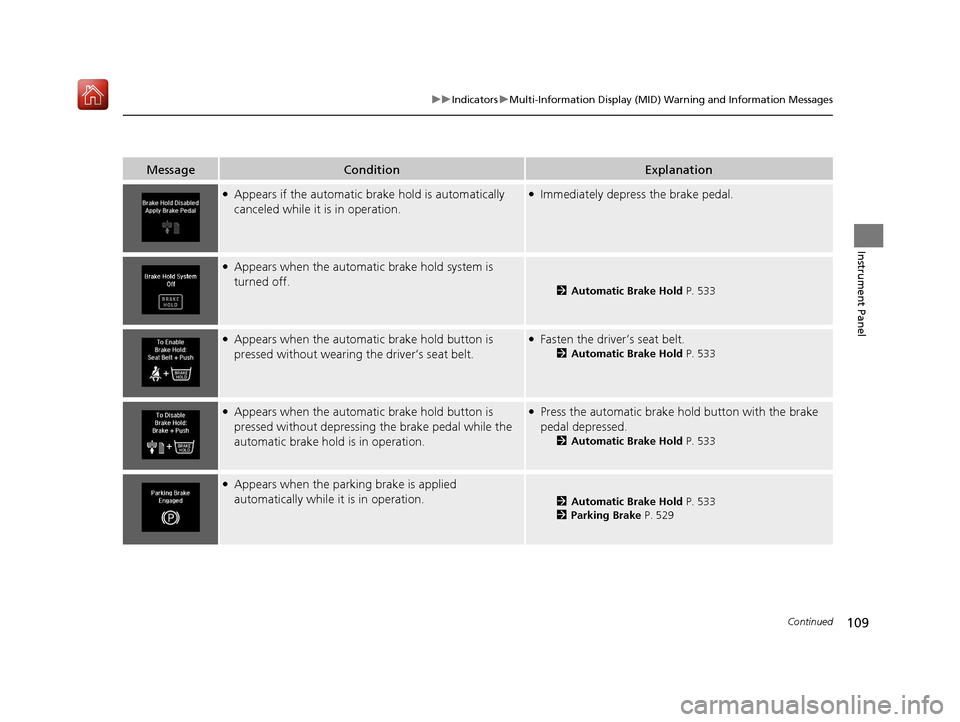
●Appears if the automatic br ake hold is automatically
canceled while it is in operation.●Immediately depress the brake pedal.
●Appears when the automatic brake hold system is
turned off.
2 Automatic Brake Hold P. 533
●Appears when the automatic brake hold button is
pressed without wearing the driver’s seat belt.●Fasten the driver’s seat belt.
2Automatic Brake Hold P. 533
●Appears when the automatic brake hold button is
pressed without depressing the brake pedal while the
automatic brake hold is in operation.●Press the automatic brake ho ld button with the brake
pedal depressed.
2 Automatic Brake Hold P. 533
●Appears when the parking brake is applied
automatically while it is in operation.
2Automatic Brake Hold P. 533
2 Parking Brake P. 529
20 ACURA MDX-31TZ56600.book 109 ページ 2019年4月24日 水曜日 午後5時44分
Page 113 of 701
112
uuIndicators uMulti-Information Display (MID) Warning and Information Messages
Instrument Panel
MessageConditionExplanation
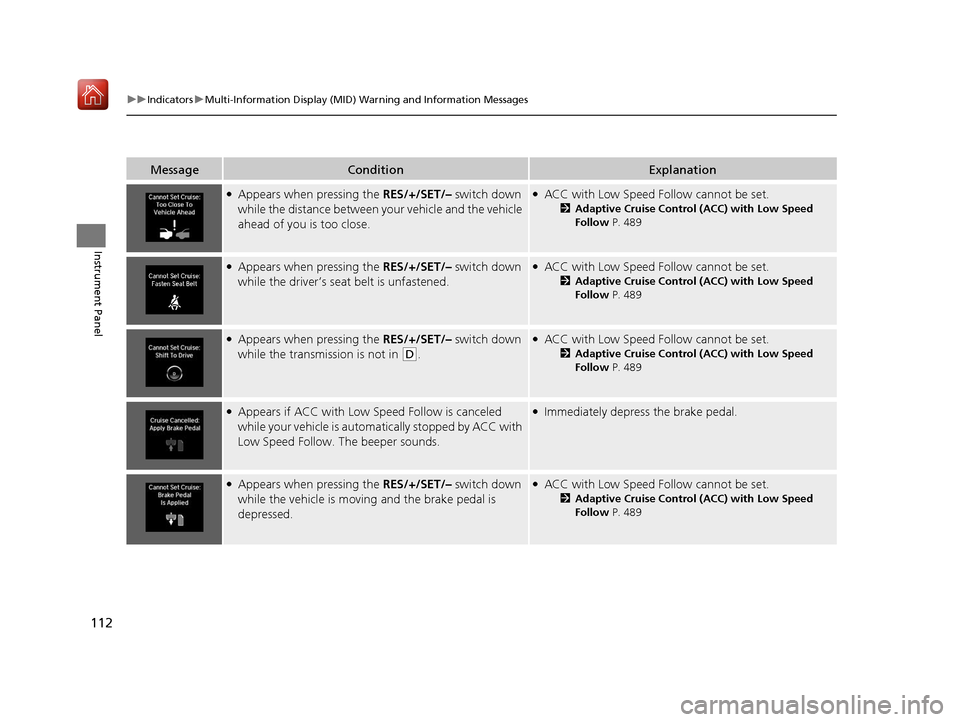
●Appears when pressing the RES/+/SET/– switch down
while the distance between y our vehicle and the vehicle
ahead of you is too close.●ACC with Low Speed Follow cannot be set.
2 Adaptive Cruise Control (ACC) with Low Speed
Follow P. 489
●Appears when pressing the RES/+/SET/– switch down
while the driver’s seat belt is unfastened.●ACC with Low Speed Follow cannot be set.
2 Adaptive Cruise Control (ACC) with Low Speed
Follow P. 489
●Appears when pressing the RES/+/SET/– switch down
while the transmission is not in
(D.
●ACC with Low Speed Follow cannot be set.
2 Adaptive Cruise Control (ACC) with Low Speed
Follow P. 489
●Appears if ACC with Low Sp eed Follow is canceled
while your vehicle is automatically stopped by ACC with
Low Speed Follow. The beeper sounds.●Immediately depress the brake pedal.
●Appears when pressing the RES/+/SET/– switch down
while the vehicle is moving and the brake pedal is
depressed.●ACC with Low Speed Follow cannot be set.
2 Adaptive Cruise Control (ACC) with Low Speed
Follow P. 489
20 ACURA MDX-31TZ56600.book 112 ページ 2019年4月24日 水曜日 午後5時44分
Page 132 of 701
131
uuGauges and Multi-Info rmation Display (MID)uMID
Continued
Instrument Panel
*1: Default SettingSetup Group Customizable Features
Description Selectable Settings
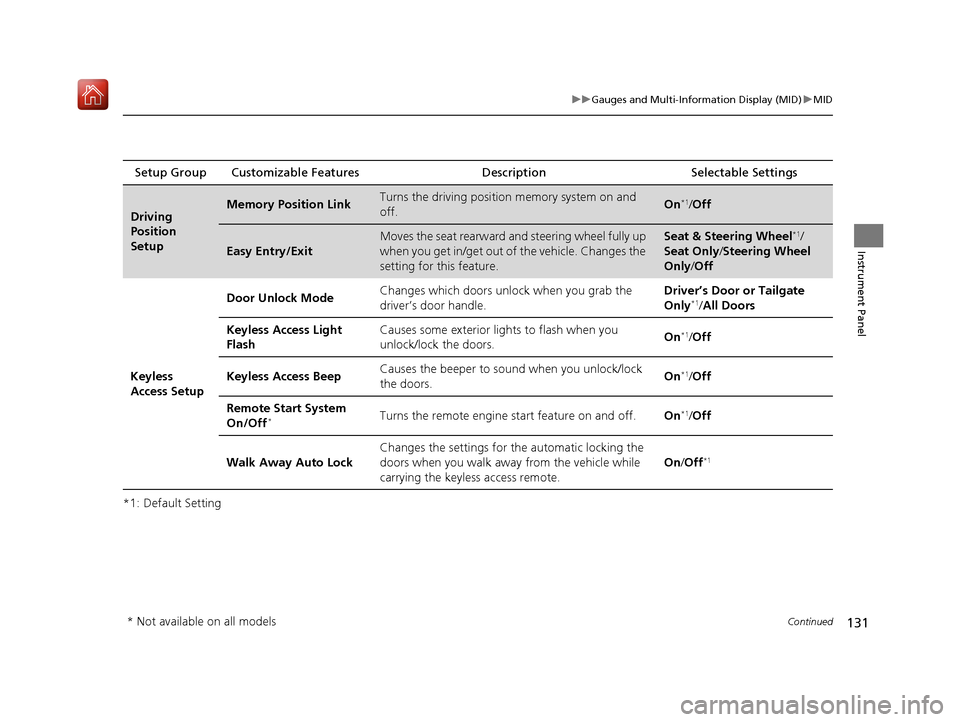
Driving
Position
SetupMemory Position LinkTurns the driving position memory system on and
off.On*1/ Off
Easy Entry/Exit
Moves the seat rearward and steering wheel fully up
when you get in/get out of the vehicle. Changes the
setting for this feature.Seat & Steering Wheel*1/
Seat Only/ Steering Wheel
Only /Off
Keyless
Access Setup Door Unlock Mode
Changes which doors unlock when you grab the
driver’s door handle. Driver’s Door or Tailgate
Only
*1/
All Doors
Keyless Access Light
Flash Causes some exterior li
ghts to flash when you
unlock/lock the doors. On
*1/
Off
Keyless Access Beep Causes the beeper to sound when you unlock/lock
the doors.
On
*1/
Off
Remote Start System
On/Off
*Turns the remote engine start feature on and off. On*1/Off
Walk Away Auto Lock Changes the settings for th
e automatic locking the
doors when you walk away from the vehicle while
carrying the keyless access remote. On
/Off
*1
* Not available on all models
20 ACURA MDX-31TZ56600.book 131 ページ 2019年4月24日 水曜日 午後5時44分
Page 138 of 701
137
Controls
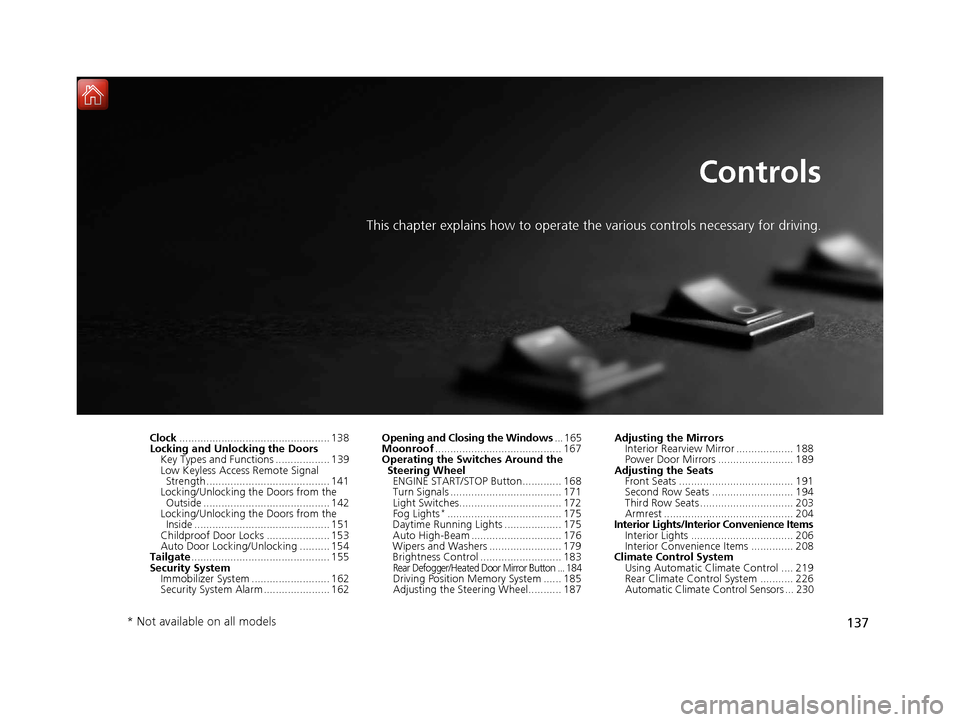
This chapter explains how to operate the various controls necessary for driving.
Clock.................................................. 138
Locking and Unlocking the Doors Key Types and Functions .................. 139
Low Keyless Access Remote Signal Strength ......................................... 141
Locking/Unlocking the Doors from the
Outside .......................................... 142
Locking/Unlocking the Doors from the Inside ............................................. 151
Childproof Door Locks ..................... 153
Auto Door Locking/Unlocking .......... 154
Tailgate .............................................. 155
Security System Immobilizer System .......................... 162
Security System Alarm ...................... 162 Opening and Closing the Windows
... 165
Moonroof .......................................... 167
Operating the Switches Around the
Steering Wheel ENGINE START/STOP Button............. 168
Turn Signals ..................................... 171
Light Switches.................................. 172
Fog Lights
*...................................... 175
Daytime Running Lights ................... 175
Auto High-Beam .............................. 176
Wipers and Washers ........................ 179
Brightness Control ........................... 183
Rear Defogger/Heated Door Mirror Button ... 184Driving Position Memory System ...... 185
Adjusting the Steering Wheel........... 187 Adjusting the Mirrors
Interior Rearview Mirror ................... 188
Power Door Mirrors ......................... 189
Adjusting the Seats Front Seats ...................................... 191
Second Row Seats ........................... 194
Third Row Seats ............................... 203
Armrest ........................................... 204
Interior Lights/Interior Convenience Items
Interior Lights .................................. 206
Interior Convenience Items .............. 208
Climate Control System
Using Automatic Climate Control .... 219
Rear Climate Control System ........... 226
Automatic Climate Control Sensors ... 230
* Not available on all models
20 ACURA MDX-31TZ56600.book 137 ページ 2019年4月24日 水曜日 午後5時44分
Page 153 of 701
uuLocking and Unlocking the Doors uLocking/Unlocking the Doors from the Inside
152
Controls
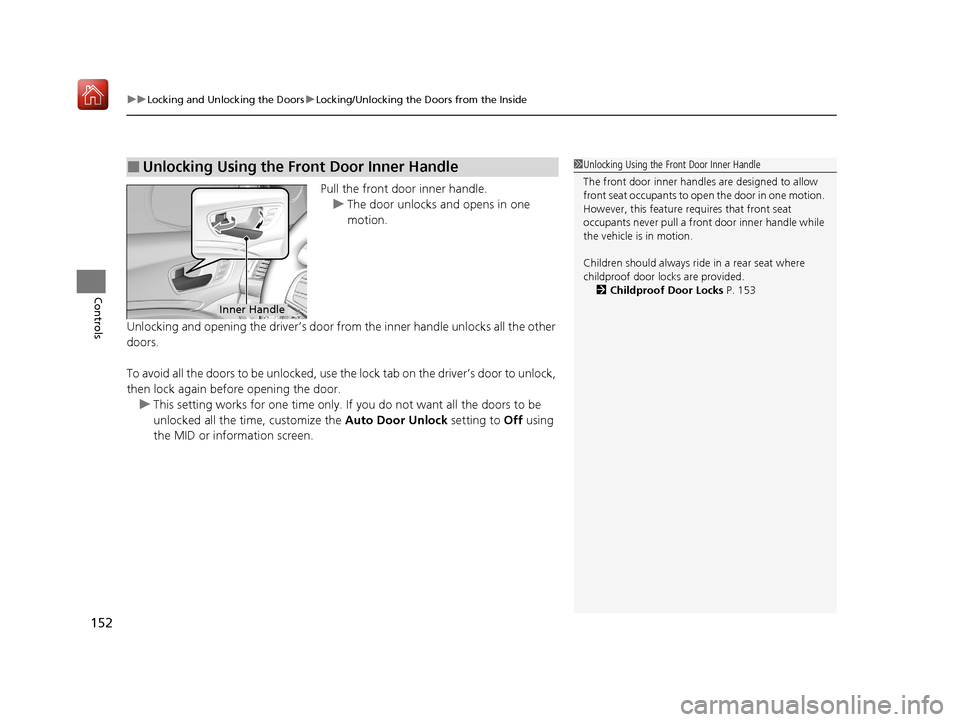
Pull the front door inner handle.
u The door unlocks and opens in one
motion.
Unlocking and opening the driver’s door from the inner handle unlocks all the other
doors.
To avoid all the doors to be unlocked, use the lock tab on the driver’s door to unlock,
then lock again before opening the door. u This setting works for one time only. If you do not want all the doors to be
unlocked all the time, customize the Auto Door Unlock setting to Off using
the MID or information screen.
■Unlocking Using the Front Door Inner Handle1 Unlocking Using the Front Door Inner Handle
The front door inne r handles are designed to allow
front seat occupants to ope n the door in one motion.
However, this feature requires that front seat
occupants never pull a front door inner handle while
the vehicle is in motion.
Children should always ride in a rear seat where
childproof door locks are provided. 2 Childproof Door Locks P. 153
Inner Handle
20 ACURA MDX-31TZ56600.book 152 ページ 2019年4月24日 水曜日 午後5時44分
Page 166 of 701

165Continued
Controls
Opening and Closing the Windows
Opening/Closing the Power Windows
The power windows can be opened and closed when the power mode is in ON,
using the switches on the doors.
The driver’s side switches can be used to open and close all the windows. The power
window lock button on the driver’s side must be switched off (not pushed in,
indicator off) to open and close the windows from anywhere other than the driver’s
seat.
When the power window lock button is pushed in, the indicator comes on and you
can only operate the driver’s window. Turn the power window lock button on if a
child is in the vehicle.
■Manual operation
To open: Push the switch down lightly, and
hold it until the desired position is reached.
To close: Pull the switch up lightly, and hold it
until the desired position is reached.
■Automatic operation
To open: Push the switch down firmly.
To close: Pull the switch up firmly.
The window opens or closes completely. To
stop the window at any time, push or pull the
switch briefly.
■Opening/Closing the Windows with Auto-Open/Close
Function
1 Opening/Closing the Power Windows
The power windows can be operated for up to 10
minutes after you set the power mode to VEHICLE
OFF (LOCK).
Opening either front door cancels this function.
Auto Reverse
If a power window senses resistance when closing
automatically, it will stop closing and reverse
direction.
The driver’s window auto re verse function is disabled
when you continuously pull up the switch.
The auto reverse function stops sensing when the
window is almost closed to en sure that it fully closes.
3WARNING
Closing a power window on someone’s
hands or fingers can cause serious injury.
Make sure your passengers are away from
the windows before closing them.
ON
OFF
Power Window
Lock Button
Rear Passenger’s
Window Switches
Front Passenger’s
Window Switch
Driver’s Window
Switch
Indicator
20 ACURA MDX-31TZ56600.book 165 ページ 2019年4月24日 水曜日 午後5時44分