transmission Acura MDX 2020 Workshop Manual
[x] Cancel search | Manufacturer: ACURA, Model Year: 2020, Model line: MDX, Model: Acura MDX 2020Pages: 701, PDF Size: 38.91 MB
Page 554 of 701
Continued553
uuParking Your Vehicle uCross Traffic Monitor*
Driving
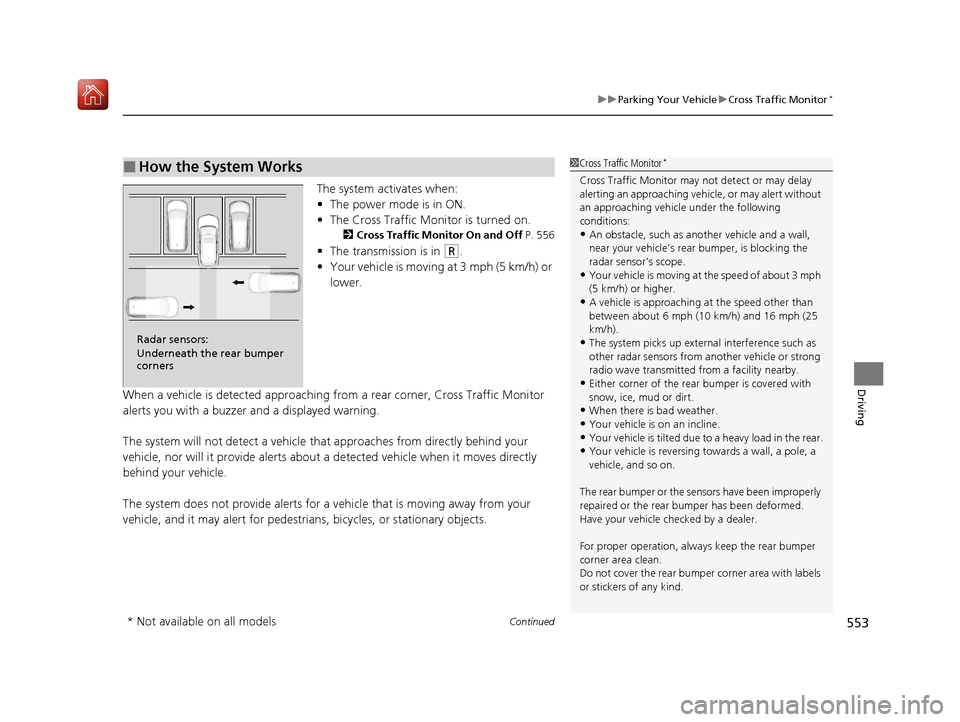
The system activates when:
• The power mode is in ON.
• The Cross Traffic Monitor is turned on.
2 Cross Traffic Monitor On and Off P. 556
•The transmission is in (R.
• Your vehicle is moving at 3 mph (5 km/h) or
lower.
When a vehicle is detected approaching from a rear corner, Cross Traffic Monitor
alerts you with a buzzer and a displayed warning.
The system will not detect a vehicle that approaches from directly behind your
vehicle, nor will it provide alerts about a detected vehicle when it moves directly
behind your vehicle.
The system does not provide alerts for a vehicle that is moving away from your
vehicle, and it may alert for pedestrians, bicycles, or stationary objects.
■How the System Works1 Cross Traffic Monitor*
Cross Traffic Monitor may not detect or may delay
alerting an approaching vehi cle, or may alert without
an approaching vehicle under the following
conditions:
•An obstacle, such as a nother vehicle and a wall,
near your vehicle’s rear bumper, is blocking the
radar sensor’s scope.
•Your vehicle is moving at the speed of about 3 mph
(5 km/h) or higher.
•A vehicle is approaching at the speed other than
between about 6 mph (10 km/h) and 16 mph (25
km/h).
•The system picks up external interference such as
other radar sensors from an other vehicle or strong
radio wave transmitted fr om a facility nearby.
•Either corner of the rear bumper is covered with
snow, ice, mud or dirt.
•When there is bad weather.
•Your vehicle is on an incline.
•Your vehicle is tilted due to a heavy load in the rear.•Your vehicle is reversing towards a wall, a pole, a
vehicle, and so on.
The rear bumper or the sens ors have been improperly
repaired or the rear bum per has been deformed.
Have your vehicle checked by a dealer.
For proper operation, always keep the rear bumper
corner area clean.
Do not cover the rear bumper corner area with labels
or stickers of any kind.
Radar sensors:
Underneath the rear bumper
corners
* Not available on all models
20 ACURA MDX-31TZ56600.book 553 ページ 2019年4月24日 水曜日 午後5時44分
Page 556 of 701
Continued555
uuParking Your Vehicle uCross Traffic Monitor*
Driving
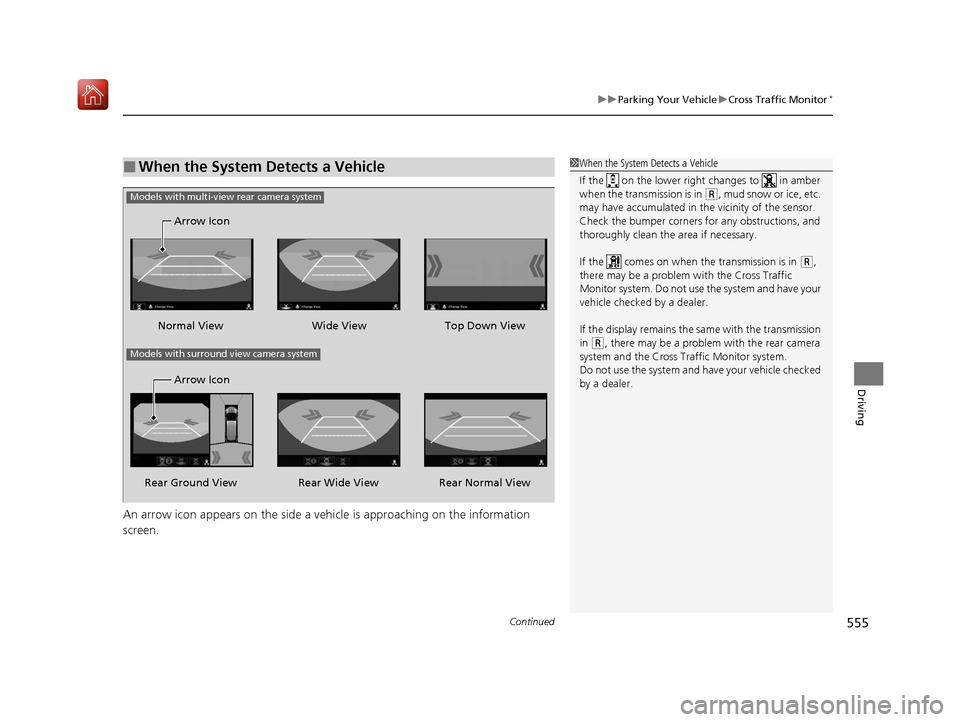
An arrow icon appears on the side a ve hicle is approaching on the information
screen.
■When the System Detects a Vehicle1 When the System Detects a Vehicle
If the on the lower right changes to in amber
when the transmission is in
( R, mud snow or ice, etc.
may have accumulated in th e vicinity of the sensor.
Check the bumper corners for any obstructions, and
thoroughly clean the area if necessary.
If the comes on when the transmission is in
( R,
there may be a problem with the Cross Traffic
Monitor system. Do not use the system and have your
vehicle checked by a dealer.
If the display remains the same with the transmission
in
( R, there may be a problem with the rear camera
system and the Cross Traffic Monitor system.
Do not use the system and have your vehicle checked
by a dealer.
Wide View
Normal View Arrow Icon
Models with multi-view rear camera system
Top Down View
Rear Normal View
Rear Wide View
Rear Ground View Arrow Icon
Models with surround view camera system
20 ACURA MDX-31TZ56600.book 555 ページ 2019年4月24日 水曜日 午後5時44分
Page 558 of 701
557Continued
Driving
Multi-View Rear Camera*
About Your Multi-View Rear Camera
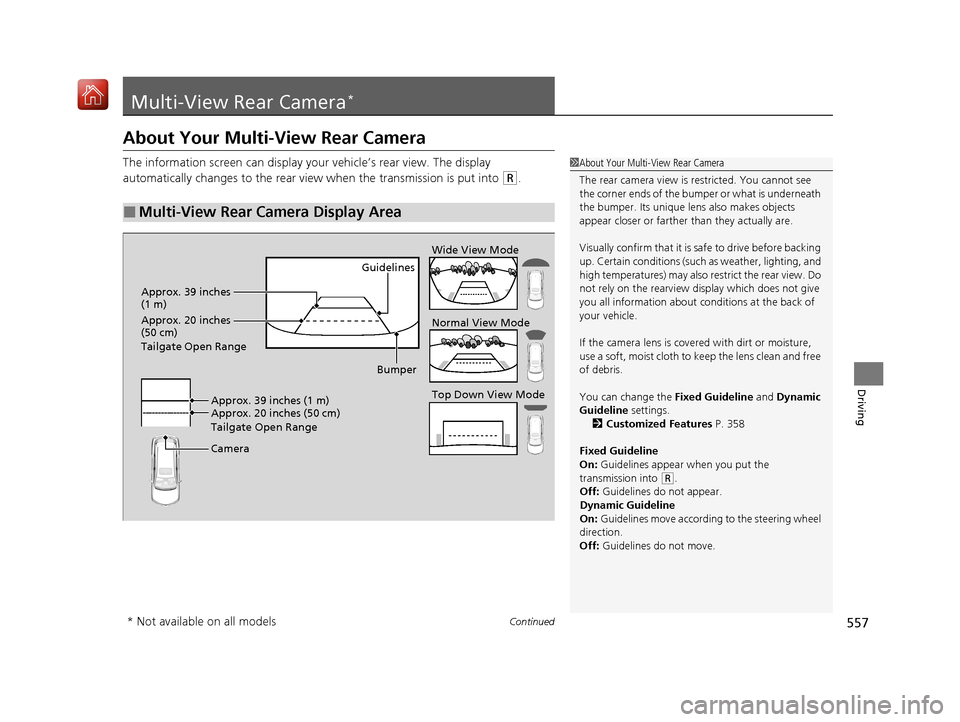
The information screen can display your vehicle’s rear view. The display
automatically changes to the rear view when the transmission is put into
(R.
■Multi-View Rear Camera Display Area
1About Your Multi-View Rear Camera
The rear camera view is restricted. You cannot see
the corner ends of the bumper or what is underneath
the bumper. Its unique le ns also makes objects
appear closer or farther than they actually are.
Visually confirm that it is safe to drive before backing
up. Certain conditions (such as weather, lighting, and
high temperatures) may also restrict the rear view. Do
not rely on the rearview display which does not give
you all information about conditions at the back of
your vehicle.
If the camera lens is cove red with dirt or moisture,
use a soft, moist cloth to keep the lens clean and free
of debris.
You can change the Fixed Guideline and Dynamic
Guideline settings. 2 Customized Features P. 358
Fixed Guideline
On: Guidelines appear when you put the
transmission into
( R.
Off: Guidelines do not appear.
Dynamic Guideline
On: Guidelines move accordi ng to the steering wheel
direction.
Off: Guidelines do not move.
Guidelines
Bumper
Camera Approx. 20 inches (50 cm)
Tailgate Open Range Approx. 39 inches (1 m) Wide View Mode
Normal View Mode
Top Down View Mode
Approx. 39 inches
(1 m)
Approx. 20 inches
(50 cm)
Tailgate Open Range
* Not available on all models
20 ACURA MDX-31TZ56600.book 557 ページ 2019年4月24日 水曜日 午後5時44分
Page 559 of 701
558
uuMulti-View Rear Camera*uAbout Your Multi-View Rear Camera
Driving
You can view three different camera mode s on the rearview display. Press the
selector knob to switch the mode. : Wide view mode
: Normal view mode
: Top down view mode
• If the last used viewing mo de was Wide or Normal view mode, the same mode is
selected the next time you put the transmission into
(R.
• If Top down view mode was last used be fore you turned the power mode to OFF,
Wide View mode is selected next time you set the power mode to ON and put the
transmission into
(R.
• If Top down view mode was last used more than 10 second s after you change
from
(R, Wide View mode is selected the ne xt time you put the transmission into
(R.
20 ACURA MDX-31TZ56600.book 558 ページ 2019年4月24日 水曜日 午後5時44分
Page 574 of 701
573
Maintenance
This chapter discusses basic maintenance.
Before Performing MaintenanceInspection and Maintenance ............ 574
Safety When Performing Maintenance ..575
Parts and Fluids Used in Maintenance Service...576Maintenance MinderTM..................... 577
Maintenance Under the Hood
Maintenance Items Under the Hood .. 581
Opening the Hood ........................... 582
Engine Compartment Cover ............. 583
Recommended Engine Oil ................ 584
Oil Check ......................................... 585
Adding Engine Oil ............................ 586
Changing the Engine Oil and Oil Filter ...587 Engine Coolant ................................ 589
Transmission Fluid ............................ 591
Brake Fluid ....................................... 592
Refilling Window Washer Fluid......... 592
Replacing Light Bulbs ....................... 593Checking and Maintaining Wiper Blades... 598Checking and Maintaining Tires
Checking Tires ................................. 602
Tire and Loading Information Label .. 603
Tire Labeling .................................... 603
DOT Tire Quality Grading (U.S. Vehicles).. 605Wear Indicators................................ 607
Tire Service Life ................................ 607 Tire and Wheel Replacement ........... 608
Tire Rotation .................................... 609
Winter Tires ..................................... 610
Battery ............................................... 611
Remote Transmitter Care Replacing the Button Battery ........... 613
Remote Control and Wireless Headphone Care
*........................... 615Climate Control System Maintenance.. 617Cleaning Interior Care .................................... 618
Exterior Care.................................... 620
Accessories and Modifications ........ 623
* Not available on all models
20 ACURA MDX-31TZ56600.book 573 ページ 2019年4月24日 水曜日 午後5時44分
Page 580 of 701
579
uuMaintenance MinderTMuTo Use Maintenance MinderTM
Continued
Maintenance
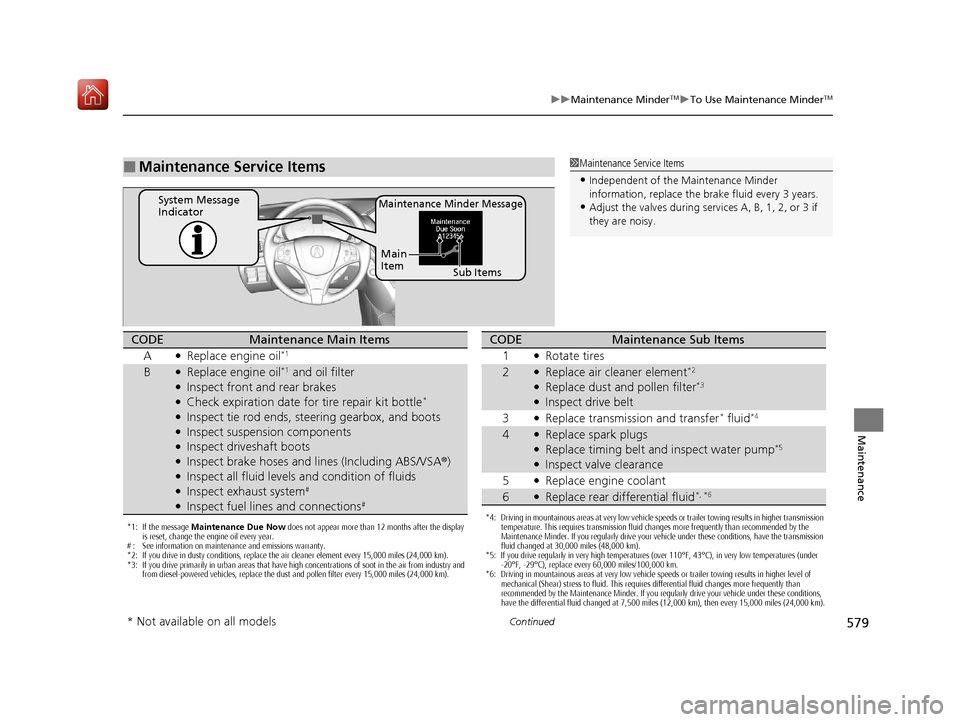
■Maintenance Service Items1Maintenance Service Items
•Independent of the Maintenance Minder
information, replace the brake fluid every 3 years.
•Adjust the valves during services A, B, 1, 2, or 3 if
they are noisy.Maintenance Minder MessageSystem Message
Indicator
Sub Items
Main
Item
*1: If the message
Maintenance Due Now does not appear more than 12 months after the display
is reset, change the engine oil every year.
# : See information on maintenance and emissions warranty.
*2: If you drive in dusty conditions, replace the air cleaner element every 15,000 miles (24,000 km).
*3: If you drive primarily in urban areas that have high concentrations of soot in the air from industry and from diesel-powered vehicles, replace the dust and pollen filter every 15,000 miles (24,000 km).
CODEMaintenance Main Items
A
●Replace engine oil*1
B●Replace engine oil*1 and oil filter●Inspect front and rear brakes●Check expiration date for tire repair kit bottle*
●Inspect tie rod ends, steering gearbox, and boots●Inspect suspension components●Inspect driveshaft boots●Inspect brake hoses and li nes (Including ABS/VSA®)●Inspect all fluid levels and condition of fluids●Inspect exhaust system#
●Inspect fuel lines and connections#
*4: Driving in mountainous areas at very low vehicle speeds or trailer towing results in higher transmission
temperature. This requires transmission fluid changes more frequently than recommended by the
Maintenance Minder. If you regularly drive your vehicle under these conditions, have the transmission
fluid changed at 30,000 miles (48,000 km).
*5: If you drive regularly in very high temperatures (over 110°F, 43°C), in very low temperatures (under -20°F, -29°C), replace every 60,000 miles/100,000 km.
*6: Driving in mountainous areas at very low vehicle speeds or trailer towing results in higher level of
mechanical (Shear) stress to fluid. This requires differential fluid changes more frequently than
recommended by the Maintenance Minder. If you regularly drive your vehicle under these conditions,
have the differential fluid changed at 7,500 miles (12,000 km), then every 15,000 miles (24,000 km).
CODEMaintenance Sub Items
1
●Rotate tires
2●Replace air cleaner element*2
●Replace dust and pollen filter*3
●Inspect drive belt
3
●Replace transmission and transfer* fluid*4
4●Replace spark plugs●Replace timing belt and inspect water pump*5
●Inspect valve clearance
5
●Replace engine coolant
6●Replace rear differential fluid*, *6
* Not available on all models
20 ACURA MDX-31TZ56600.book 579 ページ 2019年4月24日 水曜日 午後5時44分
Page 592 of 701
591
uuMaintenance Under the Hood uTransmission Fluid
Maintenance
Transmission Fluid
Have a dealer check the fluid level and replace if necessary.
Do not attempt to check or change th e automatic transmission fluid yourself.
■Automatic Transmission Fluid
Specified fluid: Acura ATF-TYPE 3.1 or higher
1Automatic Transmission Fluid
NOTICE
Do not mix Acura ATF-TYPE 3.1 (or higher) with
other transmission fluids.
Using a transmission fluid other than Acura ATF-TYPE
3.1 (or higher) may advers ely affect the operation
and durability of your ve hicle’s transmission, and
damage the transmission.
Any damage caused by using a transmission fluid that
is not equivalent to Acura ATF-TYPE 3.1 (or higher) is
not covered by Acura’s new vehicle limited warranty.
20 ACURA MDX-31TZ56600.book 591 ページ 2019年4月24日 水曜日 午後5時44分
Page 621 of 701
620
uuCleaning uExterior Care
Maintenance
Exterior Care
Dust off the vehicle body after you drive.
Regularly inspect your vehi cle for scratches on painted surfaces. A scratch on a
painted surface can result in body rust. If you find a scratch, promptly repair it.
Wash the vehicle regularly. Wash more frequently when driving in the following
conditions:
• If driving on roads with road salt.
• If driving in coastal areas.
• If tar, soot, bird droppings, insects, or tree sap are stuck to painted surfaces.
• Make sure to follow the instructions indicated on the automated car wash.
• Fold in the door mirrors.
• For models equipped with automatic inte rmittent wipers, turn the wipers off.
■Washing the Vehicle
■Using an Automated Car Wash
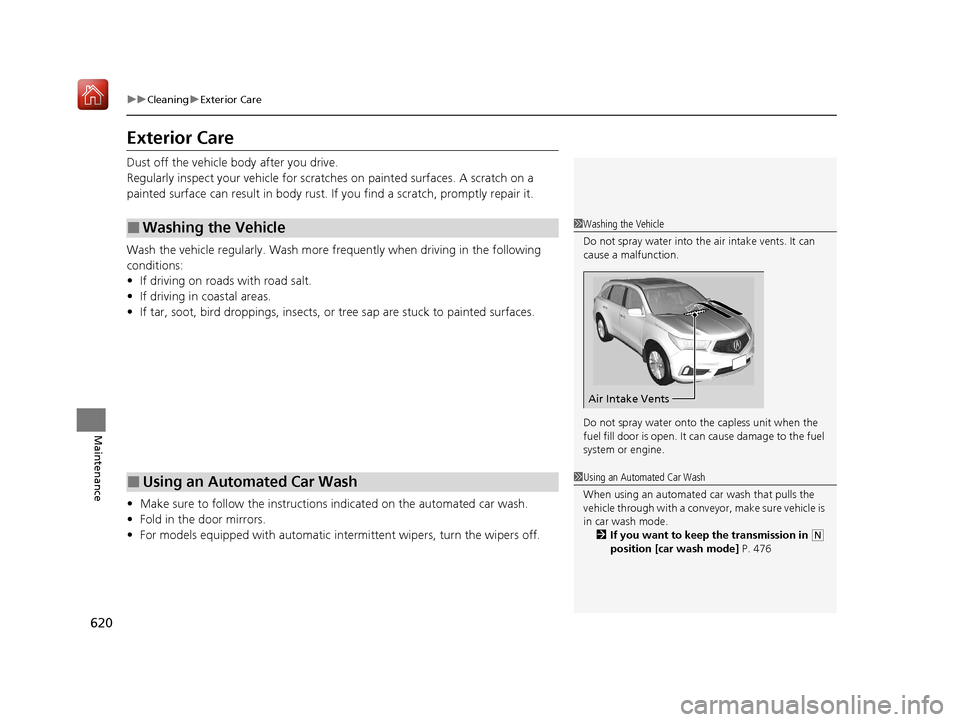
1Washing the Vehicle
Do not spray water into the air intake vents. It can
cause a malfunction.
Do not spray water onto the capless unit when the
fuel fill door is open. It ca n cause damage to the fuel
system or engine.
Air Intake Vents
1 Using an Automated Car Wash
When using an automated car wash that pulls the
vehicle through with a convey or, make sure vehicle is
in car wash mode. 2 If you want to keep the transmission in
(N
position [car wash mode] P. 476
20 ACURA MDX-31TZ56600.book 620 ページ 2019年4月24日 水曜日 午後5時44分
Page 626 of 701
625
Handling the Unexpected
This chapter explains how to handle unexpected troubles.
ToolsTypes of Tools .................................. 626
If a Tire Goes Flat
Changing a Flat Tire ......................... 627
Temporarily Repairi ng a Flat Tire....... 635
Engine Does Not Start Checking the Engine ........................ 649
If the Keyless Access Remote Battery is Weak ............................................. 650
Emergency Engine Stop ................... 651
Models with a compact spare tire
Models with temporary tire repair kit
Jump Starting .................................... 652
Overheating How to Handle Overheating............. 654
Indicator, Coming On/Blinking
If the Low Oil Pressure Indicator Comes On ... 656
If the Charging System Indicator Comes On .. 656
If the Malfunction Indicator Lamp Comes On or Blinks ................................... 657
If the Brake System Indicator (Red) Comes On ................................................... 658
If the Speed-Sensitive Electric Power Steering
(EPS) System Indicator Comes On........... 658
If the Low Tire Pressure/TPMS Indicator Comes On or Blinks ....................... 660
If the Transmission System Indicator Blinks along with the Warning Message ...... 661
Fuses Fuse Locations ................................. 662
Inspecting and Changing Fuses ........ 669
Emergency Towing ........................... 670
When You Cannot Unlock the Fuel Fill Door... 671
When You Cannot Open the Tailgate.. 672
Refueling........................................... 673
Refueling From a Portable Fuel Container . 673
20 ACURA MDX-31TZ56600.book 625 ページ 2019年4月24日 水曜日 午後5時44分
Page 628 of 701
627Continued
Handling the Unexpected
If a Tire Goes Flat
Changing a Flat Tire
If a tire goes flat while driving, grasp the steering wheel firmly, and brake gradually
to reduce speed. Then, stop in a safe plac e. Replace the flat tire with a compact
spare tire. Go to a dealer as soon as possib le to have the full-size tire repaired or
replaced.
1. Park the vehicle on firm, level, non-slip pery surface and apply the parking brake.
2. Put the transmission into
(P.
3. Turn on the hazard warning lights an d set the power mode to VEHICLE OFF
(LOCK).
Models with a compact spare tire
1 Changing a Flat Tire
Periodically check the tire pressure of the compact
spare. It should be set to the specified pressure.
Specified Pressure: 60 psi (420 kPa, 4.2 kgf/cm
2)
When driving with the compact spare tire, keep the
vehicle speed under 50 mph (80 km/h). Replace with
a full-size tire as soon as possible.
The compact spare tire and wheel in your vehicle are
specifically for this model. Do not use them with
another vehicle. Do not us e another type of compact
spare tire or wheel with your vehicle.
Do not mount tire chains on a compact spare tire.
If a chain-mounted front tire goes flat, remove one of
the full-size rear tires and replace it with the compact
spare tire. Remove the flat front tire and replace it
with the full-size tire that was removed from the rear.
Mount the tire chains on the front tire.
Do not use a puncture-repairing agent other than the
one provided in the kit that came with your vehicle (if
equipped). If a different agent is used, you may
permanently damage the tire pressure sensor.
20 ACURA MDX-31TZ56600.book 627 ページ 2019年4月24日 水曜日 午後5時44分