lane assist ACURA MDX 2022 User Guide
[x] Cancel search | Manufacturer: ACURA, Model Year: 2022, Model line: MDX, Model: ACURA MDX 2022Pages: 712, PDF Size: 22.65 MB
Page 416 of 712

415
Driving
This chapter discusses driving and refueling.
Before Driving................................... 416
Towing a Trailer ................................ 422
Off-Highway Driving Guidelines ..... 432
When Driving Starting the Engine .......................... 434
Precautions While Driving................. 440
Automatic Transmission ................... 441
Shifting ............................................ 442
Acura Integrated Dynamics System... 450
Auto Idle Stop .................................. 457
Vehicle Stability Assist
TM (VSA ®), aka Electronic
Stability Control (ESC), System .............463
Agile Handling Assist ....................... 465
Super Handling-All Wheel DriveTM (SH-AWD®)*..... 466
Tire Pressure Monitoring System (TPMS) with Tire Fill Assist .......................... 467
Tire Pressure Monitoring System (TPMS) - Required Federal Explanation ......... 469
Blind spot information System.......... 471
AcuraWatch
TM................................... 474
Collision Mitigati on Braking SystemTM
(CMBSTM) ....................................... 479
Low Speed Braking Control*............ 490
Adaptive Cruise Control (ACC) with Low Speed Follow ................................. 496
Lane Keeping Assist System (LKAS) .. 514
Traffic Jam Assist.......................... 523Road Departure Mitigation System ..............535 Traffic Sign Recognition System ....... 541
Front Sensor Camera ....................... 547
Radar Sensor ................................... 549
Sonar Sensors
*................................ 550
Braking Brake System ................................... 551
Anti-lock Brake System (ABS) ........... 558
Brake Assist System ......................... 559
Parking Your Vehicle ........................ 560
Multi-View Rear Camera
*................ 571
Surround View Camera System*..... 573
Refueling Fuel Information .............................. 581
How to Refuel ................................. 582
Fuel Economy and CO
2 Emissions .... 584
* Not available on all models
22 ACURA MDX-31TYA6000_02.book 415 ページ 2020年11月5日 木曜日 午前11時39分
Page 472 of 712

471
uuWhen Driving uBlind spot information System
Continued
Driving
Blind spot information System
Is designed to detect vehicles in specified alert zones adjacent to your vehicle,
particularly in harder to see areas commonly known as “blind spots.”
When the system detects vehicles approach ing from behind in adjacent lanes, the
appropriate indicator comes on for a few seconds, providing assistance when you
change lanes.
■How the system works
1 Blind spot information System
Important Safety Reminder
Like all assistance systems, blind spot information
system has limitations. Over reliance on blind spot
information system may result in a collision.
The blind spot information system alert indicator may
not come on under the following conditions:
•A vehicle does not stay in the alert zone for more
than two seconds.
•A vehicle is parked in a side lane.•The speed difference betw een your vehicle and the
vehicle you are passing is greater than 6 mph (10
km/h).
•An object not detected by the radar sensors
approaches or passes your vehicle.
•A vehicle running in the adjacent lane is a
motorcycle or other small vehicle.
3WARNING
Failure to visually confirm that it is safe to
change lanes before doing so may result in
a crash and serious injury or death.
Do not rely only on the blind spot
information system wh en changing lanes.
Always look in your mi rrors, to either side
of your vehicle, and behind you for other
vehicles before changing lanes.
Alert zone range
A: Approx. 1.6 ft. (0.5 m)
B: Approx. 10 ft. (3 m)
C: Approx. 10 ft. (3 m) Radar Sensors:
underneath the
rear bumper
corners
Alert Zone
A
B
C
●The transmission is in (D
or
( S.●Your vehicle speed is
between 20 mph (32 km/h)
and 100 mph (160 km/h)
22 ACURA MDX-31TYA6000_02.book 471 ページ 2020年11月5日 木曜日 午前11時39分
Page 475 of 712

474
Driving
AcuraWatchTM
AcuraWatchTM is a driver support system which employs the use of two distinctly
different kinds of sensors, a radar sens or located behind the emblem, and a front
sensor camera mounted to th e interior side of the windshield, behind the rearview
mirror.
AcuraWatch
TM is a driver support system which employs the use of three distinctly
different kinds of sensors, a radar sensor located behind the emblem, a front sensor
camera mounted to the interior side of th e windshield, behind the rearview mirror,
and the sonar sensors located in the front and rear bumpers.
AcuraWatch
TM has following functions.
■The functions whic h do not require switch operations to activate
• Collision Mitigation Braking SystemTM (CMBSTM) 2 P. 479
• Low Speed Braking Control* 2 P. 490
• Road Departure Mitigation System 2 P. 535
• Traffic Sign Recognition System 2 P. 541
■The functions wh ich require switch op erations to activate
• Adaptive Cruise Control ( ACC) with Low Speed Follow
2 P. 496
• Lane Keeping Assist System (LKAS) 2 P. 514
• Traffic Jam Assist 2 P. 523
Models without Low Speed Braking Control
Models with Low Speed Braking Control
* Not available on all models
22 ACURA MDX-31TYA6000_02.book 474 ページ 2020年11月5日 木曜日 午前11時39分
Page 478 of 712

477
uuAcuraWatchTMu
Continued
Driving
You can have the head-up display show you the current state of each function.
2Head-Up Display* P. 122
cIndicates that LKAS or Traffic Jam Assist is activated and whether or not traffic
lane lines are detected.
• Solid line: The system is on.
• Contour line: The syst em is in standby.
dIndicates whether or not ACC with Low Speed Follow detected the vehicle ahead.
eShows vehicle set speed in ACC with Low Speed Follow.
fShows set vehicle interval in ACC with Low Speed Follow.
gIndicates that ACC with Low Speed Follow shows the setting status.
• Green: The system is on.
• Outlined: The system is not activated.
Models with Head-up display
* Not available on all models
22 ACURA MDX-31TYA6000_02.book 477 ページ 2020年11月5日 木曜日 午前11時39分
Page 479 of 712

478
uuAcuraWatchTMu
Driving
To activate ACC with Low Speed Follow, LKAS, and Traffic Jam Assist, carry out the following steps:
■How to Operate the Buttons on the Steering Wheel
Press the Button
ButtonRES/+/SET/−
Switch
LKAS Button
ACC with Low Speed
Follow
The vehicle icon,
interval bars and set
speed appear on the
gauge.Press the
LKAS
Button
Press the
RES/+
/SET/−
Switch down
Press the LKAS
Button
Traffic Jam Assist
Keep your vehicle near the center of the lane while
driving.
Keep vehicle speed under 45mph (72 km/h).
Lane outlines appear on the
gauge.
Traffic Jam Assist is ready to
use. The contour lines change to
solid ones once the system
starts operating after
detecting the left and right
lane markings.
LKAS
Keep your vehicle near the center of the lane while driving.
Keep vehicle speed over 45mph (72 km/h).
Lane outlines (contour
lines) appear on the gauge.
LKAS is activated. The contour lines change to solid
ones once the system starts
operating after detecting the left
and right lane markings.
Press the button, and then press
the RES/+
/SET/− Switch down
(white)
(green) (white)
(green)
22 ACURA MDX-31TYA6000_02.book 478 ページ 2020年11月5日 木曜日 午前11時39分
Page 515 of 712

514
uuAcuraWatchTMuLane Keeping Assist System (LKAS)
Driving
Lane Keeping Assist System (LKAS)
Provides steering input to help keep the vehicle in the middle of a detected lane and
provides tactile and visual alerts if the ve hicle is detected drifting out of its lane.1Lane Keeping Assist System (LKAS)
Important Safety Reminders
The LKAS is for your convenience only. It is not a
substitute for your vehicl e control. The system does
not work if you take y our hands off the steering
wheel or fail to steer the vehicle.
Do not place objects on the instrument panel.
Objects may reflect on th e windshield and prevent
correct detection of the traffic lanes.
The LKAS only alerts you when lane drift is detected
without a turn signal in use. The LKAS may not detect
all lane markings or lane departures; accuracy will
vary based on weather, speed, and lane marker
condition. It is always your responsibility to safely
operate the vehicle an d avoid collisions.
The LKAS is convenient when it is used on freeways.
The LKAS may not work properly or may work
improperly under the certain conditions:
2 LKAS Conditions and Limitations P. 520
You can read about handling information for the
camera equipped with this system. 2 Front Sensor Camera P. 547
The LKAS may not function as designed while driving
in frequent stop and go traf fic, or on roads with
sharp curves.
When you operate the turn signals to chan ge lanes, the system is suspended, and
resumes after the signals are off.
If you make a lane change without operat ing the turn signals, the LKAS alerts
activate, and torque is applied to the steering.
■Front Sensor
Camera
Monitors the lane
lines■Tactile and visual alerts
Rapid vibrations on the steering
wheel and a warning display alert
you that the vehicle is drifting out
of a detected lane.
■Steering input assist
The system applies torque to the steering to keep the vehicle between the left and
right lane lines. The applied torque becomes stronger as the vehicle gets closer to
either of the lane lines.
22 ACURA MDX-31TYA6000_02.book 514 ページ 2020年11月5日 木曜日 午前11時39分
Page 516 of 712

Continued515
uuAcuraWatchTMuLane Keeping Assist System (LKAS)
Driving
Provides assistance to keep the vehicle in the center of the lane. When the vehicle
nears a white or yellow line, steering force of the electric power steering will become
stronger.
When the vehicle enters the warning area, the LKAS alerts you with slight steering
wheel vibration as well as a warning display.
■Lane Keep Support Function1 Lane Keeping Assist System (LKAS)
When it fails to detect lanes, the system will
temporarily be canceled. When a lane is detected, the
system will recover automatically.
■Lane Departure Warning Function
Warning Area
Warning Area
22 ACURA MDX-31TYA6000_02.book 515 ページ 2020年11月5日 木曜日 午前11時39分
Page 517 of 712
uuAcuraWatchTMuLane Keeping Assist System (LKAS)
516
Driving
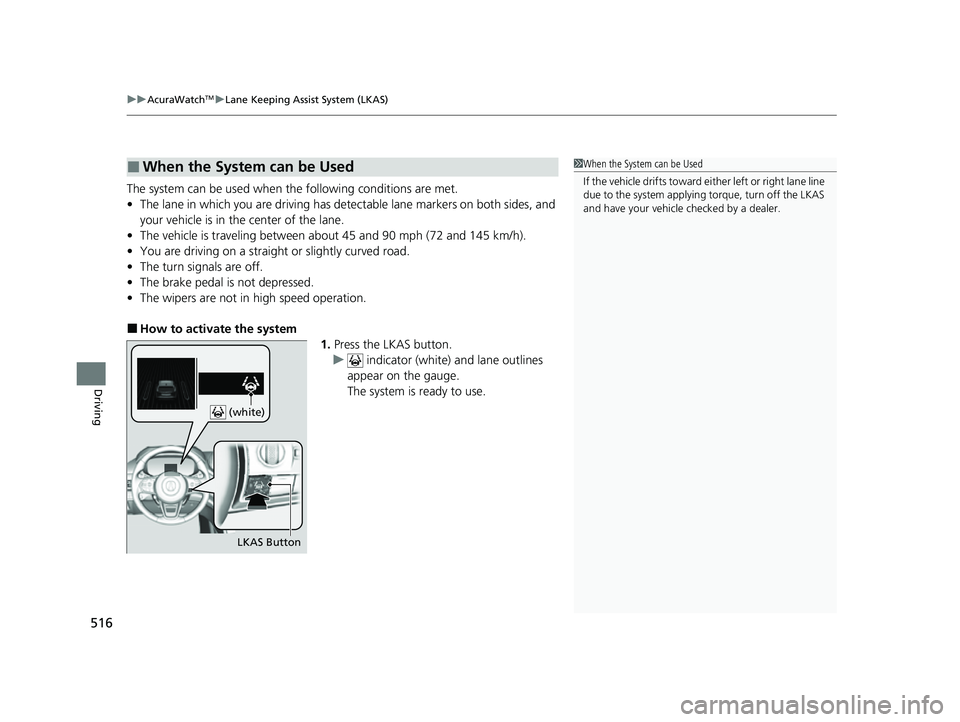
The system can be used when the following conditions are met.
• The lane in which you are driving has dete ctable lane markers on both sides, and
your vehicle is in the center of the lane.
• The vehicle is traveling between about 45 and 90 mph (72 and 145 km/h).
• You are driving on a straight or slightly curved road.
• The turn signals are off.
• The brake pedal is not depressed.
• The wipers are not in high speed operation.
■How to activate the system
1.Press the LKAS button.
u indicator (white) and lane outlines
appear on the gauge.
The system is ready to use.
■When the System can be Used1 When the System can be Used
If the vehicle drifts toward ei t h e r l ef t o r r ight lane line
due to the system applying torque, turn off the LKAS
and have your vehicle checked by a dealer.
LKAS Button
(white)
22 ACURA MDX-31TYA6000_02.book 516 ページ 2020年11月5日 木曜日 午前11時39分
Page 518 of 712

517
uuAcuraWatchTMuLane Keeping Assist System (LKAS)
Continued
Driving
2. Keep your vehicle near the center of the
lane while driving.
u The indicator changes from white to
green and the contour lines change to
solid ones once the system starts
operating after detecting the left and
right lane markings.
Press the LKAS button.
The LKAS is turned off every time you stop the
engine, even if you turned it on the last time
you drove the vehicle.
(green)
■To Cancel
LKAS Button
22 ACURA MDX-31TYA6000_02.book 517 ページ 2020年11月5日 木曜日 午前11時39分
Page 519 of 712

uuAcuraWatchTMuLane Keeping Assist System (LKAS)
518
Driving
■The system operation is suspended if
you:
• Set the wipers to high speed.
u Turning the wipers off, setting it to LO,
or the wipers are operating intermittently
resumes the LKAS.
• Decrease the vehicle speed to about 40
mph (64 km/h) or less.
u Increasing the vehicle speed to about 45
mph (72 km/h) or more resumes the
LKAS.
• Depress the brake pedal.
u The LKAS resumes and starts detecting
the lane lines again once you release the
brake pedal.
• Your vehicle is driving to the right or the left
of the lane.
When the LKAS is suspended,
the lane lines on the gauge
change to contour lines, and the
beeper sounds (if activated). (white)
1
The system operation is suspended if you:
You can change the setting for the LKAS.
LKAS suspended beep on and off can be selected.
2 Customized Features P. 345
22 ACURA MDX-31TYA6000_02.book 518 ページ 2020年11月5日 木曜日 午前11時39分