lights ACURA MDX 2022 User Guide
[x] Cancel search | Manufacturer: ACURA, Model Year: 2022, Model line: MDX, Model: ACURA MDX 2022Pages: 712, PDF Size: 22.65 MB
Page 104 of 712

103
uuIndicators u
Instrument Panel
IndicatorNameOn/BlinkingExplanation
Safety Support
Indicator (Amber)
●Comes on when mud, snow, or ice
accumulates in the vicinity of sonar.
●Remove the obstacle in the vicinity of sonar sensor.
2Low Speed Braking Control* P. 490
●Comes on when mud, snow, or ice has
accumulated in the vicini ty of the blind spot
information system sensor.●Comes on while driving - Remove the obstacle in
the vicinity of the blind spot information system
sensor.
2 Blind spot information System P. 471
Safety Support
Indicator (Green/
Gray)
●Lights up in green when Road Departure
Mitigation system, CMBSTM, Low Speed
Braking Control*, and blind spot information
system are on.
●Lights up in green and gray when Road
Departure Mitigation system, CMBSTM, Low
Speed Braking Control*, or blind spot
information system, or any two or three of
these systems are off.
●Lights up in gray when Road Departure
Mitigation system, CMBSTM, Low Speed
Braking Control*, and blind spot information
system are off.
2 Road Departure Mitigation On and Off P. 538
2 CMBSTM On and Off P. 483
2 Blind spot information System On and Off
P. 473
2 System On and Off P. 493
Models with Low Speed Braking Control
* Not available on all models
22 ACURA MDX-31TYA6000_02.book 103 ページ 2020年11月5日 木曜日 午前11時39分
Page 119 of 712
118
uuGauges and Displays uDriver Information Interface (Right Side Area)
Instrument Panel
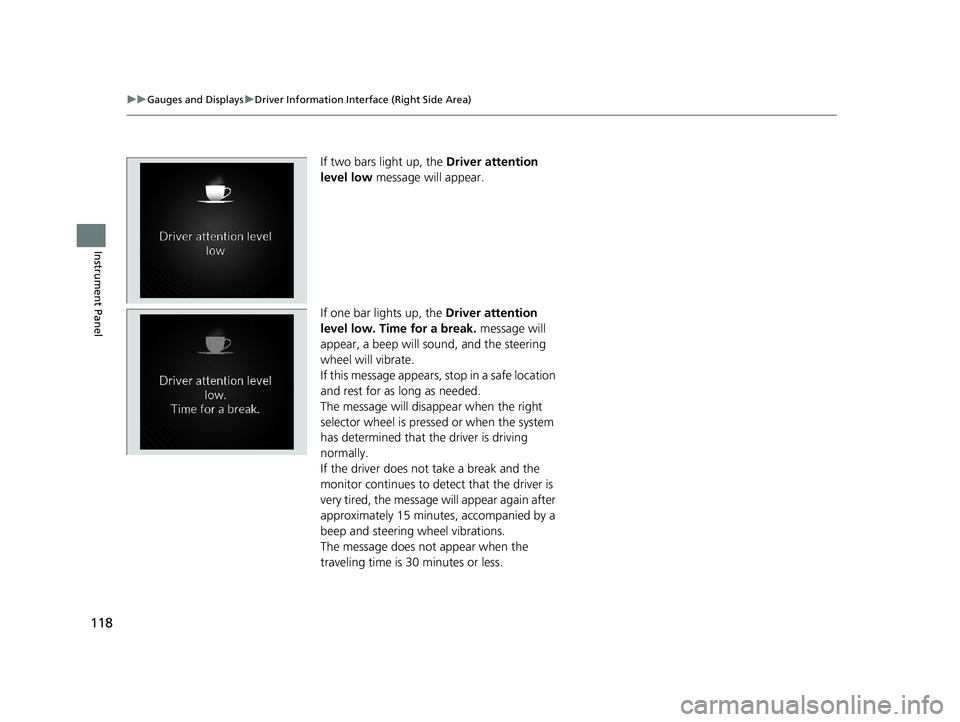
If two bars light up, the Driver attention
level low message will appear.
If one bar lights up, the Driver attention
level low. Time for a break. message will
appear, a beep will sound, and the steering
wheel will vibrate.
If this message appears, stop in a safe location
and rest for as long as needed.
The message will disa ppear when the right
selector wheel is pressed or when the system
has determined that the driver is driving
normally.
If the driver does not take a break and the
monitor continues to dete ct that the driver is
very tired, the message will appear again after
approximately 15 minutes, accompanied by a
beep and steering wheel vibrations.
The message does not appear when the
traveling time is 30 minutes or less.
22 ACURA MDX-31TYA6000_02.book 118 ページ 2020年11月5日 木曜日 午前11時39分
Page 124 of 712
123
uuGauges and Displays uHead-Up Display*
Continued
Instrument Panel
The display also shows the following
warnings.
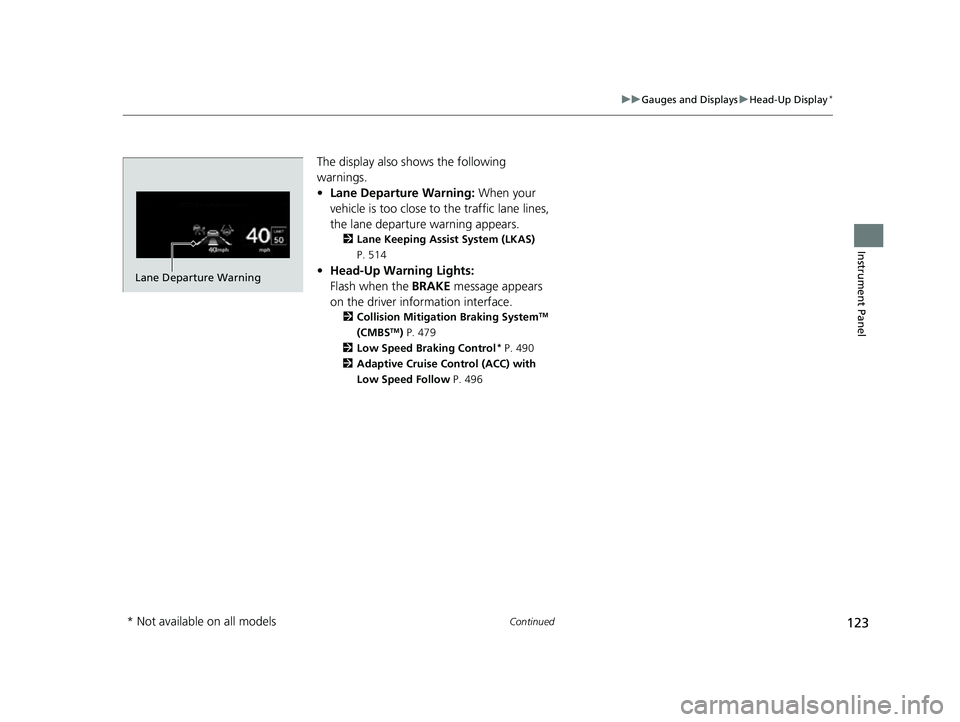
• Lane Departure Warning: When your
vehicle is too close to the traffic lane lines,
the lane departure warning appears.
2 Lane Keeping Assist System (LKAS)
P. 514
• Head-Up Warning Lights:
Flash when the BRAKE message appears
on the driver information interface.
2 Collision Mitigation Braking SystemTM
(CMBSTM) P. 479
2 Low Speed Braking Control
* P. 490
2 Adaptive Cruise Control (ACC) with
Low Speed Follow P. 496
Lane Departure Warning
* Not available on all models
22 ACURA MDX-31TYA6000_02.book 123 ページ 2020年11月5日 木曜日 午前11時39分
Page 128 of 712
127
Controls
This chapter explains how to operate the various controls necessary for driving.
Clock.................................................. 128
Locking and Unlocking the Doors
Key .................................................. 130
Low Keyless Access Remote Signal Strength ......................................... 132
Locking/Unlocking the Doors from the Outside .......................................... 133
Locking/Unlocking the Doors from the
Inside ............................................. 143
Childproof Door Locks ..................... 145
Auto Door Locking/Unlocking .......... 146
Tailgate .............................................. 147
Security System ................................ 157
Windows ........................................... 160
Panoramic Roof ................................. 163 Operating the Switches Around the
Steering Wheel ENGINE START/STOP Button............. 166
Turn Signals ..................................... 169
Light Switches.................................. 170
Fog Lights
*...................................... 173
Daytime Running Lights ................... 173
Auto High-Beam .............................. 174
Wipers and Washers ........................ 177
Rear Defogger/Heated Door Mirror Button ... 180Heated Windshield Button*............. 180
Brightness Control ........................... 181
Driving Position Memory System ...... 183
Adjusting the Steering Wheel........... 186 Mirrors
Interior Rearview Mirror ................... 187
Power Door Mirrors ......................... 188
Seats
Front Seats ...................................... 190
Second Row Seats ........................... 195
Third Row Seats ............................... 199
Armrest ........................................... 207
Interior Convenience Items .............. 208
Climate Control System Using Automatic Climate Control .... 229
Rear Climate Control System ........... 233
Automatic Climate Control Sensors ... 235
* Not available on all models
22 ACURA MDX-31TYA6000_02.book 127 ページ 2020年11月5日 木曜日 午前11時39分
Page 134 of 712

133
uuLocking and Unlocking the Doors uLocking/Unlocking the Doors from the Outside
Continued
Controls
Locking/Unlocking the Doors from the Outside
When you carry the keyless access remote,
you can lock/unlock the doors, tailgate, and
fuel fill door.
You can lock/unlock the doors, tailgate, and
fuel fill door within a radius of about 32 inches
(80 cm) of the outside door handle or tailgate
outer handle.
■Using the Keyless Access System1Locking/Unlocking the Doors from the Outside
If the interior light switch is in the door activated
position, the interior light comes on when you unlock
the doors and tailgate.
No doors opened: The li ght fades out after 30
seconds.
Doors and tailgate relo cked: The light goes off
immediately. 2 Interior Lights P. 208
1Using the Keyless Access System
If you do not open a door or the tailgate within 30
seconds of unlocking the vehicle with the keyless
access system, the doors and tailgate will
automatically relock.
You can lock or unlock doors using the keyless access
system only when the power mode is in VEHICLE OFF.
Models without rear door touch sensor
Models with rear door touch sensor
22 ACURA MDX-31TYA6000_02.book 133 ページ 2020年11月5日 木曜日 午前11時39分
Page 135 of 712
uuLocking and Unlocking the Doors uLocking/Unlocking the Doors from the Outside
134
Controls
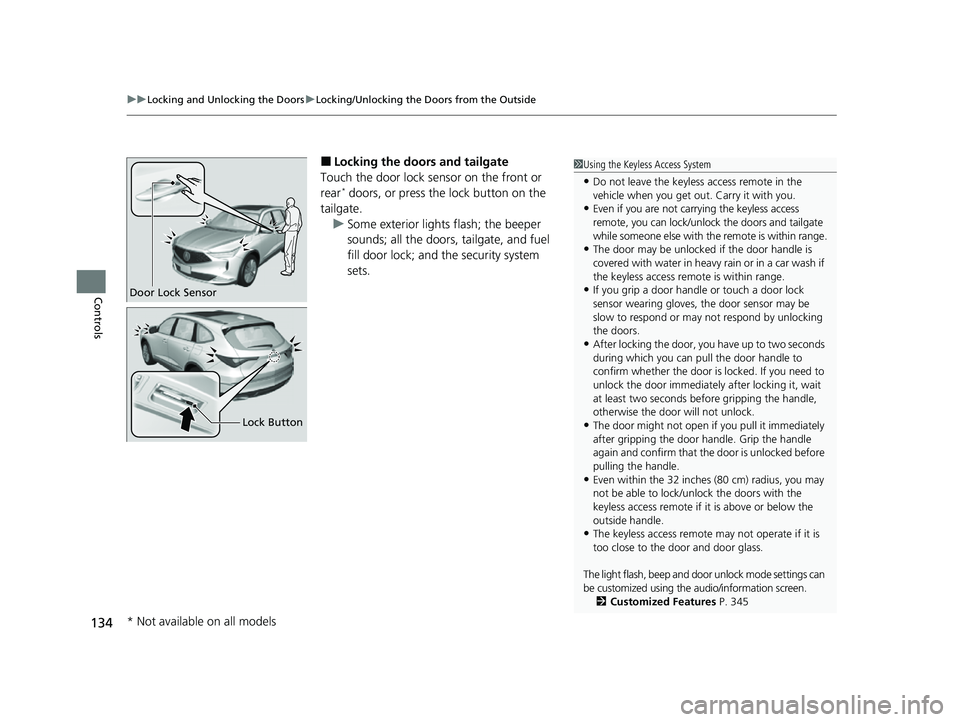
■Locking the doors and tailgate
Touch the door lock sensor on the front or
rear
* doors, or press the lock button on the
tailgate. u Some exterior lights flash; the beeper
sounds; all the doors, tailgate, and fuel
fill door lock; and the security system
sets.
1Using the Keyless Access System
•Do not leave the keyless access remote in the
vehicle when you get out . Carry it with you.
•Even if you are not carrying the keyless access
remote, you can lock/unl ock the doors and tailgate
while someone else with th e remote is within range.
•The door may be unlocked if the door handle is
covered with water in heavy rain or in a car wash if
the keyless access remote is within range.
•If you grip a door handle or touch a door lock
sensor wearing gloves, the door sensor may be
slow to respond or may not respond by unlocking
the doors.
•After locking the door, yo u have up to two seconds
during which you can pull the door handle to
confirm whether the door is locked. If you need to
unlock the door immediately after locking it, wait
at least two seconds befo re gripping the handle,
otherwise the door will not unlock.
•The door might not open if you pull it immediately
after gripping the door handle. Grip the handle
again and confirm that th e door is unlocked before
pulling the handle.
•Even within the 32 inches (80 cm) radius, you may
not be able to lock/unl ock the doors with the
keyless access remote if it is above or below the
outside handle.
•The keyless access remote may not operate if it is
too close to the door and door glass.
The light flash, beep and door unlock mode settings can
be customized using the audio/information screen.
2 Customized Features P. 345
Door Lock Sensor
Lock Button
* Not available on all models
22 ACURA MDX-31TYA6000_02.book 134 ページ 2020年11月5日 木曜日 午前11時39分
Page 136 of 712

Continued135
uuLocking and Unlocking the Doors uLocking/Unlocking the Doors from the Outside
Controls
■Unlocking the doors and tailgate
Grab the driver’s door handle: u The driver’s door and fuel fill door
unlock.
u Some exterior lights flash twice and the
beeper sounds twice.
Grab the front passenger’s door or rear
* door
handle: u All doors, tailgate, and fuel fill door
unlock.
u Some exterior lights flash twice and the
beeper sounds twice.
Press the tailgate outer handle: u The tailgate unlocks.
u Some exterior lights flash twice and the
beeper sounds twice.
2 Opening/Closing the Tailgate P. 148
1Using the Keyless Access System
When you go into the keyless access system working
range with all the doors locked, the door outer
handle ambient lights come on for 30 seconds.
The lights do not come on if you have previously
stayed within the range for more than two minutes,
or the doors have been locked for a few days.
The feature activates again after you drive the
vehicle, then lock the doors.
You can also unlock and open with the power
tailgate. 2 Opening/Closing the Tailgate P. 148
Models with door outer handle ambient lights
All models
Outer Handle
* Not available on all models
22 ACURA MDX-31TYA6000_02.book 135 ページ 2020年11月5日 木曜日 午前11時39分
Page 137 of 712

uuLocking and Unlocking the Doors uLocking/Unlocking the Doors from the Outside
136
Controls
■Locking the doors and tailgate (Walk
away auto lock ®)
When you walk away from the vehicle with all
doors and tailgate closed while carrying the
keyless access remote, the doors and tailgate
will automatically lock.
The auto lock function activates when all
doors and tailgate are closed or all doors are
closed and tailgate begins power close
operation, and the keyle ss access remote is
within about 5 feet (1 .5 m) radius of the
outside door handle.
Exit vehicle while carrying keyless access
remote and close door(s) and tailgate.
1. While within about 5 feet (1.5 m) radius of
the vehicle.
u The beeper sounds; the auto lock
function will be activated.
2. Carry the keyless access remote beyond
about 5 feet (1.5 m) from the vehicle and
remain outside this range for 2 or more
seconds.
u Some exterior lights flash; the beeper
sounds; all doors and tailgate will then
lock.1Locking the doors and tailg ate (Walk away auto lock®)
The auto lock function is set to OFF as the factory
default setting. The auto lo ck function can be set to
ON using the audio/information screen.
If you set the auto lock function to ON using the
audio/information screen, only the remote
transmitter that was used to unlock the driver’s door
prior to the setting change can activate auto lock. 2 Customized Features P. 345
After the auto lock function has been activated,
when you stay within the locking/unlocking
operation range, the indica tor on the keyless access
remote will continue to flash until the doors and
tailgate are locked.
When you stay beside the vehicle within the
operation range, the door s and tailgate will
automatically lock approx imately 30 seconds after
the auto lock function activating beeper sounds.
When you open a door or tailgate after the auto lock
function activating beeper sounds, the auto lock
function will be delayed unt il all doors and tailgate
are closed.
Under the following circumstances, the auto lock
function will not activate:
•The remote is inside the vehicle.
•The remote is taken out of its operational range
before all the doors an d tailgate are closed.
u
The beeper will not sound.
u The beeper will sound.
The activation range of
the auto lock function is
about 5 feet (1.5 m)
22 ACURA MDX-31TYA6000_02.book 136 ページ 2020年11月5日 木曜日 午前11時39分
Page 140 of 712

Continued139
uuLocking and Unlocking the Doors uLocking/Unlocking the Doors from the Outside
Controls
■Locking the doors and tailgate
Press the lock button.
Once: u Some exterior lights flash, all the doors,
tailgate, and fuel fill door lock, and the
security system sets.
Twice (within five se conds after the first
push): u The beeper sounds and verifies the
security system is set.
■Unlocking the doors and tailgate
Press the unlock button.
Once:
u Some exterior lights flash twice, and the
driver’s door and fuel fill door unlock.
Twice: u The remaining doors and tailgate unlock.
*1:
Checking Door Lock Status* P. 140
■Using the Remote Transmitter1 Using the Remote Transmitter
If you do not open a door or the tailgate within 30
seconds of unlocking the vehicle with the remote
transmitter, the doors and ta ilgate will automatically
relock.
You can change the relock timer setting. 2 Customized Features P. 345
You can lock or unlock doors using the remote
transmitter only when the power mode is in VEHICLE
OFF.
The remote transmitter us es low-power signals, so
the operating range may vary depending on the
surroundings.
The remote will not lock th e vehicle when a door is
open.
If the distance at which the remote transmitter works
varies, the batter y is probably low.
If the LED does not come on when you press a
button, the battery is dead.
2 Replacing the Button Battery P. 626
You can customize the door unlock mode setting. 2 Customized Features P. 345
LED
Unlock
Button Lock
Button
LED
*1
Unlock
Button Lock
Button
* Not available on all models
22 ACURA MDX-31TYA6000_02.book 139 ページ 2020年11月5日 木曜日 午前11時39分
Page 143 of 712

uuLocking and Unlocking the Doors uLocking/Unlocking the Doors from the Outside
142
Controls
If you do not have the key on you, or if fo r some reason you cannot lock a door using
the key, you can lock the door without it.
■Locking the front doors
Push the lock tab forward
a or push the
master door lock switch in the lock direction
b, and close the door.
■Locking the rear doors
Push the lock tab forward and close the door.
■Lockout protection function
If the vehicle cannot detect the keyless access
remote, lockout protection activates: u A beeper sounds, some exterior lights
flash, the doors unl ock, and a message
appears on the driver information
interface.
u This allows you to open a door in case
the keyless access remote is still inside
the vehicle.
If you do not open a door, all doors relock
after 15 seconds.
To avoid non-detection, make sure to keep
the keyless access remote away from cell
phones and other devices that may cause
signal interference.
■Locking a Door Without Using a Key1 Locking a Door Without Using a Key
When you lock the driver’s door, all the other doors,
tailgate, and fuel fill door lock at the same time.
Before locking a door, make sure that the key is not
inside the vehicle.
You can change the lockout protection operation
setting. 2 Customized Features P. 345
22 ACURA MDX-31TYA6000_02.book 142 ページ 2020年11月5日 木曜日 午前11時39分