maintenance ACURA MDX 2022 User Guide
[x] Cancel search | Manufacturer: ACURA, Model Year: 2022, Model line: MDX, Model: ACURA MDX 2022Pages: 712, PDF Size: 22.65 MB
Page 339 of 712

338
uuGeneral Information on the Audio System uLegal Information on Apple CarPlay/Android Auto
Features
YOU EXPRESSLY ACKNOWLEDGE AND AGREE THAT USE OF APPLE CARPLAY OR ANDROID AUTO (“THE APPLICATIONS”) IS AT YOUR
SOLE RISK AND THAT THE ENTIRE RISK AS TO SATISFACTORY QUALITY, PERFORMANCE, ACCURACY AND EFFORT IS WITH YOU TO THE
MAXIMUM EXTENT PERMITTED BY APPLICABLE LAW, AND THAT TH E APPLICATIONS AND INFORMATION ON THE APPLICATIONS IS
PROVIDED “AS IS” AND “AS AVAILABLE,” WITH ALL FAULTS AND WITHOUT WARRANTY OF ANY KIND, AND HONDA HEREBY
DISCLAIMS ALL WARRANTIES AND CONDITIONS WITH RESPECT TO TH E APPLICATIONS AND INFORMATION ON THE APPLICATIONS,
EITHER EXPRESS, IMPLIED OR STATUTORY, INCLUDING, BUT NOT LIMITED TO, TH E IMPLIED WARRANTIES AND/OR CONDITIONS OF
MERCHANTABILITY, SATISFACTORY QUALITY, FITNESS FOR A PART ICULAR PURPOSE, ACCURACY, QUIET ENJOYMENT, AND NON-
INFRINGEMENT OF THIRD PARTY RIGHTS. NO ORAL OR WRI TTEN INFORMATION OR ADVICE GIVEN BY HONDA OR AN AUTHORIZED
REPRESENTATIVE SHALL CREATE A WARRANT Y. AS EXAMPLES, AND WITHOUT LIMITATION, HONDA DISCLAIMS ANY WARRANTY
REGARDING THE ACCURACY OF DATA PROVIDED BY THE APPL ICATIONS, SUCH AS THE ACCURACY OF DIRECTIONS, ESTIMATED
TRAVEL TIME, SPEED LIMITS, ROAD CONDITIONS, NEWS, WEATHER, TRAFFIC, OR OTHER CONTENT PROVIDED BY APPLE, GOOGLE, THEIR
AFFILIATES, OR THIRD PARTY PROVIDERS; HONDA DOES NOT GUARANTEE AGAINST LOSS OF APPLICATION DATA, WHICH MAY BE LOST
AT ANY TIME; HONDA DOES NOT GUARANTEE THAT THE APPLICATION S OR ANY SERVICES PROVIDED THROUGH THEM WILL BE
PROVIDED AT ALL TIMES OR THAT ANY OR ALL SERVICES WILL BE AVAILABLE AT ANY PA RTICULAR TIME OR LOCATION. FOR EXAMPLE,
SERVICES MAY BE SUSPENDED OR INTERRUPTED WITHOUT NOTICE FOR REPAIR, MAINTENANCE, SECURITY FIXES, UPDATES, ETC.,
SERVICES MAY BE UNAVAILABLE IN YOUR AREA OR LOCATION, ETC. IN ADDITION, YOU UNDERSTAND THAT CHANGES IN THIRD PARTY
TECHNOLOGY OR GOVERNMENT REGULATION MAY RENDER THE SERVICES AND/OR APPLICATIONS OBSOLETE AND/OR UNUSABLE.
TO THE EXTENT NOT PROHIBITED BY LAW, IN NO EVENT SHALL HONDA OR ITS AFFILIATES BE LIABLE FOR PERSONAL INJURY, OR ANY
INCIDENTAL, SPECIAL, INDIRECT OR CONSEQUENTIAL DAMAG ES WHATSOEVER, INCLUDING, WITHOUT LIMITATION, DAMAGES FOR
LOSS OF PROFITS, CORRUPTION OR LOSS OF DATA, FAILURE TO TRANSMIT OR RECEIV E ANY DATA, BUSINESS INTERRUPTION OR ANY
OTHER COMMERCIAL DAMAGES OR LOSSES, ARISING OUT OF OR RELATE D TO THE APPLICATIONS OR YOUR USE OF OR INABILITY TO
USE THE APPLICATIONS OR INFORMATION ON THE APPLICATIONS, HOWEVER CAUSED, REGARDLESS OF THE THEORY OF LIABILITY
(CONTRACT, TORT OR OTHERWISE) AND EVEN IF HONDA WERE AD VISED OF THE POSSIBILITY OF SUCH DAMAGES. SOME STATES AND
JURISDICTIONS DISALLOW THE EXCLUSION OR LIMITATION OF LI ABILITY FOR DAMAGES, SO THESE LIMITATIONS AND EXCLUSIONS MAY
NOT APPLY TO YOU. IN NO EVENT SHALL HONDA’S TOTAL LIABILIT Y TO YOU FOR ALL DAMAGES (OTHER THAN AS MAY BE REQUIRED
BY APPLICABLE LAW IN CASES INVOLVING PERSONAL INJURY) EXC EED THE AMOUNT OF FIVE DOLLARS ($5.00). THE FOREGOING
LIMITATIONS WILL APPLY EVEN IF THE ABOVE STA TED REMEDY FAILS OF ITS ESSENTIAL PURPOSE.
■DISCLAIMER OF WARRANTIES; LIMITATION ON LIABILITY
22 ACURA MDX-31TYA6000_02.book 338 ページ 2020年11月5日 木曜日 午前11時39分
Page 352 of 712

351
uuCustomized Features u
Continued
Features
Road Departure Mitigation Setting
Forward Collision Warning Distance
ACC Forward Vehicle Detect Beep
Lane Keeping Assist Suspend Beep
Blind Spot Information
Driver Assist System
Setup
Driver Attention Monitor
(Select Reset Items)Maintenance Information
Reset All Due
Guidelines
Cross Traffic Monitor
Guidelines
Cross Traffic Monitor
Rear Camera*Camera
Surround View Camera*
Show after Shifti ng from Reverse
* Not available on all models
22 ACURA MDX-31TYA6000_02.book 351 ページ 2020年11月5日 木曜日 午前11時39分
Page 369 of 712

368
uuCustomized Features u
Features
*1:Default SettingSetup Group Customizable Features Description Selectable Settings
Vehicle Driver Assist
System
SetupForward Collision Warning
Distance
Changes Collision Mitigation Braking
System (CMBS
TM) alert distance.Long
/Normal
*1/
Short
ACC Forward Vehicle Detect
Beep Causes the system to beep when the
system detects a vehicle, or when the
vehicle goes out of the ACC with Low
Speed Follow range.
ON
/OFF
*1
Road Departure Mitigation
Setting Changes the setting for the road
departure mitigation system. Normal*1/
Wide /
Warning Only /
Narrow
Lane Keeping Assist Suspend
Beep Causes the system to beep when Lane
Keeping Assist Sy
stem (LKAS) is
suspended. ON
/OFF
*1
Blind Spot Information Changes the setting for the blind spot
information. Audible and Visual
Alert*1/
Visual Alert
Driver Attention Monitor Changes the setting for the driver
attention monitor. OFF
, Tactile Alert ,
Tactile/Audible
Alert
*1
Maintenance
Information (Select Reset Items)
Resets the Maintenance MinderTM
display when you have performed the
maintenance service. —
Reset All Due
22 ACURA MDX-31TYA6000_02.book 368 ページ 2020年11月5日 木曜日 午前11時39分
Page 417 of 712

416
Driving
Before Driving
Driving Preparation
Check the following items before you start driving.
• Make sure there are no obstructions on th e windows, door mirrors, exterior
lights, or other parts of the vehicle.
u Remove any frost, snow, or ice.
u Remove any snow on the roof, as this can slip down and obstruct your field of
vision while driving. If frozen solid , remove ice once it has softened.
u When removing ice from around the wheel s, be sure not to damage the wheel
or wheel components.
• Make sure the hood is securely closed.
u If the hood opens while driving, your front view will be blocked.
• Make sure the tires are in good condition.
u Check air pressure, and check for damage and excessive wear.
2 Checking and Maintaining Tires P. 615
•Make sure there are no people or ob jects behind or around the vehicle.
u There are blind spots from the inside.
■Exterior Checks1Exterior Checks
NOTICE
When doors are frozen s hut, use warm water around
the door edges to melt any ice. Do not try to force
them open, as this can damage the rubber trim
around the doors. When done, wipe dry to avoid
further freezing.
Do not pour warm water into the key cylinder.
You will be unable to insert the key if the water
freezes in the hole.
Heat from the engine and exhaust can ignite
flammable material s left under the hood, causing a
fire. If you’ve parked y our vehicle for an extended
period, inspect and remove any debris that may have
collected, such as dried grass and leaves that have
fallen or have been carried in for use as a nest by a
small animal. Also check under the hood for leftover
flammable materials after you or someone else has
performed maintenance on your vehicle.
22 ACURA MDX-31TYA6000_02.book 416 ページ 2020年11月5日 木曜日 午前11時39分
Page 434 of 712

433
uuOff-Highway Driving Guidelines uAvoiding Trouble
Driving
Avoiding Trouble
• Check Out Your Vehicle before you leave the pavement and make sure that all
scheduled maintenance has been completed. Pay special attention to the
condition of the tires, and check the tire pressures.
• Remember the route you choose presents limi ts (too steep or bumpy), you have
limits (driving skill and comfort), and your ve hicle has limits (traction, stability, and
power). Failing to recognize these limits will likely put you and your passengers in
a hazardous situation.
• Accelerating and Braking should be done slowly and gradually. Trying to start
or stop too fast can cause a loss of traction and you could lose control.
• Avoiding Obstacles and Debris in the road reduces the likelihood of a rollover
or damage to your suspension or other components.
• Driving on Slopes increases your risk of a rollover, particularly if you attempt to
drive across a slope that is too steep. Goin g straight up or down a slope is usually
the safest. If you can’t clearly see all cond itions or obstacles on a slope, walk it
before you drive it. If there is any doubt whether you can safely pass, don’t try it.
Find another route. If you get stuck when climbing, do not try to turn around.
Back down slowly following the same route you took up the hill.
• Crossing a Stream - Avoid driving through deep water. If you encounter water
in your route (a small stream or large pu ddle, for example), evaluate it carefully
before going ahead. Make sure it is shallow, flowing slowly, and has firm ground
underneath. If you are not sure of the depth or the ground, turn around and find
another route. Driving thro ugh deep water can also damage your vehicle. The
water can get into the transmission and di fferential, diluting the lubricant and
causing an eventual failure. It can also wash the grease out of the wheel bearings.
• If You Get Stuck , carefully go in the direction that you think will get you
unstuck. Do not spin the tires as this will only make things worse and could
damage the transmission. If you are unable to free yourself, your vehicle will need
to be towed. Front tow hook is provided for this purpose.
22 ACURA MDX-31TYA6000_02.book 433 ページ 2020年11月5日 木曜日 午前11時39分
Page 471 of 712

470
uuWhen Driving uTire Pressure Monitoring System (TPMS) - Required Federal Explanation
Driving
Please note that the TPMS is not a substitute for proper tire
maintenance, and it is the driver ’s responsibility to maintain
correct tire pressure, even if un der-inflation has not reached the
level to trigger illumina tion of the TPMS low ti re pressure telltale.
Your vehicle has also been eq uipped with a TPMS malfunction
indicator to indicate when the sy stem is not operating properly.
The TPMS malfunction indicator is combined with the low tire
pressure telltale. When the system detects a malfunction, the
telltale will flash fo r approximately one minute and then remain
continuously illuminated. This sequence will continue upon
subsequent vehicle start-ups as long as the malfunction exists.
When the malfunction indicator is illuminated, the system may
not be able to detect or signal low tire pressure as intended.
TPMS malfunctions may occur for a variety of reasons, including
the installation of replacement or alternate tires or wheels on the
vehicle that prevent the TPMS from functioning properly.
Always check the TPMS malfunction telltale after replacing one or
more tires or wheels on your vehicle to ensure that the
replacement or alternate tires and wheels allow the TPMS to
continue to function properly.
22 ACURA MDX-31TYA6000_02.book 470 ページ 2020年11月5日 木曜日 午前11時39分
Page 492 of 712
Continued491
uuAcuraWatchTMuLow Speed Braking Control*
Driving
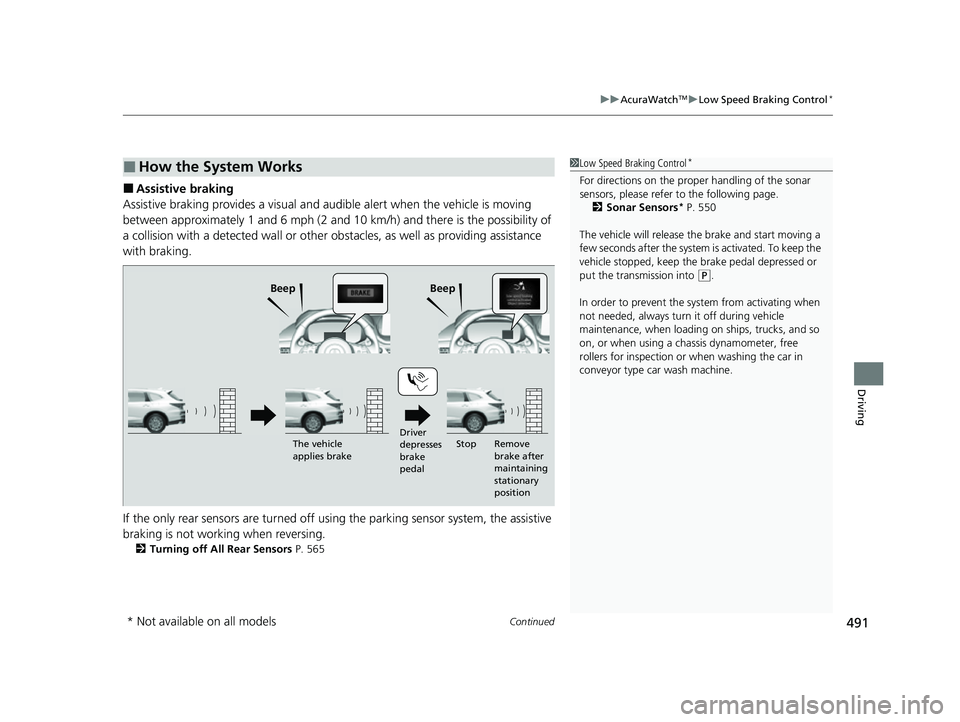
■Assistive braking
Assistive braking provides a visual and audible alert when the vehicle is moving
between approximately 1 and 6 mph (2 and 10 km/h) and there is the possibility of
a collision with a detected wall or other ob stacles, as well as providing assistance
with braking.
If the only rear sensors are turned off usi ng the parking sensor system, the assistive
braking is not working when reversing.
2 Turning off All Rear Sensors P. 565
■How the System Works1Low Speed Braking Control*
For directions on the prop er handling of the sonar
sensors, please refer to the following page.
2 Sonar Sensors
* P. 550
The vehicle will release the brake and start moving a
few seconds after the system is activated. To keep the
vehicle stopped, keep the brake pedal depressed or
put the transmission into
( P.
In order to prevent the sy stem from activating when
not needed, always turn it off during vehicle
maintenance, when loading on ships, trucks, and so
on, or when using a chassis dynamometer, free
rollers for inspection or when washing the car in
conveyor type car wash machine.Beep Beep
Driver
depresses
brake
pedalRemove
brake after
maintaining
stationary
position
The vehicle
applies brake
Stop
* Not available on all models
22 ACURA MDX-31TYA6000_02.book 491 ページ 2020年11月5日 木曜日 午前11時39分
Page 585 of 712

584
Driving
Fuel Economy and CO2 Emissions
Improving Fuel Economy and Reducing CO2
Emissions
Achieving fuel economy and reducing CO2 emissions is dependent on several
factors, including driving conditions, load weight, idling time, driving habits, and
vehicle condition. Depending on these and other factors, you may not achieve the
rated fuel economy of this vehicle.
You can optimize your fuel economy with proper maintenance of your vehicle.
Always maintain your vehicle in accordance with the messages displayed on the
driver information interface.
• Use engine oil with the viscosity recommended.
2 Recommended Engine Oil P. 599
•Maintain the specified tire pressure.
• Do not load the vehicl e with excess cargo.
• Keep your vehicle clean. A buildup of snow or mud on your vehicle’s underside
adds weight and increases wind resistance.
■Maintenance and Fuel Economy
1Improving Fuel Economy and Reducing CO2 Emissions
Direct calculation is the recommended method to
determine actual fuel consumed while driving.
In Canada, posted fuel economy numbers are
established following a simulated test.
For more information on how this test is performed,
please visit https://www.nrcan.gc.ca and search for
“fuel consumption testing” in the search field at the
top of the page.
Miles driven Gallons of
fuel Miles per
Gallon
100 Liters of fuel Kilometers
driven L per 100 km
22 ACURA MDX-31TYA6000_02.book 584 ページ 2020年11月5日 木曜日 午前11時39分
Page 586 of 712
585
Maintenance
This chapter discusses basic maintenance.
Before Performing MaintenanceInspection and Maintenance ............ 586
Safety When Performing Maintenance ..587
Parts and Fluids Used in Maintenance Service ........................................... 588
Maintenance Minder
TM..................... 589
Maintenance Under the Hood Maintenance Items Under the Hood .. 595
Opening the Hood ........................... 596
Engine Compartment Cover ............. 598
Recommended Engine Oil ................ 599
Oil Check ......................................... 600
Adding Engine Oil ............................ 601 Changing the Engine Oi
l and Oil Filter .. 602
Engine Coolant ................................ 604
Transmission Fluid ............................ 606
Brake Fluid ....................................... 607
Refilling Window Washer Fluid......... 607
Replacing Light Bulbs ....................... 608
Checking and Maintaining Wiper Blades... 610Checking and Maintaining Tires
Checking Tires ................................. 615
Tire and Loading Information Label .. 616
Tire Labeling .................................... 616
DOT Tire Quality Grading (U.S. Vehicles).. 618
Wear Indicators ............................... 620
Tire Service Life ................................ 620
Tire and Wheel Replacement ........... 621
Tire Rotation .................................... 622
Winter Tires ..................................... 623
Battery ............................................... 624
Remote Transmitter Care Replacing the Button Battery ........... 626
Climate Control System Maintenance.. 628CleaningInterior Care .................................... 629
Exterior Care.................................... 631
Accessories and Modifications ........ 634
22 ACURA MDX-31TYA6000_02.book 585 ページ 2020年11月5日 木曜日 午前11時39分
Page 587 of 712

586
Maintenance
Before Performing Maintenance
Inspection and Maintenance
For your safety, perform all listed inspections and maintenance to keep your vehicle
in good condition. If you become aware of an y abnormality (noise, smell, insufficient
brake fluid, oil residue on the ground, etc.), have your vehicle inspected by a dealer.
(Note, however, that service at a dealer is not mandatory to keep your warranties in
effect.) Refer to the separate maintena nce booklet for detailed maintenance and
inspection information.
■Routine inspections
Perform inspections before long distance trips, when washing the vehicle, or when
refueling.
2 Maintenance P. 26
■Periodic inspections
• Check the brake fluid level monthly.
2 Checking the Brake Fluid P. 607
•Check the tire pressure monthly. Examin e the tread for wear and foreign objects.
2Checking and Maintaining Tires P. 615
•Check the operation of the exterior lights monthly.
2 Replacing Light Bulbs P. 608
•Check the condition of the wiper bl ades at least every six months.
2Checking and Maintaining Wiper Blades P. 610
■Types of Inspection and Maintenance
1Inspection and Maintenance
Maintenance, replacement, or repair of
emissions control devices and systems may be
done by any automotive repair establishment or
individuals using parts that are “certified” to
EPA standards.
According to state and fede ral regulations, failure to
perform maintenance on the maintenance main
items marked with # will not void your emissions
warranties. However, all ma intenance services should
be performed in accordan ce with the intervals
indicated by the driver information interface.
2 Maintenance Service Items P. 591
If you want to perform complex maintenance tasks
that require more skills a nd tools, you can purchase a
subscription to the Service Express website at
www.techinfo.acura.com .
2 Authorized Manuals P. 700
If you want to perform ma intenance yourself, make
sure that you have the necessary tools and skills first.
After performing maintenanc e, update the records in
the separate maintenance booklet.
U.S. models
22 ACURA MDX-31TYA6000_02.book 586 ページ 2020年11月5日 木曜日 午前11時39分