transmission ACURA MDX 2022 Owner's Manual
[x] Cancel search | Manufacturer: ACURA, Model Year: 2022, Model line: MDX, Model: ACURA MDX 2022Pages: 712, PDF Size: 22.65 MB
Page 346 of 712

345Continued
Features
Customized Features
Use the audio/information screen to customize certain features.
■How to customize
With the power mode in ON, select Settings, then select a setting item.
1Customized Features
When you customize settings:
•Make sure that the vehicle is at a complete stop.
•Put the transmission into (P.
The contents and order of the customized features
may vary depending on th e vehicle’s features.
To customize features detail, refer to the following. 2 Customization flow P. 346
2 List of customizable options P. 353
Audio/Information Screen
22 ACURA MDX-31TYA6000_02.book 345 ページ 2020年11月5日 木曜日 午前11時39分
Page 367 of 712

366
uuCustomized Features u
Features
*1:Default SettingSetup Group Customizable Features Description Selectable Settings
Vehicle Meter Setup Adjust Outside Temp Display
Adjusts the temperature reading by a
few degrees. −5°F ~
±0°F
*1 ~ 5°F
(U.S.)
−3°C ~ ±0°C
*1 ~ 3°C
(Canada)
“Trip A” Reset Timing Changes the setting of how to reset
trip meter A and average fuel economy
A. With Refuel
/IGN
Off /Manually
Reset
*1
“Trip B” Reset Timing Changes the setting of how to reset
trip meter B and average fuel economy
B. With Refuel
/IGN
Off /Manually
Reset*1
Reverse Shift Position Beep Causes the beeper to sound once
when the transmission is put into (R.ON*1/
OFF
Adjust Alarm Volume Changes the alarm volume, such as
buzzers, warnings, turn signal sound,
and so on. High
/Mid
*1/Low
Turn by Turn Display Selects whether the turn-by-turn
display comes on during the route
guidance. ON
*1/
OFF
Rear Seat Reminder Turns the Rear Seat Reminder feature
on and off. ON
*1/
OFF
22 ACURA MDX-31TYA6000_02.book 366 ページ 2020年11月5日 木曜日 午前11時39分
Page 370 of 712

369
uuCustomized Features u
Continued
Features
*1:Default SettingSetup Group Customizable Features
Description Selectable Settings
Camera
Rear Camera*
Guidelines
Selects whether the guidelines come
on the rear camera monitor.
2Multi-View Rear Camera* P. 571
Dynamic /Fixed /
Both*1/ Off
Cross Traffic MonitorTurns the cross traffic monitor feature
on and off.On*1/Off
Surround
View
Camera
*
Guidelines
Selects whether the guidelines come
on the rear camera monitor.
2 Surround View Camera System*
P. 573
Dynamic /Fixed /
Both*1/ Off
Cross Traffic MonitorTurns the cross traffic monitor feature
on and off.On*1/Off
Show after Shifting from
ReverseSets the rear view to be automatically
switched to the fr ont view when the
transmission is out of
(R.
On /Off*1
* Not available on all models
22 ACURA MDX-31TYA6000_02.book 369 ページ 2020年11月5日 木曜日 午前11時39分
Page 398 of 712
Continued397
uuBluetooth ® HandsFreeLink ®u Text Message
Features
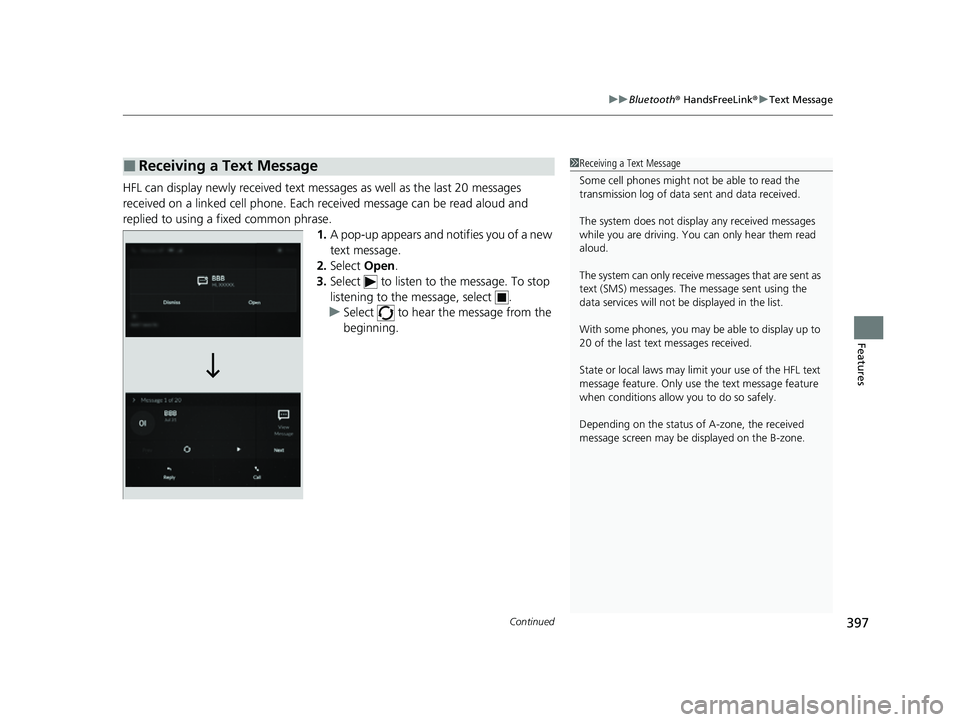
HFL can display newly received text mess ages as well as the last 20 messages
received on a linked cell phone. Each received message can be read aloud and
replied to using a fixed common phrase.
1.A pop-up appears and notifies you of a new
text message.
2. Select Open.
3. Select to listen to th e message. To stop
listening to the message, select .
u Select to hear the message from the
beginning.
■Receiving a Text Message1Receiving a Text Message
Some cell phones might not be able to read the
transmission log of data sent and data received.
The system does not display any received messages
while you are driving. You can only hear them read
aloud.
The system can only receive messages that are sent as
text (SMS) messages. The message sent using the
data services will not be displayed in the list.
With some phones, you may be able to display up to
20 of the last text messages received.
State or local laws may limit your use of the HFL text
message feature. Only use the text message feature
when conditions allow you to do so safely.
Depending on the status of A-zone, the received
message screen may be displayed on the B-zone.
22 ACURA MDX-31TYA6000_02.book 397 ページ 2020年11月5日 木曜日 午前11時39分
Page 406 of 712

405Continued
Features
AcuraLink®
Is a subscription-based service that provid es convenient features such as voice
communication in case of emergency, online security, one-on-one operator
assistance, and the transmission of importa nt messages regarding your vehicle’s
status.
Use the following procedure to connect to AcuraLink.
■To enable the AcuraLink
You need to allow the consent of the lo cation service to enable the AcuraLink.
1. Press the (home) button.
2. Select AcuraLink .
u The confirmation message appears on
the screen for the first time, then select
Allow .
■To Connect to AcuraLink
1AcuraLink ®
AcuraLink also provides services you can operate
from the Internet or your smartphone.
To subscribe to AcuraLink, or to get more
information about all of its features, contact an Acura
dealer, or visit owners.acura.com (U.S.) or
www.acura.ca/owners/acuralink (Canada).
1To enable the AcuraLink
You can also set up a Vehicle Data Collection by
the following procedure.
1. Press the (home) button.
2. Select AcuraLink .
3. Select MENU .
4. Select Vehicle Data Collection .
5. Select Allow or Block.
•Allow: Sends the vehicle location data, diagnostic
information, driving behavior data and phone data
when you have previously allowed it when you
connect a phone with Bluetooth®.
•Block : Does not send the ve hicle location data,
diagnostic information, driving behavior data.
For detail information of all data shared visit https://
acuralink.acura.com/#/acuralinkLegalTerms
22 ACURA MDX-31TYA6000_02.book 405 ページ 2020年11月5日 木曜日 午前11時39分
Page 416 of 712

415
Driving
This chapter discusses driving and refueling.
Before Driving................................... 416
Towing a Trailer ................................ 422
Off-Highway Driving Guidelines ..... 432
When Driving Starting the Engine .......................... 434
Precautions While Driving................. 440
Automatic Transmission ................... 441
Shifting ............................................ 442
Acura Integrated Dynamics System... 450
Auto Idle Stop .................................. 457
Vehicle Stability Assist
TM (VSA ®), aka Electronic
Stability Control (ESC), System .............463
Agile Handling Assist ....................... 465
Super Handling-All Wheel DriveTM (SH-AWD®)*..... 466
Tire Pressure Monitoring System (TPMS) with Tire Fill Assist .......................... 467
Tire Pressure Monitoring System (TPMS) - Required Federal Explanation ......... 469
Blind spot information System.......... 471
AcuraWatch
TM................................... 474
Collision Mitigati on Braking SystemTM
(CMBSTM) ....................................... 479
Low Speed Braking Control*............ 490
Adaptive Cruise Control (ACC) with Low Speed Follow ................................. 496
Lane Keeping Assist System (LKAS) .. 514
Traffic Jam Assist.......................... 523Road Departure Mitigation System ..............535 Traffic Sign Recognition System ....... 541
Front Sensor Camera ....................... 547
Radar Sensor ................................... 549
Sonar Sensors
*................................ 550
Braking Brake System ................................... 551
Anti-lock Brake System (ABS) ........... 558
Brake Assist System ......................... 559
Parking Your Vehicle ........................ 560
Multi-View Rear Camera
*................ 571
Surround View Camera System*..... 573
Refueling Fuel Information .............................. 581
How to Refuel ................................. 582
Fuel Economy and CO
2 Emissions .... 584
* Not available on all models
22 ACURA MDX-31TYA6000_02.book 415 ページ 2020年11月5日 木曜日 午前11時39分
Page 429 of 712

428
uuTowing a Trailer uTowing Preparation
Driving
■Safety chains
Always use safety chains when you tow a trailer. Leave enough slack to allow the
trailer to turn corners easily, but do not allow the chains to drag on the ground.
■Sway control
This device can be used if your trailer te nds to sway. Your trailer maker can tell you
what kind of sway control you need and how to install it. Improper installation could
degrade the handling and stability of your vehicle.
■Trailer mirrors
Many states, provinces and te rritories require special exterior mirrors when towing a
trailer. Install special mirrors whenever you cannot clearly see behind you, or if the
trailer creates a blind spot.
■Automatic transmission cooler
An additional ATF (automatic transmission fluid) cooler is required to keep the
transmission from overheating when towing more than 3,500 lbs (1,588 kg). You
can get the additional ATF cooler at a dealer.
AWD models
22 ACURA MDX-31TYA6000_02.book 428 ページ 2020年11月5日 木曜日 午前11時39分
Page 432 of 712

431
uuTowing a Trailer uTowing Behind a Motorhome
Driving
• Turn more slowly and with a wider turning arc than normal.
• Allow more time and distance for braking.
• Do not brake or turn suddenly.
• Monitor your temperature gauge. If it nears the red (H) mark, turn off the climate
control system and reduce speed. Pull to the side of the road safely to cool down
the engine if necessary.
• Change the shift position to
(S position if the transmi ssion shifts frequently.
If the vehicle tires slip when retrieving a boat from the water, keep the transmission
in
(D and do not use the sequential shift mode in (S. This prevents damage to the
transmission.
Towing Behind a Motorhome
Your vehicle is not designed to be towed behind a motor home. If your vehicle needs
to be towed in an emergency, refer to the emergency towing information.
2Emergency Towing P. 685
■Turning and Braking
■Driving in Hilly Terrain
■Retrieving a Boat
1Driving in Hilly Terrain
If the automatic transmission fluid temperature
exceeds the specified limit, the transmission will also
automatically up shift, even in the sequential shift
mode.
22 ACURA MDX-31TYA6000_02.book 431 ページ 2020年11月5日 木曜日 午前11時39分
Page 434 of 712

433
uuOff-Highway Driving Guidelines uAvoiding Trouble
Driving
Avoiding Trouble
• Check Out Your Vehicle before you leave the pavement and make sure that all
scheduled maintenance has been completed. Pay special attention to the
condition of the tires, and check the tire pressures.
• Remember the route you choose presents limi ts (too steep or bumpy), you have
limits (driving skill and comfort), and your ve hicle has limits (traction, stability, and
power). Failing to recognize these limits will likely put you and your passengers in
a hazardous situation.
• Accelerating and Braking should be done slowly and gradually. Trying to start
or stop too fast can cause a loss of traction and you could lose control.
• Avoiding Obstacles and Debris in the road reduces the likelihood of a rollover
or damage to your suspension or other components.
• Driving on Slopes increases your risk of a rollover, particularly if you attempt to
drive across a slope that is too steep. Goin g straight up or down a slope is usually
the safest. If you can’t clearly see all cond itions or obstacles on a slope, walk it
before you drive it. If there is any doubt whether you can safely pass, don’t try it.
Find another route. If you get stuck when climbing, do not try to turn around.
Back down slowly following the same route you took up the hill.
• Crossing a Stream - Avoid driving through deep water. If you encounter water
in your route (a small stream or large pu ddle, for example), evaluate it carefully
before going ahead. Make sure it is shallow, flowing slowly, and has firm ground
underneath. If you are not sure of the depth or the ground, turn around and find
another route. Driving thro ugh deep water can also damage your vehicle. The
water can get into the transmission and di fferential, diluting the lubricant and
causing an eventual failure. It can also wash the grease out of the wheel bearings.
• If You Get Stuck , carefully go in the direction that you think will get you
unstuck. Do not spin the tires as this will only make things worse and could
damage the transmission. If you are unable to free yourself, your vehicle will need
to be towed. Front tow hook is provided for this purpose.
22 ACURA MDX-31TYA6000_02.book 433 ページ 2020年11月5日 木曜日 午前11時39分
Page 438 of 712
Continued437
uuWhen Driving uStarting the Engine
Driving
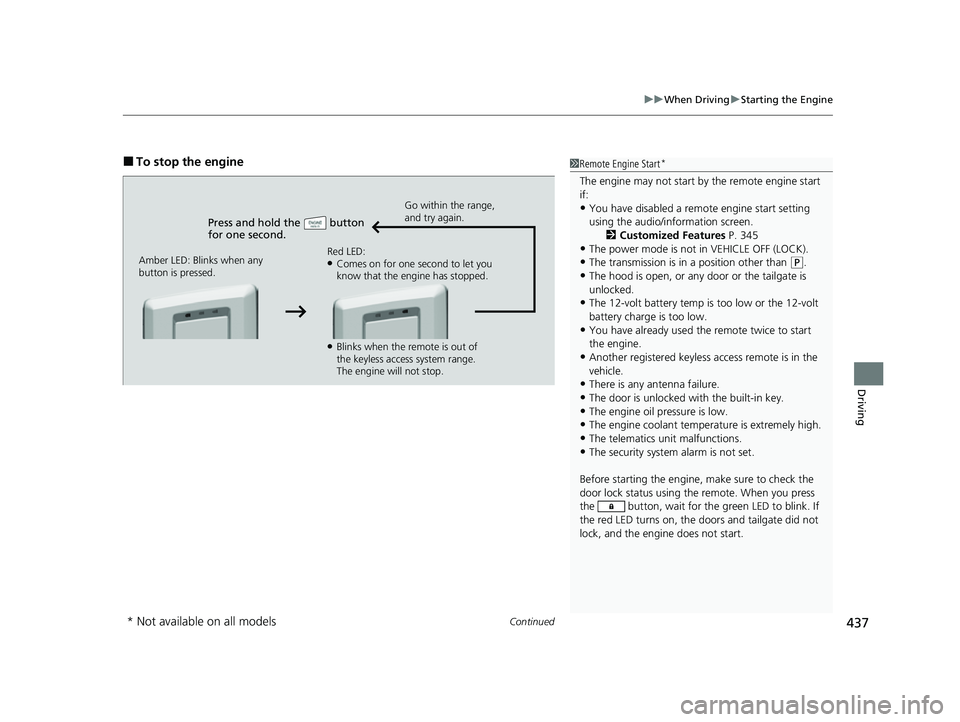
■To stop the engine
Press and hold the button
for one second.
Go within the range,
and try again.
Amber LED: Blinks when any
button is pressed. Red LED:
●Comes on for one second to let you
know that the engine has stopped.
●Blinks when the remote is out of
the keyless access system range.
The engine will not stop.
1
Remote Engine Start*
The engine may not start by the remote engine start
if:
•You have disabled a remo te engine start setting
using the audio/information screen. 2Customized Features P. 345
•The power mode is not in VEHICLE OFF (LOCK).
•The transmission is in a position other than (P.
•The hood is open, or any door or the tailgate is
unlocked.
•The 12-volt battery temp is too low or the 12-volt
battery charge is too low.
•You have already used the remote twice to start
the engine.
•Another registered keyless access remote is in the
vehicle.
•There is any antenna failure.
•The door is unlocked with the built-in key.
•The engine oil pressure is low.•The engine coolant temper ature is extremely high.
•The telematics unit malfunctions.
•The security system alarm is not set.
Before starting the engine, make sure to check the
door lock status using the remote. When you press
the button, wait for the green LED to blink. If
the red LED turns on, the doors and tailgate did not
lock, and the engine does not start.
* Not available on all models
22 ACURA MDX-31TYA6000_02.book 437 ページ 2020年11月5日 木曜日 午前11時39分