light ACURA MDX 2022 Repair Manual
[x] Cancel search | Manufacturer: ACURA, Model Year: 2022, Model line: MDX, Model: ACURA MDX 2022Pages: 712, PDF Size: 22.65 MB
Page 324 of 712
323
uuGeneral Information on the Audio System uCompatible iPod, iPad, iPhone, and USB Flash Drives
Continued
Features
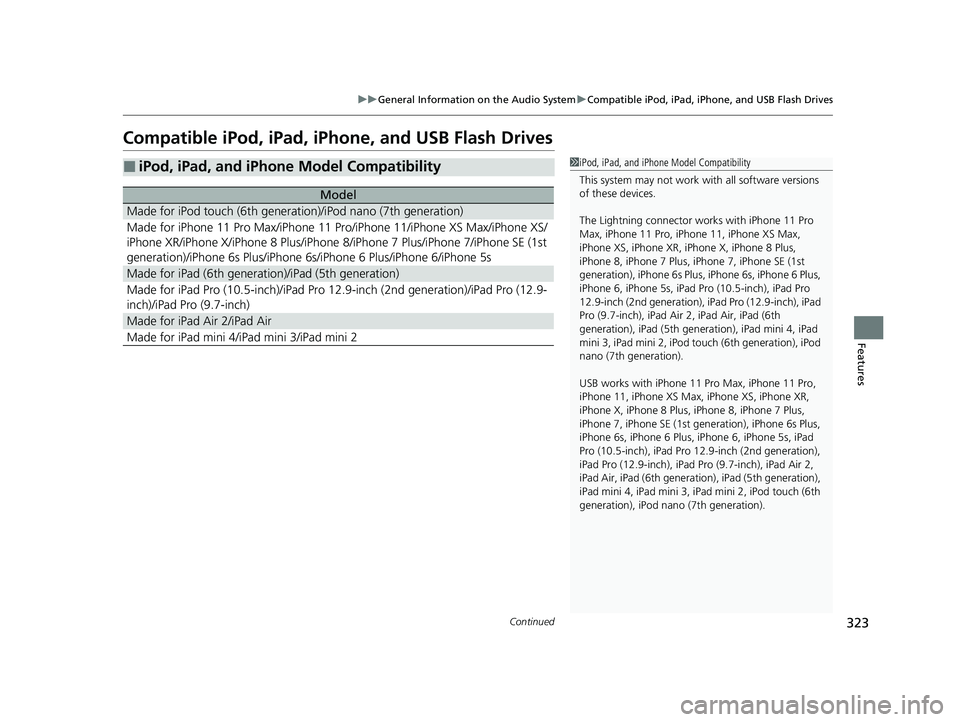
Compatible iPod, iPad, iP hone, and USB Flash Drives
■iPod, iPad, and iPhone Model Compatibility
Model
Made for iPod touch (6th generation)/iPod nano (7th generation)
Made for iPhone 11 Pro Max/iPhone 11 Pro/iPhone 11/iPhone XS Max/iPhone XS/
iPhone XR/iPhone X/iPhone 8 Plus/iPhone 8/iPhone 7 Plus/iPhone 7/iPhone SE (1st
generation)/iPhone 6s Plus/iPhone 6s/iPhone 6 Plus/iPhone 6/iPhone 5s
Made for iPad (6th genera tion)/iPad (5th generation)
Made for iPad Pro (10.5-inch)/iPad Pro 12.9-inch (2nd generation)/iPad Pro (12.9-
inch)/iPad Pro (9.7-inch)
Made for iPad Air 2/iPad Air
Made for iPad mini 4/iPad mini 3/iPad mini 2
1 iPod, iPad, and iPhone Model Compatibility
This system may not work with all software versions
of these devices.
The Lightning connector work s with iPhone 11 Pro
Max, iPhone 11 Pro, iP hone 11, iPhone XS Max,
iPhone XS, iPhone XR, iPhone X, iPhone 8 Plus,
iPhone 8, iPhone 7 Plus, iPhone 7, iPhone SE (1st
generation), iPhone 6s Plus , iPhone 6s, iPhone 6 Plus,
iPhone 6, iPhone 5s, iPad Pro (10.5-inch), iPad Pro
12.9-inch (2nd generation), iP ad Pro (12.9-inch), iPad
Pro (9.7-inch), iPad Air 2, iPad Air, iPad (6th
generation), iPad (5th genera tion), iPad mini 4, iPad
mini 3, iPad mini 2, iPod touch (6th generation), iPod
nano (7th generation).
USB works with iPhone 11 Pro Max, iPhone 11 Pro,
iPhone 11, iPhone XS Max, iPhone XS, iPhone XR,
iPhone X, iPhone 8 Plus, iP hone 8, iPhone 7 Plus,
iPhone 7, iPhone SE (1st ge neration), iPhone 6s Plus,
iPhone 6s, iPhone 6 Plus, iP hone 6, iPhone 5s, iPad
Pro (10.5-inch), iPad Pro 12.9-inch (2nd generation),
iPad Pro (12.9-inch), iPad Pro (9.7-inch), iPad Air 2,
iPad Air, iPad (6th genera tion), iPad (5th generation),
iPad mini 4, iPad mini 3, iPad mini 2, iPod touch (6th
generation), iPod nano (7th generation).
22 ACURA MDX-31TYA6000_02.book 323 ページ 2020年11月5日 木曜日 午前11時39分
Page 342 of 712

341
uuGeneral Information on the Audio System uLicense Information
Continued
Features
“Made for iPod,” “Made for iPhone,” and “Made for iPad” mean that an electronic
accessory has been designed to connect specifically to iPod, iPhone, or iPad,
respectively, and has been certified by the developer to meet Apple performance
standards. Apple is not responsible for the operation of this device or its compliance
with safety and regulatory st andards. Please note that the use of this accessory with
iPod, iPhone, or iPad may affect wireless performance.
Apple, the Apple Logo, iPad, iPhone, iPod touch are trademarks of Apple Inc.,
registered in the U.S. and other countries . iPad Air, iPad mini, iPad Pro, Apple
CarPlay, and Lightning are trademarks of A pple Inc. App Store is a service mark of
Apple Inc.
■Apple
22 ACURA MDX-31TYA6000_02.book 341 ページ 2020年11月5日 木曜日 午前11時39分
Page 350 of 712
349
uuCustomized Features u
Continued
Features
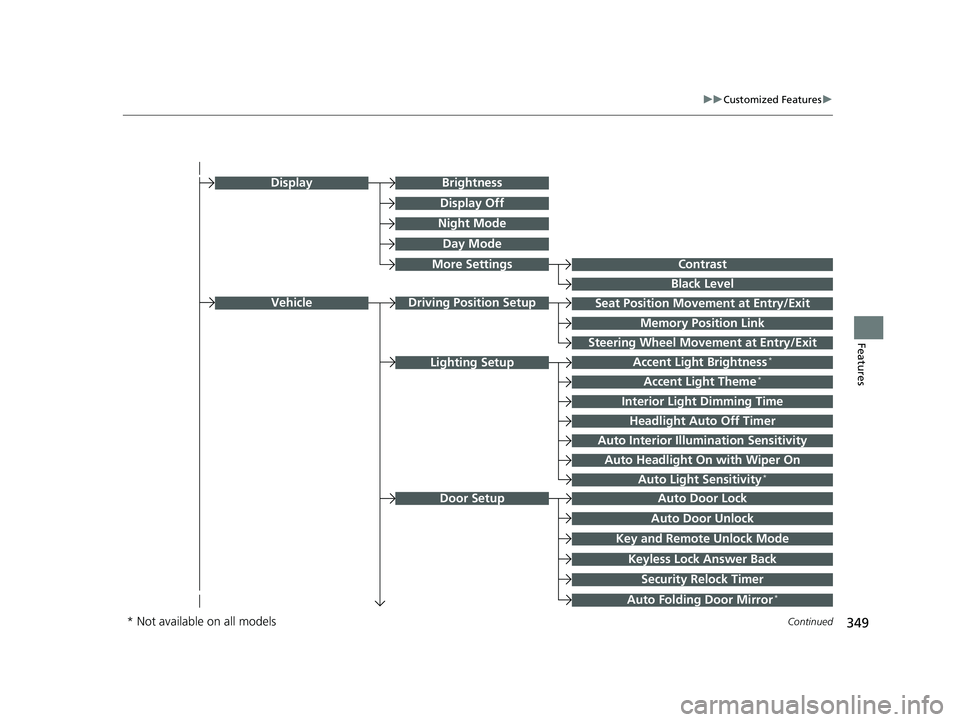
Seat Position Movement at Entry/Exit
Memory Position Link
VehicleDriving Position Setup
Night Mode
Day Mode
BrightnessDisplay
Contrast
Black Level
More Settings
Display Off
Key and Remote Unlock Mode
Auto Door Lock
Auto Door Unlock
Door Setup
Keyless Lock Answer Back
Security Relock Timer
Accent Light Brightness*
Accent Light Theme*
Interior Light Dimming Time
Headlight Auto Off Timer
Auto Interior Illumi nation Sensitivity
Lighting Setup
Auto Folding Door Mirror*
Auto Headlight On with Wiper On
Auto Light Sensitivity*
Steering Wheel Movement at Entry/Exit
* Not available on all models
22 ACURA MDX-31TYA6000_02.book 349 ページ 2020年11月5日 木曜日 午前11時39分
Page 351 of 712

350
uuCustomized Features u
Features
Power Tailgate Keyless Open Mode
Power Tailgate Open by Outer Handle
Hands Free Access Power Tailgate*
Power Tailgate Setup
Door Unlock Mode
Keyless Access Beep Volume
Keyless Access Light Flash
Keyless Access Beep
Remote Start System On/Off*
Walk Away Auto Lock
Keyless Access Setup
Lockout Protection
Remote Window Opening
“Trip B” Reset Timing
Adjust Outside Temp Display
“Trip A” Reset Timing
Meter Setup
Reverse Shift Position Beep
Adjust Alarm Volume
Turn by Turn Display
Rear Seat Reminder
Speed Limit Information
* Not available on all models
22 ACURA MDX-31TYA6000_02.book 350 ページ 2020年11月5日 木曜日 午前11時39分
Page 363 of 712

362
uuCustomized Features u
Features
*1:Default SettingSetup Group Customizable Features Description Selectable Settings
Vehicle Lighting
SetupAccent Light Brightness
*Changes the brightness level of the
interior accent lighting.
Link To
Illumination*1/
Max /
High /Mid/ Low/Off
Accent Light Theme
*
Changes the theme of the interior
accent lighting.
2 Lighting area of the accent light
P. 454
Dynamic Mode*1:
See other selectable
settings on the screen.
Interior Light Dimming Time Changes the length of time the interior
lights stay on after you close the doors. 15 sec
/30 sec
*1/60
sec
Headlight Auto Off Timer Changes the length of time the
exterior lights stay on after you close
the driver’s door. 0 sec/
15 sec
*1/30 sec /
60 sec
Auto Interior Illumination
Sensitivity Changes the sensitivity of the
brightness of the instrument panel
when the headligh
t switch is in AUTO
position. Min/
Low/Mid
*1/
High /Max
Auto Headlight On with
Wiper On Causes the headlights to come on
when the headlight switch is in the
AUTO
position and the wipers are
used several times within a certain
number of intervals. ON
*1/
OFF
Auto Light Sensitivity
*Changes the timing for the headlights
to come on. Min/
Low/Mid*1/
High /Max
* Not available on all models
22 ACURA MDX-31TYA6000_02.book 362 ページ 2020年11月5日 木曜日 午前11時39分
Page 364 of 712

363
uuCustomized Features u
Continued
Features
*1:Default SettingSetup Group Customizable Features
Description Selectable Settings
Vehicle Door Setup Auto Door Lock
Changes the setting for the automatic
locking feature. OFF
/With Vehicle
Speed
*1/ Shift from P
Auto Door Unlock Changes the setting for when the
doors unlock automatically. All Doors with
Driver’s Door
Opens
*1/
All Doors
with Shift to P /All
Doors with IGN Off /
OFF
Key and Remote Unlock
Mode Sets up either the driver’s door or all
doors to unlock on the first push of the
remote or built-in key. Driver Door
*1/
All
Doors
Keyless Lock Answer Back LOCK/UNLOCK- The exterior lights
flash.
LOCK (2nd push)- The beeper sounds. ON
*1/
OFF
Security Relock Timer Changes the time it takes for the doors
to relock and the security system to set
after you unlock th
e vehicle without
opening any door. 30 sec
*1/
60 sec/ 90
sec
Auto Folding Door Mirror
*
Changes the setting so that the mirrors
fold at the time the doors are locked
with the remote transmitter or keyless
access system. Auto Fold with
Keyless
*1/
Manual
Only
* Not available on all models
22 ACURA MDX-31TYA6000_02.book 363 ページ 2020年11月5日 木曜日 午前11時39分
Page 366 of 712

365
uuCustomized Features u
Continued
Features
*1:Default SettingSetup Group Customizable Features
Description Selectable Settings
VehicleKeyless
Access SetupDoor Unlock Mode
Changes which doors unlock when
you grab the driver’s door handle. Driver Door
*1/
All
Doors
Keyless Access Beep Volume Changes the beep volume. High
*1/Low
Keyless Access Light Flash Causes some exterior lights to flash
when you unlock/lock the doors. ON
*1/
OFF
Keyless Access Beep Causes the beeper to sound when you
unlock/lock the doors.
ON
*1/
OFF
Remote Start System On/
Off
*Turns the remote engine start feature
on and off. ON*1/
OFF
Walk Away Auto Lock Changes the settings for the auto lock
function when you walk away from
the vehicle. Enable
/Disable
*1
Lockout Protection Changes the settings for the lockout
protection function. Enable*1/
Disable
Remote Window Opening Changes the settings for the remote
window opening function. Enable
*1/
Disable
* Not available on all models
22 ACURA MDX-31TYA6000_02.book 365 ページ 2020年11月5日 木曜日 午前11時39分
Page 374 of 712
373
Features
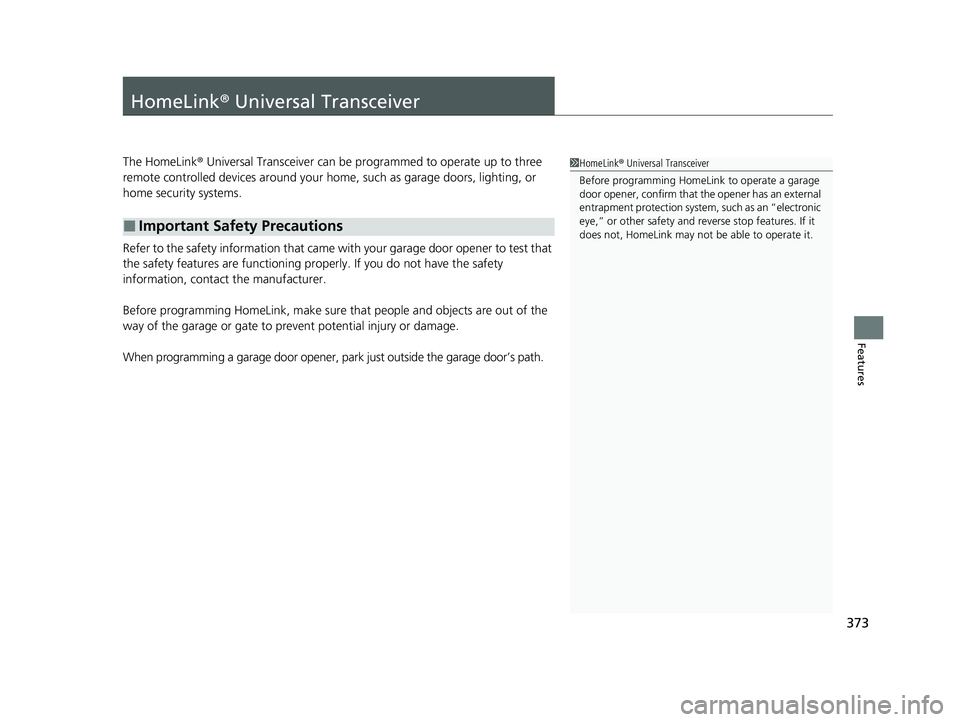
HomeLink® Universal Transceiver
The HomeLink ® Universal Transceiver can be programmed to operate up to three
remote controlled devices around your home, such as garage doors, lighting, or
home security systems.
Refer to the safety information that came wi th your garage door opener to test that
the safety features are functioning prope rly. If you do not have the safety
information, contact the manufacturer.
Before programming HomeLink, make sure that people and objects are out of the
way of the garage or gate to prevent potential injury or damage.
When programming a garage door opener, pa rk just outside the garage door’s path.
■Important Safety Precautions
1HomeLink ® Universal Transceiver
Before programming HomeLi nk to operate a garage
door opener, confirm that the opener has an external
entrapment protection system , such as an “electronic
eye,” or other safety and re verse stop features. If it
does not, HomeLink may not be able to operate it.
22 ACURA MDX-31TYA6000_02.book 373 ページ 2020年11月5日 木曜日 午前11時39分
Page 413 of 712

uuAcuraLink ®u
412
Features
Your subscribed telematics service provider can check your vehicle’s condition. For
maximum functionality download AcuraLink app in your smartphone and connect it
with the vehicle.
■Automatic Collision Notifications
A live agent will reach out and check on you and request that help be sent in the
event of a crash.
■Send Destination
Search for destinations on your phone and in stantly beam turn-by-turn directions to
your navigation system
*. Requires In-vehicle Navigation System*.
■Stolen Vehicle Locator
Helps authorities track and recover your vehicle in case of theft.
■Remote Start & Stop
Arrive at your vehicle with the engine warmed up and the interior set to a
comfortable temperature.
■Remote Lock & Unlock
Lock and unlock your vehicle with your smartphone.
■Find My Car
Find your parked vehicle and flash/sound your horns remotely using your
smartphone.
■Connection Features1 Connection Features
The contact information of your provider, your user
ID and PIN will be given when you subscribe to
AcuraLink. If you forget any of the above, contact a
Acura dealer, or go to owners.acura.com (U.S.) or
www.acura.ca/owners/acuralink (Canada).
You can also activate the remote door lock/unlock
and vehicle finder features from the Internet or using
your smartphone app. As k a dealer, or visit
owners.acura.com (U.S.) or www.acura.ca/owners/
acuralink (Canada) for details.
1Find My Car
The lights will stop flas hing and horn will stop
sounding under the following:
•When conditions 30 seconds have elapsed.
•You unlock the doors using the remote transmitter.
•You unlock the doors using the keyless access
system.
•You unlock the doors using the built-in key.
•The power mode is set to ACCESSORY or ON.
* Not available on all models
22 ACURA MDX-31TYA6000_02.book 412 ページ 2020年11月5日 木曜日 午前11時39分
Page 417 of 712

416
Driving
Before Driving
Driving Preparation
Check the following items before you start driving.
• Make sure there are no obstructions on th e windows, door mirrors, exterior
lights, or other parts of the vehicle.
u Remove any frost, snow, or ice.
u Remove any snow on the roof, as this can slip down and obstruct your field of
vision while driving. If frozen solid , remove ice once it has softened.
u When removing ice from around the wheel s, be sure not to damage the wheel
or wheel components.
• Make sure the hood is securely closed.
u If the hood opens while driving, your front view will be blocked.
• Make sure the tires are in good condition.
u Check air pressure, and check for damage and excessive wear.
2 Checking and Maintaining Tires P. 615
•Make sure there are no people or ob jects behind or around the vehicle.
u There are blind spots from the inside.
■Exterior Checks1Exterior Checks
NOTICE
When doors are frozen s hut, use warm water around
the door edges to melt any ice. Do not try to force
them open, as this can damage the rubber trim
around the doors. When done, wipe dry to avoid
further freezing.
Do not pour warm water into the key cylinder.
You will be unable to insert the key if the water
freezes in the hole.
Heat from the engine and exhaust can ignite
flammable material s left under the hood, causing a
fire. If you’ve parked y our vehicle for an extended
period, inspect and remove any debris that may have
collected, such as dried grass and leaves that have
fallen or have been carried in for use as a nest by a
small animal. Also check under the hood for leftover
flammable materials after you or someone else has
performed maintenance on your vehicle.
22 ACURA MDX-31TYA6000_02.book 416 ページ 2020年11月5日 木曜日 午前11時39分